
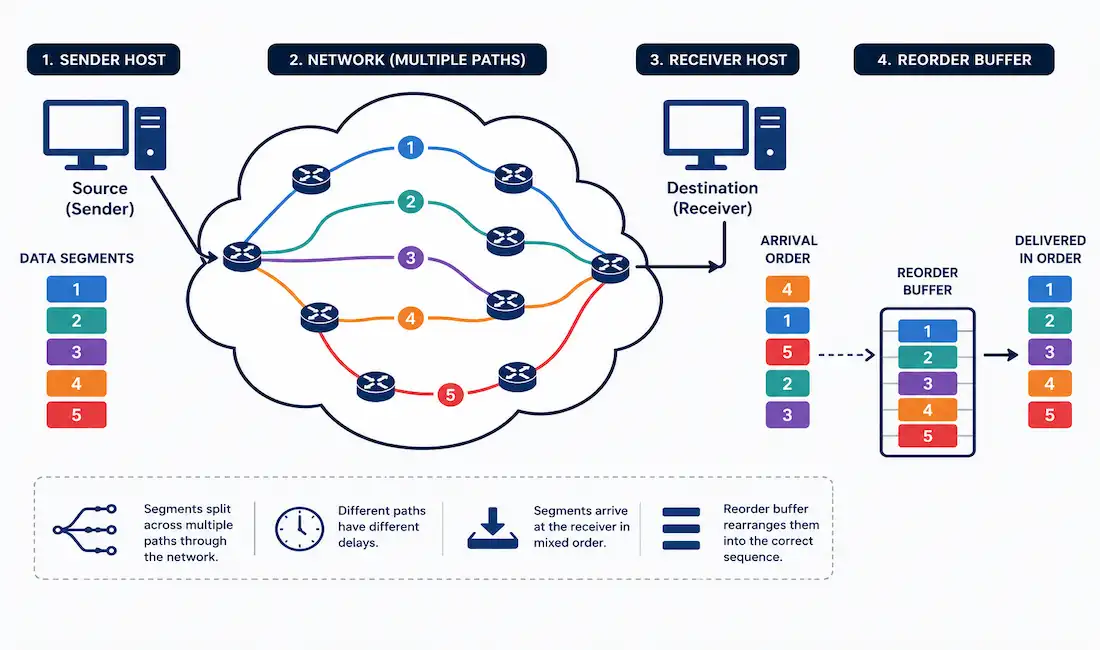
TCP takes data from an application, breaks it into segments, wraps each one in a header, and hands it off to IP for delivery across the network. None of that guarantees the segments arrive in order, or that they arrive at all. Reliability and flow control are the two mechanisms that turn an unreliable network into a dependable byte stream — and they’re two of the most important concepts for understanding how TCP actually behaves under real conditions.
This guide covers how TCP reassembles out-of-order data, how the sliding window mechanism paces transmission, how congestion avoidance keeps a network from collapsing under its own load, and the tools you’d actually use to observe and troubleshoot all of it.
TCP Reliability: Sequence Numbers and Reassembly
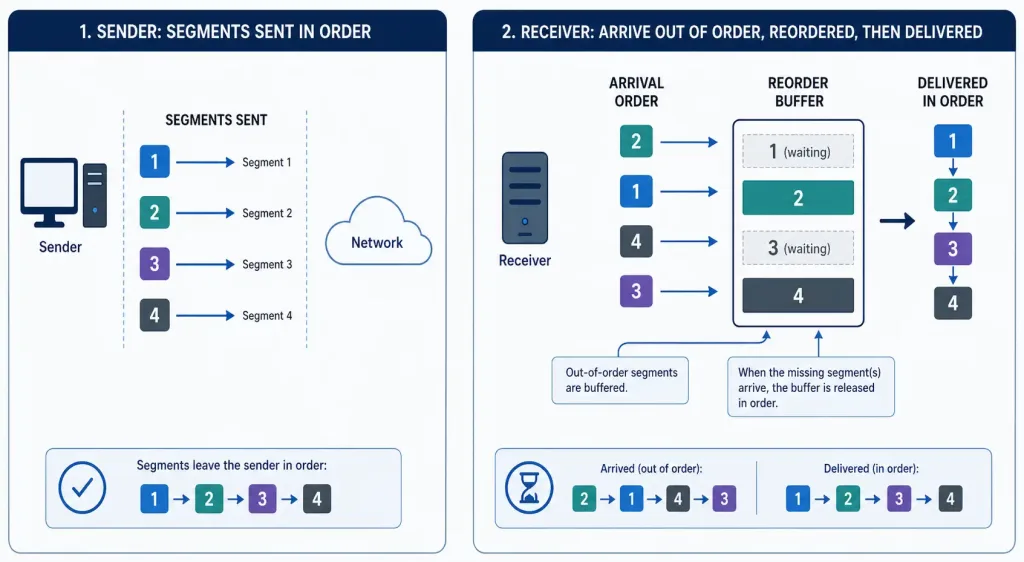
TCP segments can — and often do — arrive at their destination out of order. Different segments may take different paths across the network, encounter different delays, or get retransmitted after loss. To reconstruct the original message correctly, every segment’s header carries a sequence number, which identifies the position of that segment’s first data byte within the overall byte stream.
When a TCP session is established, both sides pick an Initial Sequence Number (ISN) — a semi-random starting value, chosen specifically to make sequence numbers hard to predict and harder for an attacker to exploit. As data is transmitted during the session, the sequence number increases by the number of bytes sent. This byte-level tracking is what lets the receiver identify exactly which bytes it has, which are missing, and which arrived in the wrong order.
For the worked examples in this guide, we’ll use an ISN of 1, purely for readability — in a real capture you’d see a large, effectively random starting number instead.
The receiving TCP process places incoming data into a receive buffer. Segments that arrive in the correct sequence are reassembled and passed up to the application layer immediately. Segments that arrive out of order are held in the buffer, not discarded, until the missing bytes between them arrive — at which point everything is reassembled in the correct order and passed up together.
TCP Flow Control
Reliability solves the “did it all arrive correctly” problem. Flow control solves a different one: making sure the sender doesn’t overwhelm the receiver. A receiving host has finite buffer space, finite processing capacity, and its own competing workload — if a sender pushes data faster than the receiver can consume it, packets get dropped and have to be retransmitted, which wastes bandwidth and adds latency.
Flow control is why application developers rarely have to think about any of this directly. You write data to a socket, and TCP handles pacing the actual transmission to match what the receiving side can handle.
Window Size and the Sliding Window Mechanism
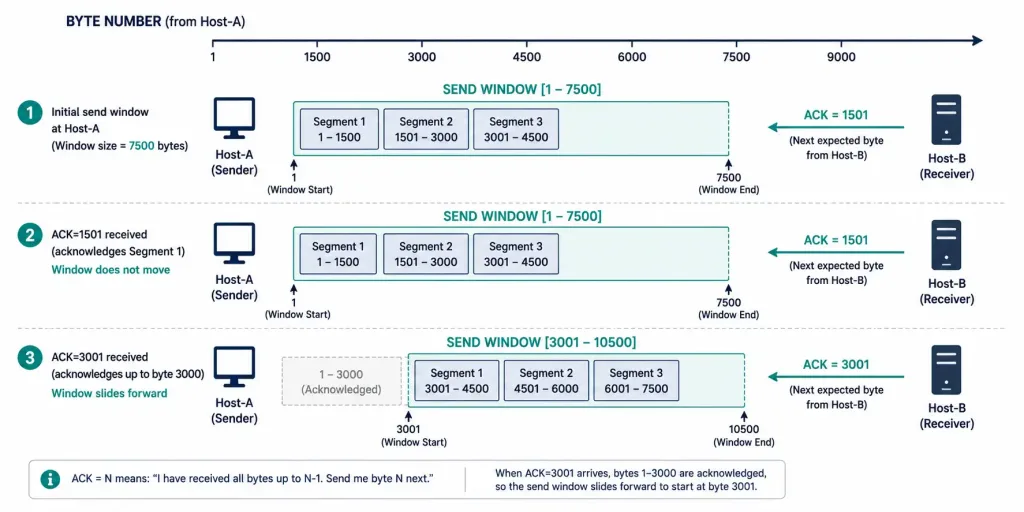
TCP flow control works through a 16-bit field in the TCP header called the window size, sometimes called the receive window. This value tells the sender exactly how many unacknowledged bytes the receiver is currently willing to accept.
Here’s a complete, consistent worked example. Assume:
- MSS (Maximum Segment Size): 1,500 bytes per segment — negotiated during the three-way handshake
- Initial window size: 4,500 bytes — enough room for exactly three full segments before an acknowledgment is required
- ISN: 1, for readability
Host-A (the sender) transmits three segments to fill Host-B’s initial window:
| Segment | Bytes |
|---|---|
| 1 | 1–1500 |
| 2 | 1501–3000 |
| 3 | 3001–4500 |
Host-B doesn’t have to wait for all three segments before acknowledging — TCP acknowledgments are cumulative, meaning an ACK confirms every byte received up to that point, not just one specific segment. Suppose Host-B acknowledges after processing the first two segments, sending back ACK=3001 (the next byte it expects) along with its current window size, still 4,500 bytes. Host-A’s sending window immediately slides forward: it can now send up to byte 3001 + 4500 − 1 = 7500, even though it already has one segment (3001–4500) in flight from the original batch.
This continuous process — the receiver acknowledging bytes as it processes them, and the sender’s window sliding forward in response — is what gives the mechanism its name: the sliding window.
If Host-B’s buffer starts filling up faster than it can process incoming data, it can advertise a smaller window size in a later ACK, explicitly telling Host-A to slow down. The window size can shrink and grow throughout a session as buffer conditions change; it isn’t fixed for the life of the connection.
Congestion Avoidance
Flow control manages the receiver’s buffer. Congestion avoidance manages something different: the shared network path between sender and receiver, which neither host fully controls.
When a router along the path becomes overloaded, it drops packets. A TCP segment that gets dropped never generates an acknowledgment, and the sender can infer network congestion by noticing that an increasing proportion of its segments are going unacknowledged.
Congestion avoidance is fundamentally proactive rather than reactive. TCP tries to detect early signs of congestion and adjust its sending rate before the network actually saturates, because once a network does saturate, throughput collapses sharply rather than degrading gradually — queues fill, packets get dropped in bulk, and every affected sender has to back off and slowly ramp back up, which wastes significant time and capacity. A congestion avoidance approach aims to keep the network pipe as full as possible without ever tipping it into that failure mode.
When congestion is detected, TCP reduces the number of unacknowledged bytes it’s willing to send — this is a rate adjustment made by the sender, separate and distinct from the receiver’s advertised window size. Both mechanisms limit how much data is in flight, but for different reasons: one protects the receiver’s buffer, the other protects the shared network.
Congestion Control Algorithms
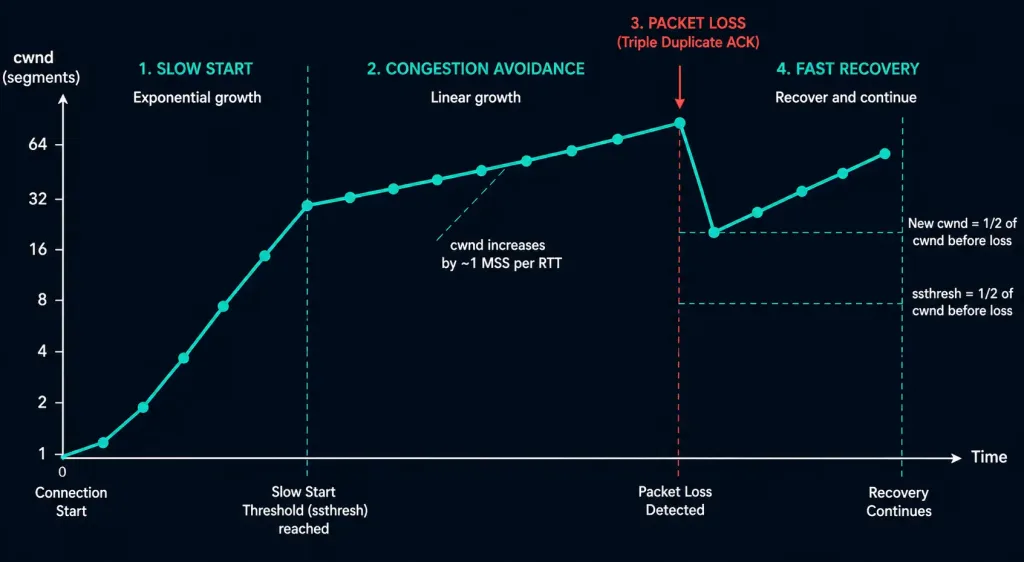
Modern TCP implementations manage congestion through a small set of well-established algorithms, typically used together:
- Slow Start: begins a new connection (or a connection recovering from loss) with a small congestion window, then grows it — roughly doubling every round trip — until it either reaches the receiver’s advertised window or detects loss.
- Congestion Avoidance: once the window reaches a certain threshold, growth switches from the aggressive doubling of slow start to a much more conservative, incremental increase.
- Fast Retransmit: retransmits a segment as soon as the sender detects strong evidence of loss (typically three duplicate ACKs) rather than waiting for a full retransmission timeout.
- Fast Recovery: after a fast retransmit, reduces the congestion window moderately rather than dropping all the way back to slow start, allowing the connection to recover throughput more quickly.
On Linux, the specific congestion control algorithm in use is configurable. CUBIC has been the Linux kernel’s default since kernel version 2.6.19, released in 2006 — it isn’t a recent change, and it remains the default on the overwhelming majority of current distributions. You can check or change it with:
sysctl net.ipv4.tcp_congestion_control
sudo sysctl -w net.ipv4.tcp_congestion_control=cubic
Other algorithms, like Google’s BBR (available since kernel 4.9), are also available on modern systems and are worth evaluating for high-bandwidth or high-latency links, though CUBIC remains a solid general-purpose default.
Observing TCP Behavior in Practice
A common but inaccurate claim is that you can inspect TCP sequence numbers with netstat. You can’t — netstat reports connection state, local and remote addresses, and ports, but not sequence numbers. To actually see sequence numbers, window sizes, and retransmissions, you need a packet capture tool.
tcpdump (Linux/macOS), capturing TCP traffic with sequence and window details:
tcpdump -i any -S tcpWireshark (any platform) gives you the same information with a graphical interface — filter for a specific connection and look at the Sequence Number, Acknowledgment Number, and Window Size fields in the TCP layer of any captured packet. Wireshark’s “Follow TCP Stream” feature is particularly useful for watching how sequence numbers and window sizes evolve across an entire session.
For a quick, high-level view of active connections and per-protocol statistics, netstat and ss are still useful — just not for sequence-number-level detail:
netstat -s
ss -i
Troubleshooting Tips
Suspected packet loss: on Windows, use ping -t <host> for a continuous ping until you stop it manually with Ctrl+C. On Linux, plain ping <host> already runs continuously by default — you don’t need any special flag for this. Avoid ping -f (flood ping) for general troubleshooting: it fires packets as fast as possible, requires root privileges, and can itself look like a denial-of-service attempt on a shared or monitored network. Reserve flood ping for controlled lab testing, not routine diagnostics.
Suspected receive-buffer overflow: on Windows, check and adjust TCP auto-tuning with:
netsh int tcp show global
netsh int tcp set global autotuninglevel=restricted
On Linux, adjust the maximum receive buffer size with:
sysctl net.core.rmem_max
sudo sysctl -w net.core.rmem_max=8388608
Suspected congestion-related slowdowns: capture traffic during the slowdown and look for duplicate ACKs or retransmitted segments in Wireshark. A steady stream of duplicate ACKs for the same sequence number is a strong sign that a specific segment was lost and the receiver is signaling it hasn’t arrived.
Reliability vs. Flow Control vs. Congestion Control: How They Differ
These three mechanisms get discussed together so often that it’s easy to blur them into one concept. They’re related, but they solve different problems:
| Mechanism | Problem it solves | Who controls it |
|---|---|---|
| Reliability | Detecting and recovering from lost or out-of-order segments | Both sender and receiver, via sequence numbers and ACKs |
| Flow control | Preventing the sender from overwhelming the receiver’s buffer | The receiver, via the advertised window size |
| Congestion control | Preventing the sender from overwhelming the shared network path | The sender, via its own congestion window adjustments |
A connection can be flow-control-limited (the receiver’s buffer is small) while the network itself has plenty of spare capacity, or congestion-limited (the network path is saturated) even though the receiver could easily handle more data. Telling these apart is often the difference between a five-minute fix and an hour of troubleshooting the wrong layer.
FAQs
What is TCP reliability?
TCP reliability is the set of mechanisms that guarantee data arrives accurately and in order, even over a network that can lose, delay, or reorder packets. It works by assigning a sequence number to every byte transmitted, then using acknowledgments to confirm receipt and trigger retransmission of anything that goes missing.
How does TCP handle out-of-order segments?
Segments that arrive out of order aren’t discarded — they’re held in the receiver’s buffer until the missing bytes between them arrive. Once the gap is filled, TCP reassembles everything in the correct sequence based on each segment’s sequence number and passes the complete, ordered data up to the application.
What is the role of flow control in TCP?
Flow control prevents a fast sender from overwhelming a slower or busier receiver. It works through the sliding window mechanism, where the receiver continuously advertises how many additional bytes it’s willing to accept, and the sender is bound by that limit until it receives further acknowledgments.
Why is data segmentation important in TCP?
Breaking data into smaller segments, sized according to the negotiated MSS, makes transmission more efficient and far more resilient to loss. If a single segment is lost, only that segment needs retransmission — not the entire message — which is a major reason TCP performs reasonably well even on unreliable or high-latency networks.
How does TCP ensure efficient data delivery?
TCP combines segmentation, reordering, flow control, and congestion control to keep data moving efficiently without overwhelming the receiver or the network. Each mechanism addresses a distinct failure mode, and together they let applications treat an unreliable, best-effort network as if it were a reliable, ordered byte stream.
What’s the difference between flow control and congestion control?
Flow control protects the receiving host’s buffer and is controlled by the receiver’s advertised window size. Congestion control protects the shared network path between sender and receiver and is managed entirely by the sender, based on its own inference of network conditions from lost or delayed acknowledgments.



