
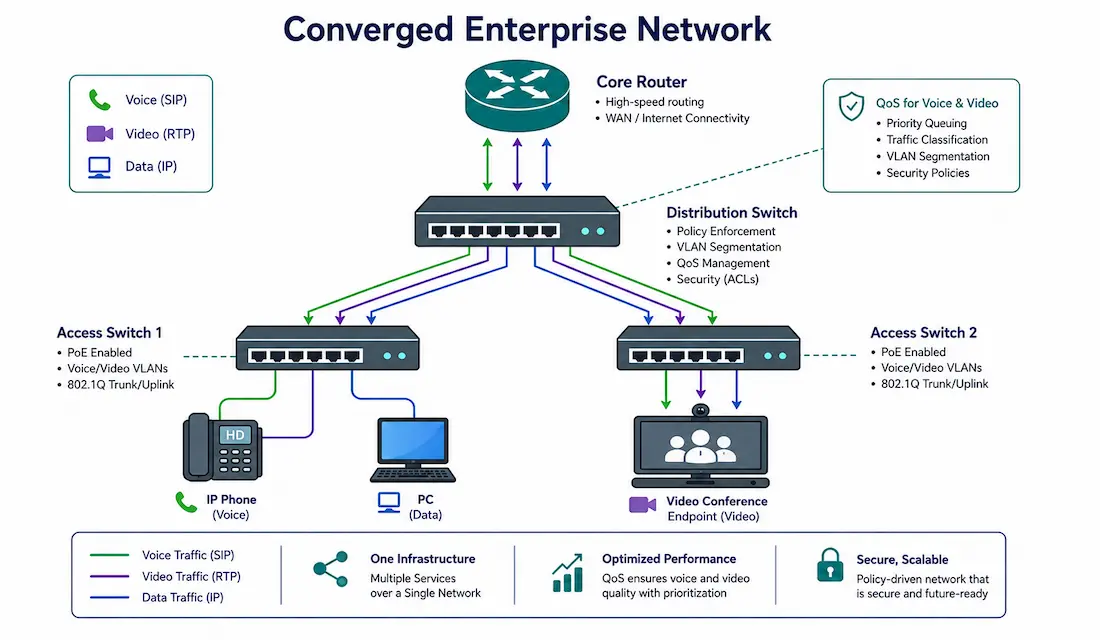
A converged network carries voice, video, and data over a single IP infrastructure, rather than maintaining separate physical networks for phones, video systems, and computers. This is standard practice in modern enterprise networking, but making it work well — without voice calls sounding choppy the moment someone starts a large file transfer — depends entirely on getting the design right.
This guide covers the components of a converged network, real QoS configuration with the actual bandwidth and latency numbers involved, security considerations, and how to design one that actually holds up under load.
What a Converged Network Actually Solves
Traditional networks ran voice, video, and data on entirely separate infrastructure — a dedicated phone system (PBX) with its own cabling, a separate video conferencing system, and a completely independent data network. That meant three sets of cabling, three sets of equipment to manage, and three separate skill sets to maintain them.
A converged network collapses all of this onto one IP infrastructure, using Layer 2 switches for local connectivity and Layer 3 routers for inter-VLAN and WAN routing. The cost savings are real and significant — one physical network to install, cable, and manage instead of three — but the savings only materialize if that single network is actually engineered to handle all three traffic types without one degrading the others.
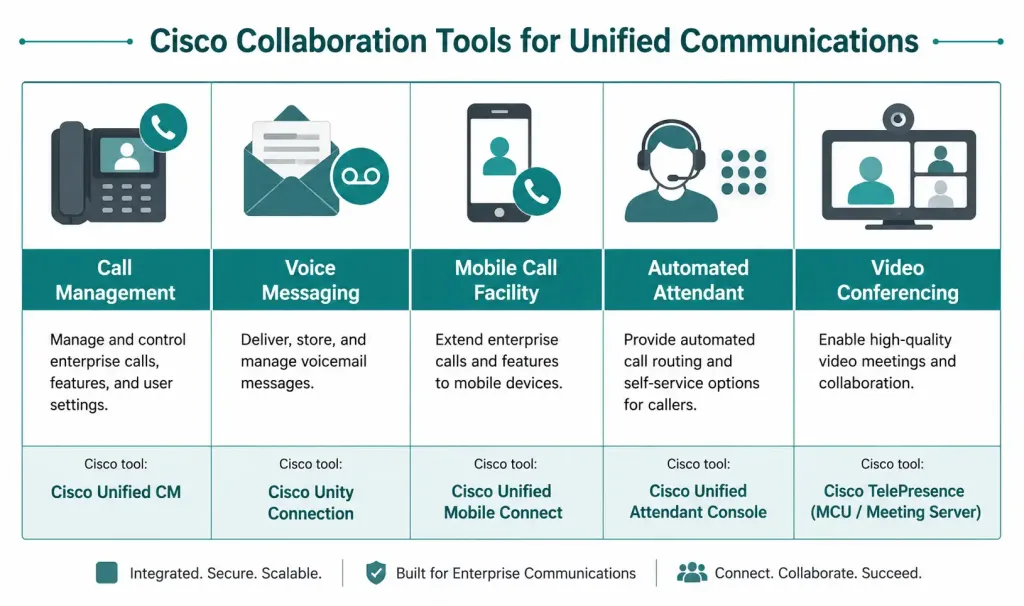
Core Components of a Converged Network
| Component | Function | Cisco Tool | CCNA/CCNP Relevance |
|---|---|---|---|
| Call Management | Call processing, caller ID, hold, transfer, conferencing | Cisco Unified Communications Manager (CUCM) | Understand call flows and basic CUCM configuration |
| Voice Messaging | Voicemail integrated with email or softphone apps | Cisco Unity Connection | Configure voicemail integration and troubleshoot connectivity |
| Mobile Call Facility | Seamless mobility via softphones and IP phones | Cisco Mobile and Remote Access (MRA) | Study VPN and firewall configuration for secure external access |
| Automated Attendant | Automated call routing via interactive voice response (IVR) | Cisco Unified Contact Center Express (UCCX) | Understand IVR scripting and CUCM integration |
| Video Conferencing | Point-to-point and multipoint video calls | Cisco Webex, TelePresence | Configure QoS to prioritize video and control latency |
All five of these depend on the same underlying requirement: a well-segmented, properly-prioritized IP network. Without that foundation, none of the call-management or video features perform reliably, regardless of how well they’re configured individually.
Designing the Network Architecture
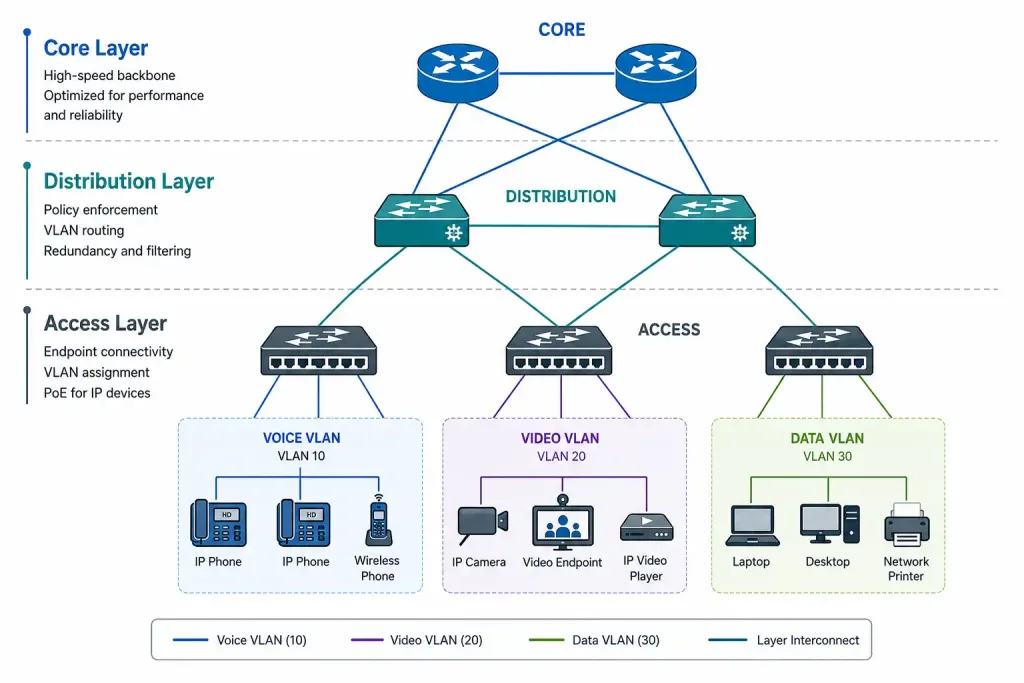
A hierarchical three-layer design — access, distribution, core — is the standard approach for a converged network, and for good reason: it keeps the network scalable and makes fault isolation far easier than a flat topology would.
- Access layer: Catalyst switches connecting end devices directly — IP phones, PCs, video endpoints.
- Distribution layer: aggregates access-layer traffic and enforces policy (VLAN routing, QoS, security).
- Core layer: high-speed backbone connecting distribution switches and routers, prioritizing speed and redundancy over granular policy enforcement.
A typical converged setup separates traffic into distinct VLANs — for example, VLAN 10 for voice, VLAN 20 for video, and VLAN 30 for data — with CUCM handling call processing centrally.
Basic VLAN configuration on a Cisco Catalyst switch:
Switch(config)# vlan 10
Switch(config-vlan)# name VOICE
Switch(config-vlan)# exit
Switch(config)# vlan 20
Switch(config-vlan)# name VIDEO
Switch(config-vlan)# exit
Switch(config)# vlan 30
Switch(config-vlan)# name DATA
Switch(config-vlan)# exit
Assigning an access port to carry both voice and data, using the auxiliary voice VLAN feature so a PC and an IP phone can share a single switch port:
Switch(config)# interface GigabitEthernet0/1
Switch(config-if)# switchport mode access
Switch(config-if)# switchport access vlan 30
Switch(config-if)# switchport voice vlan 10
This is a genuinely important detail for CCNA study: IP phones typically have a built-in switch port for a daisy-chained PC, and the switchport voice vlan command is what lets a single physical cable run carry both the phone’s voice VLAN traffic and the PC’s data VLAN traffic simultaneously, correctly tagged and separated.
Quality of Service: The Numbers That Actually Matter
QoS isn’t optional in a converged network — it’s the mechanism that keeps a large file transfer from making a phone call unusable. Voice traffic has genuinely strict requirements, verified against Cisco’s own QoS design guidance and the ITU-T G.114 recommendation:
| Metric | Target for Toll-Quality Voice | Why It Matters |
|---|---|---|
| One-way latency | Under 150 ms | Beyond this, callers start talking over each other |
| Jitter | Under 30 ms | Beyond this, the receiver’s jitter buffer overflows, causing choppy or robotic-sounding audio |
| Packet loss | Under 1% | Voice has no retransmission — a lost packet is simply gone, unlike TCP data traffic |
Video conferencing tolerates slightly more variation than voice, but still needs meaningfully better treatment than routine data traffic like email or file transfers, which can absorb far more delay and loss without anyone noticing.
Classifying and marking voice traffic for priority treatment, using DSCP Expedited Forwarding (EF, decimal value 46) — the industry-standard marking for voice:
Router(config)# class-map VOICE-TRAFFIC
Router(config-cmap)# match protocol rtp audio
Router(config-cmap)# exit
Router(config)# policy-map WAN-QOS
Router(config-pmap)# class VOICE-TRAFFIC
Router(config-pmap-c)# priority percent 15
Router(config-pmap-c)# set dscp ef
Router(config-pmap-c)# exit
Router(config)# interface GigabitEthernet0/0
Router(config-if)# service-policy output WAN-QOS
Reserving 10-15% of available WAN bandwidth for the voice priority queue is a common starting point, comfortably covering typical concurrent call counts on a small-to-mid-size network without over-allocating bandwidth voice traffic won’t actually use.
Cisco AutoQoS can generate a reasonable baseline QoS configuration automatically on supported platforms, which is a faster starting point than hand-writing every class-map and policy-map from scratch — though it’s still worth reviewing and tuning the generated configuration rather than treating it as a finished product.
Verify QoS is actually working as configured:
show policy-map interface GigabitEthernet0/0
show queue GigabitEthernet0/0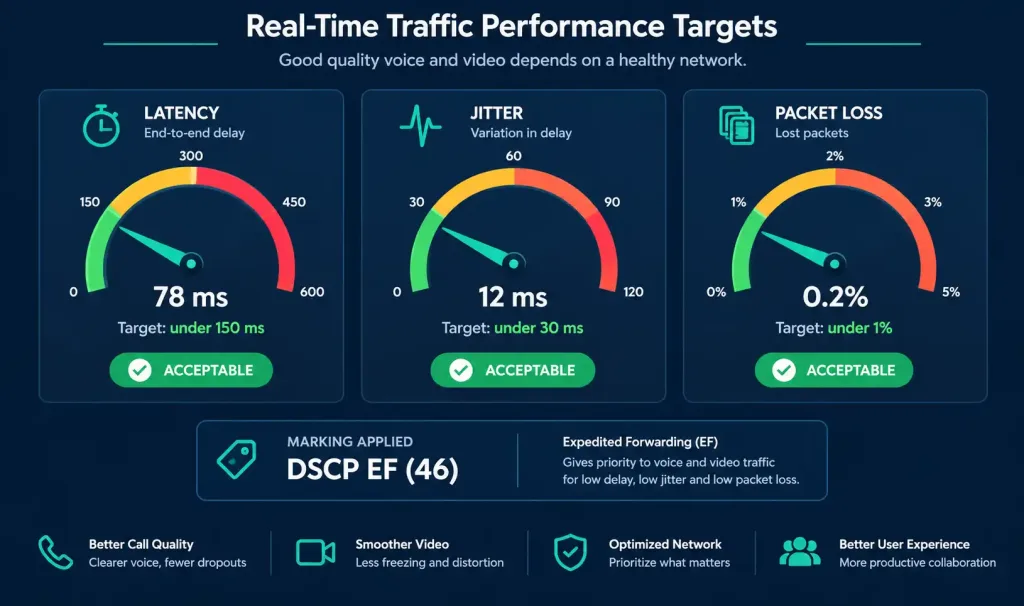
Security in a Converged Network
VLAN segmentation isolates voice and data traffic from each other, which matters for more than just performance — it also limits what an attacker who compromises a data-VLAN device can reach on the voice network, and vice versa.
Encryption: voice media streams use SRTP (Secure Real-time Transport Protocol), while call signaling is commonly secured with TLS. Video conferencing traffic follows a similar pattern — SRTP for the media itself, TLS for signaling and control — rather than being secured by HTTPS, which specifically refers to web browsing traffic and isn’t the mechanism actually protecting voice or video streams.
Network Access Control: Cisco ISE (Identity Services Engine) can enforce policy about which devices are allowed onto which VLAN in the first place, based on device identity and posture, rather than relying on VLAN segmentation alone as the only control.
Redundancy for a Converged Network
Voice and video are far less tolerant of an outage than routine data traffic — a dropped call is immediately obvious to users in a way a brief data hiccup often isn’t. Standard redundancy mechanisms apply, with extra weight given to fast convergence specifically because of this sensitivity:
- HSRP or VRRP on routers, providing gateway failover so a router failure doesn’t take down connectivity for the VLANs it serves.
- EtherChannel on switches, bundling multiple physical links into one logical link, so a single cable or port failure doesn’t interrupt traffic at all.
Given how quickly a failed call or dropped video session gets noticed, it’s worth tuning HSRP/VRRP timers more aggressively on a converged network than you might on a data-only network — the default sub-15-second failover window is fine for a file transfer that simply retries, but noticeable and disruptive on an active call.
Bandwidth Planning for Converged Traffic
QoS prioritizes traffic when bandwidth is tight, but it can’t create bandwidth that doesn’t exist — a link with genuinely insufficient capacity will still have problems no matter how well the priority queue is configured. Planning realistic bandwidth requirements upfront avoids discovering this the hard way after deployment.
A single G.711 voice call (the standard, uncompressed codec) consumes roughly 80-100 kbps per call once header overhead is included — small individually, but it adds up quickly across many simultaneous calls. Compressed codecs like G.729 reduce this to roughly 24-30 kbps per call, at a modest cost to audio quality, which is often a reasonable trade-off on WAN links where bandwidth is genuinely constrained.
Video conferencing bandwidth varies far more widely depending on resolution and quality settings — a basic voice-only call and a full HD video conference have very different bandwidth footprints, and provisioning for video specifically requires checking your platform’s actual requirements rather than assuming a single fixed number covers every use case.
A practical rule of thumb: size the voice priority queue based on your actual expected concurrent call count, not a rough guess. A branch office supporting 20 simultaneous G.711 calls needs roughly 2 Mbps reserved for voice alone — a number worth calculating explicitly during design rather than discovering through complaints about call quality after the network is already in production.
Troubleshooting a Converged Network
Voice calls sound choppy or robotic: this is the classic jitter symptom. Confirm the voice VLAN is correctly configured and that QoS is actually classifying and prioritizing the traffic — a misconfigured class-map that isn’t matching real voice traffic will silently do nothing.
show policy-map interface GigabitEthernet0/0Video conferencing freezes or degrades under load: check whether video traffic is actually getting its allocated bandwidth reservation, and whether competing data traffic (like a large backup job) is running concurrently and consuming the link.
show interfaces GigabitEthernet0/0 | include rateA phone won’t register with CUCM: confirm the phone landed on the correct voice VLAN and that it has reachability to CUCM specifically, not just general network connectivity.
show vlan brief
show ip interface brief
FAQs
What is a converged network?
A converged network carries voice, video, and data traffic over a single IP infrastructure instead of maintaining separate networks for each service. This consolidation reduces cabling, equipment, and management overhead significantly, but only delivers on that promise if the network is properly segmented and prioritized to handle all three traffic types without one degrading the others.
Why is QoS important in a converged network?
QoS ensures latency-sensitive traffic like voice gets priority treatment over traffic that can tolerate delay, such as email or file transfers. Voice specifically needs one-way latency under 150ms, jitter under 30ms, and packet loss under 1% to sound acceptable to callers — without QoS enforcing this, a single large data transfer can make an active phone call unusable.
What Cisco tools are used in converged networks?
Core tools include Cisco Unified Communications Manager (CUCM) for call processing and signaling, Cisco Unity Connection for voicemail, and Cisco Webex or TelePresence for video conferencing. On the network side, Catalyst switches handle VLAN segmentation and QoS marking, while ISR routers handle inter-VLAN routing and WAN connectivity.
How does a converged network actually save costs?
Consolidating voice, video, and data onto one physical network eliminates the need for separate cabling, separate equipment, and separate specialized staff to maintain each system independently. The savings compound over time, since ongoing maintenance, troubleshooting, and equipment refreshes only need to happen once rather than across three parallel infrastructures.
What protocols are used for voice in converged networks?
SIP and H.323 handle call setup and signaling, while RTP (Real-time Transport Protocol) carries the actual audio data once a call is established. SRTP adds encryption on top of RTP for secure voice transport, and understanding how these protocols interact is a core CCNA and CCNP topic for anyone configuring or troubleshooting VoIP.
How should I prepare for converged network topics on CCNA/CCNP exams?
Focus on VLAN configuration (especially the voice VLAN feature on access ports), QoS classification and marking with DSCP values, and the redundancy protocols — HSRP, VRRP, and EtherChannel — that keep a converged network available. Hands-on practice with Cisco Packet Tracer or GNS3, actually configuring and verifying these features rather than just reading about them, makes a significant difference for both the exam and real deployments.



