
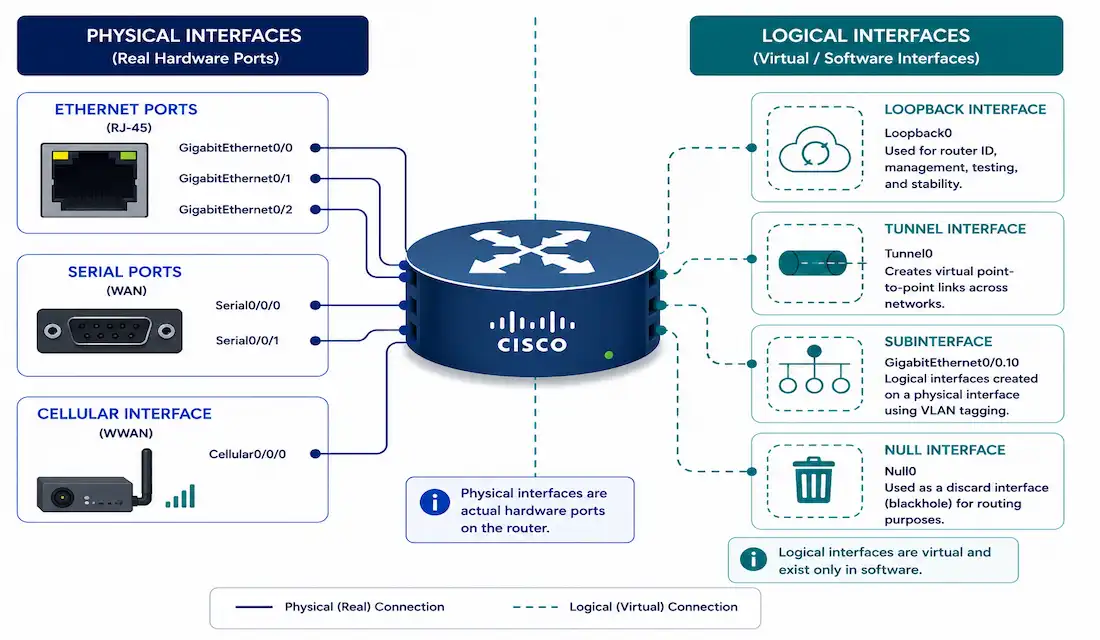
Every router interface falls into one of two broad categories: physical, where actual traffic enters and exits over real cabling or radio, and logical, which exist purely in software but serve genuinely important roles — a stable router ID, a VPN endpoint, a way to carve one physical port into many logical ones. Knowing which interface type solves which problem is foundational CCNA material and comes up constantly in real router configuration.
This guide covers the physical interface types you’ll actually configure, the logical interfaces that extend a router’s capabilities beyond its physical ports, how to verify and troubleshoot interface status, and two hands-on lab exercises to practice with.
Physical Interfaces
Ethernet, Fast Ethernet, and Gigabit Ethernet
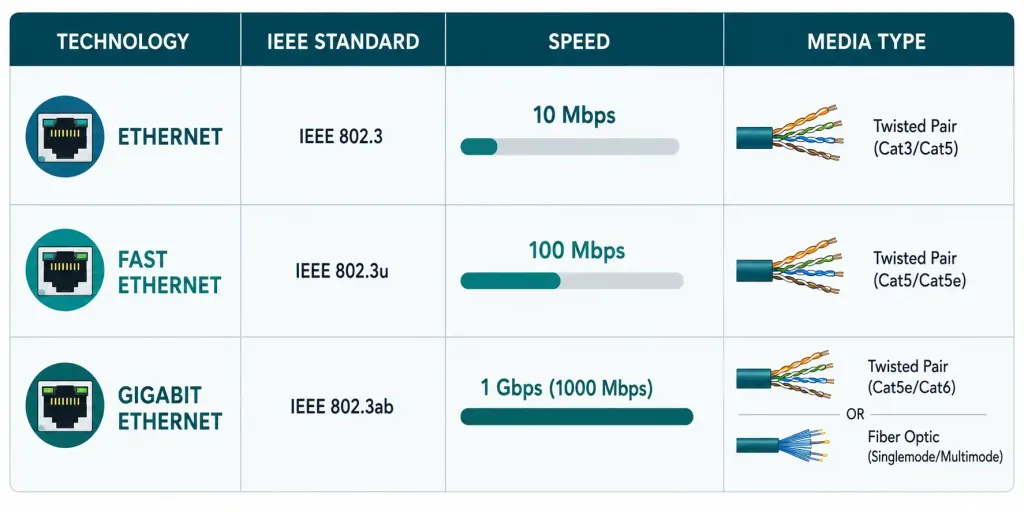
These three represent the evolution of copper Ethernet standards, and knowing their speeds and media types cold is basic CCNA knowledge:
| Interface | Standard | Speed | Media |
|---|---|---|---|
| Ethernet | IEEE 802.3 | 10 Mbps | 10BASE-T |
| Fast Ethernet (FE) | IEEE 802.3u | 100 Mbps | 100BASE-T |
| Gigabit Ethernet (GE) | IEEE 802.3ab | 1000 Mbps | 1000BASE-T |
Configuration:
Router(config)# interface GigabitEthernet0/0
Router(config-if)# ip address 192.168.1.1 255.255.255.0
Router(config-if)# no shutdown
Verify:
Router# show interfaces GigabitEthernet0/0Modern deployments have moved well beyond these baseline standards — 10 Gigabit, 25 Gigabit, and higher-speed Ethernet are common in data center and high-density environments today. The underlying configuration principles stay the same regardless of speed; what changes is primarily the hardware and, at very high speeds, the physical media (fiber becomes standard rather than copper). Regardless of the specific speed involved, the same interface, ip address, and no shutdown sequence applies consistently across every Ethernet variant.
Serial Interfaces
Serial interfaces transmit data using voltage pulses over WAN connections — historically T1/E1 leased lines, Frame Relay, and similar technologies. Their use has declined significantly as WAN architectures have shifted toward Ethernet-based and SD-WAN approaches, but serial interfaces and HDLC/PPP encapsulation remain genuinely important CCNA topics, both because legacy equipment is still out there and because understanding point-to-point Layer 2 framing (with no MAC addressing, unlike Ethernet) is foundational conceptual knowledge.
Router(config)# interface Serial0/1/0
Router(config-if)# encapsulation hdlc
Cellular Interfaces (LTE/5G)
Cisco ISR routers have supported cellular WAN interfaces — originally 3G/4G LTE, with 5G support on newer hardware — for backup connectivity at remote sites for a considerable time; this isn’t a new or emerging capability. It’s a genuinely useful pattern worth knowing: a cellular interface configured as backup WAN connectivity kicks in automatically if the primary wired connection fails.
Router(config)# interface Cellular0/1/0
Router(config-if)# ip address dhcp
Router(config-if)# dialer lte enable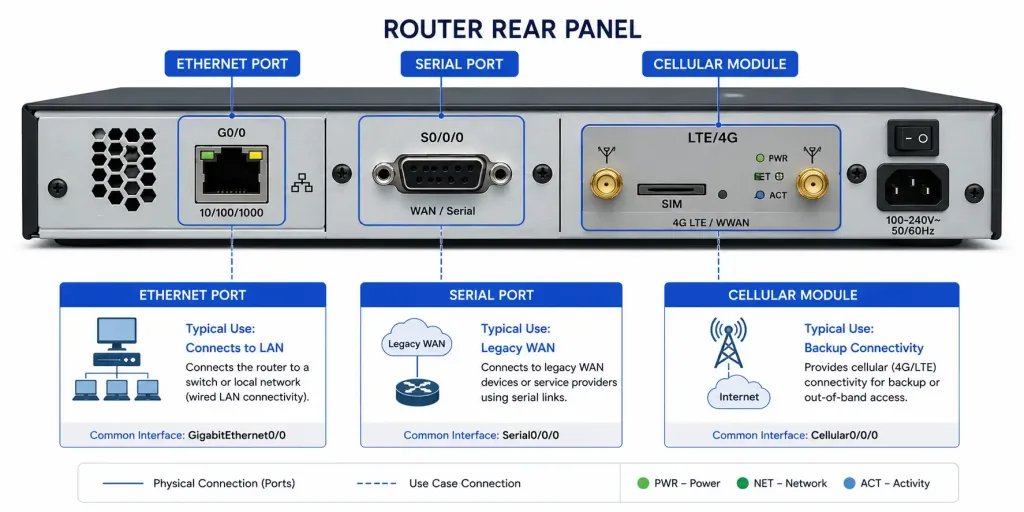
Logical Interfaces
Loopback Interfaces
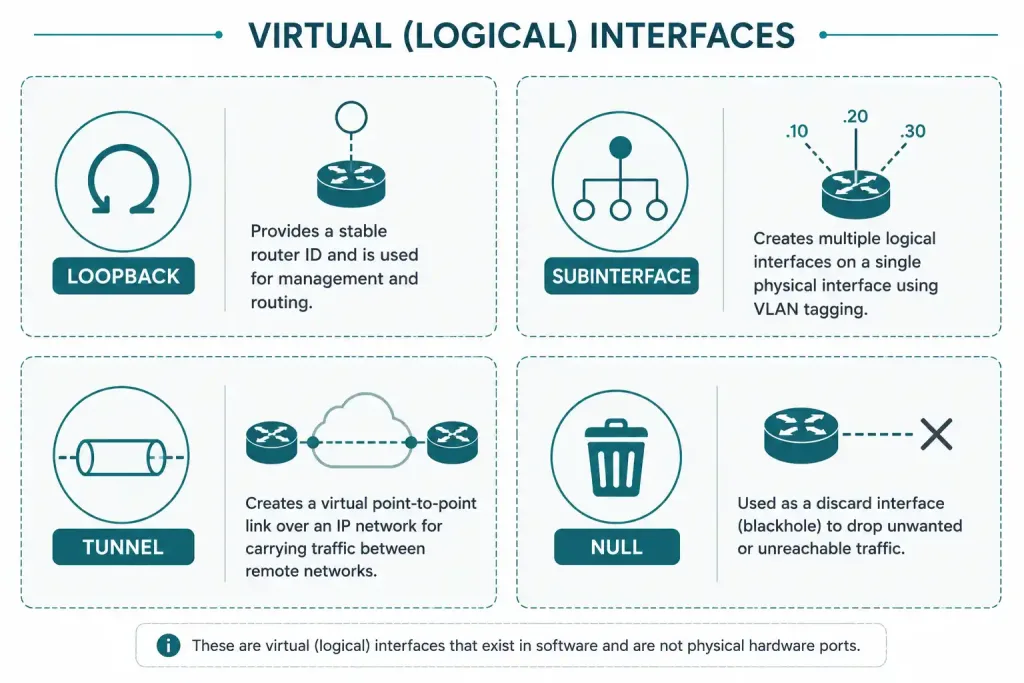
A loopback interface is a virtual interface with no physical hardware behind it at all — it stays up as long as the router itself is up and the interface hasn’t been administratively shut down — unlike a physical interface, there’s no cable or hardware fault to take it offline, but a shutdown command still works on a loopback just like any other interface, which is exactly what makes it valuable for a stable OSPF or BGP router ID: unlike a physical interface’s IP address, a loopback’s address doesn’t go down just because a physical link fails.
Router(config)# interface Loopback0
Router(config-if)# ip address 10.0.0.1 255.255.255.255
Note the /32 mask — a loopback typically represents a single address, not a subnet, since its entire purpose is providing one stable, always-reachable identifier for the router itself.
Subinterfaces (Router-on-a-Stick)
Subinterfaces let a single physical interface handle traffic for multiple VLANs, each with its own logical sub-interface and IP configuration — the classic “router-on-a-stick” pattern for inter-VLAN routing without a Layer 3 switch.
Router(config)# interface GigabitEthernet0/0.10
Router(config-subif)# encapsulation dot1Q 10
Router(config-subif)# ip address 192.168.10.1 255.255.255.0
Each VLAN needs its own subinterface with matching encapsulation dot1Q <vlan-id> and an IP address in that VLAN’s subnet — a mismatch between the subinterface number and the actual dot1Q VLAN tag is a common configuration mistake worth double-checking.
Tunnel Interfaces (GRE)
Tunnel interfaces create a virtual point-to-point link across an existing IP network, commonly used for GRE tunnels (often paired with IPsec for encryption) connecting two sites over the public internet or another intermediate network.
Router(config)# interface Tunnel1
Router(config-if)# tunnel source GigabitEthernet0/0
Router(config-if)# tunnel destination 203.0.113.5
Router(config-if)# ip address 10.10.10.1 255.255.255.252
Null Interface
The null interface is a virtual interface that discards any traffic routed to it — no IP address is ever assigned to it, since its entire purpose is dropping packets, commonly used to prevent routing loops when summarizing routes (traffic for a summarized subnet that doesn’t match any more specific route gets sent to Null0 rather than looping). This is a small but genuinely elegant solution to a real problem: without it, a router that advertises a summary route covering address space it doesn’t actually have specific routes for could end up forwarding unmatched traffic right back toward whichever neighbor sent it the summary in the first place, creating a loop.
VASI (VRF-Aware Software Infrastructure)
VASI is a genuinely real but more advanced feature worth knowing exists, even if it’s outside typical CCNA scope: it provides paired virtual interfaces that let services like firewalling, NAT, and IPsec be applied to traffic crossing between two different VRF (Virtual Routing and Forwarding) instances on the same router. It’s implemented as interface pairs — conventionally named something like vasileft1 and vasiright1 — each associated with a different VRF, rather than a single standalone interface.
Physical vs. Logical Interfaces: A Direct Comparison
| Factor | Physical Interfaces | Logical Interfaces |
|---|---|---|
| Hardware required | Yes — a real port | No — exists purely in software |
| Can go down due to a cable/hardware fault | Yes | No (except tunnel/subinterfaces, which depend on their underlying physical interface) |
| Examples | Ethernet, Fast Ethernet, Gigabit Ethernet, Serial, Cellular | Loopback, Subinterface, Tunnel, Null, VASI |
| Typical use | Actual traffic ingress/egress | Stable addressing, VLAN routing, VPN endpoints, loop prevention |
This distinction matters practically, not just conceptually — a loopback interface staying up regardless of physical link status is precisely why it’s the standard choice for a router ID, and understanding which interfaces can and can’t fail due to a cable problem is genuinely useful when troubleshooting an unexpected interface state.
Troubleshooting Common Interface Issues
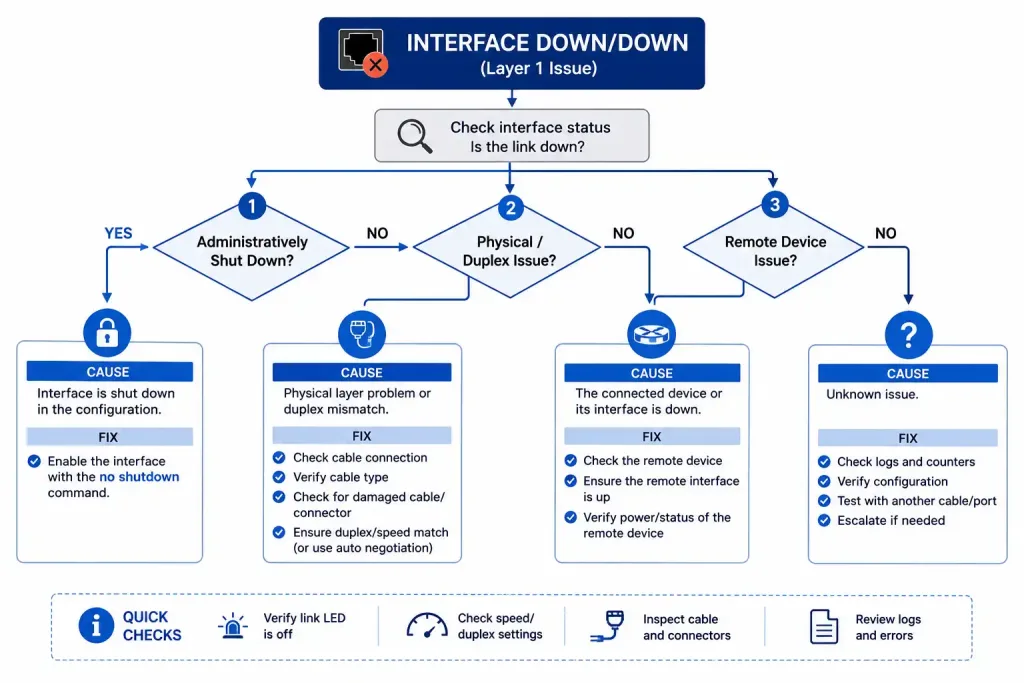
Interface Status “Down/Down”
Check current status with show interfaces status for a compact summary, or show interfaces <interface> for full detail:
Router# show interfaces FastEthernet0/1
FastEthernet0/1 is administratively down, line protocol is down
  Hardware is Lance, address is 000b.be66.0b01 (bia 000b.be66.0b01)
  MTU 1500 bytes, BW 100000 Kbit, DLY 1000 usec,
     reliability 255/255, txload 1/255, rxload 1/255
  Encapsulation ARPA, loopback not set
  Keepalive set (10 sec)
  Auto-duplex, Auto-speed
“Administratively down” specifically means someone (or some process) issued the shutdown command — it’s distinct from a physical or protocol-level failure, and the fix is straightforward:
Router(config-if)# no shutdown*Mar 1 00:06:05.515: %LINK-3-UPDOWN: Interface FastEthernet0/1, changed state to up
*Mar 1 00:06:06.515: %LINEPROTO-5-UPDOWN: Line protocol on Interface FastEthernet0/1, changed state to upIf the interface is not administratively down but still shows down/down, check the physical cabling and the status of the device on the other end — an administrative shutdown is only one of several possible causes.
Duplex Mismatch
A mismatched duplex setting between two connected devices causes degraded performance rather than an outright failure, which makes it easy to overlook during initial troubleshooting.
Router(config)# interface GigabitEthernet0/0
Router(config-if)# duplex full
Router(config-if)# speed 1000
Manually setting both duplex and speed on both ends of a link (rather than leaving one side on auto-negotiate and the other manually configured) avoids the specific mismatch scenario that trips people up most often.
CCNA Lab Exercises
Lab 1: Configure a GRE Tunnel
- Create the tunnel interface on both routers, setting matching
tunnel sourceandtunnel destinationaddresses (each router’s source is the other’s destination). - Assign IP addresses within the same subnet to each end of the tunnel.
- Verify with
ping 10.10.10.2(or the tunnel IP on the far end) — a successful ping confirms the tunnel is passing traffic correctly. - Check tunnel status directly with
show interfaces Tunnel1, confirming it shows up/up.
Lab 2: VLAN Subinterface Setup (Router-on-a-Stick)
- Create a subinterface for each VLAN needing inter-VLAN routing, matching each one’s
encapsulation dot1Qtag to the correct VLAN ID. - Assign each subinterface an IP address within that VLAN’s subnet, and confirm the physical parent interface itself has no IP address assigned (only the subinterfaces do).
- Configure the connected switch’s trunk port to allow the relevant VLANs.
- Test with a ping between hosts in two different VLANs to confirm inter-VLAN routing is actually working end to end.
Console vs. AUX Ports
Worth distinguishing clearly, since both provide direct management access but serve different purposes: the console port connects via a rollover cable directly to a terminal or laptop for local configuration, typically used for initial setup before any network connectivity exists. The AUX port supports modem-based remote management — historically used to dial into a router for out-of-band access when the network itself was unreachable, though this use case has become less common as other remote management methods (SSH over an in-band or dedicated management network) have become standard.
FAQs
What are the main types of interfaces on a Cisco router?
The main categories are physical interfaces — Ethernet, Fast Ethernet, Gigabit Ethernet, serial, and cellular — and logical interfaces, including loopback, subinterfaces, tunnel, and null interfaces. Physical interfaces handle actual traffic over real cabling or radio, while logical interfaces exist purely in software but serve genuinely important roles like providing a stable router ID or enabling VLAN routing over a single physical port.
How do I assign an IP address to a Cisco router interface?
Enter the interface with interface <type/number>, assign the address with ip address <IP> <subnet mask>, and activate the interface with no shutdown — all three steps are required, since a correctly addressed interface left administratively shut down still won’t pass traffic.
What’s the difference between console and AUX ports?
The console port is used for direct, local configuration via a rollover cable, typically for initial device setup. The AUX port supports modem-based remote management, historically used for out-of-band dial-in access, though it’s seen less use as other remote management methods have become standard.
Why is my Cisco router interface showing “down/down” status?
Check whether it’s administratively shut down first with show interfaces, and apply no shutdown if so. If the interface remains down afterward, the issue is likely physical — check cabling, the connected device’s status, or a hardware fault on either end.
How do serial interfaces differ from Ethernet on Cisco routers?
Serial interfaces historically handled WAN connections like T1/E1 leased lines and Frame Relay, using encapsulation types like HDLC or PPP with no MAC addressing at all, since point-to-point links have only one possible recipient. Ethernet interfaces handle LAN connectivity and increasingly WAN connectivity too, using MAC addressing since Ethernet is inherently a multi-access medium.
What is a loopback interface used for?
A loopback interface is a virtual interface that stays up as long as the router itself is up, making it ideal for a stable OSPF or BGP router ID that doesn’t depend on any single physical interface remaining up. It’s commonly assigned a /32 mask, since it represents a single address rather than an actual subnet.
What is VASI, and is it relevant to CCNA?
VASI (VRF-Aware Software Infrastructure) is a more advanced feature that lets services like firewalling and NAT be applied to traffic crossing between different VRF instances on the same router, implemented through paired virtual interfaces. It’s generally outside typical CCNA scope, becoming more relevant at the CCNP and enterprise design level where multiple VRFs on a single device are actually in use.



