
In networking, the TCP three-way handshake (often called a “TCP conversation”) establishes reliable connections, which is crucial for Access Control Lists (ACLs) to filter traffic effectively. ACLs manage inbound and outbound traffic based on IP addresses, ports, and TCP flags. This article explains TCP fundamentals before diving into ACL integration, helping CCNA students grasp transport layer basics and CCNP learners apply them to advanced security.
TCP Communication Basics
When a host requests data — sending an email, downloading a file — IP handles addressing and routing between source and destination. TCP, at the transport layer (OSI Layer 4), ensures reliable delivery by breaking data into segments, numbering them, and reassembling them at the destination.
Think of TCP as a phone call: hosts “agree” on connection rules before exchanging data, ensuring nothing is lost or duplicated. That agreement is exactly what the three-way handshake accomplishes, in three specific, ordered steps — the order itself is the entire point, since each step depends on information the previous one provided.
How the TCP Three-Way Handshake Works
TCP is connection-oriented, reliable, and full-duplex, with flow and congestion control mechanisms like window sizing and slow-start working alongside the handshake once a connection is up. The handshake itself always happens in this order:
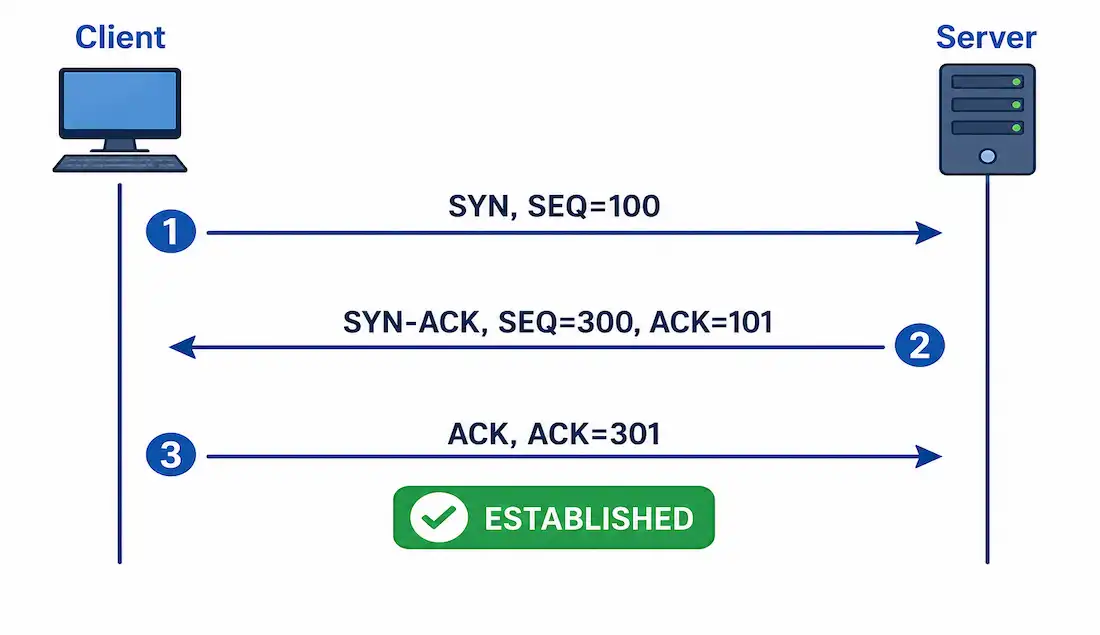
1. SYN. The client sends a SYN packet with an initial sequence number — for example, SEQ=100. This proposes the starting point for the client’s byte numbering in this conversation.
2. SYN-ACK. The server responds with a SYN-ACK packet, doing two things at once: acknowledging the client’s sequence number (ACK=101, one more than the client’s SEQ, confirming safe receipt) and proposing its own starting sequence number for data flowing the other direction (for example, SEQ=300).
3. ACK. The client acknowledges the server’s sequence number (ACK=301, one more than the server’s SEQ=300), confirming the connection is now open in both directions.
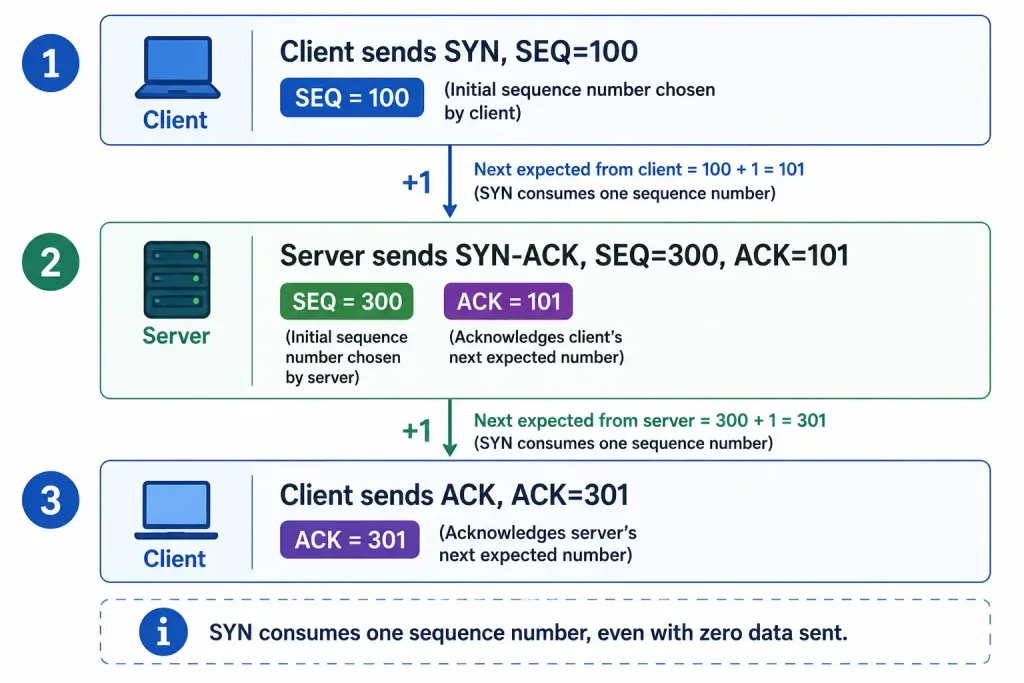
Notice the pattern: each ACK value is exactly one more than the SEQ value it’s acknowledging. This +1 increment happens because the SYN flag itself consumes one sequence number, even though no actual data has been sent yet — a detail worth remembering, since it trips people up when they expect the ACK to simply repeat the SEQ value rather than increment it.
Only after all three steps complete does the connection reach the ESTABLISHED state, and actual application data can begin flowing.
TCP Flags and Connection Management
TCP segments use flags to signal their purpose:
- SYN. Synchronizes sequence numbers to start a connection.
- ACK. Acknowledges received data.
- FIN. Finishes the connection gracefully.
- RST. Resets the connection abruptly, typically in response to an error or an unexpected segment.
- PSH. Pushes data to the application immediately, rather than buffering it.
- URG. Indicates urgent data is present, with the Urgent Pointer field marking where it ends.
Connection termination uses a four-way sequence, distinct from the three-way handshake that opens a connection:
- Host 1 sends FIN.
- Host 2 sends ACK.
- Host 2 sends its own FIN.
- Host 1 sends the final ACK.
This distinction matters for extended ACLs, which can match specific flags — the established keyword, for instance, matches segments with the ACK or RST flag set, which is how a router-based ACL can permit return traffic for a connection that originated elsewhere without needing to track full connection state the way a stateful firewall does.
Types of Traffic Control with ACLs
Traffic control via ACLs ranges from simple to complex:
- Standard ACLs. Permit or deny based on source IP address only — for example, denying all traffic from 192.168.1.0/24.
- Extended ACLs. Filter based on source and destination IP, protocol, TCP/UDP port, and flags — for example, allowing HTTP traffic on port 80 from specific hosts.
| ACL Type | Filters On | Example Command (Cisco IOS) |
|---|---|---|
| Standard | Source IP | access-list 10 deny 192.168.1.0 0.0.0.255 |
| Extended | IP, protocol, port, flags | access-list 101 permit tcp any host 10.0.0.1 established |
The established keyword in that extended ACL example matches any TCP segment with ACK or RST set, regardless of destination port — it’s typically used on its own, without a specific port match, precisely because its job is recognizing return traffic for connections already opened elsewhere, not filtering by application.
TCP Ports and Comparison to UDP
TCP uses ports to direct data to the correct application. Well-known ports (0–1023) include some of the most commonly referenced services:
| Port | Service |
|---|---|
| 20 / 21 | FTP (data / control) |
| 25 | SMTP |
| 80 | HTTP |
| 443 | HTTPS |
Port ranges fall into three bands:
| Range | Category |
|---|---|
| 0–1023 | Well-known |
| 1024–49151 | Registered |
| 49152–65535 | Dynamic/Private |
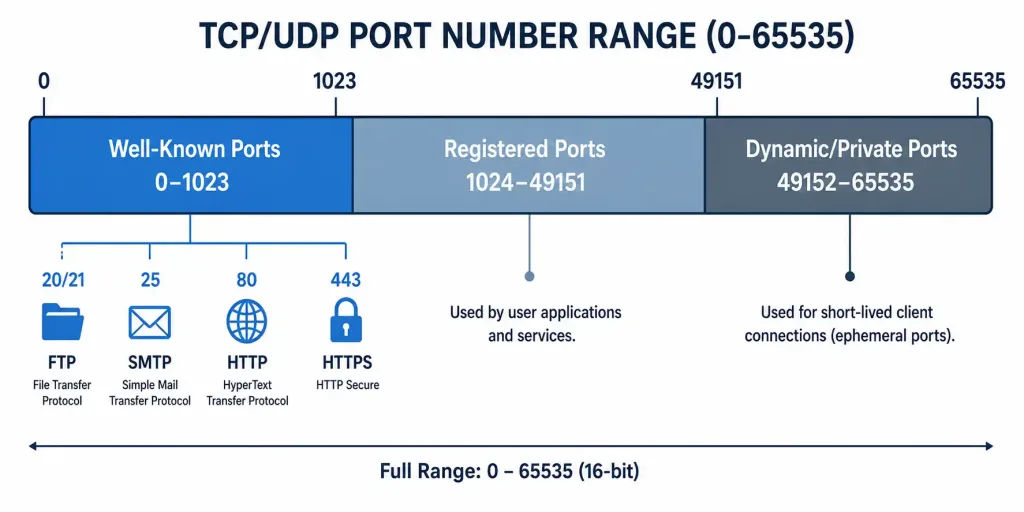
A client connection typically uses a well-known or registered port on the server side (port 80 for a web server, for instance) paired with a dynamic port the client’s own OS assigns for that specific connection — which is also why a single client can have many simultaneous connections to the same server port without conflict, since each connection is uniquely identified by the full combination of source IP, source port, destination IP, and destination port.
Unlike TCP, UDP is connectionless and unreliable — no handshake, no guaranteed delivery, no sequence numbers. That trade-off is exactly what makes UDP fast for use cases like DNS lookups, where a quick retry costs less than the overhead of a full TCP connection, but unsuitable for ACLs that need to track connection state, since there’s no established flag equivalent when a protocol never establishes anything in the first place.
TCP Header Breakdown
The TCP header is 20 bytes minimum, before any options:
| Field | Size (Bits) | Description |
|---|---|---|
| Source Port | 16 | Identifies the sending application |
| Destination Port | 16 | Identifies the receiving application |
| Sequence Number | 32 | Tracks the order of bytes sent |
| Acknowledgment Number | 32 | Indicates the next expected byte |
| Data Offset | 4 | Header length in 32-bit words |
| Reserved | 3 | Reserved for future use |
| Flags (Control Bits) | 9 | SYN, ACK, FIN, and the rest, for connection control |
| Window Size | 16 | Flow control — bytes the receiver can currently accept |
| Checksum | 16 | Error detection |
| Urgent Pointer | 16 | Points to urgent data if the URG flag is set |
| Options | Variable | For example, Maximum Segment Size (MSS) |
Adding up every fixed-size field confirms the 20-byte minimum: 16+16+32+32+4+3+9+16+16+16 bits totals exactly 160 bits, or 20 bytes. The 9-bit flags field reflects the modern extended header — the original six flags (URG, ACK, PSH, RST, SYN, FIN) plus three added later for congestion notification (NS, CWR, ECE), which is also why Reserved shrank from its original size to make room. Understanding this header is essential for CCNP-level packet analysis, such as reading a Wireshark capture flag by flag.
Troubleshooting TCP Connections
Common issues fall into a few categories:
- SYN floods. An attacker sends large volumes of SYN packets without ever completing the handshake, exhausting server resources reserved for half-open connections. Mitigate with ACLs limiting SYN rate, or with SYN cookies, which avoid allocating full connection state until the handshake actually completes.
- Connection timeouts. Check sequence numbers and acknowledgments with
netstat -anon a host, orshow tcp briefon Cisco devices, comparing what each side believes the current sequence state to be. - Port conflicts. Confirm applications are using the correct, expected ports —
telnetorncagainst a specific port is a fast way to test reachability before assuming a deeper routing or firewall issue.
Wireshark captures the full handshake directly. Filter with tcp.flags.syn == 1 to isolate connection initiations, or tcp.flags.syn == 1 && tcp.flags.ack == 1 to isolate the SYN-ACK responses specifically, which is often the fastest way to spot a server never completing its side of a handshake.
Illustrative Scenario: A Connection Stuck at SYN_SENT
Here’s a common scenario, meant to show the troubleshooting logic in action rather than describe a specific real event.
A client repeatedly attempts to reach a web server and reports connection timeouts. Checking netstat -an on the client shows the connection sitting in SYN_SENT state — meaning the client’s SYN went out, but no SYN-ACK ever came back, and the handshake never advanced to step two.
A packet capture on the client, filtered with tcp.flags.syn == 1, confirms the client’s SYN packets are genuinely leaving the interface at regular retransmission intervals. The absence of any SYN-ACK response points away from a client-side problem entirely — the client is doing exactly what it should. Checking the path reveals an extended ACL on an intermediate router permitting outbound traffic to the server’s port 80 but never explicitly permitting the return SYN-ACK, since the ACL was written without an established clause covering the return leg.
Adding a rule matching established traffic on the return path resolves it immediately — SYN-ACKs start arriving, connections complete, and SYN_SENT stops appearing in netstat output. The broader lesson: a connection stuck at SYN_SENT, with confirmed SYN packets actually leaving the client, points toward something blocking the return path specifically, not a general connectivity problem — exactly the kind of asymmetric filtering an ACL missing its established clause produces.
Conclusion
Understanding TCP conversations and their integration with ACLs is foundational for troubleshooting and security alike. The three-way handshake’s fixed order — SYN, then SYN-ACK, then ACK — isn’t an arbitrary convention; each step depends on information the previous one supplied, which is exactly why a broken or filtered step anywhere in that sequence leaves a connection stuck rather than degraded. Practice capturing real handshakes in Wireshark, or lab environments like Packet Tracer or GNS3, to make the sequence numbers and flag combinations feel concrete. For deeper detail, RFC 793 remains the original TCP specification, extended since by RFC 3168 for the ECN flags covered in the header breakdown above.
FAQs
What is the TCP three-way handshake?
The TCP three-way handshake establishes a reliable connection using three ordered steps: SYN, where the client proposes an initial sequence number; SYN-ACK, where the server acknowledges the client and proposes its own sequence number; and ACK, where the client confirms the server’s number. Only after all three steps complete does the connection reach ESTABLISHED and actual application data begin flowing, which is vital for applications like web browsing that depend on reliable, ordered delivery.
Why is the TCP three-way handshake important?
It prevents data loss by synchronizing sequence numbers on both sides before any application data is exchanged, enabling flow control and guaranteed ordered delivery for everything that follows. In security contexts, it supports stateful-style ACL filtering through the established keyword, which recognizes return traffic by its ACK or RST flag — a mechanism that also makes SYN flood attacks recognizable, since they generate large volumes of connections that never complete this sequence.
What are common issues with TCP handshakes?
SYN floods overload servers with half-open connections that never complete the handshake, exhausting resources reserved for legitimate connections. Timeouts often trace back to mismatched sequence or acknowledgment numbers, checkable with netstat -an or Cisco’s show tcp brief. Port conflicts and asymmetric ACL filtering — permitting outbound SYNs but never explicitly allowing return SYN-ACKs — are two other frequent causes worth checking with tools like Wireshark or telnet before assuming a more complex problem.
How does TCP differ from UDP in connection setup?
TCP uses the three-way handshake for reliable, connection-oriented setup, tracking sequence numbers and retransmitting anything lost along the way. UDP is connectionless and has no handshake at all — no SYN, no acknowledgment, no guaranteed delivery — which makes it faster for use cases like DNS lookups but unsuitable for ACLs that need to recognize established connection state, since UDP never establishes anything to recognize.
What TCP flags are used in the three-way handshake?
SYN initiates the connection and appears in both the first and second steps — the client’s opening SYN and the server’s combined SYN-ACK. ACK confirms receipt and appears in the second and third steps, first alongside the server’s SYN and then alone in the client’s final acknowledgment. After the handshake completes, FIN and RST take over for graceful and abrupt connection closure respectively, and extended ACLs can match on any of these flags to build more precise, security-aware filtering rules.



