
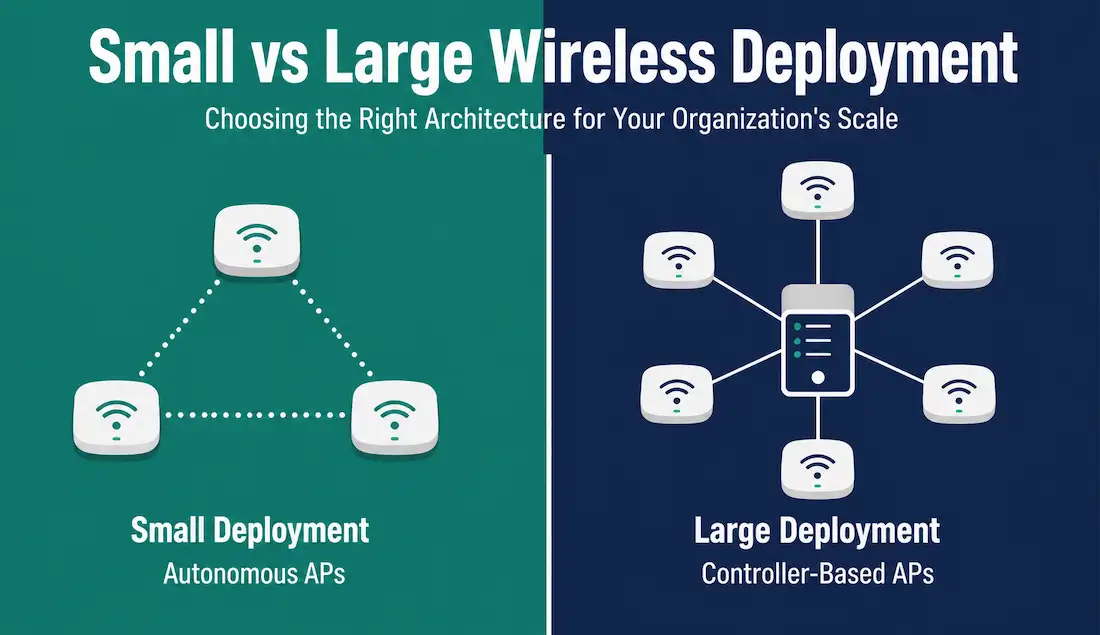
Wireless deployment strategy depends heavily on the size of the organization. A small office with a handful of users needs a very different approach than a campus or multi-site enterprise with hundreds of access points. Cisco offers distinct solutions for both ends of that spectrum, and the specific products involved have changed considerably since this topic was first standardized in CCNA material. This guide covers both small and large wireless network deployment models, using the vendor lineup and protocols actually in use in 2026.
Small Wireless Deployment: Autonomous APs
For small deployments — a single office, a small retail location, or a handful of users — Cisco’s current recommendation is a small number of autonomous access points, each configured and managed individually rather than through a central controller.
The current small-business-oriented access point line is the Cisco Catalyst 9105 Series, aimed at small-to-medium organizations and available in both ceiling-mounted and wall-mounted form factors, with Wi-Fi 6 support. This replaces the older Cisco WAP series and AP541N line referenced in older networking material, which have been discontinued for years.
Several Catalyst and Cisco Business access points support clustering — a feature that lets a handful of standalone APs share configuration and act as a single logical network without requiring dedicated controller hardware. The practical benefits of clustering are the same as they’ve always been:
- A single configuration change propagates to every AP in the cluster.
- Administrators get one view of the whole small deployment instead of managing each AP separately.
- Adding coverage means adding another AP to the cluster, not repeating a full manual configuration.
Clustering has practical limits, generally topping out in the range of a handful to a couple dozen access points, depending on the specific product line — well short of what a true controller-based deployment handles. For clustering to work correctly across multiple APs, a few conditions generally apply:
- Cluster mode must be enabled on each AP.
- All APs must use the same radio mode.
- All clustered APs must share the same cluster name.
- All APs must sit on the same network segment.
Small deployments remain the right fit when the number of APs stays small enough that individual configuration and clustering don’t become a burden. Once a deployment grows past that point, or spans multiple sites, a controller-based approach becomes the more practical choice.

Large Wireless Deployment Solutions: Controller-Based APs
For larger organizations, Cisco’s controller-based model provides better scalability and central management. Two architectures dominate this space: cloud-managed (Meraki) and on-premises wireless LAN controllers (WLC).
Cisco Meraki Cloud-Managed Architecture
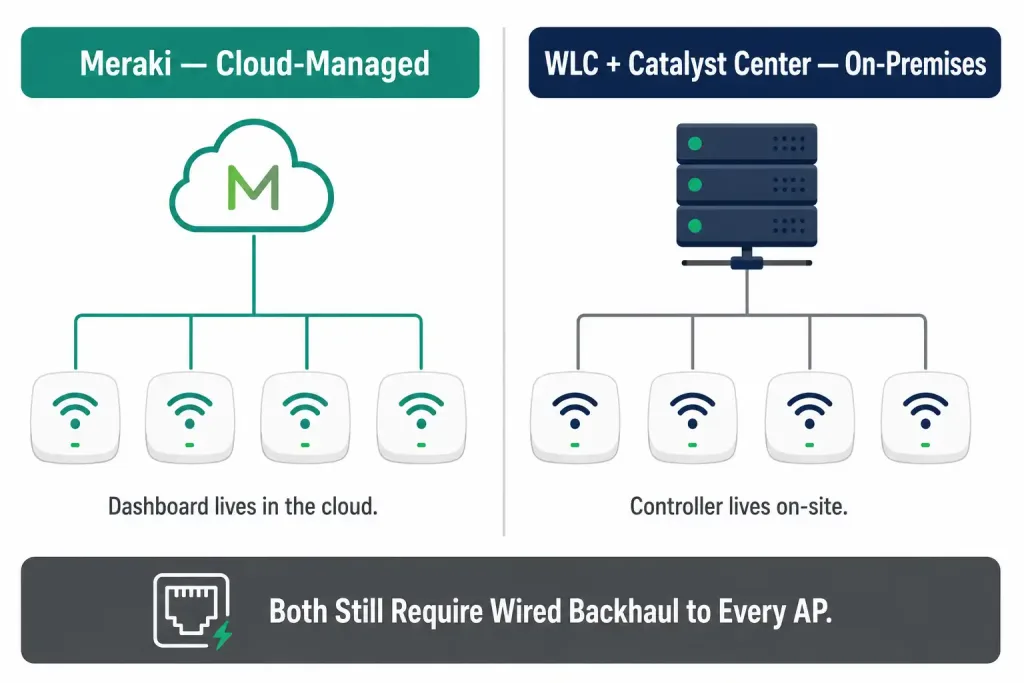
Meraki’s cloud architecture manages every access point from a centralized dashboard hosted in the cloud, rather than from on-site controller hardware. This significantly reduces the cost and complexity of managing many APs, and is particularly popular for organizations with many small or geographically distributed sites — a retail chain or a multi-branch business, for example — where deploying dedicated controller hardware at every location would be impractical.
Administrators can centrally push firmware updates, security settings, wireless network configuration, and SSIDs to every managed AP from one dashboard. Meraki’s architecture is deliberately designed so that only management traffic flows through Meraki’s cloud infrastructure — actual user data traffic from clients does not route through Meraki’s servers.
A Meraki deployment requires three core components:
- Cisco Meraki cloud-managed wireless APs — the current lineup spans several series (including Wi-Fi 6 and Wi-Fi 6E models), replacing the older “MR” naming still seen in some documentation.
- The Meraki cloud dashboard — the centralized, browser-based management and monitoring service.
- A network connection to the internet — required for each AP to reach the cloud dashboard for configuration and telemetry.
The dashboard continuously monitors, optimizes, and reports on network performance, and all configuration and diagnostics happen through the same web interface rather than through individual device logins.
Cisco Unified Wireless Network Architecture (Controller-Based)
The alternative to cloud management is an on-premises wireless LAN controller (WLC) architecture, which uses a split-MAC design: some access point functions are handled locally on the AP, while time-insensitive functions — authentication, centralized configuration, and policy decisions — are handled by the controller.
The components of this architecture are lightweight access points and one or more wireless LAN controllers. Lightweight APs communicate with the controller using CAPWAP (Control And Provisioning of Wireless Access Points) — the current IETF-standardized protocol for this communication. Older material describes this as LWAPP (Lightweight Access Point Protocol); that description is outdated. LWAPP was Cisco’s original proprietary version of this protocol, and it was superseded by the standardized CAPWAP more than a decade ago. Current Cisco lightweight APs and controllers use CAPWAP exclusively.
Cisco’s currently supported access point lineup for controller-based deployments is the Catalyst 9100 series, covering a range of models from the Wi-Fi 6-capable Catalyst 9105 and 9115 through the Wi-Fi 6E-capable 9136, 9162, and 9164/9166 models, with newer Wireless-branded 9170/9180-series models now supporting Wi-Fi 7. This replaces the Aironet-branded APs (including the 1600, 2600, and 3600 series referenced in older material) — Cisco formally sunset the entire Aironet AP brand in 2022 in favor of the Catalyst line.
On the controller side, the current lineup centers on the Cisco Catalyst 9800 Series Wireless Controllers, available as physical appliances, as a module integrated into Catalyst switches, or as a virtual controller. This replaces older controller models such as the 2500, 5760, and 8500 Series referenced in older material, all of which have been retired. Controllers are typically managed through Cisco Catalyst Center (formerly Cisco DNA Center, renamed in 2023), which provides a single dashboard for configuring, monitoring, and troubleshooting the entire wireless deployment across potentially hundreds of access points.
Choosing Between Meraki and On-Premises WLC
Both controller-based approaches solve the same core problem — centralized management at scale — but they suit different situations:
| Factor | Meraki (Cloud-Managed) | On-Premises WLC + Catalyst Center |
|---|---|---|
| Management location | Cloud dashboard, accessible anywhere | On-site controller (or virtual controller) |
| Best for | Distributed, multi-site organizations | Single large campus, or organizations wanting full on-prem control |
| Setup complexity | Lower — no controller hardware to deploy | Higher — controller sizing and placement required |
| Internet dependency | Required for configuration and monitoring | APs can operate locally if the controller connection drops, depending on design |
| Licensing model | Ongoing cloud subscription per device | Controller and AP licensing, varies by deployment |
Many organizations end up using a mix: Meraki for smaller or remote branch offices, and an on-premises WLC architecture for a large primary campus, with both managed under Cisco’s broader networking ecosystem.
Planning a large-scale deployment
Choosing between Meraki and on-premises WLC is only the first decision in a large deployment. A few additional planning steps apply regardless of which architecture is chosen:
Site survey and AP density. Before installing anything, a proper wireless site survey measures signal strength, interference sources, and building materials throughout the intended coverage area. This determines how many APs are actually needed and where they should go — a step that’s far cheaper to get right on paper than to fix after installation.
Controller sizing and redundancy. For on-premises WLC deployments, the controller (or controller pair) must be sized for the expected number of APs and client devices, with enough headroom for growth. Enterprise deployments typically deploy controllers in a redundant pair, so that if one controller fails, the other takes over without dropping every connected AP.
Bandwidth and backhaul planning. Every AP needs a wired connection back to the network, typically over Ethernet with Power over Ethernet (PoE) to avoid running separate power cables. As Wi-Fi 6E and Wi-Fi 7 APs push higher per-AP throughput, the switch ports and uplinks feeding those APs need enough capacity to avoid becoming the actual bottleneck.
Licensing model. Both Meraki and Catalyst Center-managed deployments now typically run on subscription licensing rather than a one-time hardware purchase, which affects long-term budgeting differently than the older perpetual-license model many CCNA materials still assume.
Security considerations across both deployment models
Regardless of whether a deployment uses clustering, Meraki, or an on-premises WLC, a few security practices apply broadly:
- WPA3 should be the default security standard for any new AP or SSID configuration, with WPA3-Enterprise and 802.1X used for staff networks where individual identity needs to be verified.
- Segmented SSIDs — separate SSIDs for staff, guest, and IoT traffic, each mapped to its own VLAN, limit the blast radius if any one segment is compromised.
- Rogue AP detection — both Meraki and Catalyst Center-managed WLC deployments include built-in detection for unauthorized access points appearing on the network.
- Firmware currency — because APs sit at the network’s physical edge, keeping firmware current across the whole deployment matters more here than almost anywhere else in the network; both Meraki’s cloud dashboard and Catalyst Center support centralized, scheduled firmware updates across an entire fleet of APs.
Frequently Asked Questions
What replaced Cisco’s older small-business AP lines like the WAP121 and WAP321? These have been discontinued. The Catalyst 9105 Series is the current comparable option for small-to-medium organizations, alongside Cisco’s Meraki lineup for those preferring cloud management even at small scale.
Is LWAPP still used in current Cisco wireless deployments? No. LWAPP was Cisco’s original proprietary protocol for lightweight AP-to-controller communication. It was replaced by the IETF-standard CAPWAP protocol years ago, and all currently supported Cisco lightweight APs and controllers use CAPWAP.
Do I need a wireless LAN controller for a large deployment, or can Meraki handle it? Meraki can scale to large deployments and is used by many large organizations, particularly distributed ones. The choice between Meraki and an on-premises WLC usually comes down to how centralized the physical footprint is, whether full on-premises control is a requirement, and existing investment in Cisco’s non-cloud ecosystem.
Can autonomous APs be converted to controller-based (lightweight) mode later? Yes, for many AP models Cisco supports converting an autonomous AP to lightweight mode so it can join a wireless LAN controller, which is a common path as a deployment grows beyond what clustering can comfortably handle.
What’s the practical difference between choosing Meraki and choosing an on-premises Catalyst 9800 controller if both can scale to the same size? The difference is mostly about where control and dependency live. Meraki centralizes everything in Cisco’s cloud, which lowers on-site complexity but means configuration changes and monitoring depend on internet connectivity to reach the dashboard. An on-premises Catalyst 9800 controller keeps that control plane inside the organization’s own network, which some regulated industries or security policies specifically require, at the cost of needing staff who can size, deploy, and maintain that controller hardware or virtual appliance directly.
Conclusion
Wireless deployment strategy still comes down to the same fundamental choice it always has: individually managed autonomous APs for small deployments, versus centrally managed controller-based APs — whether cloud-managed through Meraki or on-premises through a WLC and Catalyst Center — for larger ones. What has changed is the hardware and protocols behind that choice: LWAPP has given way to CAPWAP, the Aironet brand has given way to Catalyst, and the WAP and AP541N small-business lines have given way to the Catalyst 9105 Series.
The architecture concepts from older CCNA material still hold; the specific products and protocol names need to be current to be useful in a real 2026 deployment. Whichever path an organization takes, the fundamentals of good deployment — a proper site survey, sensible controller sizing and redundancy, adequate wired backhaul, and consistent security policy across every AP — matter just as much as the brand name on the hardware.



