
In a wired LAN, every client connects to a switch, which acts as the central point of access to the network. A wireless network needs an equivalent device to play that role over the air — that device is the wireless access point (AP). This guide explains how APs work, the two fundamental deployment models (autonomous and controller-based), and how enterprise AP management has actually evolved since the 2000s-era tools many older guides still reference.
What a wireless access point does
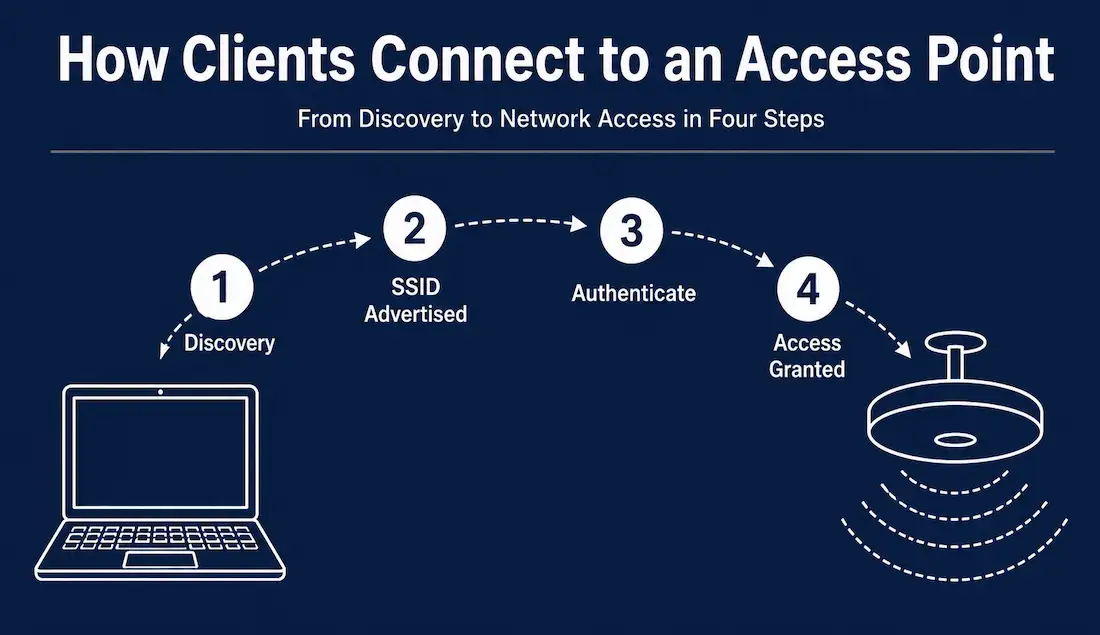
A wireless access point connects to the wired network, typically through a switch, and extends network access to wireless clients over radio frequency signals. The process a client goes through to join the network happens in a consistent sequence:
- Discovery — a wireless client uses its wireless network interface card (WNIC) to scan for nearby access points.
- SSID advertisement — each access point broadcasts its SSID (Service Set Identifier), the network name that shows up when a device scans for Wi-Fi.
- Selection and authentication — the client selects an SSID and attempts to connect, authenticating with a password or, in enterprise networks, with individual user or device credentials.
- Access granted — once authenticated, the client can reach network resources through the access point, the same way a wired client reaches them through a switch port.
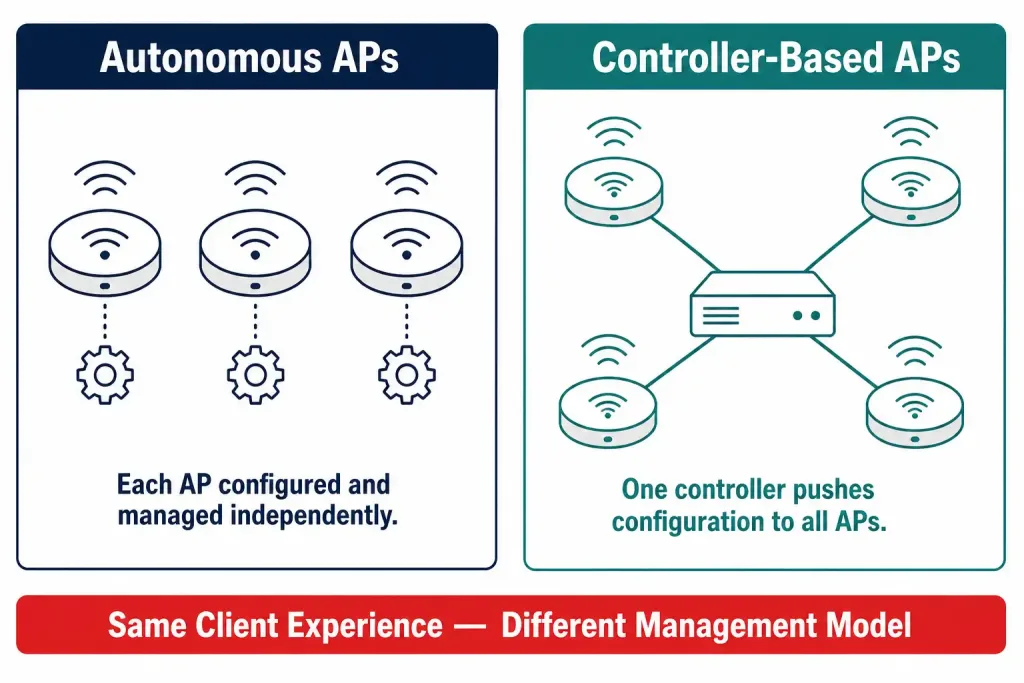
Access points come in two fundamentally different deployment models: autonomous APs and controller-based APs. The difference between them is about how they’re configured and managed, not how they handle client connections.
Autonomous APs
An autonomous AP is a self-contained device. It runs its own operating system, holds its own configuration, and operates independently of any other AP on the network. Each autonomous AP is configured individually, typically through a command-line interface (CLI) or a web-based GUI, and continues operating even if it loses contact with the rest of the network.
The most familiar example of an autonomous AP is a typical home wireless router — it is configured once, broadcasts its own SSID, and doesn’t rely on any central controller to function.
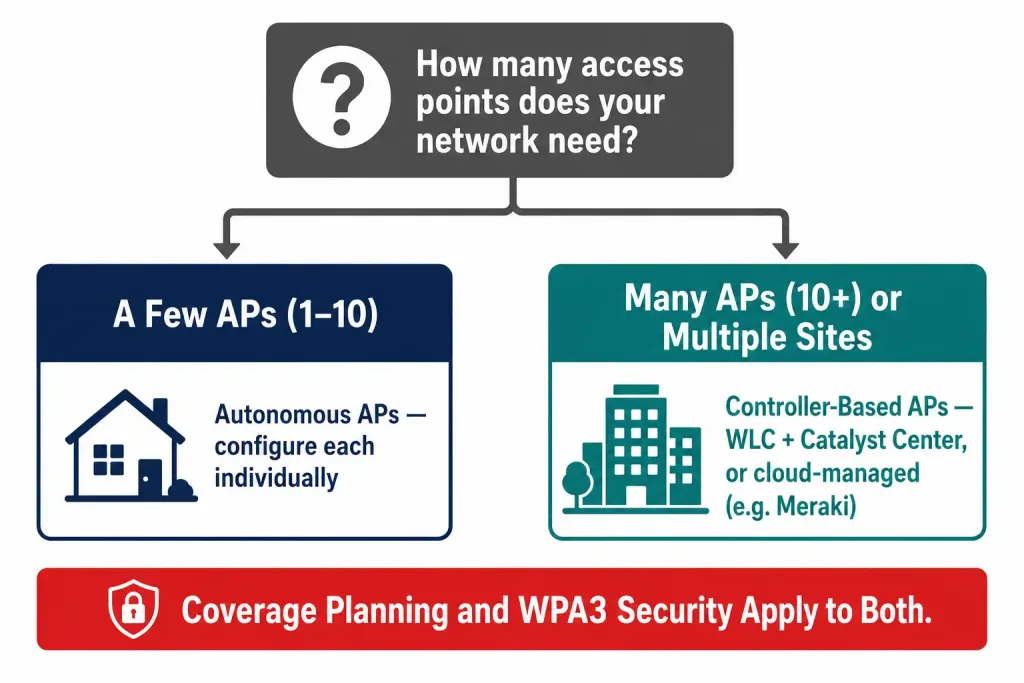
Autonomous APs make sense in small deployments: a single office, a small retail location, or a home network, where only one or a handful of APs are needed. The tradeoff shows up as the network grows. Because each autonomous AP is configured and managed on its own, tracking down a misconfigured AP, pushing out a firmware update, or enforcing consistent security settings across a dozen or more independently managed devices becomes time-consuming and error-prone.
How autonomous APs used to be centrally managed — and what replaced it
Older networking material — including earlier versions of this article — describes managing groups of autonomous APs using Wireless Domain Services (WDS) together with the CiscoWorks Wireless LAN Solution Engine (WLSE). That description is out of date: Cisco formally retired the WLSE product line years ago, and it is no longer supported or sold. Anyone deploying or studying enterprise wireless today will not encounter WLSE in a live network.
The practical successor to that old management model, for organizations that still deploy autonomous-style or lightweight APs at scale, is Cisco’s centralized wireless LAN controller (WLC) architecture, paired with a management dashboard — Cisco Catalyst Center (formerly known as Cisco DNA Center, renamed in 2023) for on-premises Cisco environments, or a cloud-managed platform such as Cisco Meraki for organizations that prefer to manage access points entirely from a browser without on-site controller hardware. The underlying goal — pushing consistent configuration and monitoring to many APs from one place — hasn’t changed; the tools that do it have moved on considerably.
Controller-Based APs
A controller-based AP, often called a lightweight access point, is designed to depend on a central wireless LAN controller (WLC) rather than holding its own full configuration. When a new controller-based AP is added to the network, it discovers the controller automatically, and the controller pushes down its configuration — SSIDs, security settings, radio channel and power settings, and firmware — without requiring an administrator to touch the AP individually.
This model scales far better than autonomous APs once a network grows beyond a handful of access points. A single controller can typically manage anywhere from dozens to hundreds of APs depending on the controller model, giving administrators one place to make a change and have it apply consistently across the entire wireless network. The controller also coordinates radio resource management across all its APs — automatically adjusting channel assignments and transmit power to reduce interference between neighboring APs, something that’s impractical to do manually across a large autonomous deployment.
The tradeoff is a dependency on the controller itself: if the controller becomes unreachable, lightweight APs may lose the ability to accept new client connections or push configuration changes, depending on the specific failover and high-availability design in place. Enterprise deployments typically address this with controller redundancy — a backup controller ready to take over — rather than relying on a single point of failure.
Choosing between the two models
| Factor | Autonomous APs | Controller-Based APs |
|---|---|---|
| Best for | Home networks, single small sites | Multi-AP enterprise and campus networks |
| Configuration | Individual, per-device | Centralized, pushed from controller |
| Scaling | Becomes difficult beyond a few APs | Designed to scale to dozens or hundreds |
| Failure dependency | Each AP fails independently | Depends on controller availability (mitigated with redundancy) |
| Radio coordination | Manual, per-AP | Automatic, coordinated by controller |
| Typical management tool | Local CLI/GUI per AP | Cisco WLC + Catalyst Center, or cloud dashboards like Meraki |
Cloud-managed access points: a third path
Since the controller-based model was first standardized, a third option has become common, particularly for small and mid-sized organizations: cloud-managed access points. Platforms like Cisco Meraki, Aruba Central, and similar vendor offerings move the “controller” function into the cloud entirely. APs connect to the internet and check in with a cloud dashboard for configuration and monitoring, eliminating the need for on-site controller hardware while still providing the centralized management benefits of the controller-based model. This approach has become popular for distributed organizations with many small sites, such as retail chains, where deploying dedicated controller hardware at every location would be impractical.
Access point placement and coverage planning
Regardless of which management model is used, an AP’s physical placement has as much effect on network performance as its configuration. A few principles apply broadly:
- Coverage overlap, not duplication — neighboring APs should have overlapping coverage at their edges so clients can roam between them without a dead zone, but too much overlap on the same channel causes co-channel interference and actually reduces performance.
- Ceiling-mounted over wall-mounted where possible — in office and campus environments, ceiling mounting typically gives more even coverage across an open floor plan than wall-mounted units, which tend to project signal unevenly.
- Site surveys for anything beyond a small space — a proper wireless site survey measures actual signal strength and interference throughout a building before AP placement is finalized, rather than relying on rule-of-thumb spacing, since building materials and layout vary enormously.
- Channel and power planning — in controller-based deployments, radio resource management usually handles this automatically; in autonomous deployments, an administrator needs to manually assign non-overlapping channels to avoid neighboring APs interfering with each other.
Security considerations for access point deployments
An access point is the network’s most exposed edge — it’s the device physically broadcasting into public or shared space. A few security practices matter regardless of deployment model:
- WPA3 should be the baseline security standard for any new AP deployment, with WPA3-Enterprise and 802.1X authentication used wherever individual user or device identity needs to be verified, such as in office and campus networks.
- Rogue AP detection — controller-based and cloud-managed platforms typically include built-in detection for unauthorized access points broadcasting on the network, which could otherwise be used to intercept traffic or provide unauthorized network access.
- Management interface protection — an AP’s own configuration interface, whether local or cloud-based, should be protected with strong administrative credentials and, where supported, multi-factor authentication, since compromising the management plane can compromise every client connected through it.
- Separate SSIDs for different trust levels — many organizations run separate SSIDs for staff devices, guest access, and IoT devices, each mapped to a different VLAN, so that a compromised guest or IoT device cannot reach sensitive internal systems.
Troubleshooting common access point issues
Clients can see the SSID but can’t connect — usually an authentication mismatch (wrong password, or a security protocol the client doesn’t support) or the AP has reached its maximum client capacity.
Weak signal in a specific area — check for physical obstructions first (concrete, metal, thick walls), then consider whether an additional AP or a repositioned existing AP would close the gap, rather than simply increasing transmit power, which can worsen interference with neighboring APs.
Intermittent disconnections while roaming between APs — often a sign of misconfigured or absent fast-roaming support (such as 802.11r), or APs on the same channel causing clients to hesitate between them instead of handing off cleanly.
A controller-based AP won’t join the controller — check that the AP can reach the controller’s management IP address on the network, that firmware versions are compatible, and that any required VLANs or DHCP options for AP discovery are correctly configured.
Frequently Asked Questions
Is a home Wi-Fi router the same thing as a wireless access point? A home router typically combines an access point with a router and a switch in a single device, functioning as an autonomous AP. A dedicated “access point” device, without router or switch functions, is more common in business and enterprise settings.
Do I need a wireless LAN controller for a small office? Usually not. A handful of autonomous APs, or even a single AP, is manageable by hand in a small office. Controllers earn their value once you’re managing enough APs that centralized configuration and radio coordination save meaningful administrative time — commonly cited as somewhere above five to ten APs, though this varies by environment.
What happened to Cisco WLSE? It was retired by Cisco and is no longer sold or supported. Organizations that once used it for managing autonomous APs have migrated to wireless LAN controllers managed through Cisco Catalyst Center, or to cloud-managed platforms.
Can autonomous and controller-based APs be mixed on the same network? Technically, both can coexist on the same physical network, but they are managed completely separately — an autonomous AP will not be managed by a wireless LAN controller unless it is specifically converted to lightweight mode, a process Cisco and other vendors support for many AP models.
How many client devices can a single access point handle? It varies by AP model, radio configuration, and the mix of traffic types, but many enterprise-grade APs are rated for somewhere between 50 and 200 associated clients, with real-world usable performance often dropping well before that ceiling if many clients are simultaneously streaming or transferring large amounts of data. Planning for a lower practical client count per AP, and adding more APs rather than overloading one, generally produces a better experience than chasing a single device’s maximum rated capacity.
Conclusion
Wireless access points give wireless clients the same kind of network entry point that a switch gives wired clients, but how those access points are configured and managed varies significantly with network size. Autonomous APs work well for small, simple deployments where each device can be configured on its own.
Controller-based APs, managed through a wireless LAN controller and a platform like Cisco Catalyst Center, or through a cloud dashboard like Meraki, are built for the scale and consistency that larger networks require — and have fully replaced the retired first-generation management tools like WLSE that older documentation still occasionally references. Whichever model fits a given network, good placement, coverage planning, and baseline security practices like WPA3 remain just as important as the choice between autonomous and controller-based management.



