
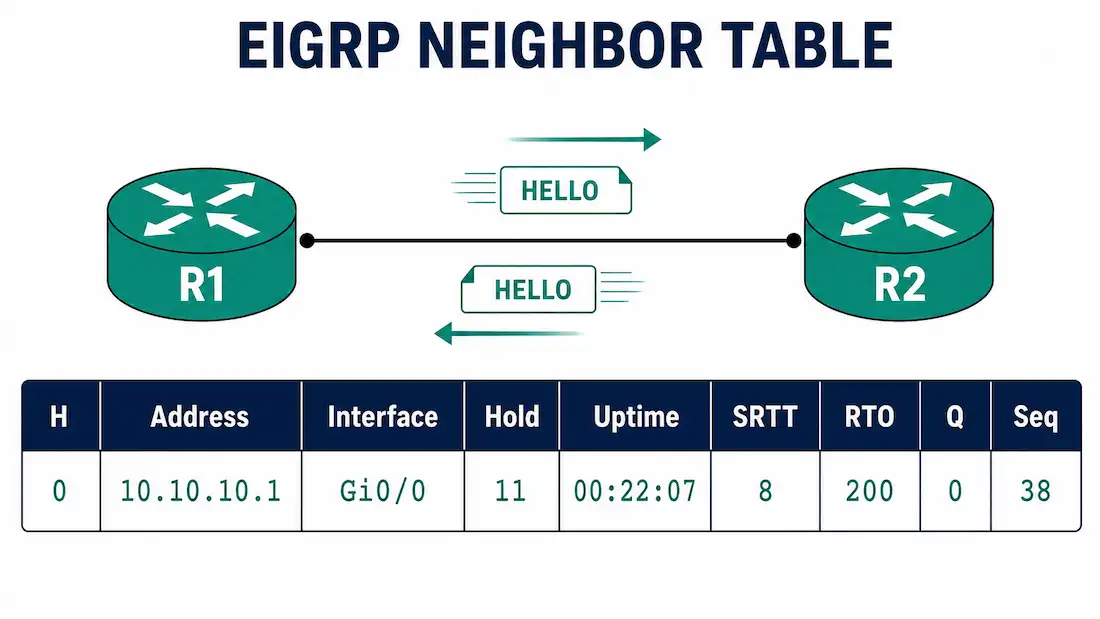
EIGRP-enabled routers establish neighbor adjacencies with other EIGRP-enabled routers by exchanging EIGRP hello packets. Without a neighbor adjacency, two routers cannot send or receive any EIGRP updates between them — no routes, no topology information, nothing. This is why neighbor formation is the first thing to check whenever EIGRP routes aren’t showing up where you expect them.
Once two routers form an adjacency, each maintains a neighbor table listing every other EIGRP router it currently has an active relationship with. You examine this table with the show ip eigrp neighbors command — one of the most frequently used EIGRP verification commands, and usually the first stop in any EIGRP troubleshooting session.
Reading the Neighbor Table Output
Using the same three-router topology from earlier in this series — R1, R2, and R3 connected in a triangle, with router IDs 1.1.1.1, 2.2.2.2, and 3.3.3.3 — here’s what show ip eigrp neighbors looks like on R1:
R1# show ip eigrp neighbors
EIGRP-IPv4 Neighbors for AS(1)
H   Address                 Interface       Hold  Uptime   SRTT   RTO   Q   Seq
                                             (sec)          (ms)        Cnt Num
1   10.10.10.9              Gi0/1           13    00:14:22  12    200   0   41
0   10.10.10.1              Gi0/0           11    00:22:07   8    200   0   38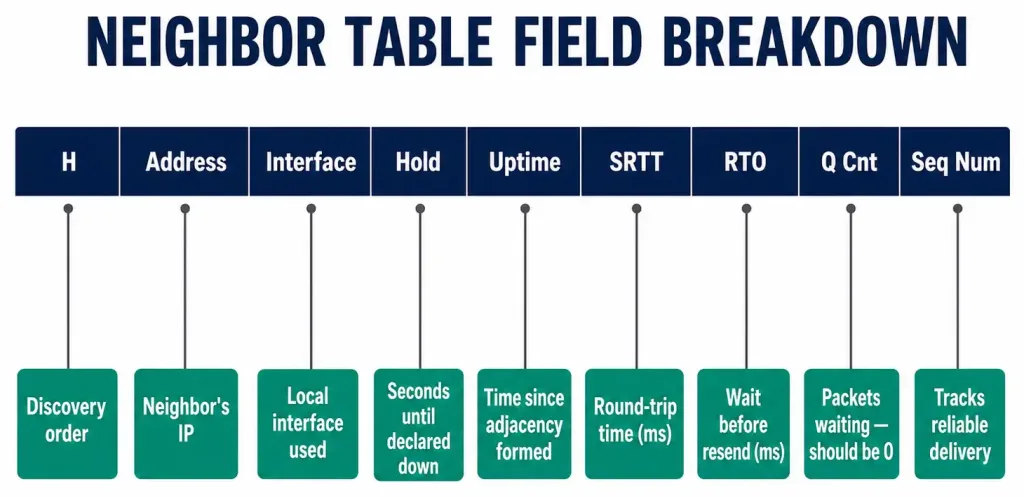
Each column tells you something specific about that neighbor relationship:
- H (Handle) — Lists neighbors in the order they were learned. The first neighbor discovered gets a value of 0, the second gets 1, and so on. This is purely an internal tracking index; it has no bearing on route selection or priority.
- Address — The IPv4 address of the adjacent neighbor, as seen on the directly connected link.
- Interface — The local interface on which this neighbor’s hello packets are received. This is your router’s interface, not the neighbor’s.
- Hold — How long, in seconds, this router will wait to hear from the neighbor again before declaring it down. Every time a hello packet arrives, this value resets to the interface’s configured hold time and starts counting down again. If it reaches zero, the neighbor is considered down and the adjacency is torn down.
- Uptime — The elapsed time, in hours:minutes:seconds, since this neighbor was added to the table. A neighbor that keeps resetting to a low uptime, rather than climbing steadily, points to a flapping adjacency.
- SRTT (Smooth Round-Trip Timer) — The average time, in milliseconds, it takes to send an EIGRP packet to this neighbor and receive an acknowledgment back. This is measured continuously and smoothed over time, not a single snapshot.
- RTO (Retransmission Timeout) — How long EIGRP will wait, in milliseconds, before retransmitting a packet from the retransmission queue if no acknowledgment arrives. This value is calculated from the SRTT.
- Q Cnt (Queue Count) — The number of EIGRP packets currently queued and waiting to be sent to this neighbor. This should be 0 under normal conditions; a consistently nonzero value points to congestion or a struggling link.
- Seq Num (Sequence Number) — The sequence number of the last update, query, or reply packet received from this neighbor, used by EIGRP’s reliable transport mechanism to track packet delivery.
Why the Neighbor Table Matters for Troubleshooting
The neighbor table is the fastest way to answer one question: is this router actually talking to the EIGRP routers it should be talking to? If a neighbor you expect to see is missing from the table entirely, or if a neighbor is present but its Hold value is unusually low and dropping fast, that tells you where to focus before digging into routes or the topology table at all.
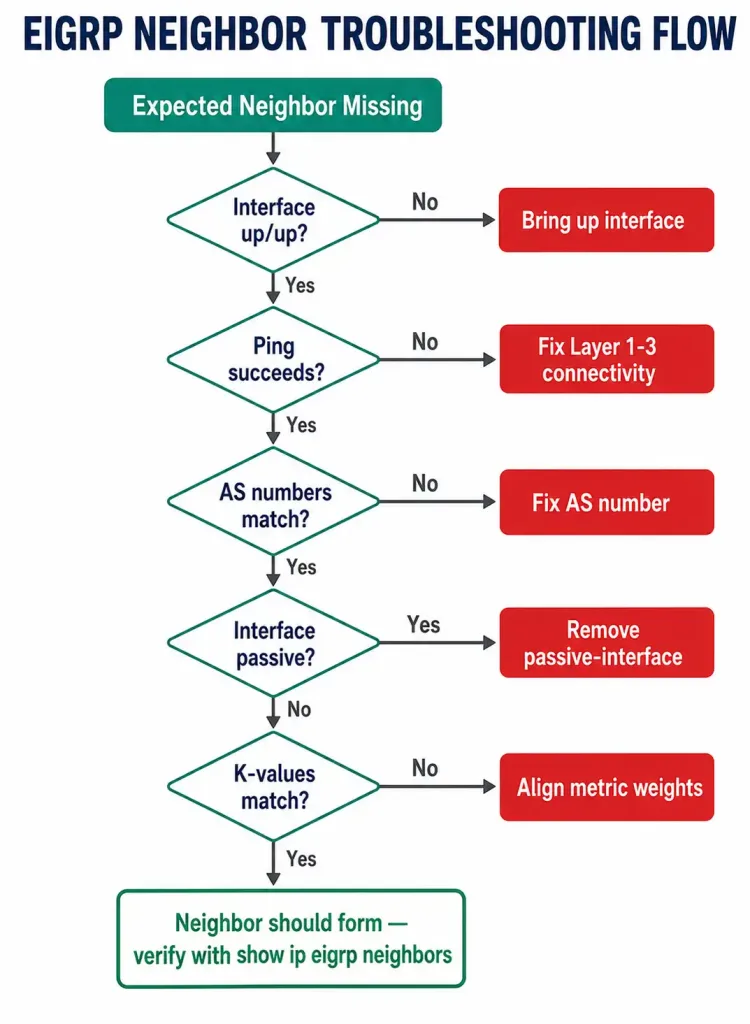
A practical troubleshooting sequence when an expected neighbor doesn’t appear:
- Confirm interface state. Run
show ip interface briefon both routers. If the interface connecting them is down or administratively down, no hello packets can be exchanged regardless of any EIGRP configuration. - Test basic reachability. If the interface is up, ping the neighbor’s IPv4 address directly. If the ping fails, the problem is below EIGRP entirely — Layer 1/2/3 connectivity, not routing protocol configuration.
- Confirm the AS number matches. If the ping succeeds but no adjacency forms, verify both routers are configured with the same autonomous system number under
router eigrp. A mismatched AS number is one of the most common reasons two routers that can clearly reach each other still won’t become EIGRP neighbors. - Check for a passive interface. If AS numbers match and the interface still won’t form an adjacency, confirm the interface hasn’t been marked passive — a passive interface sends no hello packets at all, so it will never appear as a neighbor relationship regardless of anything else being correctly configured.
- Check K-values and authentication. If everything above checks out, compare
show ip protocolsoutput on both routers for matching K-values and, if configured, matching authentication.
What “Healthy” Looks Like at a Glance
Once you know what each field means, it helps to have a quick sense of what’s normal versus what warrants a closer look:
| Field | Healthy | Worth investigating |
|---|---|---|
| Hold | Stable, resets near the max hold time repeatedly | Consistently low or dropping toward zero across multiple checks |
| Uptime | Climbing steadily, matching how long the link has actually been up | Frequently resets to a low value (flapping) |
| SRTT | Low and stable, proportional to link type (higher on WAN links, lower on LAN links) | Sudden spikes or high variance between checks |
| RTO | Proportional to SRTT, generally stable | Rapidly increasing values alongside a rising SRTT |
| Q Cnt | 0 | Nonzero and staying nonzero across repeated checks |
None of these values have hard universal thresholds — a WAN link’s SRTT will naturally run higher than a LAN link’s, for instance — so the real skill is comparing a neighbor’s current values against its own historical baseline, not against some fixed number.
Worked Example: Diagnosing a Flapping Neighbor
Consider a scenario where R1’s neighbor table shows R2 with an Uptime that keeps resetting to a low value every few minutes, rather than climbing steadily — a classic symptom of a flapping adjacency, where the relationship keeps forming and immediately breaking again.
R1# show ip eigrp neighbors
EIGRP-IPv4 Neighbors for AS(1)
H   Address                 Interface       Hold  Uptime   SRTT   RTO   Q   Seq
1   10.10.10.9              Gi0/1           12    00:01:47  12    200   0   6
0   10.10.10.1              Gi0/0           11    04:12:33   8    200   0   38
R2 (10.10.10.9) has an uptime of under two minutes, while R3 (10.10.10.1) has been stable for over four hours. That contrast is the key diagnostic clue — it isolates the problem to the specific link between R1 and R2, rather than something wrong with R1’s EIGRP process as a whole.
Working through the troubleshooting sequence above: interface state on both ends checks out as up/up, and pings between R1 and R2 succeed consistently, which rules out a hard physical or Layer 3 problem. AS numbers match. No passive-interface configuration is present on either side. That leaves the Hold timer itself as the next thing to examine — if the physical link between R1 and R2 has intermittent packet loss, hello packets can be dropped often enough that the Hold timer occasionally expires before the next hello arrives, even though the link is “up” from an interface-state perspective.
In this kind of case, checking interface error counters with show interfaces GigabitEthernet0/1 on R1 is the next step — a climbing CRC error count or input/output error count on that specific interface would confirm a physical-layer problem (a bad cable, a failing SFP, a duplex mismatch) rather than anything wrong with the EIGRP configuration itself. This is a useful pattern to remember: when Hold and Uptime look unstable but every EIGRP-specific configuration item checks out, the next place to look is almost always the physical layer, not another EIGRP command.
Neighbor Table vs. Topology Table vs. Routing Table
It’s worth being clear about how these three EIGRP data structures relate, since they’re easy to conflate:
| Table | Command | What it shows |
|---|---|---|
| Neighbor table | show ip eigrp neighbors | Which routers this router has an active EIGRP adjacency with |
| Topology table | show ip eigrp topology | Every route learned from every neighbor, including backup (feasible successor) routes not currently in use |
| Routing table | show ip route eigrp | Only the best route to each destination, as installed for actual packet forwarding |
The neighbor table comes first in that chain — no adjacency means nothing from that router ever makes it into the topology table, and by extension, nothing makes it into the routing table either. This is why neighbor-table checks are the starting point of EIGRP troubleshooting rather than the last resort.
EIGRP Neighbor Formation vs. OSPF Neighbor Formation
Both protocols use hello packets to discover and maintain neighbors, but the specific requirements differ:
| Requirement | EIGRP | OSPF |
|---|---|---|
| Matching AS/Process | Same autonomous system number | Same area on the connecting interface (process ID doesn’t need to match) |
| Duplicate router ID | Allowed — adjacency still forms | Blocked — prevents adjacency |
| Metric parameters | Same K-values required | Same hello/dead intervals required |
| Passive interface behavior | No hellos, no adjacency; subnet still advertised elsewhere | No hellos, no adjacency; subnet still advertised as a stub route elsewhere |
If you’re studying both protocols together, the AS-number-vs-area distinction is one of the most common points of confusion — EIGRP cares about matching autonomous system numbers across the whole domain, while OSPF’s matching requirement is scoped to the area configured on each specific link.
FAQs
What is an EIGRP neighbor?
An EIGRP neighbor is another EIGRP-enabled router that this router has formed an active adjacency with by successfully exchanging hello packets. Only routers with an active adjacency can exchange routing updates with each other.
What command shows the EIGRP neighbor table?
show ip eigrp neighbors, run in privileged EXEC mode. It lists every currently active neighbor along with timing and reliability statistics for each relationship.
Why is a neighbor missing from the table when I expect it to be there? The most common causes, in rough order of likelihood: the connecting interface is down, the two routers aren’t actually reachable at Layer 3, the autonomous system numbers don’t match, the interface has been configured as passive, or the K-values don’t match between the two routers.
What does a high Q Cnt value mean?
A queue count consistently above 0 means EIGRP packets are backing up and not being sent to that neighbor promptly, which usually points to congestion or a degraded link rather than a configuration problem. An occasional brief nonzero reading isn’t necessarily a problem; a sustained one is worth investigating.
Does the order neighbors appear in the H column matter for route selection?
No. The H column is purely a record of discovery order for internal tracking purposes. It has no effect on which routes are selected as successors or how traffic is forwarded.
Can two routers have an EIGRP adjacency across a passive interface?
No. A passive interface sends no hello packets, and hello packets are required to form and maintain any EIGRP adjacency. If you need a neighbor relationship on that link, the interface can’t be passive.
Does a stable neighbor table guarantee that routes are actually being exchanged correctly?
Not entirely. A stable neighbor table confirms the adjacency layer is healthy, but it doesn’t by itself confirm that expected routes are present or correctly metriced. After confirming a neighbor is stable in show ip eigrp neighbors, the next step for full verification is checking show ip eigrp topology for that neighbor’s advertised routes, and show ip route eigrp to confirm those routes were actually installed for forwarding.



