
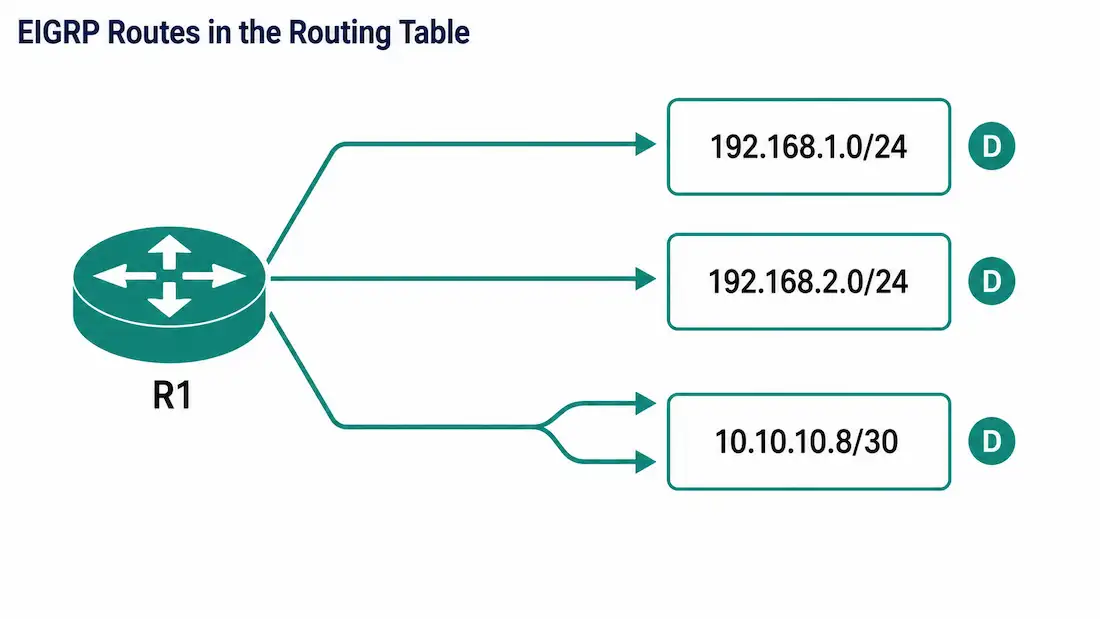
Once EIGRP neighbors are up and exchanging routes, the next verification step is confirming those routes actually made it into the router’s routing table — not just the topology table. The show ip route command is the tool for this: it displays the complete routing table, including remote networks learned dynamically, directly connected networks, and any static routes, all in one place. It’s typically the first command used to confirm EIGRP has converged after a configuration change.
EIGRP routes appear in the routing table marked with the letter D, a reference to DUAL (Diffusing Update Algorithm), the algorithm EIGRP uses to select loop-free paths. Externally redistributed EIGRP routes are marked D EX instead, distinguishing routes EIGRP originated internally from routes it learned from another routing protocol and redistributed.
Reading R1’s Routing Table
Using the same three-router triangle topology from earlier in this series — R1 connected to R2 over 10.10.10.4/30 and to R3 over 10.10.10.0/30, with R2 and R3 also connected to each other over 10.10.10.8/30 — here’s what R1’s routing table shows once EIGRP has converged:
R1# show ip route eigrp
D    192.168.1.0/24 [90/3072] via 10.10.10.6, 00:12:41, GigabitEthernet0/0
D    192.168.2.0/24 [90/3072] via 10.10.10.2, 00:12:41, GigabitEthernet0/1
D    10.10.10.8/30 [90/2816] via 10.10.10.6, 00:12:41, GigabitEthernet0/0
                    [90/2816] via 10.10.10.2, 00:12:41, GigabitEthernet0/1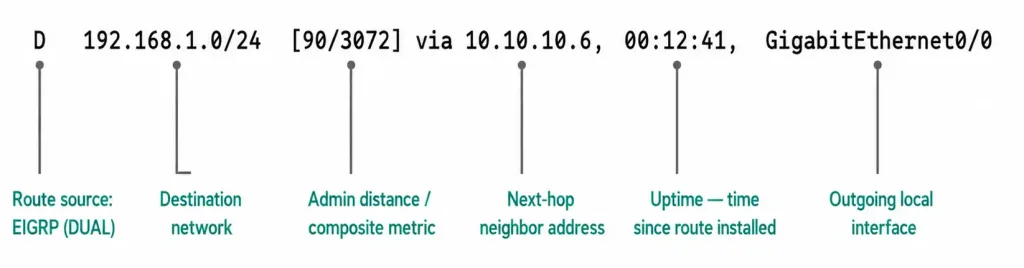
R1 has installed routes to three remote IPv4 networks:
- 192.168.1.0/24 — R2’s LAN, learned from R2 via next-hop 10.10.10.6, out GigabitEthernet0/0.
- 192.168.2.0/24 — R3’s LAN, learned from R3 via next-hop 10.10.10.2, out GigabitEthernet0/1.
- 10.10.10.8/30 — the point-to-point link between R2 and R3. R1 isn’t directly connected to this subnet, but it’s reachable through either neighbor.
That last entry is the interesting one: R1 lists two next-hops for the same destination — 10.10.10.6 via GigabitEthernet0/0 and 10.10.10.2 via GigabitEthernet0/1 — both with the identical composite metric of 2816. Because R1’s cost to reach 10.10.10.8/30 is exactly equal through both R2 and R3 (the triangle topology is symmetric), EIGRP installs both paths and load-balances traffic across them rather than picking one arbitrarily and discarding the other.
Each route entry also shows [90/metric] — the 90 is EIGRP’s internal administrative distance, and the number after the slash is the composite metric DUAL calculated for that specific path, based on bandwidth and delay by default.
Equal-Cost Load Balancing in EIGRP
EIGRP supports equal-cost load balancing by default, installing up to four equal-cost paths to the same destination in the routing table. This limit is controlled by the maximum-paths command under the EIGRP process:
R1(config-router)# maximum-paths 4The default value is already 4, so this command is typically only used to change it — either lowering it to force a single path, or raising it (some platforms support up to 32, depending on the IOS version and license) if a topology has more than four equal-cost paths available. Unlike some load-balancing implementations, EIGRP’s equal-cost balancing works per-destination based on the CIDR-block routing table entries shown above — you don’t need any special configuration beyond having genuinely equal-cost paths for it to activate automatically.
EIGRP can also perform unequal-cost load balancing using the variance command, which allows paths with a higher metric (up to a configurable multiple of the best metric) to also be installed and used, proportionally to their metric. That’s a more advanced topic covered in EIGRP’s variance and traffic-share behavior specifically, but it’s worth knowing equal-cost balancing shown here is only the default behavior, not the only option.
How Auto-Summary Affects What You See Here
The specific subnets that appear in show ip route depend heavily on whether auto-summary is active. Auto-summarization was enabled by default in IOS versions before 15.0(1)M/12.2(33); from that release onward, it’s disabled by default. With auto-summary on, R1 would see a single rolled-up 192.168.0.0-style classful entry from a neighbor’s advertisements rather than the specific /24 subnet, if those subnets crossed a classful boundary relative to R1’s own addressing. With auto-summary off — the current default on modern IOS — you see each subnet exactly as advertised, which is what the sample output above reflects. If your own routing table looks less granular than expected, checking auto-summary status with show ip protocols is the first thing to verify.
Verifying Convergence Step by Step
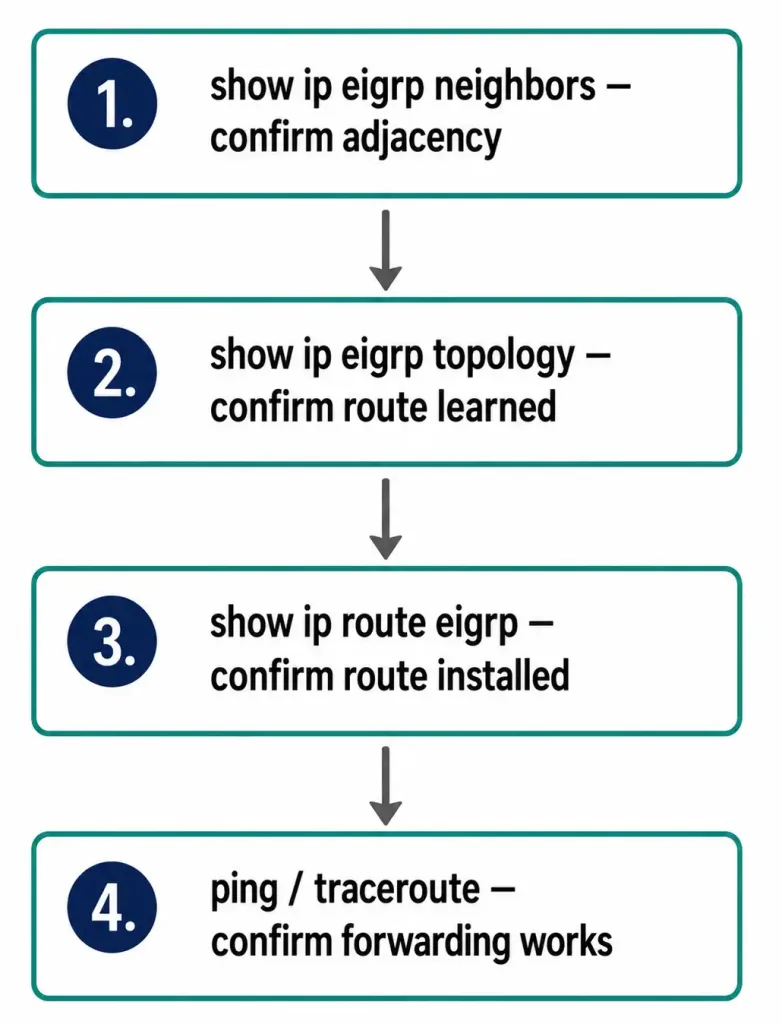
show ip route sits at the end of a verification chain, not the beginning. A practical sequence for confirming EIGRP has fully converged after a change:
- Confirm neighbors are up with
show ip eigrp neighbors. No stable adjacency means nothing downstream will populate correctly. - Confirm the route is in the topology table with
show ip eigrp topology. This shows every route EIGRP has learned, including feasible successors not currently installed for forwarding. - Confirm the route was installed with
show ip route eigrp(or the unfilteredshow ip route, which also shows connected and static routes alongside EIGRP ones). Only routes that clear DUAL’s feasibility condition and become the successor get installed here. - Confirm forwarding actually works with a
pingortracerouteto a destination inside the remote subnet, not just to the next-hop address — this catches problems further downstream that routing-table verification alone won’t reveal.
Worked Example: Unequal-Cost Load Balancing with Variance
To see how variance extends load balancing beyond strictly equal-cost paths, suppose R1 has two paths to a destination with composite metrics of 2816 and 5120 — not equal, so only the 2816 path would normally be installed. Configuring a variance of 2 tells EIGRP to also accept any path with a metric up to 2 times the best metric:
R1(config-router)# variance 2With this configured, the 5120 path (which is less than 2 × 2816 = 5632) now also qualifies and gets installed alongside the 2816 path. Traffic isn’t split evenly between them, though — EIGRP proportions traffic inversely to each path’s metric, sending more traffic down the lower-metric path and less down the higher-metric one. The routing table reflects this with a [90/2816] and [90/5120] pair listed together under the same destination, similar in format to the equal-cost example above, just with two different metric values instead of matching ones.
One important constraint: variance only considers paths that are feasible successors in the topology table to begin with — DUAL’s feasibility condition (that a neighbor’s reported distance to the destination must be strictly less than the local router’s own best metric) still has to be satisfied. Variance does not override loop-prevention; it only widens which of the already loop-free feasible successors get installed for forwarding. Setting an aggressive variance value on a network with meaningfully different link speeds can send significant traffic down a much slower path, so it’s worth checking actual link bandwidths before setting variance higher than 1 or 2 in a production network.
Troubleshooting: Route Missing from the Table
Symptom: A neighbor is confirmed stable in show ip eigrp neighbors, but its advertised subnet never shows up in show ip route. Check show ip eigrp topology first — if the route is present there but marked as a feasible successor rather than the successor, it wasn’t installed because a better path exists elsewhere, which is expected behavior, not a fault. If the route is missing from the topology table entirely, the problem is upstream at the neighbor’s own network statement or redistribution configuration, not on the local router.
Symptom: Only one path shows for a destination you expected to see load-balanced across two links. Compare the composite metrics for each path in show ip eigrp topology. EIGRP only installs multiple paths in the routing table when their metrics are genuinely equal (or, with variance configured, within the allowed multiple) — a link with even slightly higher bandwidth or delay on one path will produce a different metric and be excluded from equal-cost balancing.
Symptom: The routing table shows fewer, broader subnets than expected. This is the classic auto-summary symptom described above. Check show ip protocols for the router’s current auto-summary status before assuming a network statement or redistribution problem.
show ip route vs. show ip eigrp topology vs. show ip eigrp neighbors
| Command | Shows | Use it to check |
|---|---|---|
show ip eigrp neighbors | Active adjacencies | Is this router talking to its neighbors at all? |
show ip eigrp topology | All learned routes, including backups | Did a specific route arrive, and is it the best path? |
show ip route / show ip route eigrp | Only installed, forwarding-ready routes | Is this route actually being used to forward traffic? |
These three commands form a natural troubleshooting funnel, from broadest (adjacency) to narrowest (actual forwarding table), and checking them in that order avoids wasted time chasing a routing-table symptom whose real cause is actually a missing adjacency further upstream.
FAQs
What does the “D” code mean in the EIGRP routing table?
“D” marks a route as learned via EIGRP, referencing DUAL, the algorithm EIGRP uses for loop-free path selection. “D EX” marks an EIGRP route that was originally learned from another routing protocol and redistributed into EIGRP.
Why does R1 show two next-hops for the same destination network?
This is equal-cost load balancing. When two or more paths to the same destination have identical composite metrics, EIGRP installs all of them (up to the maximum-paths limit, default 4) and distributes traffic across them, rather than selecting just one.
Does a route appearing in show ip eigrp topology guarantee it’s in the routing table?
No. The topology table holds every viable route DUAL has learned, including feasible successors kept as backups. Only the best path — the successor — for each destination is actually installed in the routing table shown by show ip route.
Why does my routing table show fewer, more general subnets than I configured?
This is almost always auto-summarization rolling specific subnets up to their classful boundary. Check show ip protocols to confirm current auto-summary status; it’s enabled by default only on IOS versions older than 15.0(1)M/12.2(33).
What administrative distance does EIGRP use?
Internal EIGRP routes use an administrative distance of 90. Externally redistributed EIGRP routes (marked D EX) use 170.
How do I change how many equal-cost paths EIGRP installs?
Use the maximum-paths command under the EIGRP process. The default is 4; lowering it restricts EIGRP to fewer simultaneous paths even when more equal-cost options exist, and raising it (platform-dependent) allows more.
What does the variance command actually do?
Variance allows EIGRP to install and use paths whose metric is higher than the best path, up to a configured multiple of that best metric — for example, a variance of 2 permits any feasible successor with a metric up to twice the lowest metric found. Traffic is then proportioned across the installed paths inversely to their metrics, rather than split evenly.
Is it safe to set variance to a high value to force more load balancing?
Not without checking the actual link characteristics first. A high variance value can pull a meaningful share of traffic onto a much slower or higher-delay path just because it happens to still qualify as a feasible successor, which can create unexpected congestion on the weaker link. It’s best to calculate the actual metric ratio between candidate paths before choosing a variance value, rather than picking a large number to “make load balancing more aggressive.”
Does show ip route show anything besides EIGRP routes?
Yes — unlike show ip route eigrp, which filters to EIGRP-learned routes only, plain show ip route shows the complete routing table: directly connected networks, static routes, and routes learned from any other running routing protocol, all with their respective source codes (C for connected, S for static, O for OSPF, and so on alongside D for EIGRP). This makes it the better command for a full convergence check, while show ip route eigrp is better when you specifically want to isolate EIGRP’s contribution to the table.



