
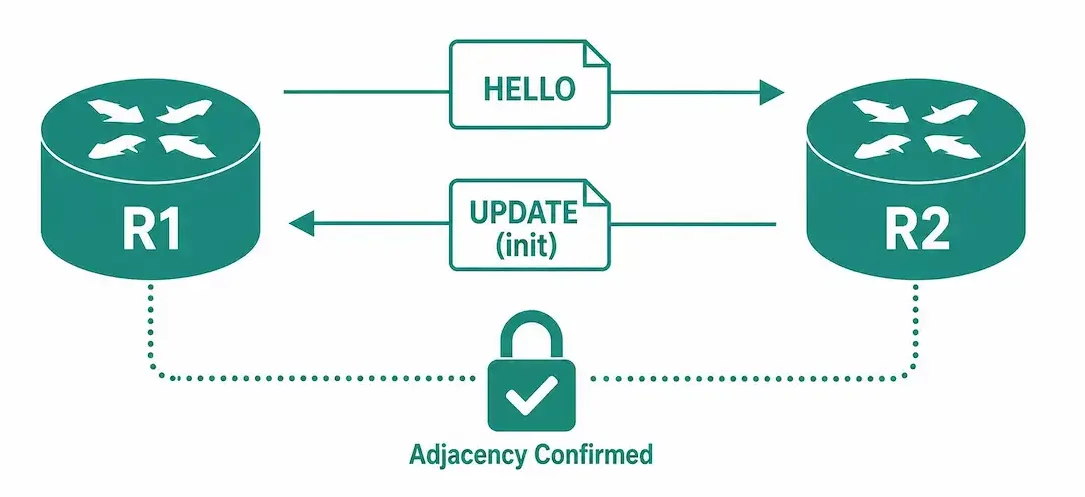
Before exchanging any EIGRP update packets between routers, EIGRP must first discover its neighbor. An EIGRP neighbor is an adjacent router running EIGRP on a directly connected network. EIGRP hello packets are used both to establish new neighbor adjacencies and to maintain existing ones — hellos don’t stop once the adjacency is up; they continue at regular intervals for as long as the relationship exists, and a missed run of hellos is exactly what causes an adjacency to be declared down.
Several parameters between two routers must match before they can become EIGRP neighbors:
- The same autonomous system number, configured under
router eigrp <AS>on both routers - The same K-values (metric weights), which default to matching but can be changed with
metric weights - A shared primary subnet on the connecting interface
- Matching authentication, if authentication is configured on either side
Each EIGRP-enabled router maintains a list of routers it currently has an adjacency with — this is the neighbor table, viewable with show ip eigrp neighbors. The router uses this table to track the status of every EIGRP neighbor it knows about.
How the Adjacency Actually Forms
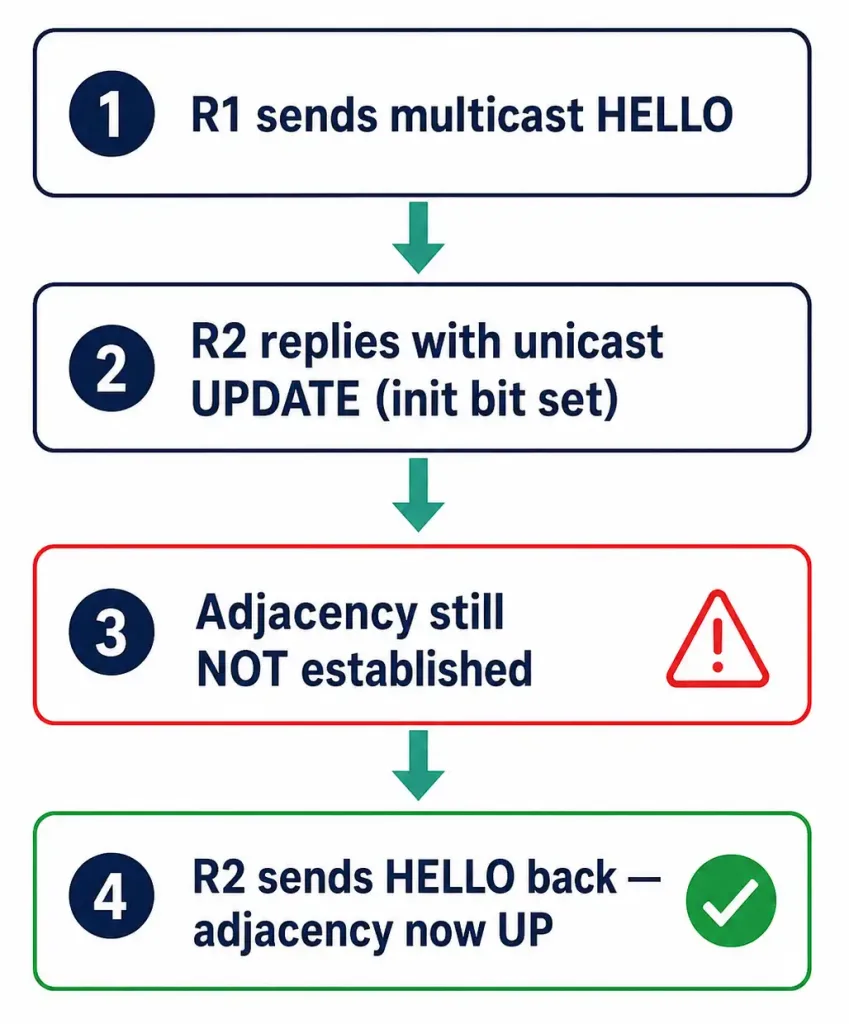
EIGRP’s neighbor discovery process is a specific, verifiable sequence — not just “two routers see each other and agree.” Using R1 and R2 from this series’ three-router topology as an example:
- R1 sends an EIGRP hello packet. As soon as EIGRP is enabled on an interface (via the
networkcommand, and provided that interface isn’t passive), the router begins sending periodic multicast hello packets to 224.0.0.10 on that interface. - R2 receives R1’s hello and replies with an Update packet — not a hello. Because R2 doesn’t yet have R1 in its neighbor table, it adds R1 in a pending state and sends a unicast Update packet back to R1. This Update carries R2’s full routing information (excluding any routes learned through that same interface, per EIGRP’s split-horizon rule) and has the initialization bit set, marking it as part of the initial handshake rather than a routine update.
- The adjacency is still not established at this point. Receiving the Update alone doesn’t complete the relationship. The neighbor adjacency only becomes established once R2 also sends R1 a hello packet — confirming bidirectional communication is actually working, not just one-directional delivery.
- Once R2’s hello reaches R1, both routers add each other to their neighbor tables, and R1 sends its own full routing information back to R2 in the same manner, completing the mutual exchange.
This staged sequence exists specifically to avoid a router treating a one-way or unreliable link as a working adjacency — RFC 7868, which documents EIGRP’s behavior, describes this explicitly as a three-way handshake used to verify that both multicast and unicast delivery are reliable in both directions before the two routers commit to exchanging routing information.
Why Requiring a Hello (Not Just an Update) Matters
It might seem redundant to require a hello packet after an Update has already been exchanged, but this extra step protects against exactly the kind of failure that’s easy to miss otherwise: a link where packets flow reliably in one direction but not the other. If R2 could receive R1’s hello and immediately be treated as a confirmed neighbor without R2 ever successfully sending anything back, R1 would have no actual confirmation that R2 can hear anything from it. Requiring R2’s own hello to complete the handshake forces a genuine bidirectional confirmation, not just a one-sided assumption based on what R1 happened to receive.
Worked Example: A Single Mismatched Parameter Blocking Adjacency
Consider R1 and R3 attempting to form an adjacency over their 10.10.10.0/30 link. Both interfaces are up, pings succeed in both directions, and debug eigrp packets hello confirms hellos are flowing both ways continuously — yet show ip eigrp neighbors on R1 never shows R3, and no %DUAL-5-NBRCHANGE message ever appears.
With basic connectivity and hello exchange both confirmed working, the remaining candidates are the other three requirements: AS number, K-values, and authentication. Checking show ip protocols on both routers:
R1# show ip protocols | include AS|weight
Routing Protocol is "eigrp 1"
    Metric weight K1=1, K2=0, K3=1, K4=0, K5=0

R3# show ip protocols | include AS|weight
Routing Protocol is "eigrp 1"
    Metric weight K1=1, K2=1, K3=1, K4=0, K5=0
Both routers are in AS 1, ruling that out. But R3’s K2 value is 1 while R1’s is 0 — a K-value mismatch. This is exactly the kind of failure that hello exchange alone won’t surface, because hellos succeed regardless of K-value configuration; the mismatch is only enforced at the point where EIGRP would otherwise proceed to build the adjacency, which is why the symptom looks like “hellos work, but nothing ever completes” rather than “no hellos at all.” Correcting R3’s K2 value back to 0 with metric weights 0 1 0 1 0 0 (matching R1’s configuration) resolves the mismatch and allows the adjacency to complete on the next hello cycle.
Watching the Handshake in Debug Output
The four-step sequence above isn’t just a conceptual model — it’s directly observable with debug eigrp packets on a lab router. A simplified version of what you’d see on R2 as R1’s adjacency forms:
R2# debug eigrp packets hello
EIGRP: Received HELLO on GigabitEthernet0/0 nbr 10.10.10.5
EIGRP: New peer 10.10.10.5

R2# debug eigrp packets update
EIGRP: Enqueueing UPDATE on GigabitEthernet0/0 nbr 10.10.10.5 iidbQ un/rely 0/1 serno 12-12
EIGRP: Update contains 3 routes, init flag set

R2# debug eigrp packets hello
EIGRP: Sending HELLO on GigabitEthernet0/0

R2#
%DUAL-5-NBRCHANGE: EIGRP-IPv4 1: Neighbor 10.10.10.5 (GigabitEthernet0/0) is up: new adjacency
Reading this against the four-step process: the first line is R2 receiving R1’s initial hello (step 1) and recognizing it as a new peer. R2 then enqueues and sends its Update packet with the init flag set (step 2). R2 continues sending its own regular hellos as normal operation (step 3, from R2’s perspective — R2’s hello is what R1 needs to receive to complete the handshake on R1’s end). Once R1’s hello arrives back and both directions are confirmed, the %DUAL-5-NBRCHANGE syslog message announces the adjacency is up — this specific log line is one of the most useful things to search for when confirming an adjacency formed successfully, and its absence when you expect it is itself a useful troubleshooting signal.
This debug output is also the fastest way to distinguish which specific step of the handshake is failing when troubleshooting: if you never see the “New peer” line, R1’s hello isn’t arriving at all; if you see “New peer” but never see R2’s own Update get enqueued and sent, something is blocking R2’s outbound traffic specifically; and if both of those succeed but the %DUAL-5-NBRCHANGE message never appears, the problem is specifically that R1’s confirming hello isn’t making it back to R2.
Troubleshooting Adjacency Formation Failures
Because adjacency formation is a defined sequence, it’s useful to think about where in the sequence a failure is happening, not just whether it failed:
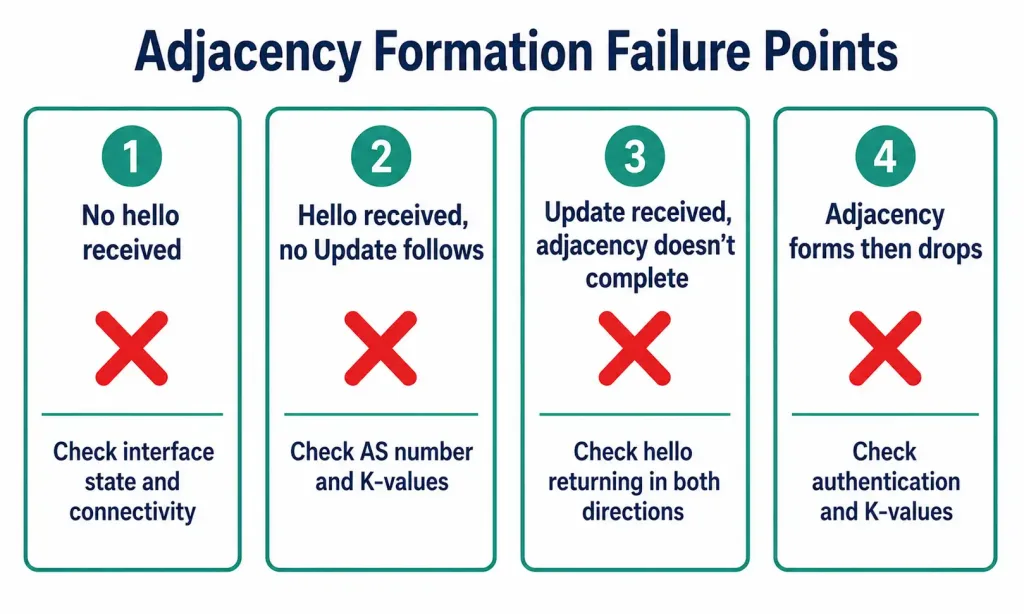
No hello ever received from the expected neighbor. Check basic connectivity first — interface state with show ip interface brief, then a direct ping. If the interface is up and pings succeed but no hello arrives, confirm the neighbor’s interface actually has EIGRP enabled via its network statement, and that the interface isn’t marked passive.
Hello received, but no Update follows. This points to a mismatch that’s blocking the relationship even though basic hello exchange is working — check for a K-value mismatch or an AS number mismatch with show ip protocols on both sides.
Update received, but the adjacency never fully forms (stuck in a pending-like state). This is the specific failure mode this article’s process explains: the far-end router may not be sending its own hello back. Confirm hellos are being sent and received in both directions, not just the initial Update — a firewall, ACL, or asymmetric routing issue between the two routers could be blocking hellos in one direction only, even while the initial Update got through.
Adjacency forms, then immediately drops. This usually indicates an authentication mismatch or a K-value mismatch that wasn’t caught on the first pass — re-check show ip eigrp neighbors detail for authentication-related error messages.
EIGRP Adjacency Formation vs. OSPF Adjacency States
EIGRP’s process is intentionally simpler than OSPF’s. OSPF adjacencies pass through a defined series of named states (Down, Init, 2-Way, ExStart, Exchange, Loading, Full), each representing a specific stage of database synchronization. EIGRP doesn’t use named states in the same way — its three-step handshake (hello, Update with Init bit, confirming hello) is comparatively lightweight, reflecting EIGRP’s overall design philosophy of being simpler to configure and troubleshoot than link-state protocols while still guaranteeing reliable delivery through its own Reliable Transport Protocol.
| Aspect | EIGRP | OSPF |
|---|---|---|
| Discovery mechanism | Multicast hello (224.0.0.10) | Multicast hello (224.0.0.5) |
| Formation process | 3-step handshake (hello → Update → hello) | Multi-state progression (Down through Full) |
| What’s exchanged during formation | Full routing table via Update packets | Full link-state database via DBD/LSR/LSU packets |
| Named states shown in verification commands | No — neighbor table shows Up/pending, not named states | Yes — show ip ospf neighbor shows explicit state names |
FAQs
What is required for two routers to become EIGRP neighbors?
They need a matching autonomous system number, matching K-values, a shared primary subnet on the connecting interface, and matching authentication if authentication is configured. All four conditions must be satisfied simultaneously.
Does receiving a hello packet alone establish an EIGRP adjacency?
No. Receiving a hello only causes the receiving router to place the sender in a pending state and respond with an Update packet. The adjacency isn’t considered fully established until the original sender also receives a hello back, confirming two-way communication.
Why does EIGRP require a three-step handshake instead of just exchanging hellos?
The extra step verifies that both multicast and unicast delivery work reliably in both directions before either router commits to exchanging routing information. Without it, a one-way-only link could be mistaken for a working adjacency.
What’s in the Update packet sent during adjacency formation?
The full routing information the sending router currently has, with the initialization bit set to mark it as part of the initial handshake rather than a routine incremental update. Routes learned through the same interface the Update is being sent on are excluded, per EIGRP’s split-horizon behavior.
Do hello packets stop once an adjacency is established?
No. Hello packets continue at regular intervals for the entire life of the adjacency — this is exactly what allows a router to detect when a neighbor has gone down, via the Hold timer counting toward zero if hellos stop arriving.
How is EIGRP’s adjacency process different from OSPF’s?
EIGRP uses a comparatively lightweight three-step handshake and doesn’t expose named adjacency states the way OSPF does. OSPF’s process is more involved because it’s synchronizing a full link-state database across multiple explicit states, while EIGRP exchanges distance-vector-style routing information directly during the handshake itself.
What does the %DUAL-5-NBRCHANGE syslog message mean?
It’s the confirmation message EIGRP logs when a neighbor adjacency successfully comes up (or goes down). Seeing “is up: new adjacency” confirms the full handshake completed on that interface; its absence when you’re expecting a new adjacency to form is a strong signal that the handshake stalled at some step before completion.
Can I watch the adjacency formation process directly instead of just checking the end result?
Yes, using debug eigrp packets hello and debug eigrp packets update on a lab or low-traffic production router. This shows the actual hello and Update packets as they’re received and sent, which is far more precise for pinpointing exactly which step of the handshake is failing than only checking the final neighbor table state. Debug commands generate significant CPU load on a busy router, so they should be used cautiously and turned off with undebug all once you’ve captured what you need.



