
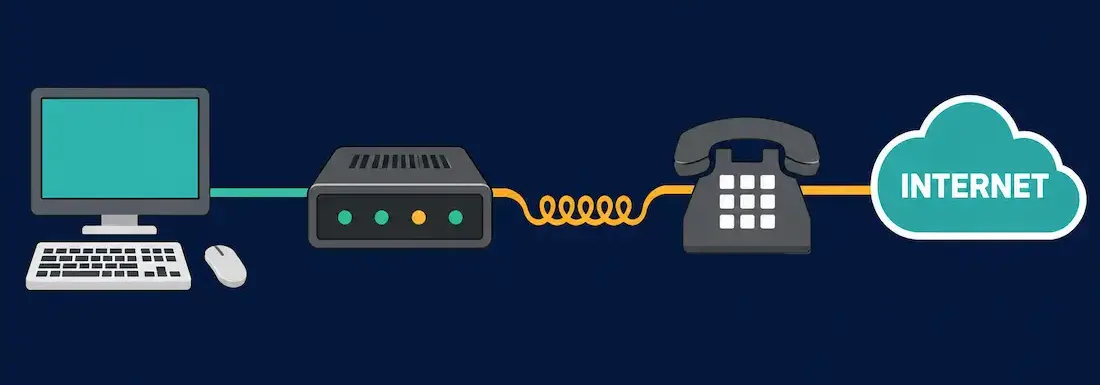
Dial-up is a WAN connection technique established using a modem and an active PSTN (Public Switched Telephone Network) line. The modem dials a phone number attached to another modem at the destination end and establishes a connection capable of transferring data, using the ordinary analog telephone line as the transmission medium.
Dial-up was, for decades, the primary way individuals and small businesses connected to the Internet, and it remains a useful example on the CCNA exam of a low-bandwidth WAN technology with genuine, if narrow, real-world use cases even today.
How a Dial-Up Connection Works
Usually, a dial-up connection is used with an Internet Service Provider (ISP) to reach the Internet. The user initiates the connection, and the modem dials a phone number designated by the ISP to receive dial-up calls. The ISP’s modem answers the call and negotiates the connection — a process that typically takes about 5 to 10 seconds and is accompanied by the distinctive sequence of beeps, static bursts, and buzzing tones familiar to anyone who used the Internet before broadband.
The word “modem” itself describes exactly what the device does: it modulates binary computer data into an analog signal for transmission at the source, and demodulates that analog signal back into binary data at the receiving end. This modulation/demodulation process is what allows digital computer data to travel across a network that was originally built to carry analog voice.
History of the Dial-Up Modem
Modems are the essential hardware component behind dial-up networking, and their history stretches back further than most people expect.
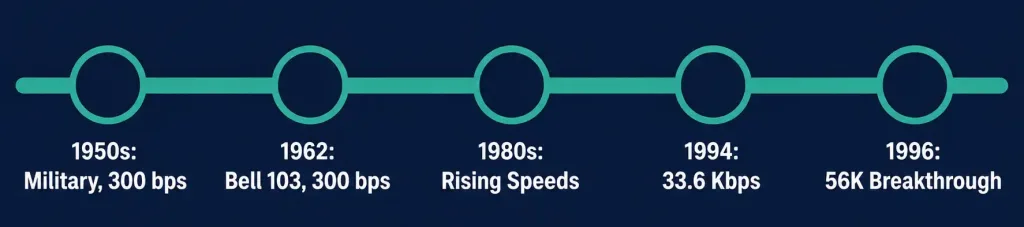
The earliest modems were developed in the 1950s for military use, connecting North American Air Defense (NORAD) radar installations as part of the SAGE air defense system. These early modems were restricted to military applications and had a maximum data rate of just 300 bps.
In 1962, AT&T introduced the Bell 103, the first commercially available modem. It also transmitted at 300 bps, but offered full-duplex transmission (simultaneous two-way communication) using frequency-shift keying (FSK) to encode data as tones.
Modems became a mainstream consumer technology through the 1980s and 1990s as home computing and early online services grew, with speeds climbing steadily from 300 bps to 1,200, 2,400, 9,600, and eventually 33,600 bps (33.6 Kbps) by the mid-1990s. In 1996, Canadian engineer Dr. Brent Townshend developed the core algorithm behind what became the 56K modem, achieving a roughly 66% speed improvement over the fastest prior modems. His technology was later incorporated into the ITU-T V.90 standard, ratified in 1998, which became the final and most widely deployed dial-up modem standard.
The Real Story Behind “56K”
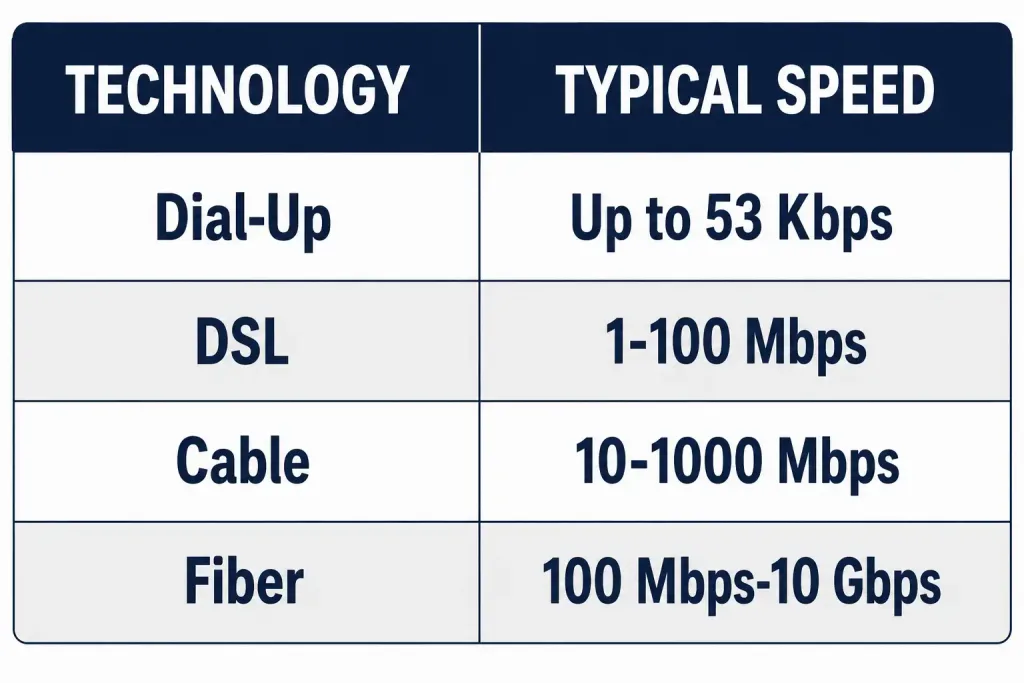
The commonly cited 56 Kbps figure comes with an important asterisk that’s easy to miss. In the United States, FCC power regulations on telephone lines capped real-world download speeds at 53 Kbps, not the full 56 Kbps that the V.90 standard could theoretically support. Just as importantly, the 56K rate applied to downloads only — uploads were limited to a much lower rate, typically 33.6 Kbps under V.90, later improved to around 48 Kbps under the newer V.92 standard.
This asymmetry existed because 56K technology worked by avoiding one analog-to-digital conversion step on the ISP’s side of the connection, a shortcut that only applied in the download direction. So while “56K modem” became the popular shorthand, actual real-world dial-up performance was both slower and more one-directional than the name implies.
When Dial-Up Is Still the Right Choice
A dial-up WAN connection is most valuable when no other WAN technology is available. A remote location served only by a basic analog telephone line — with no cable, fiber, or cellular data coverage — can still use a dial-up modem to establish a working, if slow, WAN connection. Dial-up is well suited to irregular, low-volume data transfers rather than continuous high-bandwidth use.
Because the physical characteristics of analog phone lines cap the practical data rate at roughly 53 Kbps for downloads, dial-up is a poor fit for real-time traffic like voice or video calls, online gaming, or streaming media, all of which need sustained low-latency bandwidth that a dial-up line simply cannot provide.
Worked Example: What 53 Kbps Actually Means in Practice
Real-World Deployment Context
To put the real-world constraint in concrete terms: at a theoretical maximum of 53 Kbps, downloading a 1 MB file (roughly 8 million bits) would take approximately 8,000,000 ÷ 53,000 ≈ 151 seconds, or just over two and a half minutes — and that’s assuming a clean, noise-free line with no protocol overhead, which real connections rarely achieve. This is exactly why dial-up became impractical for image-heavy web pages, software downloads, or streaming media as the Internet grew richer in the late 1990s and 2000s, even though it remained perfectly workable for email and small text-based transfers.
Dial-up’s most durable modern niche is remote telemetry and monitoring equipment. Consider a rural water utility with pump stations scattered across a wide geographic area, many of which have no cellular coverage and no economical path for running fiber or cable.
A dial-up modem connected to each pump station’s control system can call in on a scheduled basis — say, once every few hours — to report status readings and receive configuration updates. Because the data volume is small (a handful of sensor readings, not continuous video or large files), the low bandwidth of dial-up is a non-issue, and the low cost of a basic phone line makes it far more economical than trenching new fiber to a dozen remote sites for infrequent, low-volume polling.
This same logic applies to point-of-sale terminals, ATMs, and older industrial control systems in areas with poor connectivity: when the total data transferred per session is small and infrequent, dial-up’s slow speed is a non-factor, and its low cost and near-universal availability become the deciding advantages rather than liabilities.
How a Modem Establishes a Connection: Step by Step
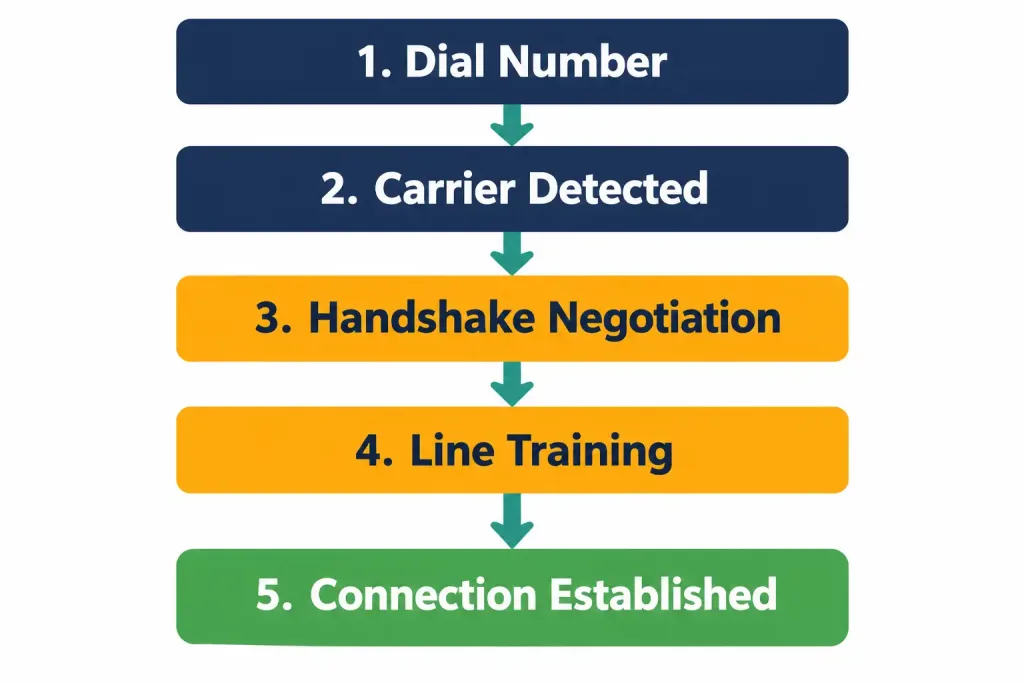
Understanding the actual handshake sequence helps demystify the familiar dial-up sound:
- Off-hook and dial: The originating modem takes the phone line off-hook (as if picking up a handset) and dials the destination number, either as touch tones or older pulse dialing.
- Carrier detection: The answering modem picks up and transmits a carrier tone; the originating modem listens for this tone to confirm a modem, not a person or answering machine, picked up.
- Handshake and negotiation: Both modems exchange a rapid sequence of tones negotiating the fastest mutually supported speed, error-correction method, and compression scheme — this is the source of the recognizable screeching and static noises.
- Training: The modems briefly send known test patterns to each other to measure the specific phone line’s noise characteristics and fine-tune signal parameters for the best achievable speed on that particular connection.
- Connection established: Once negotiation completes, the modems settle into a stable data connection and begin transmitting actual computer data, modulated as analog signals over the line.
Historically, dial-up modems were configured and controlled using the Hayes AT command set, a text-based command language where every instruction begins with the letters “AT” (for “attention”). A command like ATDT followed by a phone number instructs the modem to dial using touch-tone signaling — a detail that occasionally surfaces in networking history questions even though it’s rarely relevant to hands-on troubleshooting today.
Advantages of Dial-Up
- Extremely low cost: Analog phone lines and modems are inexpensive compared to nearly any other WAN technology.
- Wide availability: Anywhere a basic telephone line reaches, dial-up can potentially work, including remote areas with no other WAN infrastructure.
- Simple to deploy: No specialized equipment or provider coordination beyond a standard phone line and a modem.
- Low jitter for point-to-point traffic: Because the connection uses a dedicated circuit for its duration, jitter is minimal, even though the achievable bandwidth is low.
Disadvantages of Dial-Up
- Low maximum data rate: Roughly 53 Kbps for downloads in practice, far below broadband, fiber, or even basic DSL speeds.
- Slow connection setup: Establishing a call typically takes 5 to 10 seconds, and the line is unusable for anything else (including voice calls) while the connection is active on a single phone line.
- Poor fit for real-time or media-rich traffic: Voice calls, video, gaming, and streaming all require sustained bandwidth that dial-up cannot reliably deliver.
- Asymmetric performance: Upload speeds are significantly slower than the advertised download rate, which matters for any use case involving sending large amounts of data.
Dial-Up Today
At present, only a small number of enterprises and individuals still rely on dial-up access, largely limited to remote areas with no other WAN options. It remains a genuinely feasible solution for small businesses needing to exchange sales figures, price lists, or basic reports, and for email service in locations where no broadband, cellular data, or satellite Internet is available. Some legacy industrial and telemetry systems also continue to use dial-up connections for infrequent, low-volume data polling, since the cost and complexity of upgrading isolated equipment often outweighs the benefit for such limited use.
Troubleshooting and Exam Tips
- If a question asks for the maximum theoretical dial-up modem speed, the textbook answer is 56 Kbps — but remember the real-world nuance: FCC regulations capped actual U.S. download speeds at 53 Kbps, and uploads were always slower still.
- Remember the modem’s core function: modulating digital data into analog signals for transmission, and demodulating analog signals back into digital data on receipt — this is literally where the word “modem” comes from.
- If a scenario describes a remote site with no cable, fiber, DSL, or cellular coverage but an existing phone line, dial-up is often the correct fallback answer for CCNA WAN technology selection questions.
- Dial-up’s connection handshake (the familiar screeching sound) is the modems negotiating speed and error-correction settings — worth knowing conceptually even if you never troubleshoot a physical modem today.
- Don’t confuse dial-up with ISDN: both use PSTN-related infrastructure, but ISDN provides a fully digital connection at higher, more predictable rates, while dial-up remains fundamentally analog at the local loop.
Conclusion
Dial-up is a WAN connection technology that uses a modem to modulate and demodulate data over an ordinary analog telephone line, historically capped at a real-world maximum of around 53 Kbps for downloads under the V.90 standard. Though it has been largely superseded by broadband, fiber, and cellular data across most of the world, dial-up remains a relevant fallback for remote locations with only basic telephone infrastructure, and understanding its history and constraints is genuinely useful for grasping how early WAN technology shaped the Internet we use today.
Frequently Asked Questions
What is dial-up Internet?
Dial-up is a WAN connection method that uses a modem to establish a connection over an analog telephone line, historically used to connect to an ISP by dialing a designated phone number.
What is the maximum speed of a dial-up connection?
The theoretical maximum under the V.90 standard is 56 Kbps, but real-world U.S. download speeds were capped at 53 Kbps by FCC regulations, and uploads were limited to a lower rate, typically 33.6 Kbps.
Who invented the 56K modem?
Dr. Brent Townshend, a Canadian engineer, developed the core algorithm behind the 56K modem in 1996. His work was later incorporated into the ITU-T V.90 standard, ratified in 1998.
Is dial-up still used today?
Yes, though rarely. It persists in remote areas with no other WAN infrastructure, in some legacy industrial telemetry systems, and among a small number of businesses needing only occasional, low-volume connectivity.
Why is dial-up bad for video calls or streaming?
Its maximum practical bandwidth (around 53 Kbps download, less for upload) is far too low to sustain the continuous data rates that real-time voice, video, or streaming media require.



