
Most account breaches don’t come from sophisticated hacking — they come from reused, weak, or already-leaked passwords. In 2019, Microsoft scanned its own user base against a database of roughly three billion known leaked credentials and found that 44 million accounts were using passwords that had already been exposed elsewhere. That’s the actual scale of the problem this guide addresses: not hypothetical risk, but passwords that are already compromised and simply haven’t been exploited yet.
Use a Unique Password for Every Account
This is the single most important habit, and it’s the one most “password tips” lists leave out: never reuse a password across more than one account. Here’s why it matters so much — when one service you use gets breached (and services get breached constantly, often without you finding out for months), attackers immediately try that same email-and-password combination against every other major site. If you reused it, one breach you had nothing to do with becomes a breach of your email, your bank, and everything else tied to that password. A unique password per account means a single breach stays contained to that one account.
Use a Password Manager, and Rethink “Never Write It Down”
The old blanket advice to never write a password down anywhere is more nuanced than it used to be. Current guidance from NIST (the U.S. National Institute of Standards and Technology) acknowledges that a strong, unique password written down and stored securely offline — not in an unlocked document on your computer or a sticky note on your monitor — can be a reasonable fallback, particularly as a backup for a password manager’s own master password.
That said, a password manager remains the practical solution for actually using unique passwords across dozens of accounts, since no one can realistically memorize that many. A password manager generates and stores strong, unique passwords for every account and fills them in automatically, removing the temptation to reuse a password purely out of convenience.
Add a Second Layer: 2FA, and Which Kind Actually Matters
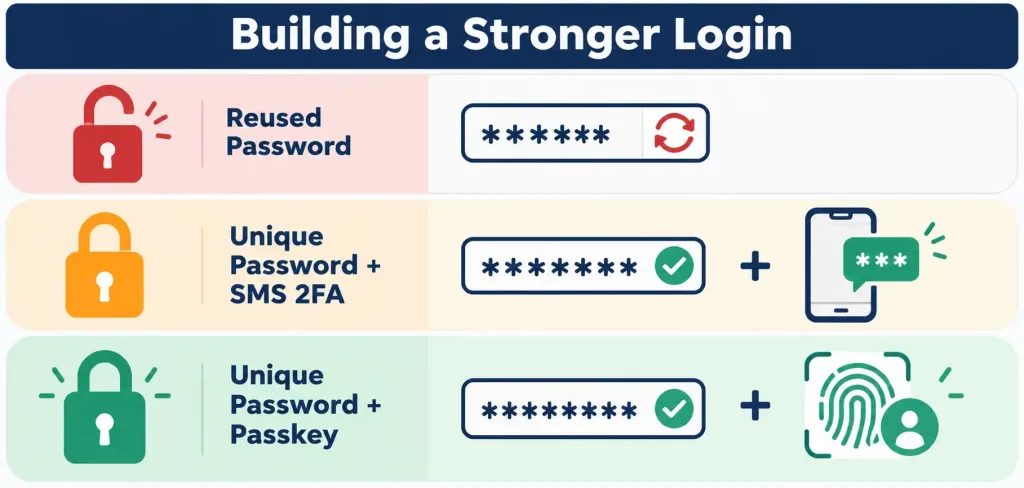
Two-factor authentication (2FA) requires a second piece of proof beyond your password to log in, and it’s genuinely one of the most effective things you can do to protect an account — but not all 2FA methods offer the same protection:
- SMS and email codes are better than no 2FA at all, but they’re the weakest option, vulnerable to SIM-swapping and account-recovery attacks on your email itself.
- Authenticator apps (generating time-based codes on your phone) are meaningfully stronger, since they don’t depend on your phone number or email being compromised.
- Passkeys and hardware security keys (FIDO2/WebAuthn) are currently the strongest option, resistant to phishing in a way the other methods aren’t — a passkey is cryptographically tied to the specific site you’re logging into, so a fake phishing page simply can’t use it. Passkey support has grown substantially since 2021 and is now offered by most major platforms (Google, Apple, Microsoft, and many banks and social media services), making it genuinely practical to adopt rather than a niche option.
If a service offers passkeys, it’s worth switching to them specifically, rather than defaulting to whichever 2FA option is offered first.
Check Whether Your Passwords Have Already Been Breached
Beyond creating strong passwords going forward, it’s worth checking whether your existing accounts use passwords that have already appeared in a known data breach. Breached-password checking services compare a password (via secure hashing, without exposing the actual password) against databases of leaked credentials — many password managers now build this check in directly, flagging any saved password that’s been compromised so you know to change it.
Encryption and VPNs: What They Actually Protect
It’s worth being precise about what encryption and a VPN each actually do, since the two get conflated often: encryption protects data by making it unreadable without the correct key, whether that data is stored on a device or traveling across a network. A VPN specifically encrypts your internet traffic in transit between your device and the VPN provider, which is useful on an untrusted network (public Wi-Fi, for instance) — but a VPN does nothing to protect a weak or reused password, and it doesn’t prevent phishing. Treat a VPN as one tool addressing one specific risk (traffic interception), not a general security solution that makes other precautions unnecessary.
Keep Software Updated
Software updates frequently patch known security vulnerabilities, and attackers specifically target systems that haven’t been updated, since the vulnerability (and how to exploit it) is often publicly documented once a patch is released. Enabling automatic updates where possible removes the gap between a patch becoming available and it actually being installed.
Learn to Recognize Phishing
Phishing — fraudulent messages designed to trick you into revealing credentials or clicking a malicious link — remains one of the most common ways accounts get compromised, regardless of how strong the underlying password is. Watch for mismatched sender addresses, urgent or threatening language, and links that don’t match the text describing them (hovering over a link before clicking usually reveals the actual destination). No password strength or 2FA method fully protects against voluntarily handing credentials to an attacker through a convincing fake login page, which is exactly why phishing-resistant 2FA methods like passkeys matter — they can’t be phished the way a code or password can.
The Bottom Line
Strong account security comes down to a short list of habits that compound on each other: unique passwords per account (the step most often skipped), a password manager to make that practical, the strongest 2FA method a service actually offers (prioritizing passkeys where available), keeping software updated, and staying alert to phishing. None of these require expensive tools — a reputable password manager’s free tier and your phone’s built-in authenticator support cover most of what matters here.
Frequently Asked Questions
Is it really that risky to reuse the same password across accounts?
Yes — it’s one of the most exploited security gaps. When one service gets breached, attackers test that same email-password combination against other major sites. A reused password means one breach elsewhere can cascade into every account sharing it.
Is writing passwords down always a bad idea?
Not necessarily. Current NIST guidance accepts that a strong, unique password written down and stored securely offline can be reasonable, particularly as a backup for a password manager’s master password. It’s a better practice than reusing a weak, memorable password everywhere.
What’s the strongest form of two-factor authentication?
Passkeys and hardware security keys (FIDO2/WebAuthn) are currently the strongest option, since they’re resistant to phishing in a way SMS codes, email codes, and even authenticator apps aren’t. Use passkeys when a service offers them.
Does a VPN protect my passwords from being stolen?
No — a VPN encrypts your internet traffic in transit, which helps on untrusted networks like public Wi-Fi, but it does nothing to protect a weak or reused password and doesn’t prevent phishing. It’s a useful tool for one specific risk, not a substitute for strong password practices.



