

A link running at 80% utilization sounds healthy on a dashboard. It can still be delivering a terrible voice call or a choppy video stream to the person actually using it. That gap between “the pipe looks fine” and “the application feels broken” is what network output performance is really about — not just how many bits move, but how they’re queued, delayed, dropped, and routed along the way.
This matters more as networks carry more real-time traffic — voice, video conferencing, and interactive applications — where a brief burst of delay or loss is far more noticeable than it would be on a file transfer. Understanding output performance means looking past the single throughput number and into what’s actually happening to packets as they leave an interface.
The Output Fallacy: Why Raw Throughput Is a Misleading Metric
Throughput tells you how much data moved. It says nothing about how that data was treated while it moved. A link can report strong throughput numbers while individual flows experience queuing delay, jitter, or outright drops, especially during short bursts of congestion that don’t show up in longer-interval averages.
This is the core output fallacy: treating a link’s reported speed as a proxy for the experience of the traffic crossing it. A 1 Gbps link running at 40% average utilization can still cause real problems for latency-sensitive traffic if that 40% arrives in bursts rather than smoothly, because queuing and buffering behavior — not the long-term average — is what actually determines application performance in the moment that matters.
Measuring Output Correctly: CLI Commands and Telemetry That Matter
Interface Counters Are Not Enough
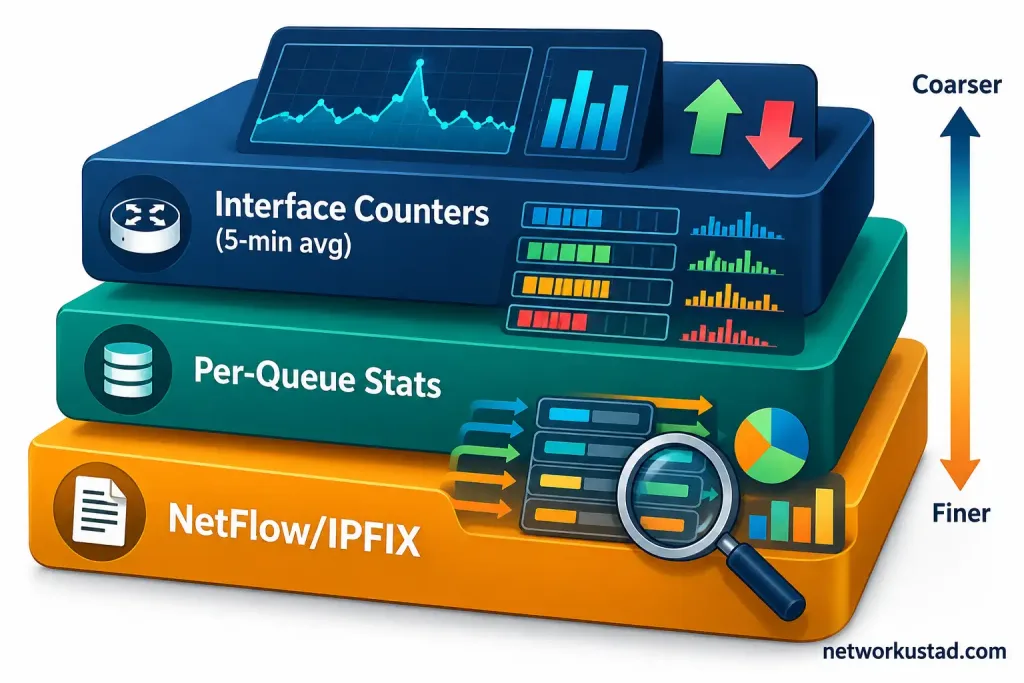
A command like show interfaces on Cisco IOS-XE reports input and output rates averaged over an interval that defaults to five minutes, not five seconds — and that five-minute default is exactly the problem for catching short bursts of congestion. A burst that saturates a link for ten seconds and causes real packet loss can disappear almost entirely inside a five-minute average. The load-interval command lets you shorten that averaging window, commonly down to 30 seconds, which gives a meaningfully closer view of short-term behavior, though it still won’t catch everything a packet capture would.
Per-Queue Output Visibility
show policy-map interface shows drops and transmitted packets broken down by traffic class, which is far more useful than the aggregate interface counters alone. If voice traffic is being placed into a low-latency queue correctly, this command confirms it’s actually being serviced the way the policy intends, rather than just trusting that the configuration is doing what it says.
NetFlow and IPFIX for Output Granularity
Sampled NetFlow, often configured at a 1-in-1000 packet sampling rate to reduce load on the exporting device, trades visibility for efficiency. That sampling rate is fine for broad traffic-pattern analysis but genuinely can miss short-lived flows or brief congestion events entirely. Full-flow IPFIX export, where every flow is recorded rather than sampled, gives a more complete picture at the cost of higher resource usage on the exporting router or switch — a tradeoff worth weighing deliberately rather than defaulting to whichever sampling rate a vendor ships out of the box.
Bufferbloat: The Network Output Performance Problem Standard Counters Don’t Capture
Bufferbloat happens when a device holds too much data in its output buffer before transmitting, trying to avoid drops by queuing instead — and in doing so, introduces latency that can badly affect real-time traffic even though no packets were actually lost. A connection can show zero packet loss and still feel unusable for a voice call, because the data is arriving, just badly delayed.
A simple illustrative example: imagine a home or small-office connection where round-trip latency sits around 5 milliseconds when idle. Under a large file upload saturating the same link, that same round-trip latency can climb into the hundreds of milliseconds, because the upload traffic is queued ahead of everything else in an oversized buffer. This is a general pattern bufferbloat produces, not a claim about any specific measured network — the exact numbers vary by connection and equipment.
Testing for it is straightforward: run a baseline ping test with a larger-than-default packet size (1400 bytes is a common choice) while the link is idle, then repeat it while deliberately saturating the link with a large transfer, and compare the latency difference. A large jump is the signature of bufferbloat. On Linux-based systems, the fq_codel queuing discipline is a widely used mitigation, specifically designed to manage buffer depth and reduce this kind of latency spike under load.
QoS and Traffic Shaping: Controlling Network Output Performance Under Real Congestion
Shaping vs. Policing: When Each Makes Sense
| Traffic Shaping | Traffic Policing | |
|---|---|---|
| What it does | Buffers excess traffic to smooth it out | Drops or re-marks traffic that exceeds a rate |
| Effect on bursts | Delays them rather than dropping them | Can drop them immediately |
| Typical use case | Outbound traffic to a slower downstream link | Enforcing a service-level rate limit |
| TCP behavior under congestion | Tends to be gentler on TCP flows | Can trigger more retransmissions on affected flows, since dropped packets force TCP to back off and resend |
Policing’s abrupt drops can cause more TCP retransmissions than shaping’s smoother approach, particularly for bursty traffic that regularly exceeds the configured rate — though how much this matters in practice depends heavily on the specific traffic mix and how aggressively the policer is configured, not a fixed universal outcome.
LLQ and Output Scheduling
Low Latency Queuing (LLQ) combines strict-priority queuing for delay-sensitive traffic, like voice, with class-based weighted fair queuing for everything else. A configuration like priority percent 10 reserves a guaranteed share of bandwidth for the priority class while still policing it, so that priority traffic can’t starve every other class on the interface if it misbehaves or spikes unexpectedly.
Output Across SD-WAN and MPLS: Policy-Based Path Selection
In an SD-WAN deployment, output decisions aren’t limited to a single interface’s queue — they extend to choosing which path a flow takes across multiple available links, based on real-time measurements of loss, latency, and jitter on each path. Cisco’s Catalyst SD-WAN Manager (the current name for the platform previously known as vManage) is one example of a centralized controller used to configure and monitor these path-selection policies across a fleet of SD-WAN routers.
Fortinet’s FortiOS implements similar SD-WAN path selection through its config system sdwan configuration block, allowing administrators to define performance SLAs per application and have the router dynamically select the best-performing available path rather than a statically configured one. MPLS networks achieve a related goal through traffic engineering and class-of-service markings, though the mechanism differs from SD-WAN’s active, continuous path measurement.
The Role of Output Visibility in Modern Network Operations
Network operations teams increasingly rely on continuous telemetry — interface counters, per-queue statistics, and flow records together — to catch output degradation before it becomes a user-facing incident, rather than waiting for a help-desk ticket to point them at a problem after the fact. Platforms that correlate output metrics across many devices can surface patterns that would be difficult to spot by checking individual interfaces manually, such as a slow link gradually worsening across several routers in a path.
This kind of correlated visibility is genuinely useful operationally, though it’s worth being skeptical of vendor claims about exactly how much automation or prediction any specific platform delivers without checking current, vendor-published documentation for that product, since this space changes quickly and marketing claims often run ahead of what a given release actually ships.
Jitter: The Network Output Performance Metric That Gets Overlooked
Jitter is the variation in latency between consecutive packets, rather than the latency value itself, and it’s a major contributor to poor network output performance for real-time traffic even when average latency looks acceptable. Voice and video codecs rely on a steady, predictable arrival pattern; a buffer can absorb some variation, but large or unpredictable swings in delay between packets cause the audible glitches and frozen frames that users actually notice and complain about.
Measuring jitter typically means looking at the standard deviation of round-trip times across a series of pings, or using a dedicated tool that reports jitter directly rather than inferring it from raw latency samples. A link with low average latency but high jitter can perform worse for voice traffic than a link with slightly higher but more consistent latency, which is a counterintuitive result if you’re only looking at average latency as your single output quality metric.
Building a Practical Baseline for Network Output Performance
None of the measurements above mean much without a baseline to compare against. Capture interface counters, per-queue drop statistics, and a bufferbloat test result during a known-good period, and keep that baseline on hand. When a complaint comes in about poor application performance, comparing current measurements against that baseline tells you immediately whether something has actually changed, rather than guessing based on a single snapshot taken after the problem was already reported.
A baseline is also what makes QoS policy review meaningful. Traffic patterns shift as an organization adopts new applications or changes how people work, and a policy tuned for last year’s traffic mix may not reflect the queues and priorities that matter today. Revisiting the baseline periodically, rather than treating the initial QoS configuration as permanent, keeps network output performance aligned with how the network is actually being used.
Common Mistakes When Evaluating Network Output
A few patterns show up repeatedly. Treating a single throughput average as the whole story, rather than checking queue-level and per-flow behavior, is the most common one — it’s exactly the output fallacy covered above. Relying on default averaging intervals that are too long to catch short bursts of congestion is another. Assuming zero packet loss means zero problem, when bufferbloat can degrade real-time traffic badly without a single dropped packet, is a third. And configuring QoS policies once and never revisiting them, even as traffic patterns on the network genuinely shift over time, leaves policies that no longer match actual usage.
Frequently Asked Questions
What’s the difference between throughput and network output performance?
Throughput measures how much data moved across a link. Network output performance covers how that data was treated along the way — queuing delay, jitter, loss, and path selection — all of which can degrade an application’s experience even when throughput numbers look fine.
How do I actually test for bufferbloat on my own network?
Run a baseline ping test while the connection is idle, then repeat the same test while saturating the link with a large upload or download, and compare the latency. A sharp increase under load, without necessarily seeing packet loss, is the signature of bufferbloat.
Should I use traffic shaping or traffic policing?
Shaping tends to be gentler on TCP traffic since it buffers rather than drops excess traffic, making it a common choice for smoothing outbound traffic to a slower link. Policing enforces a hard rate limit by dropping or re-marking excess traffic, which suits strict service-level enforcement but can increase retransmissions on affected flows.
Why does the interface counter on my router seem to miss short bursts of congestion?
Most platforms default to averaging input and output rates over a longer interval, commonly five minutes on Cisco IOS-XE. A short burst of congestion can be smoothed out almost entirely inside that average. Shortening the load-interval gives a closer view of short-term behavior.
The Bottom Line
Network output performance is about more than the number on a throughput graph. Queuing behavior, bufferbloat, QoS configuration, and path selection in SD-WAN or MPLS environments all shape whether traffic actually arrives in a usable state, not just whether it arrives at all. Measuring with the right tools — per-queue statistics, appropriately short averaging intervals, and full or representative flow records — and testing deliberately for issues like bufferbloat gives a far more accurate picture than a single interface counter ever will.



