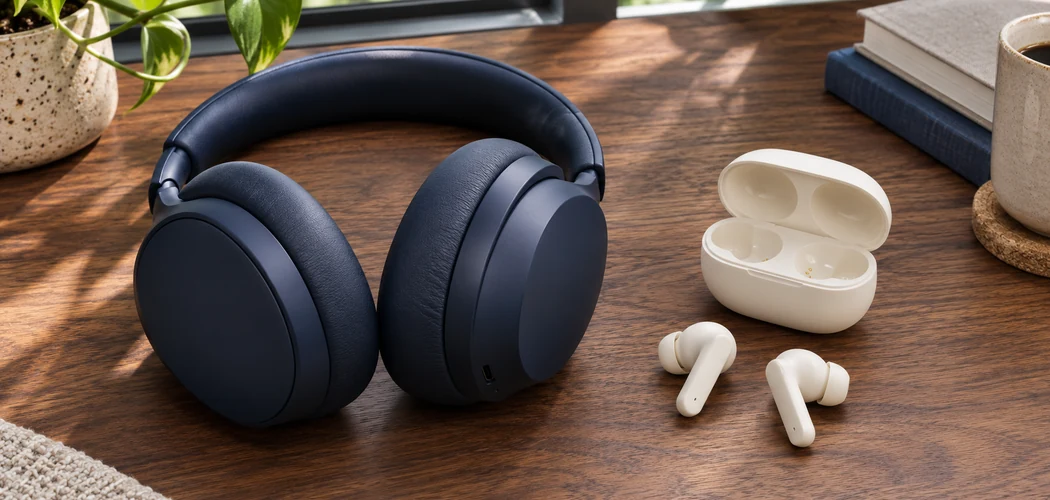
A pair of over-ear headphones can be comfortable for an afternoon at your desk and awkward to carry on a crowded train. Wireless earbuds can slip into a coat pocket, but the wrong ear tips may leave them loose by the time you reach the station. Both formats can play the same music from the same phone. The choice comes down to how they fit, how you use them, and which inconveniences you’d rather avoid.
Start with the situation that matters most. Put a long flight, a work call, or a run at the top of your list. Then note how long you need to listen without a charging break and which device will send the audio. Those details are more useful than a large battery number or a long feature list.
Bluetooth Headphones vs. Wireless Earbuds for Everyday Use
In this guide, headphones means wireless over-ear headphones, with cups that surround the ears. True wireless earbuds are two separate earpieces that usually recharge in a case. Both can use Bluetooth. The most noticeable differences are how they sit on your ears, how much space they take up when packed, and when they need to recharge.
Over-ear headphones are worth trying if you dislike pressure inside your ears. The cushions spread the contact over a larger area, but the headband and clamping pressure can take some getting used to. Check the weight and the size of the folded or packed headphones. A travel case can take more room than the headphones alone suggest.
Earbuds are easier to carry in a small pocket, and you can put them away between short trips or calls. Some have silicone tips that seal the ear canal. Others use an open design, which can feel less enclosed but lets in more of the room. If you often remove earbuds to talk to someone, see how easily you can take them out and return them to the case without dropping them.
Try the Fit With the Things You Already Wear
Test over-ear headphones while wearing your usual glasses. The arms can press into your temples or leave a small gap in the cushion. Look down, turn your head, and lean back as you would on a train or at your desk. Leave the headphones on for several minutes, especially if you tend to feel pressure on the top of your head. A fit that works for one song can become distracting during a film.
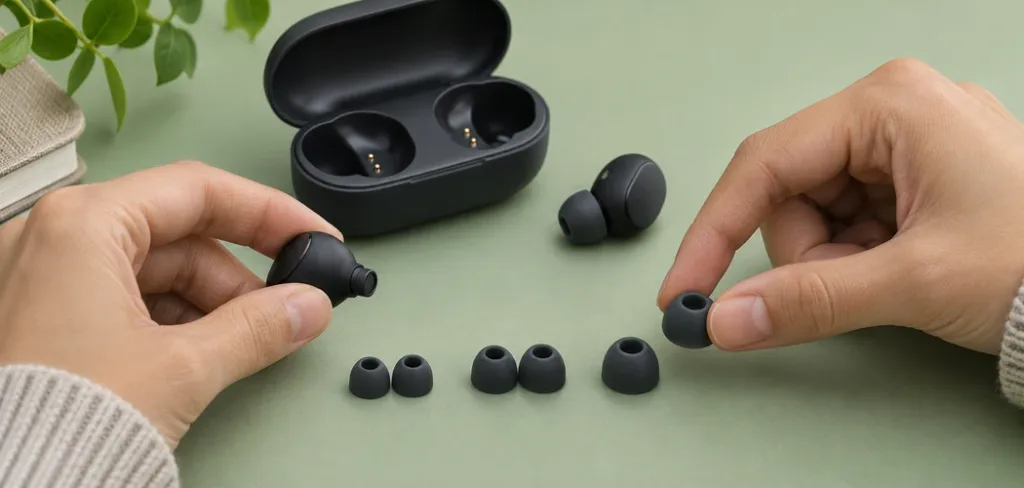
With sealed earbuds, try the supplied tip sizes one ear at a time. Your ears may need different sizes. A tip should sit securely without feeling as though you have to force it into place. When it fits well, the sound should stay reasonably consistent as you move your jaw. If the bass fades when you turn your head, or one side suddenly sounds thinner, try adjusting the fit before judging the sound.
For exercise, test the earpieces with the movements you actually make. Ear hooks or stabilizing fins may help in a model designed for that use. Check whether a hook competes for space with glasses or whether your hat presses on a touch control. Also consider how easy the controls are to use with wet hands or gloves. A secure fit is useful only if the device stays comfortable long enough to finish the activity.
Compare Battery Life Per Charge and With the Case
Read the small print next to the battery claim. A pair of earbuds might be rated for eight hours in the earpieces and 32 hours total when you include case recharges. Those are different measures. If you need to listen for ten hours straight, the eight-hour figure is the relevant starting point. Taking a break to put the earbuds back in the case changes the practical runtime.
Compare battery ratings under similar conditions. Check whether the figure assumes noise cancellation is on or off, whether it refers to music or calls, and whether the manufacturer lists different runtimes for different modes. Treat published ratings as a starting point. Volume, settings, battery age, and your mix of activities can affect how long a charge lasts.
Over-ear headphones often quote one playback figure for the battery inside the headphones. Check whether the model can still play audio through a cable when the battery runs out, if that matters to you. A cable input can be useful on a flight or at a desk, but it is worth checking what stays active in that mode. Some features may still require power.
Check both steps in the charging process for earbuds. The case recharges the earpieces when they are seated properly. The case itself may charge through a cable, a wireless charging pad, or either method, depending on the model. If you use a charging pad at home, confirm that the exact case supports it. Then check whether the case shows its own battery level separately from that of the earbuds.
Listen for the Difference Between Noise Cancellation and Call Quality
A well-fitting cushion or ear tip can block some outside sound before any electronics are involved. Active noise cancellation adds another layer by using microphones and processing to reduce some ambient sound. Results vary with fit and the type of noise. If your usual problem is a steady train rumble, try a model in a similar setting or during a return period. Compare the same music with the feature on and off.
Transparency or ambient mode feeds some outside sound through the earphones. Try it in a quiet setting first so you know how to switch modes and how the controls behave. If you need to hear an announcement, check whether you can pause playback or lift one earcup easily. Choose a listening setup that lets you pay attention to your surroundings when the situation calls for it.
Call quality is a separate test. Ask someone to listen to you speak near a fan or a busy room. Can they follow soft words and sentence endings? Try a short call from your laptop as well as your phone. The result can depend on the device and calling app, and music playback tells you little about how your voice will sound to other people.
Verify Bluetooth Features on the Devices You Use
Check the model’s compatibility with your phone, laptop, or tablet. A spec sheet may list a codec or a feature that only works with certain devices. The Bluetooth SIG’s LC3 specification describes a codec used for audio including speech and music. If you’re buying for LE Audio or a particular feature, check support at both ends of the connection.
If you work across a phone and computer, decide what you expect from multipoint. Some models can maintain connections to more than one device, but the way they switch can vary. Test what happens when a phone call arrives while a video plays on the laptop. Then check whether the video audio returns after the call ends. For help with the basic setup, see NetworkUstad’s guide to installing and configuring peripheral devices.
If you watch video or play games, check for delay with the actual app you use. Look for a noticeable gap between a spoken word and the movement of someone’s lips. A video player may behave differently from a game or editing app. If timing is important, try the same material with a wired connection to see whether that better suits your setup.
Check Water Resistance, Controls, and Replacement Parts
Look up the rating and care instructions for your exact model. Check the earbuds and case separately. A rating on the earpieces may not apply to the case. For example, Apple’s water-resistance guidance lists the earbuds and charging case together or separately depending on the AirPods model. Follow the manufacturer’s instructions for your own device, including how to handle moisture before charging.
Try the buttons or touch controls without looking at your phone. Pause music, adjust the volume, and switch listening modes. If a gesture is easy to trigger by accident while adjusting an ear tip, check whether you can change or disable it. For a model with a companion app, check what functions remain available when the app is closed or when you use the headphones with a different device.
Before placing an order, check what you can replace. Ear pads and silicone tips can wear with regular use. A lost charging case may be an expensive problem if the manufacturer only sells a complete set. Compare the cost of the accessories you expect to need and read the return terms, especially for in-ear products that have been opened.
Make the Decision With a Short Trial
Repeat the top activity on your list. Wear over-ear headphones through a regular work session, or try earbuds during the length of your usual commute. Use your own phone, familiar music, and the volume you normally choose. Make one call and check how much battery remains afterward. Then pack everything the way you would when leaving home.
If two options meet your needs, choose the one you find easier to live with. For a frequent traveler, that might mean longer playback without stopping to charge. For an exerciser, it might mean earpieces that stay in place and a case small enough to carry. The best test is whether the pair works during the part of your day you bought it for.