

Most IT infrastructure doesn’t fail all at once. It degrades gradually — a server nobody documented, a firewall rule nobody remembers the reason for, a monitoring gap that only becomes visible after the outage it should have caught. Good infrastructure management isn’t a single tool or a checklist; it’s a set of disciplines that, done consistently, keep that gradual decay from turning into a 3 a.m. incident call. Here’s what actually works, with the specific frameworks and practices behind each piece.
Start With a Framework, Not a Tool List
Before picking any tool, it helps to anchor infrastructure management decisions to an established framework rather than reinventing structure from scratch. ITIL (Information Technology Infrastructure Library) remains the most widely adopted IT service management framework, organizing infrastructure work around service strategy, design, transition, operation, and continual improvement. Organizations don’t need to adopt it wholesale — even borrowing its incident/problem/change management vocabulary gives teams a shared language for triaging issues (is this an incident to resolve now, or a problem requiring root-cause investigation?) that generic “fix things when they break” approaches lack.
A Configuration Management Database (CMDB) — a structured, queryable inventory of every hardware asset, software license, server, and their relationships to each other — is the practical foundation this framework rests on. Without one, “what depends on this server” is a question someone has to answer from memory, which is exactly how outages cascade unpredictably. Getting the underlying network design right in the first place also matters here — our guide to subnetting and network requirements covers the planning groundwork that makes a clean, well-documented infrastructure possible from the start.
Setting Goals That Are Actually Measurable
Vague goals like “improve performance” or “reduce downtime” aren’t useful without numbers attached. Infrastructure teams that get real traction typically track:
- Mean Time to Resolution (MTTR) — how long it takes to resolve an incident once it’s detected, a direct measure of operational maturity.
- Mean Time Between Failures (MTBF) — how often equipment or systems fail, useful for prioritizing hardware refresh cycles.
- Uptime/availability percentage, usually tracked against a target like 99.9% (“three nines,” about 8.7 hours of downtime per year) or 99.99% (“four nines,” about 52 minutes per year) — the jump between tiers requires disproportionately more redundancy investment, so picking a realistic target matters more than aiming for the highest number on principle.
- Patch compliance rate — the percentage of systems running current security patches within a defined window, a leading indicator for breach risk.
Setting a target without a baseline measurement first is a common mistake — know your current MTTR before declaring a goal to cut it by some percentage.
Visibility Tools: What to Actually Look For
Network visibility tools generally fall into a few functional categories, and infrastructure teams typically need more than one:
- Network packet brokers and taps aggregate and distribute traffic copies to monitoring and security tools without disrupting production traffic — useful specifically when multiple tools (an IDS, a packet analyzer, a compliance recorder) all need to see the same traffic simultaneously.
- SNMP-based monitoring polls devices for status and performance metrics (CPU, memory, interface utilization) at regular intervals — the long-standing standard for basic device health visibility.
- NetFlow/sFlow-based traffic analysis gives visibility into what traffic is flowing where, which matters for capacity planning and spotting anomalous patterns (a sudden spike in outbound traffic to an unfamiliar destination is often the first sign of a compromised host).
- Full-stack observability platforms combine metrics, logs, and traces into a single view — increasingly standard in environments where infrastructure spans on-premises hardware and multiple cloud providers, since siloed tools per environment recreate the same blind-spot problem visibility tools are meant to solve.
The right combination depends on infrastructure complexity — a small single-site network needs far less tooling than a hybrid multi-cloud environment, and over-tooling has its own cost in alert fatigue and maintenance overhead.
Documentation That Actually Gets Used
Documentation fails for a predictable reason: it’s written once during a project and never touched again, so within a year it no longer reflects reality — the single biggest cause of outdated runbooks causing more confusion than they prevent during an actual incident. Practices that keep documentation usable:
- Version-controlled network diagrams and configuration files, stored in the same kind of system developers use for code (Git-based repositories are increasingly common even for network configs), so changes are tracked and previous states are recoverable.
- Automatically generated documentation where possible — many network management platforms can generate current-state topology diagrams directly from live device data, which stays accurate by construction rather than by someone remembering to update a diagram.
- A documented change log tied to every configuration change, not just a general “we made some updates” note — specifically who, what, when, and why, which becomes essential during root-cause investigation.
Automation: Where It Actually Pays Off
Automation delivers the clearest return in high-frequency, low-judgment tasks — not because automation can’t handle complex decisions, but because the payoff scales with how often a task repeats:
- Configuration deployment and drift detection — tools like Ansible, Puppet, and Chef can push consistent configurations across many devices and flag when a device’s actual configuration has drifted from its intended state, catching the kind of undocumented manual change that causes mysterious inconsistent behavior later.
- Automated backup and recovery testing — not just running backups automatically, but automatically verifying they’re restorable, since an untested backup is a backup you only discover is broken during an actual disaster.
- Patch management automation — scheduling and deploying security patches on a defined cadence rather than manually, which directly improves the patch-compliance metric mentioned earlier.
- Network automation via Intent-Based Networking (IBN) — a more recent approach where administrators define desired network behavior (intent) and the system continuously configures and verifies the network matches it, rather than manually configuring individual devices to achieve that state.
Automation’s main risk is applying it to a process that’s still poorly understood — automating a bad manual process just makes mistakes happen faster and at scale, so documenting and stabilizing a process before automating it is usually the right order of operations.
Communication and Cross-Team Collaboration
Infrastructure problems increasingly span organizational boundaries — a performance issue might involve networking, application developers, and a cloud provider’s own infrastructure simultaneously. Structured practices that reduce this friction include shared incident channels with clear escalation paths, blameless post-incident reviews (focused on process gaps rather than individual fault, which research on high-reliability organizations consistently shows produces more honest root-cause analysis), and regular cross-team syncs between infrastructure, security, and development teams rather than siloed communication that only happens during an active incident. The tools teams actually use for this matter too — see our look at integrating Microsoft Teams and Slack for how real-time collaboration platforms fit into this picture.
Proactive Monitoring vs. Reactive Firefighting
The practical difference between proactive and reactive monitoring comes down to what triggers action. Reactive monitoring waits for a threshold breach or outright failure. Proactive monitoring looks for leading indicators — gradually climbing disk usage, a slow memory leak, an interface error rate ticking upward — and acts before they become a full outage. Synthetic monitoring (actively testing a service the way a real user would, on a schedule, rather than only watching passive metrics) and anomaly detection (flagging behavior that deviates from an established baseline, rather than only alerting on fixed thresholds) are the two practices that typically move a team from reactive to proactive. Thresholds alone catch failures already happening; baseline-deviation detection catches the pattern that precedes one.
Investing in Skills: What Actually Matters
Infrastructure teams age out of relevance quickly if skills development is treated as optional. Beyond standard vendor certifications (CCNA/CCNP for networking, relevant cloud-provider certifications for hybrid environments), the skills seeing the fastest demand growth are cloud infrastructure management (since most organizations now run hybrid or multi-cloud environments rather than pure on-premises), infrastructure-as-code tools (Terraform, CloudFormation), and security fundamentals broadly — infrastructure and security have become inseparable disciplines rather than separate teams with separate concerns.
Security and Compliance: Building It In, Not Bolting It On
Rather than treating security as a final checklist item, mature infrastructure practices build it into every layer:
- Patch management, tracked against the compliance-rate metric above, closes the most common entry point for opportunistic attacks — unpatched known vulnerabilities.
- Network segmentation, limiting how far an attacker who compromises one system can move laterally — a foundational practice given how many real breaches escalate specifically through flat, unsegmented networks.
- Zero Trust architecture principles — verifying every access request regardless of whether it originates inside or outside the traditional network perimeter, increasingly the standard approach as remote work and cloud services have eroded the idea of a single defensible network edge.
- Compliance frameworks relevant to the organization’s sector — NIST Cybersecurity Framework and ISO/IEC 27001 are the two most broadly referenced general frameworks, with sector-specific requirements (HIPAA for healthcare, PCI DSS for payment processing) layered on top where applicable.
Continual Evaluation: Closing the Loop
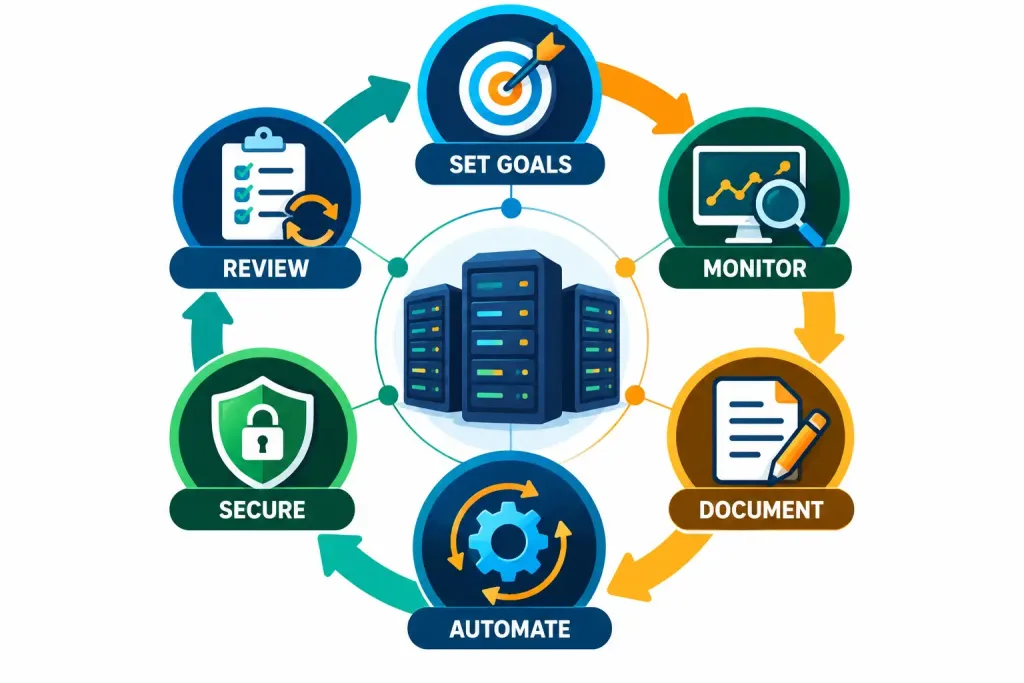
None of the above works as a one-time setup. Infrastructure management frameworks that actually hold up over time build in a regular review cycle — quarterly is common — that revisits the metrics defined earlier (MTTR, MTBF, uptime, patch compliance), checks whether documentation still matches reality, and gathers direct feedback from the teams who depend on the infrastructure daily, since the people closest to day-to-day friction often spot problems that dashboards don’t surface.
The Bottom Line
Effective IT infrastructure management isn’t one practice — it’s goal-setting tied to real metrics, visibility tooling matched to actual complexity, documentation that’s maintained rather than written once, automation applied to stable and well-understood processes, and security built into the architecture rather than added afterward. Teams that treat these as an integrated system, reviewed on a regular cycle, consistently show fewer surprise outages than teams chasing the same priorities one at a time without a framework connecting them.
Frequently Asked Questions
What’s the difference between MTTR and MTBF?
MTTR (Mean Time to Resolution) measures how long it takes to fix a problem once it occurs — a measure of response efficiency. MTBF (Mean Time Between Failures) measures how often failures happen in the first place — a measure of system reliability. Both matter, but they point to different improvement levers: MTTR improves through better processes and tooling, MTBF improves through better hardware, redundancy, and preventive maintenance.
Is network automation worth the setup effort for a smaller IT team?
Generally yes for high-frequency repetitive tasks (configuration deployment, patch scheduling, backup verification) even at smaller scale, since the time saved compounds every time the task repeats. It’s less clearly worth it for low-frequency, high-judgment tasks that happen rarely enough that building and maintaining automation costs more than doing them manually.
What’s the single highest-impact first step for a team with no formal infrastructure management practice yet?
Building a basic, accurate inventory (a CMDB, even a simple one) and establishing a baseline for key metrics like current uptime and MTTR. Nearly every other practice — documentation, monitoring, automation — depends on first knowing what you actually have and how it’s currently performing.



