

A broadband speed test seems like it should give a simple answer — is your connection fast or slow — but the number it returns only tells part of the story. Knowing what Mbps actually represents, what a realistic result looks like for your connection type, and what to do when the number disappoints you matters more than the test itself. Here’s how to run a TalkTalk speed test properly and actually make sense of the result.
Running the Test Correctly
TalkTalk’s own speed test tool measures your current connection speed in real time, but the result is only meaningful if the test conditions are controlled:
- Close other apps and browser tabs that use bandwidth — streaming, downloads, and cloud backups running in the background will drag your result down and make it look worse than your actual connection capability.
- Disconnect other devices from the network temporarily, or at minimum pause anything actively streaming or downloading on them — a household with several devices pulling bandwidth simultaneously will show a lower per-device result than the connection is actually capable of.
- Test over a wired (Ethernet) connection if possible, or position yourself close to the router with a clear line of sight if testing over Wi-Fi — walls, distance, and interference from other electronics all reduce Wi-Fi throughput independent of your actual broadband speed, so a bad Wi-Fi result doesn’t necessarily mean a bad broadband connection.
- Run the test more than once, at different times of day, since broadband performance — especially on shared local infrastructure — can vary during peak evening usage hours compared to off-peak times.
What the Numbers Actually Mean
- Mbps (megabits per second) measures how much data your connection can transfer per second — the headline number most speed tests report, and the main figure that matters for streaming quality, download times, and multiple simultaneous users.
- Latency (ping), measured in milliseconds, measures how long it takes data to make a round trip to a server and back. This matters enormously for anything real-time — video calls, online gaming, remote desktop work — in a way raw download speed doesn’t. A connection with high Mbps but high latency can still feel sluggish for these use cases.
- Jitter measures how much latency varies from moment to moment. High jitter causes the stuttering or dropped-frame effect in video calls even when average speed and latency both look fine individually — it’s a specific, separate metric worth checking if video calls feel unstable despite a good base speed test result.
- Upload speed matters specifically for video calls, cloud backups, and uploading large files — and on many broadband connections (especially non-fibre ones) upload speed is dramatically lower than download speed, which is worth checking separately if you work remotely and rely on video conferencing.
What’s a Good Result, Realistically
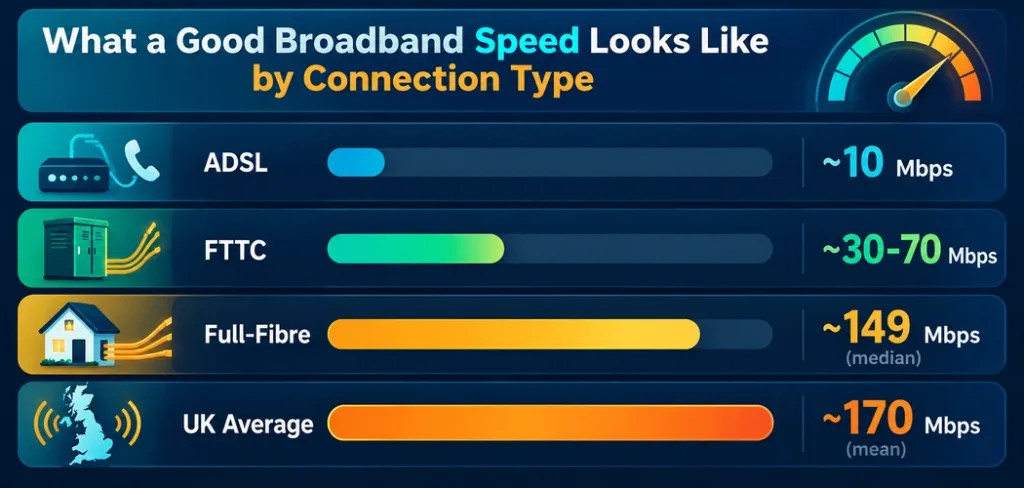
Context matters more than a single number. According to UK broadband market data, average download speeds vary substantially by connection type:
- ADSL (older copper-line broadband): typically around 10Mbps in practice, among the slowest widely available options.
- FTTC / “superfast” partial fibre (fibre to the local cabinet, copper for the final stretch to your home): typically in the 30–70Mbps range, with the national average around 56Mbps as of recent measurements.
- Full-fibre (FTTP): median peak-time download speeds around 149Mbps, with higher-tier full-fibre packages often delivering several hundred Mbps or more depending on the specific plan.
- UK-wide average across all connection types: mean download speed has been reported around 170Mbps as of early 2025, though this average is pulled upward by a relatively small number of very fast full-fibre connections — the median (the “typical” household) is meaningfully lower than the mean.
If your speed test result lands well below what your plan promises and well below these typical figures for your connection type, that’s a genuine signal something’s wrong — not just normal variation.
Why Distance From the Street Cabinet Matters (and When It Doesn’t)
On FTTC connections, your actual speed depends partly on how far your home is from the street cabinet, since the final stretch still runs over copper wire, and copper’s signal degrades with distance — the farther you are, the more your realistic maximum speed drops below the plan’s advertised figure. This is a real, physics-based limitation, not a minor technicality.
Full-fibre (FTTP) connections run fiber-optic cable all the way to your home, which doesn’t have this distance-based degradation in the same way — fiber signal doesn’t attenuate over typical residential distances the way copper does, which is the real technical reason full-fibre plans deliver more consistent speeds regardless of how far a home is from the local exchange or cabinet.
Common Causes of Slow Speed Test Results, and the Actual Fix
- Loose or damaged cables — check that the Ethernet cable and any phone-line/DSL connections are fully seated, especially if the connection was recently moved or the router recently relocated.
- Router placement — a router buried in a cabinet, behind a TV, or far from where you’re actually using the internet weakens Wi-Fi signal substantially; central, elevated, open placement improves real-world throughput even without changing anything about the underlying broadband plan.
- Too many connected devices — smart home devices, phones, and laptops all consume some bandwidth even when idle (background updates, sync processes); a household with many connected devices benefits from checking which ones are actually active during a test.
- Outdated router firmware or an aging router — routers several years old may not support the full speed of a newer broadband plan, a frequently overlooked bottleneck when a plan was upgraded but the router wasn’t.
- Wi-Fi security and interference — an open or outdated Wi-Fi security protocol isn’t just a security risk, it can also result in unauthorized devices quietly consuming your bandwidth; checking connected-devices lists periodically is worth doing for both reasons.
When to Contact Your Provider
If you’ve controlled for all of the above (wired connection, no competing devices, good router placement, reasonable time of day) and your result still falls well short of your plan’s advertised speed and the realistic benchmarks for your connection type, that’s the point to contact TalkTalk support directly rather than continuing to troubleshoot on your own — a persistent gap between promised and actual speed, after ruling out the usual local causes, often points to a line fault or local infrastructure issue that only the provider can diagnose and fix.
The Bottom Line
A speed test number means little without context — what connection type you’re on, what a realistic result looks like for that type, and whether latency and jitter (not just Mbps) are actually the real source of a frustrating experience. Running the test under controlled conditions, understanding what each metric actually measures, and knowing the realistic benchmark for your specific connection type turns a single confusing number into something you can actually act on.
Frequently Asked Questions
Are there other speed test tools besides TalkTalk’s own? Yes — TalkTalk’s tool is convenient if you’re already on their network, but several independent speed test tools exist and can be useful for cross-checking a result, since testing against more than one server occasionally reveals whether a slow result is specific to one testing service rather than your actual connection.
How often should I run a speed test? Running one whenever you suspect a problem is reasonable, but a single test is easily skewed by temporary conditions (other devices active, peak-hour congestion). Testing at a few different times — including once under ideal controlled conditions — gives a more accurate picture than a single result.
Why is my Wi-Fi speed much lower than my wired speed? Wi-Fi throughput is affected by distance, walls, and interference from other electronics in ways a wired Ethernet connection isn’t. A lower Wi-Fi result doesn’t necessarily mean your actual broadband connection is underperforming — testing over Ethernet isolates whether the issue is your broadband line or your Wi-Fi setup.
Does full-fibre always mean faster speeds than FTTC? Generally yes, and more consistently so — full-fibre doesn’t suffer the distance-based signal degradation that affects FTTC’s copper final stretch. A full-fibre connection’s speed depends mainly on which plan tier you’re subscribed to, rather than how far your home is from local infrastructure.
My speed test looks fine but video calls still lag — why? This usually points to latency or jitter rather than raw download speed. A connection can have perfectly good Mbps and still produce choppy video calls if latency is high or inconsistent (high jitter), since real-time communication is far more sensitive to those metrics than to overall bandwidth.



