Huntsville businesses have plenty of internet lines – but finding a straight answer is harder. This guide ranks the 5 lowest-cost business internet providers in Huntsville, Alabama (August 4, 2026). We cut through promo pricing to reveal real 24-month costs, upload speeds, uptime promises, and contract hooks. Scan the table below, and you’ll know which service can keep your POS and video calls steady – without a price hike in month 13.
Quick look: plans and prices side by side
Need a fast comparison? The table below shows each provider’s headline speed, true 24-month cost, contract term, and included hardware. Use it to shortlist one or two contenders, then dig into the detailed reviews that follow.
| Provider | Best use case | Plan scored | Connection | Advertised speed | Base monthly price | 24-mo. effective cost* | Contract | Included equipment/installation |
| WOW! Business | Local bargain where available | Business 600 | Coax | 600 Mbps | $65.99 | $65.99 + equip. | 1- or 3-year term | Free install, modem free 3 mos |
| WOW! Business | High speed local | Business 1.2 Gig | Coax | 1.2 Gbps | $70.99 + equip. | $70.99 + equip. + equip. | 1- or 3-year term | Free install, modem free 3 mos |
| AT&T Business Fiber | Best overall value | Fiber 300 | Fiber | 300 / 300 Mbps | $60 (online) | $60.00 | Month-to-month | Gateway + self-install |
| GFiber Business | Transparent gigabit | Business 1 Gig | Fiber | 1,000 / 1,000 Mbps | $100 | $100.00 | Month-to-month | Wi-Fi 6 router + pro install |
| T-Mobile Business | Budget backup or temporary | Business Advanced | 5G fixed wireless | Variable | From $50 | $50.00 | Month-to-month | Wi-Fi 7 gateway (shipped) |
| Comcast Business† | Quote-driven option | Address-specific | Cable / Fiber | Address-specific | Quote | Quote | Varies | Quote |
*Effective cost rolls service, required equipment, installation, and free-month credits into one 24-bill average; reward cards or bundle discounts are excluded.
†Comcast publishes no public Huntsville price card; request a written quote for your exact address.
Prices verified August 4, 2026. Promotions, contract terms, and upload speeds change frequently – always reconfirm before signing.
WOW! Business – best local value when the right network is available
According to WOW!’s Huntsville, AL business internet services page, new Business 600 customers at $65.99 per month receive 600 Mbps downloads, free installation, a complimentary modem for the first three months, and a 60-day satisfaction guarantee.
Why WOW! earns a top spot
WOW! Business covers much of Huntsville and pairs competitive pricing with solid download capacity. If your address qualifies for the Business 600 plan at $65.99 per month, you receive 600 Mbps downloads, free installation, and a modem at no charge for the first three months. That mix of low entry price and strong speed makes WOW! a cost-savvy pick within its business footprint.
Plans, speeds, and the real two-year bill
- Speed tiers. Business 600 costs $65.99 per month; upgrading to 1.2 Gig is only $5 more at $70.99 + equip.. Most five- to ten-person offices find the 600-Mbps tier sufficient for cloud apps, backups, and guest Wi-Fi.
- Equipment and add-ons. Prices exclude taxes, fees, and equipment. The complimentary modem ends after month three on 300 Mbps and faster plans. Optional extras include Static IP ($14.99/mo), Whole-Business Wi-Fi ($19.99/mo), and Wireless Internet Backup ($44.99/mo with a Cradlepoint E100 and optional 8- to 16-hour battery).
Result: Base pricing is competitive, but add the modem fee after month three when you work out the 24-month average.
Reliability, contract details, and static-IP caveat
WOW! lists network reliability on its city pages. That figure is a performance target, not a 99.9-percent SLA. Each plan includes 24/7 U.S. support and a 60-day satisfaction guarantee (exclusions apply). A Price-Lock Guarantee holds only for the contract term. Business pricing requires a one- or three-year agreement. WOW! does not publish its early-termination formula on the city page; HighSpeedInternet reports it as 75 percent of the remaining monthly service charges, so ask for the exact figure in writing before you sign. Worth knowing before you accept a term: WOW!’s own FCC Broadband Facts labels list no contract requirement and no early-termination fee on all thirteen business plans at the standing rate, so the commitment is what buys the discount. Static IP remains a paid add-on at $14.99 per month.
What to verify yourself
Public sentiment on business cable is thin and mostly residential, so treat any thread you find as background rather than data. Two checks are worth more than a dozen reviews: ask the rep what the rate becomes the month after your term ends, and ask whether the outage-credit process is automatic or requires you to call. Get both answers by email.
Pro tip: WOW! publishes its Huntsville business footprint by ZIP: 35801, 35802, 35803, 35805, 35806, 35810, 35811, 35816, 35824, 35758, 35759 and 35761, covering Downtown Huntsville, Madison, Decatur, Hartselle and Athens. Check yours against that list before you call sales.
AT&T Business Fiber – best overall value
Why AT&T tops the scorecard
The Business Fiber 300 plan costs $60 per month online with no contract, free installation, and a Wi-Fi gateway included. That single offer removes two common headaches: equipment rent and long commitments.
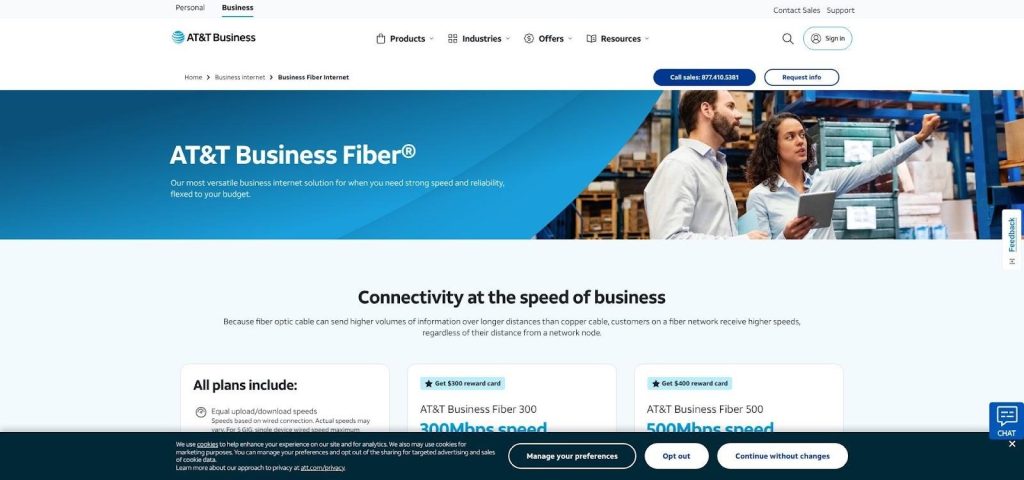
Because uploads equal downloads at 300 Mbps, nightly cloud backups, security-camera streams, and large file shares move just as quickly as downloads. That symmetry, along with the entry price, puts AT&T at the top of our weighted scorecard.
AT&T adds protection. Under the AT&T Guarantee, an outage longer than twenty minutes triggers an automatic bill credit. Plans at 1 Gig or faster also include built-in 5G/LTE failover. If your uptime needs grow, upgrading is straightforward.
Plans, costs, and your actual bill
- Fiber 300 – 300/300 Mbps for $60 online ($70 by phone)
- Fiber 500 – 500/500 Mbps for $100
- Fiber 1 Gig – 1,000/1,000 Mbps for $140
All tiers include the gateway, installation, and unlimited data. The 300-Mbps plan remains a steady $60 average over twenty-four months; there is no promo cliff or modem surprise. Redeem the current $300 reward card and the net out-of-pocket average drops to about $47.50 per month. Activate the card on time to capture that benefit.
Static IPs are sold only in blocks of eight (five usable). Ask sales for the monthly fee if you host VPNs or on-prem servers.
Reliability, backup perks, and support quality
Fiber’s physical stability already beats cable and fixed wireless, but AT&T layers on two safeguards. First, the AT&T Guarantee credits your bill automatically after a twenty-minute outage. Second, 1 Gig and faster plans ship with wireless failover; traffic shifts to 5G in roughly a minute if the fiber is cut. Add an uninterruptible power supply so failover keeps working during power loss.
Support is available 24/7 from U.S. agents. Local users praise the automatic credits and quick truck rolls; the main complaint is gradual price creep on legacy DSL, which does not affect new fiber circuits. Static-IP blocks and eight-hour repair targets cost extra, so confirm fees and SLA wording before you sign.
Need symmetrical uploads today and contract freedom tomorrow? AT&T’s blend of price stability, self-healing backup, and month-to-month terms is hard to match for a Huntsville storefront.
GFiber Business – best transparent gigabit plan
Why GFiber wins on simplicity
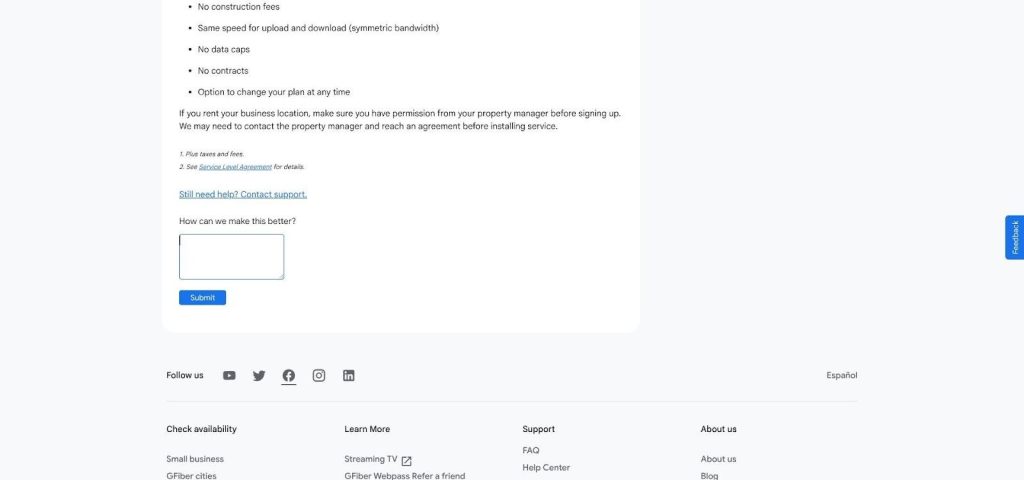
GFiber keeps billing plain: the Business 1 Gig plan is $100 per month with no promo clock, no equipment rent, and no contract. The price you see on day one matches the price in month thirteen. Service rides Huntsville Utilities’ city-owned fiber across downtown, Research Park, and growing pockets in the south and northeast. Symmetrical 1 Gbps speed means cloud backups leave as fast as they arrive, and the 2 Gig tier at $250 includes one static IP for teams that need extra headroom.
Plans, costs, and what’s included
- Business 1 Gig – $100
- Business 2 Gig – $250 with one static IP
Both prices already cover a Wi-Fi 6 router, up to two mesh extenders on 2 Gig, professional installation, and month-to-month terms. Because the rate never flips to a higher “standard” amount, the effective 24-month cost equals the sticker price – $100 or $250.
Extras stay minimal. Need more static IPs? Bring your own router and request a quote. GFiber publishes a Premium SMB service-level agreement: a 99.9 percent monthly uptime commitment with a credit of 25 percent of that month’s charges when it misses, capped at one month’s charges. There is no speed guarantee in it, only availability, and scheduled maintenance is excluded with 72 hours’ notice. Read it before you assume the number on the marketing page is the number you can claim against.
A final caution: Huntsville’s utility fiber ends abruptly at certain street boundaries. Two suites on the same block can see different results. Always run the exact address through GFiber’s checker before adding the plan to your budget. Source: GFiber Business plan overview, accessed August 4, 2026
T-Mobile Business Internet – best budget backup or temporary line
Why T-Mobile earns a seat
Sometimes you need an internet line the same day, without permits or trenching. T-Mobile ships a Wi-Fi 7 gateway to your door; ten minutes after power-up, you are online. The Business Advanced plan starts at $50 per month, with no contract, shipping, and a fifteen-day money-back trial. That quick setup makes it valuable for pop-up retail, construction trailers, and home offices waiting on fiber.
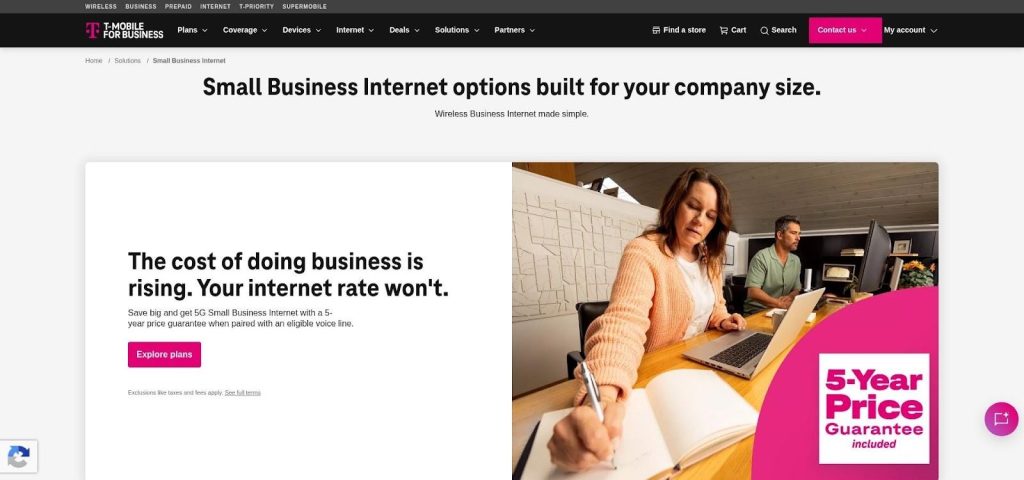
Because the service rides T-Mobile’s 5G network, it moves with you when you relocate and creates path diversity if a backhoe severs nearby cables. As a primary circuit for data-hungry offices, it trails wired fiber or cable, but as a secondary or stop-gap link it provides rare flexibility at a modest price.
Speed, limitations, and when to rely on it
T-Mobile commits to consistent download speeds of at least 25 Mbps, though independent tests often show typical performance in the low triple digits with higher peaks possible. Fixed wireless is the one technology where the published range tells you almost nothing about your own suite, because tower distance, floor height and wall construction decide it. Order on the 15-day return window, put the gateway where it will actually live, and run peak-hour tests before the window closes. Because throughput can sag at peak hours, we treat the service as backup first, primary only for light traffic such as POS, email, and browsing.
Need a public IP? A static-IP upgrade is available on Business Advanced; confirm the fee and note that it runs on IPv4-over-LTE, not 5G SA, and bypasses carrier CGNAT. Contracts remain off the table, yet T-Mobile adds a five-year price guarantee when you bundle qualifying voice lines. Order internet only, and the $50 sticker holds steady with no bundle requirement.
Test the gateway in the exact spot it will live; a one-room shift can mean the difference between crisp VoIP and buffering frustration.
Source: T-Mobile Business Internet plan page, accessed August 4, 2026
Comcast Business – best quote-based coverage-gap option
Why Comcast still matters
Comcast’s cable network covers most of urban Huntsville and reaches blocks where fiber stops short. When legacy DSL is the only other wire, a Comcast Business quote can keep bandwidth-heavy workflows moving. The trade-off is opacity: no public price card exists. You must enter a complete business address before you will see speed tiers, upload rates, or contract language.
That caveat lowers Comcast’s composite score, yet the product mix improves once you secure a written quote. Many suites qualify for 300, 500, 1,250 or 2,000 Mbps down, with uploads that top out around 35 Mbps on older plant, and enterprise fiber appears on streets with existing laterals. SecurityEdge malware filtering is built into every plan at no extra cost rather than sold as a bundle, and Wireless Connect adds dual-carrier LTE failover with up to eight hours of battery from $35 per month.
What to pin down in the quote
- Exact download and upload speeds for your suite, not the node.
- Year-by-year pricing: intro, renewal, and any automatic increase.
- Static-IP fee and whether it persists during LTE failover.
- Connection Pro cost after promotional pricing ends.
- Early-termination formula and auto-renewal window.
- Construction or special-build charges: negotiate a cap or full waiver.
Bottom line
Comcast works best when it is the only gig-class wire or when SecurityEdge and multi-location voice tools balance the higher cost. Insist on a fully itemized quote; without it, negotiating is guesswork.
Honorable mentions: niche fits worth a quick quote
Most Huntsville businesses will choose one of the five core providers above, but a few edge cases justify an extra quote:
- Mediacom (cable pockets). Mediacom’s plant reaches about 17 percent of Huntsville, mostly outside the core. Promo-year prices can mimic Comcast, yet upload speeds and static-IP policies differ. Confirm you are getting a true business tier, not a repackaged residential plan.
- XNET WiFi (fixed wireless). Reaches a sizable share of Huntsville addresses, more than either fiber network, and it is the option most often missing from national lists. There is no published business rate card, so treat it as a quote to request rather than a price to compare.
- Verizon Business Internet (fixed wireless). Similar to T-Mobile but with steadier performance in tower-dense Research Park. Equipment fees are higher, so it seldom wins on headline cost.
- Starlink Priority (LEO satellite). A lifeline for rural yards or construction trailers with limited cell coverage. Hardware plus priority-data fees often lift the bill past $100 per month, but the satellite path is physically separate from every terrestrial carrier.
- Uniti Fiber (formerly Southern Light) and Zayo (dedicated circuits). If you need a written 99.99-percent SLA, a sub-four-hour restoration target, or BGP failover, these are the Huntsville names. A 1 Gbps circuit riding an existing lateral typically runs just under $1,000 per month; a new build or a multi-site ring runs into five figures. Uniti is adding 70 route miles here, so ask whether your street is on the new build before you accept a construction quote.
Consider these names when the mainstream options cannot meet a specific technical or geographic need.
How to buy: nine checks before you sign
1. Start with the exact service address
Internet ads talk in ZIP codes, but fiber and cable eligibility is decided at the curb. Two doors apart can face different networks, construction fees, or upload caps.
Take a few minutes to plug your full suite number into each provider’s availability tool, then cross-check against the FCC Broadband Map. Provider portals beat federal filings because they reflect live build data. Save a screenshot of every result; it gives you proof if a sales rep later claims the address “should qualify.”
This step prevents wasted time chasing promo rates you cannot buy and keeps negotiations honest. When checking WOW! availability, verify your address against their published ZIP-level business footprint to confirm that you qualify. When AT&T lists DSL instead of fiber, pivot to GFiber or Comcast before spending time on upsell calls.
Complete this check first and the rest of the buying process falls into place.
2. Calculate the full contract cost
The headline rate is only the start; extra fees can turn a bargain into a budget buster. Before you sign, list every required charge: service, equipment, installation, activation, static IP, LTE backup, security add-ons, and any “network-enhancement” or “unified-access” fees shown on the sample bill.
Add these numbers and divide by the full contract term (or twenty-four months on a no-term plan). A “$50” promo can climb to about $80 once modem rent, regulatory surcharges, and the month-thirteen price jump appear on the invoice.
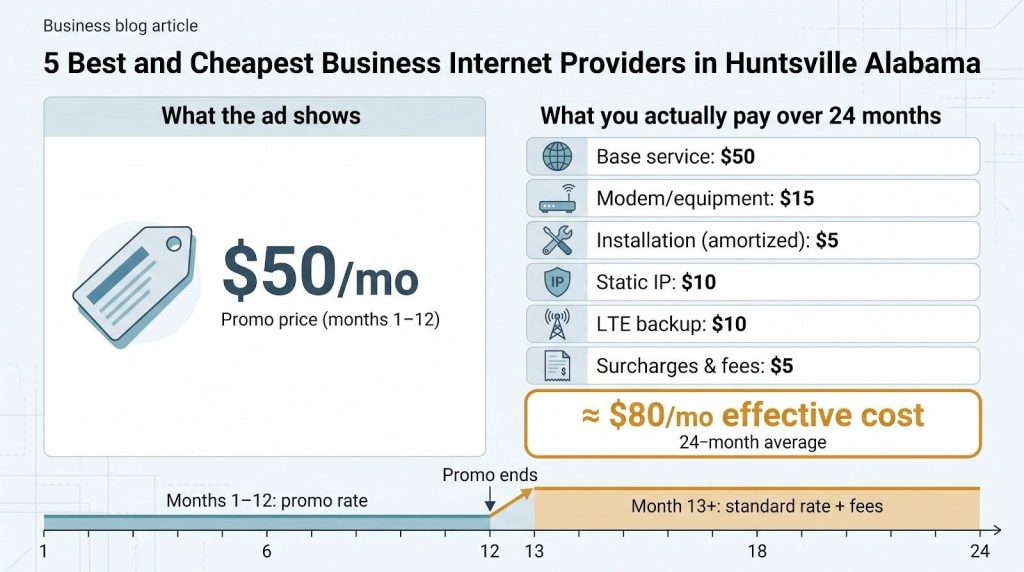
Treat reward cards as rebates rather than discounts. Miss the redemption window and your cost rises. Apply the same logic to bundles that force you to add a wireless line you never planned to carry.
3. Match speed to staff and workload
Raw bandwidth matters only when it covers your busiest minute. A five-person architecture studio pushing large Revit files needs far more headroom than a ten-chair salon running cloud POS and background music.
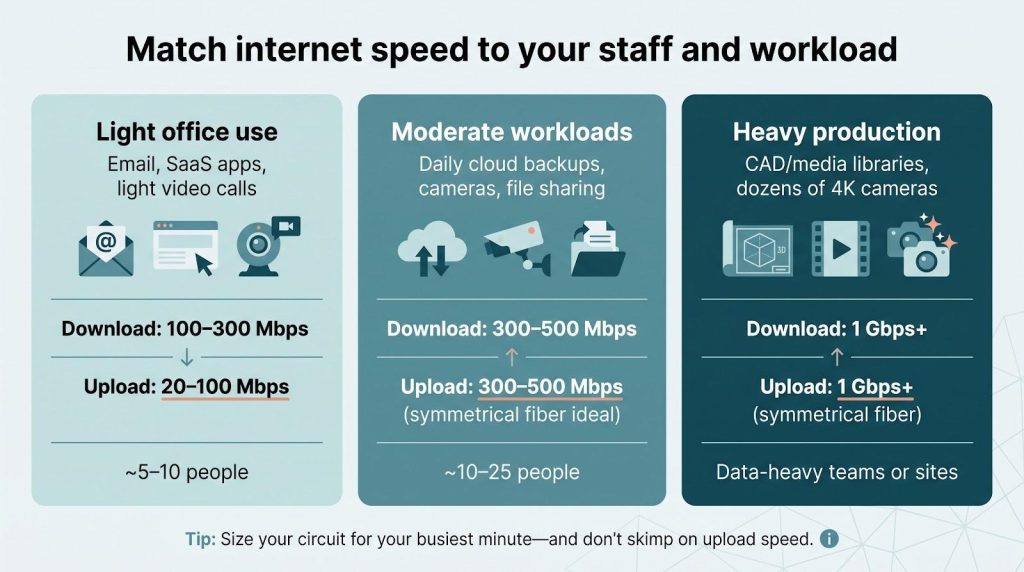
- Light office use: email, SaaS, and occasional video calls run smoothly on 100 to 300 Mbps, provided upload speed receives equal attention.
- Moderate workloads: daily cloud backups, security-camera streams, and routine file transfers fit best in the 300 to 500 Mbps symmetrical range.
- Heavy production: on-prem media hosting, massive CAD libraries, or dozens of 4K cameras make gigabit or faster symmetrical service a time saver rather than a luxury.
Multi-gig tiers pay off only if your LAN, router, and upstream SaaS can use that capacity. Count devices, find the biggest data burst, and size the circuit for the worst-case minute; anything less is guesswork.
4. Prioritize upload speed for modern workflows
A decade ago most offices downloaded far more data than they uploaded. Today cloud backups, Google Drive sync, live camera feeds, and nonstop video meetings often reverse that ratio. A 300/20 Mbps cable plan looks quick on a speed test but stalls when five users upload design files at once.
Use a simple filter: if your business moves large files such as photos, CAD drawings, surveillance clips, or nightly database dumps, treat symmetrical fiber as essential. Spending an extra ten to fifteen dollars each month can save hours of waiting and protect productivity.
If cable is the only wire reaching your suite, ask whether a low-cost fixed-wireless circuit can carry uploads or whether a dual-WAN router can direct outbound traffic over cellular. Two paths usually cost less than jumping straight to an enterprise dedicated circuit.
5. Separate “reliability” marketing from a real SLA
Providers often advertise “99 percent network reliability,” which sounds solid until the fine print reveals no penalty if the link fails during lunch rush. A genuine service-level agreement does three things:
- Sets an uptime target, typically 99.9 or 99.99 percent.
- Defines a restoration window, for example four hours.
- Credits your bill when either metric slips.
Most shared business broadband such as AT&T Business Fiber’s Guarantee, Comcast Business cable, and WOW! Business offers best-effort uptime with goodwill credits rather than a contractual SLA. Dedicated Internet Access from carriers like Uniti or Zayo includes a written SLA, but monthly prices usually reach four figures.
Ask the sales rep to email the exact uptime clause and remedy schedule. If credits start only after a four-hour outage, you still need a failover circuit or battery-backed cellular router to bridge shorter interruptions. Marketing statements are useful, but written SLAs protect revenue.
6. Confirm static-IP details up front
A public, routable IP supports VPNs, on-prem mail servers, and reliable VoIP, but Huntsville providers treat static addresses differently. GFiber includes one on its 2-Gig tier and sells add-ons for 1-Gig plans, requiring your router if you need multiple addresses. AT&T sells only blocks of eight (five usable) and lists the fee on a separate line item. WOW! charges $14.99 per month for a static IP, while Comcast and T-Mobile quote the amount during ordering.
Ask these five questions before you sign:
- How many usable IPv4 addresses are in the block?
- What is the monthly fee and any setup cost?
- Does the static IP remain active during failover or apply to outage credits?
- Is reverse DNS included?
- When IPv6 is assigned, will the prefix stay static or change?
Lock the answers into the service order. Static addressing is simple to request during negotiation but expensive to add after installation.
7. Plan for outages and power loss
Even the best fiber circuit is useless if a forklift cuts the patch cord or the neighborhood loses electricity. Build resilience in layers:
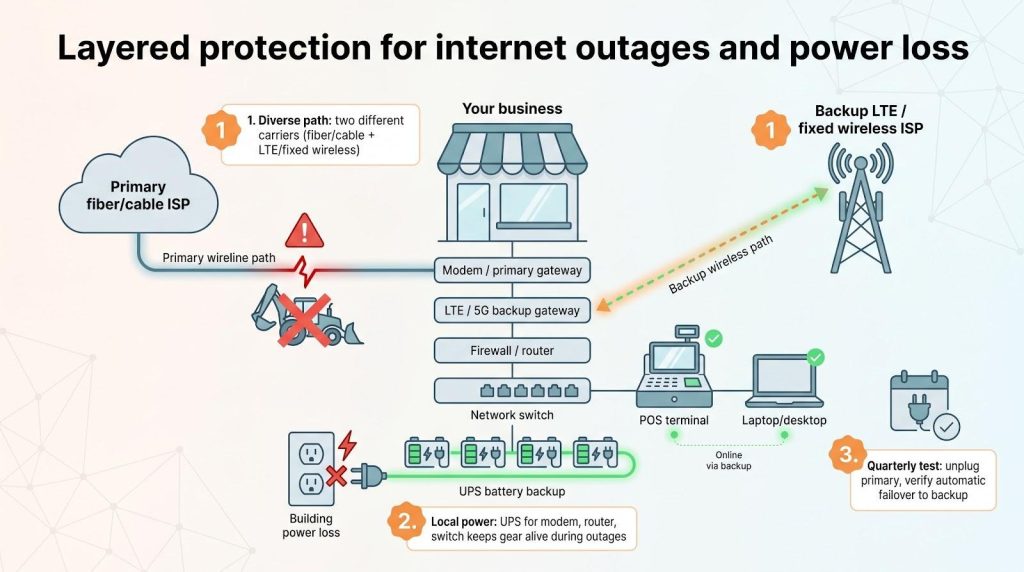
- Diverse path. Pair your primary wire with a second carrier (T-Mobile or Verizon fixed wireless, or Comcast Connection Pro LTE) so a single cut will not stop card readers or cloud apps.
- Local power. Place an uninterruptible power supply under every gateway, switch, and firewall. A unit rated for at least 30 minutes of runtime keeps equipment running long enough for LTE failover or an orderly shutdown.
- Quarterly test. Unplug the modem every 90 days and confirm that failover engages and that your static IP, VPN, and VoIP lines stay online. The five-minute drill exposes wiring mistakes long before a Saturday rush.
Layered protection costs far less than a prolonged outage.
8. Read renewal language like a lawyer
Intro prices attract notice; renewal clauses reshape the bill. Watch for three red flags in the contract:
- Auto-renewal period. Many business agreements roll into a one-year extension unless you cancel 30–60 days before the anniversary. Miss the window and the early-termination fee resets.
- Month-25 rate. Cable providers often display only the first-year promo. Request the post-promo figure in writing.
- Relocation policy. If you move suites mid-term, does the contract follow you or restart? A clear answer can prevent double installation fees.
Add these key dates to your calendar and set reminders; a two-minute review today can guard against a costly surprise later.
9. Judge support quality, not just hours
Every provider promises 24/7 support, yet response times range from instant help to hour-long holds. Before you sign, call the business line at 8 pm on a weeknight and again at 6 am. Ask one simple question (for example, static-IP pricing or outage credit policy) and note how many minutes pass before a qualified agent answers.
Next, review recent Google Business Profile ratings and Huntsville-focused Reddit threads that mention the provider’s business service. A single rant is background noise; recurring themes indicate a real issue.
Finally, confirm whether the provider assigns a named escalation contact or keeps a local field office. When your circuit powers a sales floor, having someone who can dispatch a truck quickly is far better than waiting in a generic 1-800 queue.
Conclusion: who should buy what
For most Huntsville storefronts and small offices, AT&T Business Fiber 300 at $60 a month is the pick: symmetrical 300 Mbps, month-to-month terms, gateway and installation included, and an automatic bill credit once an outage passes twenty minutes.
WOW! Business is the value play wherever its plant reaches you, and the arithmetic is easy to miss because the numbers sit in different sections of this guide. Business 600 at $65.99 plus a static IP at $14.99 is about $81 a month for a 600 Mbps circuit with a fixed public address. The cheapest GFiber configuration that includes a static IP is the 2 Gig tier at $250. If a routable IP is on your requirement list and you do not need a gigabit, that gap is the whole decision.
GFiber Business 1 Gig at $100 is the clean answer when you want a gigabit with no promo clock, no equipment rent and a written 99.9 percent uptime commitment behind it. T-Mobile is a backup line or a stopgap, not a primary circuit. Comcast is worth the quote only when it is the sole gig-class wire at your address.
Whatever you shortlist, do the three things this guide keeps returning to: run your exact suite number through every provider’s checker before you shortlist anyone, get the month-13 rate and the early-termination formula in writing, and price the static IP and the backup path into the monthly figure instead of treating them as extras.