
Domain 1.6 | Network Fundamentals — 20% of exam
Learning Objectives
By the end of this lesson, you will be able to:
- Identify the network address, broadcast address, usable host range, and host count for any given IP address and prefix
- Calculate subnet boundaries quickly using the block-size shortcut, without a calculator
- Allocate VLSM subnets of different sizes from a single address block based on specific host requirements
- Configure IPv4 addressing on Cisco router interfaces and verify the configuration
Key Terms
| Term | Definition |
|---|---|
| Subnet mask | A 32-bit value marking which bits of an IP address identify the network versus the host |
| CIDR notation | Shorthand for a subnet mask, written as a slash followed by the number of network bits (e.g., /27) |
| Network address | The first address in a subnet, with all host bits set to 0; identifies the subnet itself |
| Broadcast address | The last address in a subnet, with all host bits set to 1; used to reach every host on that subnet |
| Block size | The numerical interval between consecutive subnet boundaries |
| VLSM | Variable Length Subnet Masking; allocating subnets of different sizes from one address block |
| Host bits | The bits of an address not used to identify the network, available for numbering individual hosts |
Explanation
Why This Is the Single Most Important Skill on the Exam
Not because there’s a dedicated “calculate this subnet” question waiting for you. There usually isn’t, not directly. It matters because this skill is embedded — inside routing questions, inside ACL questions, inside NAT questions, inside OSPF network statements, throughout nearly every other domain on this exam. A candidate who’s slow at subnetting doesn’t just miss subnetting questions. They run out of time on everything that quietly requires it along the way.
Get comfortable with this now. It pays off for the rest of the exam, not just this one lesson — including the TCP vs UDP concepts from the previous lesson, since transport-layer scenarios frequently reference specific IP addressing right alongside protocol behavior.
The Core Skill, Broken Into Four Questions
Given any IP address and a prefix (or subnet mask), you need to be able to answer four things, reliably and fast:
- What’s the network address?
- What’s the broadcast address?
- What’s the usable host range?
- How many usable hosts does this subnet actually support?
The network address is every host bit set to zero. The broadcast address is every host bit set to one. Everything in between is usable. And the host count formula is 2^(host bits) − 2 — subtracting two specifically for the network and broadcast addresses themselves, since neither can be assigned to an actual device.
Building the Foundation: What’s Actually Happening in Binary
The shortcut method below is fast, and it’s what you’ll actually use under exam time pressure. But it’s worth understanding what it’s a shortcut for — because a shortcut applied without understanding breaks the moment a question phrases things slightly differently than expected.
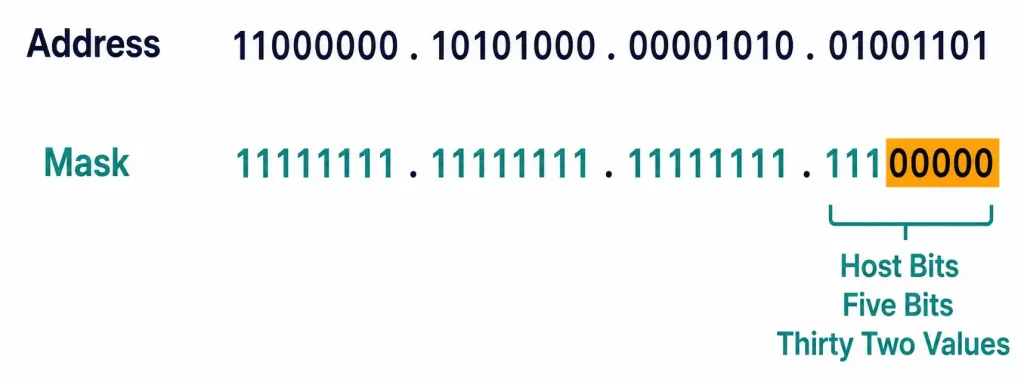
An IPv4 address is 32 bits. Just 32 ones and zeros, grouped into four 8-bit sections called octets, each octet converted to decimal for human readability. That’s all “192.168.10.77” actually is underneath — four binary octets, translated into a form people can read at a glance instead of squinting at binary.
192.168.10.77 in binary:
192       .168      .10       .77
11000000  .10101000 .00001010 .01001101
A subnet mask is also 32 bits, but it’s not an address — it’s a pattern. Every bit set to 1 identifies a network bit; every bit set to 0 identifies a host bit. A /27 mask means the first 27 bits (reading left to right) are 1s, and the remaining 5 bits are 0s.
/27 in binary:
255       .255      .255      .224
11111111  .11111111 .11111111 .11100000
Line the address and mask up together, and the concept behind subnetting becomes visible directly:
Address: 11000000.10101000.00001010.01001101
Mask:    11111111.11111111.11111111.11100000
                                     ^^^^^
                              host bits (5 bits = 32 values, 0-31)
Everywhere the mask has a 1, that address bit is fixed — part of identifying which subnet this address belongs to. Everywhere the mask has a 0, that address bit is free to vary — those are the bits that actually distinguish one host from another within that subnet. The network address is what you get when every one of those free (host) bits is forced to 0. The broadcast address is what you get when every one of those free bits is forced to 1. Everything else — every combination of those 5 host bits other than all-zeros and all-ones — is a valid, assignable host address.
This is the actual mechanism the block-size shortcut below is calculating for you without needing to write out the binary every time. Once you’ve seen it work at the bit level once or twice, the shortcut stops feeling like a memorized trick and starts feeling like the obvious fast path to an answer you could always get the slow way if you needed to.
The Block-Size Shortcut: Subnetting Without a Calculator
Here’s the technique that actually makes this fast. Forget converting everything to binary every single time — there’s a shortcut, and it’s worth internalizing until it’s automatic.
Block size = 256 minus the relevant octet of the subnet mask.
That single number tells you everywhere a subnet boundary falls. Subnets always start at multiples of the block size: 0, then block size, then double the block size, and so on, up through 256.
Full worked example: 192.168.10.77/27
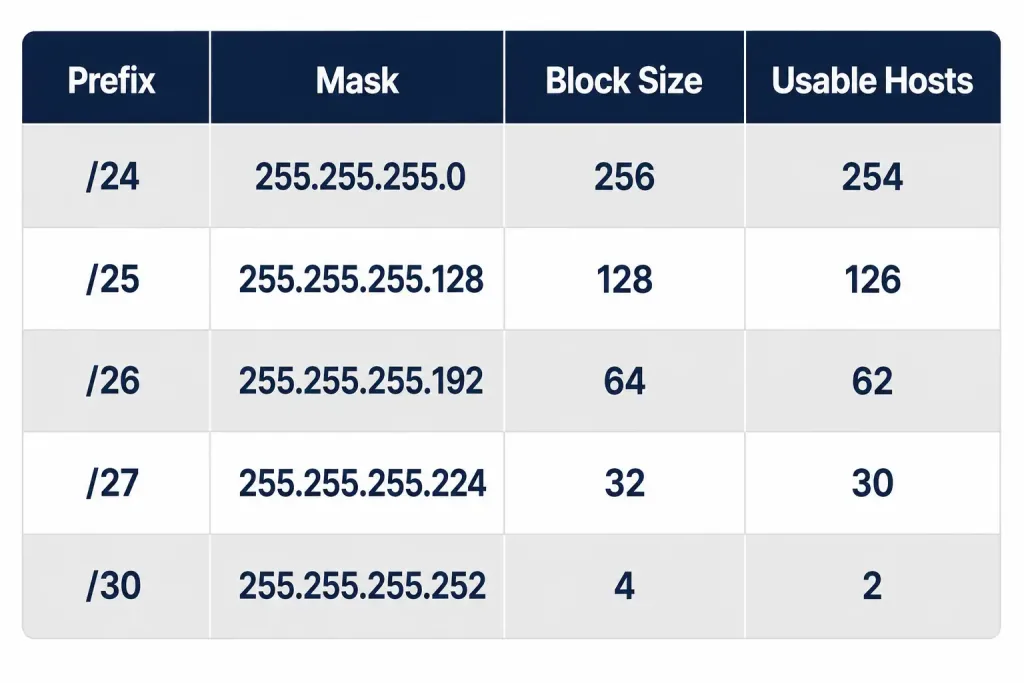
Start with what /27 actually means. A /27 prefix means 27 bits identify the network, leaving 5 host bits (32 total minus 27). In dotted decimal, /27 is 255.255.255.224 — worth simply memorizing the common prefix-to-mask conversions (/24 through /30 especially), since you’ll use them constantly.
Block size: 256 − 224 = 32.
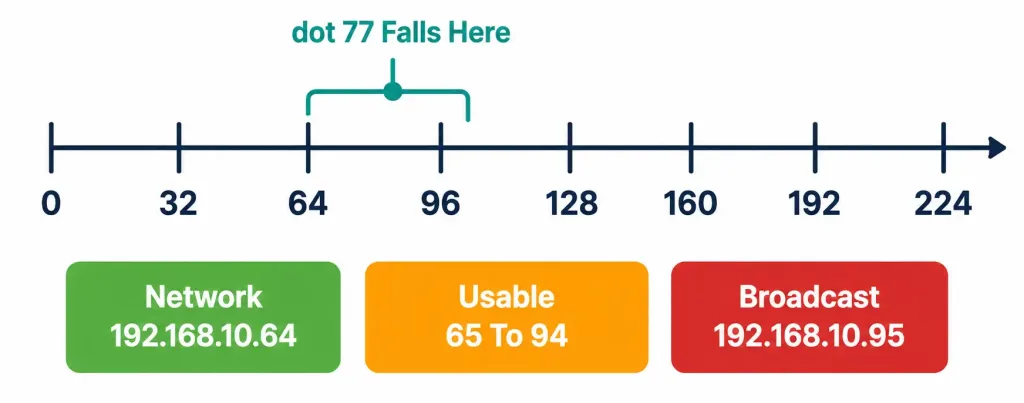
Subnet boundaries, counting up by the block size: .0, .32, .64, .96, .128, .160, .192, .224.
Where does .77 fall? Between .64 and .96 — so this address belongs to the .64 block.
- Network address: 192.168.10.64
- Broadcast address: 192.168.10.95 (one less than the next boundary, .96)
- Usable host range: 192.168.10.65 – 192.168.10.94
- Usable hosts: 2^5 − 2 = 30
A second worked example, for reinforcement — 10.4.201.130/26
/26 in dotted decimal is 255.255.255.192. Block size: 256 − 192 = 64. Boundaries: .0, .64, .128, .192. Address .130 falls between .128 and .192.
- Network address: 10.4.201.128
- Broadcast address: 10.4.201.191
- Usable range: 10.4.201.129 – 10.4.201.190
- Usable hosts: 2^6 − 2 = 62
Notice the process was identical both times. Find the block size. Find which block the address falls in. The network address is the start of that block, the broadcast is one less than the next block, and the host count comes straight from the number of host bits. Once this sequence is automatic, subnetting stops being the bottleneck it is for most candidates early in their studying.
Common misconception, worth naming directly: it’s tempting to count host bits and forget the minus-two at the end, especially under exam time pressure. A /27 has 2^5 = 32 total addresses in the block — but only 30 are usable, since the first and last are reserved as the network and broadcast addresses respectively. This distinction between “addresses in the block” and “usable host addresses” is one of the most common, avoidable points lost on subnetting questions.
A third worked example, using a smaller subnet — 172.16.44.9/29
/29 in dotted decimal is 255.255.255.248. Block size: 256 − 248 = 8. Boundaries: .0, .8, .16, .24, .32, .40, .48. Address .9 falls between .8 and .16.
- Network address: 172.16.44.8
- Broadcast address: 172.16.44.15
- Usable range: 172.16.44.9 – 172.16.44.14
- Usable hosts: 2^3 − 2 = 6
A /29 supports only 6 usable hosts — small enough that it’s a genuinely common real-world choice for a tiny segment like a small server cluster, or a handful of network management interfaces, where a /24 would waste an enormous amount of unused space.
Working Backward: Given a Host Requirement, Find the Prefix
Every example so far started with an address and a prefix, and worked forward to find the subnet details. The exam just as often runs this in reverse — starting with a stated host requirement, and asking which prefix satisfies it. This direction trips up candidates who’ve only practiced the forward direction, so it’s worth its own explicit method.
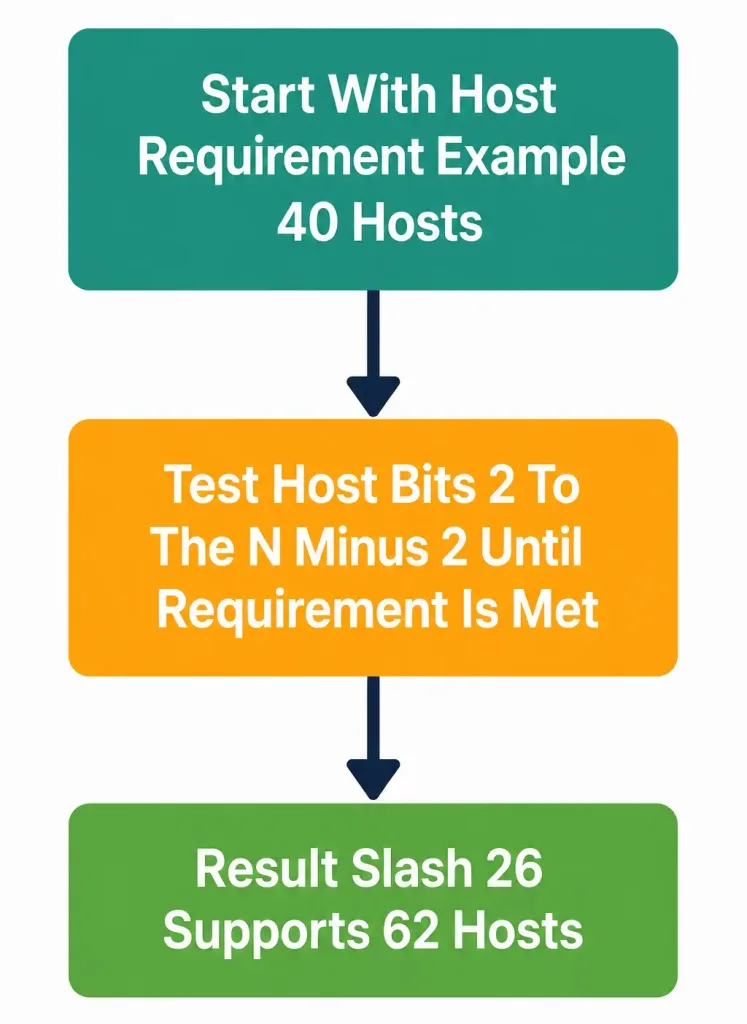
The question to ask: what’s the smallest number of host bits whose 2^n − 2 meets or exceeds the requirement?
Worked example: a network needs to support 40 hosts. Test host-bit counts starting small:
- 5 host bits: 2^5 − 2 = 30. Not enough — 30 < 40.
- 6 host bits: 2^6 − 2 = 62. Enough — 62 ≥ 40.
Six host bits is the answer, meaning the prefix is /26 (32 − 6 = 26). Notice that 5 bits genuinely wasn’t enough, even though it might look “close” at a glance — subnetting math doesn’t round in your favor, and a subnet that’s one host short of a stated requirement is a real, exam-relevant failure, not a rounding error to wave away.
A related, frequently tested variant: “how many subnets can a /24 network be divided into using a /27 mask?” This asks how many times the smaller block fits into the larger one. A /24 has 8 bits of address space beyond the /24 boundary itself (32 − 24 = 8 bits total available for further subnetting down to /27, since /27 borrows 3 of those 8 bits, using 24 + 3 = 27). The answer is 2^(borrowed bits) = 2^3 = 8 subnets. Each of those 8 subnets is the /27 block size (32 addresses each) calculated earlier in this lesson.
VLSM: Matching Subnet Size to Actual Need
Fixed-size subnetting — carving one address block into equal pieces — wastes address space whenever different parts of a network genuinely need different numbers of hosts. A point-to-point WAN link between two routers needs exactly 2 usable addresses. A branch office LAN might need 50. Giving both the same fixed subnet size means either the WAN link wastes dozens of addresses it’ll never use, or the branch office doesn’t have enough.
VLSM (Variable Length Subnet Masking) solves this by allowing different subnet sizes carved from the same overall address block, each sized to match its actual requirement rather than a single uniform size applied everywhere.
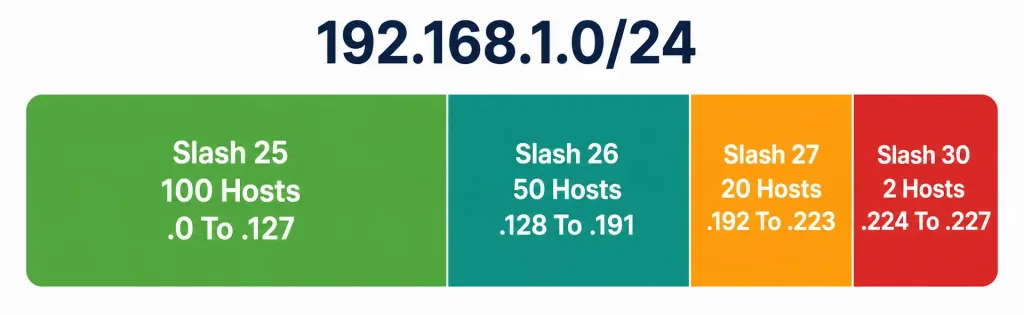
Worked VLSM example. Suppose you’re given 192.168.1.0/24 to allocate across four requirements: a LAN needing 100 hosts, a LAN needing 50 hosts, a LAN needing 20 hosts, and a point-to-point link needing 2 hosts.
The standard approach: allocate largest requirements first, since it makes the remaining math cleaner.
- 100 hosts needs at least 7 host bits (2^7 − 2 = 126, enough; 2^6 − 2 = 62 wouldn’t be). That’s a /25 (32 − 7 = 25). Allocate 192.168.1.0/25, covering .0 through .127.
- 50 hosts needs at least 6 host bits (2^6 − 2 = 62, enough). That’s a /26. Next available block after the /25 above: 192.168.1.128/26, covering .128 through .191.
- 20 hosts needs at least 5 host bits (2^5 − 2 = 30, enough). That’s a /27. Next available block: 192.168.1.192/27, covering .192 through .223.
- 2 hosts (the point-to-point link) needs at least 2 host bits (2^2 − 2 = 2, exactly enough). That’s a /30. Next available block: 192.168.1.224/30, covering .224 through .227.
Notice how little space is wasted compared to forcing all four into the same fixed size. The point-to-point link uses a /30 — just 4 total addresses, 2 usable — instead of being handed the same /27 or /25 the larger LANs needed. That’s the entire value proposition of VLSM: precision, not uniformity.
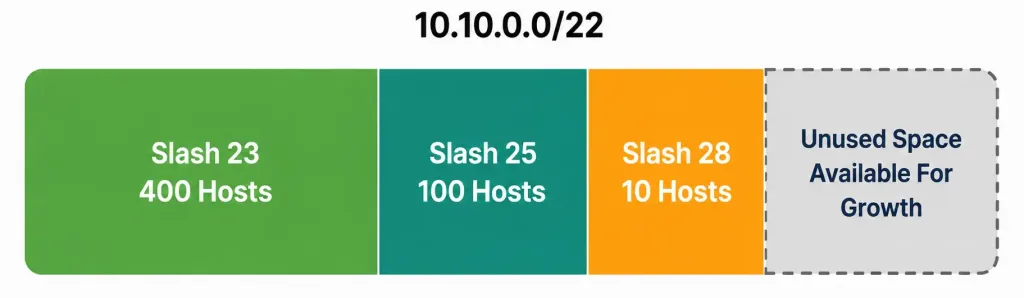
A second VLSM example, with a leftover-space wrinkle worth knowing about. Given 10.10.0.0/22 (a larger starting block than the previous example), allocate for three requirements: 400 hosts, 100 hosts, and 10 hosts.
- 400 hosts needs 9 host bits (2^9 − 2 = 510, enough; 2^8 − 2 = 254 isn’t). That’s a /23. Allocate 10.10.0.0/23, covering 10.10.0.0 through 10.10.1.255.
- 100 hosts needs 7 host bits (2^7 − 2 = 126, enough). That’s a /25. Next available block: 10.10.2.0/25, covering 10.10.2.0 through 10.10.2.127.
- 10 hosts needs 4 host bits (2^4 − 2 = 14, enough). That’s a /28. Next available block: 10.10.2.128/28, covering 10.10.2.128 through 10.10.2.143.
Notice something worth flagging explicitly: after these three allocations, a meaningful amount of the original /22 block remains unused — from 10.10.2.144 all the way through 10.10.3.255. This is normal, not a mistake. VLSM doesn’t require consuming every last address in the original block; it requires giving each stated requirement an appropriately sized subnet, and leftover space is simply available for future growth or additional requirements that weren’t part of the original list. A common exam trap is assuming a VLSM problem must perfectly exhaust the entire starting block — it doesn’t, and questions that describe “remaining unused space” after a VLSM allocation are describing entirely expected, correct behavior, not a leftover error to fix.
Exam Tip Worth Repeating
Questions rarely ask “what is the subnet mask for X” as a standalone question. They embed this calculation inside a larger routing, ACL, or OSPF scenario, and expect you to work through it quickly as one step among several. Practice until the four-question process above — network, broadcast, range, count — takes seconds, not minutes. Running out of time on basic subnet math, repeated across several embedded questions throughout the exam, is one of the most common and most avoidable reasons candidates run out of time overall.
Configuring IPv4 Addressing on a Cisco Router
Subnetting math means little without the ability to actually apply it. Here’s a small, realistic lab configuring addressing on two routers connected via a point-to-point link, using the VLSM allocation from the example above.
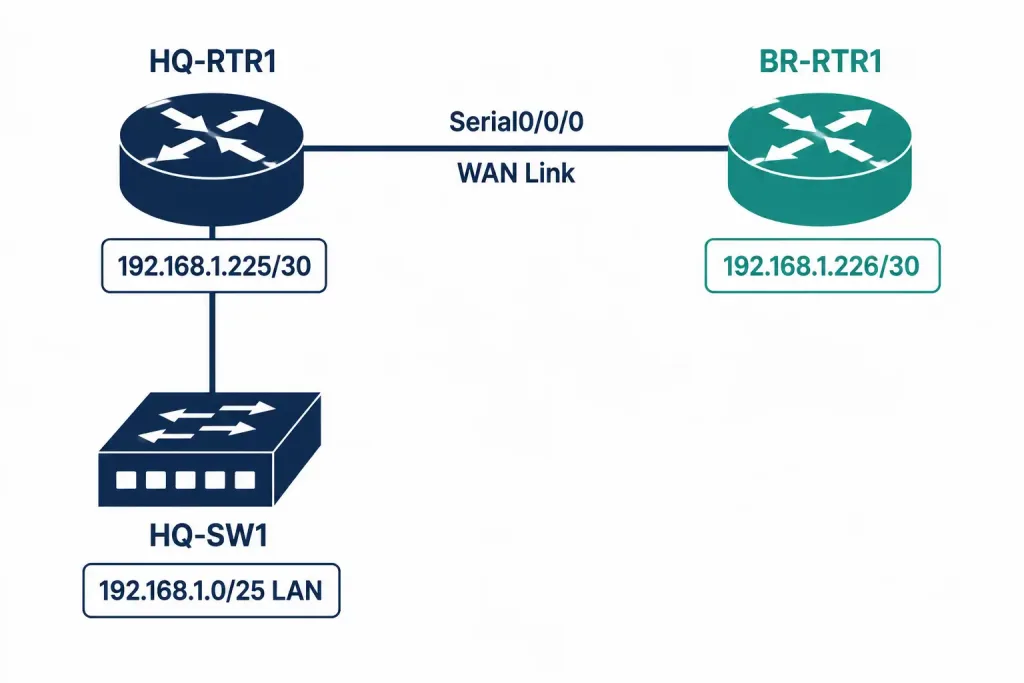
Topology: HQ-RTR1 connects to BR-RTR1 over a WAN link, using the /30 point-to-point subnet (192.168.1.224/30) from the VLSM example. HQ-RTR1 also has a LAN interface on the 192.168.1.0/25 subnet (the 100-host allocation).
Addressing table:
| Device | Interface | IP Address | Subnet Mask |
|---|---|---|---|
| HQ-RTR1 | GigabitEthernet0/0 (LAN) | 192.168.1.1 | 255.255.255.128 |
| HQ-RTR1 | Serial0/0/0 (WAN) | 192.168.1.225 | 255.255.255.252 |
| BR-RTR1 | Serial0/0/0 (WAN) | 192.168.1.226 | 255.255.255.252 |
Configuring HQ-RTR1:
HQ-RTR1(config)# interface GigabitEthernet0/0
HQ-RTR1(config-if)# ip address 192.168.1.1 255.255.255.128
HQ-RTR1(config-if)# no shutdown
HQ-RTR1(config-if)# exit
HQ-RTR1(config)# interface Serial0/0/0
HQ-RTR1(config-if)# ip address 192.168.1.225 255.255.255.252
HQ-RTR1(config-if)# no shutdown
Configuring BR-RTR1:
BR-RTR1(config)# interface Serial0/0/0
BR-RTR1(config-if)# ip address 192.168.1.226 255.255.255.252
BR-RTR1(config-if)# no shutdown
Verifying the configuration:
HQ-RTR1# show ip interface brief
Interface                  IP-Address      OK? Method Status                Protocol
GigabitEthernet0/0         192.168.1.1     YES manual up                    up
Serial0/0/0                192.168.1.225   YES manual up                    up
show ip interface brief is the fastest way to confirm addressing is applied and interfaces are actually up — both the interface status and line protocol columns need to read “up” for the interface to be genuinely functional, not just addressed.
A confirmation worth doing every time, and easy to skip under exam or lab time pressure: after configuring, verify the subnet math actually matches what was intended. HQ-RTR1’s WAN interface at 192.168.1.225/30 should have BR-RTR1 reachable at 192.168.1.226 — the only other usable address in that /30 block (192.168.1.224 is the network address, 192.168.1.227 is the broadcast address, leaving exactly .225 and .226 as the two usable addresses a /30 point-to-point link is specifically sized for).
Packet Tracer Practice Activity: VLSM Allocation and Configuration
Background/Scenario: You’ve been given the address block 172.16.0.0/24 to allocate across a small company network: a main office LAN needing 60 hosts, a branch office LAN needing 25 hosts, and a point-to-point WAN link between the two site routers. Your task is to calculate the VLSM allocation, then configure and verify addressing on both routers.
Topology (build this in Packet Tracer or GNS3):
[HQ-SW1]---[HQ-RTR1]======WAN Link======[BR-RTR1]---[BR-SW1]
   |                                                    |
[PC-HQ1]                                            [PC-BR1]
Addressing table (fill in the IP Address and Subnet Mask columns yourself before configuring):
| Device | Interface | IP Address | Subnet Mask |
|---|---|---|---|
| HQ-RTR1 | GigabitEthernet0/0 (LAN) | _______________ | _______________ |
| HQ-RTR1 | Serial0/0/0 (WAN) | _______________ | _______________ |
| BR-RTR1 | Serial0/0/0 (WAN) | _______________ | _______________ |
| BR-RTR1 | GigabitEthernet0/0 (LAN) | _______________ | _______________ |
| PC-HQ1 | NIC | _______________ | _______________ |
| PC-BR1 | NIC | _______________ | _______________ |
Part 1: Calculate the VLSM allocation
- Determine the required prefix length for the 60-host requirement, and allocate the first block starting at 172.16.0.0.
- Determine the required prefix length for the 25-host requirement, and allocate the next available block.
- Determine the required prefix length for the point-to-point WAN link (2 hosts), and allocate the next available block.
- Fill in the addressing table above using your calculated subnets — assign the first usable address in each LAN subnet to the router interface, and the last usable address in each LAN subnet to the connected PC.
Part 2: Configure basic device settings
- Configure a hostname on each router (HQ-RTR1 and BR-RTR1) matching the topology.
- Configure
no ip domain-lookupon each router to prevent typo command lookups from hanging the CLI.
Part 3: Configure and verify IP addressing
- Configure the LAN and WAN interfaces on both routers using your completed addressing table.
- Configure the IP address, subnet mask, and default gateway on both PCs.
- Issue
no shutdownon every router interface you’ve configured.
Verification steps — expected output when done correctly:
show ip interface briefon both routers should show all configured interfaces with status “up” and protocol “up.”pingfrom PC-HQ1 to its own default gateway (HQ-RTR1’s LAN interface) should succeed.pingfrom HQ-RTR1’s WAN interface to BR-RTR1’s WAN interface should succeed, confirming the point-to-point link addressing is correct.- Note: ping from PC-HQ1 to PC-BR1 will not succeed yet at this stage, since no routing protocol has been configured between the two routers — that’s the subject of a later lesson in Domain 3. Successful pings across each individual link, without full end-to-end connectivity yet, is the expected and correct result here.
You can build this same topology yourself in Packet Tracer or GNS3 to practice hands-on — working through your own VLSM calculation before checking it against a completed answer is significantly more effective for retention than reading a worked example alone.
Troubleshooting Common Addressing Mistakes
Real-world addressing problems, and exam scenarios describing them, tend to fall into a small number of recurring patterns. Recognizing the pattern quickly matters more than memorizing a long list of possible causes.
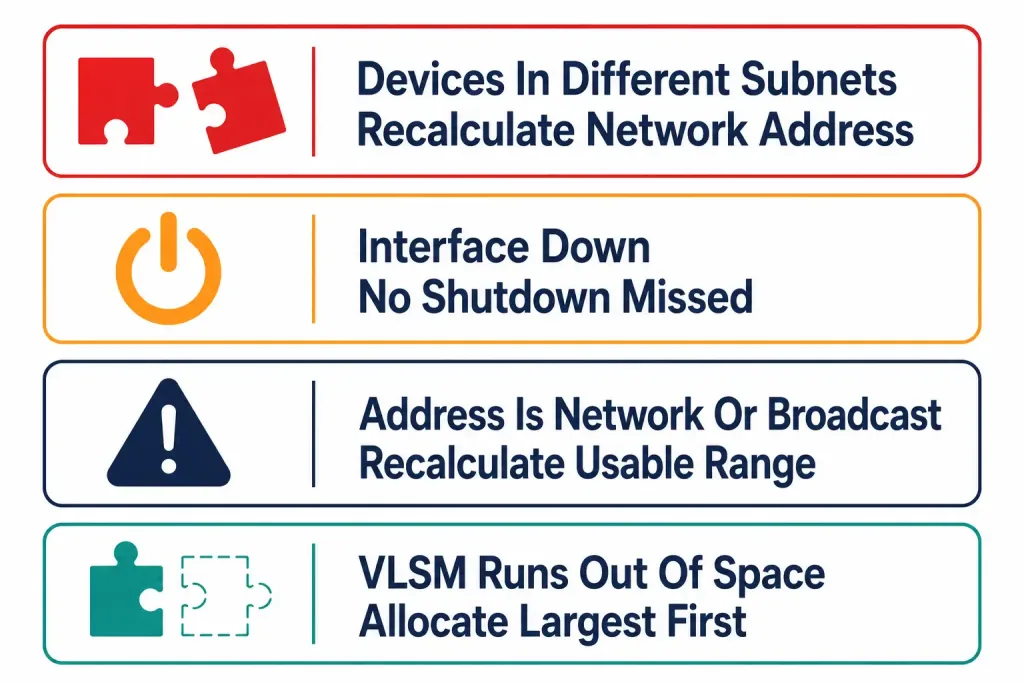
Two devices on paper look like they should reach each other, but can’t. The most common cause: they’re actually in different subnets, despite both addresses looking superficially similar. Always calculate the actual network address for both devices before assuming they share a subnet — two addresses that differ only in their last octet can still belong to different subnets entirely, depending on the mask in use. A /26 subnet, for instance, splits a single third octet’s worth of addresses into four separate subnets; two devices numerically close to each other can easily land in different ones.
An interface won’t come up after being addressed. Before suspecting the addressing itself, confirm no shutdown was actually issued — a genuinely common, easy-to-forget step, especially when working quickly through multiple interfaces in a lab or exam simulation. show ip interface brief will show the interface administratively down if this step was missed, which is a distinct status from the interface being down due to a genuine physical or addressing problem.
A device’s assigned address turns out to be the network or broadcast address of its own subnet. This is a configuration mistake, not a network problem — the device won’t function correctly with an address that isn’t actually a usable host address, and no amount of correct cabling or routing configuration will fix an address that was invalid from the start. Recalculating the subnet’s actual usable range catches this immediately.
A VLSM allocation runs out of address space partway through. This usually means the largest requirements weren’t allocated first. Allocating a small requirement early can fragment the remaining space in a way that no longer cleanly fits a later, larger requirement — even though the total remaining address count might look sufficient at a glance. This is exactly why the “largest requirements first” ordering isn’t just a convenience; skipping it can make an otherwise-solvable VLSM problem genuinely unsolvable within the given block.
Frequently Asked Questions
Do I need to memorize every possible subnet mask, or just learn the calculation method? Both, realistically. Memorizing the common prefix-to-mask conversions (/24 through /30 especially) removes a full step from every calculation, while still understanding the underlying block-size method means you’re not stuck if a question uses a less common prefix you haven’t specifically memorized.
Is VLSM the same thing as CIDR? Related, but not identical. CIDR (Classless Inter-Domain Routing) is the broader concept that address space isn’t constrained to old fixed class boundaries (A, B, C) at all — any prefix length is valid, anywhere. VLSM is the specific practice of using that classless flexibility to allocate different-sized subnets within one address block. VLSM is really an application of CIDR’s underlying flexibility, not a separate, competing concept.
Why does the exam care about VLSM specifically, rather than just fixed-size subnetting? Because it reflects genuine real-world practice. Real networks almost never have uniform host requirements across every segment — a server VLAN, a small management network, and a handful of point-to-point WAN links all coexisting on the same overall address space is completely normal, and VLSM is the actual technique used to address that reality efficiently rather than wastefully.
What’s the fastest way to get genuinely fast at this before the exam? Repetition, specifically timed repetition. Work through subnetting problems with a timer running, and track how long each one takes as you practice. The goal isn’t just getting the right answer eventually — it’s getting there in the handful of seconds a real exam scenario question can actually afford, given that subnetting is usually one step embedded inside a larger question, not the entire question itself.
IPv4 Subnetting & VLSM Practice Quiz
Test your knowledge of subnet masks, network addresses, VLSM, host calculations, and router interface verification.
Summary
- The core skill is answering four questions fast: network address, broadcast address, usable range, and host count.
- The block-size shortcut (256 minus the relevant mask octet) makes this calculation quick without needing binary conversion every time.
- Host count is always 2^(host bits) − 2 — don’t forget to subtract the network and broadcast addresses.
- VLSM allocates different subnet sizes from one block based on actual host requirements, avoiding the waste of fixed-size subnetting; allocate largest requirements first.
- This skill is embedded throughout the rest of the exam — speed and accuracy here directly affects performance on routing, ACL, NAT, and OSPF questions elsewhere.



