Domain 6.7 | Automation and Programmability — 10% of exam
Learning Objectives
By the end of this lesson, you will be able to:
- Describe JSON’s structure: objects, arrays, key-value pairs, and supported data types.
- Navigate a nested JSON structure to correctly identify a specific value.
- Recognize common JSON syntax rules and the mistakes that most often break them.
- Contrast JSON with XML and YAML, the two other data formats covered elsewhere in this domain.
Key Terms Glossary
| Term | Definition |
|---|---|
| JSON (JavaScript Object Notation) | A lightweight, human-readable data format structuring data using key-value pairs, arrays, and nested objects. |
| Key-value pair | A single piece of data in JSON, consisting of a named key and its associated value. |
| Object | A JSON structure enclosed in curly braces {}, containing one or more key-value pairs. |
| Array | A JSON structure enclosed in square brackets [], containing an ordered list of values. |
| Nesting | Placing an object or array inside another object or array, creating multiple levels of structure. |
| Data type | The kind of value a JSON key holds: string, number, boolean, null, object, or array. |
Why This Objective Matters: A Reading Skill, Not a Writing Skill
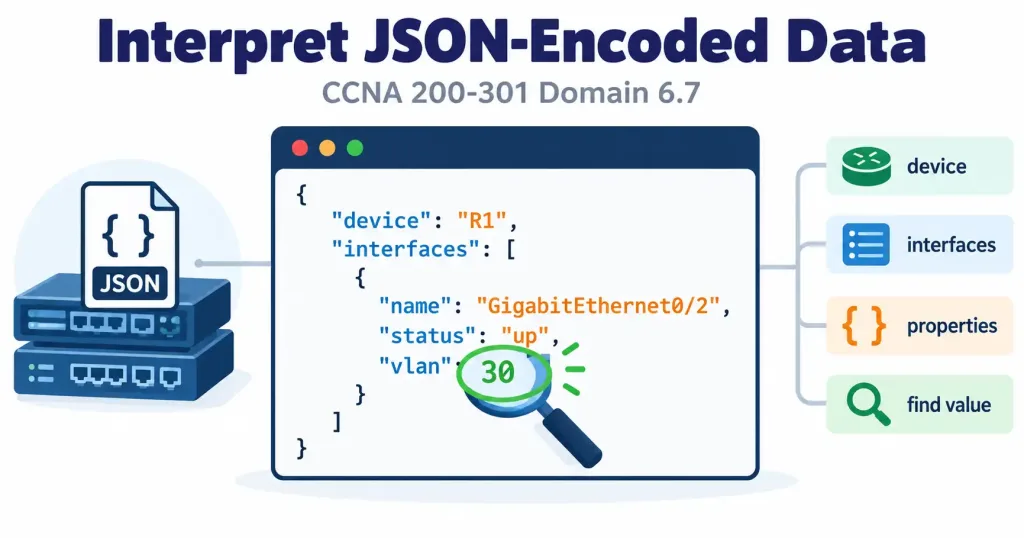
It’s worth being precise about what this objective actually tests, since it’s framed differently from most other objectives in this course. You are not expected to write API-calling code from scratch for this exam. The practical skill being tested is the ability to read a JSON structure presented as sample API output and correctly identify a specific value within it — for example, “what VLAN is this interface assigned to?”
This is fundamentally a parsing and navigation skill, not a programming skill, and it’s directly relevant given how dominant JSON has become as the data format for REST API responses, covered in objective 6.5 — when a controller or device returns data in response to an API request, that data is very commonly formatted as JSON, and being able to read it correctly is a genuinely practical, everyday skill for anyone working with network automation.
JSON’s Basic Building Blocks
JSON structures data using key-value pairs, organized into objects and arrays, and supporting a small, specific set of data types.
json
{
  "interface": "GigabitEthernet0/1",
  "status": "up",
  "vlan": 20,
  "addresses": ["192.168.1.1", "192.168.1.2"]
}
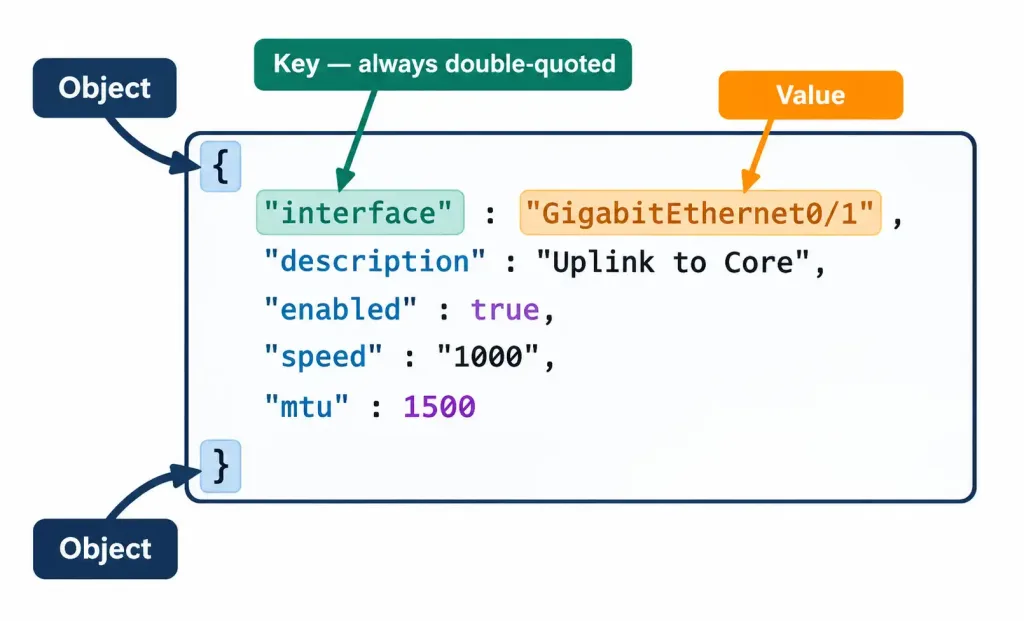
This example, drawn directly from the source material for this objective, illustrates the core building blocks concretely. The entire structure is enclosed in curly braces {}, making it an object — a container holding key-value pairs. Each line inside is a key-value pair: "interface" is the key, and "GigabitEthernet0/1" is its associated value. Keys in JSON are always written as strings, enclosed in double quotes, followed by a colon and then the value.
Data Types JSON Supports
Looking closely at this same example reveals several distinct data types, each represented differently:
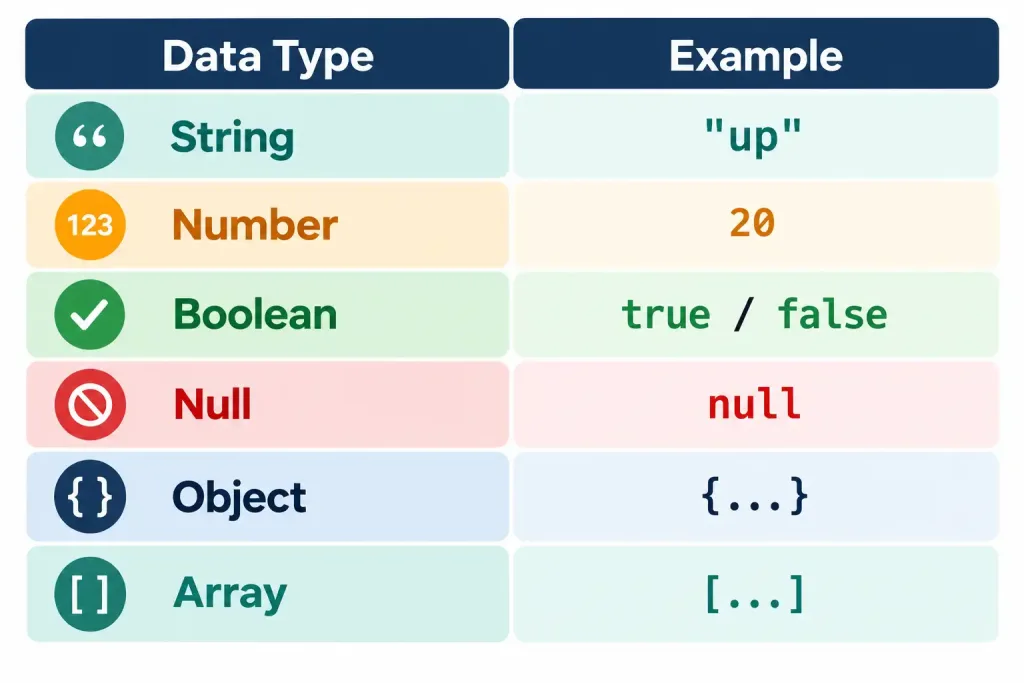
- String — text data enclosed in double quotes, like
"GigabitEthernet0/1"or"up". - Number — numeric data with no quotes at all, like
20for the VLAN value. - Array — an ordered list of values enclosed in square brackets
[], like["192.168.1.1", "192.168.1.2"]for the addresses field, which holds two separate string values in a specific order.
Beyond what appears in this specific example, JSON also supports boolean values (true or false, written without quotes), null (representing the deliberate absence of a value, written as the bare word null), and nested objects (an object used as the value for a key, rather than a simple string or number) — all worth recognizing on sight even though this particular example doesn’t happen to include every type.
Answering “What VLAN Is This Interface Assigned To?”
This is precisely the kind of question this objective is built around, and working through it explicitly demonstrates the actual skill. Looking at the example structure above: the key "vlan" has the value 20. That’s the complete answer — VLAN 20. The skill here isn’t complicated once you know what to look for; it’s simply locating the correct key within the structure and reading its associated value accurately, without being thrown off by the surrounding syntax (quotes, brackets, commas) that a first-time reader might find visually unfamiliar.
Navigating Nested Structures
Real API responses are frequently more complex than a single flat object, involving nesting — objects inside objects, or arrays containing multiple objects — and correctly navigating several levels deep is where this skill becomes genuinely practical rather than trivial.
json
{
  "device": {
    "hostname": "R1",
    "interfaces": [
      {
        "name": "GigabitEthernet0/1",
        "status": "up",
        "vlan": 20
      },
      {
        "name": "GigabitEthernet0/2",
        "status": "down",
        "vlan": 30
      }
    ]
  }
}
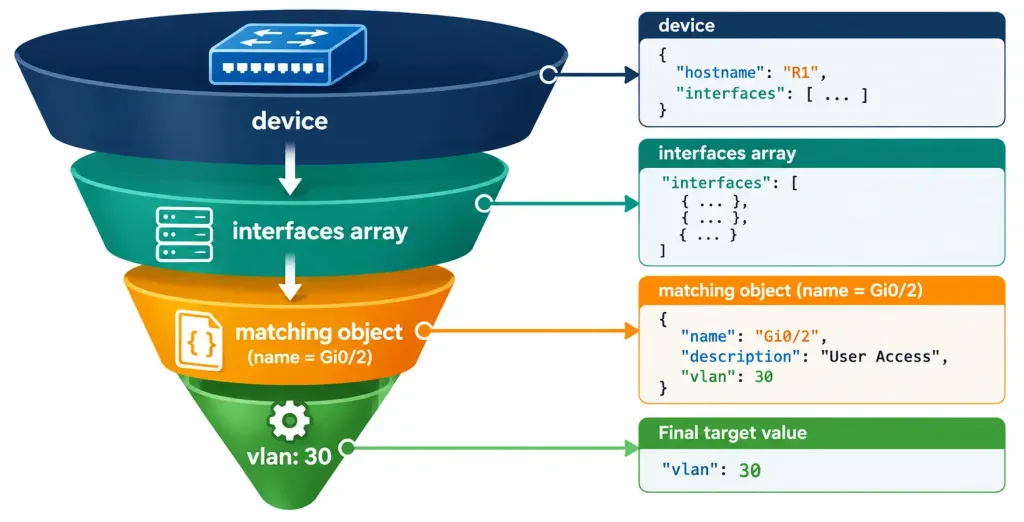
Here, the outermost object contains a single key, "device", whose value is itself another object. That inner object contains "hostname" (a simple string) and "interfaces" (an array of objects — a list where each individual item in the list is itself a complete object with its own set of key-value pairs).
To answer “what VLAN is GigabitEthernet0/2 assigned to,” you’d need to: enter the "device" object, find the "interfaces" array, locate the specific object within that array where "name" equals "GigabitEthernet0/2", and then read that object’s "vlan" value — 30. This multi-step navigation, working inward through successive layers, is exactly the skill real API responses demand, since a single flat object like the first example is genuinely simpler than most real-world data actually returned by a controller or device.
Going One Level Deeper
Real device and controller responses frequently nest even further than the two-level example above, and it’s worth practicing on something closer to that reality before moving on:
json
{
  "device": {
    "hostname": "R1",
    "interfaces": [
      {
        "name": "GigabitEthernet0/1",
        "status": "up",
        "vlan": 20,
        "ip_config": {
          "address": "192.168.10.1",
          "subnet_mask": "255.255.255.0",
          "dhcp_enabled": false
        }
      }
    ]
  }
}
Here, a third level of nesting appears: within the single interface object inside the "interfaces" array, the key "ip_config" holds yet another nested object, containing "address", "subnet_mask", and "dhcp_enabled". Answering “is DHCP enabled on this interface” now requires navigating three levels inward — "device" → the matching object within "interfaces" → "ip_config" → "dhcp_enabled" — arriving at the value false, a boolean written without quotes, distinguishing it visually from a string value like "false" would be. This example is also worth noticing for a second reason: dhcp_enabled demonstrates the boolean data type in context, something the earlier, simpler examples in this lesson didn’t happen to include, rounding out a concrete illustration of all the core JSON data types working together in one realistic structure.
Common JSON Syntax Rules and Pitfalls
Recognizing correct JSON syntax — and spotting what makes a structure invalid — is a practical skill worth building explicitly.
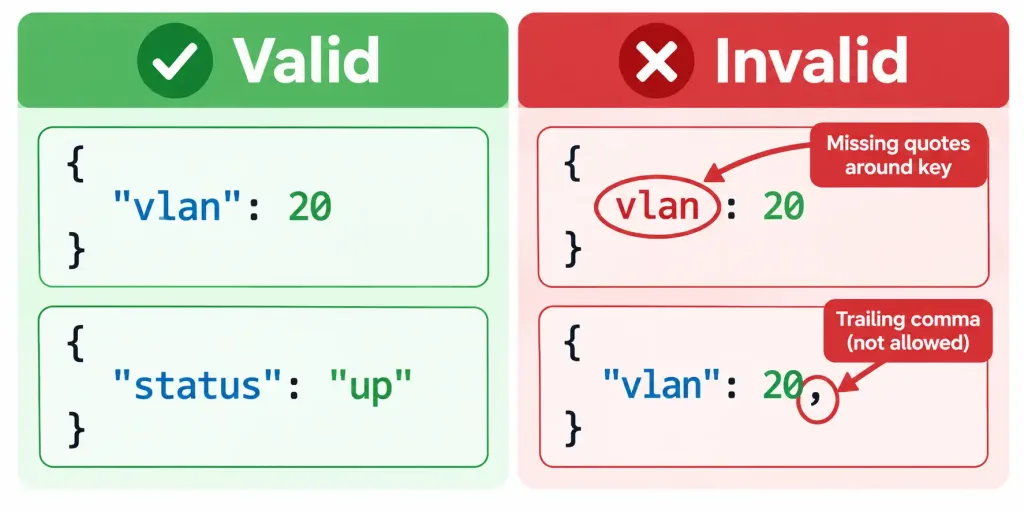
Keys must always be double-quoted strings. "vlan" is correct; vlan (no quotes) or 'vlan' (single quotes) are not valid JSON, even though similar unquoted or single-quoted syntax might be acceptable in some programming languages or in YAML, covered in objective 6.6.
String values must use double quotes, never single quotes. "up" is correct; 'up' is not valid JSON syntax.
No trailing commas are allowed. A comma after the last item in an object or array — {"vlan": 20,} with a comma right before the closing brace — is a syntax error in strict JSON, even though this same trailing comma is often harmless or even conventional in some programming languages.
Commas separate items, but only between items, never after the last one. Multiple key-value pairs within an object, or multiple values within an array, are separated by commas, but getting the comma placement wrong — too many, too few, or in the wrong position — is one of the most common sources of invalid JSON when hand-editing it.
JSON vs. XML vs. YAML: Three Formats, Three Objectives
This domain has now introduced three distinct data formats, each associated with a different objective, and explicitly contrasting them reinforces all three rather than leaving them as isolated facts.
JSON, covered in this objective, is the dominant format for REST API data (objective 6.5), using curly braces, square brackets, and quoted keys/string values, as shown throughout this lesson.
XML, mentioned in objective 6.3’s NETCONF discussion, uses tag-based markup — <vlan>20</vlan> rather than "vlan": 20 — historically common in network device APIs and still the standard format NETCONF specifically uses, even as JSON has become more dominant elsewhere.
YAML, covered in objective 6.6’s discussion of Ansible playbooks, uses indentation-based structure with minimal punctuation — no curly braces, no quotes required around most simple values — prioritizing human readability, particularly well suited to configuration files a person writes and edits directly rather than data primarily generated and consumed programmatically.
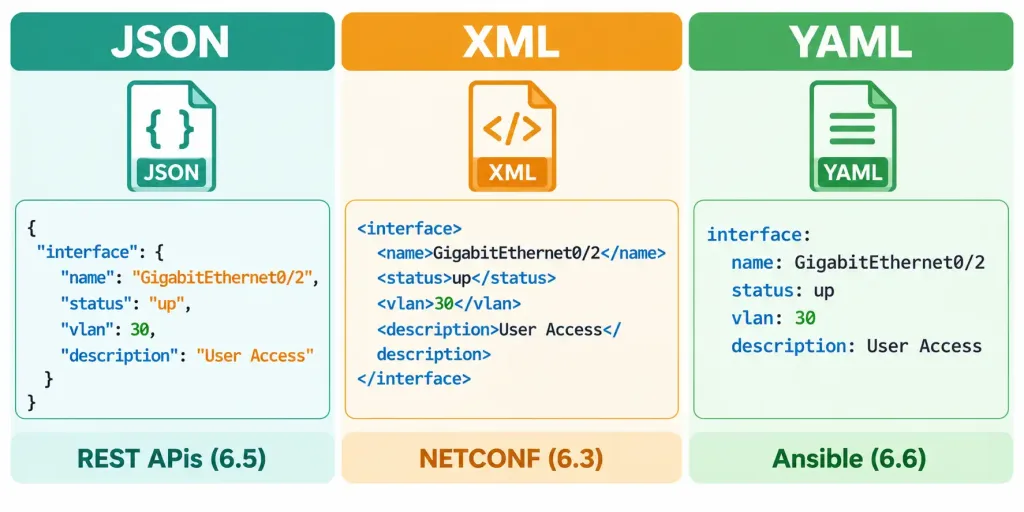
The same underlying data — an interface’s name, status, and VLAN — could reasonably be represented in any of these three formats, and recognizing which format a given sample is written in, along with correctly reading its content regardless of format, rounds out the practical data-literacy skill this entire domain builds toward across objectives 6.3, 6.5, 6.6, and this final objective together.
The Same Data, Three Ways
Seeing identical information expressed in all three formats side by side makes the contrast concrete rather than abstract. The interface data from earlier in this lesson, expressed in JSON:
json
{
  "interface": "GigabitEthernet0/1",
  "status": "up",
  "vlan": 20
}
The same data expressed in XML, NETCONF’s conventional format:
xml
<interface>
  <name>GigabitEthernet0/1</name>
  <status>up</status>
  <vlan>20</vlan>
</interface>
And the same data expressed in YAML, Ansible’s conventional format:
yaml
interface: GigabitEthernet0/1
status: up
vlan: 20
All three carry exactly the same three pieces of information — the interface name, its status, and its VLAN — but each format encodes that information using genuinely different punctuation and structural conventions. JSON relies on braces, quotes, and colons; XML relies on paired opening and closing tags surrounding each value; YAML relies on indentation and a bare colon, with no braces or closing tags required at all. Recognizing which format you’re looking at on sight, purely from these structural cues, is itself part of the practical skill this section of the domain builds toward, before you even get to the separate task of reading the actual values out of whichever format you’re working with.
Where This Data Actually Comes From in Practice
It’s worth grounding this skill in a realistic end-to-end scenario rather than treating JSON samples as isolated puzzles to decode. When a network engineer sends a GET request (covered in objective 6.5) to a controller’s REST API asking for an interface’s current status, the controller queries its own internal data about that device and returns the answer formatted as JSON in the HTTP response body — exactly the kind of structure shown throughout this lesson.
The engineer, or more commonly an automation script acting on the engineer’s behalf, then needs to parse that JSON response to extract the specific value actually needed, whether that’s checking whether an interface is up before proceeding with a planned change, or confirming a VLAN assignment matches what was intended after a configuration push.
This lesson’s skill — reading and navigating JSON to find a specific value — is precisely what happens at that final step, whether performed manually by a human reading raw output during troubleshooting, or performed programmatically inside a script that then makes a decision based on what it finds. Understanding the manual version of this skill is exactly what makes the programmatic version comprehensible later, since a script’s parsing logic is ultimately just an automated version of the same “find this key, read its value” process a human performs by eye.
A Final Worked Walkthrough
It’s worth bringing every concept in this lesson together in one last, slightly larger example, read start to finish the way an actual exam question or real troubleshooting task would present it:
json
{
  "site": "HQ",
  "devices": [
    {
      "hostname": "SW1",
      "model": "Catalyst 9300",
      "uptime_days": 145,
      "interfaces": [
        {"name": "Gi1/0/1", "status": "up", "vlan": 10},
        {"name": "Gi1/0/2", "status": "down", "vlan": 10}
      ]
    },
    {
      "hostname": "SW2",
      "model": "Catalyst 9300",
      "uptime_days": 12,
      "interfaces": [
        {"name": "Gi1/0/1", "status": "up", "vlan": 20}
      ]
    }
  ]
}
Suppose the question is: “Which switch has been running for fewer days, and what is that switch’s first interface’s VLAN assignment?” Working through it step by step: the outermost object has a "devices" array containing two device objects. Comparing "uptime_days" across both — 145 for SW1, 12 for SW2 — SW2 has clearly been running for fewer days. Within SW2’s object, the "interfaces" array contains one entry, Gi1/0/1, with a "vlan" value of 20.
The complete answer: SW2, with an uptime of 12 days, has its interface Gi1/0/1 assigned to VLAN 20. This kind of multi-step comparison across an array of sibling objects, followed by drilling into one specific match, is a realistic combination of everything covered in this lesson — reading values, comparing them, and navigating nested arrays — rather than any single isolated skill practiced in complete isolation from the others.
Common Misconceptions
- “JSON keys can be written without quotes, since it’s obvious what they mean.” JSON syntax strictly requires double-quoted keys — omitting the quotes produces invalid JSON, even if a human reader could still understand the intended meaning.
- “Numbers in JSON need to be enclosed in quotes, just like strings.” Numbers are written without quotes (
20, not"20") — adding quotes around a number technically changes its data type to a string, which can cause problems if the receiving system expects an actual numeric value. - “An array can only contain simple values like strings or numbers.” Arrays can contain objects too, as shown in the nested interfaces example — an array of objects is an extremely common real-world JSON pattern, not an unusual edge case.
- “JSON, XML, and YAML are essentially interchangeable, and the choice between them doesn’t matter.” Each has genuinely different syntax rules, different typical use cases (JSON for REST APIs, XML for NETCONF, YAML for human-edited configuration files like Ansible playbooks), and correctly recognizing which one you’re looking at matters for correctly parsing it.
- “This objective requires being able to write complete, syntactically perfect JSON from memory.” The stated skill is reading and navigating presented JSON to find specific values — production-quality JSON writing is a related but distinct skill beyond this particular objective’s explicit scope.
Frequently Asked Questions
Can a JSON array contain a mix of different data types within the same array?
Yes, technically — a single array could contain a string, a number, and an object all as separate elements — though in well-designed, real-world API responses, arrays typically contain elements of a consistent type (all strings, or all objects with the same structure), since that consistency makes the data considerably easier for both humans and programs to process predictably.
Is there a limit to how deeply JSON can be nested?
Not really, in practical terms — JSON can nest objects within arrays within objects within arrays, as many levels deep as needed to represent genuinely complex, hierarchical data, though extremely deep nesting can become harder for a human reader to navigate visually, even though it remains technically valid.
Does whitespace or formatting (like indentation) matter in JSON, the way it does in YAML?
No — JSON’s structure is defined entirely by its brackets, braces, quotes, and commas, not by indentation or whitespace. JSON is commonly formatted with indentation for human readability (exactly as shown throughout this lesson), but that formatting is a stylistic convenience, not a syntax requirement the way YAML’s indentation actually is.
What tools help verify whether a piece of JSON is syntactically valid?
Various online JSON validator tools and built-in features in many code editors can check JSON syntax and highlight specific errors — useful in practice, though for this objective’s exam-relevant skill, being able to visually spot the common pitfalls covered in this lesson (missing quotes, trailing commas, mismatched brackets) without needing an external tool is the more directly tested capability.
Why does NETCONF use XML instead of JSON if JSON is more dominant overall?
NETCONF predates JSON’s rise to dominance in modern API design, and its XML-based approach became established as part of the protocol’s original specification; while JSON has become more common in many newer network API contexts, NETCONF’s continued use of XML reflects its own established history rather than JSON being universally superior for every use case.
What happens if a string value itself needs to contain a double quote character?
JSON requires special characters like a literal double quote inside a string value to be “escaped” using a backslash — "He said \"hello\"" — signaling that the escaped quote is part of the string’s actual content rather than marking the end of the string itself. Recognizing an escaped quote when you see one (a backslash immediately before it) is a minor but occasionally relevant detail when reading real-world JSON that includes free-text values, such as a device description field an administrator has typed themselves.
JSON Fundamentals for Network Automation
18 Questions • JSON Syntax • Objects • Arrays • Nesting • Network Automation
Summary
JSON structures data using objects ({}), arrays ([]), and double-quoted key-value pairs, supporting strings, numbers, booleans, null, nested objects, and arrays as its core data types.
The practical, tested skill for this objective is reading and navigating presented JSON to correctly identify specific values — not writing JSON or API-calling code from scratch, a distinction worth keeping firmly in mind while preparing.
Nested structures require navigating multiple levels inward, often including arrays of objects, to locate a specific value buried several layers deep within a larger response — a skill this lesson practiced across examples ranging from one level to three levels of nesting.
Common JSON syntax pitfalls include missing double quotes around keys or string values, and trailing commas — both of which produce invalid JSON even though similar patterns might be acceptable in other formats or languages, and both worth being able to spot on sight during troubleshooting.
JSON, XML (used by NETCONF, objective 6.3), and YAML (used by Ansible playbooks, objective 6.6) are three distinct data formats this domain covers together, each suited to different typical use cases despite representing broadly similar underlying data.
Reading JSON is ultimately the manual version of what an automation script does programmatically — locating a specific key and reading its value — making this lesson's skill directly relevant to understanding how automated tooling actually processes API responses.