Domain 6.6 | Automation and Programmability — 10% of exam
Learning Objectives
By the end of this lesson, you will be able to:
- Describe what configuration management tools do and name the three most commonly referenced examples.
- Distinguish agent-based configuration management (Puppet, Chef) from agentless configuration management (Ansible).
- Explain why Ansible’s agentless, SSH-based architecture is particularly well suited to network infrastructure specifically.
- Describe Ansible’s playbook concept and its YAML-based syntax.
- Connect configuration management’s design goals back to idempotency and automation concepts from earlier in this domain.
Key Terms Glossary
| Term | Definition |
|---|---|
| Configuration management tool | Software designed to automate the deployment and ongoing management of configuration across many devices or systems consistently. |
| Agent | Software installed and running on a managed node, periodically checking in with a central server to pull and apply configuration. |
| Agentless | An architecture requiring no persistent software installed on the managed device, instead pushing configuration directly via an existing protocol like SSH. |
| Playbook | Ansible’s human-readable YAML file defining the configuration tasks to be applied. |
| YAML | A human-readable data serialization format commonly used for configuration files, including Ansible playbooks. |
| Inventory | Ansible’s list of managed hosts (devices) that playbooks can be run against. |
| Module | A reusable, self-contained unit of Ansible functionality performing a specific task, such as configuring an interface. |
What Configuration Management Tools Do
Puppet, Chef, and Ansible are all configuration management tools — software designed to automate the deployment and ongoing management of configuration across many devices or systems consistently. This is a direct, concrete application of the consistency and reduced-repetition benefits covered in objective 6.1: rather than an administrator manually applying similar configuration to device after device, a configuration management tool defines the desired configuration once and applies it programmatically across however many devices actually need it.
All three tools solve fundamentally the same problem, but they take genuinely different architectural approaches to actually delivering configuration to managed systems — and understanding that architectural difference, rather than just memorizing three product names, is the actual substance of this objective.
Agent-Based Architecture: Puppet and Chef
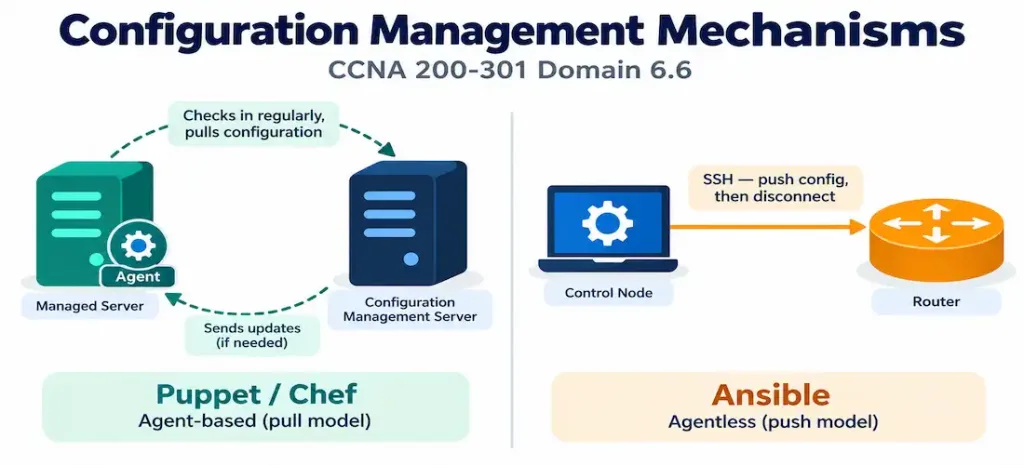
Puppet and Chef traditionally require an agent — a piece of software installed and running on every managed node. This agent periodically checks in with a central server, at which point it pulls down whatever configuration has been defined for it and applies that configuration locally. This is often described as a pull model: the managed node itself initiates the check-in and pulls its configuration, rather than the central server reaching out and pushing configuration to the node on its own schedule.
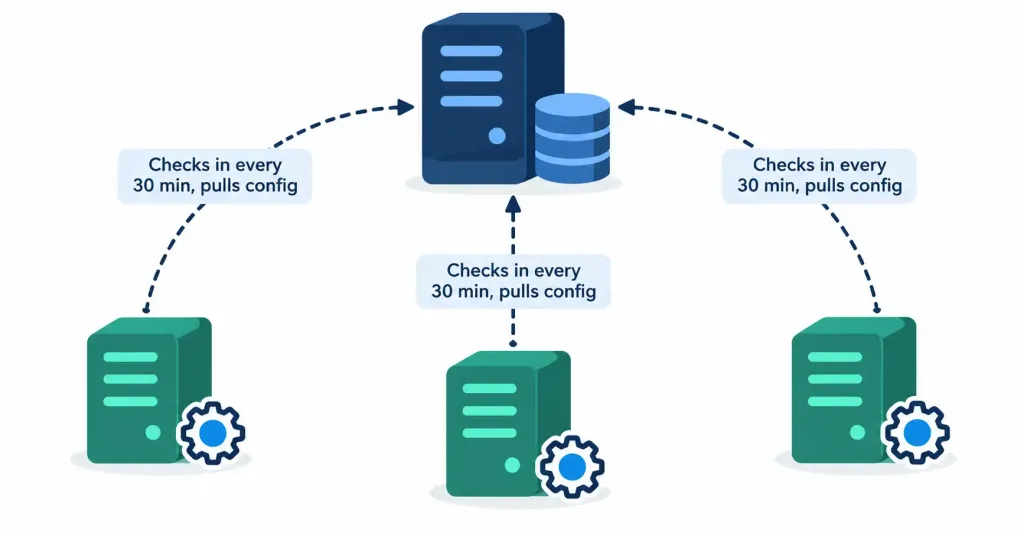
This model works well in environments where installing persistent, ongoing software on every managed system is entirely normal and expected — general-purpose servers running a full operating system with ample resources to spare for an additional background agent process are the classic fit for this approach.
A Brief Distinction Between Puppet and Chef
While both share the agent-based, pull architecture described above, Puppet and Chef differ in how they define configuration internally — Puppet uses its own declarative language specifically designed for describing a desired end state, while Chef uses “recipes” written in Ruby, a general-purpose programming language, giving Chef configurations more procedural, code-like flexibility at the cost of requiring somewhat more programming familiarity to read and write comfortably. For CCNA purposes, this internal distinction matters far less than the shared architectural pattern both tools follow — agent-based, pull-based, well suited to general-purpose server environments — which is the actual point of comparison this objective tests against Ansible’s alternative approach.
Agentless Architecture: Ansible
Ansible takes a fundamentally different approach: it is agentless. Rather than requiring any persistent software installed on the managed device, Ansible uses standard SSH (for Linux systems and network devices) or WinRM (for Windows systems) to push configuration directly, on demand, with nothing left running on the managed device between one Ansible run and the next. This is generally described as a push model: a central control node initiates the connection and pushes configuration out to managed devices, rather than waiting for each device to check in on its own schedule.
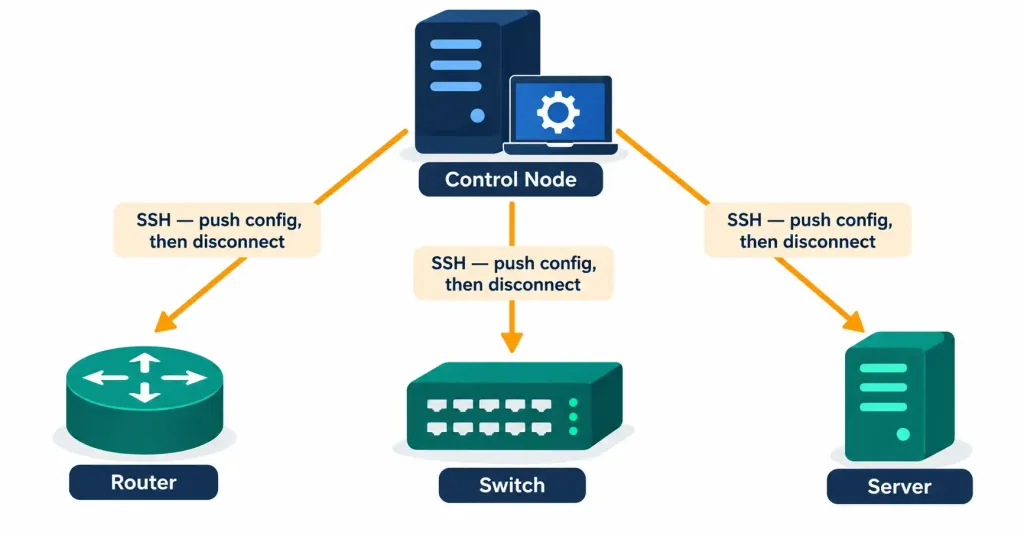
Configuration in Ansible is defined in human-readable YAML files called playbooks — plain text files describing, in a structured but genuinely readable format, exactly what configuration state should exist on the targeted devices.
Why Agentless Matters Specifically for Network Devices
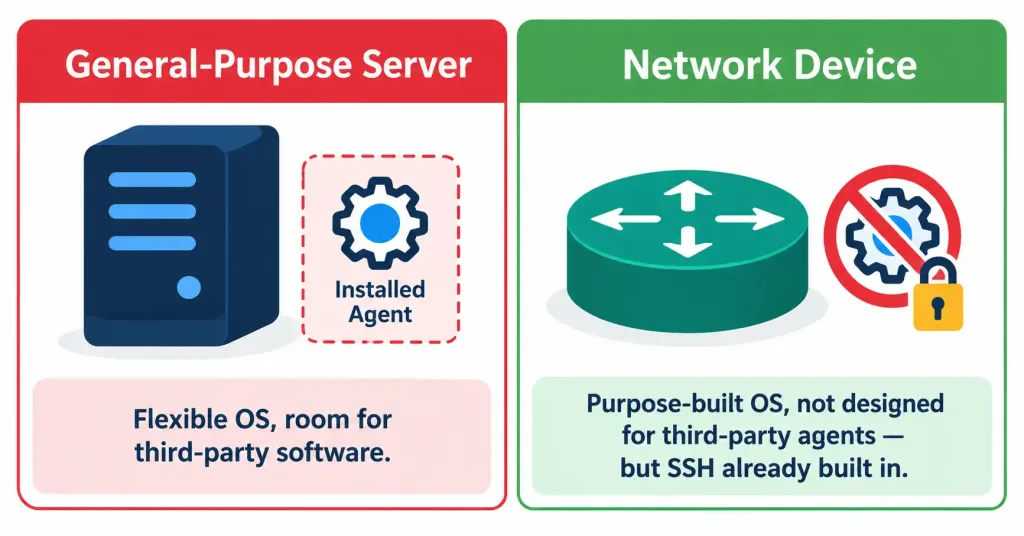
This architectural difference has an outsized practical consequence specifically in networking contexts, and it’s worth stating directly: network devices historically don’t support installing arbitrary third-party agent software the way general-purpose servers do. A router or switch runs a purpose-built network operating system with a fundamentally different design philosophy than a general-purpose server OS — it isn’t designed to host arbitrary background processes from third-party vendors, and even where some limited extensibility exists on newer platforms, it’s nowhere near as open and flexible as installing an agent on a full Linux or Windows server.
This is precisely why Ansible’s SSH-based, agentless model is a much more natural fit for network infrastructure than Puppet or Chef’s agent-based approach. SSH is already a standard, widely supported management protocol on network devices — exactly the same SSH covered in objective 4.8 as the standard for secure remote CLI access. Ansible doesn’t require anything new or unusual to be installed or enabled on the device at all; it simply uses a connection method the device already supports for entirely different, familiar purposes.
The Exam Tip Worth Internalizing
The pattern worth remembering directly: if a question emphasizes “no agent required” or “uses SSH directly,” it’s describing Ansible. If it mentions an installed agent checking in with a central server, that’s describing Puppet or Chef.
Ansible Playbooks and YAML
A playbook is Ansible’s fundamental unit of configuration definition, and seeing a simplified example makes the “human-readable” characterization concrete rather than abstract:
yaml
---
- name: Configure NTP on all routers
  hosts: routers
  tasks:
    - name: Set NTP server
      ios_config:
        lines:
          - ntp server 192.168.1.1
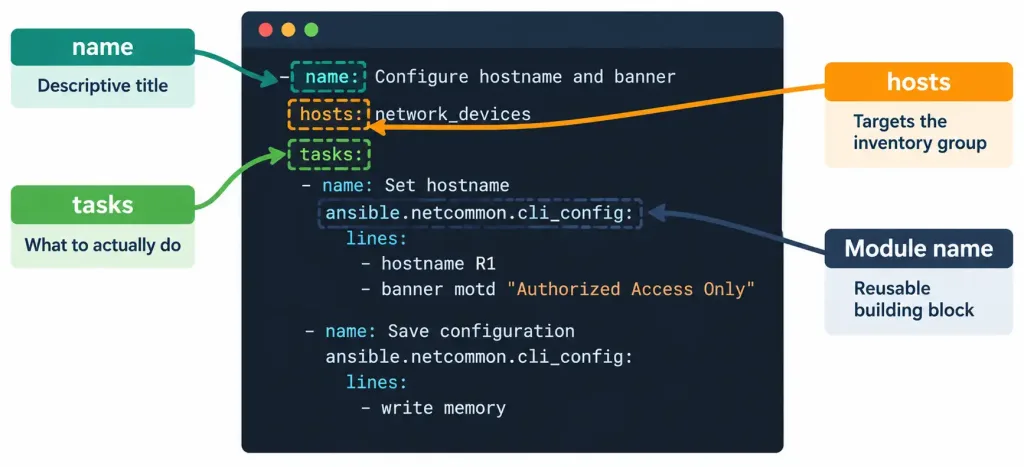
Reading this structure top to bottom: the playbook has a descriptive name (“Configure NTP on all routers”), targets a specific group of devices defined in Ansible’s inventory (the routers group — Ansible’s list of managed hosts, organized however makes sense for a given environment), and defines one task using a module — ios_config in this case, a reusable, self-contained unit of Ansible functionality specifically designed for pushing configuration lines to Cisco IOS devices. Notice how closely this YAML structure resembles plain English description of the intended outcome, which is precisely the “human-readable” quality that makes Ansible playbooks approachable even for someone without a traditional software development background — a meaningful advantage in a field like networking where many practitioners come from a hardware and CLI-configuration tradition rather than a programming one.
Ad-Hoc Commands vs. Full Playbooks
Beyond structured playbooks, Ansible also supports ad-hoc commands — a single, one-off command run directly from the command line without needing to first write a complete playbook file. An ad-hoc command might check a specific fact across a group of devices (confirming their current IOS version, for instance) as a quick, immediate query rather than a repeatable, saved automation task. Playbooks, by contrast, are the appropriate tool when a task needs to be saved, version-controlled, reviewed, and run repeatedly over time — exactly the configuration-as-code practice covered in objective 6.1. Recognizing this distinction rounds out the practical picture: Ansible isn’t exclusively a “write a full playbook every time” tool, and knowing that a lighter-weight, one-off option also exists reflects a more complete understanding of the platform’s actual flexibility in day-to-day use, even though playbooks remain the primary focus for anything resembling ongoing, maintained automation.
Idempotency in Configuration Management: A Direct Callback
Configuration management tools are specifically designed to be idempotent, connecting directly to the concept introduced in objective 6.1 and revisited in objective 6.5’s discussion of idempotent HTTP methods. A well-written Ansible playbook doesn’t simply “add” configuration blindly every time it runs — it checks the current state of a managed device and only makes changes where the actual state differs from the desired state defined in the playbook. Running the exact same playbook against the exact same, already-correctly-configured device a second time should report “no changes made” rather than attempting to reapply configuration that’s already present, exactly the “ensure this line exists” idempotent pattern from objective 6.1’s original illustration, rather than the “add this line” non-idempotent pattern that would accumulate unintended duplicates.
This idempotent design is precisely what makes configuration management tools safe to run repeatedly and predictably — an administrator can re-run the same playbook as a routine consistency check across an entire device fleet, confident that devices already matching the desired state simply won’t be touched, while any device that’s drifted from that state gets corrected automatically, directly delivering the configuration-drift prevention benefit covered back in objective 6.1.
A Practical Illustration of Idempotency in Action
Consider a fleet of 50 routers, 48 of which already have the correct NTP server configured, while 2 were recently replaced and still have factory-default settings. Running an idempotent Ansible playbook against all 50 devices produces a precise, predictable outcome: the 48 already-correct routers report “ok” with no changes made, while the 2 factory-default routers report “changed,” confirming the NTP configuration was actually applied to bring them into line with the rest of the fleet. This selective, accurate reporting is itself a genuinely useful troubleshooting and auditing signal — an administrator reviewing the playbook’s output can immediately identify which specific devices were out of compliance before the run, without needing to manually inspect all 50 devices individually to discover the same two-device discrepancy themselves.
Recognizing These Concepts in a Described Scenario
A meaningful part of this objective’s practical skill is correctly classifying a described tool or architecture rather than only reciting definitions. A scenario describing “a background process running continuously on each server, checking in periodically” describes an agent, pointing toward Puppet or Chef. A scenario describing “connecting via SSH, applying configuration, then disconnecting with nothing left running” describes Ansible’s agentless model specifically. A scenario describing configuration files that “read almost like plain English instructions” and use indentation-based structure describes YAML, and by extension likely an Ansible playbook. And a scenario describing a tool that “only reports changes where something actually needed to change” is describing idempotent behavior, the design goal every well-built configuration management tool in this lesson shares regardless of its underlying architecture.
Common Misconceptions
- “Puppet, Chef, and Ansible all use the same underlying delivery mechanism, just with different syntax.” They differ architecturally at a fundamental level — Puppet and Chef require an installed agent using a pull model; Ansible is agentless, using a push model over SSH or WinRM.
- “Agentless means Ansible can’t actually configure anything meaningfully, since nothing is installed on the device.” Agentless simply means no persistent software remains on the device between runs — Ansible still fully configures the device during each run, using an existing management protocol (SSH) rather than requiring dedicated, continuously running software.
- “Ansible playbooks require traditional programming knowledge to write and understand.” YAML’s human-readable structure is specifically designed to be approachable without a traditional software development background, closely resembling plain-language description of intended configuration outcomes.
- “Configuration management tools apply configuration blindly every time they run, regardless of current state.” Well-designed configuration management tools check current state first and only make changes where needed, exactly the idempotent behavior pattern connecting back to objective 6.1.
- “Push and pull models are just two names for the same underlying process.” They describe genuinely different initiation patterns — pull means the managed node itself initiates checking in for configuration (Puppet/Chef); push means a central system initiates sending configuration out to managed nodes (Ansible).
Frequently Asked Questions
Can Ansible manage non-network devices too, or is it network-specific?
Ansible is a general-purpose configuration management tool, originally and still widely used for managing Linux servers, cloud infrastructure, and many other system types — its relevance to networking specifically comes from its agentless architecture fitting network device constraints particularly well, not from being purpose-built exclusively for networking.
Does Puppet or Chef’s agent-based model have any advantages over Ansible’s agentless approach?
In appropriate contexts, yes — an installed agent can continuously monitor and enforce configuration state without needing to be triggered externally, and can operate even during periods when a central control node might be temporarily unreachable, since the agent itself initiates check-ins independently on its own schedule rather than waiting for an external push.
Is WinRM used for network devices, or only for Windows servers?
WinRM is specifically used for managing Windows-based systems; network devices (routers, switches) are managed via SSH under Ansible’s agentless model, not WinRM, which is a Windows-specific remote management protocol.
Do all Ansible modules work identically across every vendor’s network devices?
No — modules are often vendor- or platform-specific (like the ios_config module shown in this lesson’s example, specific to Cisco IOS), reflecting that different network operating systems have genuinely different configuration syntax and capabilities requiring correspondingly different module implementations.
How does idempotent configuration management relate to the REST API idempotency discussed in objective 6.5?
They’re the same underlying principle applied in different contexts — objective 6.5 covered idempotency at the level of individual HTTP methods (GET, PUT, DELETE), while this objective applies the same principle at the level of an entire configuration management playbook run, but both describe the same core property: repeated execution converging on the same end state without accumulating unintended side effects.
Are Puppet, Chef, and Ansible the only configuration management tools that exist?
No — other tools exist in this same general category (SaltStack being one commonly mentioned example), each with their own particular architectural choices and trade-offs. Puppet, Chef, and Ansible are specifically highlighted at the CCNA level because they represent the two dominant architectural approaches (agent-based and agentless) clearly enough to illustrate the core conceptual distinction this objective actually tests, rather than because they’re literally the only tools in existence.
Configuration Management: Puppet, Chef & Ansible
16 Questions • Configuration Management • Agent-Based vs Agentless • Idempotency
Summary
Puppet, Chef, and Ansible are all configuration management tools automating consistent configuration deployment across many devices, directly applying the automation benefits covered in objective 6.1.
Puppet and Chef traditionally use an agent-based, pull model — installed software on each managed node periodically checks in with a central server to pull and apply configuration, an approach well suited to general-purpose servers with resources to spare for a background process.
Ansible uses an agentless, push model — SSH (or WinRM for Windows) pushes configuration directly with nothing left running on the device afterward, making it particularly well suited to network devices that historically don't support installing arbitrary agent software the way general-purpose servers do.
Ansible playbooks are written in human-readable YAML, organized around an inventory of managed hosts and reusable modules performing specific configuration tasks, with lighter-weight ad-hoc commands available for quick, one-off queries that don't warrant a full saved playbook.
Well-designed configuration management tools are idempotent, directly connecting to the concept from objective 6.1 and the HTTP method idempotency from objective 6.5 — repeated execution against an already-correctly-configured device should report no changes, safely and predictably preventing configuration drift.
Recognizing the architectural pattern a scenario describes — an installed agent checking in periodically, versus an SSH connection that leaves nothing running afterward — is the practical skill this comparative objective ultimately tests.