
Domain 1.4 | Network Fundamentals — 20% of exam
Learning Objectives
By the end of this lesson, you will be able to:
- Describe how collisions occur on shared media and explain CSMA/CD’s role in managing them
- Identify CRC errors, runts, and giants, and explain what physical-layer problem each typically indicates
- Diagnose a duplex mismatch from its symptoms, and explain why it degrades performance without preventing the link from coming up
- Diagnose a speed mismatch and explain why it behaves differently from a duplex mismatch
- Interpret
show interfacesoutput to identify which of these problems is actually occurring
Key Terms
| Term | Definition |
|---|---|
| Collision | Corruption that occurs when two devices transmit simultaneously on a shared medium |
| CSMA/CD | Carrier Sense Multiple Access with Collision Detection; the legacy mechanism Ethernet used to manage collisions |
| CRC error | A frame that fails a Cyclic Redundancy Check, indicating corruption during transmission |
| Runt | An Ethernet frame smaller than the 64-byte minimum, usually from a collision or bad NIC |
| Giant | An Ethernet frame larger than the maximum allowed size, usually from a misconfigured device |
| Duplex mismatch | One end of a link set to full-duplex, the other to half-duplex |
| Late collision | A collision detected after the point in transmission where normal CSMA/CD should have caught it |
| Speed mismatch | Interfaces on either end of a link configured for different speeds |
Explanation
Why This Objective Exists
Every network breaks eventually. Cables get damaged. Interfaces get misconfigured. Someone plugs the wrong device into the wrong port.
The question isn’t whether these things happen. It’s whether you can tell, quickly, what’s actually going wrong. This lesson covers the physical and data-link layer symptoms that show up when something’s genuinely broken — and, just as important, the counters and commands that reveal which specific problem you’re actually looking at.
This lesson builds directly on physical interface and cabling types. That lesson covered the media. This one covers what happens when that media, or the interfaces on either end of it, isn’t behaving correctly.
Collisions and CSMA/CD: Mostly History, Still Tested
A collision happens when two devices transmit at the same moment on a shared medium, and their signals corrupt each other on the wire. We covered this mechanism in the previous lesson, in the context of legacy shared-media Ethernet. It’s worth revisiting here specifically because collision-related symptoms remain something you need to recognize, diagnose, and explain — even on exam scenarios describing modern equipment.
CSMA/CD, spelled out: Carrier Sense Multiple Access with Collision Detection. Each part of that name describes one step. Carrier Sense — a device listens before transmitting, checking whether the shared medium is currently busy. Multiple Access — multiple devices share the same medium and can potentially transmit. Collision Detection — if two devices sense the medium as free and transmit at nearly the same instant anyway (a real possibility, since propagation delay means “sensing” isn’t instantaneous across any distance), both detect the resulting corruption and respond.
The response itself matters. Both devices stop transmitting immediately upon detecting the collision. Both wait a random backoff period before retrying. Random, deliberately — if both devices waited the same fixed amount of time, they’d simply collide again on the retry, every time.
On modern switched, full-duplex networks, this entire mechanism is structurally irrelevant. No shared medium, no possibility of collision, nothing for CSMA/CD to manage. But you’ll still encounter half-duplex scenarios on the exam — and, less often today, in the real world on older equipment or specific legacy links — where this mechanism is genuinely active. Know it. It resurfaces, directly, in the duplex mismatch discussion below.
Errors: CRC, Runts, and Giants
These three error types show up constantly in show interfaces output, and they’re worth being able to distinguish at a glance.
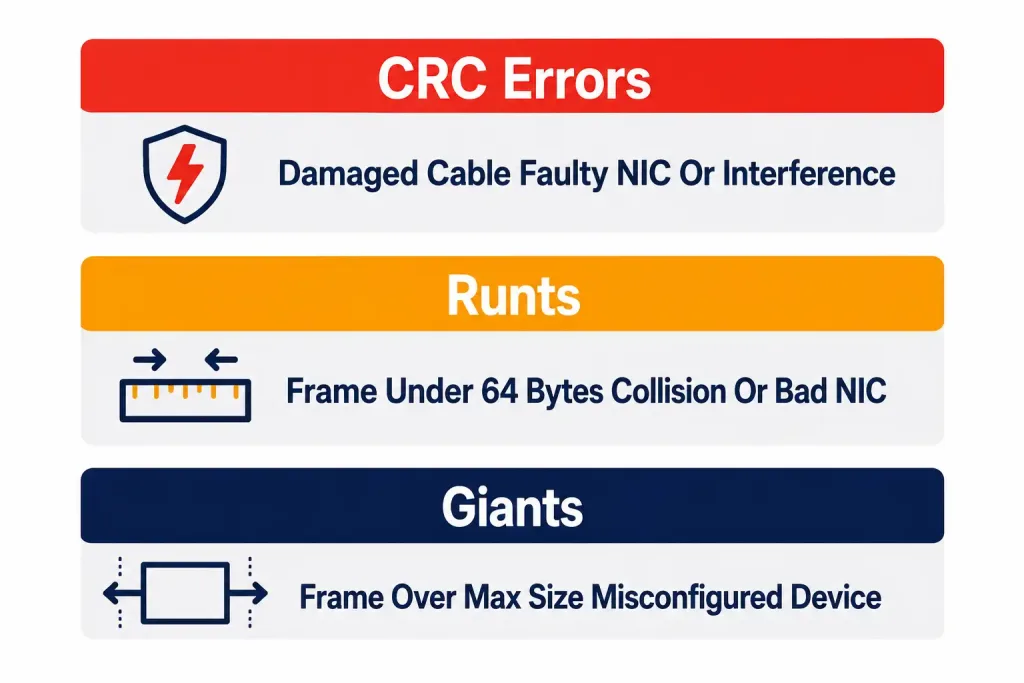
CRC errors. Every Ethernet frame includes a Frame Check Sequence — a value calculated from the frame’s contents, using a Cyclic Redundancy Check algorithm. The receiving device recalculates that same check on arrival. If the two values don’t match, something corrupted the frame in transit, and the receiving interface counts it as a CRC error. A rising CRC error count points toward a physical-layer problem: a damaged cable, a failing connector, a faulty NIC, or electrical interference along the path.
Runts. A runt is a frame smaller than Ethernet’s 64-byte minimum. Two common causes. A collision cutting a transmission short mid-frame, common on half-duplex segments. Or a genuinely faulty NIC generating malformed, undersized frames on its own, independent of any collision at all.
Giants. The opposite problem — a frame exceeding the maximum allowed size (1518 bytes for standard Ethernet, more if jumbo frames are explicitly configured and expected on that segment). Giants typically point to a misconfigured device generating oversized frames, or occasionally a device sending jumbo frames onto a segment that isn’t configured to expect them.
Worked example, using actual output. Here’s a trimmed show interfaces GigabitEthernet0/1 excerpt showing exactly what you’d be reading in a real diagnostic scenario:
GigabitEthernet0/1 is up, line protocol is up
  ...
  5 minute input rate 1000 bits/sec, 2 packets/sec
  5 minute output rate 2000 bits/sec, 3 packets/sec
     1458291 packets input, 187245552 bytes
     Received 12 broadcasts, 0 runts, 0 giants, 0 throttles
     347 input errors, 347 CRC, 0 frame, 0 overrun, 0 ignored
     0 input packets with dribble condition detected
     982103 packets output, 145392011 bytes, 0 underruns
     0 output errors, 0 collisions, 1 interface resets
Read that output like a story, not a wall of numbers. 347 CRC errors, with 0 runts and 0 giants, and the collision counter sitting at zero. That pattern points specifically toward a physical-layer problem — a bad cable or connector — rather than a duplex or collision issue, since collision-related symptoms (runts, actual collision counts) aren’t elevated here at all. Change the pattern, and the diagnosis changes with it. This is exactly the skill this objective is testing: not memorizing definitions, but reading a real counter set and identifying which specific problem it’s actually describing.
Duplex Mismatch: The Classic Real-World and Exam Scenario
This is worth its own dedicated section, because it’s genuinely one of the most commonly tested — and most commonly encountered in the real world — interface problems on the entire exam.
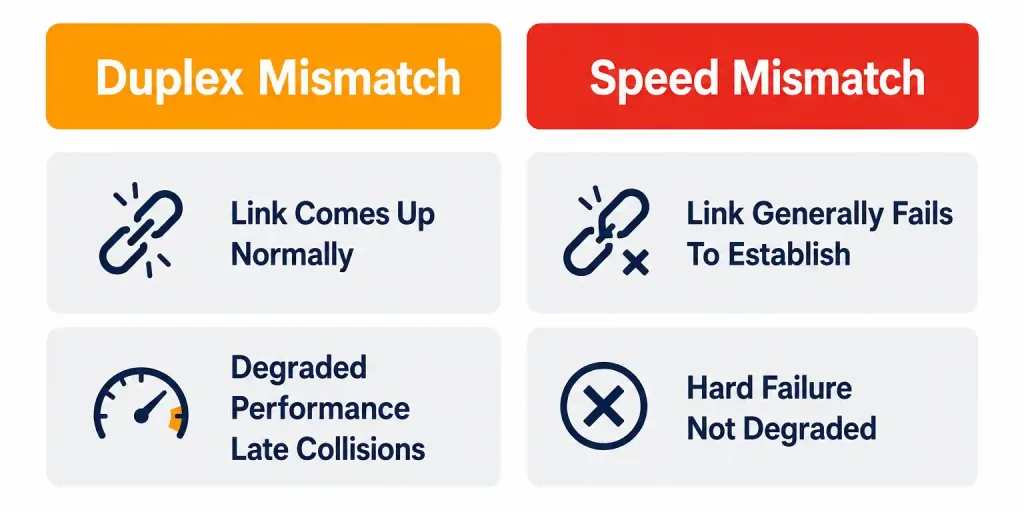
A duplex mismatch happens when one end of a link is set to full-duplex, and the other end is set to half-duplex. Here’s the part that trips people up: the link still comes up. It doesn’t fail to establish. It just performs terribly once it’s running, in a way that’s genuinely confusing to diagnose if you don’t already know the pattern.
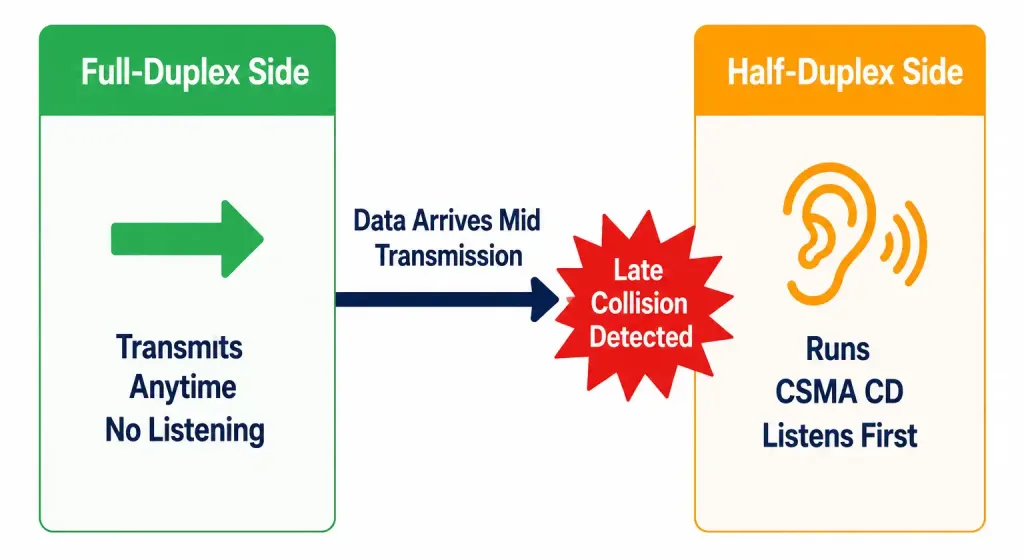
Walk through why. The half-duplex side still runs CSMA/CD — it was never told otherwise. It listens before transmitting, and it watches for collisions the way half-duplex has always required. The full-duplex side does neither. It was configured under the assumption that its transmit and receive paths are independent, so it transmits whenever it has data ready, with no listening, no collision detection, no concept that a collision could even occur on its end.
Now the half-duplex side, mid-transmission, receives data from the full-duplex side arriving on what it still thinks is a shared, contested medium. From the half-duplex side’s perspective, that looks exactly like a collision — except it’s arriving well after the point in the frame where a normal, timely collision detection should have caught it. This is a late collision, and it’s the single most reliable fingerprint of a duplex mismatch. Not a regular collision count climbing. A late collision count climbing, specifically, on an interface that’s otherwise up and passing traffic.
Why this matters practically, beyond the exam: duplex mismatches are a real, still-occurring cause of “the link is up, throughput is terrible, and nothing else about the configuration looks wrong” support tickets. Auto-negotiation failures — one side hard-set to a specific duplex, the other left on auto, or a NIC driver quirk — are a common real-world cause, even on modern equipment where you’d assume this problem shouldn’t happen anymore.
Speed Mismatch: A Different Failure Pattern Entirely
Where duplex mismatch degrades a link that’s still up, speed mismatch generally prevents the link from coming up at all.
Interfaces configured for genuinely different speeds — one hard-set to 100 Mbps, the other hard-set to 1000 Mbps, say — typically can’t establish a working link between them in the first place. This is a hard failure, not a degraded one. You won’t see “up but slow.” You’ll see “down,” full stop, or an interface that never stabilizes into an up/up state.
The auto-negotiation exception, worth knowing specifically. If both interfaces are left on auto-negotiation rather than hard-set, the two ends typically negotiate down to whatever speed they both actually support, and the link comes up fine at that lower common speed. Auto-negotiation genuinely solves the speed mismatch problem in most cases — which is exactly why leaving both ends of a link on auto is generally the safer default, rather than hard-setting both ends and risking a configuration mistake between them.
Why hard-setting both ends is still sometimes deliberately chosen, despite that risk. Some environments hard-set speed and duplex on both ends specifically to eliminate auto-negotiation’s own occasional failure modes — auto-negotiation itself can fail to agree correctly in rare cases, particularly with older or mismatched hardware, ironically sometimes causing the exact duplex mismatch problem covered above. This is a genuine trade-off in real network design, not a simple “always leave it on auto” rule — though for CCNA purposes, know that auto-negotiation is generally the safer, more forgiving default, and that hard-setting introduces real risk if both ends aren’t configured consistently by whoever’s doing it.
The Exam Tip Worth Memorizing Verbatim
If a question describes “the link is up, but performance is terrible, with increasing late collision counters” — that’s a duplex mismatch. Not a speed mismatch. Speed mismatches don’t produce a degraded-but-functional link with climbing late collisions; they produce a link that generally doesn’t come up in a stable state at all. This single distinction — degraded-but-up versus down-or-unstable — is the fastest way to tell these two problems apart, on the exam and in a real troubleshooting scenario alike.
Identifying Interface and Cable Issues: Practice Quiz
Test your knowledge of CSMA/CD, CRC errors, runts, giants, duplex mismatches, speed mismatches, and auto-negotiation.
Summary
- CSMA/CD manages collisions on legacy shared media; irrelevant on modern full-duplex links, but still directly relevant to understanding duplex mismatch symptoms.
- CRC errors, runts, and giants each point toward a different underlying cause — read the specific combination of counters, not just one number in isolation.
- Duplex mismatch lets the link come up but degrades performance through late collisions, since only one side is still running CSMA/CD.
- Speed mismatch generally prevents the link from coming up at all, unless auto-negotiation resolves it.
- The single fastest diagnostic distinction: degraded-but-up with climbing late collisions means duplex mismatch; down or unstable means speed mismatch.



