
Domain 1.2 | Network Fundamentals — 20% of exam
Learning Objectives
By the end of this lesson, you will be able to:
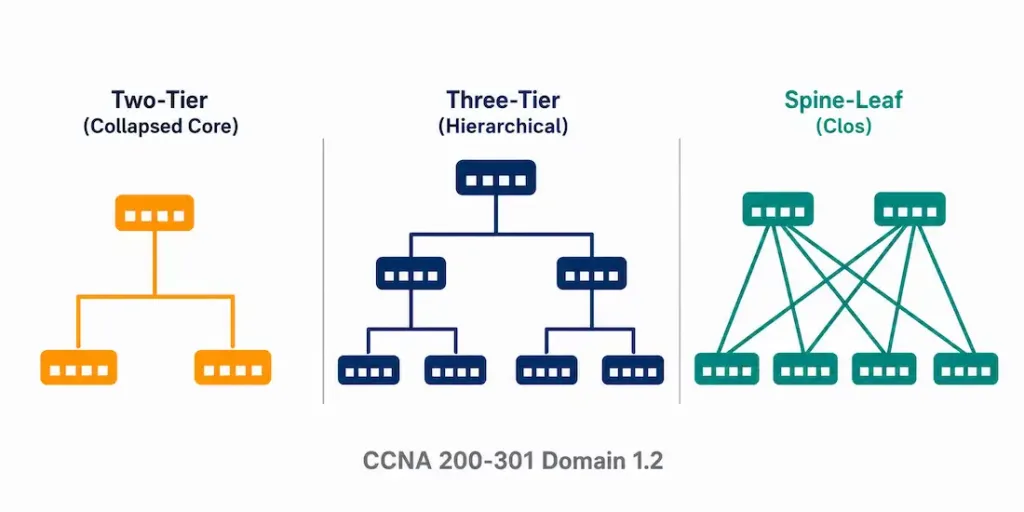
- Describe the two-tier (collapsed core) and three-tier hierarchical network models, and explain when each fits
- Explain why spine-leaf architecture exists and how it differs from traditional hierarchical designs
- Describe WAN connectivity options and how they differ from campus-local designs
- Describe a SOHO network and how it differs from an enterprise campus
- Compare on-premises and cloud infrastructure, including the shared responsibility model
Key Terms
| Term | Definition |
|---|---|
| Two-tier (collapsed core) | A design combining access and distribution/core functions into two layers instead of three |
| Three-tier | A design with separate core, distribution, and access layers, each with a distinct job |
| Core layer | The high-speed backbone of a three-tier design; minimal policy enforcement, maximum throughput |
| Distribution layer | Aggregates traffic from access switches; applies routing and policy between access blocks |
| Access layer | Where end devices physically connect to the network |
| Spine-leaf | A data center architecture where every leaf switch connects to every spine switch |
| WAN | Wide Area Network; connects geographically distant sites, usually through a service provider |
| SOHO | Small office/home office; a flat, minimal-hierarchy network design |
| Shared responsibility model | The division of security and management duties between a cloud provider and its customer |
Explanation
Why Topology Choice Isn’t Arbitrary
Every network has a shape. That shape isn’t an accident. It reflects a real trade-off between cost, scale, and how much traffic actually needs to move where.
A five-person office doesn’t need the same design as a 5,000-employee campus. A data center doesn’t need the same design as either one. This lesson walks through the standard shapes you’ll actually encounter — and, more importantly, why each one exists.
If you haven’t already, it’s worth reviewing network components first. Topology is really just a question of how those components get arranged and connected. The devices stay the same. The arrangement changes.
Two-Tier (Collapsed Core)
In a two-tier design, the access and distribution/core functions live in the same layer. There’s no separate core switch sitting above distribution. The distribution switches are the core.
Why collapse them? Simple: cost and scale. A small or mid-sized campus doesn’t generate enough traffic to justify a dedicated core layer. Adding one would mean more hardware, more licensing, more management overhead — for no real performance gain.
Picture a single-building office with a few hundred users. Two or three distribution switches, each also acting as the core, connect down to a handful of access switches on each floor. That’s it. No separate core tier required.
Common misconception: people sometimes assume “collapsed core” means a weaker or less capable network. It doesn’t. It means fewer layers, not less capability. The distribution switches in a well-designed two-tier network are often just as powerful, port-for-port, as the ones in a three-tier design one size up. The difference is architectural, not qualitative.
Three-Tier: Core, Distribution, Access
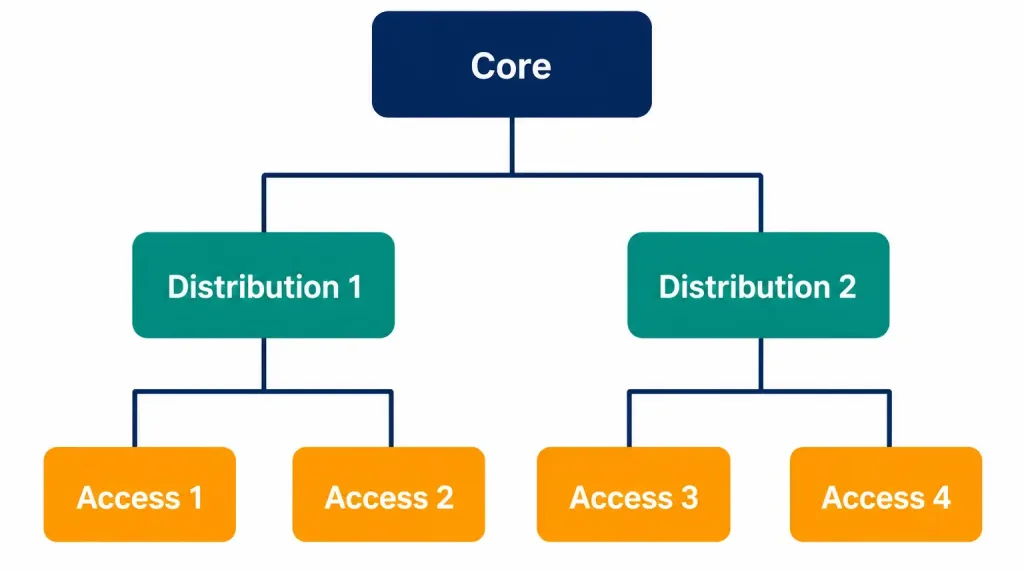
Three-tier splits the network into three distinct layers, and each one has a genuinely different job.
Access is where end devices connect. Laptops, phones, printers, IP cameras — all of it plugs in here. Access switches are usually optimized for port density, not raw throughput, since they’re serving many individual devices.
Distribution sits above access. It aggregates traffic from multiple access switches, and this is where routing and policy actually happen — VLAN routing, ACLs, QoS marking. Think of distribution as the layer that enforces the rules.
Core sits at the top. Its only job is speed. Move traffic between distribution blocks as fast as possible. No policy enforcement here, or as little as possible. Any inspection or filtering at the core adds latency to every flow crossing the entire network — so core switches are deliberately kept simple.
Why does this separation matter at scale? Because it lets each layer be sized and upgraded independently. A growing company can add more access switches for new floors without touching the core. A traffic spike at the core doesn’t require redesigning every access closet in the building. Each layer solves one problem, and solves it well.
A useful way to remember the three jobs: access connects, distribution decides, core delivers. Three verbs, three layers.
Spine-Leaf: A Different Shape for a Different Problem
Spine-leaf looks nothing like the hierarchical models above. That’s deliberate.
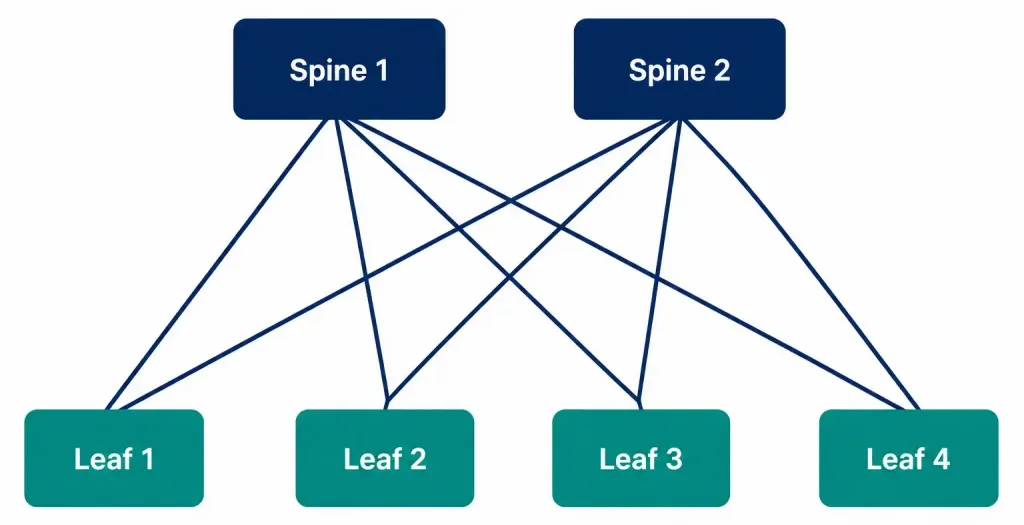
In a spine-leaf fabric, every leaf switch connects to every spine switch. Full mesh, between exactly two layers. There’s no core sitting above the spine — the spine layer itself is the top.
Why build it this way? Traditional hierarchical networks were designed for a world where most traffic flowed north-south — client devices talking up to a server, and back down. Modern data centers don’t work like that anymore. Servers talk to other servers constantly. East-west traffic, not north-south, dominates. Think of one virtual machine talking to a database, which talks to a caching layer, which talks to another service — all within the same data center, none of it flowing “up and back down” the way client traffic once did.
Spine-leaf solves this directly. Any leaf-to-leaf conversation crosses exactly one spine hop. Always. It doesn’t matter which two leaves are talking. The path length never varies. Compare that to a hierarchical design, where two devices might sit close together or might require a much longer, less predictable path depending on which access switches they happen to connect to.
That predictability is the entire point. Consistent latency. Consistent bandwidth. No traffic engineering required to avoid a congested “long way around” — because there is no long way around. Every path is the same length.
Worked example: Leaf-1 needs to reach Leaf-8. It doesn’t matter whether Leaf-8 is physically the switch right next to Leaf-1 in the rack, or on the opposite side of the data center. The traffic goes Leaf-1 → any Spine → Leaf-8. One hop up, one hop down. Every single time.
Common misconception: students sometimes assume spine-leaf “replaced” three-tier design everywhere. It didn’t. Spine-leaf is a data center pattern, built for east-west server traffic at scale. Three-tier campus design is still very much alive for connecting end users, printers, and access points across a building or campus. Different traffic patterns. Different topologies. Neither one is simply “better” in the abstract — they solve different problems.
WAN: Connecting Sites That Aren’t in the Same Building
Everything so far has assumed devices are close together — same building, same campus. A WAN exists for the opposite case: sites that are geographically distant, connected through a service provider rather than cabling you own and control end to end.
Three common WAN connection types, and it’s worth knowing roughly where each one sits today:
MPLS (Multiprotocol Label Switching) is a provider-managed private connection between sites. Historically the enterprise standard for reliable, predictable site-to-site connectivity, with guaranteed performance characteristics built into the service contract.
Internet-based VPN connects sites over the public internet, using encryption to keep the traffic private as it crosses a network you don’t control. Cheaper than MPLS, and increasingly common — especially as internet bandwidth has gotten faster and more reliable in most regions.
Dedicated leased lines are a direct, physical point-to-point connection between two locations. Once the standard. Now increasingly rare, mostly because they’re expensive relative to the alternatives above, and inflexible if a company’s connectivity needs change.
Notice the trend across all three: predictability and control, traded against cost, on a sliding scale. Leased lines sit at one end — maximum control, maximum cost. Internet VPN sits at the other — lower cost, less inherent control over the path your traffic actually takes. MPLS sits somewhere in between.
Why this matters for exam scenarios: a question describing a company connecting two offices in different cities is a WAN question, not a campus topology question, even if the individual office networks themselves use standard three-tier or two-tier design internally. Don’t confuse the topology inside a site with the connection between sites — they’re separate design decisions, answered separately.
Small Office/Home Office (SOHO)
A SOHO network is about as flat as networking gets. Usually one all-in-one device — router, switch, and wireless access point combined — serving a handful of users. No distribution layer. No core. Often, no dedicated networking staff managing it day to day, either.
This isn’t a “lesser” design any more than two-tier is a lesser version of three-tier. It’s the right design for the actual scale involved. A five-person home office doesn’t need VLANs, redundant core switches, or a dedicated distribution layer. It needs internet access, basic Wi-Fi, and enough ports for a printer and a couple of workstations. SOHO delivers exactly that, at exactly the right cost.
Where the exam likes to test this: questions that describe a small number of users, minimal budget, and simple requirements are pointing you toward SOHO — not toward a scaled-down enterprise design. Recognize the scale of the described scenario, and the right topology usually follows from it directly.
On-Premises vs. Cloud
This last distinction isn’t really about physical shape the way the others are. It’s about who owns and manages what.
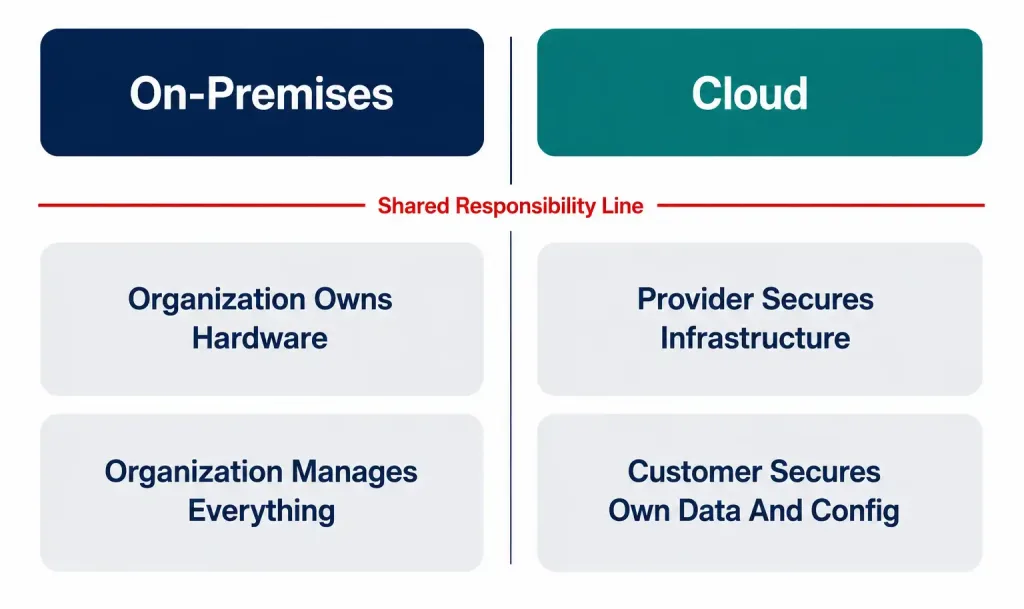
On-premises infrastructure is physically located at, and fully managed by, the organization using it. Servers in your own data center. Switches in your own wiring closet. Full control — and full responsibility, for everything from hardware failures to physical security to power redundancy.
Cloud infrastructure is hosted and managed by a third-party provider — AWS, Azure, Google Cloud, among others. The organization consumes it as a service rather than owning the underlying hardware.
Here’s the part that actually gets tested: the shared responsibility model. Moving to the cloud doesn’t mean the customer’s responsibility disappears. It shifts. The provider takes on responsibility for the underlying physical infrastructure — the actual servers, the data center, the physical network. The customer remains responsible for their own data, their access control configuration, and how they’ve set up what they’re running on top of that infrastructure.
A useful way to think about it: the provider secures the building. You still have to lock your own door. A misconfigured cloud storage bucket, left publicly accessible by the customer, isn’t the provider’s failure — even though the underlying infrastructure is technically the provider’s. That’s the shared responsibility line, and it’s exactly where a surprising number of real-world cloud security incidents actually originate: not from the provider’s infrastructure failing, but from the customer’s side of that shared line being misconfigured.
Common misconception: “we moved to the cloud, so security is the provider’s problem now.” This is wrong, and it’s wrong in a way that causes real incidents. The provider secures the platform. The customer still secures what they put on it, and how they’ve configured access to it.
Bringing It Together: Matching Topology to Actual Need
Here’s the thread running through every architecture in this lesson: none of them is objectively “best.” Each one is the right answer for a specific scale, traffic pattern, and budget.
A five-person office needs SOHO, not three-tier. A growing mid-size campus needs two-tier, not spine-leaf. A data center full of servers talking constantly to each other needs spine-leaf, not a traditional hierarchical design built for client-server traffic. Two offices in different cities need a WAN connection between them, on top of whatever internal topology each office uses independently. And infrastructure decisions increasingly split between on-premises and cloud, with responsibility dividing along a specific, definable line rather than transferring wholesale in either direction.
Exam scenarios test this by describing a situation — company size, traffic pattern, budget, number of sites — and expecting you to recognize which architecture actually fits. Not which one sounds most advanced. Not which one you’ve seen most recently. Whichever one the described scenario actually calls for.
Test your knowledge of campus network design, WAN technologies, VPNs, cloud responsibility, and SOHO networks.
Summary
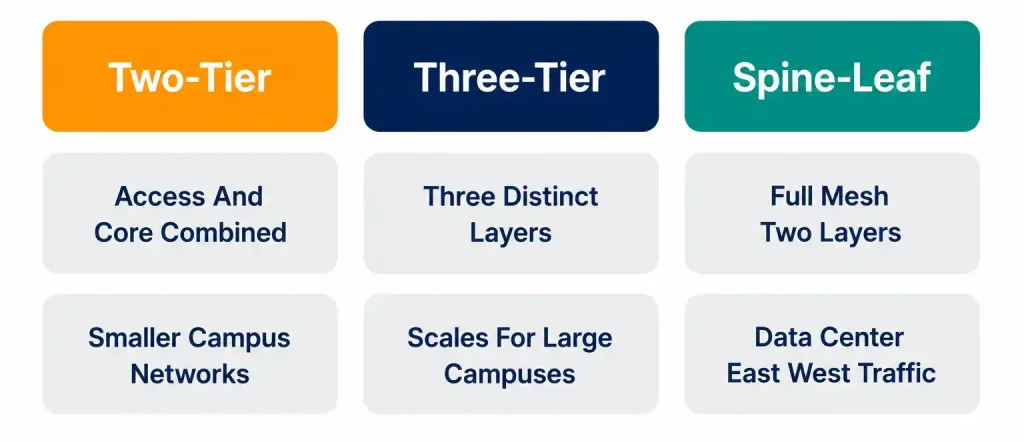
- Two-tier combines access and distribution/core into two layers; three-tier separates all three for better scaling at larger campuses.
- Core moves traffic fast with minimal policy; distribution enforces routing and policy; access connects end devices.
- Spine-leaf gives every leaf-to-leaf path exactly one spine hop, built specifically for east-west data center traffic.
- WAN connections (MPLS, internet VPN, leased lines) trade cost against control and predictability.
- SOHO is a flat, minimal design right-sized for a small number of users, not a weaker version of enterprise design.
- Cloud shifts, rather than eliminates, responsibility — the provider secures the infrastructure, the customer secures their own data and configuration on top of it.



