
If you’ve come across “Proxy Orb” (branded as ProxyOrb) while looking into ways to access a blocked website, you’re looking at one of many free, browser-based web proxy services that have popped up in recent years. It’s a real product, not a scam name — but understanding what a service like this actually does under the hood, and where its privacy claims hold up versus where they don’t, matters a lot more than most people realize before they start routing their browsing through it.
This guide covers what ProxyOrb specifically claims to offer, how free web proxies work as a category, the genuine security and privacy trade-offs involved, and — because “proxy” gets used loosely and interchangeably with “VPN” and “Tor” far too often — a clear technical breakdown of how these three tools actually differ.
What is ProxyOrb?
ProxyOrb positions itself as a free web proxy and “proxy browser” — a website you visit, where you type in the URL of another site you want to reach, and ProxyOrb fetches that page and displays it to you through its own servers. According to its own public listings, it markets itself around a few core claims: no software installation required, encrypted transmission between your device and its servers, the ability to bypass geo-blocks and school or workplace content filters, and a stated no-logs policy.
It’s worth being clear about what kind of tool this is, structurally: a web-based HTTP proxy, not a VPN and not Tor. That distinction is the most important thing in this entire article, because it changes what protection you’re actually getting.
How a web proxy like this actually works
The mechanics are simpler than the marketing language around them usually suggests. When you type a URL into a service like ProxyOrb:
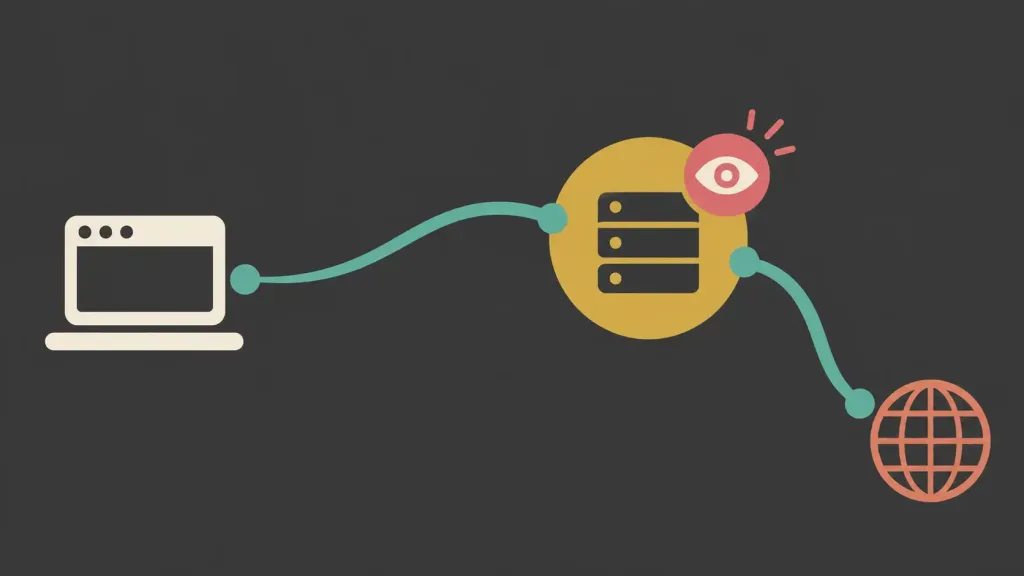
- Your browser sends the request to ProxyOrb’s server, not directly to the site you want to visit.
- ProxyOrb’s server fetches the requested page on your behalf.
- ProxyOrb sends that page’s content back to your browser, often rewriting links on the page so that clicking around continues to route through ProxyOrb.
From the destination website’s perspective, the request appears to come from ProxyOrb’s server, not your own device — which is the entire basis for “hiding your IP address” and “bypassing geo-blocks.” Content filters that block based on domain name (a school or workplace filter blocking a specific site) get bypassed because you’re technically only ever connecting to ProxyOrb’s domain, not the blocked one directly.
This is a genuinely useful mechanism for a narrow set of legitimate purposes. It’s also a mechanism with real, specific limitations worth understanding before you route anything sensitive through it.
What a service like this can and can’t actually protect
What it can plausibly do:
- Mask your IP address from the specific destination website, since the site only sees ProxyOrb’s server address.
- Get around simple, domain-based content filters (a school, workplace, or basic ISP block on a specific site).
- Work without installing any software, which is genuinely convenient for a one-off use on a locked-down device where you can’t install anything.
What it does not reliably do, regardless of marketing language:
- Encrypt all your traffic. Many free web proxies only proxy the specific page you’re viewing through a browser tab — they don’t create a system-wide encrypted tunnel the way a VPN does. Other applications on your device, and often even other browser tabs, aren’t protected at all.
- Guarantee your data isn’t logged, no matter what the privacy policy says. A “no-logs” claim from any free service — proxy, VPN, or otherwise — is only as trustworthy as the company making it, and there’s typically no independent way for an end user to verify it. Running servers costs real money; a genuinely free service needs to fund that somehow, whether through advertising, data monetization, or another model that isn’t always disclosed clearly.
- Protect you the way HTTPS already does on most sites. If you’re visiting a site that already uses HTTPS (the padlock icon, the vast majority of the modern web), your connection to that site is already encrypted end-to-end in your browser. A proxy sitting in the middle of that connection doesn’t add meaningful additional encryption for that traffic — and in some proxy implementations, it can actually mean the proxy operator is in a position to see more of your traffic than you’d expect, depending on how the proxy is technically implemented.
- Hide your activity from the proxy operator itself. Whatever protection a proxy gives you from the destination website, it gives the proxy operator itself full visibility into what you’re doing, since your traffic is quite literally routing through their servers. You’re not eliminating a party that can see your activity — you’re just changing which party that is.
The genuine security risks of free web proxies as a category
This isn’t specific to ProxyOrb — it applies to the entire category of free, browser-based web proxies, and it’s worth taking seriously regardless of which specific service is involved:
Ad injection is a common revenue model. Because running proxy infrastructure isn’t free, many services in this category insert their own advertising into the pages you view through them — sometimes disclosed, sometimes not, and not always from reputable ad networks. This is a direct mechanism by which a “free” tool can end up exposing you to the same malicious-ad risks covered in security research on other proxy-adjacent tools.
Traffic visibility is total, by design. As noted above, the proxy operator sees everything you route through it. For casual browsing of non-sensitive content, this is a manageable trade-off. For anything involving login credentials, financial information, or personal data, it’s a meaningfully different risk profile than browsing directly.
“Encrypted” claims often refer only to the connection to the proxy, not what happens after. A service can accurately claim your connection to its servers is encrypted while the proxy operator itself still has full visibility into the unencrypted content once it arrives there — encryption in transit doesn’t mean the middle-man can’t see what’s inside.
Free proxy services have a documented history of being compromised or malicious themselves. Security researchers have repeatedly found free proxy services — across many different brand names over the years — injecting malware, harvesting credentials, or being run by operators with undisclosed data-selling arrangements. This isn’t a reason to assume any specific service is doing this, but it’s a reason not to assume the opposite by default either, especially for a free service with limited public track record or independent security auditing.
Session and login persistence can behave unpredictably through a proxy. Because proxies rewrite links and route your session through their own infrastructure, logging into an account through one carries real risk of exposing session tokens or credentials to the proxy operator — which is why security guidance consistently recommends never entering login credentials or payment information while browsing through any proxy service, free or paid.
Proxy vs. VPN vs. Tor: what actually differs

This is where a lot of casual understanding breaks down, because all three get described loosely as “hiding your IP” or “protecting your privacy” — but they work at fundamentally different levels, with different trust models and different real-world protection.
Web proxy (like ProxyOrb)
- What it protects: The IP address the destination website sees, for the specific traffic routed through it — often just browser traffic, sometimes just a single tab.
- What it doesn’t protect: Traffic outside the proxied browser session; full system-wide encryption; your activity from the proxy operator itself.
- Trust model: You’re placing full trust in one operator, who can see everything you do through the proxy, with typically no independent verification of their privacy claims.
- Best fit for: Low-stakes, casual use — checking whether a page loads differently from another region, getting past a simple content filter for non-sensitive browsing.
VPN (Virtual Private Network)
- What it protects: All of your device’s internet traffic (not just browser traffic) is routed through an encrypted tunnel to the VPN provider’s server, which then forwards it to the destination. This covers apps, background processes, and browsing alike — a meaningfully broader scope than a web proxy.
- What it doesn’t protect: The same fundamental limitation as a proxy applies at a deeper level — you’re still trusting one company (the VPN provider) with visibility into your traffic, unless the provider has a genuinely audited no-logs policy. Free VPNs carry the same “how does a free service make money” question as free proxies, often with the same answers (ad injection, data monetization).
- Trust model: Single trusted intermediary, but with system-wide encryption and generally more mature security practices among reputable, paid providers — reputation, independent audits, and jurisdiction matter significantly here.
- Best fit for: Protecting all your traffic on untrusted networks (public Wi-Fi), general privacy from your ISP, and legitimate access to region-restricted content you’re authorized to use — provided you choose a reputable, transparent provider rather than a free, unaudited one.
Tor (The Onion Router)
- What it protects: Tor routes your traffic through at least three independently operated relay nodes, encrypting it in layers so that no single node knows both who you are and what you’re accessing — the entry node knows your IP but not your destination; the exit node knows your destination but not your IP. This is a fundamentally different trust model from a proxy or VPN, since no single party can see the whole picture.
- What it doesn’t protect: Tor is notably slower than a proxy or VPN due to the multi-hop routing, and the exit node can see unencrypted traffic content if the destination site itself isn’t using HTTPS — the same caveat that applies to any tool sitting between you and an unencrypted site. Tor also doesn’t make you anonymous if you log into personally identifying accounts while using it.
- Trust model: Distributed trust across independently run relays rather than a single company — a meaningfully stronger privacy architecture for people with genuine, serious anonymity needs (journalists, activists, whistleblowers), though it comes with a real usability and speed cost.
- Best fit for: Situations genuinely requiring strong anonymity, where speed is a secondary concern to not having a single trusted party see the full picture of who you are and what you’re accessing.
A simple way to think about the trade-off
The three tools sit on a rough spectrum: a web proxy is the lowest-effort, lowest-protection option, typically single-purpose and often free because the operator has to make money somehow; a reputable paid VPN offers system-wide encryption with a more mature trust and business model; and Tor offers the strongest anonymity architecture at the cost of speed and convenience. None of them is universally “the best” — the right tool depends entirely on what you’re actually trying to protect against, and being honest with yourself about that is more useful than defaulting to whichever tool is free and easiest to reach.
Practical guidance if you do use a service like ProxyOrb
If you’re using any free web proxy for low-stakes browsing, a few habits meaningfully limit your exposure:
- Never log into any account through a web proxy — email, banking, social media, or anything else requiring credentials. Route that kind of activity through a direct, trusted connection instead.
- Assume the proxy operator can see whatever you view through it, and avoid anything you wouldn’t want a third party observing.
- Check whether the destination page is using HTTPS even through the proxy — the padlock icon still matters, though its guarantees are weaker when a proxy sits in the middle of the connection.
- Don’t install anything the proxy site prompts you to install. A legitimate web proxy doesn’t need you to install a browser extension or “player” to view a normal web page — a prompt like that is a red flag regardless of which specific proxy site shows it.
- Read the actual privacy policy, not just the marketing summary, if you’re going to trust a free service with any meaningful browsing activity, and treat “no logs” claims from any unaudited free service with appropriate skepticism.
Frequently asked questions
Is ProxyOrb safe to use?
It’s a real, publicly listed proxy service rather than an obvious scam, but like any free web proxy, it involves routing your traffic through a third party’s servers with limited independent verification of its privacy claims. It’s reasonable for low-stakes, casual browsing; it’s not a substitute for a VPN or Tor for anything involving sensitive data or genuine privacy needs.
Is a web proxy the same as a VPN?
No. A web proxy typically only reroutes browser traffic (often just one tab), while a VPN encrypts all of your device’s internet traffic system-wide. They solve overlapping but different problems.
Does ProxyOrb hide my identity completely?
It can mask your IP address from the specific site you’re visiting through it, but the proxy operator itself sees your traffic, and it doesn’t provide the layered, distributed anonymity architecture that Tor does.
Why would a free proxy service exist if it costs money to run?
Free services in this category typically fund themselves through advertising (sometimes injected directly into proxied pages) or another monetization model — worth understanding before assuming a “free and no-logs” claim has no trade-off attached.
Should I use a proxy, a VPN, or Tor?
It depends on what you’re protecting against: a proxy for very low-stakes, casual needs; a reputable paid VPN for general privacy and full-traffic encryption on untrusted networks; Tor for genuine, high-stakes anonymity needs where speed is a secondary concern.
Can I safely log into my accounts while using a web proxy?
This isn’t recommended. Because the proxy operator can see traffic routed through it, entering credentials or payment details while using any web proxy carries meaningfully more risk than doing so on a direct, trusted connection.
The bottom line
ProxyOrb is a real example of a broader category — free, browser-based web proxies — that offer a genuinely useful but narrow kind of protection: masking your IP address from a specific destination site, for browser traffic only, while placing full trust in whoever operates the proxy. Understanding that it isn’t a VPN and isn’t Tor, and that “free” and “no-logs” claims deserve healthy skepticism regardless of which specific brand is making them, is the difference between using a tool like this appropriately and assuming it protects far more than it actually does.