Hyte Y50 RGB Review: Clean Design Meets Strong Airflow
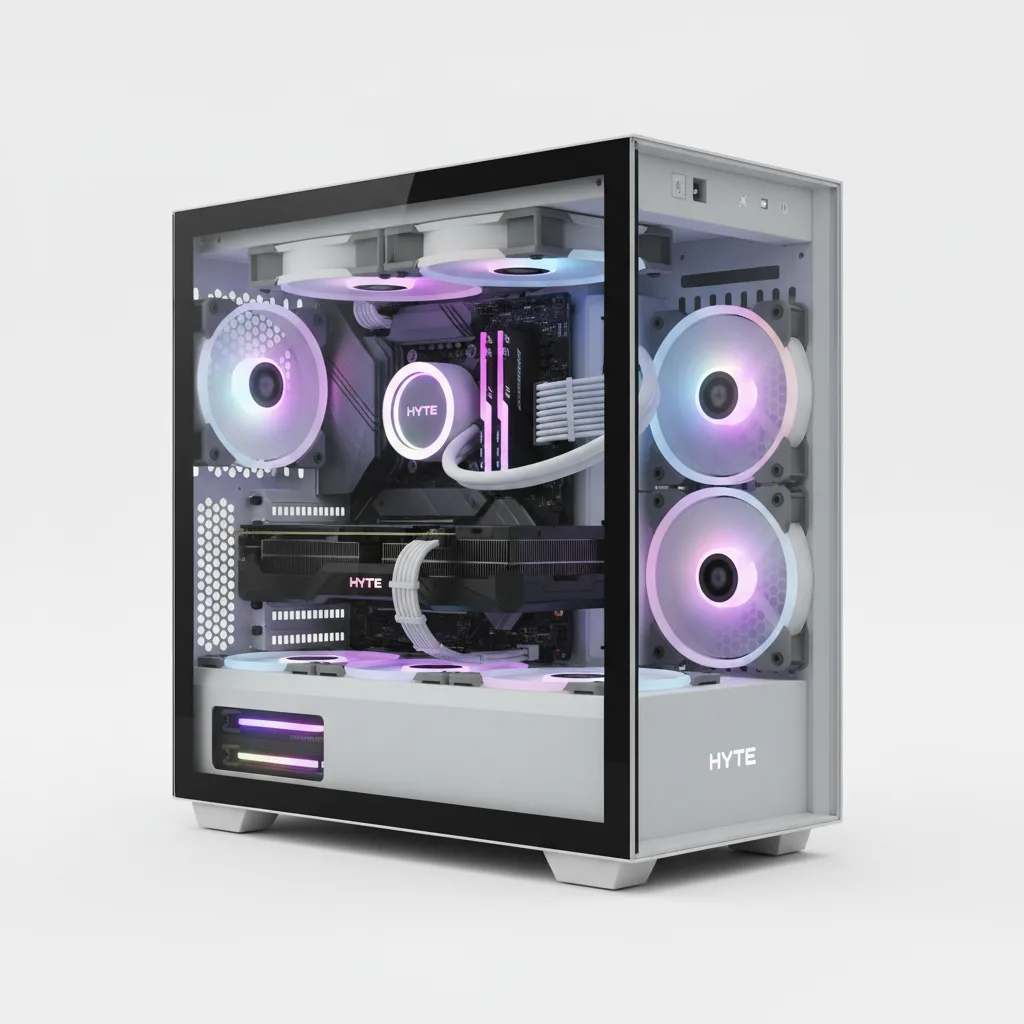
The HYTE Y50 RGB is the most accessible entry in HYTE's iconic Y-Series lineup, and it earns its place with genuine substance rather than just a low sticker price. For $99.99, builders get a three-panel panoramic tempered glass chassis, four ARGB fans (a 360mm reverse-blade unibody side array plus a 120mm rear exhaust), a dual-chamber design, native rear-connect motherboard support, and cooling headroom for 360mm radiators on both the top and side. The most important correction from early coverage: a vertical GPU mount is NOT included — GPUs mount horizontally up to 360mm in length. The case suits first-time showcase builders, RGB enthusiasts, and anyone building around rear-connect platforms like ASUS BTF, Gigabyte STEALTH, or MSI Project ZERO who cannot justify spending $200-plus on a premium case.
Performance Analysis
As a PC case, the HYTE Y50 RGB does not have processor benchmarks to report — thermal performance depends entirely on the components installed and cooling configuration chosen. What the specifications do verify is that the Y50 RGB provides a stronger cooling foundation than most cases at or near its price point. The dual-chamber design separates the PSU bay from the motherboard cavity, which reduces heat recirculation and gives builders more usable space behind the motherboard tray for cable routing. The side panel accommodates a 360mm radiator up to 83mm thick — an unusually generous specification at this price that allows high-performance AIOs to mount without modification.
The included four ARGB fans provide baseline airflow immediately out of the box. The side-mounted 360mm reverse-blade unibody array serves as intake, drawing cool air across the GPU and system interior, while the 120mm rear fan exhausts heated air from the CPU zone. Fan speeds rated to 1,500 RPM offer meaningful static pressure headroom for light radiator use, though ThinkComputers’ review notes these fans are not optimised for radiator duty at high pressures — HYTE’s own THICC FR12 RGB series is recommended for radiator applications. Tom’s Hardware‘s hands-on confirmed that the included fans spin quietly during system operation while keeping components adequately cooled in a standard ATX build.
The stair-stepped internal floor is a practical design refinement over HYTE’s older Y60 and Y70 chassis. This floor geometry frees up additional clearance for radiators and cable routing at the base of the case without increasing the overall footprint. The top mount supports radiators up to 410mm long and 46mm thick — an important spec for builders pairing the Y50 with a 360mm AIO from external brands, since HYTE’s own Nexus AIO range uses this position. Neoseeker’s review noted that comparative thermal and acoustic testing was not performed in their evaluation, consistent with this being a newer case release, but confirmed that the layout, ventilation area, and fan configuration provide a strong foundation for both air-cooled and liquid-cooled systems.
The clear tempered glass panels — unlike the heavily tinted glass found in competing cases — present a full, unobstructed view of the internal components. This design choice benefits builders who invest in attractive components and ARGB lighting, but it also means cable management quality is fully visible from all three glass sides. Routing cables tidily behind the motherboard tray, leveraging the dual-chamber design’s cable depth, is more important in this case than in cases with tinted or opaque panels.
Design and Build Quality
HYTE’s Y50 RGB carries the visual language of the premium Y70 into a smaller, more accessible chassis. The three-panel panoramic glass eliminates the large dead zones above and below the glass that reviewers consistently noted in the Y60 and Y70 — Tom’s Hardware specifically praised this improvement, pointing out that the forehead and chin of black bezel that surrounded the glass in earlier models is effectively absent in the Y50. The result is a more complete, full-coverage glass presentation that looks cleaner from the front and sides simultaneously.
The case measures 473mm (L) × 288mm (W) × 461mm (H) and has a 63.8-litre internal volume — slightly smaller than the Y60 but spacious enough to accommodate E-ATX motherboards up to 250mm wide. Build materials are steel, ABS plastic, and tempered glass. The steel frame uses a standard 0.8mm SGCC gauge consistent with mid-range case construction. Panel removal is tool-free: all three glass panels detach individually, which simplifies cleaning each pane without pulling the entire side panel assembly from the case. This is a practical improvement over single-piece panoramic designs where the full side section must be removed as one unit.
The front I/O placement on the top edge includes two USB-A 3.2 Gen 1 ports (5 Gbps), a single USB-C 3.2 Gen 2 (10 Gbps), and an audio/mic combo jack. Tom’s Hardware noted the absence of an RGB control button on the I/O panel — HYTE expects users to manage lighting through the Nexus software rather than physical button inputs. The front-panel power and reset cables are bridged into a single block connector, eliminating the frustration of individually seating each tiny header on the motherboard. This quality-of-life detail, highlighted in Tom’s Hardware’s hands-on, is rarely offered at this price point and significantly reduces build complexity for first-time builders.
Storage accommodation is generous for a showcase-oriented case: six 2.5-inch drive bays (four shared with 3.5-inch compatibility) plus two dedicated 3.5-inch bays, plus the motherboard’s own M.2 slots. The rear-connect motherboard support is a meaningful differentiator at the $99.99 price — ASUS BTF, Gigabyte STEALTH, and MSI Project ZERO boards route power and data connectors through the back of the motherboard, leaving the front presentation entirely cable-free. This compatibility requires no modification to the Y50’s standard layout and works within the standard ATX PSU bay dimensions.
Software and User Experience
The HYTE Y50 RGB connects its ARGB fans to the system through standard ARGB headers on the motherboard. Lighting control is managed through HYTE’s Nexus software, which consolidates RGB control, fan curve management, and device status into a single interface. Nexus is compatible with major motherboard ARGB ecosystems and does not require proprietary HYTE hardware beyond the included fan daisy-chain connector. The software supports sync with ASUS Aura Sync, Gigabyte RGB Fusion, and MSI Mystic Light, though the connection method (software bridge vs. hardware sync) may vary by motherboard brand.
The absence of a physical RGB control button on the front I/O panel means that users who want to change lighting presets without a running system need to do so through the software or through their motherboard’s own ARGB settings. For builders who prefer hardware-button control of lighting — particularly useful in prebuilt scenarios or when the operating system is not running — this represents a genuine limitation. HYTE has offered a dedicated Nexus Link hub for cable tidying in its premium cases; whether the Y50 supports the full Nexus Link ecosystem requires confirmation from HYTE’s accessory compatibility documentation.
Installation experience is notably smooth for a case at this price. The consolidated front-panel header block eliminates individual pin alignment, which is frequently the most frustrating part of a first build. The dual-chamber design provides ample routing space without requiring routing skill above the beginner level, and the Velcro tie-downs and zip ties included in the accessory box give builders the tools to produce a clean result immediately. Tom’s Hardware’s review called the building experience “an absolute pleasure,” specifically citing the cable clearance around the motherboard tray and the logical cutout placement.
Battery Life
As a desktop PC case, the HYTE Y50 RGB operates from mains power and has no battery. Power consumption of the installed system depends entirely on the components fitted. The included fans carry a rated speed range of 200–1,500 RPM and use ARGB LEDs, which draw minimal additional power compared to the rest of a gaming system. The PSU bay accommodates ATX power supplies up to 250mm in length (225mm when using rear-connect motherboards), which covers the vast majority of modular and semi-modular units available for gaming builds.
Value for Money and Competition
At $99.99, the HYTE Y50 RGB sits in a segment that has traditionally been dominated by solid-but-plain mesh cases or single-panel windowed cases with minimal fan inclusions. The closest direct comparison in the panoramic glass category is the Montech TG3, which Tom’s Hardware reviewed in August 2026 and praised as a “fantastic value, with four included RGB fans and panoramic views” — likely the most direct aesthetic rival to the Y50 RGB at a similar price. Builders choosing between them should compare radiator mounting positions, fan quality, and rear-connect compatibility, which the Y50 supports natively.
Against the Lian Li Lancool 216 (approximately $79–$99), the Y50 RGB offers superior glass coverage and a more dramatic visual presentation, while the Lancool 216’s fully mesh front panel provides stronger stock airflow for builds that prioritise thermal performance over aesthetics. The Lancool 216 does not offer the three-panel panoramic glass or the single-frame unibody fan design. The Fractal Design North ($109–$119) targets a different aesthetic entirely — natural materials and understated styling — and does not compete on the RGB showcase dimension that defines the Y50.
Stepping up the price ladder, HYTE’s own Y60 (approximately $149–$169) offers a larger chassis, included vertical GPU mount, and more premium construction, but requires separate fan purchases and comes without pre-installed ARGB fans. The Y70 ($370) adds the integrated 4K touchscreen panel but represents a completely different category. For builders who specifically want the HYTE panoramic aesthetic without the Y60’s higher cost and empty fan mounts, the Y50 RGB delivers more usable value from day one.
The four-year warranty included with the Y50 RGB is notably longer than the one- and two-year warranties common at this price. Modders-Inc noted this as a genuine differentiator, observing that HYTE’s sub-$100 entry provides warranted build quality parity with the brand’s track record from the Y40 and Y60 generations.
Verdict
The HYTE Y50 RGB justifies its position as the easiest recommendation in HYTE’s current product line. At $99.99, it delivers the brand’s signature three-panel panoramic glass presentation, four ARGB fans, a dual-chamber layout, rear-connect motherboard compatibility, and a four-year warranty — a combination that would typically cost $30–$50 more in any other manufacturer’s lineup. The build experience is smooth for first-time builders thanks to the consolidated front-panel header block, logical cable routing channels, and ample clearance around the motherboard tray. For showcase-focused builds that will sit on a desk where the components and RGB lighting are the point, this case provides the visual result without requiring a premium case budget.
The honest caveats are worth stating clearly: the vertical GPU mount that the original NetworkUstad review claimed is included does not come with the case — GPU mounting is horizontal only. The clear glass rather than tinted panels means interior cable tidiness is directly visible, which raises the standard for the build quality inside the case. And the included fans, while good-looking and adequate for air-cooled builds, are not high-static-pressure units and should be supplemented with dedicated radiator fans for AIO cooling setups. These are all knowable and manageable trade-offs at the price point.
Skip the Y50 RGB if you specifically need vertical GPU mounting — the HYTE Y60 includes that bracket and is the natural step up. Skip it if you prefer a mesh front panel for maximum airflow with minimal acoustic concern — the Lancool 216 serves that use case better at a similar or lower price. Buy it if panoramic glass aesthetics, an ARGB fan package, and rear-connect board compatibility at under $100 match what your build requires.
Check the current price for the HYTE Y50 RGB on Amazon.
Rating: 4.4 / 5 — The best sub-$100 panoramic showcase case available in 2026, with an honest caveat on GPU mounting.
Sources: HYTE Official Product Page | website, Tom’s Hardware Hands-On | website, ThinkComputers.org Full Review | website, Neoseeker HYTE Y50 RGB Review | website, Club386 Computex Preview | website, GameSpace.com | website, OC3D | website, Modders-Inc | website — August 2026
Sources: HYTE Official Product Page, Tom's Hardware u2014 Hands-On with Hyte's Y50 RGB Case, ThinkComputers.org u2014 HYTE Y50 RGB Case Review, Neoseeker u2014 HYTE Y50 RGB Review, Club386 u2014 Hyte Y50 RGB Computex 2026 Debut, GameSpace u2014 HYTE Y50 RGB $99.99 Launch Coverage, OC3D u2014 HYTE Y50 RGB Value Overview, Modders-Inc u2014 HYTE Y50 RGB Release Coverage, DVHARDWARE u2014 HYTE Y50 RGB Case Review, MP1st u2014 HYTE Y50 Computex Announcement — August 2026
Frequently Asked Questions
Is the HYTE Y50 RGB worth buying in 2026?
Does the HYTE Y50 RGB include a vertical GPU mount?
How many fans does the HYTE Y50 RGB include?
What motherboard sizes does the HYTE Y50 RGB support?
Where can I buy the HYTE Y50 RGB at the best price?
What radiator sizes does the HYTE Y50 RGB support?
How does the HYTE Y50 RGB compare to the Lian Li Lancool 216?
+Pros
- Priced at $99.99 MSRP — the most affordable panoramic three-panel case in HYTE's Y-Series lineup
- Four ARGB fans included out of the box: a 360mm reverse-blade unibody side array (three fans) plus a 120mm rear exhaust
- Native rear-connect motherboard support (ASUS BTF, Gigabyte STEALTH, MSI Project Zero) — rare at this price
- Individually removable glass panels simplify cleaning without disassembling the full side assembly
- Dual-chamber design provides generous cable routing depth and isolates PSU heat from the main component bay
- Consolidated front-panel IO header block eliminates individual pin placement — a meaningful first-build quality-of-life improvement
- Four-year warranty included with every unit
- Five colour options including non-black choices (Snow White, Black Cherry, Strawberry Milk, Taro Milk)
−Cons
- No vertical GPU mount included — horizontal mounting only, up to 360mm length
- Lighting management requires HYTE Nexus software — no physical RGB button on the front I/O panel
- Clear (non-tinted) glass makes cable management quality fully visible from all three glass sides, raising the standard for interior tidiness
- Included fans rated up to 1,500 RPM are adequate for air cooling but not optimised for high-static-pressure radiator duty — radiator builds benefit from adding HYTE's THICC FR12 series or equivalent
- No dust filters on the glass side panels; bottom fan positions have limited filtration