IP routing command
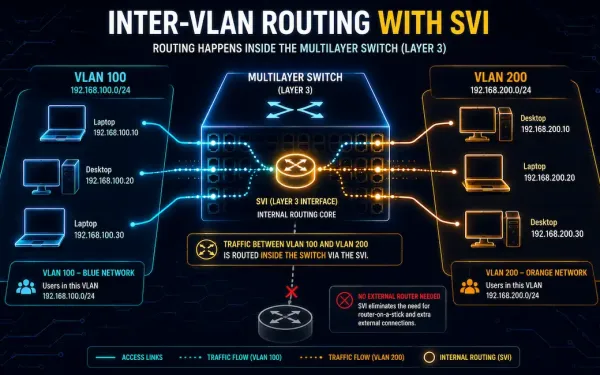
Switch Virtual Interface (SVI): Configuration, Verification, and Troubleshooting
Switch Virtual Interfaces, or SVIs, are a cornerstone of modern enterprise networking. They enable efficient inter-VLAN routing directly on a multilayer switch, no separate router required. This guide covers SVI configuration, verification, troubleshooting, and real-world tradeoffs, for CCNA and CCNP study alike. Evolution of Layer 2 and Layer 3 Switching In early networking, Layer 2...
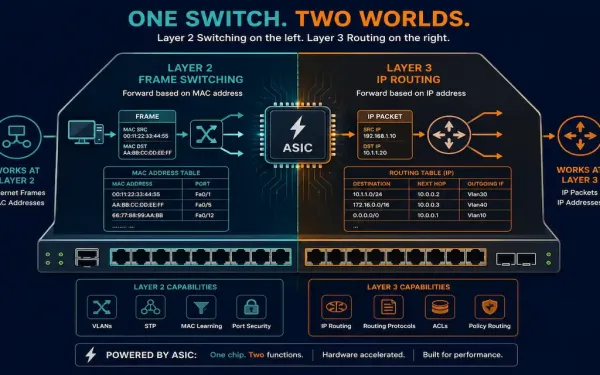
Layer 3 Switches: How They Work, How to Configure Them, and When to Use Them
Understanding Layer 3 of the OSI model is essential for CCNA (200-301) and CCNP Enterprise study. This layer, the Network layer, handles logical addressing with IP and is responsible for path determination and packet forwarding between networks through devices like routers. Traditional routers perform that Layer 3 work in software, which is flexible but CPU-intensive...
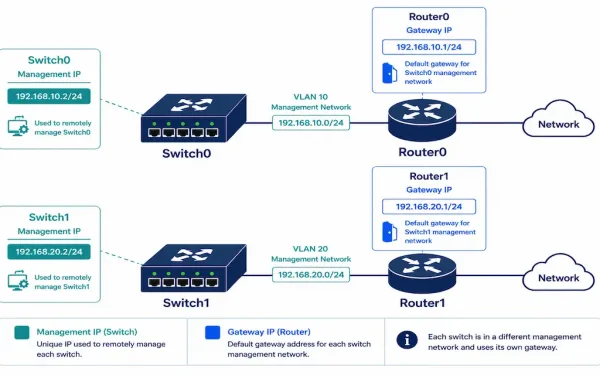
How to Enable an IP Address on a Network Switch
Switches operate at Layer 2 — forwarding frames based on MAC addresses, with no inherent concept of IP addressing at all. So how do you SSH into one, or manage it through a web interface? The answer is a Switched Virtual Interface (SVI): a virtual Layer 3 interface that gives an otherwise Layer 2-only device...