

Data loss rarely announces itself as a single dramatic event. More often it’s a failed drive, a misconfigured server, a phishing email that leads to ransomware, or simple human error — and the real cost isn’t just the data itself, it’s everything downstream of not having it: halted operations, compliance exposure, and the time it takes to get back to normal. Here’s what data loss and downtime actually cost businesses, backed by real survey data, and what actually reduces that risk.
What Causes Data Loss in the First Place
Most data loss falls into a few recurring categories: hardware failure (drives and servers do eventually fail), cyberattacks (ransomware and other malware specifically targeting data availability), and human error (accidental deletion, misconfiguration, overwritten files). None of these are rare or edge-case scenarios — they’re the ordinary operational risks every business running on digital infrastructure eventually faces in some form.
What Downtime Actually Costs
The honest answer is that it varies enormously by industry and company size, but the real figures are higher than most people assume:
- Median cost of a high-impact outage: roughly $2 million per hour, according to New Relic’s 2025 Observability Forecast, which surveyed more than 1,700 IT and engineering professionals across 23 countries. The same survey found organizations with full-stack observability tools reported closer to $1 million per hour for high-impact outages, compared to $2 million for those without — a meaningful difference tied to how quickly a problem can actually be diagnosed and fixed.
- Manufacturing specifically averages roughly $260,000 per hour in downtime costs, according to Aberdeen Group research — reflecting how directly production-line downtime translates into lost output.
- Costs scale with how fast an organization can detect and respond to an incident, not just the incident itself — which is exactly why monitoring and automated alerting matter as much as backup itself.
These figures are industry averages and large-outage-skewed, not universal per-minute math for every business — a small business’s actual exposure depends heavily on its specific operations, but the broader point holds: downtime cost accumulates fast, and the first hour is rarely the expensive one compared to the hours that follow if recovery is slow.
Why Automated, Monitored Backups Actually Matter
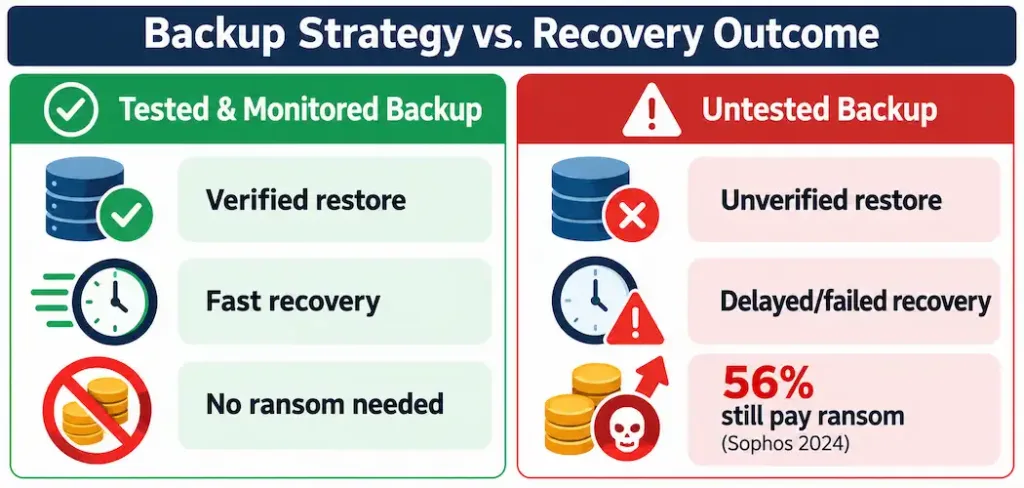
A backup that exists but isn’t verified or monitored is a backup you’re trusting without evidence. The real-world data on backup effectiveness during an actual incident is telling: in a 2024 Sophos survey of organizations that had experienced ransomware encryption, 68% recovered their data from backups, while 56% paid the ransom (some organizations did both, reflecting incidents where backup recovery alone wasn’t sufficient or fast enough). That gap — more than two-thirds using backups successfully, but over half still resorting to ransom payment — says something important: having backups isn’t the same as having backups you can actually, reliably restore from under pressure.
Automated backups remove the human-error risk of someone forgetting to run a manual backup, but automation alone isn’t the full answer. The backups still need to be:
- Tested through actual restore drills, not just confirmed as “completed” by a dashboard — a backup that’s never been test-restored is an unverified assumption, not a safety net.
- Monitored for silent failures, since a backup job that fails quietly (a storage quota issue, a credential expiration, a corrupted file) can go unnoticed for weeks before anyone discovers it only when they actually need to restore.
- Stored with real redundancy, following something like the 3-2-1 principle — three copies of data, on two different media types, with one copy off-site — so a single point of failure (a single drive, a single location) can’t take out every copy at once.
How Recovery Speed Actually Affects the Outcome
Recovery time after a data-loss event depends heavily on the cause and the backup architecture in place — there’s no universal “overnight” benchmark that applies regardless of situation, and treating any single recovery-time figure as typical oversimplifies a genuinely variable process. A clean restore from a well-tested, properly redundant backup system can be fast. A recovery complicated by ransomware encryption, corrupted backup files, or an untested restore process can take considerably longer — which is exactly the gap the Sophos data above reflects: plenty of organizations with backups still ended up paying a ransom, likely because the restore process itself wasn’t fast or reliable enough to avoid it.
What Actually Reduces Data-Loss Risk
- Follow the 3-2-1 backup rule as a baseline, not an aspiration — three copies, two media types, one off-site.
- Run real restore tests on a regular schedule, not just backup-completion checks — the only way to know a backup actually works is to restore from it and verify the result.
- Monitor backup jobs actively, with alerts for failures rather than relying on periodically checking a dashboard.
- Separate backup credentials and access from primary network credentials where possible, since ransomware that compromises a network can otherwise reach and encrypt backups stored on the same credentials.
- Document a recovery plan with realistic time estimates based on your actual backup architecture and data volume, rather than assuming recovery will be fast until you’re in the middle of needing it to be.
The Bottom Line
Data loss and downtime cost real money — a median of roughly $2 million per hour for high-impact outages, according to recent survey data — but the bigger risk most organizations underestimate isn’t the loss itself, it’s discovering during an actual incident that backups weren’t tested, monitored, or redundant enough to recover from quickly. The gap between having backups and having backups you can actually restore from under pressure is where a meaningful share of ransomware victims still end up paying anyway, even with backups in place.
Frequently Asked Questions
How much does IT downtime actually cost businesses?
The median cost of a high-impact outage is roughly $2 million per hour, according to New Relic’s 2025 Observability Forecast — though actual costs vary significantly by industry and company size. Manufacturing specifically averages around $260,000 per hour, according to Aberdeen Group research.
Do backups actually work during a ransomware attack?
Often, but not always reliably. A 2024 Sophos survey found 68% of organizations whose data was encrypted by ransomware recovered it from backups, while 56% still paid the ransom — meaning having backups doesn’t guarantee a fast or complete recovery without proper testing and monitoring in place.
What’s the 3-2-1 backup rule?
Keep three copies of your data, on two different types of storage media, with at least one copy stored off-site. This protects against any single point of failure taking out every copy of your data at once.
Is there a typical recovery time after a data-loss event?
No single typical figure applies — recovery time depends heavily on the cause (hardware failure versus ransomware versus human error) and how well-tested and redundant the backup architecture actually is. Treat any specific “overnight recovery” claim as situation-dependent, not a general benchmark.



