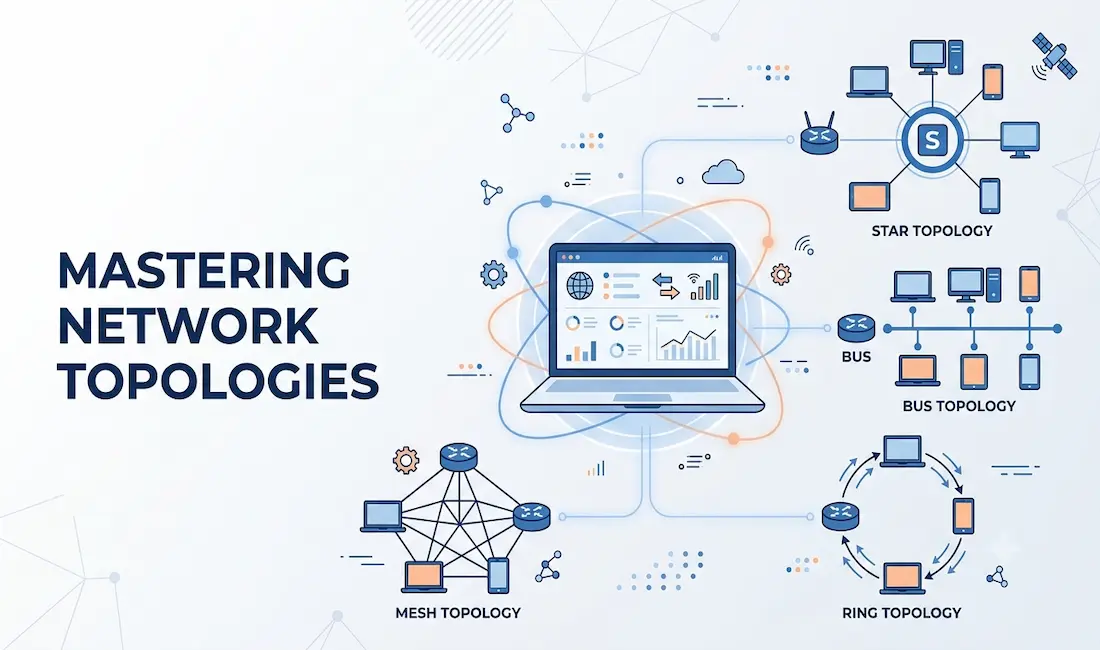
Network topology defines the schematic arrangement of devices, nodes, and connections within a computer network. It determines how data flows between devices, directly affecting performance, scalability, and reliability. Topologies are broadly categorized into physical network topology, the tangible layout of cables and devices, and logical network topology, the virtual path that data actually travels. Understanding both is essential for designing, optimizing, and troubleshooting any network.
In this guide, we explore the types, advantages, and applications of network topologies, including WAN and LAN configurations, to help you choose the best setup for your needs. We cover each physical topology with its strengths and weaknesses, explain how logical topology differs from physical wiring, compare the options side by side, and look at the modern trends reshaping how networks are built.
The Physical Network Topology
A network’s physical topology is the physical and geometric layout of the network that we can see: devices such as routers, switches, wireless access points, nodes, and the cables between them. Several common physical topologies exist, including point-to-point, ring, bus, star, and mesh. Physical topologies fall into two broad categories based on scope: WAN topologies, which interconnect geographically separated sites, and LAN topologies, which connect devices within a single location.
Common Physical WAN Topologies
Wide area networks are generally interconnected using the following physical topologies.
Point-to-Point
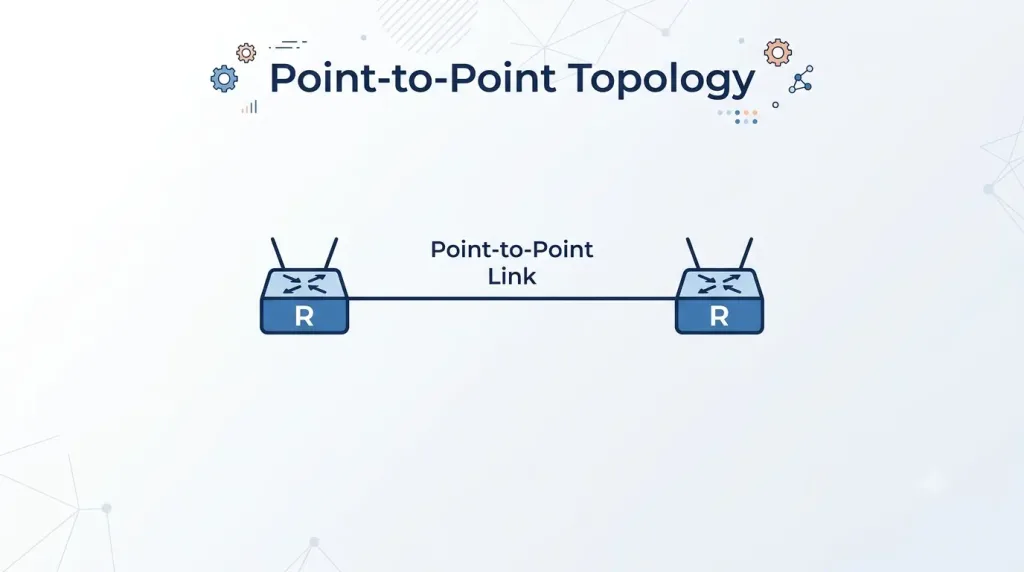
A point-to-point (PTP) network topology connects two nodes directly to one another. Only two devices are involved, with a single link, whether a physical wire or a wireless path, sitting between them. This is the simplest topology in networking, and for that reason it is a very popular WAN topology.
- Advantages: Simple, reliable, and low cost.
- Disadvantages: Not scalable, and limited to two nodes.
- Use case: Leased lines and serial connections.
Hub and Spoke
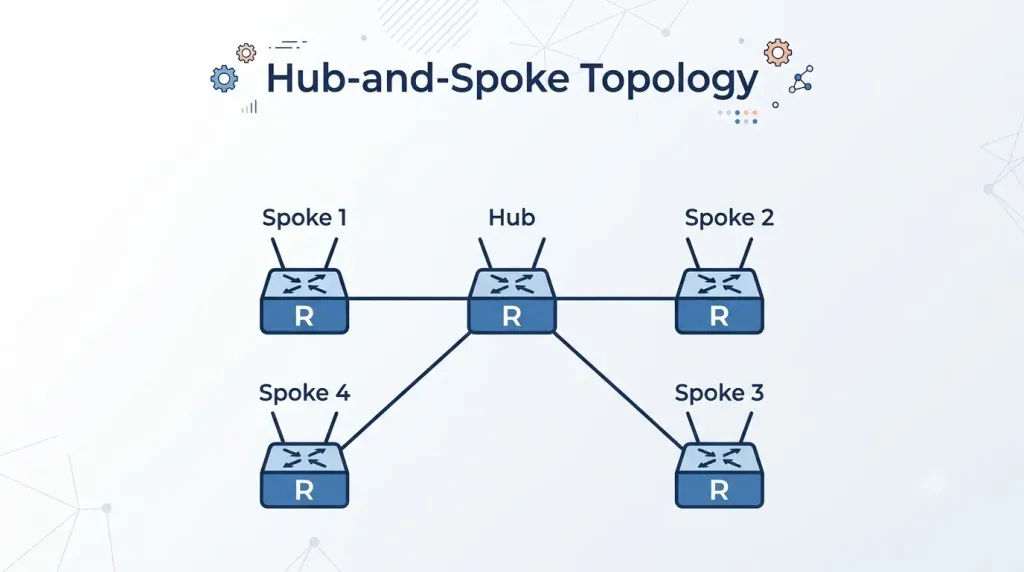
A hub-and-spoke topology is the WAN equivalent of the LAN star topology. A central site, the hub, interconnects multiple branch sites, the spokes, using point-to-point links, and communication between two spokes always travels through the hub. While hub-and-spoke and star are structurally the same idea, “hub and spoke” is the term typically used at the WAN scale for connecting branch offices to a central site, whereas “star” usually describes devices connected to a central switch within a LAN.
- Advantages: Centralized control and moderate scalability.
- Disadvantages: The hub is a single point of failure, with increased latency for spoke-to-spoke communication.
- Use case: Branch offices and retail chains.
Mesh Topology
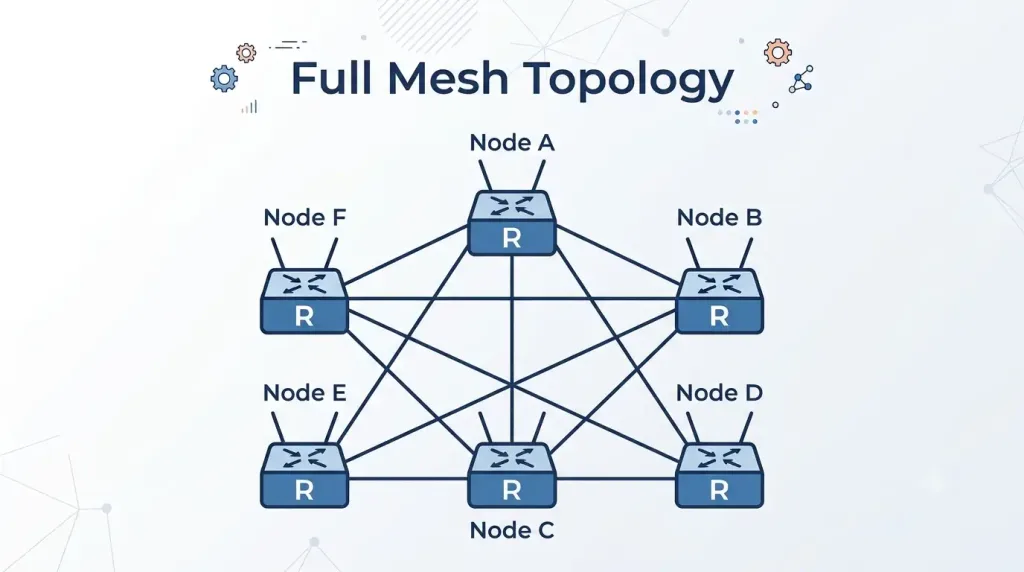
A mesh network is a topology in which each node relays data for the network, with every end system interconnected to every other system. This provides very high availability and redundancy, but the administrative and physical costs can be substantial because of the sheer number of links required. Each connection is essentially a point-to-point link to another node. A common variation is the partial mesh, in which some but not all end devices are interconnected, trading some redundancy for lower cost.
- Advantages: High reliability and redundancy.
- Disadvantages: Expensive and complex to manage.
- Use case: ISP backbones and mission-critical networks.
Physical LAN Topologies
Physical LAN topologies define how devices such as computers, servers, and switches are physically connected within a local area network. Below are the most common LAN topologies, their characteristics, and their typical use cases.
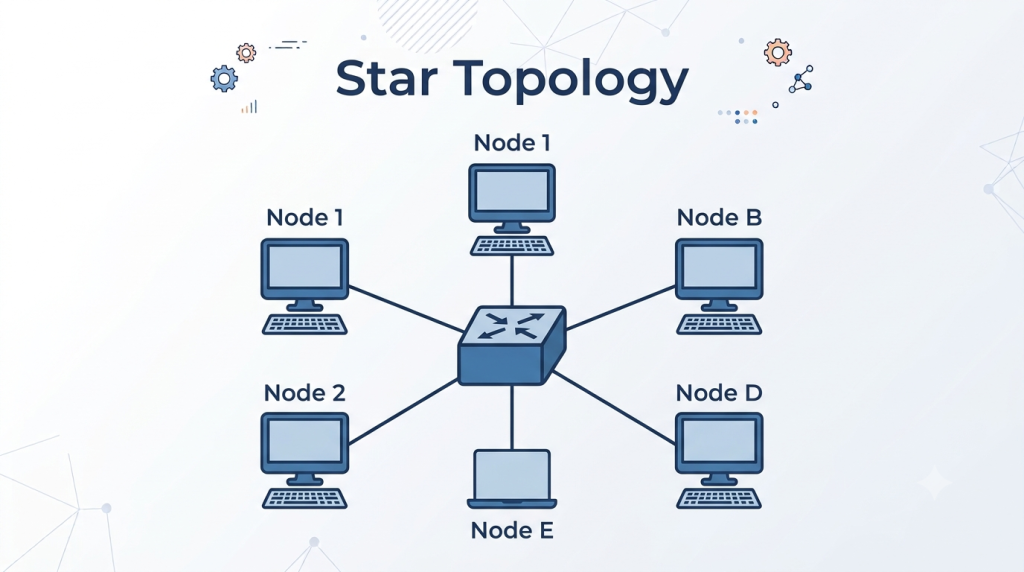
Star Topology
In a star topology, all devices connect to a central device, typically an Ethernet switch. Data flows through the switch, which manages communication and regenerates signals. This topology is widely used in modern LANs thanks to its scalability and ease of troubleshooting.
- Advantages: Easy to install and scale by adding devices to the switch; a single device failure doesn’t disrupt the rest of the network; centralized management simplifies troubleshooting.
- Disadvantages: Failure of the central device can disable the entire network; requires more cabling than bus or ring topologies.
- Use case: Office networks, schools, and data centers.
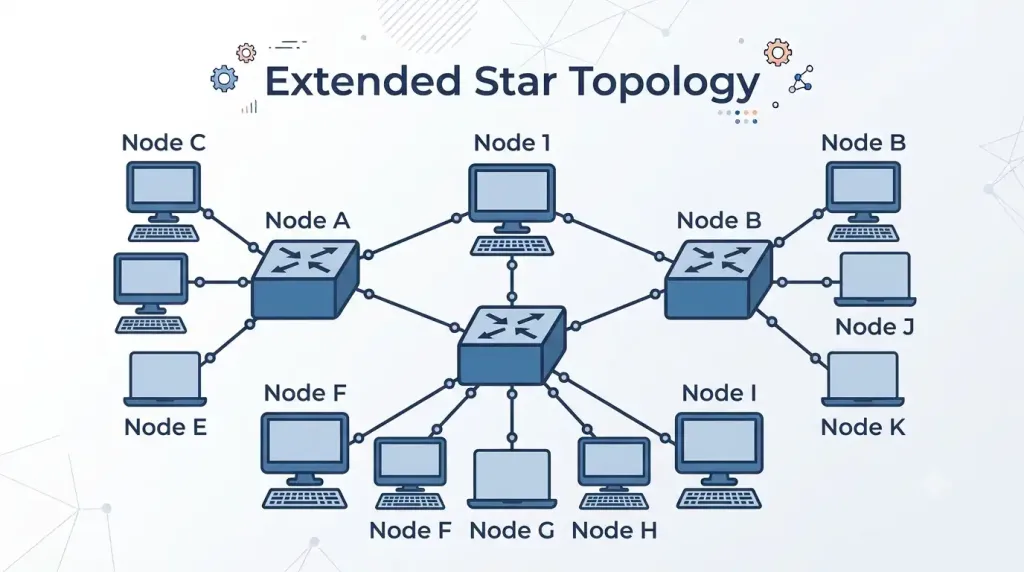
Extended Star Topology
An extended star topology connects multiple star topologies through additional switches, forming a hierarchical structure. This setup is common in large organizations with distributed networks, where a central switch links several departmental switches, each of which anchors its own star.
- Advantages: Supports large-scale networks with multiple subnets; retains the scalability and manageability benefits of the star.
- Disadvantages: Increased complexity and cabling costs; introduces multiple points of failure across the switches.
- Use case: University campuses and corporate headquarters.
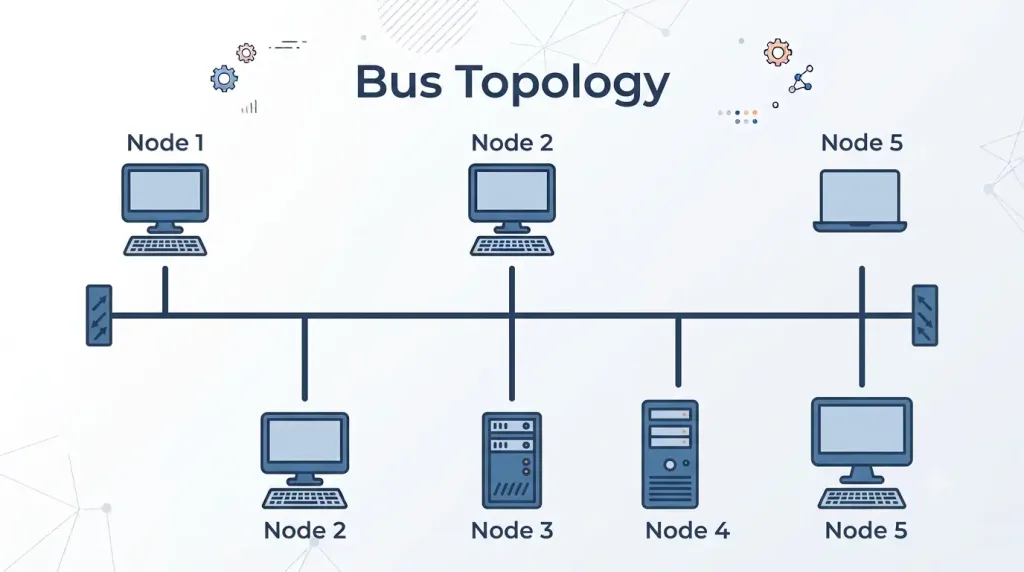
Bus Topology
In a bus topology, all devices connect to a single backbone cable, historically coaxial, which is terminated at both ends. Legacy Ethernet networks used this topology, but it is rare in modern LANs because of its limitations.
- Advantages: Inexpensive and simple to set up; requires less cabling than star or mesh.
- Disadvantages: A single cable break disrupts the entire network; difficult to troubleshoot and scale.
- Use case: Small, legacy networks (rarely used today).
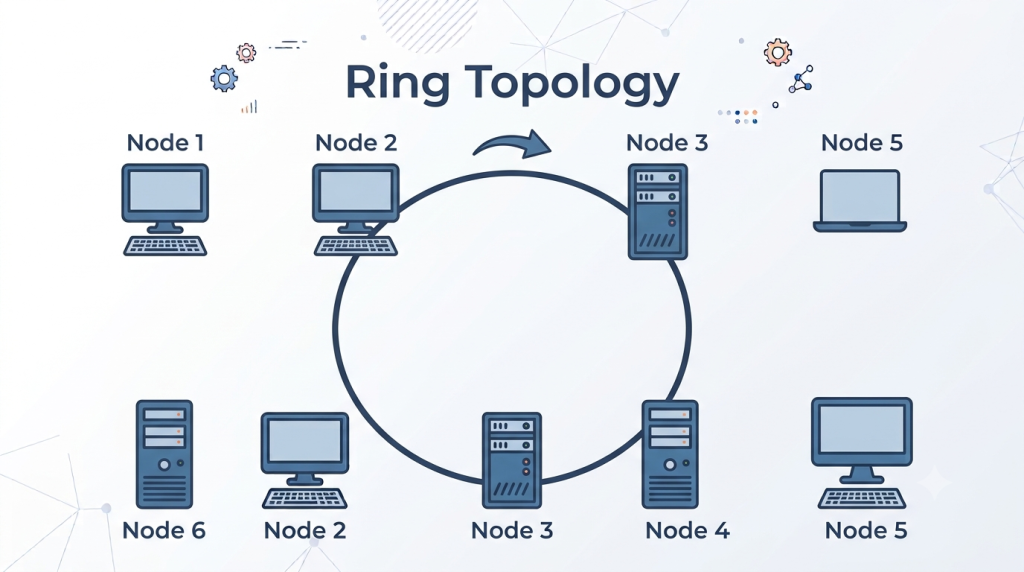
Ring Topology
In a ring topology, devices form a closed loop and data travels around it, with each device acting as a repeater that boosts the signal. Used in legacy FDDI and Token Ring networks, it is uncommon in modern LANs.
- Advantages: No termination required, unlike a bus; predictable data flow reduces collisions.
- Disadvantages: A single device failure can disrupt the ring; difficult to add or remove devices.
- Use case: Legacy networks such as Token Ring (rare today).
The Logical Network Topology
Logical network topology describes how data flows between devices, independent of their physical connections. It focuses on the virtual paths defined by data link layer protocols such as Ethernet and Wi-Fi, together with network layer routing. The key insight is that the logical topology can differ from the physical one: a network physically wired as a star may behave logically as a bus if all devices share a single collision domain, as they did in older hub-based networks.
Key Characteristics
- Data flow: Determines how frames or packets traverse the network.
- Protocols: Governed by protocols such as Ethernet, ARP, and IP.
- Media access control (MAC): The logical topology influences how devices access shared media, for example CSMA/CD in traditional Ethernet.
- Virtual connections: Logical paths may differ from physical wiring, as in VLANs or VPNs.
Example
In a LAN physically wired as a star using an Ethernet switch, the logical topology depends on the equipment:
- Point-to-point: With a modern switch, each device has a dedicated logical connection, since the switch isolates traffic between ports.
- Bus: In older hub-based networks, all devices share a single logical bus and compete for access to the media.
Importance
Logical topology has a direct impact on network performance, security, and scalability. VLANs, for instance, create logical segments on top of a single physical network, isolating traffic for security and efficiency without requiring additional hardware. This separation of logical design from physical wiring is what makes modern networks flexible.
Comparison of Network Topologies
The table below summarizes how the main topologies compare across the factors that matter most when designing a network.
| Topology | Type | Scalability | Reliability | Cost | Use Case |
|---|---|---|---|---|---|
| Point-to-Point | WAN/LAN | Low | High | Low | Dedicated links (e.g., leased lines) |
| Hub and Spoke | WAN | Moderate | Moderate | Moderate | Centralized networks (e.g., branch offices) |
| Mesh | WAN/LAN | High | Very High | Very High | Critical networks (e.g., ISPs) |
| Star | LAN | High | Moderate | Moderate | Modern LANs (e.g., offices) |
| Extended Star | LAN | Very High | Moderate | High | Large campuses |
| Bus | LAN | Low | Low | Low | Legacy networks |
| Ring | LAN | Low | Moderate | Moderate | Legacy FDDI/Token Ring |
How to Choose the Right Network Topology
Selecting the appropriate topology depends on your organization’s needs, budget, and technical requirements. Consider the following factors:
- Network size: Small networks may use a star or bus topology, while large networks benefit from an extended star or mesh.
- Budget: Bus and point-to-point topologies are cost-effective, while mesh is expensive due to cabling and maintenance.
- Performance: Mesh offers high redundancy and speed but demands complex management.
- Scalability: Star and extended star topologies are far easier to scale than bus or ring.
- Reliability: Mesh and point-to-point provide high reliability, while bus is prone to single-point failures.
- Use case: ISPs use mesh for backbone networks, while offices prefer a star for simplicity.
Practical Tips
- Assess requirements: Map out your devices, traffic patterns, and growth plans before committing to a design.
- Consult experts: Work with network engineers for large-scale deployments.
- Test configurations: Simulate topologies using tools such as Cisco Packet Tracer before rolling them out.
- Plan for redundancy: Incorporate failover mechanisms in critical networks so a single failure doesn’t take everything down.
Modern Trends in Network Topology
Network topologies continue to evolve with advances in technology. Key trends include:
- Software-defined networking (SDN): Separates the control plane from the data plane, enabling dynamic logical topologies that are managed centrally through software.
- Hybrid topologies: Combine multiple topologies, such as star and mesh, to balance flexibility and cost efficiency.
- Wireless topologies: Wi-Fi and 5G reduce reliance on physical cabling, creating logical mesh or star arrangements without the wiring.
- Cloud-based networking: Virtual topologies in cloud environments, such as AWS VPCs, abstract away the underlying physical infrastructure entirely.
- Zero Trust architecture: Logical topologies enforce micro-segmentation for security, isolating workloads regardless of physical layout.
Together, these trends highlight a clear shift toward flexible, scalable, and secure network designs in which logical structure matters as much as physical wiring.
Frequently Asked Questions
What is network topology?
Network topology is the arrangement of devices, nodes, and connections in a computer network. It defines how data flows between devices and how they communicate with one another. Topologies are categorized into physical topology, which is the hardware layout of devices and cables, and logical topology, which is the path data actually takes across the network.
What are the main types of network topology?
The most common topologies are point-to-point, star (also called hub and spoke at the WAN scale), mesh, bus, and ring. Point-to-point directly connects two nodes, star connects devices to a central hub or switch, and mesh interconnects all nodes for redundancy. Bus has devices share a single cable and ring arranges them in a closed loop, while hybrid topologies combine several of these to balance cost and performance.
What are the advantages and disadvantages of network topologies?
Each topology involves trade-offs between cost, reliability, and scalability. A star is easy to manage and scale but depends on a central device that is a single point of failure, and a mesh is highly reliable but expensive and complex to maintain. A bus is cost-effective but unreliable and hard to troubleshoot, a ring offers predictable data flow but is difficult to modify, and point-to-point is simple and reliable but cannot scale beyond two nodes.
How do I choose the best network topology?
Evaluate your needs across several dimensions: network size, budget, scalability, and reliability. Small networks may be well served by a star, while large deployments often need an extended star or mesh, and mission-critical environments justify the cost of mesh for its redundancy. Budget also matters, since a bus is the cheapest option and mesh the most expensive, so the right choice balances these factors against your growth plans.
What is the difference between physical and logical topology?
Physical topology is the actual physical layout of devices and cables, such as a star or bus arrangement. Logical topology is the virtual path that data travels, which is defined by protocols like Ethernet and by features such as VLANs. The two can differ within the same network; for example, a network physically wired as a star can behave logically as a bus when all devices share a single collision domain in a hub-based setup.
Are there modern alternatives to traditional topologies?
Yes, several modern approaches offer more dynamic and scalable alternatives to fixed physical layouts. Software-defined networking (SDN) allows logical topologies to be reconfigured through software, cloud platforms provide virtual topologies that abstract physical hardware, and wireless technologies like Wi-Fi and 5G reduce dependence on cabling. These approaches make it possible to adapt a network’s structure to changing needs without rewiring.
Can I combine multiple network topologies?
Yes, hybrid topologies combine elements of star, mesh, and other designs to balance cost, performance, and scalability. This is extremely common in real-world networks, where different parts of an organization have different requirements. For example, a corporate network may use a star topology for individual offices while relying on a mesh for its data center to maximize redundancy where it matters most.