
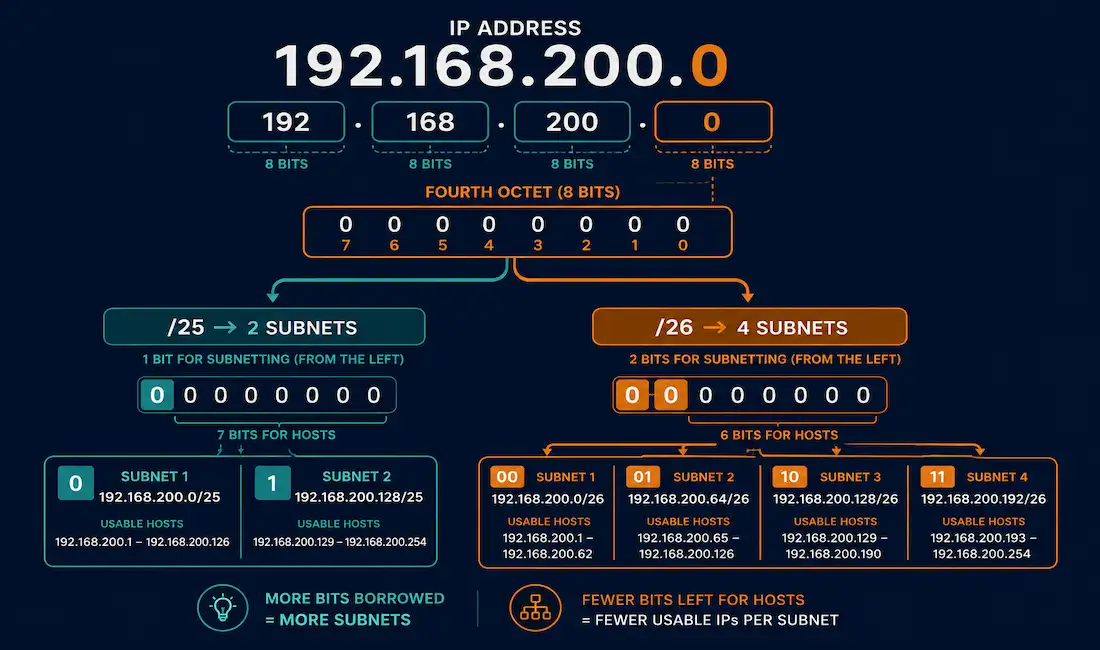
Classless subnetting, made possible by CIDR (Classless Inter-Domain Routing) since its introduction in 1993, lets an administrator borrow bits from any position in the host portion of an address, rather than being restricted to classful boundaries like /8, /16, or /24. This guide works through two complete subnetting problems on the same base network, step by step, with every calculation shown explicitly.
Starting Point: 192.168.200.0/24
Before subnetting anything, it’s worth confirming the baseline numbers for the unsubnetted network:
- Total bits in an IPv4 address: 32
- Network bits at /24: 24, leaving 8 host bits
- Total addresses: 2⁸ = 256, spanning 192.168.200.0 through 192.168.200.255
- Usable addresses: 2⁸ − 2 = 254 (subtracting the network and broadcast addresses)
- Network address: 192.168.200.0
- Broadcast address: 192.168.200.255
With no subnetting applied, this /24 supports a single LAN of up to 254 hosts. If a second, separate LAN is needed from this same address block, subnetting is required.
Example 1: Two Subnets
Problem: Create 2 usable subnets from 192.168.200.0/24.
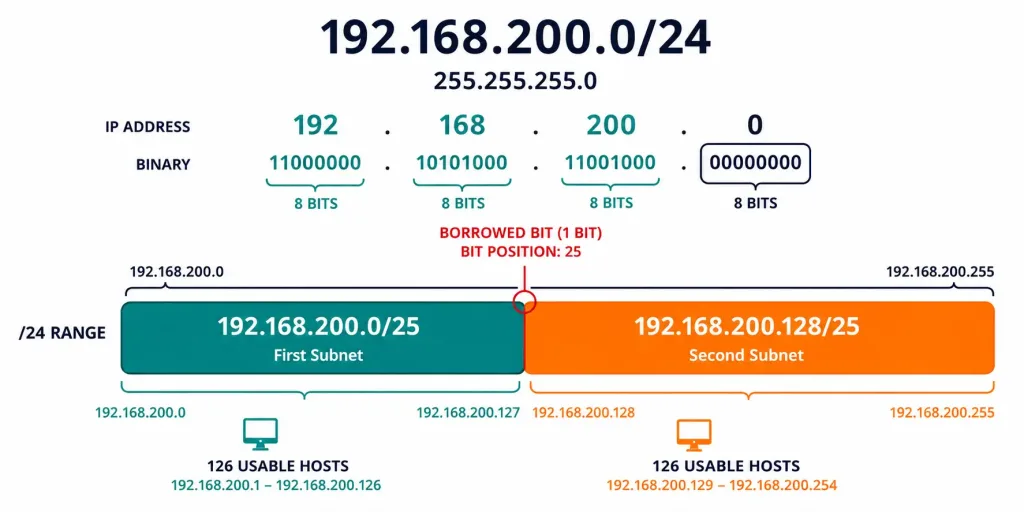
Step 1: Determine bits to borrow. The formula for the number of subnets a given number of borrowed bits produces is 2ⁿ = number of subnets. Since 2¹ = 2, exactly 1 bit needs to be borrowed from the host portion.
Step 2: Borrow the bit. That 1 bit comes from the most significant (leftmost) position of the host portion, in the fourth octet, extending the network portion from 24 bits to 25 bits, a /25. Borrowed bits become part of the network portion and are always set to 1 in the mask, exactly like the rest of the network bits.
Step 3: Enumerate the subnets. With 1 borrowed bit, that bit can be either 0 or 1, giving exactly 2 possible subnets:
| Subnet | Borrowed Bit | Fourth Octet (binary) | Network Address |
|---|---|---|---|
| Subnet 0 | 0 | 00000000 | 192.168.200.0 |
| Subnet 1 | 1 | 10000000 | 192.168.200.128 |
Step 4: Determine the new subnet mask. With 1 bit borrowed, the mask becomes 255.255.255.128, or /25.
Step 5: Calculate significant addresses for each subnet.
| Subnet 0 (192.168.200.0/25) | Subnet 1 (192.168.200.128/25) | |
|---|---|---|
| Network address | 192.168.200.0 | 192.168.200.128 |
| First usable host | 192.168.200.1 | 192.168.200.129 |
| Last usable host | 192.168.200.126 | 192.168.200.254 |
| Broadcast address | 192.168.200.127 | 192.168.200.255 |
Each /25 subnet provides 2⁷ − 2 = 126 usable host addresses, comfortably splitting the original 254-host network into two separate 126-host LANs.
Example 2: Four Subnets
Problem: Create 4 usable subnets from the same 192.168.200.0/24 network.
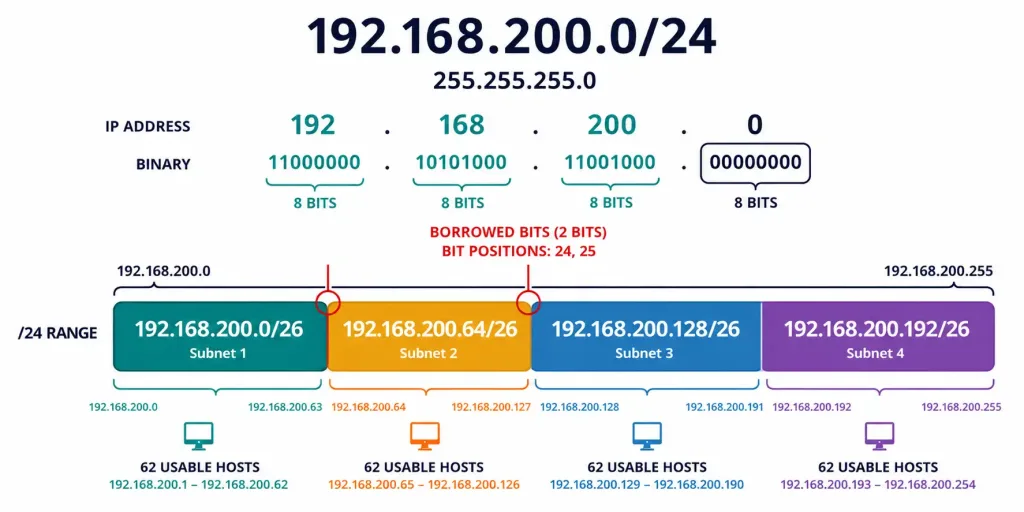
Step 1: Determine bits to borrow. Since 2¹ only produces 2 subnets, and 4 subnets are needed, borrow a second bit: 2² = 4. So, 2 bits need to be borrowed from the host portion.
Step 2: Borrow the bits. Borrowing 2 bits extends the network portion from 24 bits to 26 bits, a /26, changing the subnet mask to 255.255.255.192.
Step 3: Enumerate the subnets. With 2 borrowed bits, there are four possible combinations, giving four subnets:
| Subnet | Borrowed Bits | Fourth Octet (binary) | Network Address |
|---|---|---|---|
| Subnet 0 | 00 | 00000000 | 192.168.200.0 |
| Subnet 1 | 01 | 01000000 | 192.168.200.64 |
| Subnet 2 | 10 | 10000000 | 192.168.200.128 |
| Subnet 3 | 11 | 11000000 | 192.168.200.192 |
Step 4: Calculate usable hosts per subnet. After borrowing 2 bits, 6 host bits remain. Applying the usable-host formula, 2⁶ − 2 = 62 usable host addresses per subnet.
Step 5: Calculate the significant addresses for every subnet.
| Subnet | Network Address | First Usable | Last Usable | Broadcast |
|---|---|---|---|---|
| Subnet 0 | 192.168.200.0 | 192.168.200.1 | 192.168.200.62 | 192.168.200.63 |
| Subnet 1 | 192.168.200.64 | 192.168.200.65 | 192.168.200.126 | 192.168.200.127 |
| Subnet 2 | 192.168.200.128 | 192.168.200.129 | 192.168.200.190 | 192.168.200.191 |
| Subnet 3 | 192.168.200.192 | 192.168.200.193 | 192.168.200.254 | 192.168.200.255 |
Notice each subnet’s block size is exactly 64 addresses (256 total addresses ÷ 4 subnets), which is exactly why each subsequent network address jumps by 64: .0, .64, .128, .192.
Prefix-to-Subnet Quick Reference (from /24)
| Prefix | Bits Borrowed | Subnets | Mask | Usable Hosts per Subnet |
|---|---|---|---|---|
| /24 | 0 | 1 | 255.255.255.0 | 254 |
| /25 | 1 | 2 | 255.255.255.128 | 126 |
| /26 | 2 | 4 | 255.255.255.192 | 62 |
| /27 | 3 | 8 | 255.255.255.224 | 30 |
| /28 | 4 | 16 | 255.255.255.240 | 14 |
| /29 | 5 | 32 | 255.255.255.248 | 6 |
| /30 | 6 | 64 | 255.255.255.252 | 2 |
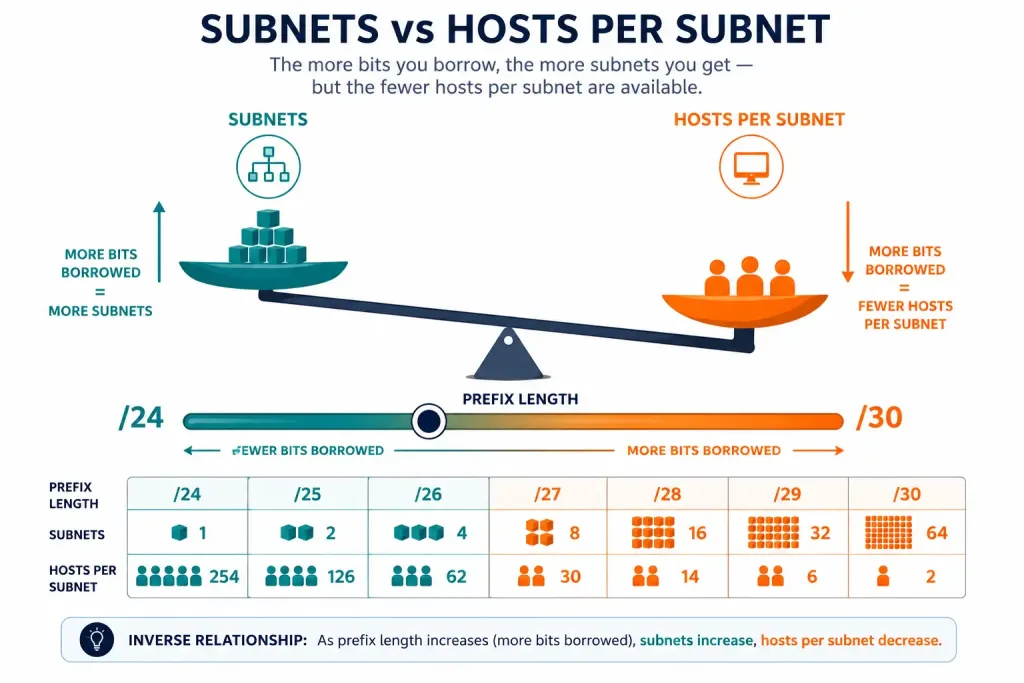
The relationship worth internalizing here is simple: every additional bit borrowed doubles the subnet count while halving the usable hosts per subnet, the same tradeoff that governs subnetting math regardless of which specific prefix you’re starting from. Once this pattern is second nature, extending the reference table above to prefixes beyond /30 becomes a trivial extrapolation rather than something that needs to be looked up separately.
Verifying Your Own Subnetting Work
It’s worth developing a habit of double-checking manual subnetting calculations, since a single arithmetic slip early on cascades into every subsequent value being wrong. Three quick sanity checks catch most mistakes:
Check that block sizes are consistent. In the four-subnet example, every subnet’s block size is exactly 64 addresses. If you calculate a network address that doesn’t fall on a multiple of the block size (0, 64, 128, 192 in this case), something’s gone wrong upstream in the calculation, and it’s worth retracing the borrowed-bit count before trusting any of the downstream numbers that follow.
Check that usable host counts match the formula. For any given number of remaining host bits h, usable hosts should always equal 2^h − 2. If your calculated usable host count doesn’t match this formula for the host bits actually remaining, recheck how many bits were borrowed before trusting the rest of the table.
Check that no subnet ranges overlap. Each subnet’s range should end exactly one address before the next subnet’s network address begins, with no gaps and no overlaps. In the four-subnet example, Subnet 0 ends at .63, and Subnet 1 begins at .64, immediately adjacent with no overlap, exactly the tight, gapless boundary that correct subnetting math always produces, hop after hop through the whole address block.
A subnet calculator is genuinely useful for confirming these calculations quickly, but working through the manual process at least a few times first is what actually builds the underlying understanding a calculator alone won’t give you, especially under exam conditions where a calculator isn’t available. Building that muscle memory now pays off directly the moment you’re staring at a subnetting question with a countdown timer running and no tool to lean on.
Why Uniform Subnetting Isn’t Always the Right Choice
Both examples above split the original /24 evenly, into 2 or 4 identically-sized subnets. This is straightforward and often exactly what’s needed when every subnet genuinely requires roughly the same number of hosts. But real deployments often don’t work that way: one location might need 100 hosts, another 20, and a point-to-point link between two routers needs exactly 2. Forcing all three onto identical, uniformly-sized subnets either wastes enormous address space on the smaller locations or fails to accommodate the larger one at all, a mismatch worth avoiding whenever the actual host requirements genuinely differ this much between locations.
This is exactly the gap VLSM fills, letting each of those three needs get its own appropriately-sized subnet, a /25 for the 100-host location, a /27 for the 20-host location, and a /30 for the point-to-point link, all carved out of the same original address block without wasting space forcing everything into one uniform size. The two worked examples in this guide are the essential building blocks for understanding VLSM: once you’re comfortable calculating a single uniform subnetting scheme, extending that same logic to mix multiple different prefix lengths within one network becomes a natural next step rather than an entirely new skill to learn from scratch. Every VLSM design, no matter how complex, ultimately breaks down into the same borrow-bits-and-calculate process demonstrated above, just applied repeatedly with different target subnet sizes, one section of the address space at a time.
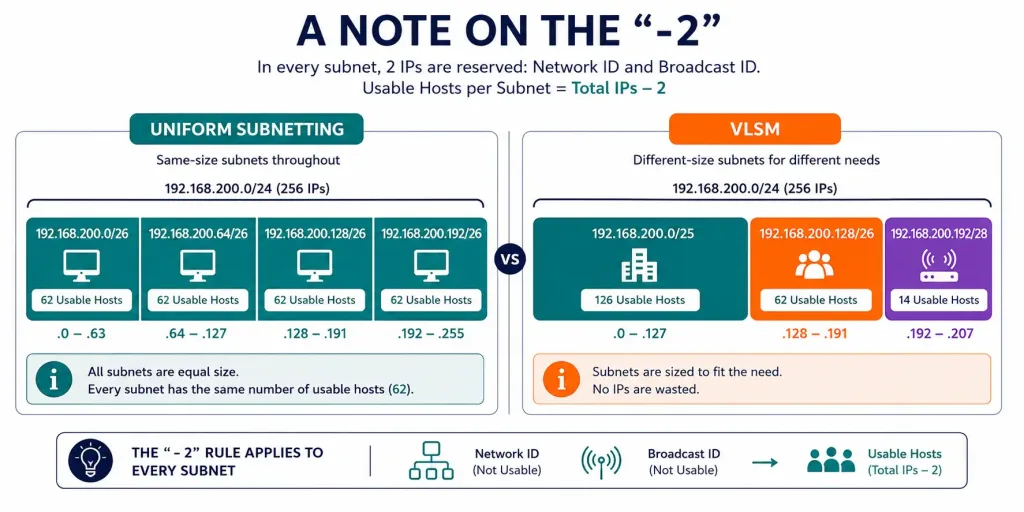
A Note on the “-2” in the Usable Host Formula
The usable host formula, 2^h − 2, subtracts exactly 2 addresses from every subnet, and it’s worth being precise about which two and why, rather than treating it as an arbitrary constant. The first subtracted address is the network address itself, all host bits set to 0, which identifies the subnet as a whole rather than any individual device on it. The second is the broadcast address, all host bits set to 1, reserved for reaching every device on that subnet simultaneously. Neither can be assigned to an individual host, which is exactly why every subnet, regardless of its size, loses exactly these same two addresses from its total to reach its usable count. This holds true whether you’re working with a massive /8 or a minimal /30, the logic never changes, only the total address count it’s being subtracted from. Understanding this rationale, rather than just memorizing the formula, makes it much harder to forget under exam pressure or apply incorrectly to an edge case, and it also makes the whole formula feel far less arbitrary once the reasoning clicks.
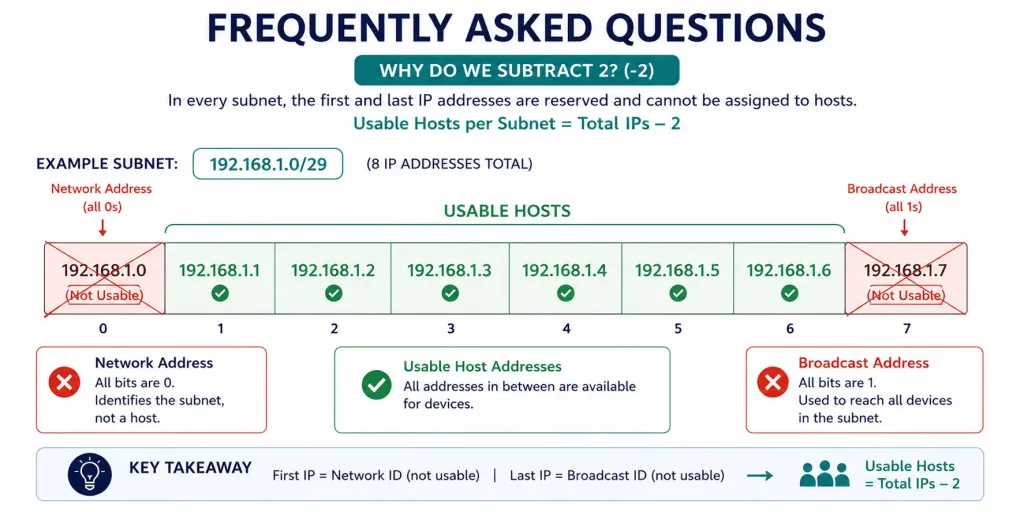
Frequently Asked Questions
How many bits do I need to borrow for a specific number of subnets?
Use the formula 2ⁿ = number of subnets, where n is the number of bits borrowed, and solve for the smallest n that meets or exceeds your required subnet count. For example, needing 5 subnets requires borrowing 3 bits, since 2² = 4 isn’t enough but 2³ = 8 covers it, even though 3 of those 8 subnets go unused.
Why does borrowing bits reduce the number of usable hosts per subnet?
Every bit borrowed from the host portion and given to the network portion is a bit no longer available for identifying individual hosts within that subnet, directly shrinking the usable host range. This is the fundamental tradeoff of subnetting: more, smaller subnets in exchange for fewer hosts in each one.
What’s the difference between classful and classless subnetting?
Classful subnetting restricts networks to fixed boundaries at /8, /16, or /24, based on address class. Classless subnetting, enabled by CIDR, allows bits to be borrowed from any position, producing prefixes like /25, /26, or /27 that fit actual host requirements far more precisely than classful boundaries ever could.
How do I calculate the broadcast address for any given subnet?
The broadcast address is the last address in a subnet’s range, found by setting every remaining host bit to 1 while keeping the network portion, including any borrowed bits, unchanged. In the four-subnet example above, Subnet 1’s broadcast address, 192.168.200.127, comes from setting all 6 remaining host bits to 1 while keeping the borrowed bits at 01.
Can I mix different subnet sizes from the same original network?
Yes, this is exactly what VLSM (Variable Length Subnet Masking) allows: rather than dividing a network into equally-sized subnets the way both examples above do, VLSM lets you create differently-sized subnets tailored to each location or purpose’s actual host requirements, generally using address space more efficiently than uniform subnetting.
What’s a common mistake to watch for when subnetting manually?
Overlapping subnets, accidentally assigning the same address range to two different subnets, is one of the most common manual subnetting errors, along with miscalculating the subnet mask for the intended number of subnets or hosts. Verifying calculations with a subnet calculator, or checking show ip route on a live Cisco device, catches these mistakes before they cause real connectivity problems, ideally well before a design ever gets deployed into production.



