
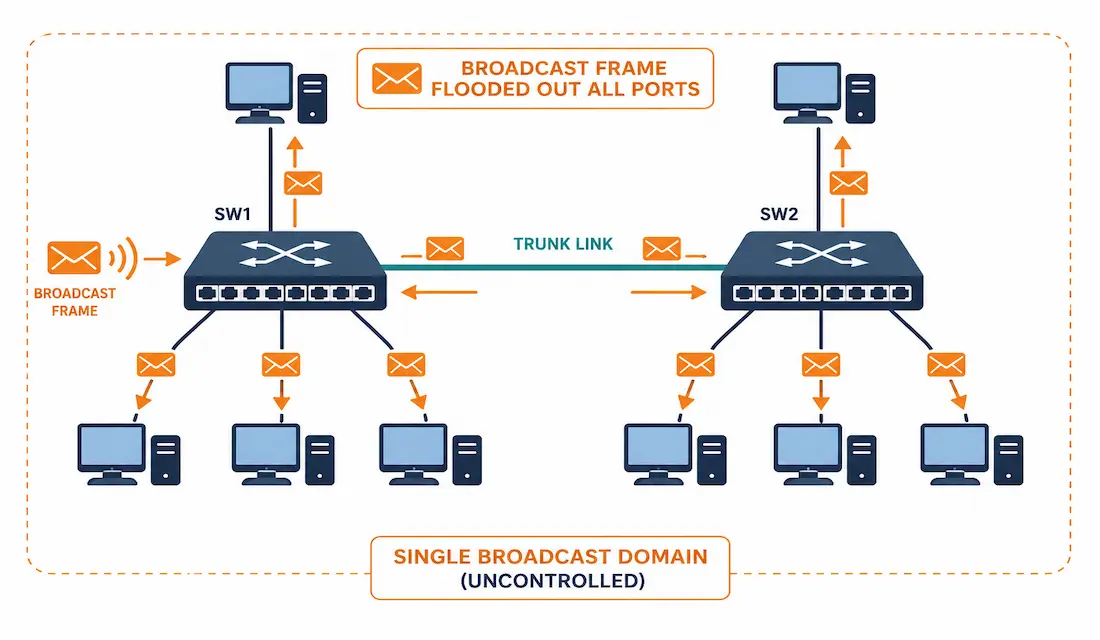
Broadcast traffic is necessary — ARP requests, DHCP discovers, and similar traffic all rely on it — but an uncontrolled broadcast domain scales badly. Every additional device adds more broadcast traffic that every other device on the same domain has to process, whether it’s relevant to them or not. Controlling broadcast domains is how networks stay efficient as they grow, and it comes down to two complementary tools: VLAN segmentation and storm control.
This guide covers exactly how broadcast flooding behaves with and without VLANs, real configuration for both segmentation and storm control, and how to verify and troubleshoot broadcast domain behavior on Cisco equipment.
How Broadcast Flooding Works Without VLANs
In a switch’s default configuration, when it receives a broadcast frame on an ingress port, it forwards that frame out every other port — this is standard behavior, not a malfunction. If the entire network sits in one flat subnet with no VLANs configured, every port on every switch belongs to the same single broadcast domain.
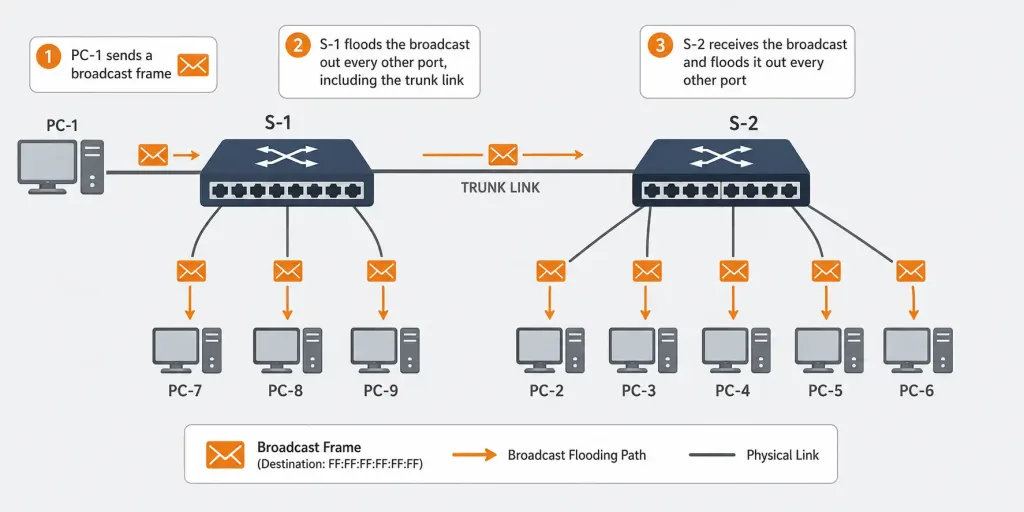
Consider a network where PC-1 sends a broadcast frame. Switch S-1 receives it and floods it out every port except the one it arrived on. Because the whole network is one broadcast domain, that flood doesn’t stop at S-1 — it propagates across the trunk to S-2 as well, and every PC connected anywhere in the network receives it. With six PCs sharing one broadcast domain, every single one processes every broadcast, regardless of whether it’s remotely relevant to five of the six.
How VLANs Contain Broadcast Flooding
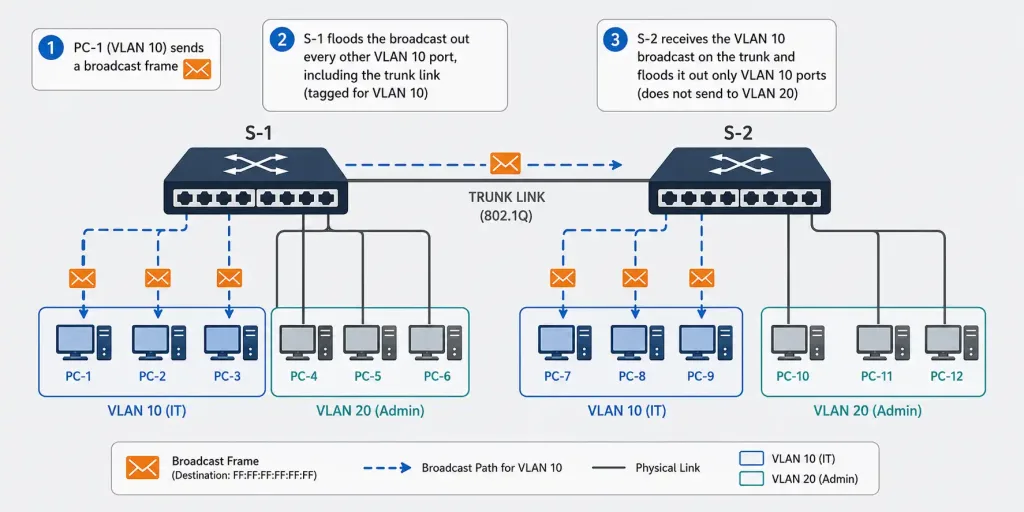
Segmenting the same network into VLANs changes this fundamentally, without requiring any additional physical hardware. Suppose the network above is split into VLAN 10 (IT department) and VLAN 20 (Admin department):
- PC-2, PC-3, and PC-4 (IT) are assigned to VLAN 10.
- PC-1, PC-5, and PC-6 (Admin) are assigned to VLAN 20.
When a broadcast originates from an IT department PC, switches S1 and S2 forward it only to ports assigned to VLAN 10, plus the trunk port connecting the two switches. Admin department broadcasts follow the same pattern, confined to VLAN 20 ports and the trunk. The trunk port between S1 and S2 carries traffic for both VLANs simultaneously, using 802.1Q tagging so each switch can tell which VLAN a given frame belongs to and forward it only to the matching ports on the other side.
The practical result: a broadcast from an IT department PC now reaches only two other devices (the other two IT PCs) instead of five. The same segmentation applies symmetrically to Admin department traffic.
Configuring the Segmentation
Creating the VLANs:
Switch(config)# vlan 10
Switch(config-vlan)# name IT
Switch(config-vlan)# exit
Switch(config)# vlan 20
Switch(config-vlan)# name ADMIN
Switch(config-vlan)# exit
Assigning access ports:
Switch(config)# interface FastEthernet0/2
Switch(config-if)# switchport mode access
Switch(config-if)# switchport access vlan 10
Configuring the trunk link between S1 and S2:
Switch(config)# interface GigabitEthernet0/1
Switch(config-if)# switchport mode trunk
Switch(config-if)# switchport trunk allowed vlan 10,20
Verify VLAN assignment and trunk status:
show vlan brief
show interfaces trunk
A Worked Comparison: Before and After Segmentation
It’s worth putting real numbers to this to make the benefit concrete. Take a network of 60 devices in one flat broadcast domain. A single ARP broadcast — a routine, constant background occurrence on any IP network — gets processed by all 60 devices, even though only one of them is the actual intended recipient. Multiply that by every device’s own routine broadcast traffic (ARP requests, DHCP renewals, and similar), and the aggregate broadcast load scales with the square of the device count in the worst case, since every device’s broadcasts are seen by every other device.
Segment that same 60-device network into four VLANs of 15 devices each, and each broadcast now reaches at most 15 devices instead of 60 — a 75% reduction in broadcast exposure per event, with the aggregate broadcast processing load across the network dropping accordingly. This is the concrete mechanism behind the often-repeated but rarely quantified claim that “VLANs improve performance” — it’s not a vague efficiency gain, it’s a direct, calculable reduction in how many devices process each other’s routine background traffic.
What Else Limits Broadcast Domain Size Beyond VLANs
VLANs are the primary tool for broadcast domain control, but a few related factors are worth understanding as part of the full picture:
Routers are natural broadcast domain boundaries. Unlike switches, routers don’t forward broadcast traffic between the networks they connect by default — this is a fundamental property of Layer 3 forwarding, not a configuration choice. Every router interface effectively terminates a broadcast domain, which is why introducing routing (whether via a dedicated router or a Layer 3 switch handling inter-VLAN routing) is often the natural next step once VLAN segmentation alone isn’t enough.
Subnet size interacts with broadcast domain size. A VLAN mapped to an overly large subnet — a /16 instead of a /24, for instance — can still end up with a large effective broadcast domain even though VLANs are properly configured, simply because the address space allows for far more hosts than intended. Sizing subnets appropriately to the actual number of devices in a VLAN, with reasonable headroom rather than excessive over-allocation, keeps broadcast domain size intentional rather than accidental.
Not all switches forward broadcasts identically under load. Under normal conditions, broadcast flooding behaves consistently and predictably. But a switch that’s resource-constrained or experiencing other issues can behave unpredictably with broadcast-heavy traffic, which is one more reason storm control’s threshold-based limiting exists as a safety net rather than relying purely on VLAN design to keep broadcast traffic within reasonable bounds under all conditions.
Understanding these factors together — VLAN segmentation, router boundaries, subnet sizing, and storm control — gives a complete picture of broadcast domain control, rather than treating VLANs as the only lever available.
Storm Control: Limiting Broadcast Traffic Directly
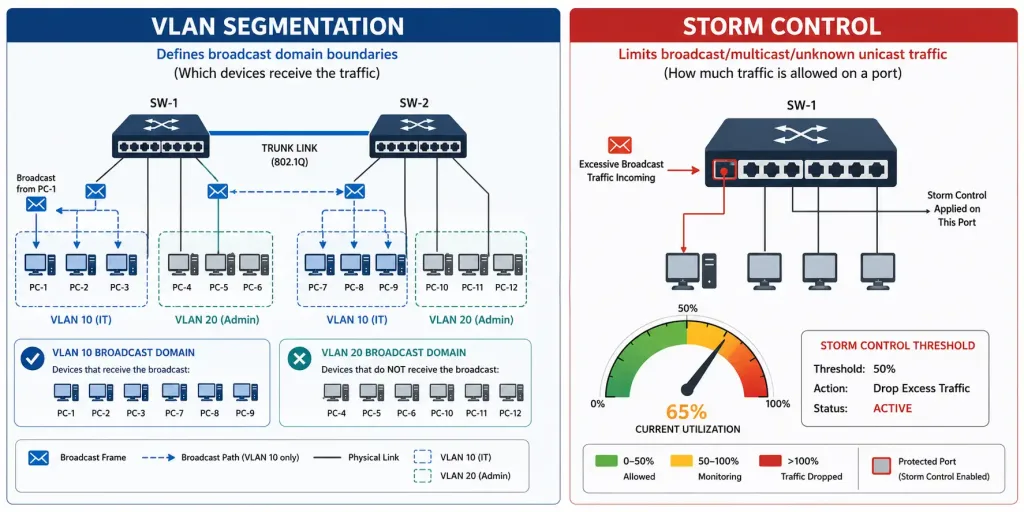
VLAN segmentation reduces the size of each broadcast domain, but it doesn’t limit how much broadcast traffic a single misbehaving device within a domain can generate. That’s a separate problem, and Cisco’s dedicated tool for it is storm control — sometimes called broadcast suppression.
Storm control monitors incoming traffic on an interface over a 1-second interval and compares it against a configured threshold, expressed as a percentage of the port’s total bandwidth, a bits-per-second value, or a packets-per-second value. If broadcast (or multicast, or unknown unicast) traffic exceeds that threshold, the switch takes action — typically dropping the excess traffic, though shutting the port down entirely or sending an SNMP trap are also configurable responses.
Configuring broadcast storm control with a percentage threshold:
Switch(config)# interface FastEthernet0/2
Switch(config-if)# storm-control broadcast level 30.00
This example limits broadcast traffic on the port to 30% of available bandwidth — once exceeded, additional broadcast traffic is dropped until the rate falls back below the threshold.
Using a specific bandwidth threshold instead of a percentage:
Switch(config-if)# storm-control broadcast level bps 10mConfiguring an action beyond the default drop behavior:
Switch(config-if)# storm-control action shutdownSetting the action to shutdown puts the port into an err-disabled state when the threshold is exceeded, which is a more aggressive response worth reserving for ports where a broadcast storm would indicate a genuine problem (like a suspected malfunctioning NIC or a loop) rather than routine, expected traffic bursts.
Verify storm control configuration and current status:
show storm-control
show running-config interface FastEthernet0/2
This is a meaningfully different mechanism from VLAN segmentation, and it’s worth being clear about the distinction: VLANs control which devices a given broadcast reaches. Storm control limits how much broadcast traffic any single port is allowed to generate in the first place, regardless of how large or small its VLAN’s broadcast domain is. A well-designed network typically uses both together.
Why Broadcast Storms Happen
A broadcast storm occurs when broadcast, multicast, or unknown unicast traffic floods a LAN segment far beyond normal levels, degrading performance for everyone sharing that broadcast domain. Common causes include a physical loop in the topology (if Spanning Tree Protocol isn’t handling it correctly), a malfunctioning network interface card generating excessive traffic, or — less commonly but seriously — a deliberate broadcast-flooding attack.
Storm control doesn’t prevent the underlying cause of a storm; it limits the damage a storm can do to the rest of the network while the actual cause gets investigated and fixed.
Troubleshooting Broadcast Domain Issues
Broadcast traffic reaching devices it shouldn’t: confirm the affected devices are actually in separate VLANs and that VLAN assignment is correct.
show vlan brief
show interfaces FastEthernet0/2 switchport
A trunk not carrying broadcast traffic for a specific VLAN: check that the VLAN is included in the trunk’s allowed list — a VLAN left off this list has its traffic silently blocked from crossing the trunk entirely.
show interfaces trunkSuspected broadcast storm degrading network performance: check storm control statistics and interface counters directly, and look for signs of a physical loop if Spanning Tree isn’t cleanly resolving the topology.
show storm-control
show interfaces FastEthernet0/2 counters
show spanning-tree
A port keeps going err-disabled: if storm control’s action is set to shutdown, a port that keeps triggering it is telling you something is generating sustained excessive broadcast traffic on that segment — worth investigating the connected device directly rather than simply re-enabling the port repeatedly.
show interfaces status err-disabledFAQs
What is a broadcast domain and why is it important to control?
A broadcast domain is the set of devices that all receive a given broadcast frame — every device in the domain has to process that traffic, whether it’s relevant to them or not. Left uncontrolled, a large broadcast domain means every device on the network pays a performance cost for every other device’s broadcast traffic, which is why segmentation becomes important as a network grows.
How do VLANs help control broadcast domains?
VLANs segment a single physical network into multiple separate broadcast domains, so a broadcast from a device in one VLAN only reaches other devices in that same VLAN. Trunk ports carry traffic for multiple VLANs simultaneously using 802.1Q tagging, letting switches keep each VLAN’s broadcast traffic properly separated even as it crosses shared links between switches.
What is storm control, and how is it different from VLAN segmentation?
Storm control is a separate Cisco feature that limits how much broadcast, multicast, or unicast traffic a single port is allowed to generate, based on a configured threshold — it protects against a single device flooding the network, regardless of how large or small its VLAN’s broadcast domain already is. VLAN segmentation and storm control solve different problems and work well used together: one controls which devices a broadcast reaches, the other controls how much broadcast traffic is allowed in the first place.
What causes a broadcast storm?
Common causes include a physical network loop that Spanning Tree Protocol hasn’t properly resolved, a malfunctioning network interface card generating excessive traffic, or a deliberate flooding attack. Storm control limits the damage a storm can cause while the underlying cause gets identified and fixed, but it doesn’t address the root cause on its own.
How can trunk ports assist in controlling broadcast domains?
Trunk ports connect switches while still keeping multiple VLANs’ broadcast traffic properly separated, using 802.1Q tags to identify which VLAN each frame belongs to as it crosses the link. Without a properly configured trunk carrying the right set of allowed VLANs, broadcast traffic for a given VLAN simply can’t reach devices on that VLAN connected to a different switch.
How do I know if storm control is actually working on my network?
Use show storm-control to check current thresholds and whether any port has recently triggered its configured action, and review interface counters for evidence of dropped or suppressed traffic. If a port keeps triggering storm control’s shutdown action repeatedly, that’s a strong signal worth investigating directly, rather than treating the port shutdown itself as the problem to fix.



