
Static routing is a fundamental skill for network engineers, essential for directing traffic in small to medium-sized networks or as a backup in dynamic routing environments. For students, understanding how to configure static routes using next-hop addresses is critical for mastering Cisco router configurations.
In this guide you will learn:
- How to configure IPv4 and IPv6 static routes using a next-hop address
- How routers resolve exit interfaces using recursive lookups
- How Cisco Express Forwarding (CEF) eliminates those lookups for faster forwarding
- How to configure return routes and floating static routes
- How to verify and troubleshoot static routes using Cisco IOS examples
What Is a Next-Hop Address in Static Routing?
A next-hop address is the IP address of the adjacent router that packets are forwarded to in order to reach a destination network. When you configure a static route with a next-hop address, you are telling the router: “For packets destined for this network, forward them to this IP address.”
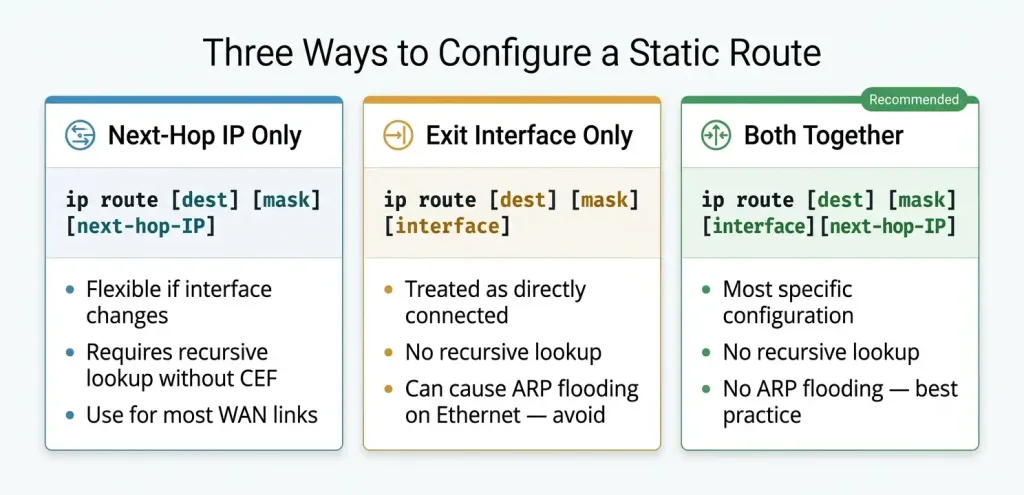
The alternative is to specify an exit interface instead of a next-hop IP. Each approach has trade-offs:
| Method | Command Example | Behaviour |
|---|---|---|
| Next-hop IP | ip route 192.168.20.0 255.255.255.0 10.10.10.2 | Router resolves the exit interface dynamically via recursive lookup or CEF |
| Exit interface | ip route 192.168.20.0 255.255.255.0 FastEthernet0/0 | Router treats the route as directly connected; no recursive lookup needed |
| Both (recommended) | ip route 192.168.20.0 255.255.255.0 FastEthernet0/0 10.10.10.2 | Most specific; eliminates recursive lookup and prevents ARP broadcast issues |
Using a next-hop IP address makes the route more flexible when the physical interface changes, but requires CEF or an additional lookup to resolve the exit interface. Using both the exit interface and next-hop IP together is the most precise approach and is common in production configurations.
Understanding Route Resolvability and Recursive Lookups
Route resolvability is the process a router uses to determine the exit interface for a packet based on its routing table. When a static route is configured with a next-hop address, the router may need to perform a recursive lookup to find the exit interface.
How Recursive Lookups Work
Consider a packet destined for the 192.168.20.0/24 network on Router1, with a static route on Router0 pointing to next-hop 10.10.10.2:
- Routing Table Lookup: Router0 checks its routing table and finds the static route for 192.168.20.0/24 with next-hop 10.10.10.2.
- Exit Interface Resolution: Since the next-hop is not directly resolvable from the first lookup alone, Router0 performs a second lookup to find which interface reaches 10.10.10.0/24 (e.g., FastEthernet0/0).
- Packet Forwarding: The packet exits via the resolved interface toward 10.10.10.2.
Router0(config)# ip route 192.168.20.0 255.255.255.0 10.10.10.2If 10.10.10.2 is not in a directly connected network, Router0 performs a recursive lookup to resolve the exit interface. Multiple lookup levels consume CPU resources. Cisco Express Forwarding (CEF) eliminates this overhead.
Why Recursive Lookups Matter
Multiple lookups consume CPU resources, potentially slowing down the router under heavy load. Cisco Express Forwarding (CEF) precomputes routing and adjacency information, eliminating recursive lookups and significantly improving forwarding speed.
Cisco Express Forwarding (CEF)
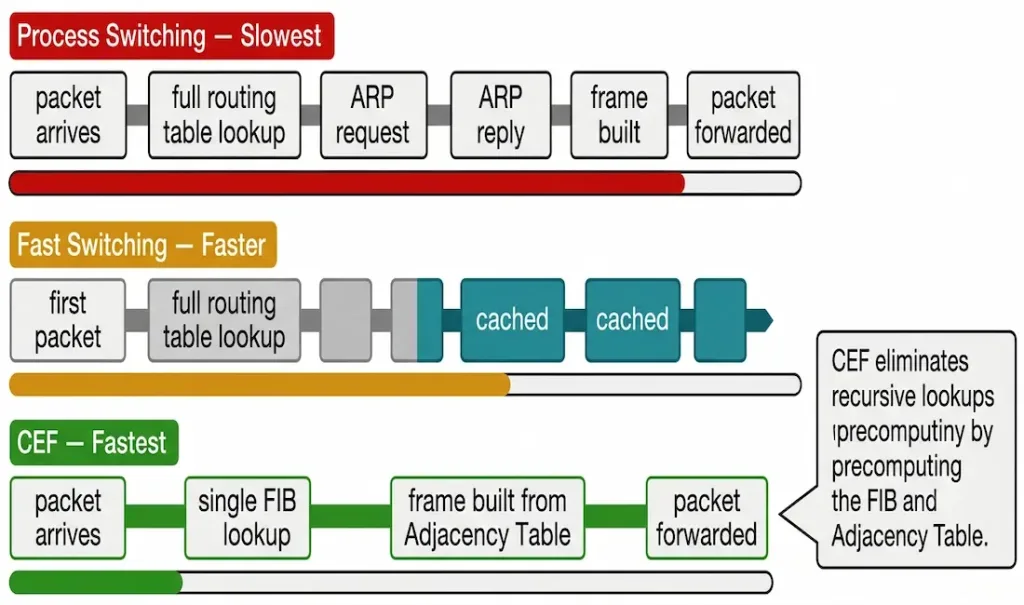
Cisco Express Forwarding is an advanced packet-switching technology used in Cisco routers to optimize forwarding performance. Unlike older methods such as process switching and fast switching, CEF precomputes routing and adjacency information into two dedicated tables, eliminating recursive lookups at forwarding time.
CEF vs. Other Switching Methods
| Method | Description | Performance |
|---|---|---|
| Process Switching | Each packet triggers a full routing table lookup and ARP query | Slowest — high CPU usage |
| Fast Switching | Caches routing decisions after the first packet of each flow | Faster — but still uses ARP for first packet |
| CEF | Precomputes FIB and Adjacency Table at control-plane level | Fastest — minimal CPU load at forwarding time |
CEF Components
Forwarding Information Base (FIB): An optimized mirror of the routing table, precomputed by CEF whenever the routing table changes. The FIB contains destination prefixes, next-hop addresses, and resolved exit interfaces, providing an efficient single-lookup path to the forwarding decision.
Adjacency Table: Stores the Layer 2 information (MAC addresses, encapsulation headers) needed to construct outgoing frames for each next-hop device. The Adjacency Table eliminates the need for a live ARP request on each forwarded packet by pre-resolving Layer 2 information at control-plane time.
Together, the FIB and Adjacency Table mean that when CEF is active, a static route using a next-hop address requires only a single FIB lookup — not the two or more lookups required without CEF.
Benefits of CEF
- Speed: Eliminates recursive lookups for dramatically faster per-packet forwarding
- Scalability: Handles large routing tables efficiently without per-packet CPU overhead
- Stability: Reduces CPU load, improving overall router performance under sustained traffic
Enabling and Verifying CEF
CEF is enabled by default on most Cisco routers running IOS 12.0 or later. To verify or manually enable it:
Router(config)# ip cef
Router# show ip cef
Router# show ip cef 192.168.20.0
Sample show ip cef output for the 192.168.20.0/24 prefix:
Router0# show ip cef 192.168.20.0
192.168.20.0/24
  nexthop 10.10.10.2 FastEthernet0/0
This output confirms CEF has resolved the next-hop 10.10.10.2 to exit interface FastEthernet0/0 without a recursive lookup at packet-forwarding time.
Configure Static Route with Next-Hop Address
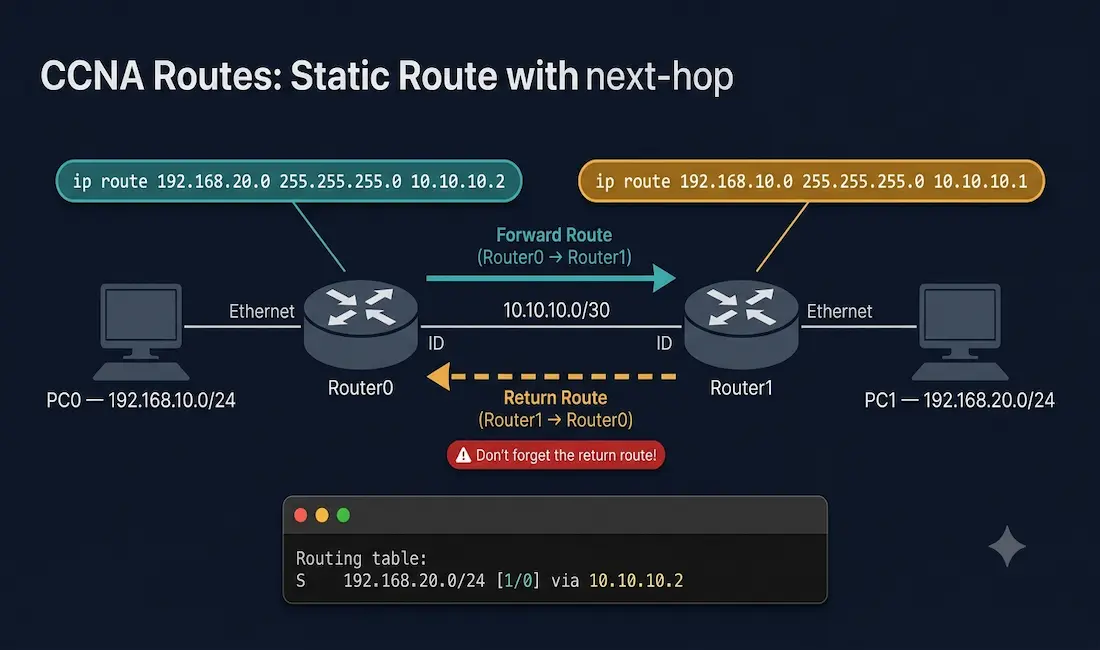
Example Topology
The topology used throughout this article:
[PC0]---[Router0 Fa0/0: 10.10.10.1]---[Router1 Fa0/0: 10.10.10.2]---[PC1]
         Fa0/1: 192.168.10.1                Fa0/1: 192.168.20.1
Network: 192.168.10.0/24 Network: 192.168.20.0/24- Router0 connects to the 192.168.10.0/24 LAN on Fa0/1 and to Router1 via 10.10.10.0/30 on Fa0/0
- Router1 connects to the 192.168.20.0/24 LAN on Fa0/1 and to Router0 via 10.10.10.0/30 on Fa0/0
- Goal: Enable PC0 (192.168.10.x) to reach PC1 (192.168.20.x) through both routers
Step 1 — Configure the Static Route on Router0
Router0 needs to know how to reach Router1’s LAN (192.168.20.0/24). The next-hop address is Router1’s interface on the shared link (10.10.10.2):
Router0> enable
Router0# configure terminal
Router0(config)# ip route 192.168.20.0 255.255.255.0 10.10.10.2
Router0(config)# exit
Router0# show ip route
Step 2 — Configure the Return Route on Router1
This is the step most CCNA students miss. For PC0 to reach PC1 and receive a reply, Router1 must also have a route back to Router0’s LAN (192.168.10.0/24). Without this return route, packets reach PC1 but the reply has no path back — the connection fails silently:
Router1> enable
Router1# configure terminal
Router1(config)# ip route 192.168.10.0 255.255.255.0 10.10.10.1
Router1(config)# exit
Router1# show ip route
Static routes are one-directional. Always configure both directions: the forward route on Router0 and the return route on Router1.
Step 3 — Verify the Routes
Router0# show ip routeExpected output showing the static route:
Codes: C - connected, S - static, R - RIP...

     10.0.0.0/30 is subnetted, 1 subnets
C       10.10.10.0 is directly connected, FastEthernet0/0
C    192.168.10.0/24 is directly connected, FastEthernet0/1
S    192.168.20.0/24 [1/0] via 10.10.10.2
The S code confirms it is a static route. The [1/0] shows the administrative distance (1) and metric (0). via 10.10.10.2 confirms the next-hop address.
Step 4 — Test End-to-End Connectivity
Router0# ping 192.168.20.1A successful ping confirms both the forward route (Router0 → Router1) and the return route (Router1 → Router0) are correctly configured. If the ping fails, check whether the return route on Router1 is missing — this is the most common cause of one-way connectivity.
IPv6 Static Route with Next-Hop Address
The same concept applies directly to IPv6. The command uses ipv6 route instead of ip route, and the destination and next-hop are IPv6 addresses:
Router0(config)# ipv6 route 2001:DB8:2::/64 2001:DB8:1::2This configures a static route to the 2001:DB8:2::/64 network via the next-hop address 2001:DB8:1::2 (Router1’s link-local or global address on the shared link).
For IPv6, using a link-local next-hop is more common and recommended. When the next-hop is a link-local address, you must also specify the exit interface:
Router0(config)# ipv6 route 2001:DB8:2::/64 FastEthernet0/0 FE80::1The link-local address is unique only within a link, so the exit interface is required to identify which link the link-local address belongs to.
Verify with:
Router0# show ipv6 route staticExpected output:
S   2001:DB8:2::/64 [1/0]
     via 2001:DB8:1::2
Floating Static Routes
A floating static route is a static route configured with a higher administrative distance than the primary dynamic route, so it only appears in the routing table if the primary route is lost. This makes it an effective backup or failover path.
Default administrative distances:
- Connected: 0
- Static route: 1
- OSPF: 110
- EIGRP internal: 90
- RIP: 120
To configure a floating static route as a backup to an OSPF route (AD 110), set the static route’s AD higher than 110:
Router0(config)# ip route 192.168.20.0 255.255.255.0 10.10.10.2 130The 130 at the end sets the administrative distance. Under normal operation, this static route does not appear in the routing table because the OSPF route (AD 110) is preferred. If OSPF loses the route, the static route with AD 130 becomes active automatically.
Verify the floating static route is inactive while OSPF is running:
Router0# show ip route 192.168.20.0When OSPF is up, you see the O (OSPF) entry. When OSPF is down, you see the S (static) entry from the floating route.
Troubleshooting Static Routes with Next-Hop Addresses
Problem 1 — Route Not in Routing Table
Symptom: show ip route does not show the static route. Cause: The next-hop address is not reachable — there is no route to the next-hop network in the routing table. Fix: Verify the next-hop is on a directly connected network or that a route to the next-hop network exists:
Router0# ping 10.10.10.2
Router0# show ip route 10.10.10.0
If the ping fails, check interface status with show interfaces FastEthernet0/0 — a down interface prevents the directly connected route from existing.
Problem 2 — Route Present but Ping Fails
Symptom: show ip route shows the static route but ping 192.168.20.1 fails. Cause: Most commonly, the return route on the remote router is missing. Fix: Log into Router1 and verify the return route:
Router1# show ip route 192.168.10.0If it is missing, add it:
Router1(config)# ip route 192.168.10.0 255.255.255.0 10.10.10.1Problem 3 — Recursive Lookup Failure
Symptom: Route appears in the routing table but CEF shows unresolved. Cause: The next-hop address is not reachable through any directly connected network. Fix:
Router0# show ip cef 192.168.20.0If output shows no route or drop, the FIB cannot resolve the next-hop. Verify the directly connected route to 10.10.10.0/24 is present and the interface is up.
Problem 4 — CEF Disabled
Symptom: Forwarding is slow; show ip cef shows no entries. Fix:
Router0(config)# ip cefVerify CEF is active:
Router0# show ip cef summaryStatic Route Quick Reference
| Task | Command |
|---|---|
| Configure IPv4 static route (next-hop) | ip route [dest] [mask] [next-hop-IP] |
| Configure IPv4 static route (interface) | ip route [dest] [mask] [interface] |
| Configure IPv4 floating static route | ip route [dest] [mask] [next-hop] [AD] |
| Configure IPv6 static route (next-hop) | ipv6 route [prefix/len] [next-hop-IPv6] |
| Configure IPv6 static route (link-local) | ipv6 route [prefix/len] [interface] [link-local] |
| Verify IPv4 routing table | show ip route |
| Verify specific IPv4 route | show ip route [network] |
| Verify IPv6 routing table | show ipv6 route |
| Verify CEF entry | show ip cef [prefix] |
| Test next-hop reachability | ping [next-hop-IP] |
| Enable CEF | ip cef |
CCNA Exam Pointers
- Static route administrative distance is 1 by default — lower than any dynamic routing protocol
- Syntax:
ip route [destination-network] [subnet-mask] [next-hop-IP | exit-interface] S*inshow ip routeindicates a default static route (0.0.0.0/0)- Floating static route: add an AD value higher than the primary dynamic protocol (e.g.,
130to float above OSPF’s 110) - Both directions must be configured — forward route and return route — for end-to-end connectivity
- CEF is enabled by default on IOS 12.0+; verify with
show ip cef - Next-hop static route requires the next-hop to be in a directly connected or otherwise reachable network, or the route will not install
- IPv6 static route:
ipv6 route [prefix/len] [next-hop]; when using link-local next-hop, exit interface is required show ip route static— filters routing table to show only static routes[1/0]in routing table =[administrative distance / metric]
Conclusion
Configuring a static route with a next-hop address is one of the most fundamental Cisco IOS skills. The core command — ip route [destination] [mask] [next-hop] — is simple, but the concepts around it (recursive lookups, CEF, return routes, floating static routes, and IPv6) are what CCNA candidates and working engineers need to understand deeply.
The most important practical takeaways: always configure both the forward and return routes, verify with show ip route and show ip cef, and use floating static routes to build resilient failover paths when dynamic routing is the primary routing method. With CEF enabled by default on modern Cisco IOS, next-hop static routes deliver single-lookup performance that scales well even in moderate-sized networks.
Frequently Asked Questions
What is a next-hop address in static routing?
A next-hop address is the IP address of the adjacent router that packets are forwarded to in order to reach a destination network. When you configure a static route using a next-hop address, the router uses that address to determine where to send packets destined for the specified network. The router must be able to reach the next-hop address through a directly connected interface for the static route to install in the routing table. If the next-hop is unreachable, the static route will not appear in show ip route, even though the configuration exists.
Why use a next-hop address instead of an exit interface?
Using a next-hop IP address makes the static route more flexible — if the physical interface changes (for example, a new cable to a different port), the route continues to work as long as the next-hop IP remains reachable. Using an exit interface alone tells the router to treat the destination as directly connected, which can cause ARP flooding on multi-access networks like Ethernet because the router will ARP for every destination IP. Using both the next-hop IP and the exit interface together eliminates the recursive lookup, prevents ARP flooding, and provides the most specific and efficient configuration.
What is a recursive lookup and when does it happen?
A recursive lookup occurs when a router cannot determine the exit interface from a single routing table lookup. With a next-hop static route, the router first looks up the destination network and finds the next-hop IP. It then performs a second lookup to find which interface is used to reach that next-hop IP. This second lookup is the recursive step. Without CEF, recursive lookups add CPU overhead on every forwarded packet. CEF eliminates this by precomputing the full forwarding path in the Forwarding Information Base (FIB), so every packet forwarding decision requires only a single FIB lookup regardless of how many routing table hops are involved.
How does CEF improve static routing with next-hop addresses?
CEF precomputes the complete forwarding path — from destination prefix through next-hop resolution to the exact Layer 2 frame header needed for the outgoing interface — and stores it in two tables: the Forwarding Information Base (FIB) and the Adjacency Table. When a packet arrives, the router looks up the destination in the FIB and immediately has the exit interface and Layer 2 encapsulation without any recursive lookup or live ARP query. This makes CEF dramatically faster than process switching or fast switching, especially under sustained traffic. CEF is enabled by default on Cisco IOS 12.0 and later, so most Cisco routers benefit from it automatically.
What is a floating static route and when should I use it?
A floating static route is a static route configured with an administrative distance higher than the primary dynamic routing protocol, so it remains inactive (floating below the routing table) while the dynamic route is present, and activates automatically if the dynamic route is lost. For example, if OSPF is the primary routing protocol (AD 110) and you want a static route as a backup, configure the static route with AD 130. Under normal operation, the OSPF route wins and the static route is not installed. If OSPF loses the route, the static route activates immediately. Floating static routes are a simple, effective way to build path redundancy without requiring a second dynamic routing protocol on the backup link.
How do I verify a static route on a Cisco router?
Use show ip route to display the entire routing table and look for lines beginning with S (static). Use show ip route [network] to check a specific destination. A correctly installed static route appears as S [destination]/[prefix] [1/0] via [next-hop]. The [1/0] represents administrative distance (1) and metric (0). If the static route is configured but not appearing in the routing table, the next-hop is likely unreachable — verify with ping [next-hop-IP] and show interfaces [interface]. For CEF verification, use show ip cef [prefix] to confirm the route is precomputed and ready for hardware forwarding.



