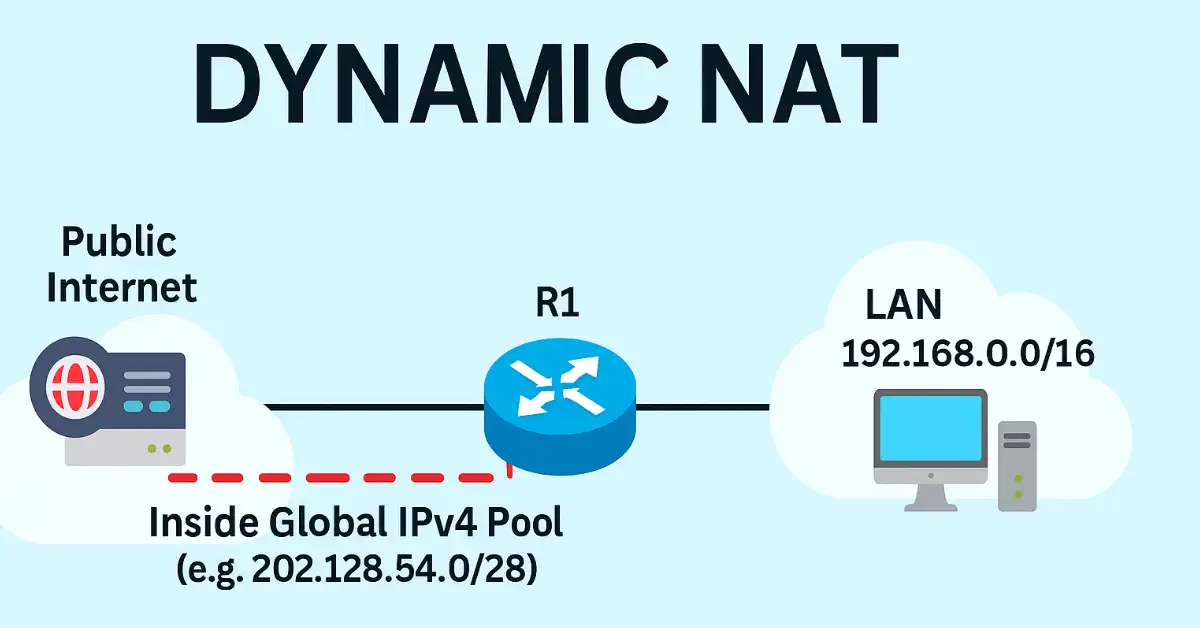
Dynamic Network Address Translation (NAT) is a cornerstone of modern networking, allowing multiple private IP devices to share a limited pool of public IPs for internet access. Unlike static NAT, dynamic NAT automatically maps inside local addresses to a pool of inside global addresses on a first-come, first-served basis—ideal for scenarios with more internal hosts than available public IPs.
In this guide tailored for CCNA and CCNP students, we’ll cover configuration, verification, troubleshooting, and real-world applications using Cisco IOS. Whether you’re prepping for the 200-301 CCNA exam or diving into enterprise deployments, follow along with our step-by-step lab using the topology below.
Key Benefits of Dynamic NAT:
- Efficient use of public IPv4 addresses amid exhaustion.
- Seamless outbound internet access for LANs.
- Foundation for advanced topics like PAT (Port Address Translation)
Dynamic NAT vs. Other NAT Types: Quick Comparison
| NAT Type | Mapping Style | Use Case (CCNA/CCNP) | Public IPs Needed | Example Command Snippet |
|---|---|---|---|---|
| Static NAT | One-to-one permanent | Server access (e.g., web server) | 1 per host | ip nat inside source static 192.168.1.10 203.0.113.10 |
| Dynamic NAT | One-to-one from pool | Limited outbound (e.g., small LAN) | = Active hosts | ip nat inside source list 1 pool MYPOOL |
| PAT (Overload) | Many-to-one (ports) | Large networks (e.g., home routers) | 1 shared IP | ip nat inside source list 1 interface Gi0/1 overload |
Step-by-Step Dynamic NAT Configuration on Cisco Router
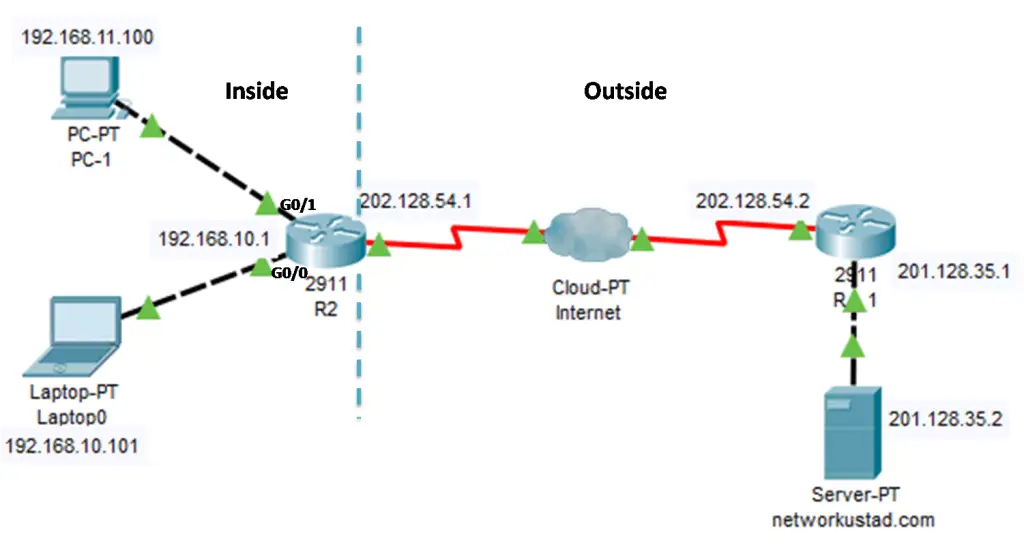
The example topology shown in the figure above has an inside network containing two LANs, 192.168.10.0/24 and 192.168.11.0/24 connected with R2. The router R1 is working as a border router. It is configured for dynamic NAT using a pool of public IPv4 addresses 202.128.54.0/28.
Any device from the inside devices can access the internet using the pool of inside global IPv4 addresses. The inside network can use this pool on a first-come, first-get basis. The dynamic NAT translates a single inside address into a single outside address.
Like a static NAT, a dynamic NAT also required enough addresses in the pool to accommodate all the inside devices want to access the outside network at the same time. If all of the addresses in the pool translate to inside addresses, other devices will wait for an available address before they can access the outside network.
Configuring Dynamic NAT
First of all, define the inside global IP pool using the“ip nat pool” This pool is usually a group of public IPv4 addresses assigned by the server providers. The pool is defined by indicating the start and end IP addresses, including the netmask or prefix length.
After configuring the pool, dynamic NAT required a standard ACL. The ACL identifies and permits the addresses required to be translated. Don’t forget to configure the implicit deny all statement at the end of each ACL.
Now bind the configured ACL to the address pool. We can bind the ACL with IP pool using the“ip nat inside source list <access-list-number> pool <pool name>”
Identify the inside and outside interfaces concerning NAT that connect to the inside or outside network and configure them accordingly.
Now I am going to configure the router R1 for dynamic NAT according to the above steps.
- R2(config)#ip nat pool Global_pool 202.128.54.3 202.128.54.14 netmask 255.255.255.240
- R2(config)#access-list 1 permit 192.168.10.0 0.0.0.255
- R2(config)#ip nat inside source list 1 pool Global_pool
- R2(config)#interface gigabitEthernet 0/0
- R2(config-if)#ip nat inside
- R2(config-if)#exit
- R2(config)#interface serial 0/0/0.101
- R2(config-subif)#ip nat outside
After the above configuration, the network 192.168.10.0/24 can access the internet, but network 192.168.11.0/24 still can’t access the internet. The network 192.168.11.0 still required configuration:
- R2(config)#access-list 1 permit 192.168.11.0 0.0.0.255
- R2(config)#interface gigabitEthernet 0/0
- R2(config-if)#ip nat inside
Now the network 192.168.11.0 can access the internet. The outside NAT interface is already configured for network 192.168.10.0/24, it will use the same interface for outside. We have just configured the “ACL permission” and “ip nat inside” interfaces.
Analyzing Dynamic NAT
Using the previous configuration of the figures illustrates the dynamic NAT translation process between the clients and the web webserver. The traffic flow from inside to outside is shown in the below figures step by step:
The host 192.168.11.100 sends an ICMP message to the web server at the public IPv4 address 201.128.35.2. in the figure below, we can read the outbound PDU information. The source IP address is 192.168.11.100 and the destination IP address is 201.128.35.2, the IP address of the web server networkustad.com.
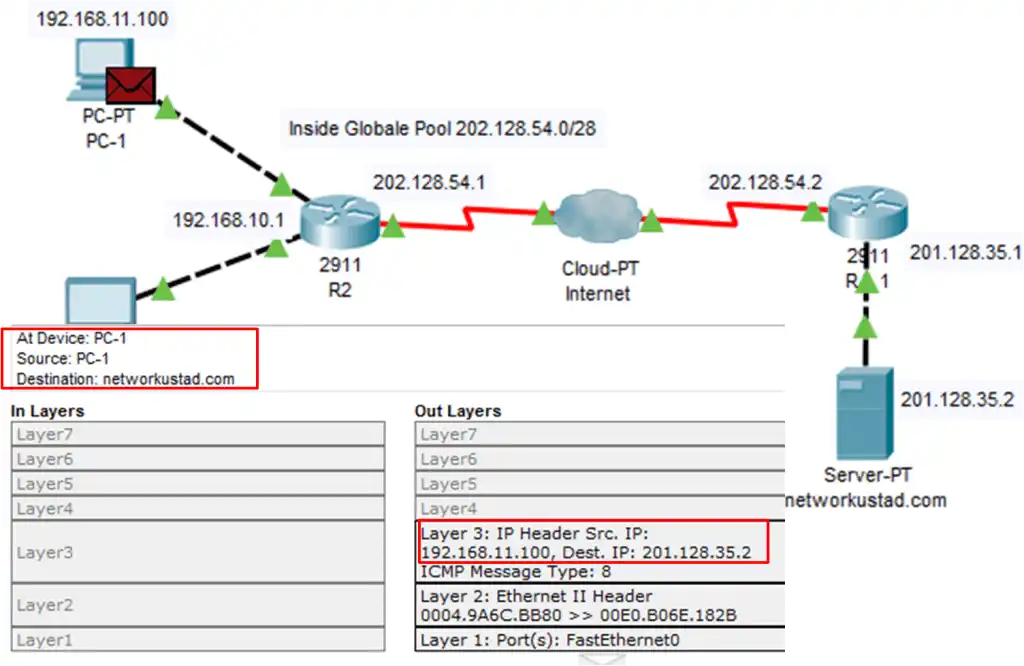
When R2 receives the packet from host 192.168.11.100 on an interface configured with an inside NAT interface, because of inside NAT, R2 checks the NAT configuration to determine if this packet should be translated. If the ACL permits the packet, so R2 will translate the packet. R2 checks its NAT configuration table.
If a translation entry is found, R2 forwards the packet; if no translation entry is found, then R2 determines that the source address 192.168.1.100 must be translated dynamically. R2 selects the first available global address from the dynamic address pool and creates a translation entry; in this example, as shown in the figure below, 128.54.3.
The above address belongs to the inside global address pool. You can see highlighted entries in the inbound interfaces and also in the outbound interfaces. At the outbound interfaces, the source address is now changed to 202.128.54.3.
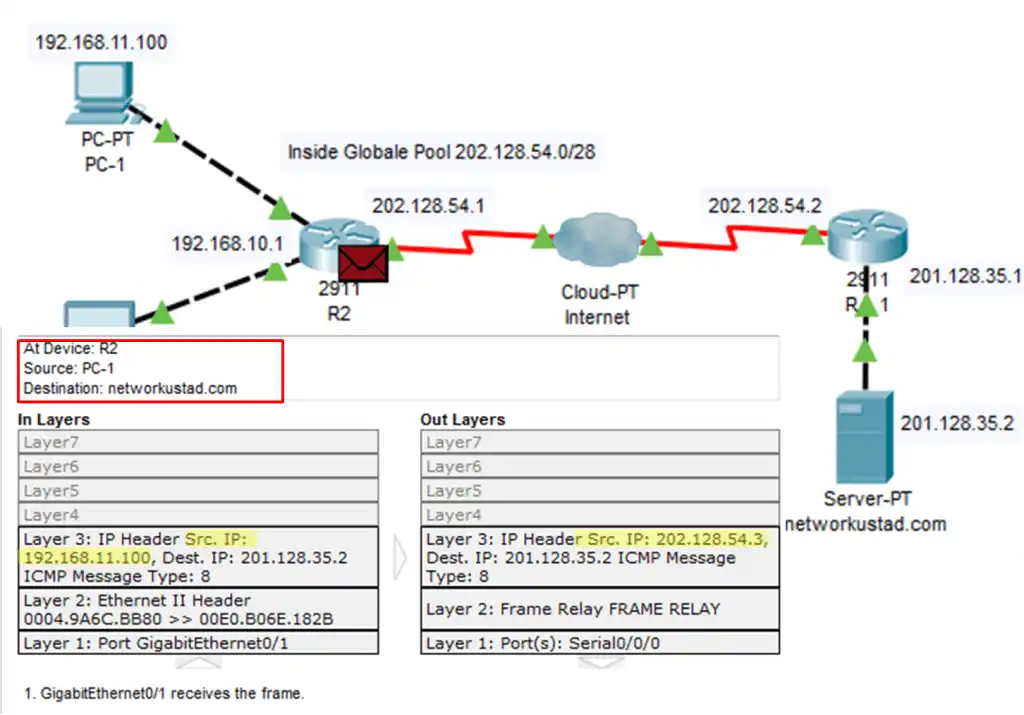
R2 replaces the inside local source address of PC1, 192.168.11.100, with the inside global address of 202.128.54.3 and forwards the packet. Here I am going to escape the packet on the internet cloud and R1. The server receives the packet from PC1 and responds using the IPv4 destination address of 202.128.54.3 as shown in the figure below.
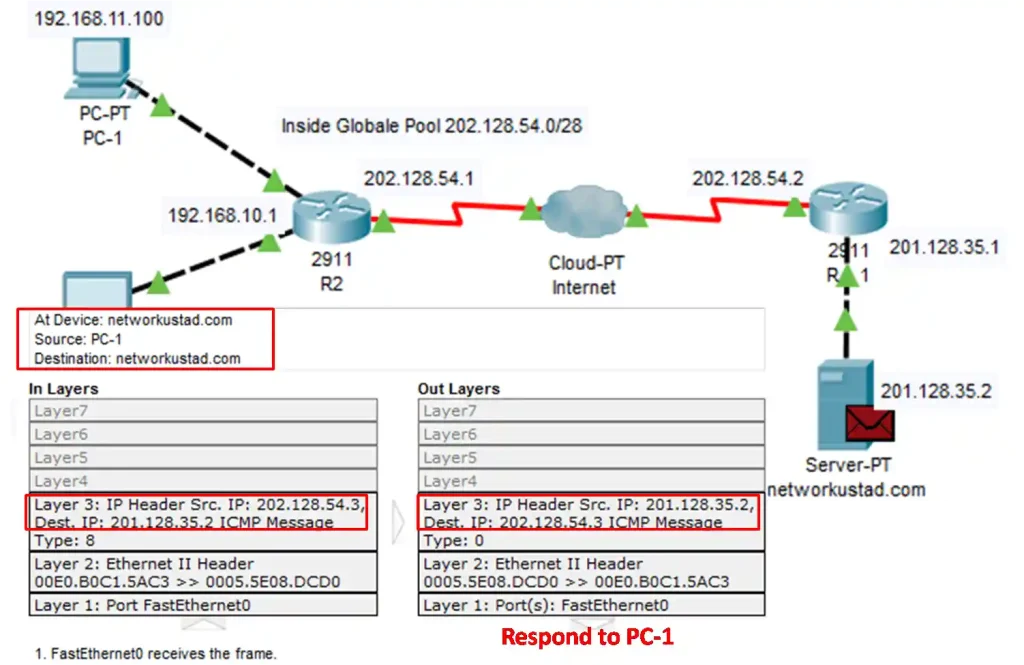
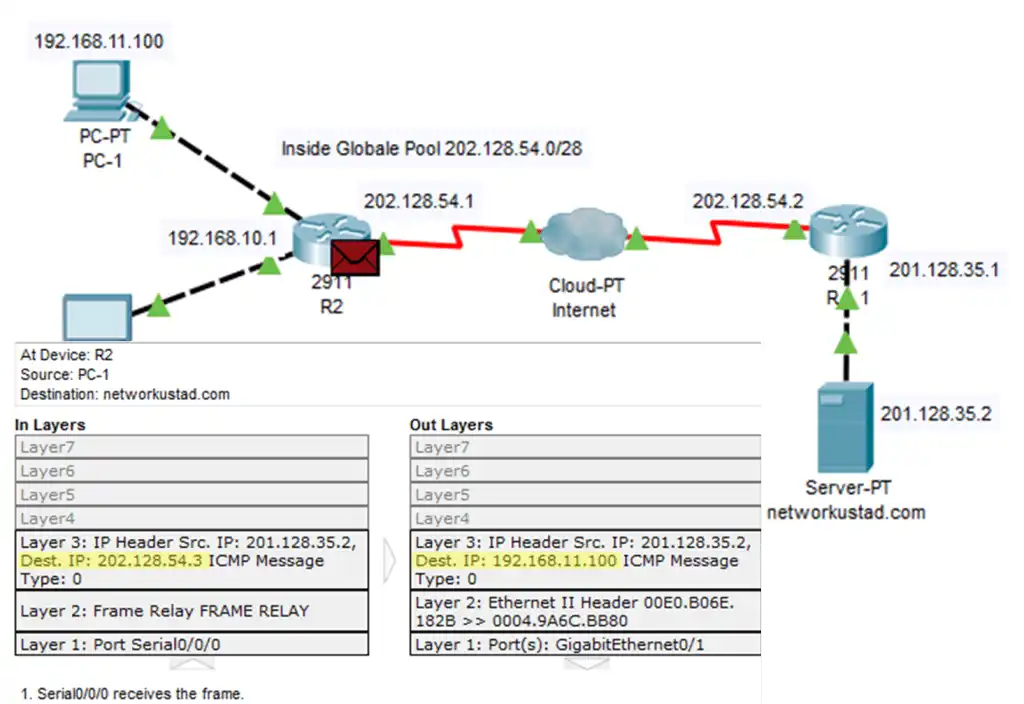
When R2 receives the packet with the destination IPv4 address of 202.128.54.3; it performs a NAT table lookup. Using the mapping from the table, R2 translates 202.128.54.3 back to the 192.168.11.100, the inside local address forwards the packet toward PC1. The same process will be done for host 192.168.10.101.
Verifying Dynamic NAT
The command show ip nat translations are used to verify the dynamic NAT configuration. We have already discussed this command in the Static NAT configuration.
The command displays all static translations, including any dynamic translations that have been created by traffic. The screen below illustrates the output of this command for dynamic NAT configuration.
R2# show ip nat translations
Pro   Inside global        Inside local         Outside local        Outside global
icmp  201.128.35.2:48      192.168.11.100:48    201.128.35.2:48      201.128.35.2:48
icmp  201.128.35.2:49      192.168.11.100:49    201.128.35.2:49      201.128.35.2:49
tcp   201.128.35.3:1029    192.168.11.100:1029  201.128.35.2:80      201.128.35.2:80
The translation entries remain in the translation table for 24 hours by default, but we can reconfigure the timer with the ip nat translation timeout <timeout-seconds> command in global configuration mode.
We can also clear the dynamic entries translation using “the clear ip nat translation” command in privileged EXEC mode. To clear dynamic NAT entries, use the command “clear ip nat translation * in privileged EXEC mode. Only the dynamic translations are cleared from the table. Static translations cannot be cleared from the translation table.
We can also use the show ip nat statistics command. The command displays information about the total number of active translations, including NAT configuration parameters, the total addresses in the pool, and the currently allocated address. We can also use the show running-config command and look for dynamic NAT configuration.
Real-World Applications and CCNP Extensions
In enterprise setups, dynamic NAT pairs with firewalls (e.g., Cisco ASA, Firepower) for secure outbound access. For IPv4 exhaustion, migrate to PAT or IPv6 NAT66.
Security Considerations
Dynamic NAT hides internal topology but does not encrypt—pair with IPsec VPNs or ZBFW (Zone-Based Firewall) for CCNP ENCOR.
FAQs
What is the purpose of the NAT pool in dynamic NAT?
The NAT pool provides a range of public IPv4 addresses (e.g., 202.128.54.3–202.128.54.14) that private inside local addresses are dynamically mapped to on a first-come, first-served basis for internet access.
How do you bind an ACL to a dynamic NAT pool?
Use the command ip nat inside source list 1 pool Global_pool after defining the pool with ip nat pool Global_pool 202.128.54.3 202.128.54.14 netmask 255.255.255.240 and permitting networks in ACL 1.
Which command verifies active dynamic NAT translations?
The show ip nat translations command displays real-time mappings like Inside global 202.128.54.3 to Inside local 192.168.11.100, including protocol and port details for ICMP/TCP traffic.
Why must both inside and outside interfaces be identified in NAT?
The ip nat inside and ip nat outside commands tell the router which interface connects to the private LAN and which faces the public internet, enabling correct translation direction.
How long do dynamic NAT entries remain in the translation table?
By default, entries persist for 24 hours (86,400 seconds). Use ip nat translation timeout 3600 to change it; clear entries manually with clear ip nat translation *.