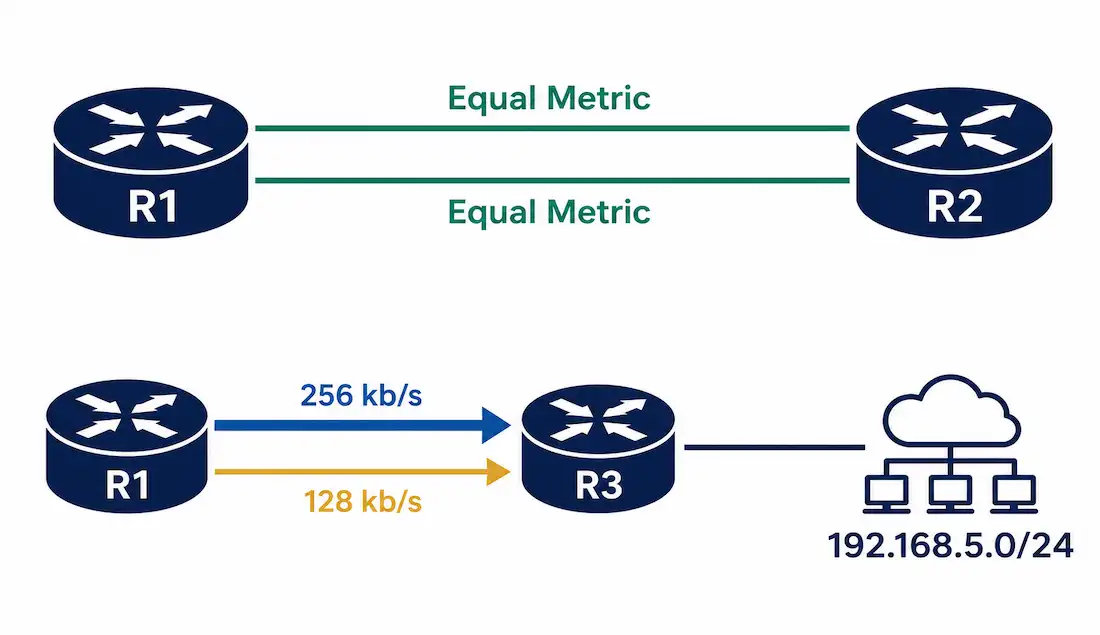
When a router has more than one valid path to the same destination, EIGRP doesn’t have to pick just one and ignore the rest. It can install multiple paths and split traffic across them — either paths with genuinely equal cost, or, uniquely among major routing protocols, paths with different costs entirely. Both are configurable, and knowing exactly how each qualifies a path for installation is what separates confidently tuning a network from guessing at commands.
This guide covers equal-cost and unequal-cost EIGRP load balancing, the exact criteria a route needs to meet for each, full worked configuration, and verification.
How EIGRP Selects Routes by Default
EIGRP calculates a composite metric for every path to a destination, based on bandwidth and delay, and installs the path (or paths) with the lowest metric into the routing table. When more than one path shares the same lowest metric and the same administrative distance, all of them get installed together — this is equal-cost load balancing, and it happens automatically with no special configuration required.
EIGRP goes further than most protocols: it’s the only major routing protocol that also supports unequal-cost load balancing, deliberately installing multiple paths even when their metrics genuinely differ, using a feature called variance.
Equal-Cost Load Balancing
When a router has two or more paths to a destination with identical metrics and identical administrative distance, it forwards traffic across all of them, using network capacity more efficiently than relying on a single path alone.
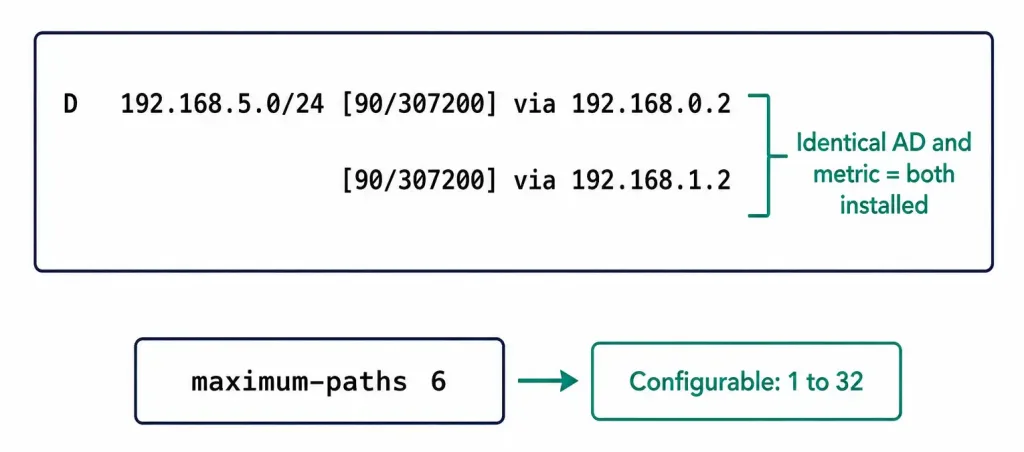
Cisco IOS installs up to 4 equal-cost paths by default, configurable from 1 up to a maximum of 32 using the maximum-paths command. Setting the value to 1 disables equal-cost load balancing entirely, forcing the router back to a single best path even when ties exist.
Command syntax:
Router(config-router)# maximum-paths <value>A complete worked example, increasing R1’s EIGRP process to support up to 6 equal-cost paths:
R1> enable
R1# configure terminal
R1(config)# router eigrp 100
R1(config-router)# maximum-paths 6
R1(config-router)# exit
Verify the configuration and see the active equal-cost paths:
R1# show ip protocolsRouting Protocol is "eigrp 100"
...
Maximum path: 6
...R1# show ip route eigrp
D 192.168.5.0/24 [90/307200] via 192.168.0.2, 00:05:12, GigabitEthernet0/0
[90/307200] via 192.168.1.2, 00:05:12, GigabitEthernet0/1Both entries share the identical administrative distance (90) and metric (307200), confirming they’re genuinely tied and both correctly installed as equal-cost successors to 192.168.5.0/24. Seeing matching values in both the AD and metric columns, not just one or the other, is the actual confirmation to look for — a coincidental match on one alone doesn’t guarantee genuine equal-cost status.
Unequal-Cost Load Balancing with Variance
If two paths to the same destination have different metrics, EIGRP won’t automatically install both — by default, only the single lowest-metric path is used. The variance command changes this, telling EIGRP to also install paths with a higher metric, up to a multiple of the best path’s metric.
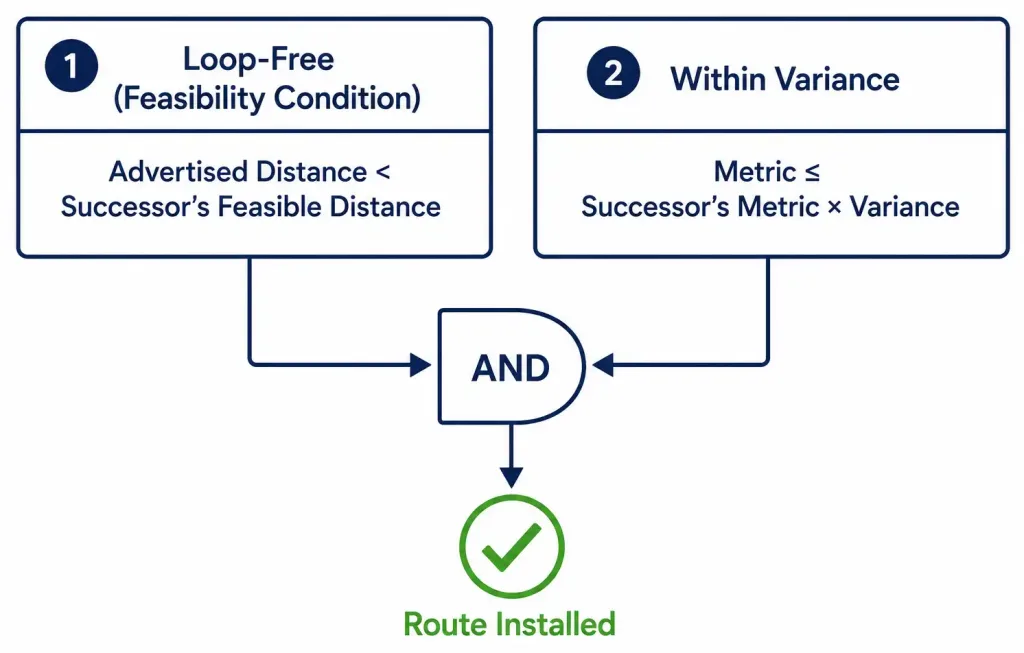
A route must satisfy two separate conditions to be installed under variance:
- It must be loop-free — specifically, it must qualify as a feasible successor, meaning its advertised (reported) distance from the neighbor is strictly less than the feasible distance of the current best path (the successor). This is EIGRP’s core loop-prevention mechanism, and it’s a separate, independent check from the variance calculation below.
- Its metric must fall within the variance multiplier — specifically, the candidate route’s own metric must be less than or equal to the successor’s metric multiplied by the configured variance value.
With variance set to 1 (the default), only routes with a metric exactly equal to the best path qualify — this is just equal-cost load balancing under a different name. Setting variance to 2 allows any feasible-successor route with a metric up to twice the best path’s metric to also be installed.
Command syntax:
Router(config-router)# variance <multiplier>The valid range is 1 to 128.
A Complete Worked Example
Consider R1 with two paths to 192.168.5.0/24: one via R3 over a 256 kb/s link, and one via R2 over a slower 128 kb/s link. Since R2’s link runs at half the speed of R3’s, a variance of 2 is the natural choice to bring the slower path into consideration alongside the faster one.
Checking the routing table before configuring variance shows only the single best path via R3, since EIGRP doesn’t consider R2’s slower path without variance enabled:
R1# show ip route 192.168.5.0
Routing entry for 192.168.5.0/24
  Known via "eigrp 100", distance 90, metric 156160
  Last update from 192.168.0.2 on GigabitEthernet0/0, 00:10:03 ago
  * 192.168.0.2, via GigabitEthernet0/0
Configuring variance on R1:
R1(config)# router eigrp 100
R1(config-router)# variance 2
R1(config-router)# exit
Checking the routing table again after configuring variance — assuming the slower path via R2 actually satisfies the feasibility condition (its advertised distance is less than R3’s feasible distance):
R1# show ip route 192.168.5.0
Routing entry for 192.168.5.0/24
  Known via "eigrp 100", distance 90, metric 156160
  * 192.168.0.2, via GigabitEthernet0/0
  * 192.168.1.2, via GigabitEthernet0/1
Both paths now appear, confirming unequal-cost load balancing is active.
For a complete view of every candidate path and exactly why each does or doesn’t qualify, show ip eigrp topology gives far more detail than the routing table alone:
R1# show ip eigrp topology 192.168.5.0/24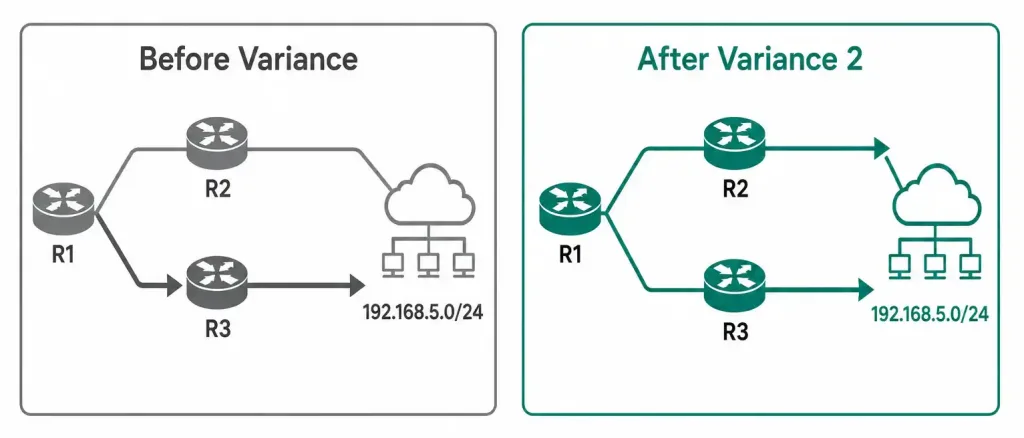
When Each Type of Load Balancing Actually Helps
Equal-cost load balancing earns its keep whenever a network genuinely has redundant, similarly-provisioned paths — dual uplinks between a branch office and a data center, or dual core links on a campus network. Splitting traffic evenly makes full use of capacity that would otherwise sit partially idle, and it has a meaningful resilience benefit too: since the remaining path is already carrying live traffic, losing one link doesn’t force an abrupt reconvergence the way relying on a single active path would.
Unequal-cost load balancing solves a narrower but real problem: two paths that genuinely aren’t equal — a primary fiber link and a backup DSL or cellular connection, for instance — where leaving the slower link completely idle until the faster one fails feels wasteful. Variance lets the slower link carry a smaller, proportional share of traffic instead of sitting unused, which is a meaningfully different (and often more efficient) outcome than simple active/passive failover.
A word of caution worth internalizing: unequal-cost load balancing sending traffic down a genuinely much slower path can degrade the experience for whatever traffic happens to get hashed onto it, particularly for latency-sensitive applications. A variance configured too aggressively — bringing in a path dramatically slower than your best path — can do more harm than good; keeping variance modest (2 or 3, rather than the maximum of 128) is standard, sensible practice for most real deployments. Testing the actual user experience on the slower path before deploying variance broadly is worth the extra effort, rather than assuming the math alone guarantees an acceptable outcome for every application sharing that link.
Controlling How Traffic Is Distributed Across Unequal Paths
Once multiple unequal-cost paths are installed, traffic-share balanced distributes traffic across them proportionally to their relative cost, rather than splitting it evenly — a path with half the metric of another gets roughly twice the traffic share, reflecting its better relative quality.
Router(config-router)# traffic-share balancedThis is the default behavior once variance is configured, though it’s worth confirming explicitly on a network where predictable traffic distribution matters for capacity planning.
Per-Destination vs. Per-Packet Load Balancing
Regardless of whether the installed paths are equal or unequal cost, the switching mechanism (CEF — Cisco Express Forwarding) determines exactly how traffic actually gets split across them:
- Per-destination (the default): CEF hashes the source and destination IP address pair, consistently sending all traffic for a given flow down the same path. This keeps packets in order, which matters for most applications.
- Per-packet: CEF alternates individual packets across the available paths on a strict rotation, maximizing link utilization at the cost of potential out-of-order delivery — generally not worth the trade-off for latency-sensitive traffic like VoIP.
Router(config-if)# ip load-sharing per-packetPer-destination is the sensible default for nearly all traffic; per-packet is a deliberate, narrower choice for specific high-throughput, order-insensitive workloads.
Troubleshooting Load Balancing
A path you expect to see installed isn’t appearing under variance: check the feasibility condition specifically, not just the variance multiplier — a path can easily satisfy the metric ceiling while still failing feasibility if its advertised distance isn’t less than the successor’s feasible distance.
R1# show ip eigrp topologyEqual-cost paths aren’t installing despite matching metrics: confirm maximum-paths hasn’t been set to 1 somewhere in the configuration, which disables equal-cost load balancing entirely regardless of how many genuinely tied paths exist.
R1# show ip protocolsTraffic seems unevenly or unexpectedly distributed across installed paths: check whether traffic-share balanced or traffic-share min is configured, and confirm the switching mode with show cef interface — per-destination hashing can appear “uneven” for a small number of flows even when working correctly, since it’s the flow-to-path assignment that’s balanced, not necessarily every individual flow’s volume.
R1# show cef interface GigabitEthernet0/0FAQs
What’s the difference between equal-cost and unequal-cost EIGRP load balancing?
Equal-cost load balancing installs multiple paths that share an identical metric, happening automatically with no special configuration. Unequal-cost load balancing, unique to EIGRP among major routing protocols, installs paths with genuinely different metrics, governed by the variance command and a separate loop-prevention feasibility check.
What is the maximum number of equal-cost paths EIGRP can use?
Cisco IOS installs up to 4 equal-cost paths by default, configurable from 1 to a maximum of 32 using the maximum-paths command. Setting the value to 1 disables equal-cost load balancing, forcing the router back to a single best path.
Why would EIGRP not install a path even though it falls within the configured variance?
The variance multiplier only checks whether a path’s metric falls within an acceptable ceiling — a separate requirement, the feasibility condition, also has to be satisfied, requiring the candidate path’s advertised distance to be strictly less than the successor’s feasible distance. A path can pass the variance check on metric alone while still failing feasibility, which is a common source of confusion when troubleshooting.
How do I calculate the right variance value for a network with different-speed links?
A reasonable starting point is basing the variance on the rough ratio between the fastest and slowest link you want included — a link running at half the speed of your best path suggests a variance of roughly 2, as in the worked example above. This is a simplified heuristic rather than an exact formula, since EIGRP’s actual composite metric depends on bandwidth and delay together, not bandwidth alone.
What’s the difference between per-destination and per-packet load balancing?
Per-destination load balancing, the default, keeps all traffic for a given source-destination pair on the same path, preserving packet order. Per-packet load balancing alternates individual packets across all available paths for maximum link utilization, at the cost of potential out-of-order delivery, which makes it a poor fit for latency-sensitive traffic.
How does traffic-share balanced affect distribution across unequal-cost paths?
It distributes traffic proportionally to each path’s relative cost rather than splitting it evenly, so a path with a better (lower) metric receives a larger share of traffic than a worse one. This is the default behavior once variance is configured, and it’s worth confirming explicitly if predictable traffic distribution matters for your network’s capacity planning.