
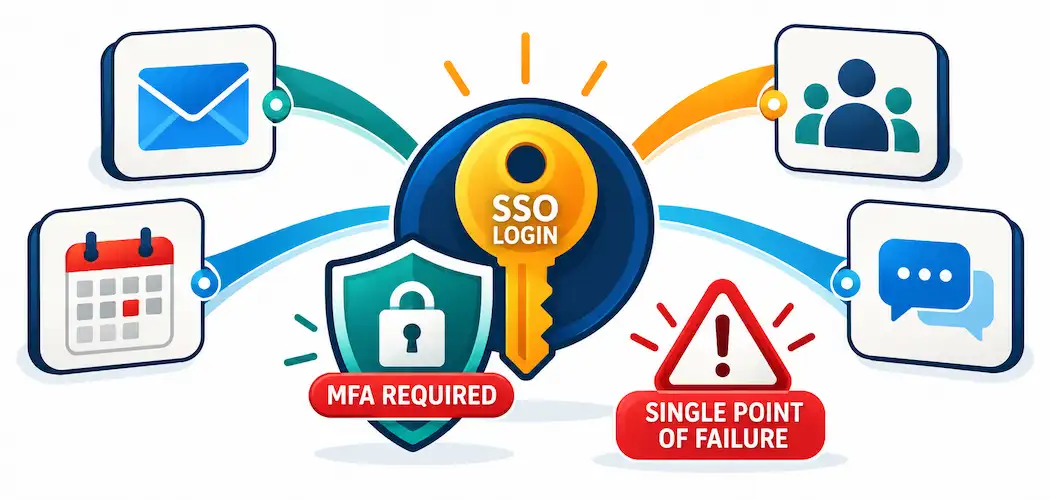
Log into your company’s identity portal once in the morning, and suddenly you have access to email, your project management tool, your HR system, and a dozen other apps without entering a password again. That’s Single Sign-On (SSO) — and while it genuinely simplifies the login experience, the convenience story is only half of what’s worth understanding. The other half is what happens to your security posture when one login now unlocks everything.
What SSO Actually Is
Single Sign-On is an authentication scheme that lets a user log in once with a single set of credentials and gain access to multiple independent software systems without re-authenticating for each one. The key architectural idea is a trust relationship between an Identity Provider (IdP) — the central service that verifies who you are — and multiple Service Providers (SPs) — the individual applications you’re trying to access. Once the IdP confirms your identity, it issues a token that each Service Provider trusts, rather than each application maintaining and checking its own separate password.
This is a meaningfully different model from simply using the same password everywhere, which is a bad practice SSO is sometimes mistakenly conflated with. Under true SSO, your password is only ever sent to the Identity Provider — individual applications never see it, which is itself a security improvement over password reuse across unrelated systems.
The Protocols That Actually Make This Work
This is the part most introductory explanations skip, and it’s the part that actually matters for understanding SSO’s real behavior and risks:
SAML 2.0 (Security Assertion Markup Language) is an XML-based standard, widely used in enterprise and education environments, where the Identity Provider sends a signed “assertion” to the Service Provider confirming the user’s identity and attributes. It’s older than OAuth/OIDC but remains heavily used, particularly in large enterprise deployments with legacy application support requirements.
OAuth 2.0 is technically an authorization framework, not an authentication protocol — it’s designed to let an application access resources on a user’s behalf (think “allow this app to access your Google Calendar”) rather than to prove identity directly. It’s foundational infrastructure, though, because the next protocol builds directly on top of it.
OpenID Connect (OIDC) is an identity layer built on top of OAuth 2.0, specifically designed for authentication rather than resource authorization. It’s the modern, JSON/REST-based standard most consumer-facing “Sign in with Google/Microsoft/Apple” flows actually use under the hood, and it’s increasingly the default choice for new enterprise SSO implementations due to its simpler, web-friendlier design compared to SAML’s XML-heavy structure.
Understanding which protocol a given SSO implementation uses matters in practice — SAML and OIDC aren’t interchangeable, and an organization integrating a new application needs to confirm which protocol(s) both the Identity Provider and the target application actually support before assuming integration will be straightforward.
How an SSO Login Actually Flows
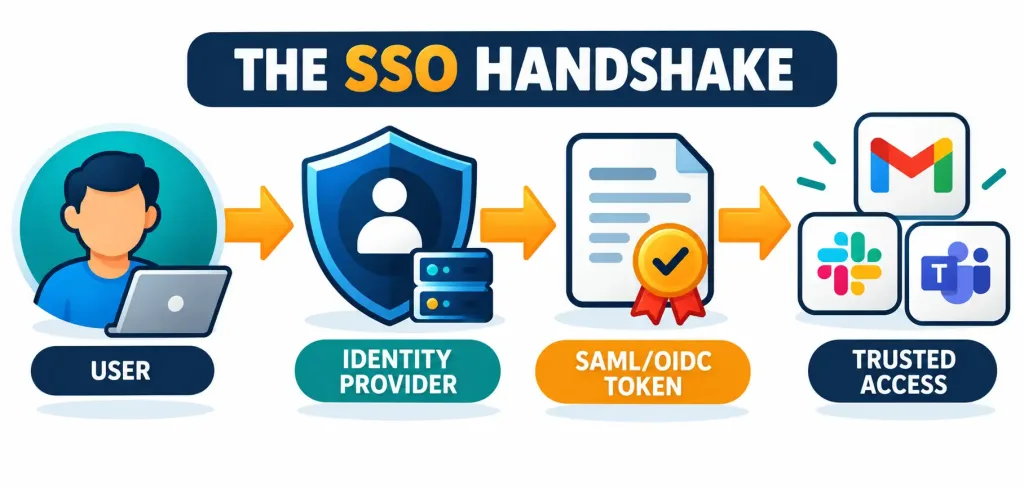
- User attempts to access a Service Provider (e.g., opens a company’s project management tool).
- The Service Provider redirects the user to the Identity Provider, since it has no active session for this user.
- The user authenticates with the Identity Provider — ideally with multi-factor authentication (MFA), not a password alone.
- The Identity Provider issues a signed token or assertion (via SAML or OIDC) confirming the user’s identity and often some attributes (role, group membership, email).
- The Service Provider validates the token’s signature and, if valid, establishes a session for the user — without ever seeing or storing their actual password.
- Subsequent access to other connected Service Providers reuses the existing Identity Provider session, skipping steps 2–4 entirely as long as that session remains valid.
The Honest Security Picture: Benefits and Real Risks
Genuine benefits:
- Reduced password fatigue and reuse. Users with fewer passwords to manage are measurably less likely to reuse weak passwords across systems — a well-documented driver of credential-stuffing attacks.
- Centralized access control. When an employee leaves a company, disabling their Identity Provider account instantly revokes access to every connected system at once, rather than requiring IT to manually deactivate accounts across a dozen separate applications — a real operational and security win.
- Stronger authentication can be enforced centrally. Requiring MFA at the Identity Provider level means every connected application benefits from that stronger authentication, rather than each application needing its own MFA implementation.
- Better visibility and audit trails. Centralized authentication logging gives security teams a single place to monitor login patterns and detect anomalies, rather than fragmented logs across many systems.
Real risks, stated plainly:
- SSO creates a single point of failure. If an attacker compromises a user’s Identity Provider credentials, they potentially gain access to every connected application at once — a fundamentally higher-stakes compromise than a single breached password under a non-SSO setup. This is exactly why pairing SSO with mandatory MFA isn’t an optional best practice — it’s close to a non-negotiable requirement for any serious SSO deployment.
- Session and token theft is a real, documented attack vector. Stolen session cookies or forged/replayed SAML assertions can let an attacker impersonate a legitimate session without ever needing the user’s actual password — a technique seen in real-world breaches. Proper token expiration, secure transmission (TLS), and signature validation aren’t implementation details — they’re the mechanisms that prevent this specific attack class.
- Phishing targeting the Identity Provider itself becomes a high-value attack. Since compromising the IdP login compromises everything downstream, attackers have strong incentive to specifically target IdP login pages with convincing phishing pages — making user training on recognizing the organization’s real IdP login domain genuinely important.
- Identity Provider downtime becomes an organization-wide outage. If the central IdP goes down, users can lose access to every connected application simultaneously — a real operational risk worth planning around (break-glass emergency access procedures, for instance) rather than assuming away.
Implementing SSO: What Actually Matters
- Inventory which applications need to be connected, and confirm which SSO protocol(s) each one actually supports (SAML, OIDC, or both) before committing to an Identity Provider choice.
- Choose an Identity Provider — commercial options (Okta, Microsoft Entra ID, Ping Identity, OneLogin, Auth0) handle the infrastructure, security patching, and compliance certifications for you; open-source options (Keycloak, for instance) offer more control at the cost of needing in-house expertise to secure and maintain the deployment correctly.
- Mandate MFA at the Identity Provider level as a baseline requirement, not an optional add-on — this is the single highest-impact decision in the whole implementation, given the single-point-of-failure risk described above. For a deeper look at building strong, breach-resistant authentication at that single point, see our guide to password security and MFA.
- Test thoroughly before full rollout, including testing what happens during IdP downtime and confirming break-glass access procedures work as intended.
- Roll out with real user training, specifically covering how to recognize the legitimate IdP login page versus a phishing imitation — the single most valuable piece of user education given how IdP phishing specifically targets SSO deployments.
- Monitor continuously — centralized authentication logging is one of SSO’s genuine security benefits, but only if someone’s actually watching it for anomalous login patterns, impossible travel, or repeated failed authentication attempts.
Where SSO Is Used in Practice
- Enterprises — the most common deployment, typically unifying access to email, collaboration tools, HR systems, and internal applications under one Identity Provider.
- Educational institutions — widely used for student/faculty access to learning management systems, library resources, and administrative portals, frequently via SAML given many education-specific platforms’ legacy support for it.
- Healthcare organizations — SSO is common here specifically because reducing password friction for clinical staff accessing multiple systems during patient care has real workflow benefits, though it requires especially careful security design given HIPAA-covered data sensitivity (see our broader look at digital identity management for how this fits into the wider authentication picture).
- Government agencies — often with additional compliance requirements (such as FedRAMP in the U.S.) layered on top of standard SSO security practices.
- E-commerce and consumer platforms — “Sign in with Google/Apple/Facebook” is consumer-facing SSO, typically implemented via OIDC, trading some data-sharing for login convenience.
The Bottom Line
SSO is a genuine security and usability improvement over scattered, reused passwords across every application — but only when implemented with MFA as a mandatory companion, not an optional extra. The convenience of “log in once” is the same property that makes a compromised SSO credential dramatically more dangerous than a single compromised password under the old model. Organizations evaluating SSO should weigh it correctly: it’s not just a login-simplification feature, it’s a fundamental shift in where your authentication risk is concentrated — and that concentration needs to be matched with proportionally stronger protection at that single point.
Frequently Asked Questions
What’s the difference between SAML and OpenID Connect?
SAML 2.0 is an older, XML-based protocol widely used in enterprise and education SSO deployments. OpenID Connect (OIDC) is a newer, JSON/REST-based identity layer built on top of OAuth 2.0, generally preferred for new implementations due to its simpler, more web-friendly design. Both accomplish the same core goal — proving identity to a Service Provider — but aren’t interchangeable, and the Identity Provider and target applications need to support the same protocol.
Does SSO make an organization less secure?
Not inherently — but it does concentrate risk. A single compromised SSO credential can grant access to every connected application, which is a higher-stakes failure mode than a single compromised password in a non-SSO environment. This is why mandatory MFA at the Identity Provider level is essential, not optional, for any serious SSO deployment.
Is using the same password across multiple sites the same thing as SSO?
No, and this is a common misconception. True SSO uses a centralized Identity Provider and cryptographically signed tokens (via SAML or OIDC) — individual applications never see your actual password. Reusing the same password across unrelated sites is a security anti-pattern with none of SSO’s architectural protections.
What happens if the Identity Provider itself goes down?
Users can lose access to every connected application simultaneously, since authentication depends entirely on the central service. This is a real operational risk that organizations should plan for with documented break-glass emergency access procedures, rather than assuming the IdP will never experience downtime.



