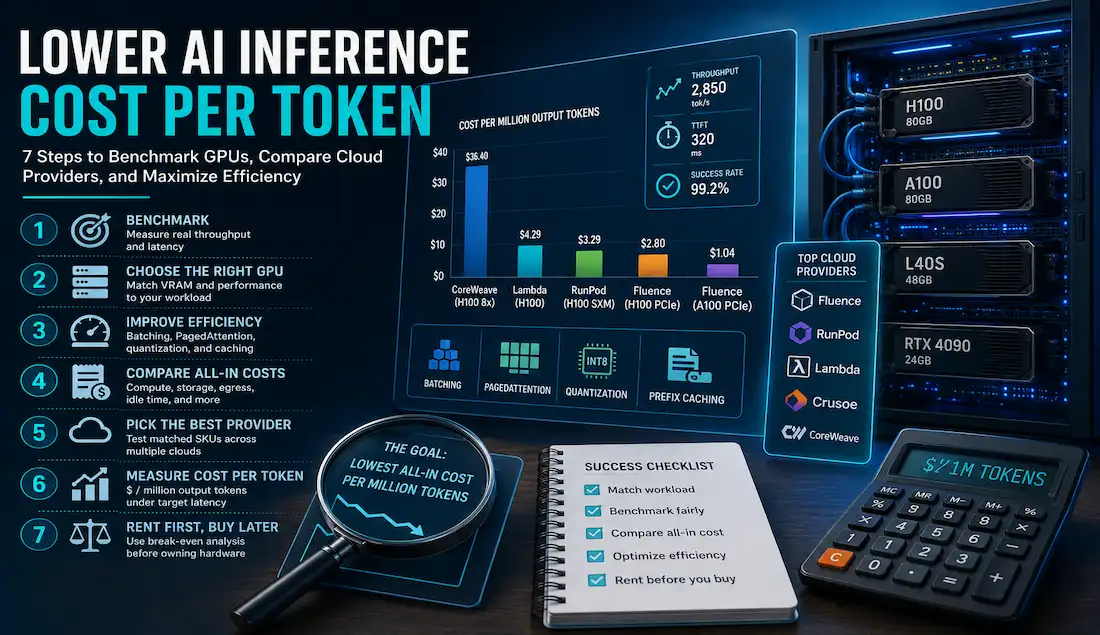
AI inference costs rarely behave the way a pricing page suggests. A GPU with a low hourly rate can become expensive once weak throughput, idle time, latency limits, or extra infrastructure enter the picture.
That matters for startups in particular. Founders need predictable unit economics, while developers need enough performance to serve real traffic without paying for capacity they cannot use efficiently.
The goal is simple: measure what each generated token actually costs, then optimize from there. The seven steps below show how to benchmark GPUs, compare cloud providers, improve serving efficiency, and decide when renting still makes more sense than buying hardware.
The cost mistake: optimizing GPU-hours instead of delivered tokens
Hourly price tells you what infrastructure costs to rent. It does not tell you how efficiently that infrastructure serves a model.
A low-cost GPU may generate fewer tokens per second, sit idle between requests, or hit latency limits as concurrency rises. Compare providers by the cost of acceptable output under production-like conditions.
What AI inference token cost actually measures
Start with GPU-only cost per million output tokens:
(GPU $/hour × 1,000,000) ÷ (aggregate output tokens/second × 3,600)
For production economics, add CPU, RAM, storage, networking, load balancing, observability, idle capacity, failed requests, interruptions, and engineering overhead.
Benchmarks should record output throughput alongside time to first token (TTFT), time per output token (TPOT), inter-token latency (ITL), success rate, prompt and output lengths, concurrency, model version, precision, and serving engine.
The benchmark and billing inputs that make comparisons valid
Match the complete GPU identity
Match model, interface, VRAM, and GPU count. H100 SXM/HGX, H100 PCIe, and H100 NVL belong in separate cohorts. The same applies to A100 SXM 80GB and A100 PCIe 80GB.
Hold the workload constant
Run the same model, precision, serving engine, context length, request distribution, concurrency, and latency target across providers.
Use production-like traces. Throughput only matters when TTFT and per-token latency remain within the product’s requirements.
Normalize the complete bill
Include billing granularity, region, CPU, RAM, storage, egress, taxes, public IPs, commitments, idle billing, and interruption risk.
RunPod bills Pod compute per second, Lambda uses one-minute increments, and Fluence uses fixed hourly periods. Short and intermittent workloads can therefore produce very different effective costs.
Exact-SKU GPU cloud pricing: what matched rentals cost
The table below groups comparable GPU configurations so teams can identify sensible candidates for benchmarking:
| GPU cohort | Fluence | RunPod | Other published options |
| H100 SXM/HGX 80GB | $1.24/h | $3.29/h | Crusoe $3.90/h; Lambda $4.29/h; CoreWeave $49.24/h for 8 GPUs |
| H100 PCIe 80GB | $2.80/h | $2.89/h | Lambda $3.29/h |
| A100 SXM 80GB | $1.13/h | $1.59/h | Crusoe $2.30/h; Lambda $2.79/GPU-h in an 8-GPU instance |
| A100 PCIe 80GB | $1.04/h | $1.39/h | Crusoe $2.00/h |
| L40S 48GB | $0.72/h | $0.99/h | Crusoe $1.50/h; CoreWeave $18/h for 8 GPUs |
| RTX 4090 24GB | $0.48/h | $0.74/h | Vast.ai varies by listing |
Note: GPU rental prices may change from time to time. Fluence rates are approximate. CoreWeave’s H100 and L40S offers and Lambda’s A100 SXM offer use multi-GPU packages. Vast.ai pricing, storage, bandwidth, region, and reliability vary by listing.
How to reduce cost per output token
Tip 1: Benchmark the traffic you actually expect
Measure throughput, TTFT, TPOT, ITL, errors, and queueing under realistic prompt lengths and concurrency. Push concurrency only while latency stays within target.
Tip 2: Choose the smallest GPU class that fits
Start with model weights, runtime memory, KV-cache demand, context length, and batch requirements.
If L40S or RTX 4090-class hardware meets the workload target, test a more affordable GPU class before moving to an 80GB accelerator.
RTX 4090 has 24GB of memory and no NVLink, which limits its fit for workloads built around larger data-center GPUs.
Tip 3: Increase useful utilization with batching and PagedAttention
Continuous batching combines active requests. PagedAttention reduces KV-cache fragmentation and can support larger effective batches.
The PagedAttention paper reported 2–4× throughput at equal latency in the tested systems. Treat that result as workload-specific. Increase batching while memory use and latency remain acceptable.
Tip 4: Quantize after testing quality and kernel support
Lower precision can reduce memory and compute requirements. That may let a model run on cheaper hardware or increase throughput on the same GPU.
Validate quality, latency, throughput, memory use, and kernel support before counting the saving.
Tip 5: Reuse repeated work
Prefix caching can reduce repeated prefill computation when requests share prompts, documents, or conversation history. It does not reduce decode time.
Speculative decoding may improve latency when small batches underutilize the GPU. Its value depends on draft acceptance and added overhead.
Tip 6: Compare the all-in bill
Normalize compute, CPU, RAM, storage, egress, taxes, idle time, commitments, and interruption costs over the same benchmark window.
Zero-egress pricing can matter for data-heavy workloads. Per-second billing can improve the economics of short experiments.
Tip 7: Rent before buying and apply a break-even test
Rental capacity keeps spending flexible while traffic and utilization remain uncertain.
Break-even hours = total net ownership cost ÷ comparable cloud $/GPU-hour
Ownership cost should include hardware, servers, power and cooling, facilities, networking, spares, administration, financing, and residual value.
Buying becomes more plausible once sustained utilization clears that break-even and the team can operate the hardware.
Provider and GPU recommendations by workload
Prototype or uncertain demand
Start with one-GPU, on-demand, or marketplace capacity from Fluence, RunPod, Lambda, Crusoe, or vetted Vast.ai offers.
Models that fit within 24GB
Benchmark RTX 4090 where memory, concurrency, and reliability requirements fit its profile.
Models that fit within 48GB
Test L40S across Fluence, RunPod, Crusoe, and CoreWeave. Account for CoreWeave’s eight-GPU packaging.
Workloads requiring 80GB
Keep PCIe and SXM/HGX tests separate. Compare A100 and H100 on throughput, latency, and total cost.
Fault-tolerant batch generation
Spot, interruptible, and marketplace capacity suit workloads that can checkpoint and resume. Include retries and reprocessing in final token cost.
Misconceptions and expensive mistakes
“The cheapest hourly rate is the cheapest inference”
Use measured all-in cost per million output tokens under a consistent service target.
“Every H100 or A100 offer is equivalent”
Verify interface, VRAM, GPU count, and packaging before comparing rates.
“Caching, quantization, and speculative decoding always save money”
Each technique depends on workload characteristics and needs benchmarking.
“Buying must be cheaper because the asset is owned”
Idle hardware still carries capital and operating costs. Ownership needs a utilization-sensitive break-even case.
A practical next-step checklist
- Define model, precision, context, concurrency, and latency targets.
- Determine minimum VRAM.
- Shortlist at least three matched rental offers.
- Normalize billing, storage, egress, reliability, and commitments.
- Run identical benchmarks.
- Calculate GPU-only and all-in token cost.
- Test expected and peak traffic.
- Apply an ownership break-even test before buying hardware.
Conclusion: buy flexibility before buying hardware
Choose infrastructure that meets quality, latency, and reliability targets at the lowest measured all-in token cost.
Renting gives teams room to validate demand and refine their serving stack. Hardware ownership makes more sense once sustained utilization and a documented break-even support the investment.