

Domain 1.8 | Network Fundamentals — 20% of exam
Learning Objectives
By the end of this lesson, you will be able to:
- Describe the structure of a 128-bit IPv6 address
- Apply the leading-zero and zero-compression rules to write IPv6 addresses in their shortest valid form
- Expand a compressed IPv6 address back to its full, uncompressed form
- Explain IPv6 prefix notation and why /64 is the standard LAN subnet size
- Configure IPv6 addressing on Cisco router interfaces and verify the configuration
Key Terms
| Term | Definition |
|---|---|
| IPv6 | Internet Protocol version 6; uses 128-bit addresses, successor to IPv4 |
| Hextet | One of the eight 16-bit groups making up an IPv6 address, written as four hexadecimal digits |
| Leading zero compression | Omitting unnecessary leading zeros within a single hextet |
| Zero compression (::) | Replacing one contiguous run of all-zero hextets with a double colon |
| Prefix length | The number of bits identifying the network portion of an IPv6 address, written after a slash |
| Interface identifier | The portion of an IPv6 address identifying a specific host within its subnet |
Explanation
Picking Up Where Private Addressing Left Off
The private IPv4 addressing lesson ended on a specific note: IPv6 was designed specifically to make address exhaustion, and the entire private-addressing-plus-NAT workaround IPv4 depends on, permanently unnecessary. This lesson is where that promise actually becomes concrete. IPv6’s address space isn’t just larger than IPv4’s — it’s larger by a margin that’s genuinely difficult to picture intuitively, and understanding its structure is the first real step toward configuring and working with it.
The 128-Bit Structure
IPv4 uses 32 bits. IPv6 uses 128 — four times the bit-length, which sounds modest until you remember that each additional bit doubles the total address space. 128 bits provides roughly 340 undecillion addresses (that’s 340 followed by 36 zeros), a number so far beyond IPv4’s roughly 4.3 billion that meaningful exhaustion, under any currently foreseeable growth pattern, simply isn’t a realistic concern.
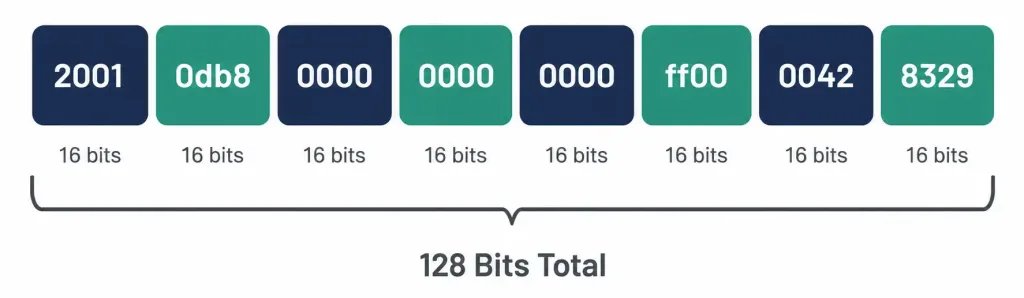
An IPv6 address is written as eight groups of four hexadecimal digits, separated by colons. Each group is called a hextet (by analogy with IPv4’s “octet,” though the term isn’t official IETF terminology, it’s near-universally used in networking education and practice). Each hextet represents 16 bits, and 8 hextets × 16 bits = 128 bits total, accounting for the entire address.
A full, uncompressed IPv6 address looks like this:
2001:0db8:0000:0000:0000:ff00:0042:8329Eight groups, each exactly four hex digits, separated by seven colons. Hexadecimal digits run 0-9 and then a-f (or A-F, case-insensitive in IPv6 notation), each single digit representing 4 bits — which is exactly why four hex digits per hextet accounts for that hextet’s full 16 bits (4 digits × 4 bits each = 16 bits).
Compression Rule One: Leading Zeros Within a Hextet
Writing out every address in its full 32-character form is tedious and error-prone, so IPv6 notation permits two distinct compression rules, applied together to reach an address’s shortest valid written form.
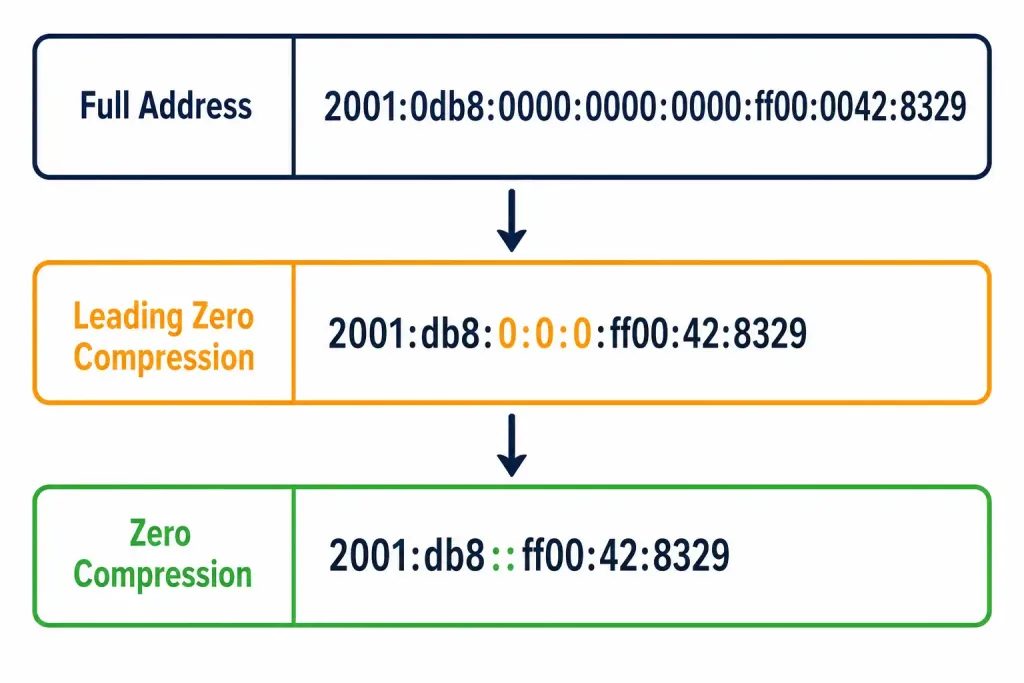
The first rule: leading zeros within any single hextet can be omitted. A hextet of 0db8 can be written simply as db8 — the leading zero carries no information once you know every hextet is understood to be four digits unless shortened. Note precisely what this rule does and doesn’t cover: it strips zeros from the beginning of a hextet only, never from the middle or end. 0042 becomes 42 (both leading zeros dropped). But a hextet like 0a00 becomes a00 — only the single leading zero drops, since the remaining zeros aren’t leading, they’re internal to the significant digits.
Worked examples of leading-zero compression, applied hextet by hextet:
- 0db8 → db8
- 0000 → 0 (a hextet of all zeros still needs at least one digit to represent it at this stage — full zero-compression, covered next, is a separate, second rule)
- 0042 → 42
- 00ff → ff… wait, more precisely: 00ff → ff is correct, since both leading zeros are dropped, leaving just the significant “ff”
This rule alone, applied to the full example address, gets you partway there:
2001:0db8:0000:0000:0000:ff00:0042:8329
2001:db8:0:0:0:ff00:42:8329
Notice 2001 stayed exactly as written — no leading zeros to strip, since all four digits are significant. 0db8 lost its single leading zero. Each of the three all-zero hextets shortened to a single 0. ff00 stayed as ff00 — this one’s worth pausing on specifically, since it’s a common point of confusion: ff00 has no leading zero to strip; the zeros here are trailing (at the end), and the leading-zero rule only ever touches the front of a hextet, never the back.
Compression Rule Two: Zero Compression With ::
The second rule operates at a different level entirely — not within a single hextet, but across multiple consecutive hextets. One contiguous run of all-zero hextets can be replaced with a double colon (::), collapsing any number of consecutive zero hextets into nothing at all.
Applying this to the address above, where three consecutive hextets (positions three, four, and five) are each 0:
2001:db8:0:0:0:ff00:42:8329
2001:db8::ff00:42:8329
The three consecutive zero hextets vanish entirely, replaced by the double colon. This is the fully compressed form of the original address — both rules applied, leading zeros stripped within remaining hextets, and the one qualifying run of consecutive all-zero hextets collapsed with ::.
The critical restriction, worth repeating explicitly: :: can only be used once per address. This isn’t a stylistic preference — it’s a hard requirement, because using it twice would make the address genuinely ambiguous, with no way to determine how many zero hextets each :: was actually standing in for.
Worked example demonstrating exactly why double-:: is ambiguous: imagine an address written as 2001::db8::1. A reader encountering this has no way to know whether the first :: represents one zero hextet and the second represents four, or the first represents three and the second represents two, or any other combination that still totals the required 8 hextets once fully expanded. Multiple different full addresses could theoretically compress to this same written form, which defeats the entire purpose of unambiguous addressing. This is exactly why the rule is absolute, not a matter of style: every valid IPv6 address contains at most one ::, and any address written with two is simply invalid notation, not just poor style.
Expanding a Compressed Address Back to Full Form
The exam tests this direction just as often as the compression direction, and it’s worth its own explicit method, since it trips up candidates who’ve only practiced compressing, never expanding.
Worked example: expand 2001:db8::ff00:42:8329 back to its full, uncompressed form.
- Count the hextets actually present: 2001, db8, ff00, 42, 8329 — that’s 5 hextets written out.
- A full IPv6 address always has exactly 8 hextets. 8 minus 5 written hextets leaves 3 hextets that the :: is standing in for.
- Replace :: with exactly 3 all-zero hextets: 2001:db8:0:0:0:ff00:42:8329.
- Restore the leading zeros dropped in step one of compression, bringing each hextet back to its full four-digit form: 2001:0db8:0000:0000:0000:ff00:0042:8329.
Final expanded form: 2001:0db8:0000:0000:0000:ff00:0042:8329 — exactly the original address this lesson started with.
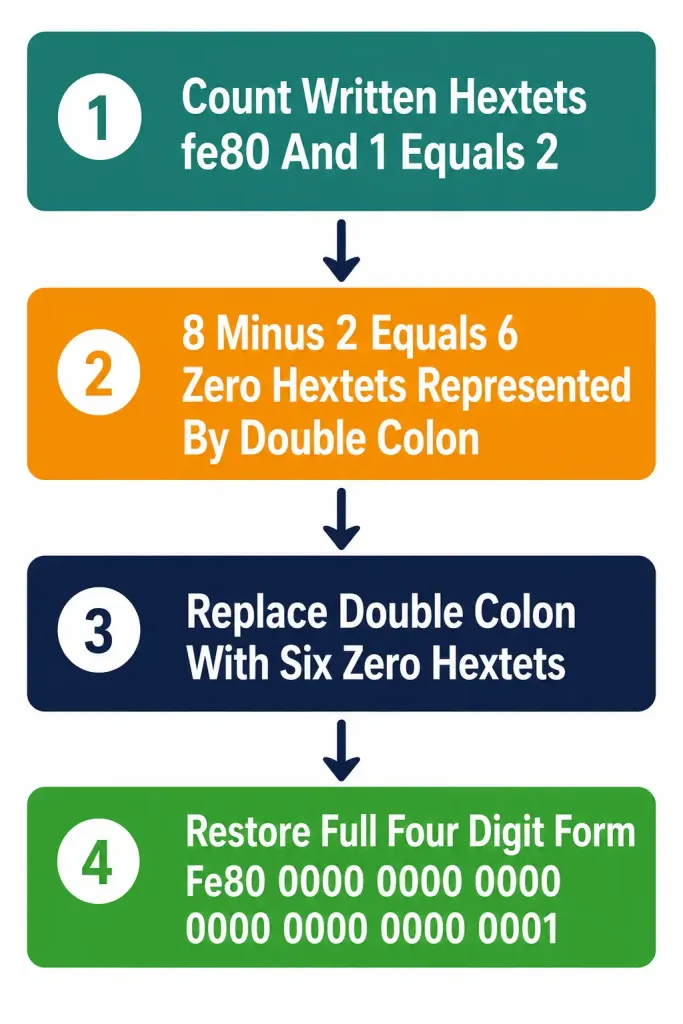
A second worked example, using a different address to reinforce the method — expand fe80::1:
- Hextets present: fe80, 1 — just 2 written.
- 8 minus 2 leaves 6 hextets the :: represents.
- Replace :: with 6 all-zero hextets: fe80:0:0:0:0:0:0:1.
- Restore leading zeros to full four-digit form: fe80:0000:0000:0000:0000:0000:0000:0001.
This particular address, fe80::/10, is worth flagging by name here even though its full significance is covered in the next lesson on IPv6 address types — it’s the beginning of the link-local address range, and you’ll see fe80:: addresses constantly once working with real IPv6-enabled interfaces, since every IPv6 interface automatically generates one.
Prefix Notation: Conceptually Familiar, Practically Different
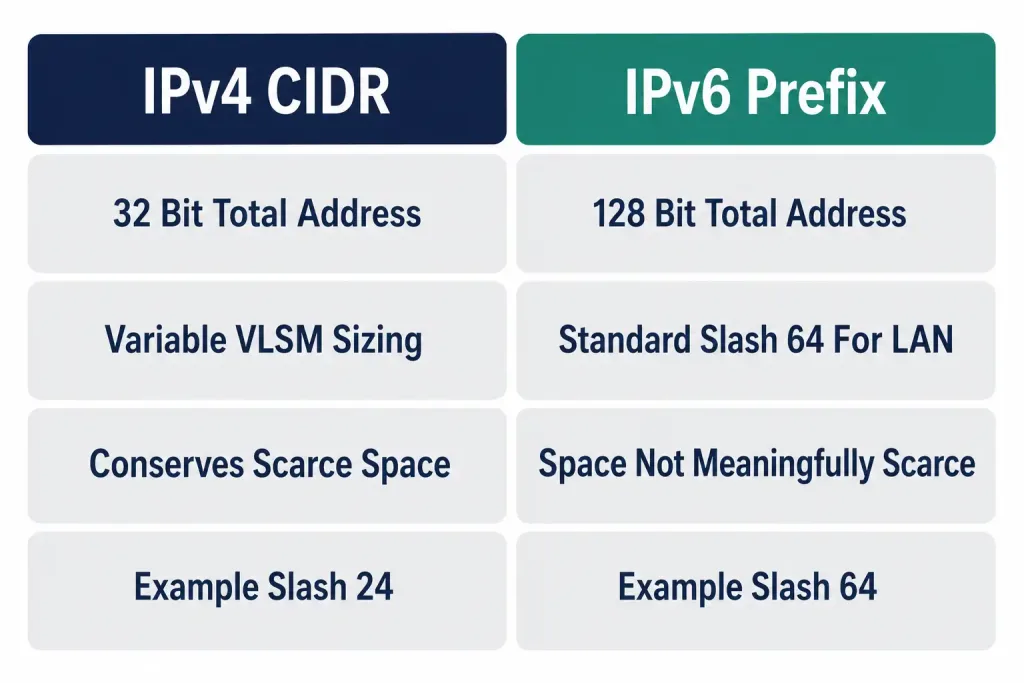
IPv6 prefix notation works the same way IPv4 CIDR notation does conceptually — a slash followed by a number indicates how many bits, counting from the left, identify the network portion of the address, with the remaining bits available for host addressing. The underlying logic transfers directly from everything covered in the IPv4 addressing and subnetting lesson.
Where it differs practically: /64 is overwhelmingly the standard for IPv6 LAN segments, not a variable choice calculated per-subnet the way IPv4 VLSM planning requires. This is a deliberate, specific design decision, not an arbitrary convention. A /64 prefix leaves exactly 64 bits — half the entire address — for the interface identifier, the portion of the address that identifies a specific host within its subnet.
Why 64 bits specifically, and why does this matter enough to be a fixed standard rather than something calculated per-subnet the way IPv4 subnetting requires? The interface identifier is commonly generated automatically from a device’s 48-bit MAC address, using a process called Modified EUI-64 — expanding that 48-bit MAC address into a full 64-bit interface identifier through a specific bit-insertion process.
This automatic generation method is covered in complete depth in the next lesson on IPv6 address types, but the practical consequence for this lesson is direct: since MAC-address-derived interface identifiers need a full 64 bits to work correctly, /64 became the standard LAN subnet size specifically to accommodate this automatic addressing method, rather than IPv6 subnet sizes being calculated to match a specific host-count requirement the way IPv4 subnets typically are.
This represents a genuine philosophical shift from IPv4 addressing, worth stating explicitly rather than leaving implicit. IPv4 subnetting is fundamentally about scarcity management — VLSM exists specifically to avoid wasting a limited resource, carving out exactly as many addresses as a given segment actually needs. IPv6, operating in a world of effectively unlimited address space, doesn’t need this discipline at the LAN-segment level at all.
A /64 provides 2^64 possible addresses on a single subnet — a number so enormous that “running out of host addresses in a subnet” simply isn’t a practical concern the way it routinely is under IPv4. The design philosophy shifted from “conserve carefully” to “allocate generously and reliably,” since the underlying resource is no longer meaningfully scarce.
Worked example, applying prefix notation to a real address: 2001:db8:acad:1::/64 identifies a subnet where the first 64 bits (2001:db8:acad:0001, expanded) identify the network, and the remaining 64 bits are available for the interface identifier of any host on that subnet. Compare this to an IPv4 /64 — which doesn’t exist, since IPv4 addresses are only 32 bits total; there’s no equivalent concept of “half the address for network, half for host” at IPv4’s much smaller scale the way there consistently is with IPv6’s /64 standard.
Common Mistakes Worth Naming Directly
Using :: twice in one address. Covered above, but worth restating as the single most common notation error: an address like 2001::db8::1 is invalid, not just poorly formatted. If you catch yourself writing a second :: anywhere in an address, one of the two needs to be expanded back to explicit zero hextets instead.
Compressing a single zero hextet with ::. The zero-compression rule requires a contiguous run — technically, RFC 5952 (which standardizes IPv6 text representation) recommends against using :: to replace just one single zero hextet, since 2001:db8:0:1:1:1:1:1 written as 2001:db8::1:1:1:1:1 saves only one character while potentially reducing clarity; the more common and recommended practice reserves :: specifically for runs of two or more consecutive zero hextets. A single isolated zero hextet is more clearly written out as a plain 0 rather than compressed.
Applying leading-zero compression to the wrong end of a hextet. As covered above, ff00 doesn’t become ff — that would be stripping a trailing zero, not a leading one, which the rule never permits. Only zeros at the very beginning of a hextet are eligible for this compression.
Assuming every IPv6 address on an interface uses the same prefix length. While /64 is the standard for LAN segments specifically, other prefix lengths absolutely do appear in real IPv6 addressing — point-to-point WAN links, for instance, are commonly addressed with /127 (the IPv6 near-equivalent reasoning to IPv4’s /30 for point-to-point links, though the specific mechanics differ, covered in more depth alongside IPv6 address types). Don’t assume /64 universally applies to every IPv6 interface you’ll ever encounter, even though it’s overwhelmingly the LAN standard.
Third and fourth worked compression examples, for additional reinforcement:
Compress fully: 2001:0000:0000:0000:0000:0000:0000:0001
- Leading-zero compression within each hextet: 2001:0:0:0:0:0:0:1
- Zero compression across the six consecutive zero hextets: 2001::1
Compress fully: 0000:0000:0000:0000:0000:0000:0000:0001 (a special address, worth recognizing by its compressed form specifically)
- Leading-zero compression: 0:0:0:0:0:0:0:1
- Zero compression across all seven leading zero hextets: ::1
This last example — ::1 — is IPv6’s loopback address, directly analogous to IPv4’s 127.0.0.1, and it’s worth recognizing on sight given how frequently it appears in verification output and troubleshooting scenarios.
Configuring IPv6 Addressing on a Cisco Router
Understanding the notation rules matters, but actually applying them to a real device is what this objective ultimately tests. Here’s a small, realistic lab configuring IPv6 addressing on two routers connected via a point-to-point link.
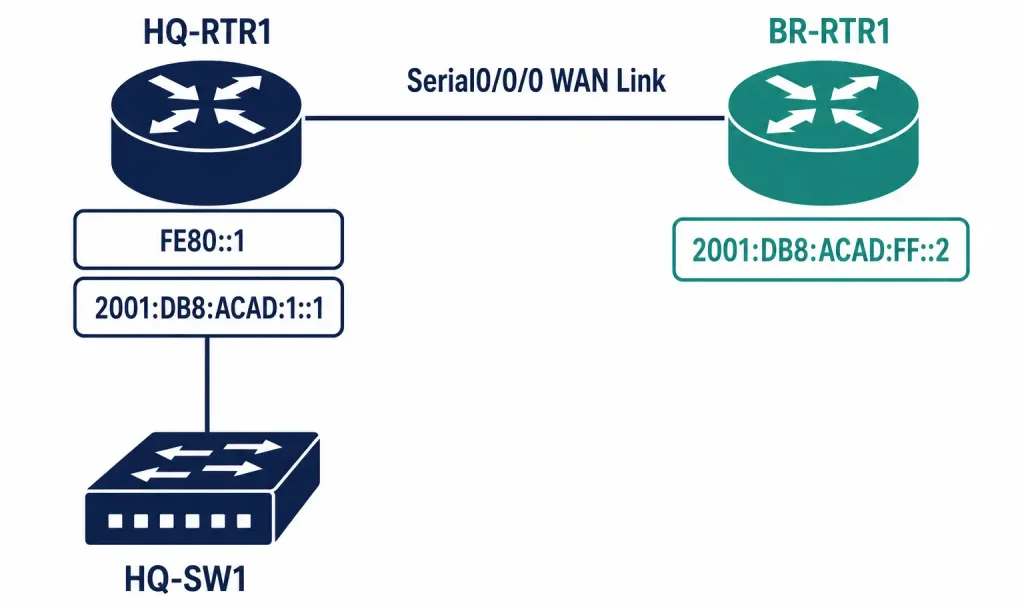
Topology: HQ-RTR1 connects to BR-RTR1 over a WAN link. HQ-RTR1 also has a LAN interface serving a local subnet.
Addressing table:
| Device | Interface | IPv6 Address/Prefix |
|---|---|---|
| HQ-RTR1 | GigabitEthernet0/0 (LAN) | 2001:db8:acad:1::1/64 |
| HQ-RTR1 | Serial0/0/0 (WAN) | 2001:db8:acad:ff::1/64 |
| BR-RTR1 | Serial0/0/0 (WAN) | 2001:db8:acad:ff::2/64 |
A prerequisite step easy to forget: unlike IPv4, where a router forwards IPv4 traffic by default once interfaces are addressed, Cisco IOS requires IPv6 unicast routing to be explicitly enabled before a router will route IPv6 traffic between interfaces at all.
Configuring HQ-RTR1:
HQ-RTR1(config)# ipv6 unicast-routing
HQ-RTR1(config)# interface GigabitEthernet0/0
HQ-RTR1(config-if)# ipv6 address 2001:db8:acad:1::1/64
HQ-RTR1(config-if)# no shutdown
HQ-RTR1(config-if)# exit
HQ-RTR1(config)# interface Serial0/0/0
HQ-RTR1(config-if)# ipv6 address 2001:db8:acad:ff::1/64
HQ-RTR1(config-if)# no shutdown
Configuring BR-RTR1:
BR-RTR1(config)# ipv6 unicast-routing
BR-RTR1(config)# interface Serial0/0/0
BR-RTR1(config-if)# ipv6 address 2001:db8:acad:ff::2/64
BR-RTR1(config-if)# no shutdown
Verifying the configuration:
HQ-RTR1# show ipv6 interface brief
GigabitEthernet0/0    [up/up]
    FE80::1
    2001:DB8:ACAD:1::1
Serial0/0/0            [up/up]
    FE80::1
    2001:DB8:ACAD:FF::1
Notice something worth pointing out explicitly, since it surprises candidates expecting IPv6 output to mirror IPv4’s show ip interface brief exactly: every IPv6-enabled interface shows two addresses, not one. The FE80:: address is the automatically generated link-local address, created the moment IPv6 is enabled on an interface, entirely independent of whatever global address you’ve manually configured — this link-local address exists on every IPv6 interface whether or not you’ve assigned a global address at all, and it’s used for specific local-network functions covered in the next lesson on IPv6 address types. The second address, the one starting 2001:DB8, is the manually configured global address from the addressing table above.
Also worth noting: Cisco IOS displays IPv6 addresses in uppercase in show command output by convention, even though lowercase is equally valid IPv6 notation when you’re typing addresses into configuration commands yourself — this is a display convention, not a rule about which case is “correct” to use.
Packet Tracer Practice Activity: IPv6 Addressing and Compression
Background/Scenario: You’ve been given the address block 2001:db8:acad::/48 for a small company network. Your task is to derive a /64 LAN subnet and a /64 WAN subnet from this block, configure IPv6 addressing on both routers, and verify connectivity.
Topology (build this in Packet Tracer or GNS3):
[HQ-SW1]---[HQ-RTR1]======WAN Link======[BR-RTR1]---[BR-SW1]
   |                                                    |
[PC-HQ1]                                            [PC-BR1]
Addressing table (fill in the IPv6 Address/Prefix column yourself before configuring, using subnet 1 for the HQ LAN and subnet ff for the WAN link):
| Device | Interface | IPv6 Address/Prefix |
|---|---|---|
| HQ-RTR1 | GigabitEthernet0/0 (LAN) | _______________ |
| HQ-RTR1 | Serial0/0/0 (WAN) | _______________ |
| BR-RTR1 | Serial0/0/0 (WAN) | _______________ |
| BR-RTR1 | GigabitEthernet0/0 (LAN) | _______________ |
| PC-HQ1 | NIC | _______________ |
| PC-BR1 | NIC | _______________ |
Part 1: Write out the addresses in full, uncompressed form first
- Using 2001:db8:acad::/48 as the base block, write the full uncompressed form of a /64 subnet using subnet ID 0001 for the HQ LAN.
- Write the full uncompressed form of a /64 subnet using subnet ID 00ff for the WAN link.
- Practice compressing both back down to their shortest valid written form before moving to configuration — this is the skill this entire lesson centers on, and doing it manually before configuring reinforces it more effectively than jumping straight to typing commands.
Part 2: Configure basic device settings
- Configure a hostname on each router matching the topology.
- Enable IPv6 unicast routing on both routers — don’t skip this step, since IPv6 traffic won’t route between interfaces without it.
Part 3: Configure and verify IPv6 addressing
- Configure the LAN and WAN interfaces on both routers using your derived addressing.
- Configure IPv6 addressing on both PCs, either via static configuration or by confirming SLAAC (Stateless Address Autoconfiguration) has assigned an address automatically — a mechanism covered in more depth in a later lesson, but worth observing here if your Packet Tracer PCs support it.
- Issue
no shutdownon every router interface you’ve configured.
Verification steps — expected output when done correctly:
show ipv6 interface briefon both routers should show each configured interface with both a link-local (FE80::) address and your manually configured global address.pingfrom PC-HQ1 to its own default gateway (HQ-RTR1’s LAN interface) should succeed.pingfrom HQ-RTR1’s WAN interface to BR-RTR1’s WAN interface should succeed, confirming the point-to-point link addressing is correct.show ipv6 routeon either router should show directly connected routes for its own local subnets, even without a routing protocol configured yet.
You can build this same topology yourself in Packet Tracer or GNS3 to practice hands-on — deriving and compressing the addresses manually before typing any configuration commands is what actually builds the speed this objective requires.
Frequently Asked Questions
Is IPv6 notation case-sensitive?
No — hexadecimal digits a through f can be written in either uppercase or lowercase, and both are equally valid. Cisco IOS conventionally displays addresses in uppercase in show command output, but this is a display convention rather than a strict requirement when typing addresses yourself.
Can I compress a hextet of 0000 to nothing at all, rather than to a single 0?
Not on its own — a single isolated all-zero hextet compresses to a single 0 through the leading-zero rule, not to an empty string. Only a run of two or more consecutive all-zero hextets qualifies for the separate :: zero-compression rule, which is what removes hextets entirely rather than just shortening them to a single digit.
Why does every IPv6 interface automatically get a link-local address, even before I configure anything?
This is a fundamental part of how IPv6 operates, distinct from IPv4’s approach entirely. The moment IPv6 is enabled on an interface, it automatically generates an FE80::-prefixed link-local address for itself, used for specific local-network operations regardless of whether a global, internet-routable address has been manually configured at all. This automatic behavior, and exactly what link-local addresses are used for, is covered in complete depth in the next lesson.
Is there an IPv6 equivalent to IPv4’s private addressing (RFC 1918)?
Yes — Unique Local Addresses (ULA), covered in the next lesson alongside the other IPv6 address types. The short version: yes, a private-use equivalent exists, but the underlying motivation differs meaningfully from IPv4’s, since IPv6 doesn’t face the same address-scarcity pressure that originally drove RFC 1918’s creation.
Do I need to enable IPv6 unicast routing on every device, or just routers?
Only devices actually performing IPv6 routing between different networks need this command — a router connecting two or more IPv6 subnets requires it, since the command specifically enables the router’s ability to forward IPv6 packets between its interfaces. An end device (a PC or a switch operating purely at Layer 2) doesn’t route between networks in this sense and doesn’t need this specific command.
How many /64 subnets fit inside the /48 block from the Packet Tracer lab?
A genuinely enormous number — 2^16, or 65,536 separate /64 subnets, since a /48 to /64 conversion borrows 16 bits (64 minus 48). This single fact captures the scale difference between IPv4 and IPv6 addressing planning better than almost anything else in this lesson: a /48 block, commonly assigned to a single organization, contains enough /64 subnets to give every one of 65,536 separate physical locations or departments its own full LAN subnet, with room to spare.
Configuring and Verifying IPv6 Addressing and Prefix: Practice Quiz
Test your knowledge of IPv6 notation, address compression, /64 subnetting, link-local addresses, routing, and point-to-point addressing.
Summary
- IPv6 uses 128-bit addresses, written as eight hextets of four hexadecimal digits each, providing an address space vastly larger than IPv4's.
- Leading-zero compression removes unnecessary zeros from the beginning of individual hextets only, never from the middle or end.
- Zero compression (::) replaces one contiguous run of all-zero hextets, and can appear at most once per address to avoid ambiguity.
- Expanding a compressed address requires counting present hextets, determining how many the :: represents, and restoring full four-digit form throughout.
- /64 is the standard IPv6 LAN prefix length, specifically sized to accommodate 64-bit interface identifiers generated through methods like Modified EUI-64.
- Cisco routers require ipv6 unicast-routing explicitly enabled before routing IPv6 traffic between interfaces, unlike IPv4's default forwarding behavior.
- Every IPv6-enabled interface automatically generates a link-local (FE80::) address, independent of any manually configured global address.



