
Domain 1.11 | Network Fundamentals — 20% of exam
Learning Objectives
By the end of this lesson, you will be able to:
- Explain why only channels 1, 6, and 11 are nonoverlapping in the 2.4GHz band
- Describe what an SSID is and how it functions
- Explain RSSI, attenuation, and common sources of RF interference
- Describe why encryption is a core wireless principle, independent of specific protocol detail
Key Terms
| Term | Definition |
|---|---|
| SSID | Service Set Identifier; the human-readable name a wireless network broadcasts |
| RSSI | Received Signal Strength Indicator; a measurement of wireless signal strength |
| Channel | A specific frequency sub-band a wireless network operates on within a larger band |
| Co-channel interference | Performance degradation caused by two or more APs operating on the same or overlapping channel |
| Attenuation | The weakening of a signal as it travels through distance or physical obstructions |
| 2.4GHz band | A wireless frequency band offering longer range but more interference and congestion |
| 5GHz band | A wireless frequency band offering higher speed and less congestion, at shorter range |
Explanation
Why Wireless Plays by Different Rules Than Wired
Everything covered so far in this course — cabling, interface behavior, addressing — assumes a physical medium you can see, measure, and control directly. Wireless breaks that assumption entirely. The “medium” is open air, shared with every other device transmitting on the same frequency within range, including devices that have nothing to do with your network at all — a neighbor’s Wi-Fi, a microwave oven, a Bluetooth speaker. Understanding wireless means understanding physics constraints that simply don’t exist in a wired connection.
Frequency Bands: 2.4GHz and 5GHz
Wi-Fi operates primarily across two frequency bands, each with a genuinely different set of trade-offs worth understanding before getting into channel specifics.
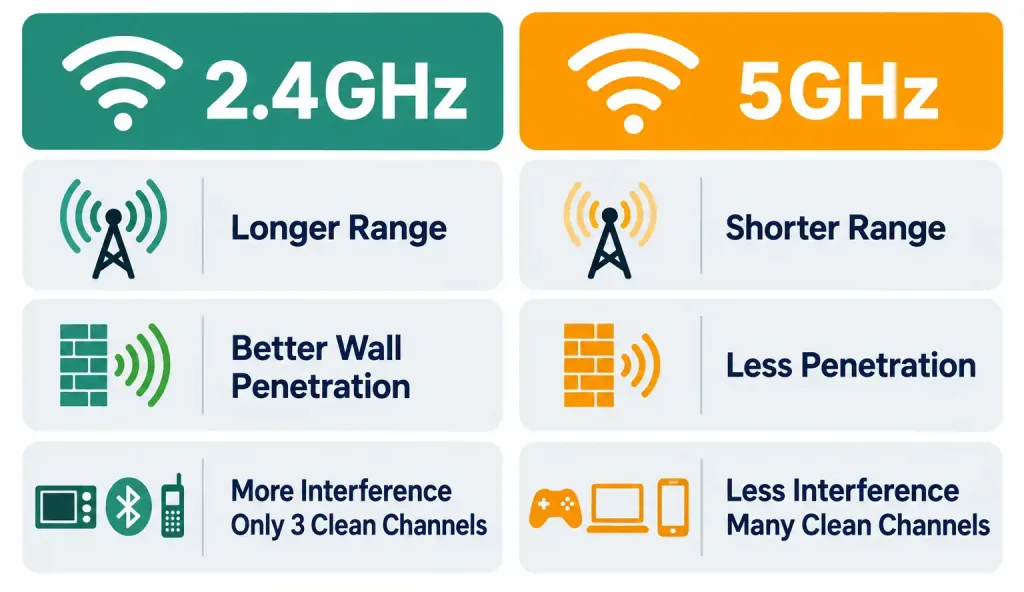
2.4GHz offers longer range and better penetration through walls and obstacles — lower frequencies travel farther and pass through physical material more easily, a real physics property, not a marketing distinction. The tradeoff: this band is heavily used, not just by neighboring Wi-Fi networks but by an entire category of non-Wi-Fi devices operating in the same space (covered in detail below), making it more prone to interference and congestion, particularly in dense environments like apartment buildings or office parks with many overlapping networks.
5GHz offers significantly higher available bandwidth and, generally, less congestion, since fewer non-Wi-Fi devices operate in this range and more total channel space exists to spread traffic across. The tradeoff runs the opposite direction from 2.4GHz: higher frequencies have shorter effective range and penetrate physical obstructions less effectively, meaning a 5GHz signal typically covers less physical area from the same AP than a 2.4GHz signal would, especially in an environment with multiple walls or floors between the AP and the client.
Neither band is universally “better” — this is worth stating plainly, since it’s a common misconception. The right choice depends on the specific deployment’s priorities: maximum coverage area and obstacle penetration favors 2.4GHz; maximum throughput and reduced interference favors 5GHz. Modern access points commonly broadcast both simultaneously, letting client devices choose (or letting the AP itself steer clients toward whichever band suits their situation better) rather than forcing an either-or choice at the network design level.
The 2.4GHz Channel Math: Why Only 1, 6, and 11 Are Nonoverlapping
This is the single most specific, most concretely testable fact in this entire objective, and it’s worth understanding the actual math behind it rather than just memorizing “1, 6, 11” as an arbitrary rule.
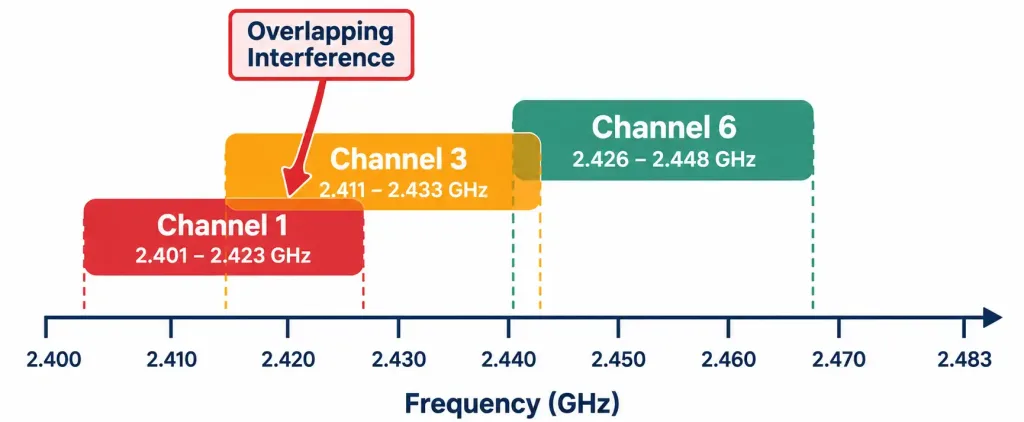
The 2.4GHz band spans from roughly 2.400GHz to 2.4835GHz, divided into channels — 11 in most regulatory domains including the US (some regions permit more). Here’s the part that isn’t obvious at first: each individual channel is 22MHz wide, but consecutive channel center frequencies are spaced only 5MHz apart. Do the math on what that means: a channel’s 22MHz width extends well beyond the 5MHz gap to the next channel’s center frequency, meaning adjacent channels genuinely overlap with each other significantly in actual frequency usage, not just in name.
Worked example showing exactly why channel 1 and channel 3 overlap: channel 1 is centered at 2.412GHz, occupying roughly 2.401–2.423GHz once its 22MHz width is accounted for (centered ± 11MHz). Channel 3 is centered at 2.422GHz, occupying roughly 2.411–2.433GHz. Compare the two ranges: they share substantial overlapping frequency space (roughly 2.411–2.423GHz), meaning devices on channel 1 and channel 3 operating near each other genuinely interfere with one another at the RF level, despite being “different” channels by number.
Why 1, 6, and 11 specifically avoid this problem: these three channels are spaced far enough apart — 5 channel numbers apart, corresponding to 25MHz of center-frequency separation — that their respective 22MHz-wide occupied ranges don’t meaningfully overlap with each other at all. Channel 1 occupies roughly 2.401–2.423GHz; channel 6 occupies roughly 2.426–2.448GHz; channel 11 occupies roughly 2.451–2.473GHz. Each sits in genuinely separate frequency space from the other two, which is exactly what “nonoverlapping” means in a literal, physical sense — not just a naming convention, but an actual absence of shared frequency usage.
Co-Channel Interference: What Happens When APs Share a Channel
Understanding the channel math above sets up why co-channel interference is a genuine, practical deployment problem, not just an abstract concept.
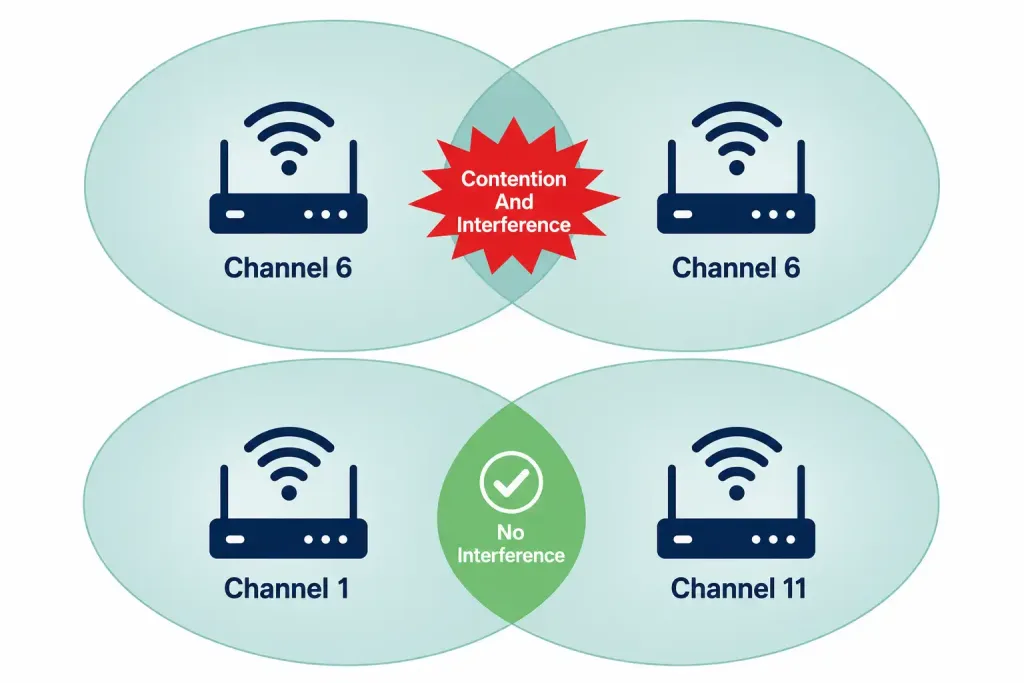
When two or more access points within range of each other operate on the same (or overlapping) channel, they’re effectively sharing the same wireless medium, the same way legacy hub-based Ethernet once forced every connected device onto one shared collision domain.
Devices on that shared channel must take turns transmitting, using a contention mechanism conceptually similar to the CSMA/CD process covered earlier in this course for wired Ethernet, though wireless uses CSMA/CA (Collision Avoidance, rather than detection, since a wireless device generally can’t reliably detect a collision while transmitting the way a wired device sometimes can). More devices and more APs contending for the same channel means more waiting, more retries, and measurably degraded throughput for everyone sharing it — even though each individual AP might look perfectly healthy in isolation.
Worked example: an office building with APs on floors one, two, and three, all defaulting to channel 6 out of the box without any deliberate channel planning. Devices near the boundary between floors — where signal from two different APs both reaches with meaningful strength — experience real, measurable interference from both APs competing for the same channel space, even though each AP individually might show a strong signal reading. The fix is straightforward once the underlying problem is understood: deliberately assign different nonoverlapping channels (1, 6, and 11) to physically adjacent APs specifically to eliminate this contention, rather than leaving every AP on its factory-default channel setting.
This is precisely why the “only three nonoverlapping channels” limitation genuinely constrains real 2.4GHz deployment design. A large building with many APs has to reuse these same three channels repeatedly across its coverage area, and the actual design skill lies in arranging which physically adjacent APs get which channel, specifically to avoid placing two APs on the identical channel close enough to each other to cause meaningful co-channel interference — a genuine constraint 5GHz’s much larger channel count (dozens of available, non-overlapping channels depending on regulatory domain) largely sidesteps, which is one more reason 5GHz appeals particularly to denser deployments.
SSID: The Network’s Human-Readable Name
The SSID (Service Set Identifier) is simply the network name a client device sees and selects when choosing which wireless network to join — “CorpNet,” “HomeWiFi-5G,” “Starbucks-Guest,” and so on. Functionally, it’s the wireless equivalent of a VLAN name in the sense that it’s a human-friendly label layered over what’s actually a specific, technically defined network segment underneath.
A single access point can broadcast multiple SSIDs simultaneously, each one commonly mapped to a different underlying VLAN — a genuinely common real-world design pattern, where one physical AP serves a “CorpNet” SSID mapped to the internal corporate VLAN, alongside a completely separate “CorpNet-Guest” SSID mapped to an isolated guest VLAN with no access to internal resources, all from the exact same physical hardware.
SSID broadcasting can be disabled (sometimes called a “hidden” network), meaning the AP stops including the network name in its periodic beacon frames, requiring a client to already know and manually type the exact SSID to connect rather than selecting it from a visible list. This is worth flagging directly as a common misconception: disabling SSID broadcast is not a meaningful security measure.
The SSID is still transmitted in other frame types during normal connection negotiation (client probe requests and AP responses, specifically), and readily available wireless scanning tools can reveal a “hidden” SSID from any device actively attempting to connect nearby, with little genuine effort required. Treat SSID hiding as a mild deterrent against casual observation at most, never as an actual security control — real wireless security comes from encryption, covered next, not from concealing the network’s name.
RF Principles: Signal Strength, Distance, and Obstruction
Radio frequency behavior follows real, predictable physical laws, and understanding them directly drives practical decisions about AP placement, channel planning, and coverage design — this isn’t abstract physics trivia, it’s the actual reasoning behind why wireless deployments are designed the way they are.
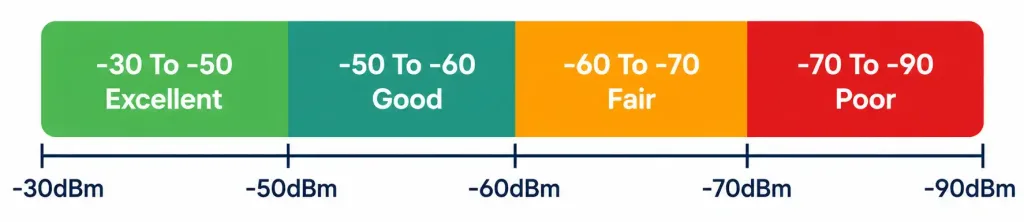
RSSI (Received Signal Strength Indicator) measures how strong a wireless signal is as received by a device, expressed in dBm (decibel-milliwatts) — and here’s a detail that trips people up on first encounter: RSSI values are negative numbers, and closer to zero means a stronger signal, not a weaker one. A signal of -40dBm is meaningfully stronger than a signal of -80dBm, even though -80 is the “larger” number in ordinary arithmetic terms — this is a logarithmic scale, not a linear one, and the sign convention reflects that the measurement represents a loss relative to the original transmitted power, not an absolute positive quantity.
General reference points worth knowing (exact thresholds vary by vendor and specific use case, so treat these as reasonable working benchmarks rather than universal fixed rules): roughly -30 to -50dBm represents an excellent signal, close to the AP with minimal obstruction; -50 to -60dBm is good, reliable signal for most typical uses; -60 to -70dBm is fair, usable but potentially showing reduced throughput; below roughly -70 to -80dBm becomes poor, with real risk of dropped connections or unreliable performance, particularly for latency-sensitive applications like voice or video calls.
Attenuation is the general term for signal weakening, and it happens through two distinct mechanisms worth distinguishing clearly:
Distance-based attenuation (free space path loss) — signal strength decreases predictably as distance from the transmitter increases, following an inverse-square relationship (doubling the distance reduces signal power by a factor of four, not simply by half) — a genuine physical law governing how radio waves spread out and weaken as they propagate through open space, independent of any obstruction at all.
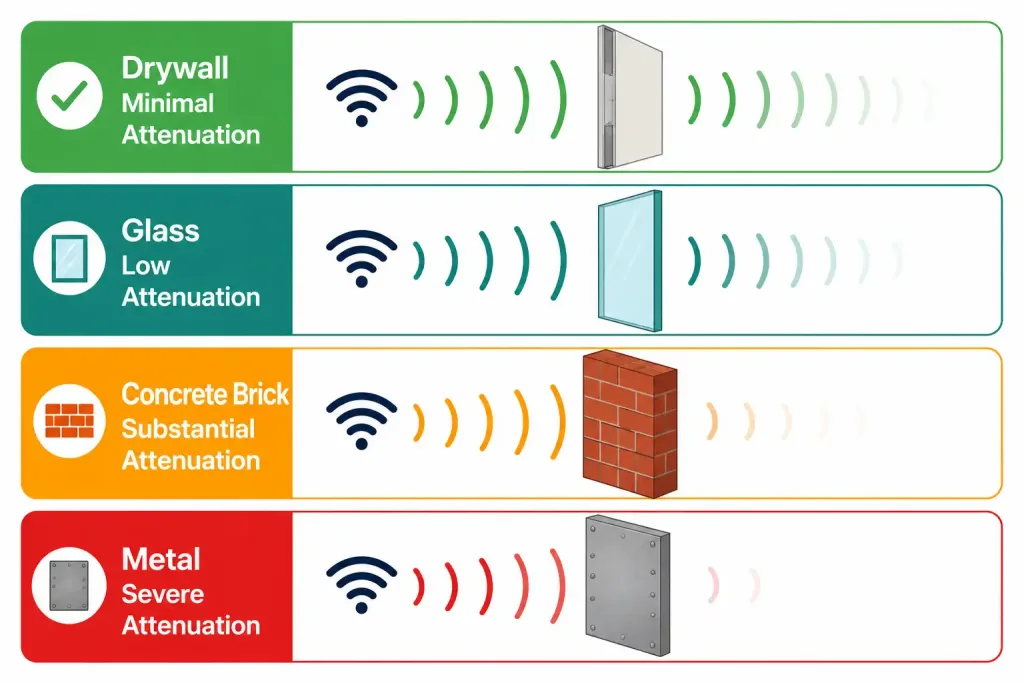
Obstruction-based attenuation — physical materials between transmitter and receiver absorb or reflect some portion of the signal, and different materials cause meaningfully different amounts of loss. Drywall causes relatively minimal attenuation; a device on the other side of a single interior wall typically still gets a perfectly usable signal. Concrete and brick cause substantially more loss, sometimes severe enough to effectively block a signal that would otherwise easily reach that distance through open air or drywall alone. Metal — filing cabinets, structural beams, elevator shafts, appliances — causes the most severe attenuation of common building materials, in some cases nearly blocking a signal entirely regardless of distance, since metal reflects RF energy rather than allowing it to pass through at all.
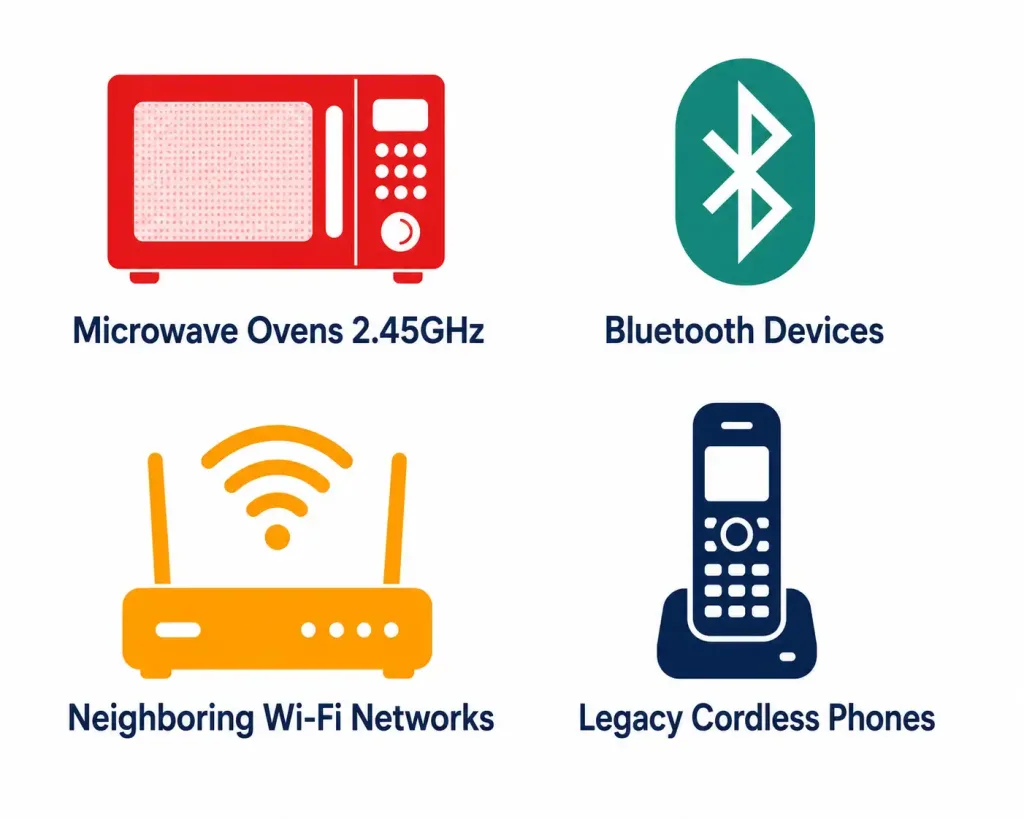
Interference from other RF sources is the third major factor affecting real-world wireless performance, distinct from both distance and obstruction, and it specifically explains why the 2.4GHz band in particular tends to be noisier than 5GHz in practice. A handful of common, genuinely significant interference sources operate in or near the 2.4GHz band specifically:
- Microwave ovens — a genuinely notable, frequently cited source, since microwave ovens operate at approximately 2.45GHz, landing directly inside the Wi-Fi 2.4GHz band. A microwave in active use can cause real, measurable, if temporary, interference with nearby 2.4GHz Wi-Fi devices, particularly on channels close to that specific frequency.
- Bluetooth devices — Bluetooth also operates in the 2.4GHz range, meaning a busy environment with many Bluetooth peripherals (headphones, keyboards, speakers) active simultaneously adds real additional contention for the same shared frequency space Wi-Fi is also using.
- Neighboring Wi-Fi networks — in dense environments (apartment buildings being the classic example), numerous independently operated networks, often left on factory-default channel settings, frequently end up creating exactly the co-channel interference problem covered above, but across separate organizations with no coordination between them at all.
- Cordless phones and certain baby monitors — older analog cordless phones in particular were historically common 2.4GHz interference sources, though this specific issue has become less prevalent as most such devices have moved to other frequencies or been phased out in favor of alternatives entirely.
Why 5GHz experiences meaningfully less of this specific problem: none of the interference sources listed above (microwaves, Bluetooth, most legacy cordless phones) operate in the 5GHz range at all, which is a genuine, practical contributor to 5GHz’s reputation for cleaner, more reliable performance in crowded environments — a direct, real-world consequence of the same frequency-band physics covered earlier, not a separate or unrelated advantage.
How these RF principles translate directly into practical AP placement decisions: central, elevated placement generally minimizes distance-based attenuation to the largest possible coverage area from a single AP. Avoiding placement directly behind metal obstructions (inside a metal equipment closet, for instance) avoids the severe obstruction-based attenuation metal specifically causes. And deliberate channel planning, informed by the nonoverlapping-channel math covered earlier, minimizes interference between an organization’s own adjacent APs — the one interference source actually within a network administrator’s direct control, unlike a neighbor’s microwave or a nearby apartment’s independently operated Wi-Fi network.
Encryption: A Core Principle, With Protocol Detail Covered Later
Wireless traffic travels through open, shared air — meaningfully different from a wired connection, where physically tapping a cable to intercept traffic requires actual physical access to that cable somewhere along its path. Anyone within radio range of a wireless network can potentially receive its transmitted signal, whether or not they’re an authorized user of that network, which is exactly why encryption is a foundational wireless principle, not an optional add-on feature the way it might be treated for certain wired scenarios.
This objective’s scope is specifically about recognizing encryption’s role as a core wireless principle — confidentiality for traffic traveling across an inherently shared, open medium — without yet requiring the specific protocol detail (WPA, WPA2, WPA3, and the meaningful differences between them) that gets covered in full depth under Domain 5 (Security Fundamentals). For now, the key takeaway is conceptual: wireless’s shared-medium nature makes encryption necessary in a way wired networks don’t face nearly as acutely, since a wired network at minimum requires an attacker to gain physical access to tap a cable somewhere, while a wireless network’s “cable” is, in a real sense, the open air itself, reachable by anyone with a receiver in range.
Common Misconceptions Worth Correcting Directly
“A higher channel number means better performance.” Channel number has no inherent relationship to quality or speed — channel 11 isn’t faster than channel 1 simply because 11 is a larger number. What actually matters for performance is whether a chosen channel is free of interference and co-channel contention in your specific physical environment, which has nothing to do with the numeric value of the channel itself.
“5GHz is always better than 2.4GHz.” As covered above, this depends entirely on the deployment’s actual priorities and physical environment. A large, obstruction-heavy space genuinely needing maximum coverage area from limited AP hardware may perform better on 2.4GHz specifically because of its superior range and obstacle penetration, even accounting for its greater susceptibility to interference — “better” is deployment-specific, not a universal ranking between the two bands.
“Hiding an SSID is a genuine security measure.” As covered directly above, this is a common but incorrect assumption — SSID concealment provides, at most, a mild deterrent against the most casual observation, and offers essentially no protection against anyone with basic wireless scanning tools and genuine intent to find the network.
“A strong RSSI reading alone guarantees good wireless performance.” Signal strength is one important factor, but not the only one — a strong RSSI reading in an environment with heavy co-channel interference or RF noise from other sources can still produce poor real-world throughput, since strength alone doesn’t account for how much contention or interference exists on that specific channel at that specific moment.
Frequently Asked Questions
Why are there only three nonoverlapping channels in 2.4GHz specifically, rather than more? This comes directly from the specific channel width (22MHz) relative to the narrow spacing between consecutive channel center frequencies (5MHz) within the available 2.4GHz spectrum — the physical math simply doesn’t allow more than three channels that wide to fit into that specific amount of total spectrum without meaningful overlap between them.
Does 6GHz Wi-Fi (increasingly available on newer equipment) solve the channel-scarcity problem entirely? It genuinely helps significantly, offering considerably more available channel space than either 2.4GHz or 5GHz, specifically because it’s a newer, less crowded band with more total spectrum allocated to it — though as of this writing, it isn’t yet universal across all client devices, and comprehensive 6GHz deployment planning sits somewhat beyond this specific objective’s core scope.
Can two devices communicate directly over Wi-Fi without going through an access point at all? Yes, through what’s typically called ad-hoc or peer-to-peer wireless mode, though this is a distinct configuration from the standard infrastructure-mode Wi-Fi (client connecting through an AP) that this lesson, and the CCNA exam generally, primarily focuses on.
Is RSSI the only measurement that matters for assessing wireless quality? No — SNR (Signal-to-Noise Ratio), comparing signal strength specifically against the background noise floor rather than measuring signal strength in isolation, is another genuinely important metric, since a strong signal in a genuinely noisy RF environment can still perform poorly despite a seemingly favorable RSSI reading on its own.
Why do some networks broadcast the same SSID across many different physical APs throughout a building? This is standard practice for larger deployments specifically to enable seamless roaming — a client device can move between different APs’ coverage areas while remaining connected to what appears to be a single, continuous network, without needing to manually reconnect to a new, differently-named network every time it crosses from one AP’s coverage area into another’s.
Wi-Fi Channels, Interference & Wireless Fundamentals: Practice Quiz
Test your knowledge of Wi-Fi channels, CSMA/CA, SSIDs, RSSI, SNR, RF attenuation, frequency bands, VLANs, and wireless security.
Summary
- 2.4GHz offers longer range and better obstacle penetration but more interference; 5GHz offers higher throughput and less congestion at shorter range — neither is universally better.
- Only channels 1, 6, and 11 are nonoverlapping in 2.4GHz, a direct consequence of 22MHz-wide channels spaced just 5MHz apart across the available spectrum.
- Co-channel interference occurs when adjacent APs share a channel, forcing contended access and degraded performance for everyone on it — deliberate channel planning is the fix.
- SSID is simply the network’s human-readable name; hiding it provides no meaningful security, since it’s still visible during normal connection negotiation.
- RSSI measures signal strength in dBm, with values closer to zero indicating stronger signal; attenuation comes from both distance (free space path loss) and physical obstruction, with metal causing the most severe blocking.
- Common 2.4GHz interference sources include microwave ovens, Bluetooth devices, and neighboring Wi-Fi networks — none of which significantly affect 5GHz.
- Encryption is a foundational wireless principle because the medium itself (open air) is inherently shared and reachable by anyone in range, unlike wired connections requiring physical access to intercept.



