
Domain 1.9 | Network Fundamentals — 20% of exam
Learning Objectives
By the end of this lesson, you will be able to:
- Compare global unicast, unique local, and link-local addresses, and describe when each is used
- Explain anycast addressing and how it differs from both unicast and multicast
- Describe IPv6 multicast and explain why IPv6 has no broadcast concept at all
- Derive a Modified EUI-64 interface identifier from a device’s MAC address by hand
Key Terms
| Term | Definition |
|---|---|
| Global unicast | A publicly routable IPv6 address, the equivalent of a public IPv4 address |
| Unique local address (ULA) | A private-use IPv6 address from the fc00::/7 block, not internet-routable |
| Link-local address | An automatically assigned address from fe80::/10, valid only on the local link |
| Anycast | An address assigned to multiple devices, delivering traffic to the nearest instance |
| Multicast | An address delivering traffic to a defined group of interested receivers |
| Modified EUI-64 | A method deriving a 64-bit interface identifier from a 48-bit MAC address |
| SLAAC | Stateless Address Autoconfiguration; lets a device configure its own IPv6 address automatically |
Explanation
Five Address Types, Three Categories
The IPv6 addressing and prefix lesson covered how to write and compress IPv6 addresses correctly. This lesson covers something different: not how an address is written, but what an address actually does — its role and scope within the network.
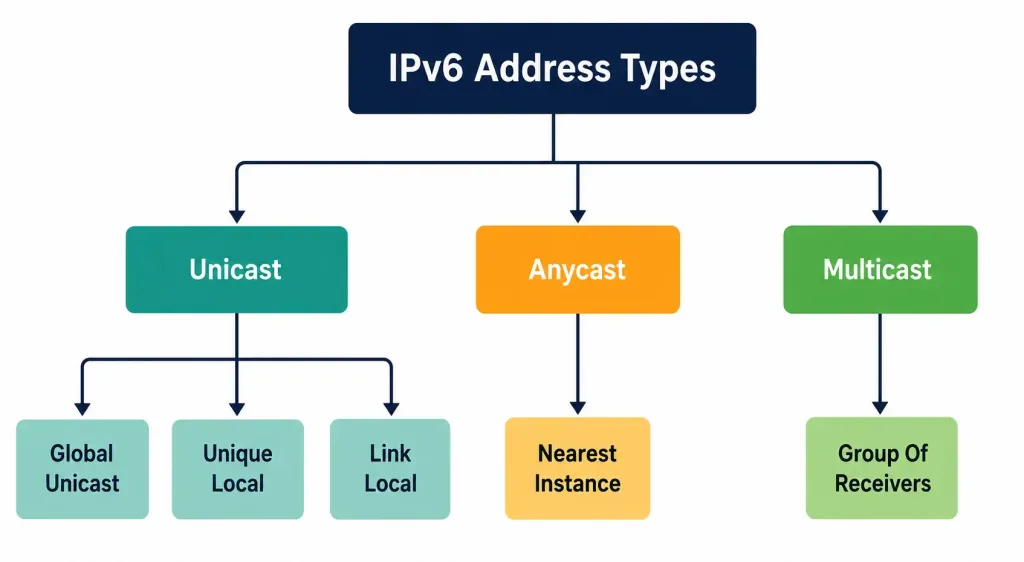
Every IPv6 address falls into one of three broad categories, each delivering traffic differently:
- Unicast — delivered to exactly one specific interface. This category itself splits into three distinct types (global unicast, unique local, and link-local), each covered in depth below.
- Anycast — delivered to the nearest of potentially many interfaces sharing the same address.
- Multicast — delivered to every interface that’s joined a specific group.
Notably absent from this list: broadcast. IPv4 has it; IPv6 deliberately doesn’t. This is one of the most frequently tested facts in this entire objective, specifically because it catches candidates coming from an IPv4 background off guard — more on exactly why IPv6 dropped broadcast entirely later in this lesson.
Global Unicast: The Public, Routable Address
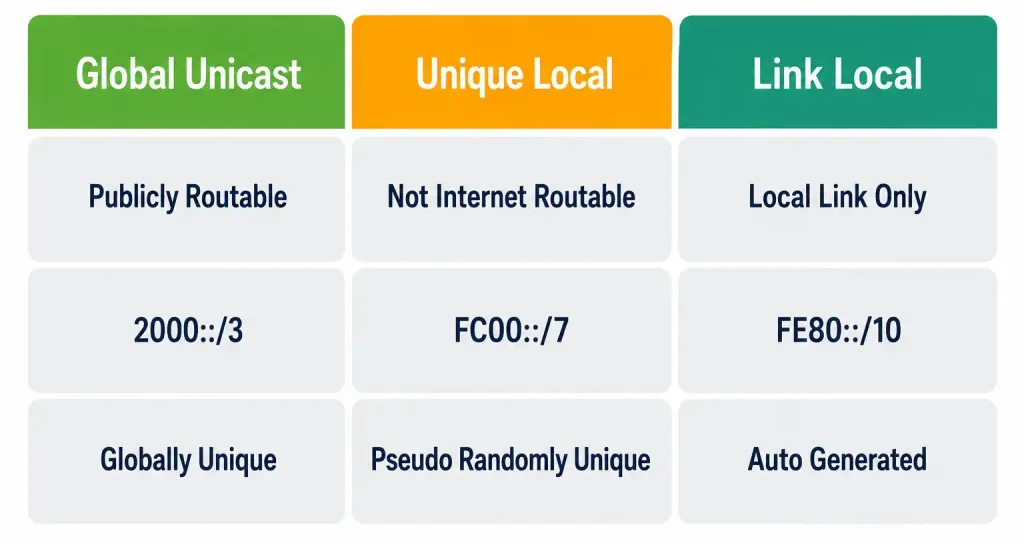
A global unicast address is the IPv6 direct equivalent of a public IPv4 address — globally unique, internet-routable, and directly reachable from anywhere on the internet without any translation layer standing in the way (a genuinely different reality from IPv4, where NAT has become nearly universal specifically because public addresses are scarce).
Global unicast addresses structurally break into three components:
- Global routing prefix — typically the first 48 bits, assigned to an organization by a regional internet registry or upstream provider, identifying that organization’s allocation on the global internet.
- Subnet ID — typically the next 16 bits, letting the organization create its own internal subnets from its allocated block (this is exactly the /48-to-/64 subnetting math covered in the previous lesson’s Packet Tracer activity).
- Interface identifier — the final 64 bits, identifying a specific device within its subnet, commonly generated through Modified EUI-64 (covered in full detail below) or through privacy-focused randomized generation methods.
Worked example: 2001:db8:acad:1::1/64 — the first 48 bits (2001:db8:acad) form the global routing prefix, the next 16 bits (0001) form the subnet ID, and the remaining 64 bits (in this case, simplified to just ::1) form the interface identifier.
Unique Local Addresses: IPv6’s Private-Use Range
Unique Local Addresses (ULA) occupy the fc00::/7 block, and they exist to serve roughly the same purpose RFC 1918 private addressing serves for IPv4 — internal-use addressing that isn’t meant to be routed across the public internet.
The comparison is genuinely useful, but it isn’t perfect, and the difference matters. RFC 1918 ranges are designed around unrestricted, uncoordinated reuse — every organization on earth can use 192.168.1.0/24 identically, with zero expectation of uniqueness beyond each organization’s own network.
ULA addresses take a different approach: the specification actually intends for ULA prefixes to be globally unique, generated using a pseudo-random algorithm specifically designed to make collision between two independently generated ULA prefixes statistically improbable, even though these addresses are still never routed across the public internet. In practice, the fd00::/8 half of the ULA block (with the 8th bit set to 1) is what’s actually used for this locally-assigned, pseudo-random generation; the fc00::/8 half is reserved for a centrally-assigned allocation scheme that was never fully implemented in practice.
Why this distinction actually matters practically: it directly reduces the overlapping-address-space problem covered in the RFC 1918 lesson — two organizations independently generating ULA prefixes through the recommended pseudo-random method are extremely unlikely to end up with identical address space, unlike two organizations both defaulting to 192.168.1.0/24 under IPv4, which happens constantly given how few practical choices IPv4 private addressing typically involves.
Link-Local: Automatic, Local-Only, Always Present
Link-local addresses, occupying fe80::/10, are the address type this series has already encountered directly — the previous lesson’s show ipv6 interface brief output showed exactly this kind of address on every configured interface, automatically, regardless of whether a global address had been manually configured at all.
That automatic behavior is the entire point. The moment IPv6 is enabled on an interface, that interface generates its own link-local address without any configuration required — commonly through Modified EUI-64, covered fully below. This address is valid only for communication with other devices on the exact same physical link (the same Ethernet segment, the same point-to-point connection) and is never forwarded by a router beyond that link under any circumstances.
Why this matters practically, not just as a definitional fact: link-local addresses are what many foundational IPv6 protocols actually run over, specifically because they’re guaranteed to exist before any other configuration happens. Neighbor Discovery Protocol (NDP) — IPv6’s replacement for ARP, briefly worth naming here even though its full depth belongs elsewhere in this curriculum — operates using link-local addresses and multicast, not global unicast addresses. Many IPv6 routing protocols form their neighbor relationships over link-local addresses too, precisely because this guarantees connectivity works at the most basic level, independent of whatever global addressing scheme a network administrator has or hasn’t gotten around to configuring yet.
Worked example, connecting directly back to the previous lesson’s verification output: when HQ-RTR1’s GigabitEthernet0/0 showed both FE80::1 and 2001:DB8:ACAD:1::1 in show ipv6 interface brief, the FE80::1 address wasn’t something anyone typed in — it was generated automatically the instant IPv6 was enabled on that interface, present and functional even in the brief window before the global address was manually configured on the following line.
Anycast: Nearest Instance Wins
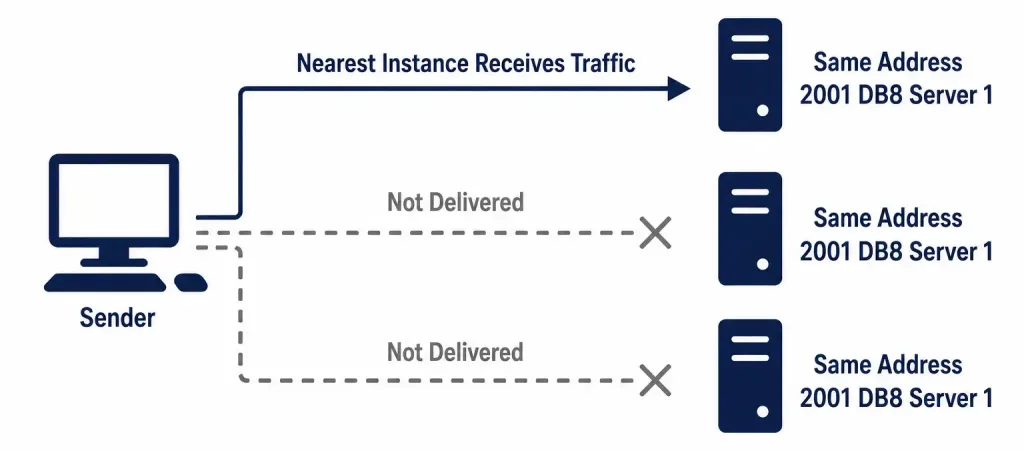
Anycast is conceptually the trickiest of the three delivery models to internalize, precisely because it looks identical to unicast in terms of address notation — there’s no special prefix or format that visually distinguishes an anycast address from an ordinary unicast one. What makes an address anycast is entirely about how it’s used: the same address is deliberately assigned to multiple different devices, typically in different physical or geographic locations, and the network’s routing infrastructure delivers any given packet to whichever instance is currently “nearest” according to standard routing metrics — not literally geographic distance, but routing cost as the network itself calculates it.
A genuinely useful real-world example: the root DNS server system uses anycast extensively. A single root server’s published address is actually answered by dozens of physically distinct server instances scattered across the globe, all sharing that identical address. A DNS query sent to that address gets routed to whichever instance is topologically closest to the querier, reducing latency and distributing load automatically, without the querying device ever needing to know multiple instances even exist — from its perspective, it’s just talking to one address, the same way it would with ordinary unicast.
Why this is genuinely different from load balancing at a conceptual level, worth being precise about: a traditional load balancer is a single device (or a small cluster) that receives all traffic and then internally decides how to distribute it further. Anycast has no such central point at all — the network’s own routing infrastructure does the distribution, inherently, as a direct consequence of how routing metrics naturally favor the closest available path to a given destination address. There’s no anycast “controller” making decisions; the distribution emerges from ordinary routing behavior applied to an address that happens to exist at multiple points simultaneously.
Multicast: One Address, Many Interested Receivers
Multicast addresses, occupying the entire ff00::/8 block, deliver traffic to every interface that has explicitly joined a particular multicast group — not everyone on the network (that would be broadcast, which IPv6 doesn’t have), and not just one specific device (that’s unicast), but specifically whichever devices have opted in to receiving that particular group’s traffic.
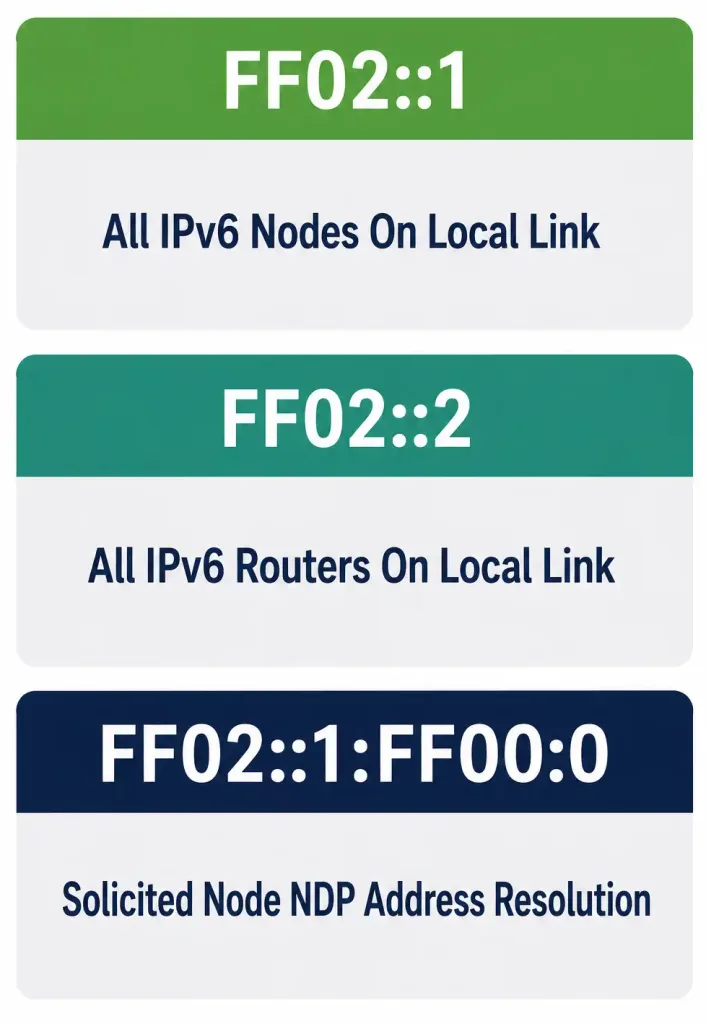
IPv6 relies on multicast far more heavily than IPv4 typically does, precisely because multicast entirely replaces broadcast’s role in the protocol. A handful of well-known multicast addresses are worth recognizing on sight, since they appear constantly in real IPv6 network operation:
- ff02::1 — the all-nodes multicast address, reaching every IPv6-enabled device on the local link. This is functionally close to what an IPv4 broadcast would have done, but scoped specifically to interested multicast listeners rather than genuinely blasting every device on the segment regardless of relevance.
- ff02::2 — the all-routers multicast address, reaching every router on the local link specifically, used by protocols needing to communicate with routing infrastructure without needing to know each router’s specific address in advance.
- ff02::1:ff00:0/104 — the solicited-node multicast address format, used specifically by Neighbor Discovery Protocol for address resolution — the direct IPv6 replacement for what ARP requests accomplished under IPv4, but using a targeted multicast group derived from the target’s own address rather than a genuine broadcast reaching every device on the segment.
Why IPv6 Deliberately Has No Broadcast
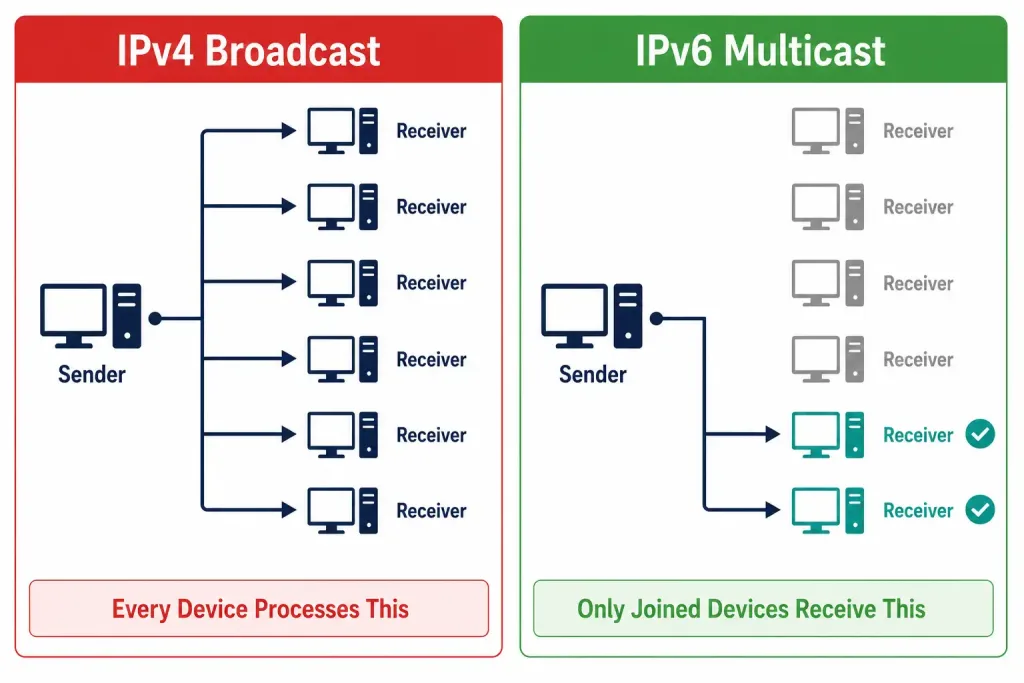
This is worth its own explicit section, not just a passing mention, given how frequently and specifically it’s tested. IPv6 has no broadcast address type at all — a deliberate design decision, not an oversight or a feature that simply hasn’t been added yet.
Here’s the reasoning behind removing it entirely. IPv4 broadcast has a genuine, well-documented cost: every broadcast packet must be processed by every single device on the segment, whether or not that device has any actual interest in the traffic. On a segment with many devices, this creates real, wasted processing overhead across the entire broadcast domain for traffic most recipients simply discard immediately after determining it’s irrelevant to them. Multicast solves the same underlying problems broadcast was used for — reaching multiple interested devices without needing to know each one’s specific address individually — while only delivering traffic to devices that have actually opted in by joining the relevant group, eliminating the wasted processing broadcast imposed on every uninterested device.
This is precisely why ARP (which relies on broadcast) was replaced with Neighbor Discovery Protocol (which relies on multicast) in IPv6. The underlying problem — “I need to find the Layer 2 address corresponding to this Layer 3 address” — is identical between IPv4 and IPv6. IPv6 simply solves it through a more targeted delivery mechanism, using the solicited-node multicast address format mentioned above rather than a genuine broadcast reaching every device on the segment regardless of relevance.
The exam tip worth memorizing verbatim, precisely because it’s such a reliable, frequently tested fact: if a question asks what replaced broadcast in IPv6, the answer is multicast, full stop — there is no IPv6 equivalent to an IPv4 broadcast address, and any answer choice suggesting otherwise is incorrect by design, not by omission.
Modified EUI-64: Deriving an Address From a MAC Address
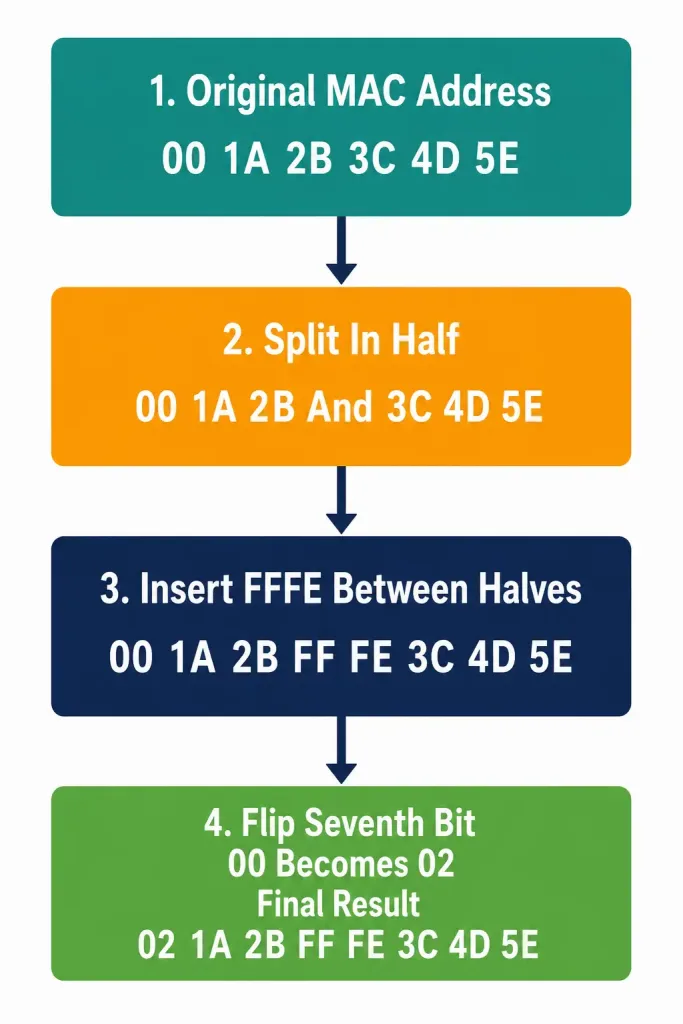
Every automatically generated IPv6 interface identifier — whether for a link-local address or a global unicast address using this method — is commonly derived from the device’s own 48-bit MAC address, through a specific, mechanical process called Modified EUI-64. Understanding this process step by step, well enough to derive one by hand, is a genuinely practical skill this objective tests directly.
The three-step process:
Step one: split the 48-bit MAC address in half. A MAC address like 00:1A:2B:3C:4D:5E splits into two 24-bit halves: 00:1A:2B and 3C:4D:5E.
Step two: insert FFFE between the two halves. This expands the 48-bit MAC address into a full 64 bits, since FFFE itself is 16 bits, and 48 + 16 = 64. The result: 00:1A:2B:FF:FE:3C:4D:5E.
Step three: flip the seventh bit of the first byte (the universal/local, or U/L, bit). This is the step that most often gets skipped or misunderstood, so it’s worth slowing down on specifically. The first byte of the original MAC address, 00, is 00000000 in binary. The seventh bit (counting from the left, starting at bit 1) is the second-to-last bit in that byte. Flipping it from 0 to 1 changes 00000000 to 00000010, which is 02 in hexadecimal. The first byte of the resulting interface identifier becomes 02 instead of the original 00.
Final result, formatted as an IPv6 interface identifier: 021A:2BFF:FE3C:4D5E
Why this specific bit gets flipped, rather than the process simply using the MAC address as-is. The universal/local bit is part of the original IEEE MAC address specification itself, predating IPv6 entirely — a value of 0 in this bit position indicates a “universally administered” address (assigned by the manufacturer, guaranteed globally unique by IEEE’s own allocation process), while a value of 1 indicates a “locally administered” address (manually assigned by a network administrator, not guaranteed unique by any central authority).
Modified EUI-64 flips this bit specifically because it’s deriving a new, distinct 64-bit value from the original 48-bit MAC — a value that IEEE’s own universal/local convention would otherwise misrepresent if left unflipped, since the resulting 64-bit identifier isn’t literally the same value IEEE assigned, even though it’s mechanically derived from it.
A second full worked example, for reinforcement: derive the Modified EUI-64 interface identifier from MAC address 58:20:B1:9C:44:2A.
- Split in half: 58:20:B1 and 9C:44:2A.
- Insert FFFE between the halves: 58:20:B1:FF:FE:9C:44:2A.
- Flip the U/L bit in the first byte. 58 in binary is 01011000. The seventh bit (second-to-last) is currently 0; flipping it to 1 gives 01011010, which is 5A in hexadecimal.
Final interface identifier: 5A20:B1FF:FE9C:442A
SLAAC: Putting Modified EUI-64 to Work Automatically
Stateless Address Autoconfiguration (SLAAC) is the mechanism that actually uses Modified EUI-64 to give a device a fully functional global unicast address with zero manual configuration and, notably, without requiring a DHCP server at all — a genuine departure from how IPv4 addressing typically works in practice.
The process, at a level appropriate for this lesson: a router on the local network periodically sends (and responds to specific requests with) Router Advertisement (RA) messages, announcing the network’s prefix (commonly a /64, exactly matching the standard covered in the previous lesson) over multicast.
A device receiving this advertisement combines that announced /64 prefix with an interface identifier it generates itself — commonly through Modified EUI-64, though modern operating systems increasingly default to randomized interface identifiers instead, specifically for privacy reasons covered briefly below — producing a complete, valid, immediately usable global unicast address without any DHCP server, without any administrator manually typing an address into that specific device, and without any centralized address-assignment database tracking which device has which address.
A privacy note worth being aware of, even though it’s not the CCNA’s primary focus: a Modified EUI-64 interface identifier is directly derived from a device’s MAC address, which means it stays constant across different networks a device connects to over time — a real privacy concern, since it makes a specific device potentially trackable across different locations and sessions purely by its consistent interface identifier.
This is exactly why many modern operating systems now default to randomized, temporary interface identifiers (sometimes called IPv6 privacy extensions) rather than Modified EUI-64 for their actual internet-facing traffic, even though Modified EUI-64 remains the CCNA-tested mechanical process and still appears constantly in real router and switch configurations, which don’t carry the same mobile-device privacy concerns end-user laptops and phones do.
Seeing Modified EUI-64 in Practice
A Cisco router interface can be explicitly configured to use Modified EUI-64 for its own interface identifier, rather than accepting a fully manual address:
Router(config)# interface GigabitEthernet0/0
Router(config-if)# ipv6 address 2001:db8:acad:1::/64 eui-64
Verifying with show ipv6 interface shows the resulting address, with the interface identifier portion visibly derived from the interface’s actual MAC address using exactly the three-step process covered above — a useful, concrete way to confirm your manual derivation matches what the device calculates automatically, if you want to check your own worked-example math against real device behavior.
Common Misconceptions Worth Correcting Directly
“Anycast and multicast are basically the same thing.” They deliver to fundamentally different destinations, despite both involving one address potentially “reaching” multiple devices in some loose sense. Multicast delivers a copy of the traffic to every interface that’s joined the group — potentially many simultaneous recipients. Anycast delivers to exactly one recipient — whichever instance is nearest — even though that same address might be assigned to several devices. One is “deliver to all interested parties”; the other is “deliver to the single closest instance.” Confusing these two is one of the most common errors on this specific objective.
“Link-local addresses can be used to reach devices on the internet.” They structurally cannot — link-local addresses are never forwarded by a router beyond the local link under any circumstances, by design, regardless of routing configuration. This isn’t a security policy that could theoretically be changed; it’s a fundamental property of how the address type itself is defined and handled throughout IPv6’s addressing architecture.
“ULA addresses work exactly like RFC 1918 addresses, just with IPv6 syntax.” Close, but not quite — the globally-unique-by-design intention behind ULA’s pseudo-random generation is a genuine, meaningful difference from RFC 1918’s unrestricted, coordination-free reuse model, even though both serve the same broad private-addressing purpose. Treating them as identical concepts glosses over exactly the distinction most likely to appear in a comparison question.
“IPv6 must have some broadcast-like address, since every network needs one.” This intuition, while understandable coming from IPv4 experience, is simply incorrect for IPv6 specifically. Multicast fully replaces every legitimate use case broadcast previously served, and IPv6’s designers made a deliberate, documented decision to omit broadcast entirely rather than include a redundant mechanism alongside multicast.
Frequently Asked Questions
Can a single device have more than one IPv6 address at the same time?
Yes, routinely — this is normal, expected IPv6 behavior, not an edge case. A typical interface carries at minimum a link-local address (always present once IPv6 is enabled) alongside one or more global unicast addresses, and potentially a ULA as well, all simultaneously active on the same interface.
Does every IPv6 network need to use Modified EUI-64 for its addressing?
No — Modified EUI-64 is one method among several for generating an interface identifier, commonly used for automatic assignment (SLAAC) and for link-local address generation, but administrators can also manually assign any valid interface identifier of their choosing, and many production environments do exactly this for global unicast addresses specifically, favoring memorable, deliberately chosen addressing schemes over MAC-derived ones.
Is anycast actually configured differently from unicast, or is it purely conceptual?
The address itself looks identical to a unicast address in every respect — same format, no special marker distinguishing it. What makes an address function as anycast is entirely the network design choice to assign that same address to multiple devices and let routing infrastructure handle delivery accordingly; there’s no special “anycast flag” set anywhere in the address itself.
Why does NDP use multicast instead of the specific device’s own address directly, if the goal is finding one specific device?
Because the entire point of the process is resolving an unknown piece of information — the target’s Layer 2 (MAC) address, given only its Layer 3 (IPv6) address — meaning the requesting device genuinely doesn’t yet know enough to address the target device directly. Solicited-node multicast narrows the search to a small, address-derived group rather than reaching every single device on the segment, which is what made the equivalent IPv4 ARP broadcast comparatively wasteful.
Do link-local addresses use Modified EUI-64 too, or a different method entirely?
They commonly use the same Modified EUI-64 process, applied to generate the interface identifier portion following the fixed fe80:: prefix — this is exactly why link-local and globally-derived EUI-64 addresses on the same interface often share an identical interface identifier suffix, differing only in their prefix.
IPv6 Address Types: SLAAC Practice Quiz
Test your knowledge of IPv6 global unicast, ULA, link-local, anycast, multicast, Modified EUI-64, and SLAAC.
Summary
- IPv6 addresses fall into three delivery categories: unicast (one specific interface), anycast (nearest of several sharing an address), and multicast (every interface in a group) — with no broadcast category at all.
- Global unicast addresses are publicly routable; ULA addresses (fc00::/7) are private-use but designed for global uniqueness through pseudo-random generation, unlike RFC 1918’s free reuse model.
- Link-local addresses (fe80::/10) generate automatically on every IPv6-enabled interface and never route beyond the local link, underpinning protocols like NDP that need guaranteed connectivity independent of other configuration.
- Anycast delivers to the nearest of potentially many devices sharing an identical address, with nothing in the address notation itself distinguishing it from ordinary unicast.
- Multicast (ff00::/8) fully replaces broadcast’s role in IPv6, delivering only to interfaces that have explicitly joined a relevant group — ff02::1 (all nodes) and ff02::2 (all routers) are worth recognizing on sight.
- Modified EUI-64 derives a 64-bit interface identifier from a 48-bit MAC address through three steps: split in half, insert FFFE, flip the seventh (U/L) bit.
- SLAAC combines router-advertised prefixes with self-generated interface identifiers to let a device configure a complete address automatically, without DHCP.



