
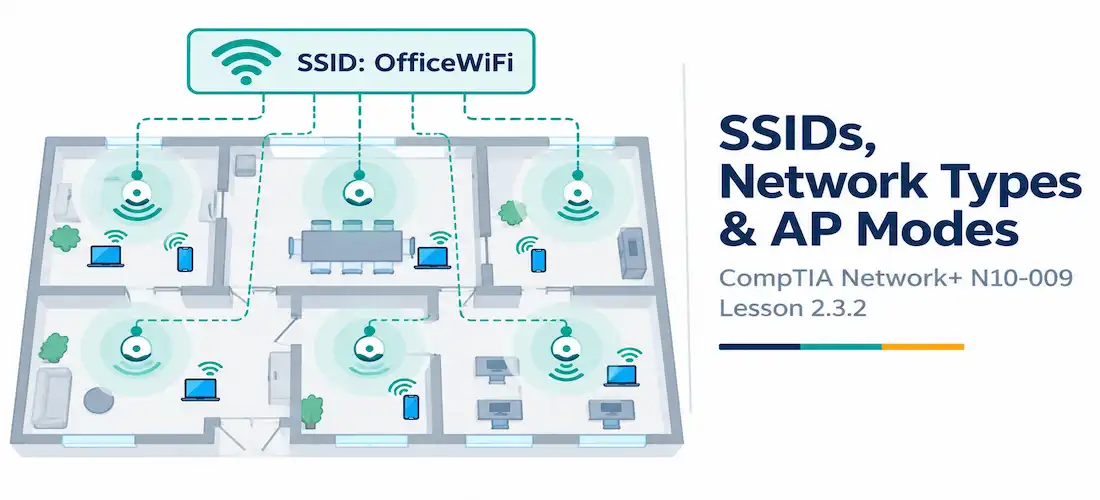
Domain 2.0 | Network Implementation — 20% of exam
Learning Objectives
By the end of this lesson, you will be able to:
- Distinguish SSID, BSSID, and ESSID and explain how they relate to each other
- Compare infrastructure, ad hoc, point-to-point, and mesh wireless network types
- Explain the difference between autonomous and lightweight access points
- Describe the role a wireless LAN controller plays in managing lightweight access points
- Identify which network type and access point mode fits a given deployment scenario
Key Terms
| Term | Definition |
|---|---|
| SSID (Service Set Identifier) | The human-readable name of a wireless network |
| BSSID (Basic Service Set Identifier) | The MAC address of a single access point’s radio broadcasting a given SSID |
| ESSID (Extended Service Set Identifier) | The same SSID broadcast consistently across multiple access points, forming one logical extended network |
| Mesh Network | A wireless network where multiple access points relay traffic to each other wirelessly, extending coverage without a wired connection to every node |
| Wireless LAN Controller (WLC) | A centralized device that manages configuration, RF settings, and roaming for lightweight access points |
Explanation
Building on Frequency and Channel Fundamentals
The previous lesson covered how wireless networks use frequency and channels to actually transmit data. This lesson moves up a level: how wireless networks are identified, structured, and managed — the naming conventions, topology choices, and access point architectures an administrator actually decides on when deploying a wireless network.SSID, BSSID, and ESSID: Naming and Identifying Wireless Networks
These three terms sound almost identical, and the exam deliberately tests whether you can tell them apart:
- SSID (Service Set Identifier) is simply the human-readable network name — “OfficeWiFi,” “GuestNetwork,” and so on. It’s what shows up in a device’s list of available networks.
- BSSID (Basic Service Set Identifier) is the actual MAC address of one specific access point’s radio broadcasting that SSID. Every physical radio has its own unique BSSID, even if several access points are all broadcasting the exact same SSID.
- ESSID (Extended Service Set Identifier) describes the situation where the same SSID is broadcast consistently across multiple access points, so that from the client’s perspective, it’s all one seamless logical network — walking from one end of a building to the other, a laptop stays connected to “OfficeWiFi” even as it transparently roams between different physical access points, each with its own distinct BSSID.
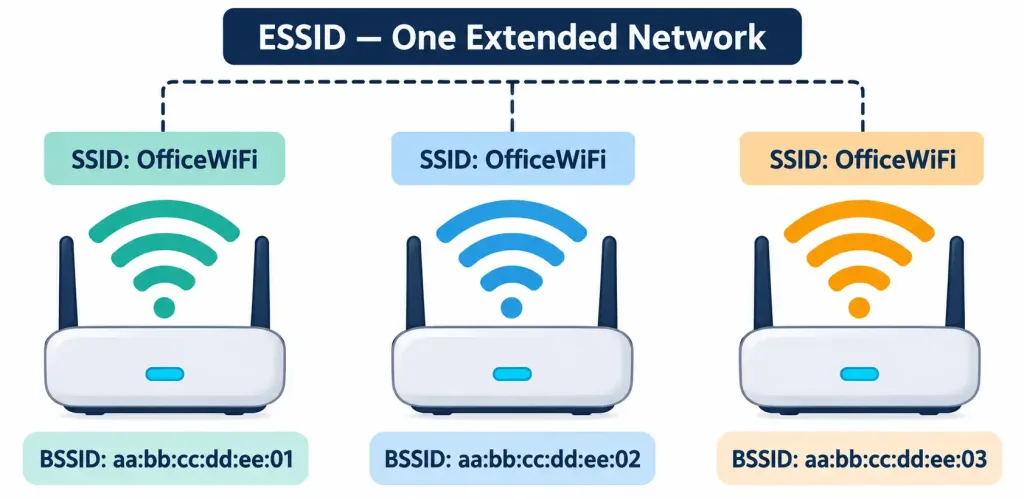
How One SSID Broadcast By Multiple Access Points, Each With Its Own BSSID, Forms An ESSID
In short: SSID is the name, BSSID identifies one specific radio, and ESSID is what you get when multiple BSSIDs share the same SSID to form one extended coverage area.
Wireless Network Types
Wireless deployments generally fall into one of four structural types:
- Infrastructure — by far the most common type, where every client connects to a central access point, and the access point handles forwarding traffic onward to the wired network. Nearly every home and office Wi-Fi network is infrastructure mode.
- Ad hoc — a peer-to-peer wireless connection between devices with no access point involved at all. Two laptops connecting directly to each other to share files is a classic ad hoc example — simple, but it doesn’t scale and lacks the centralized management infrastructure mode offers.
- Point-to-point — a dedicated wireless bridge link between two fixed locations, commonly used to connect two buildings wirelessly when running cable between them isn’t practical. Unlike infrastructure mode, this isn’t about serving many roaming clients — it’s a fixed link between exactly two endpoints.
- Mesh — multiple access points relay traffic wirelessly between each other, extending coverage across an area without requiring a wired Ethernet connection to every single access point. Mesh networks are self-healing to a degree: if one mesh node’s path to the wired network fails, traffic can often reroute through a different node.
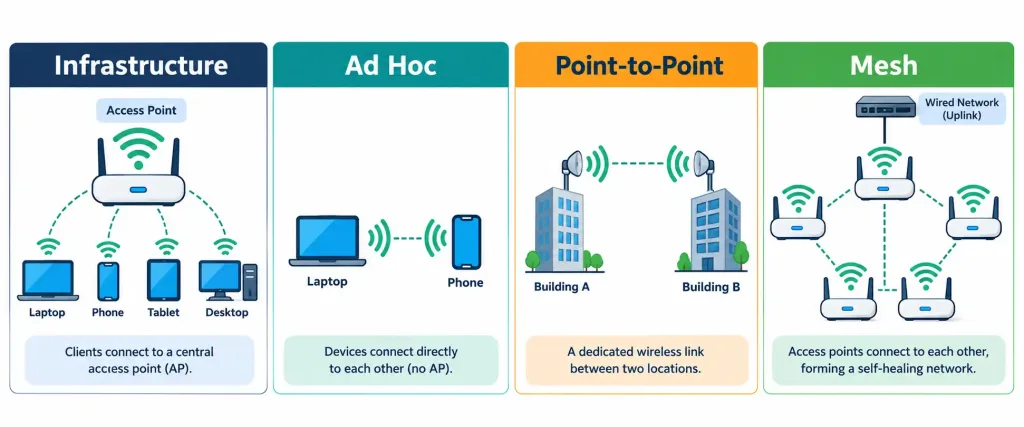
How Infrastructure, Ad Hoc, Point-To-Point, And Mesh Topologies Differ In Structure
Autonomous vs. Lightweight Access Points
Beyond network topology, there’s also a fundamental choice in how access points themselves are managed:
- An autonomous access point operates independently, holding its own complete configuration and making its own RF decisions without relying on any central controller. Each autonomous AP is configured individually — fine for a small deployment with just one or two access points, but it becomes a real administrative burden at scale, since every configuration change has to be repeated on every single AP.
- A lightweight access point doesn’t hold much configuration on its own at all. Instead, it relies on a centralized wireless LAN controller (WLC), which pushes configuration to every lightweight AP in the deployment, coordinates RF settings like channel and power across the whole site to minimize interference between neighboring APs, and manages client roaming as devices move between access points.
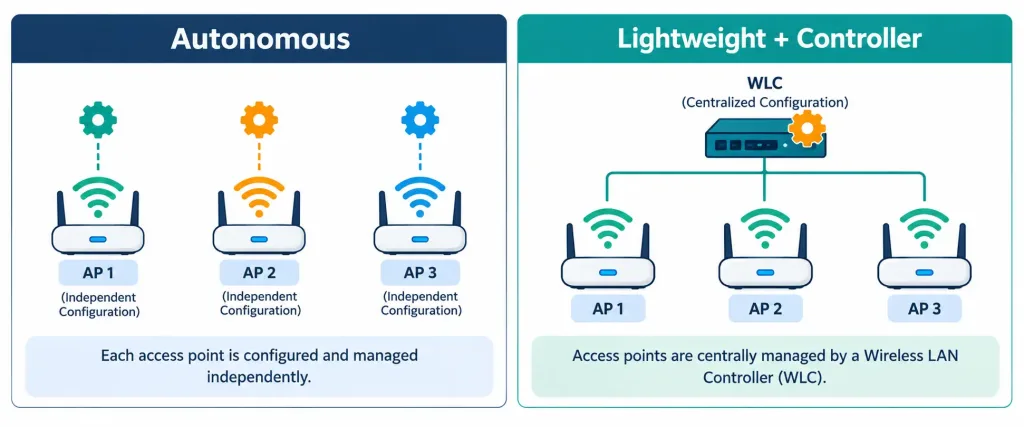
How A Wireless LAN Controller Centrally Manages Multiple Lightweight Access Points
The tradeoff is straightforward: autonomous APs are simpler to deploy for a handful of access points, but lightweight APs plus a controller scale dramatically better for larger deployments — a campus with dozens or hundreds of access points is managed far more efficiently through one central controller than by touching each AP’s configuration individually.
Choosing the Right Model for a Deployment
Real deployments combine these choices based on scale and need. A small coffee shop with two access points might run them as autonomous infrastructure-mode APs, each configured independently — simple and sufficient for that scale. A large enterprise campus, by contrast, typically deploys dozens of lightweight infrastructure-mode access points under one wireless LAN controller, letting an administrator manage the entire site’s RF environment, roaming behavior, and configuration from a single console. A warehouse or outdoor campus needing coverage across a wide area without running Ethernet to every corner might choose a mesh topology instead, and two buildings across a parking lot from each other might use a dedicated point-to-point bridge rather than either option.
Recognition-Level Verification Concepts
A few patterns are worth recognizing on sight:
- Several access points all broadcasting the identical SSID, each with a distinct BSSID (MAC address), describes an ESSID providing seamless roaming coverage.
- Two devices connecting directly to each other with no access point in the picture is an ad hoc network, not infrastructure mode.
- A dedicated wireless link connecting exactly two fixed locations, rather than serving roaming clients, is point-to-point, not mesh.
- A deployment where every access point holds a complete, independently configured setup — with no controller in the picture — is running in autonomous mode.
Common Exam Traps
- SSID, BSSID, and ESSID are not interchangeable terms, even though they sound alike. SSID is the name; BSSID identifies one specific radio; ESSID describes multiple BSSIDs sharing one SSID.
- Ad hoc and infrastructure are not the same thing with different names. Ad hoc has no access point at all; infrastructure mode always routes client traffic through one.
- Mesh and point-to-point solve different problems. Mesh extends coverage to many roaming clients across an area; point-to-point is a dedicated link between exactly two fixed locations.
- Autonomous APs don’t automatically coordinate with each other on channels or power. Without a controller, avoiding interference between nearby autonomous APs requires manual planning by the administrator.
- A lightweight access point generally cannot function fully on its own — it depends on a wireless LAN controller for configuration and ongoing management, unlike an autonomous AP.
Lesson 2.3.2 Practice Quiz — SSID Types, Wireless Network Types & AP Modes
17 questions covering SSID/BSSID/ESSID, infrastructure/ad hoc/point-to-point/mesh, and autonomous vs. lightweight APs.
N10-009 · Domain 2.3Summary
SSID is the network's human-readable name, BSSID is the MAC address of one specific access point radio, and ESSID describes multiple access points sharing one SSID to form a seamless extended network.
Infrastructure mode routes all client traffic through an access point; ad hoc connects devices directly with no access point; point-to-point bridges exactly two fixed locations; mesh relays traffic wirelessly between multiple access points to extend coverage.
Autonomous access points hold their own configuration independently, which is simple for small deployments but doesn't scale well.
Lightweight access points rely on a centralized wireless LAN controller for configuration, RF coordination, and roaming management, making them the standard choice for larger enterprise deployments.
Real-world deployments choose network type and AP mode based on scale, coverage area, and how many access points need centralized coordination.



