Domain 5.0 | Network Troubleshooting — 24% of exam
Learning Objectives
By the end of this lesson, you will be able to:
- Explain what cable testers and tone generators each verify or locate
- Describe how TDR and OTDR locate cable faults by measuring distance
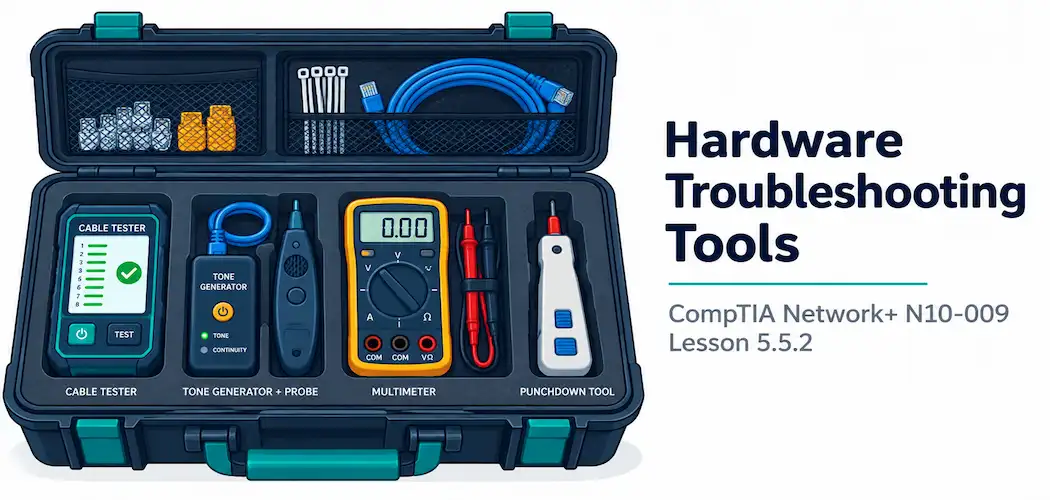
- Explain the purpose of loopback adapters and punchdown tools
- Describe spectrum analyzers, fiber light meters, and multimeters and when each is the right tool
Key Terms – Hardware Troubleshooting Tools
| Term | Definition |
|---|---|
| Cable Tester | A device that verifies wiring correctness, pinout, and continuity in a cable |
| Tone Generator (Toner) and Probe | A tool pair used to physically trace and identify a specific cable among many others |
| TDR / OTDR | Devices that send an electrical or light pulse down a cable and measure reflection timing to locate a fault by distance |
| Loopback Adapter | A device that redirects a port’s transmit signal back to its own receive, testing the port or NIC without a live device on the other end |
| Spectrum Analyzer | A device that visualizes RF spectrum usage to identify sources of wireless interference |
Explanation
From Software to Hardware Tools
The previous lesson covered tools that run on a computer already connected to the network. This final lesson covers dedicated physical devices — tools that diagnose problems software alone can’t reach, particularly the kind of physical cabling faults covered back in the cabling issues lesson earlier in this module.
Cable Testers and Tone Generators
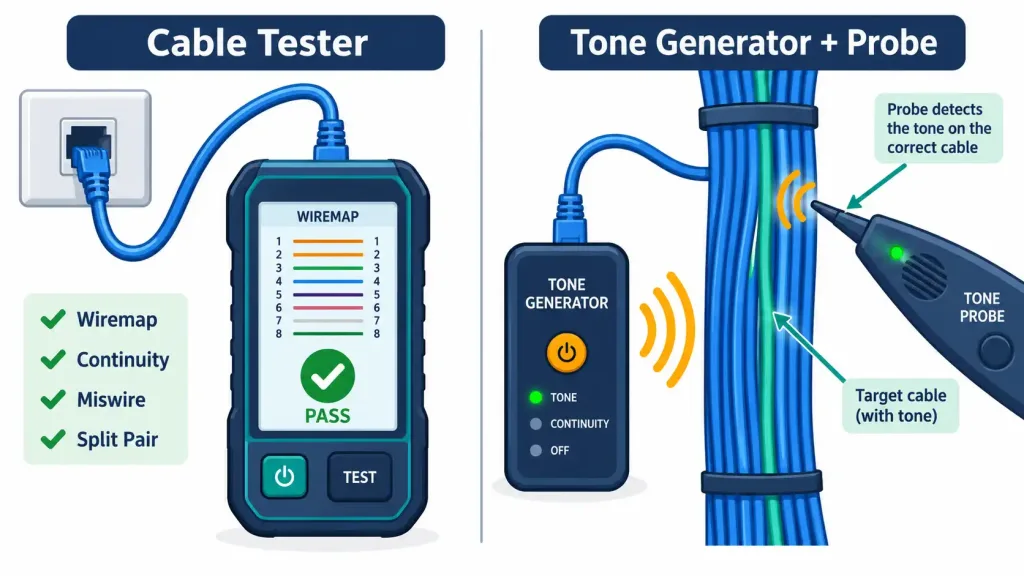
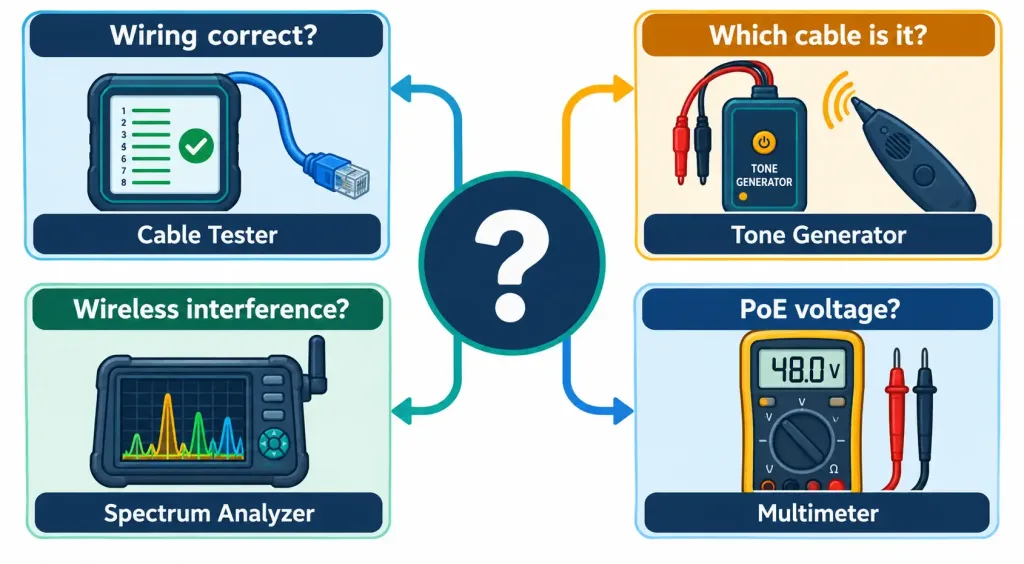
A cable tester verifies that a cable is wired correctly — checking continuity and pinout against the expected standard — making it the direct diagnostic tool for confirming or ruling out the improper termination issues covered earlier in this module. A cable tester answers “is this cable wired correctly,” a genuinely different question from a tone generator’s purpose.
A tone generator (or toner) and its companion probe solve a completely different, very practical problem: physically identifying which specific cable, among dozens bundled together in a wiring closet or ceiling space, actually corresponds to a given outlet or connection. The tone generator injects an audible tone onto one end of the cable, and the probe, run along the bundle, detects that tone specifically on the correct cable — letting a technician physically trace a connection without needing to already know which cable is which.
TDR and OTDR: Locating Faults by Distance
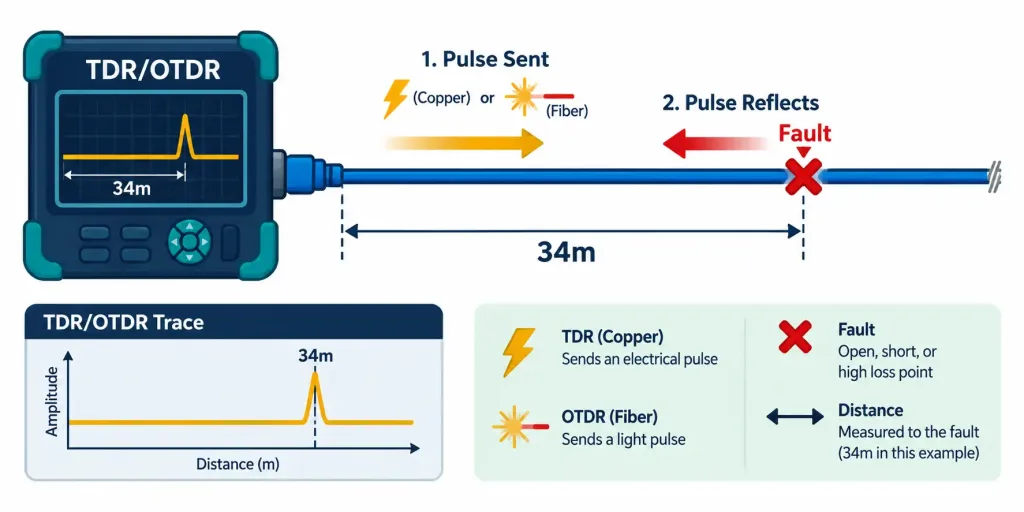
TDR (Time Domain Reflectometer), used on copper cabling, sends an electrical pulse down the cable and measures how long it takes for a reflection to return. Since that reflection timing directly corresponds to distance, a TDR can pinpoint exactly how far along a cable a break, short, or other fault actually sits — turning “there’s a problem somewhere in this 90-meter run” into “the problem is roughly 34 meters in.”
OTDR (Optical Time Domain Reflectometer) applies the identical underlying concept to fiber optic cabling, using light pulses instead of electrical ones. An OTDR can locate fiber breaks, identify degraded or poorly made splices, and measure both overall fiber length and cumulative signal loss along the run — genuinely useful detail well beyond what a simple continuity check could reveal.
Loopback Adapters and Punchdown Tools
A loopback adapter is a small physical device that plugs directly into a port, redirecting that port’s transmit signal back into its own receive path. This lets a technician test whether a specific port or NIC is actually functioning correctly, entirely on its own, without needing a second live device on the other end of a cable to complete the test — genuinely useful for isolating whether a problem lies in the port hardware itself versus everything else in the path.
A punchdown tool is used to physically terminate cable wires into a patch panel or keystone jack, pressing each individual wire into its correct slot and trimming the excess in one motion. This connects directly back to the patch panel and termination concepts covered earlier in this course — a punchdown tool is literally how that termination gets physically done in practice.
Spectrum Analyzers, Fiber Light Meters, and Multimeters
Three more specialized tools round out the toolkit, each suited to a distinct type of measurement:
- A spectrum analyzer visualizes actual RF spectrum usage across a frequency range, making it the right tool for identifying the source of wireless interference covered earlier in this module — including interference from non-Wi-Fi devices that wouldn’t show up in a standard Wi-Fi scanning tool at all.
- A fiber light meter (optical power meter) directly measures the actual optical signal strength on a fiber link, providing the precise readings behind the transceiver signal strength issues covered earlier in this module.
- A multimeter is a general-purpose electrical testing tool measuring voltage, continuity, and resistance — genuinely useful for diagnosing power-related problems, including PoE-related issues covered earlier in this module, by directly verifying whether expected voltage is actually present on a given connection.
Recognition-Level Verification Concepts
A few patterns are worth recognizing on sight:
- A tool confirming whether a cable’s wiring matches the correct pinout standard is a cable tester; a tool used to physically locate one specific cable among many is a tone generator and probe.
- A tool reporting the exact distance to a cable fault, on copper, is a TDR; the fiber equivalent is an OTDR.
- A small device plugged into a port with no other device needed to complete a connectivity test describes a loopback adapter.
- A device visualizing RF spectrum activity to identify an interference source, rather than just showing available Wi-Fi networks, is a spectrum analyzer.
Common Exam Traps
- A cable tester and a tone generator solve genuinely different problems. A cable tester verifies correctness; a tone generator/probe physically locates a specific cable — don’t conflate the two.
- TDR is for copper; OTDR is for fiber. Both share the reflection-timing concept, but they’re not interchangeable tools for the two different cable media.
- A loopback adapter tests the port/NIC itself in isolation, not the entire end-to-end path — a successful loopback test doesn’t rule out problems elsewhere along a longer connection.
- A spectrum analyzer sees more than a standard Wi-Fi scanner — specifically, non-Wi-Fi interference sources that a typical wireless scanning tool would never detect at all.
- A multimeter is a general electrical tool, not network-protocol-aware — it verifies voltage and continuity directly, which is exactly why it’s useful for power-related issues like PoE, distinct from the data-focused tools covered in the previous lesson.
Lesson 5.5.2 Practice Quiz — Hardware Troubleshooting Tools
17 questions covering cable testers, tone generators, TDR/OTDR, loopback adapters, punchdown tools, spectrum analyzers, fiber light meters, and multimeters.
N10-009 · Domain 5.5 · Final Lesson🎓 Course Complete
This is the final quiz in the CompTIA Network+ N10-009 series — all five domains, 51 lessons, done.
Summary
A cable tester verifies wiring correctness and continuity; a tone generator and probe physically locate a specific cable among many others — two genuinely different diagnostic purposes.
TDR (copper) and OTDR (fiber) both use reflection timing to pinpoint the exact distance to a cable fault, turning a vague "somewhere in this run" into a precise location.
A loopback adapter tests a port or NIC in isolation without needing a live device on the other end; a punchdown tool physically terminates cable into a patch panel or keystone jack.
Spectrum analyzers identify wireless interference sources beyond what a standard Wi-Fi scanner reveals, fiber light meters measure actual optical signal strength, and multimeters verify voltage and continuity for power-related issues like PoE.
This lesson completes N10-009 objective 5.5 (Tools and Protocols) at 2/2 lessons, completing Module 5 (Network Troubleshooting) at 9/9 lessons — and with it, the entire 51-lesson CompTIA Network+ N10-009 course for networkustad.com.