Domain 5.0 | Network Troubleshooting — 24% of exam
Learning Objectives
By the end of this lesson, you will be able to:
- Explain what ping and traceroute each reveal about connectivity and path
- Describe how nslookup and dig isolate DNS-specific problems
- Explain how netstat reveals active connections and listening ports
- Describe how ipconfig/ifconfig and arp support local configuration and address resolution troubleshooting
- Explain packet capture as a deep diagnostic tool for problems other tools can’t fully explain
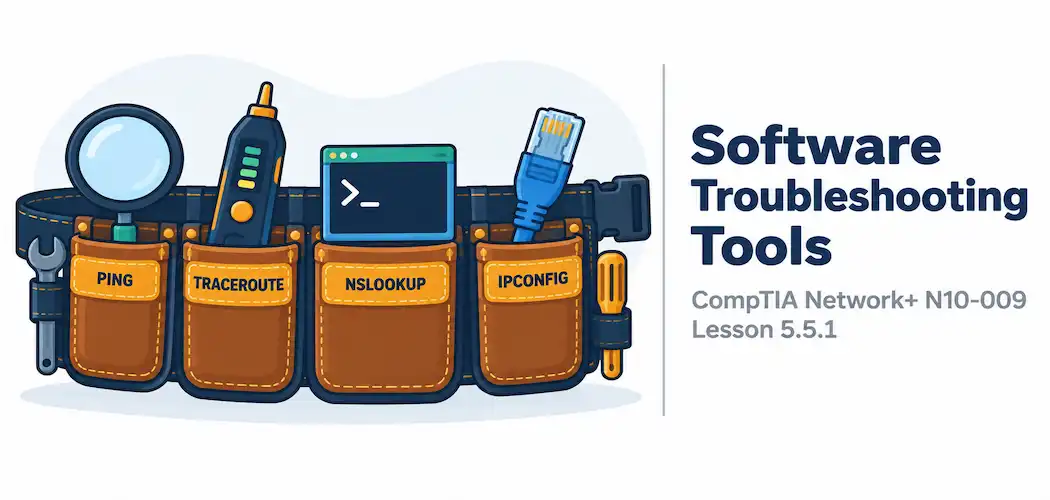
Key Terms – Software Troubleshooting Tools
| Term | Definition |
|---|---|
| ping | A basic reachability test using ICMP echo requests to confirm whether a host responds |
| traceroute | A tool that reveals the hop-by-hop path packets take to a destination |
| nslookup / dig | Tools for directly querying DNS servers to isolate name resolution problems |
| netstat | A tool showing active network connections and listening ports on a host |
| Packet Capture | Recording actual network traffic for detailed, byte-level analysis |
Explanation
From Categories of Problems to the Tools That Diagnose Them
Every lesson in this module has covered a category of problem. This lesson and the next cover the actual tools used to test a theory — Step 3 of the troubleshooting methodology covered at the start of this module. Software tools, covered here, generally require no special equipment beyond a computer already on the network; the hardware tools in the next lesson require dedicated physical devices.
ping and traceroute: Testing Reachability and Path
ping sends ICMP echo requests to a target and waits for a response, providing a simple, direct answer to “is this host reachable at all?” It’s usually the very first test run in almost any connectivity troubleshooting scenario, precisely because it’s fast and tells you immediately whether basic reachability exists — but it tells you nothing about how traffic got there, or where a problem lies if it doesn’t.
traceroute (or tracert on Windows) answers that follow-up question, revealing the hop-by-hop path packets take to reach a destination, along with the response time at each hop along the way. This makes it genuinely useful for identifying exactly where along a path a problem is occurring — a traceroute that gets partway through a path and then stops responding points directly at the specific hop where things break down.
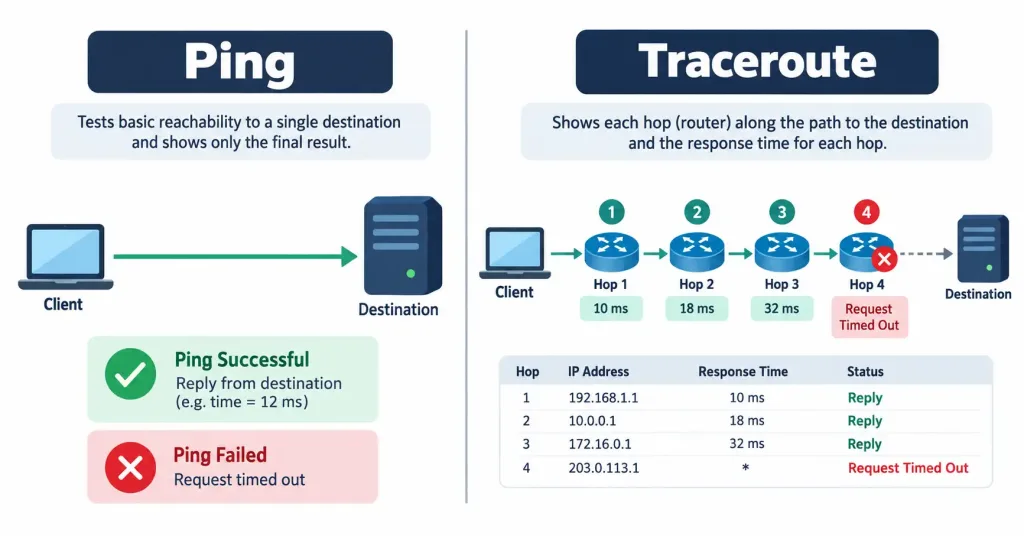
Running traceroute in both directions between two endpoints is also exactly how asymmetric routing, covered earlier in this module, actually gets confirmed in practice — comparing the hop sequence in each direction directly reveals whether the paths genuinely differ.
nslookup and dig: Diagnosing DNS Issues
nslookup (available on Windows and other platforms) and dig (common on Linux and macOS) let an administrator directly query a specific DNS server for a specific record, rather than relying on whatever resolution a normal application would perform automatically. This is exactly the tool needed to isolate whether a problem is genuinely DNS-related or something else entirely — if a direct DNS query for a hostname returns the wrong (or no) answer, the problem is clearly in name resolution; if it returns the correct answer but the application still can’t connect, the problem lies somewhere further along, past DNS entirely.
netstat: Viewing Active Connections
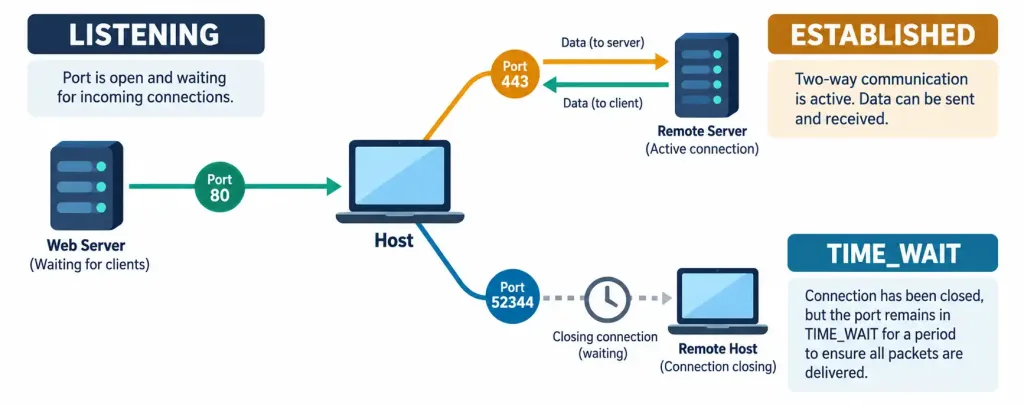
netstat displays a host’s active network connections and listening ports, which is useful in two genuinely different ways: confirming that a service is actually listening on the port it’s supposed to be (a service that isn’t listening at all explains a connection failure immediately), and identifying unexpected or suspicious connections that shouldn’t be there — a genuinely useful cross-check against the kind of unauthorized activity covered in this course’s security module.
ipconfig/ifconfig and arp: Local Configuration and Address Resolution
ipconfig (Windows) and ifconfig (Linux/macOS, though increasingly replaced by ip addr on modern Linux) display a device’s own current network configuration — its assigned IP address, subnet mask, and default gateway. This is literally the tool used to actually see an APIPA address or an incorrect gateway, covered earlier in this module, confirming exactly what a device believes its own configuration to be.
arp displays and manages a device’s local ARP cache — the table mapping IP addresses to MAC addresses on the local segment. Checking the ARP cache is exactly how ARP poisoning, covered earlier in this course’s security module, actually gets confirmed in practice — an unexpected or duplicate MAC address associated with a known IP (like the default gateway) in the ARP cache is a direct, actionable piece of evidence.
Packet Capture: The Deep Diagnostic Tool
Packet capture, covered in more depth back in the advanced monitoring lesson, records the actual contents of network traffic rather than summarized statistics or simple reachability results. This is the tool of last resort when the other tools in this lesson haven’t fully explained what’s happening — a malformed handshake, an unexpected protocol behavior, or the exact contents of a suspicious connection all require the level of detail only a full packet capture can actually provide.
Recognition-Level Verification Concepts
A few patterns are worth recognizing on sight:
- A quick reachability check with no path detail describes ping; a hop-by-hop path breakdown describes traceroute.
- A direct query returning the wrong DNS answer for a hostname points to a genuine DNS problem; a correct DNS answer with a connection failure afterward points elsewhere.
- A tool listing which ports a host is actively listening on, or what connections are currently established, describes netstat.
- A tool showing a device’s own IP configuration describes ipconfig/ifconfig; a tool showing IP-to-MAC mappings on the local segment describes arp.
Common Exam Traps
- Ping confirms reachability but reveals nothing about the path. Don’t assume a successful ping rules out a routing or path-specific problem entirely — it only confirms the endpoint itself responded.
- Traceroute stopping at a specific hop points to that hop as the likely problem location, but a hop simply not responding to traceroute’s probes (while still forwarding traffic normally) is also a real, common possibility worth ruling out.
- nslookup/dig isolate DNS specifically — don’t reach for packet capture or other deeper tools before first confirming or ruling out DNS with a quick, direct query.
- netstat is useful for both routine troubleshooting and basic security checks — don’t think of it as a single-purpose tool.
- ARP cache issues are local-segment-specific. Checking the ARP cache is only meaningful for diagnosing problems on the same local network segment as the device being checked, not for anything beyond it.
Lesson 5.5.1 Practice Quiz — Software Troubleshooting Tools
17 questions covering ping, traceroute, nslookup/dig, netstat, ipconfig/ifconfig, arp, and packet capture.
N10-009 · Domain 5.5Summary
ping confirms basic reachability without revealing path detail; traceroute reveals the hop-by-hop path and where along it a problem occurs.
nslookup and dig let an administrator directly query DNS, isolating whether a problem is genuinely DNS-related before looking elsewhere.
netstat shows active connections and listening ports, useful for confirming service availability and spotting suspicious activity.
ipconfig/ifconfig display a device's own network configuration; arp displays local IP-to-MAC mappings, directly useful for confirming ARP poisoning.
Packet capture provides the deepest level of detail, recording actual traffic contents when other tools haven't fully explained a problem.