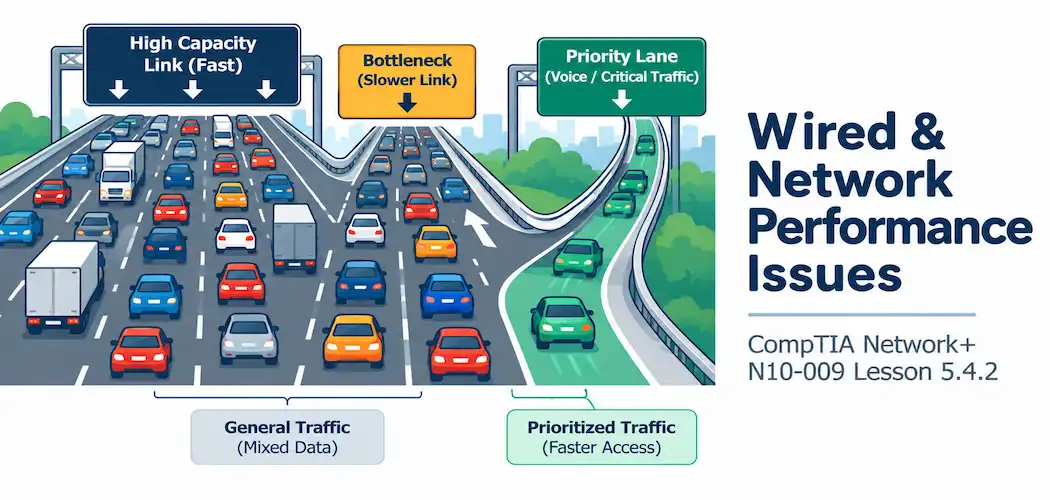
Domain 5.0 | Network Troubleshooting — 24% of exam
Learning Objectives
By the end of this lesson, you will be able to:
- Distinguish a bandwidth bottleneck from general network congestion
- Explain the performance impact of a duplex mismatch beyond just rising collision counters
- Describe MTU mismatch and how it causes fragmentation or dropped packets
- Explain how QoS misconfiguration affects latency-sensitive traffic during periods of congestion
Key Terms
| Term | Definition |
|---|---|
| Bandwidth Bottleneck | A single link or device with lower capacity than the rest of the path, constraining overall throughput |
| Network Congestion | Too much traffic competing for available capacity, causing queuing delay and drops |
| Duplex Mismatch | Two connected devices operating with different duplex settings, causing collisions and severely degraded throughput |
| MTU Mismatch | Devices along a path configured with different maximum transmission unit sizes, causing fragmentation or dropped packets |
| QoS (Quality of Service) | A set of mechanisms that prioritize certain traffic types, typically latency-sensitive ones, over others during congestion |
Explanation
From Wireless to Wired Performance
The previous lesson covered performance issues specific to wireless networks. This lesson rounds out objective 5.4 by covering performance problems that apply to wired and general network infrastructure, regardless of the wireless-specific factors covered previously.
Bandwidth Bottlenecks and Network Congestion
These two terms describe genuinely different situations, even though both produce a similar user-facing symptom of “things are slow”:
- A bandwidth bottleneck is a single link or device somewhere along a path with meaningfully lower capacity than the rest of the path — a 1 Gbps uplink connecting two otherwise 10 Gbps segments, for instance. Traffic through that path can never exceed what the bottleneck link allows, regardless of how much capacity exists everywhere else. Link aggregation, covered earlier in this course, is one common remedy specifically for this kind of constraint.
- Network congestion is a broader condition where the total traffic demand exceeds available capacity at some point in the network, causing queuing delay and, eventually, dropped packets as buffers fill up. Congestion can occur even without any single bottleneck link, simply from too much aggregate demand at a shared point.
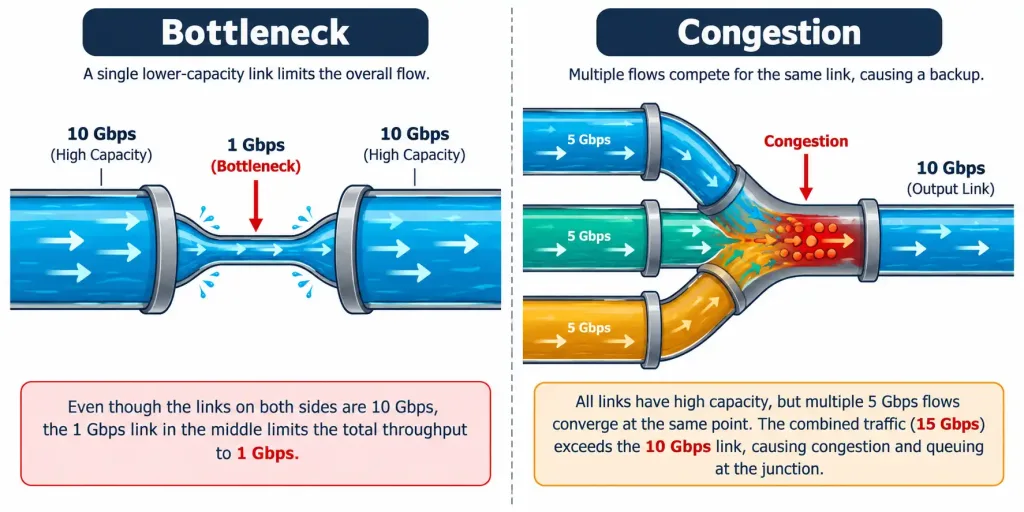
The distinction matters for the fix: a bottleneck is solved by upgrading or aggregating the specific constraining link, while congestion may require broader capacity planning, traffic shaping, or addressing the actual source of excess demand.
Duplex Mismatch Revisited from a Performance Angle
Rising collision counters, covered earlier in this module, are one visible symptom of a duplex mismatch — but the actual performance impact goes well beyond an occasional collision. A genuine duplex mismatch, where one device is configured for full duplex and the other for half duplex, produces a specific kind of collision called a late collision, and the resulting performance degradation is often severe — throughput dropping to a small fraction of the link’s rated capacity, not just a minor dip. This is exactly why a duplex mismatch is worth ruling out early when a specific link performs dramatically worse than its rated speed would suggest, rather than assuming a more exotic cause first.
MTU Mismatch
MTU (Maximum Transmission Unit) defines the largest packet size a given link or device will handle without fragmenting it. An MTU mismatch occurs when devices along a single path are configured with different MTU values — a packet sized correctly for one segment can turn out to be too large for another segment further along the path.
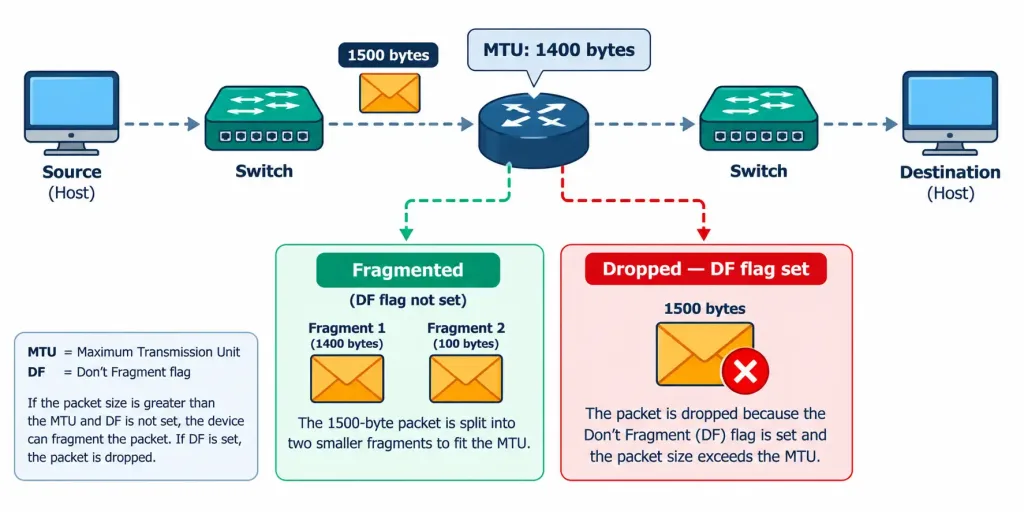
When this happens, one of two things occurs: the oversized packet gets fragmented into smaller pieces to fit, adding overhead and reducing effective throughput, or — if the packet has its “don’t fragment” flag set — it gets dropped outright, with the sender typically expected to receive an error message indicating the packet needed to be smaller. This produces a genuinely distinctive symptom pattern: small packets flow through the path just fine, while larger packets specifically fail or perform poorly, which is a strong, specific clue pointing toward an MTU mismatch rather than a more general connectivity problem.
QoS Misconfiguration
QoS (Quality of Service) mechanisms exist to prioritize certain traffic types — typically latency-sensitive traffic like voice and video — ahead of less time-sensitive traffic like file transfers or general web browsing, specifically during periods when available bandwidth is genuinely constrained. When QoS is missing or misconfigured, latency-sensitive applications can suffer from jitter, delay, and dropped packets during congestion, even when the network has technically sufficient total bandwidth for all the traffic combined — because without prioritization, that bandwidth gets allocated on a first-come, first-served basis rather than according to which traffic actually needs low latency most.
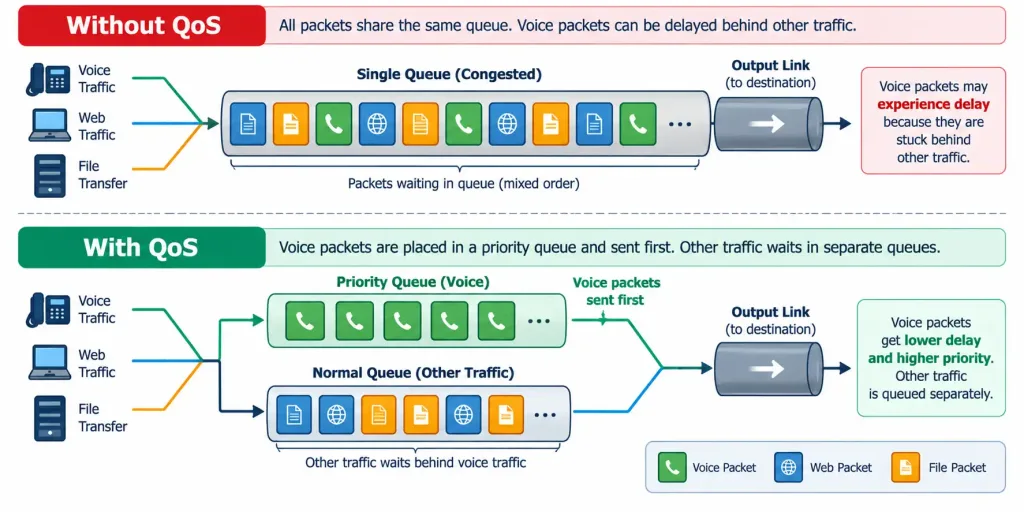
This is exactly why a voice call can sound choppy on a network with seemingly plenty of overall bandwidth available — the total capacity might genuinely be sufficient, but without QoS actively prioritizing the voice traffic during a momentary spike in competing demand, that voice traffic gets stuck waiting in the same queue as everything else.
Recognition-Level Verification Concepts
A few patterns are worth recognizing on sight:
- A single link performing far below the surrounding network’s capacity, with the rest of the path performing fine, points toward a bandwidth bottleneck at that specific link.
- General slowness affecting many different destinations simultaneously, without one obvious constraining link, points toward broader network congestion.
- Throughput on a specific link dropping to a small fraction of its rated speed, alongside rising collision counters, points toward a duplex mismatch rather than a minor cabling issue.
- Small packets succeeding while larger ones specifically fail or fragment along the same path points toward an MTU mismatch.
- Voice or video quality suffering specifically during periods of network congestion, despite adequate total bandwidth, points toward missing or misconfigured QoS.
Common Exam Traps
- A bandwidth bottleneck and network congestion are related but distinct problems, requiring different fixes. A bottleneck is solved by upgrading one specific link; congestion may require broader capacity or traffic management changes.
- A duplex mismatch’s performance impact is often severe, not minor. Don’t underestimate how dramatically throughput can drop from a duplex mismatch compared to a routine cabling issue.
- An MTU mismatch’s distinctive symptom is size-dependent failure — small packets working while large ones fail is a strong, specific signal, not a vague “sometimes it works” pattern.
- QoS problems don’t require insufficient total bandwidth to occur. The network can have technically adequate capacity overall and still suffer real latency-sensitive traffic problems if that capacity isn’t being prioritized correctly during brief congestion spikes.
- These four issue categories can look similar at first (“the network feels slow”) but have genuinely different root causes and fixes — resist treating general performance complaints as a single undifferentiated troubleshooting category.
Lesson 5.4.2 Practice Quiz — Wired & Network Performance Issues
17 questions covering bandwidth bottlenecks, congestion, duplex mismatch, MTU mismatch, and QoS misconfiguration.
N10-009 · Domain 5.4Summary
A bandwidth bottleneck is a single constraining link limiting overall throughput; network congestion is broader excess demand exceeding available capacity — each requires a different fix.
A duplex mismatch produces severe throughput degradation through late collisions, going well beyond the occasional collision counter increment that might first draw attention to it.
An MTU mismatch causes fragmentation or outright packet drops specifically for larger packets, producing a distinctive size-dependent failure pattern.
QoS misconfiguration allows latency-sensitive traffic to suffer during congestion even when total bandwidth is technically sufficient, since that capacity isn't being allocated according to actual latency sensitivity.
This lesson completes N10-009 objective 5.4 (Performance Issues) at 2/2 lessons; the next lessons move into objective 5.5, troubleshooting tools and protocols — the final objective of the course.