
Domain 2.0 | Network Implementation — 20% of exam
Learning Objectives
By the end of this lesson, you will be able to:
- Compare the 2.4GHz, 5GHz, and 6GHz Wi-Fi frequency bands and their tradeoffs
- Explain what a wireless channel is and how channel width affects throughput and interference
- Identify the non-overlapping channels in the 2.4GHz band and explain why they matter
- Explain regulatory impacts on channel selection, including Dynamic Frequency Selection under 802.11h
- Explain band steering and why it improves performance on modern wireless networks
Key Terms
| Term | Definition |
|---|---|
| Frequency Band | A range of the radio spectrum used for wireless communication — Wi-Fi uses the 2.4GHz, 5GHz, and 6GHz bands |
| Channel | A specific slice of frequency within a band that an access point transmits on |
| Non-Overlapping Channel | A channel whose frequency range doesn’t overlap with adjacent channels, avoiding interference between them |
| 802.11h | An amendment requiring Dynamic Frequency Selection (DFS) and Transmit Power Control (TPC) on certain 5GHz channels to avoid interfering with radar systems |
| Band Steering | A feature that automatically directs dual-band-capable clients toward the less congested 5GHz or 6GHz band instead of 2.4GHz |
Explanation
Why Frequency Band Choice Matters
802.11 wireless standards define the technical rules for how devices communicate over radio waves, but the standard alone doesn’t determine performance in a specific building or office. A huge part of real-world Wi-Fi performance comes down to which frequency band a network operates on and how its channels are configured — decisions an administrator makes when actually deploying access points, not something baked permanently into the 802.11 standard itself.The Three Wi-Fi Bands: 2.4GHz, 5GHz, and 6GHz
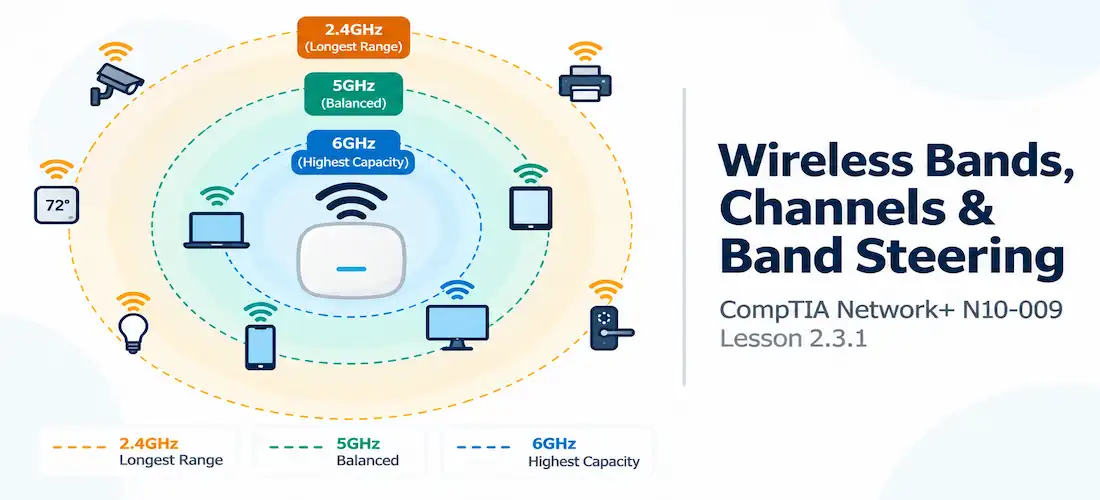
Modern Wi-Fi networks operate across three frequency bands, each with real tradeoffs:
- 2.4GHz — the oldest and most universally supported band. Lower frequencies travel farther and penetrate walls better, giving 2.4GHz the best raw range. The tradeoff is severe: the band is narrow, crowded with other devices (microwaves, Bluetooth, cordless phones), and offers only three non-overlapping channels in most regulatory domains.
- 5GHz — higher frequency, shorter range, but a much wider swath of spectrum to work with, meaning far more usable channels and generally less interference than 2.4GHz. This is the default band for most modern client traffic when range isn’t a limiting factor.
- 6GHz — the newest band (introduced with Wi-Fi 6E and carried into Wi-Fi 7), offering the most spectrum and the least legacy congestion, since only newer devices support it at all. Range is the shortest of the three, and client support is still catching up compared to 2.4GHz and 5GHz.
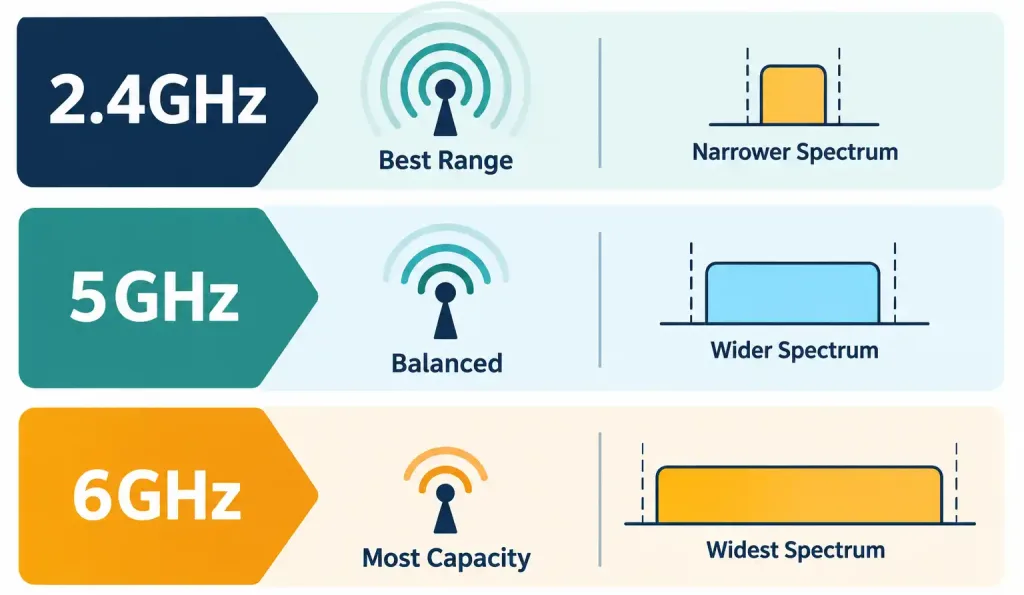
How 2.4GHz, 5GHz, And 6GHz Trade Off Range, Capacity, And Interference
The general pattern holds across all three: lower frequency means better range but less capacity; higher frequency means more capacity but shorter range. Every wireless design decision from here largely flows from that one tradeoff.
Channels and Channel Width
Within each frequency band, transmissions are organized into individual channels — narrower slices of the band that an access point can be configured to use. Channel width determines how much of that spectrum a single channel consumes: a wider channel (say, 40MHz instead of 20MHz) can carry more data per transmission, but it also consumes more of the available spectrum, leaving fewer non-overlapping channels for neighboring access points to use without stepping on each other.
This tradeoff is most visible in the 2.4GHz band, where the entire band is narrow enough that adjacent channels genuinely overlap in frequency. Out of the available channels, only channels 1, 6, and 11 are considered fully non-overlapping in most regulatory domains — meaning access points can only be cleanly separated onto three distinct channels without interference. Cramming more than three overlapping-channel access points into the same physical space is a classic cause of poor Wi-Fi performance in dense environments.
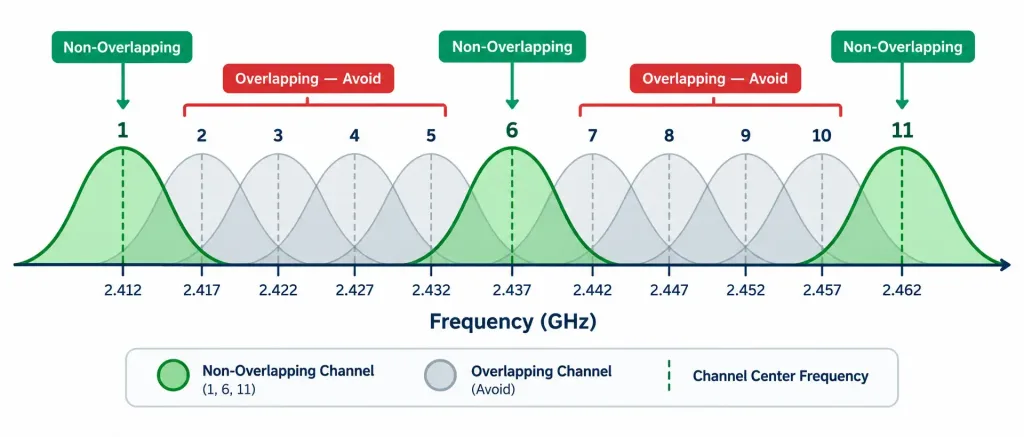
Why Only Channels 1, 6, And 11 Avoid Overlapping With Each Other In The 2.4GHz Band
5GHz and 6GHz don’t have this same narrow-band problem — their much wider spectrum allows for many more non-overlapping channels, which is one of the practical reasons 5GHz and 6GHz networks generally suffer less from channel congestion in busy environments like office buildings or apartment complexes.
Regulatory Impacts: DFS and 802.11h
Some 5GHz channels overlap with frequencies used by weather radar and certain military and aviation systems. To prevent Wi-Fi devices from interfering with those systems, the 802.11h amendment requires access points using those specific channels to implement Dynamic Frequency Selection (DFS) and Transmit Power Control (TPC).
DFS works by having the access point continuously monitor for radar signals on its current channel. If radar activity is detected, the access point is required to immediately vacate that channel and switch to another — a process that can cause a brief, noticeable interruption for connected clients. This is a real, practical consideration when planning a 5GHz deployment: DFS-required channels offer more available spectrum, but come with the small risk of an unexpected channel change if radar is detected nearby, which matters more in some geographic areas (near airports or weather stations) than others.
Band Steering
Most modern access points broadcast the same network name across multiple bands simultaneously — client devices connect using one SSID, but the access point actually has 2.4GHz, 5GHz, and sometimes 6GHz radios all active behind the scenes. Left entirely to their own judgment, many client devices default to whichever band has the strongest raw signal, which is very often 2.4GHz simply because of its superior range — even when a much less congested 5GHz or 6GHz connection would actually perform better.
Band steering addresses this by having the access point itself make smarter decisions: it can selectively delay or decline a client’s association request on the crowded band, effectively nudging capable dual-band or tri-band clients toward the less congested higher-frequency band instead, without requiring the user to do anything manually.
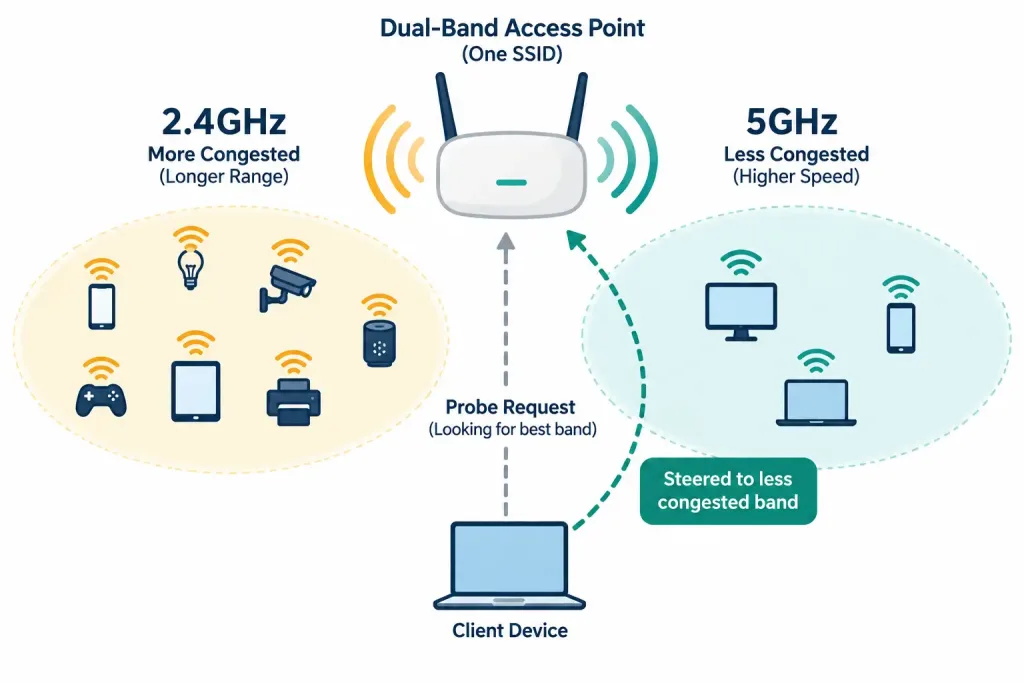
How An Access Point Steers A Capable Client Away From A Crowded Band
Band steering doesn’t help every device — an older 2.4GHz-only client has nowhere to be steered to — but on networks with a mix of modern and legacy devices, it meaningfully improves overall performance by keeping capable clients off the most congested band.
Recognition-Level Verification Concepts
A few patterns are worth recognizing on sight:
- A wireless design listing only channels 1, 6, and 11 for 2.4GHz access points reflects an intentional avoidance of channel overlap.
- An access point briefly dropping and reappearing on a different 5GHz channel, with no configuration change made, points to DFS reacting to detected radar activity.
- A single SSID broadcast across multiple bands with clients ending up on different bands is band steering in action, not a misconfiguration.
- A network design favoring 6GHz for high-density areas with modern devices, while still supporting 2.4GHz for legacy IoT devices, reflects the range-vs-capacity tradeoff across all three bands.
Common Exam Traps
- 2.4GHz has only three non-overlapping channels (1, 6, 11) in most regions — don’t assume every numbered channel in the band is usable without interference from its neighbors.
- Higher frequency bands trade range for capacity, not the other way around. 6GHz has the most available spectrum but the shortest range; 2.4GHz has the best range but the least usable capacity.
- DFS-related channel changes are a normal regulatory safety mechanism, not a fault. A brief disconnection tied to a channel switch on a DFS channel is expected behavior when radar is detected, not a sign of broken equipment.
- Band steering works at the access point level, not the client level — the AP decides which band to nudge a client toward; it isn’t something the end user manually configures on their device.
- A client that only supports 2.4GHz cannot be band-steered to 5GHz or 6GHz. Band steering only benefits genuinely dual-band or tri-band-capable clients.
Lesson 2.3.1 Practice Quiz — Wireless Frequency Bands, Channels & Band Steering
17 questions covering 2.4/5/6GHz bands, non-overlapping channels, DFS/802.11h, and band steering.
N10-009 · Domain 2.3Summary
Wi-Fi operates across three frequency bands — 2.4GHz, 5GHz, and 6GHz — trading off range against available capacity and interference.
A channel is a specific slice of a frequency band; wider channels carry more data but leave fewer non-overlapping channels available for neighboring access points.
The 2.4GHz band has only three non-overlapping channels (1, 6, 11) in most regions, making it prone to congestion in dense deployments.
802.11h requires Dynamic Frequency Selection (DFS) and Transmit Power Control (TPC) on certain 5GHz channels to avoid interfering with radar systems, which can cause an access point to briefly change channels.
Band steering nudges dual-band or tri-band-capable clients toward less congested higher-frequency bands, improving overall network performance without requiring manual client configuration.



