
Managing organizational guidelines manually can become difficult as the number of policies, employees, locations, and regulatory requirements increases. One of the earliest signs of a problem is the inability to reliably determine whether employees have received, reviewed, and acknowledged important policies.
Basic file folders, shared drives, email attachments, and spreadsheets can store information, but they do not necessarily provide a complete view of how policy documents move through an organization. As teams become more distributed, the gap between publishing a document and confirming that the right people have acknowledged it becomes more noticeable.
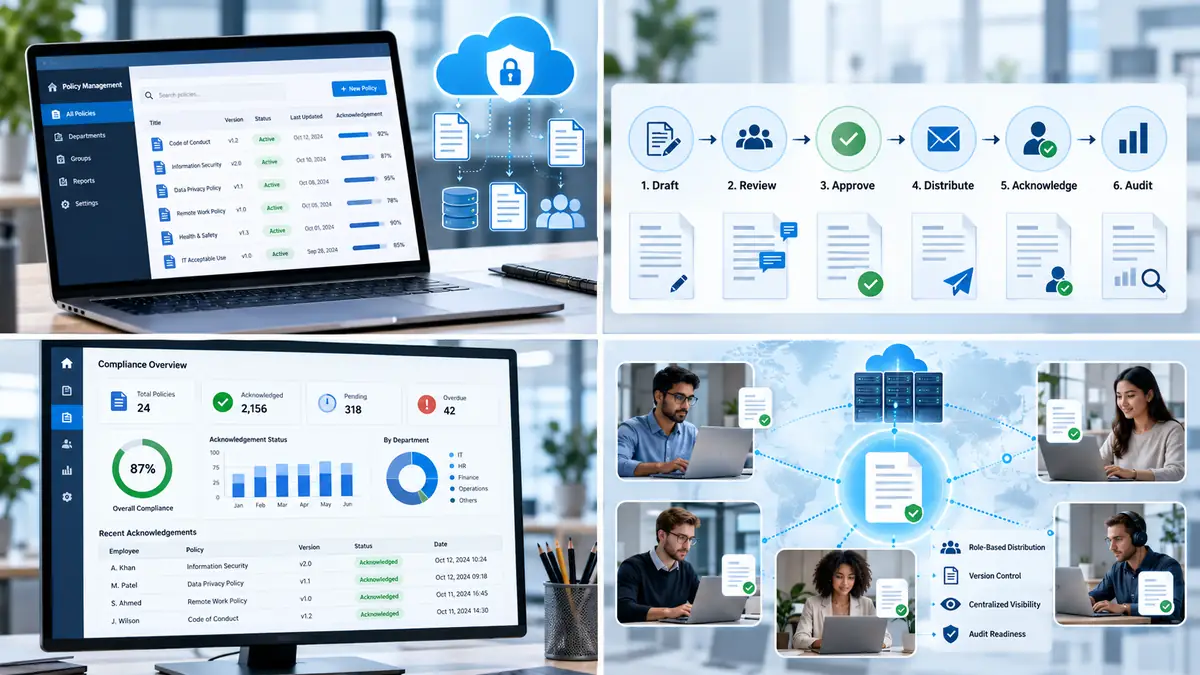
By looking at the warning signs below, organizations can identify where manual policy processes are creating avoidable administrative work and where a more structured approach may be appropriate.
What Is Policy Management Software and Why Is It Important?
Policy management software is designed to organize the lifecycle of organizational policies, procedures, and governance documents. Depending on the platform, this can include publishing, distribution, reminders, acknowledgement tracking, version control, and reporting.
The difference between a document repository and a policy-management system is mainly the workflow around the document. A repository can store a policy and control who can open it. A management system can add structured steps for assigning the document, establishing deadlines, tracking acknowledgements, and producing records of those activities.
This becomes particularly relevant when policies change frequently or when different departments need different documents. Instead of relying on assumptions about whether an email was seen, organizations can define a repeatable process for policy distribution and follow-up.
Organizations evaluating this type of workflow may come across policy management software designed to extend document libraries with structured assignment, acknowledgement, and reporting features.

6 Signs Your Organization Needs a More Structured Policy Process
If compliance tracking still depends on spreadsheets, mass emails, and manual follow-ups, it is worth examining where those processes are beginning to break down. The following six signs are common indicators that an organization may benefit from a more structured policy workflow.
1. You Track Policy Acknowledgements Through Spreadsheets and Email
Spreadsheets can be useful for simple tracking, but they become harder to maintain when many policies and employees are involved. Someone may need to record who received a document, who responded, which version was used, and when a reminder was sent.
Email-based processes create a similar problem. Attachments can be missed, follow-up messages can be overlooked, and information may end up scattered across different inboxes. Manual tracking also makes it harder to maintain a consistent history of changes.
A structured workflow can centralize these activities so that assignment, reminders, and acknowledgement status are visible in one place rather than being reconstructed from separate messages and spreadsheets.
2. You Cannot Quickly Produce Evidence of Compliance
During an audit or internal review, it may not be enough to show that a policy exists. Teams may also need to demonstrate which version was distributed, which users were assigned the document, and whether required acknowledgement steps were completed.
When this information is recorded manually, collecting it can take considerable time. A more structured system can keep timestamps, document versions, and acknowledgement status together.
3. Employees Frequently Miss Policy Updates
Publishing a revised handbook or procedure to an intranet does not necessarily mean that every affected employee has seen it. Important updates can be overlooked when they are distributed through general announcements or placed inside large document libraries.
Targeted distribution can reduce this problem by sending a policy to the groups that actually need it. For example, an updated procedure for a technical team does not necessarily need to be assigned to every employee in the organization.
This approach is also connected to the broader security principle of controlling access according to identity and role. NetworkUstad’s guide on authentication, authorization, and identity management explains how role-based access control and least privilege can be used to limit access according to defined responsibilities.
4. HR and Compliance Teams Spend Too Much Time Chasing Sign-Offs
New-hire onboarding, annual policy reviews, safety procedures, information security rules, and other recurring updates can generate a large number of acknowledgement tasks.
When every reminder has to be sent manually, administrative effort grows quickly. A structured workflow can automate routine follow-up while still allowing compliance or HR teams to intervene when an item remains overdue.
- Automated reminders: Send scheduled notifications for pending acknowledgements.
- Role-based assignment: Give different groups the policies relevant to their responsibilities.
- Status dashboards: Show which assignments are complete, pending, or overdue.
This is also where security awareness and policy administration intersect. A password standard, acceptable-use rule, or incident-response procedure has limited value when the intended audience never receives or reviews the current version.
5. Outdated Policy Versions Are Scattered Across Multiple Locations
Version control becomes increasingly important when documents are copied between local drives, shared folders, email attachments, and cloud storage. The longer several versions remain available, the harder it is for users to know which document is current.
A central repository can provide a clearer source of truth. Version history also helps administrators determine what changed between releases and which revision should be used for acknowledgement and future audits.
The same principle applies to technical security documentation. NetworkUstad covers the importance of clearly defined security controls in its guide to key security concepts and mitigation techniques , including the relationship between security objectives, threats, and controls.
6. Maintaining Consistent Policies Across Distributed Teams Is Difficult
Remote, hybrid, and multi-location teams make policy distribution more complex because employees may work across different schedules, offices, and systems.
A policy published for one office may also need to reach another location, while certain procedures may apply only to specific roles. Without structured targeting, organizations can end up with inconsistent communication or incomplete acknowledgement records.
Centralized policy workflows can help organizations maintain consistent distribution rules while still allowing access to vary by role, department, or location.
From a security perspective, the idea also fits with Zero Trust principles. NetworkUstad’s Zero Trust security guide explains why access decisions can be based on continuous verification rather than simply assuming that users inside a network are trusted.
How Policy Management Works in Different Environments
The need for structured policy workflows is not limited to one industry. The same basic process can apply to healthcare organizations, financial services, manufacturing companies, educational institutions, and distributed technology teams, although the documents and requirements vary.
Healthcare and Regulated Workflows
A healthcare organization may need to distribute privacy, safety, or operational procedures to different staff groups. A structured workflow can assign the appropriate material by department, track completion, and preserve an acknowledgement history for later review.
Financial Services and Internal Controls
Financial organizations may maintain policies covering security, acceptable use, internal controls, or regulatory procedures. Here, the challenge is often keeping the current version available while ensuring that the right teams review updates on schedule.
Manufacturing and Safety Documentation
Manufacturing environments can have multiple sites, shifts, and job functions. Machine safety procedures, operational instructions, or emergency processes may apply to particular roles rather than the entire workforce.

In each case, the technical challenge is similar: identify the audience, distribute the correct version, record the response, and make the status visible to the people responsible for governance.
Best Practices for a More Reliable Policy Workflow
Implementing policy management software is only one possible approach. Organizations can also improve their existing process by standardizing how documents are created, reviewed, distributed, and archived.
Role-based access is especially useful when organizations have many teams with different responsibilities. For a deeper look at access restrictions, NetworkUstad’s guide to access control lists provides a networking-focused example of how defined rules can control access to resources.
It is also useful to review policies on a regular schedule rather than only when an audit is approaching. A documented review cycle can make stale procedures easier to identify before they create operational confusion.
Policy Management, Automation, and Security
Policy administration is increasingly connected to wider IT operations. Identity systems, cloud platforms, collaboration tools, document repositories, and security controls can all influence how policies are distributed and maintained.
Automation can reduce repetitive administrative tasks, but it should not replace human review of policy content. Someone still needs to determine whether a policy is accurate, appropriate for the intended audience, and ready for publication.
A practical workflow therefore combines automation with governance:
For security teams, this becomes particularly important because policy documents often describe access rules, password requirements, acceptable use, remote access, incident response, or other controls that affect day-to-day technology operations.
Conclusion
Manual policy administration does not automatically mean an organization needs dedicated software. However, certain warning signs make the limits of informal processes easier to see.
Repeated spreadsheet tracking, difficulty producing acknowledgement records, missed updates, excessive manual follow-up, scattered document versions, and inconsistent distribution across locations are all signs that the existing workflow may need greater structure.
The goal is not simply to store more documents. A reliable policy process connects document versioning, audience targeting, acknowledgement, access, reminders, and reporting so that people can identify what applies to them and administrators can see the current state of the workflow.
Frequently Asked Questions About Policy Management Software
What is the primary purpose of policy management software?
Its primary purpose is to organize the lifecycle of policies and procedures, including publication, distribution, acknowledgement, reminders, version tracking, and reporting. The exact capabilities vary by platform.
Can policy management software work with Microsoft SharePoint and Microsoft 365?
Some policy-management platforms are designed specifically for SharePoint and Microsoft 365 environments. The integration model depends on the product and deployment type, so organizations should verify the supported SharePoint and Microsoft 365 versions before implementation.
How can automation reduce administrative workload?
Automation can handle repetitive activities such as policy assignment, scheduled reminders, acknowledgement tracking, and status reporting. This reduces the amount of manual coordination required for recurring policy cycles while leaving content decisions and governance with the responsible teams.



