
Domain 5.6 | Security Fundamentals — 15% of exam
Learning Objectives
By the end of this lesson, you will be able to:
- Configure standard ACLs to filter traffic based on source address, and extended ACLs to filter based on source, destination, protocol, and port.
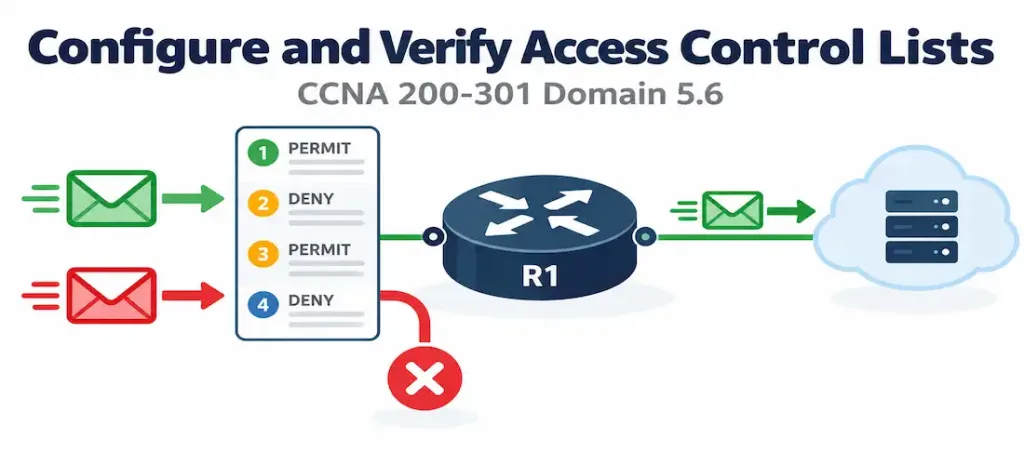
- Explain the critical behavioral rules governing ACL processing: top-down evaluation, first-match, and the implicit deny.
- Apply the correct placement guidance for standard versus extended ACLs, and explain the reasoning behind it.
- Apply an ACL to an interface in the correct direction, and explain the consequences of getting this wrong.
- Verify ACL configuration and match activity using
show access-lists.
Key Terms Glossary
| Term | Definition |
|---|---|
| Standard ACL | An access control list that filters traffic based on source IP address only. |
| Extended ACL | An access control list that filters traffic based on source and destination IP address, protocol, and port number. |
| Implicit deny | The invisible, automatic deny-all rule present at the end of every ACL, even when not explicitly configured. |
| Wildcard mask | The inverse of a subnet mask, used in ACL statements to define which addresses a rule matches. |
| access-group | The interface configuration command applying an ACL to traffic in a specific direction (inbound or outbound). |
| Named ACL | An ACL identified by a descriptive name rather than a number, supporting easier editing via sequence numbers. |
| Sequence number | A number identifying an ACL entry’s position, allowing insertion or removal of specific lines without rewriting the entire ACL. |
Standard vs. Extended ACLs: What Each Can Actually Match
An ACL (Access Control List) is a set of rules a router or switch evaluates against traffic, permitting or denying it based on defined criteria. Two types matter for this objective, and the difference between them comes down entirely to how much of a packet each type is capable of examining.
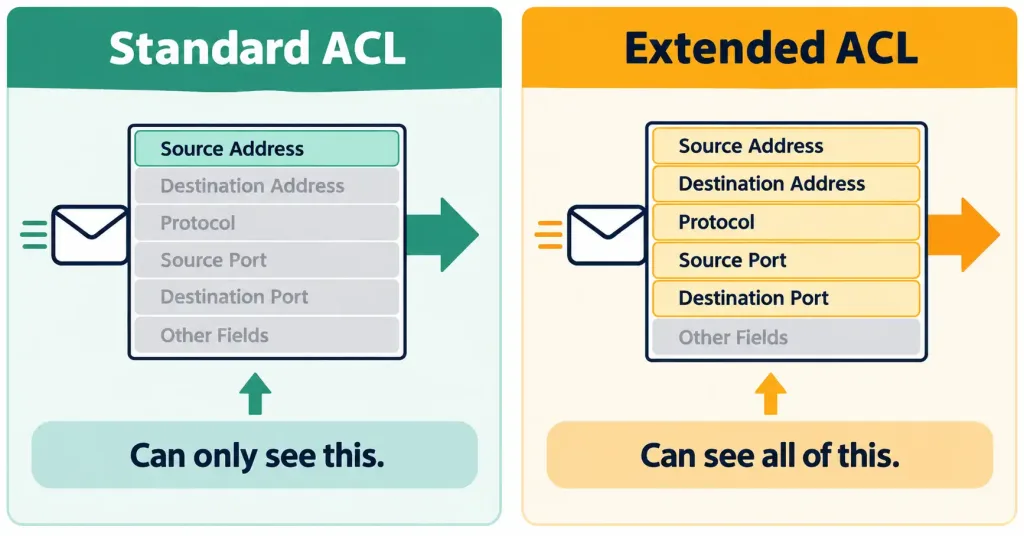
Standard ACLs filter based on source IP address only:
access-list 10 permit 192.168.1.0 0.0.0.255
access-list 10 deny any
This is simple but limited — a standard ACL can say “traffic from this source network” but has no ability to distinguish traffic by destination or by protocol/port at all. If you need to permit traffic from a given source only when it’s headed to one specific server, or only when it’s a specific type of traffic (web, not everything), a standard ACL simply cannot express that distinction.
Extended ACLs filter based on source and destination IP address, protocol (TCP, UDP, ICMP, and others), and port number:
access-list 110 permit tcp 192.168.1.0 0.0.0.255 host 10.1.1.100 eq 443
access-list 110 deny ip any any
This is far more granular — the example above permits only TCP traffic from 192.168.1.0/24, specifically destined for the single host 10.1.1.100, specifically on port 443 (HTTPS). Everything else is denied. This precision is exactly why extended ACLs are generally the preferred choice for real deployments where fine-grained control genuinely matters — a standard ACL simply can’t express “only this specific type of traffic to this specific destination.”
Notice the wildcard mask (0.0.0.255) used in both examples — this is the exact same wildcard mask concept covered in objective 3.4’s OSPF network command discussion, and it works identically here: the inverse of a subnet mask, where a 0 bit means “must match” and a 1 bit means “don’t care.” The host keyword seen in the extended example is simply shorthand for a wildcard mask of 0.0.0.0 applied to a single specific address — host 10.1.1.100 and 10.1.1.100 0.0.0.0 are functionally identical, with host simply being easier to read and less error-prone to type.
Critical Behavioral Rules
Three rules govern how every ACL actually behaves, and getting any one of them wrong is a leading cause of both real-world misconfigurations and missed exam questions.
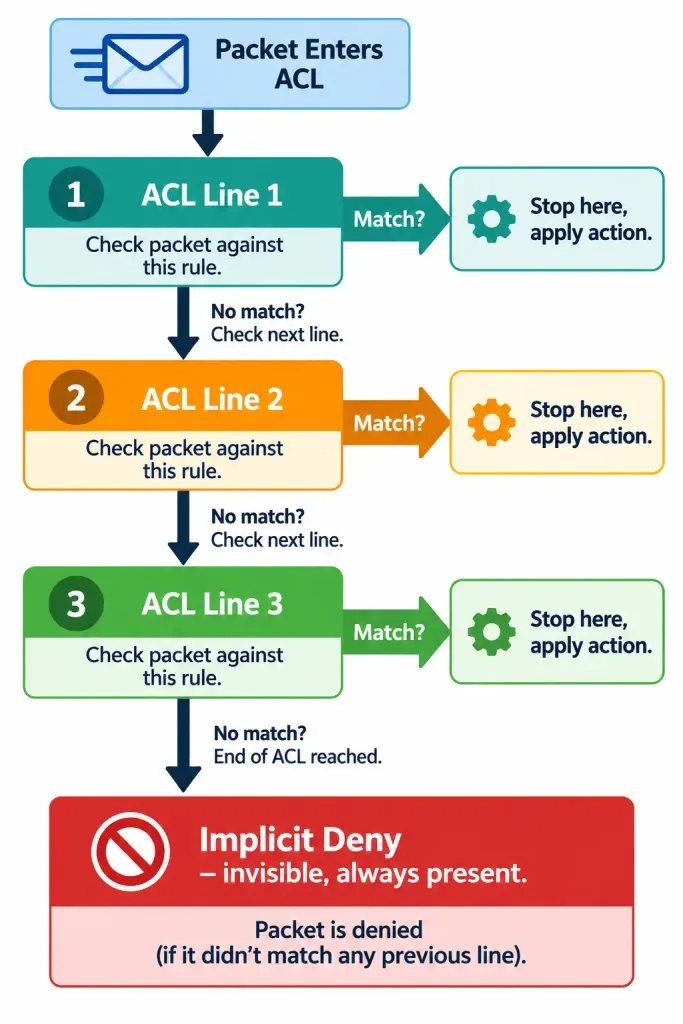
ACL entries are processed top-down, and processing stops at the first match. The router evaluates each line in order, from the first configured entry downward, and as soon as a line matches the traffic being evaluated, that line’s action (permit or deny) is applied immediately — no further lines are even considered. This means order matters enormously. A more specific rule placed after a broader rule that already matches the same traffic will never actually be reached, since the broader rule already claimed the match first.
Every ACL has an implicit deny at the very end, even though it’s completely invisible in the running configuration — you’ll never see it typed out unless an administrator explicitly adds an equivalent deny statement themselves. An ACL containing only permit statements and nothing else will still block every single packet that doesn’t match one of those permits, because that invisible final rule catches everything else. Forgetting this is one of the most common real-world and exam-tested mistakes in this entire objective — an administrator who writes a handful of permit statements and stops there, assuming untouched traffic will simply pass through unaffected, will find that assumption is exactly backward.
Placement Guidance: Where Each ACL Type Belongs
This is a frequently tested design principle, and it follows directly from the fundamental capability difference between the two ACL types.
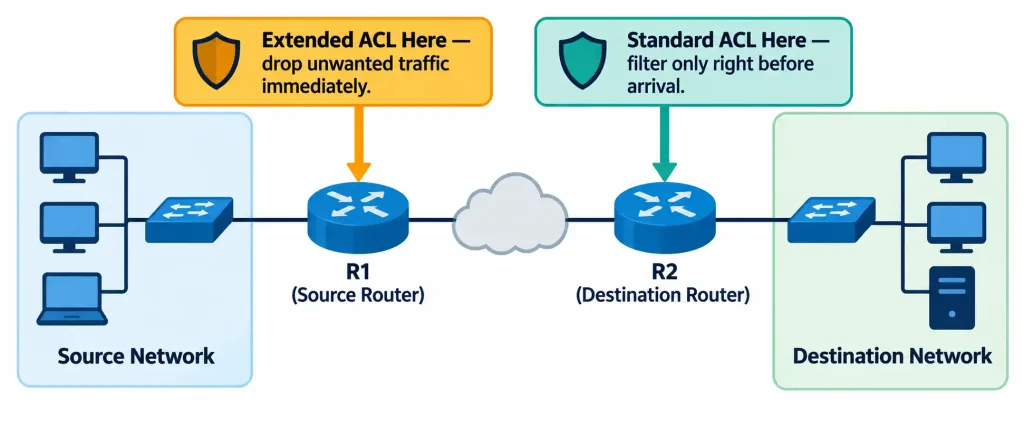
Standard ACLs should generally be placed close to the destination. Since a standard ACL can only filter on source address, placing one too close to the source risks blocking that source’s traffic from reaching any destination — including destinations that traffic should have been allowed to reach. Placing it near the destination instead means the filtering decision only affects traffic actually headed to that specific destination, rather than blanket-blocking a source’s traffic everywhere across the network.
Extended ACLs should generally be placed close to the source. Since extended ACLs can match on destination and port with precision, placing one near the source lets unwanted traffic get dropped immediately, before it consumes bandwidth traveling further across the network toward a destination it was never going to be allowed to reach anyway. There’s no benefit to letting precisely-identifiable unwanted traffic travel halfway across a network only to be dropped at the far end — an extended ACL’s precision means that decision can safely be made right at the source instead.
Applying an ACL: The access-group Command and Direction
Configuring ACL statements alone does nothing until the ACL is actually applied to an interface, in a specific direction:
interface GigabitEthernet0/1
 ip access-group 110 in
The direction keyword — in or out — matters enormously and is evaluated relative to the router, not relative to any external network. in means the ACL evaluates traffic as it enters the router through that interface, before any routing decision is made; out means the ACL evaluates traffic as it’s about to exit the router through that interface, after the routing decision has already determined it should leave that way. Applying an ACL in the wrong direction is a common and consequential mistake — an ACL correctly written but applied out instead of the intended in (or vice versa) will produce behavior that looks nothing like what was intended, filtering entirely different traffic than the administrator expected.
The Self-Inflicted Lockout Scenario
A specific, genuinely common real-world mistake deserves its own callout: applying an ACL to the VTY lines (or an interface an administrator’s own remote session traverses) that inadvertently blocks the administrator’s own access. If an extended ACL applied inbound on a router’s interface doesn’t explicitly permit the administrator’s own management traffic — perhaps because the implicit deny catches it, or because a deny statement placed too early matches it unintentionally — the administrator can lock themselves out of remote access to the very device they just modified, sometimes requiring physical console access to recover.
This is precisely why testing ACL changes carefully, and where possible verifying a permit statement for management traffic exists and is reached before any broad deny, is a standard operational precaution rather than an optional nicety.
Common Misconceptions
- “An ACL with only permit statements allows all other traffic through by default.” The implicit deny at the end blocks everything not explicitly permitted — there’s no “allow by default” behavior once any ACL is applied.
- “Standard and extended ACLs provide the same filtering capability, just with different syntax.” Standard ACLs can only match source address; extended ACLs can match source, destination, protocol, and port — this is a genuine capability difference, not a stylistic one.
- “ACL direction (in/out) refers to the direction relative to the network segment, not the router.” Direction is always evaluated relative to the router itself —
inmeans entering the router through that interface,outmeans exiting through it. - “Placing an extended ACL near the destination is just as good as placing it near the source.” While functionally the ACL would still work either way, placing it near the source avoids wasting bandwidth carrying traffic across the network that was only going to be dropped at the far end anyway — this is a genuine efficiency argument, not just a stylistic preference.
- “Editing a numbered ACL means simply adding a new line to fix a mistake.” Traditional numbered ACLs are edited as a whole; inserting a specific corrected line at a specific position generally requires either a named ACL with sequence numbers, or a numbered ACL where the specific sequence number is referenced directly, rather than just appending a line and hoping order resolves itself.
Configure and Verify: Full Lab Walkthrough
Topology: R1 sits between an internal LAN (192.168.1.0/24) and a server subnet (10.1.1.0/24) containing a web server at 10.1.1.100. The goal: allow the internal LAN to reach the web server on HTTPS only, deny all other traffic from that LAN to the server subnet, while explicitly ensuring the administrator’s own management access is preserved.
   [Internal LAN 192.168.1.0/24] --- R1 --- [Server Subnet 10.1.1.0/24]
                                              WebServer: 10.1.1.100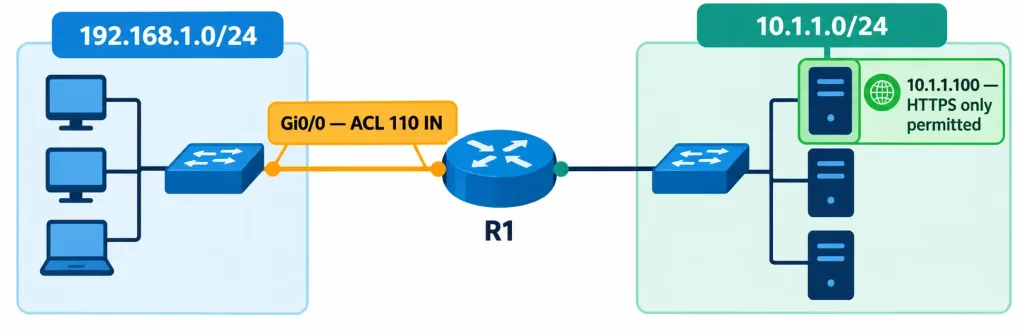
Step 1 — Configure the extended ACL:
R1(config)# access-list 110 permit tcp 192.168.1.0 0.0.0.255 host 10.1.1.100 eq 443
R1(config)# access-list 110 deny ip 192.168.1.0 0.0.0.255 10.1.1.0 0.0.0.255
R1(config)# access-list 110 permit ip any any
Reading this in order, since order determines outcome: the first line permits HTTPS traffic from the LAN to the web server specifically. The second line denies any other traffic from that same LAN toward the server subnet as a whole — this specifically stops the LAN from reaching other addresses or other ports within that server subnet, since the first, more specific permit already claimed the one type of traffic that should succeed. The third line explicitly permits everything else, ensuring traffic unrelated to this specific LAN-to-server-subnet restriction (including the administrator’s own management traffic arriving from elsewhere) isn’t caught by the implicit deny that would otherwise sit at the very end.
Step 2 — Apply the ACL inbound on the interface facing the internal LAN, following extended-ACL-near-the-source placement guidance:
R1(config)# interface GigabitEthernet0/0
R1(config-if)# ip access-group 110 in
Step 3 — Verify the ACL is configured and check match activity:
R1# show access-lists
Extended IP access list 110
    10 permit tcp 192.168.1.0 0.0.0.255 host 10.1.1.100 eq 443 (142 matches)
    20 deny ip 192.168.1.0 0.0.0.255 10.1.1.0 0.0.0.255 (37 matches)
    30 permit ip any any (891 matches)
The match counters confirm the ACL is actively being evaluated against real traffic — 142 matches on the HTTPS permit line confirm legitimate web traffic is passing, and 37 matches on the deny line confirm some traffic genuinely was being blocked as intended, rather than the ACL sitting unused. Note the sequence numbers (10, 20, 30) automatically assigned in increments of ten — this spacing is deliberate, leaving room to insert additional lines later at specific positions (an 15 between the current 10 and 20, for instance) without needing to renumber or recreate the entire ACL.
Step 4 — Confirm the ACL is applied to the correct interface and direction:
R1# show ip interface GigabitEthernet0/0 | include access list
  Outgoing access list is not set
  Inbound  access list is 110
This confirms the ACL is applied inbound, exactly as configured, and that no outbound ACL exists on this same interface that might otherwise interact with it.
Packet Tracer Practice Activity
Scenario: Your organization wants the internal LAN restricted to HTTPS-only access toward a specific web server, while leaving all other traffic patterns in the network unaffected.
Addressing table:
| Device | Interface | IP Address |
|---|---|---|
| R1 | GigabitEthernet0/0 | 192.168.1.1/24 |
| R1 | GigabitEthernet0/1 | 10.1.1.1/24 |
| PC1 | NIC | 192.168.1.10/24 |
| WebServer | NIC | 10.1.1.100/24 |
Part 1: Configure basic connectivity. Set up addressing per the table and confirm PC1 can reach WebServer on any port before adding any ACL.
Part 2: Configure the extended ACL. Build the three-line ACL exactly as shown in the lab walkthrough above.
Part 3: Apply the ACL. Apply it inbound on GigabitEthernet0/0, the interface facing PC1’s LAN.
Part 4: Verify. From PC1, confirm an HTTPS request (or a simulated HTTPS check, depending on the simulation’s capabilities) to WebServer succeeds, while a different port or protocol to the same server fails. Run show access-lists on R1 and confirm match counters are incrementing on both the permit and deny lines as expected.
Expected result: HTTPS traffic from PC1 to WebServer succeeds; other traffic from PC1 to WebServer (a different port, or ICMP ping) fails; traffic unrelated to this specific path (such as basic connectivity checks between other configured devices) remains unaffected. If HTTPS traffic unexpectedly fails too, check the ACL’s line order first — a misplaced broad deny statement positioned before the specific permit will silently swallow the intended traffic before it ever reaches the permit line meant to allow it.
Troubleshooting Patterns
“An ACL is configured, but it doesn’t seem to affect any traffic at all.” Confirm the ACL is actually applied to an interface with ip access-group — a correctly written ACL that’s never applied anywhere has no effect on any traffic whatsoever.
“Traffic that should be permitted is being blocked.” Check the ACL’s order carefully — a broader deny statement positioned before a more specific permit will catch the traffic first, since processing stops at the first match; the more specific permit further down the list is never reached.
“All traffic suddenly stopped working after applying a new ACL, including traffic that should be untouched.” This is the classic implicit-deny trap — an ACL containing only the specific permit statements intended for a narrow purpose, with no final catch-all permit, silently blocks everything else via the invisible implicit deny at the end.
“An administrator lost remote access to a device immediately after applying an ACL.” This is the self-inflicted lockout scenario — check whether the applied ACL’s permit statements actually cover the administrator’s own management traffic source, and recover via console access if necessary to correct the ACL from a session unaffected by the lockout.
“The ACL seems to be filtering the wrong direction of traffic entirely.” Confirm whether it was applied with in or out, and recall that direction is always relative to the router itself, not the surrounding network — a show ip interface <interface> | include access list check quickly confirms exactly what’s applied and in which direction.
Frequently Asked Questions
Can more than one ACL be applied to the same interface simultaneously?
Yes, but only one ACL per protocol per direction — for example, one inbound and one outbound IP ACL can both exist on the same interface at the same time, but not two separate inbound IP ACLs simultaneously.
Does the order ACL statements are typed in the configuration always match their evaluated order?
For numbered ACLs without explicit sequence numbers, yes — statements are evaluated in the order they were entered. Named ACLs (and numbered ACLs using explicit sequence numbers) allow inserting a statement at a specific position regardless of typing order, which is precisely the advantage sequence numbers provide.
Is any in an ACL statement equivalent to a specific wildcard mask?
Yes — any is shorthand for 0.0.0.0 255.255.255.255, matching every possible address, exactly analogous to how host is shorthand for a wildcard mask of 0.0.0.0 applied to one specific address.
Why does NAT configuration (from objective 4.1) also use access lists, if ACLs are a security feature?
Access lists serve a dual role across different IOS features — in a security context like this objective, an ACL applied via access-group genuinely permits or denies traffic. In NAT’s context, an access list referenced by ip nat inside source list is purely a classification tool identifying which traffic is eligible for translation; it’s never applied to an interface and doesn’t block or permit anything on its own. Same underlying access-list syntax, two structurally different purposes depending on which feature is referencing it.
What happens if an ACL references a sequence number that already exists?
Attempting to add an entry at an already-occupied sequence number typically fails or requires first removing the existing entry at that number — this is exactly why ACLs are conventionally numbered in increments of ten by default, leaving room to insert new entries between existing ones without conflict.
ACL Fundamentals: Practice Quiz
Standard ACLs, Extended ACLs, Implicit Deny, Direction, and NAT
Summary
- Standard ACLs filter on source IP address only; extended ACLs filter on source, destination, protocol, and port — a genuine capability difference that determines which type fits a given filtering requirement.
- ACL processing is top-down with first-match behavior, and every ACL carries an invisible implicit deny at the end — an ACL with only permit statements still blocks everything else by default.
- Standard ACLs generally belong close to the destination; extended ACLs generally belong close to the source, following directly from each type’s filtering precision.
ip access-group <number> in|outapplies an ACL to an interface, with direction always evaluated relative to the router itself — getting this direction wrong, or forgetting to cover an administrator’s own management traffic, are two of the most common real-world ACL mistakes.show access-listsconfirms configuration and match activity, whileshow ip interface <interface> | include access listconfirms exactly which ACL is applied and in which direction on a specific interface.



