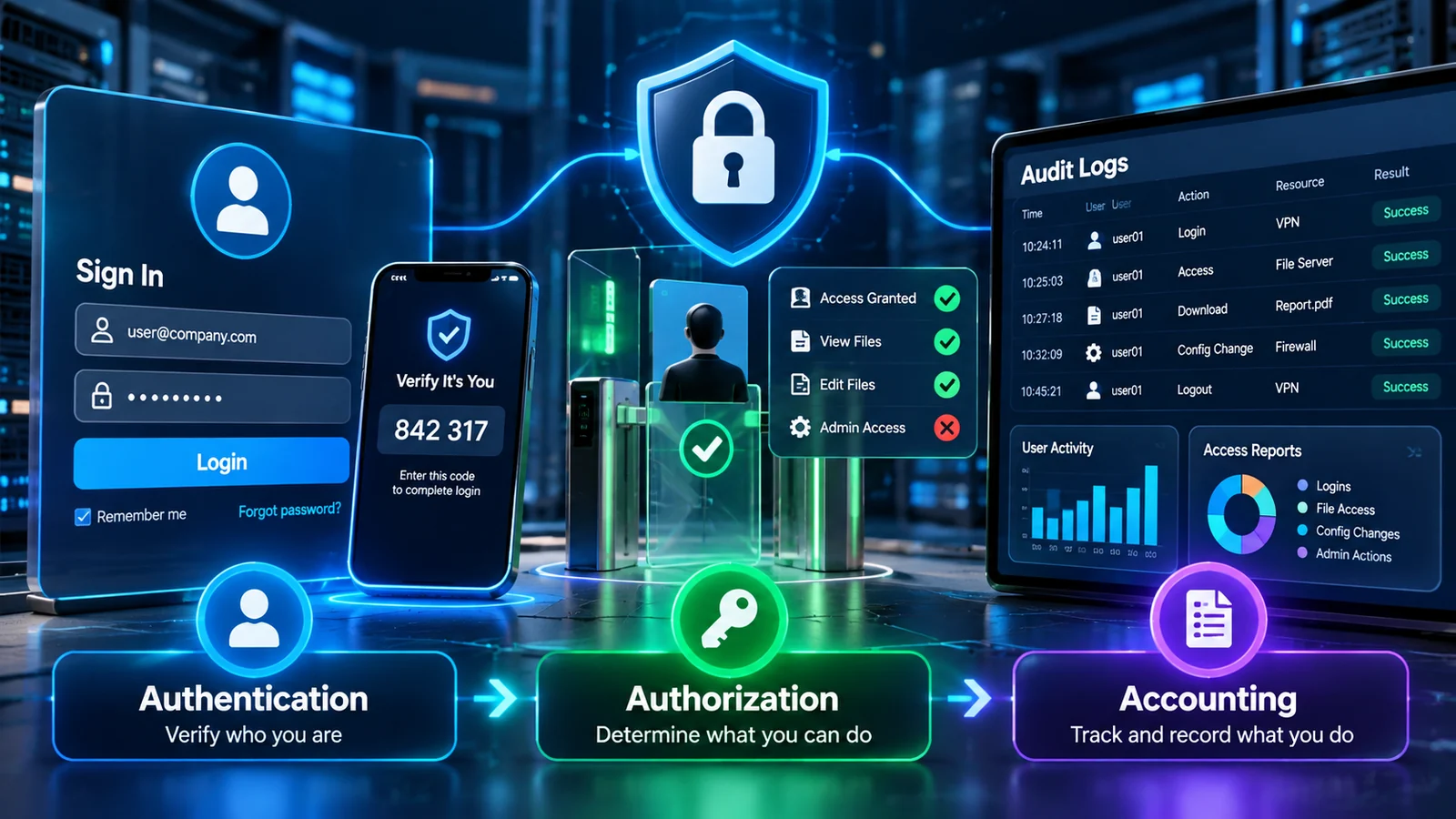
AAA identity and access workflow · Verify identity → determine access → record activity
What You’ll Learn
- The difference between authentication, authorization, and accounting.
- How AAA controls access from login through post-login activity.
- How passwords, biometrics, MFA, RBAC, least privilege, and audit logs fit into AAA.
- How to identify the correct AAA concept in Security+ scenario questions.
- Why authentication does not automatically mean authorization.
What Is AAA in Cybersecurity?
AAA stands for Authentication, Authorization, and Accounting. Together, these functions help an organization control access to systems and maintain records of activity.
The easiest way to remember the model is to ask three questions:
Who are you?
Verify the identity of a user, device, or system.
What did you do?
Record activity for monitoring, review, and investigation.

1. Authentication: Verify Who You Are
Authentication is the process of verifying an identity claim. A user identifies themselves, and the authentication system checks appropriate evidence before accepting that claim.
Authentication answers who you are. It does not, by itself, determine what you are permitted to do.
Common Authentication Factors
| Factor | Meaning | Examples |
|---|---|---|
| Something you know | A memorized secret | Password, PIN, passphrase |
| Something you have | A possession | Authenticator app, hardware token, smart card |
| Something you are | A biometric characteristic | Fingerprint, face, iris |
| Somewhere you are | A location-based condition | Trusted network or geographic condition |
| Something you do | A behavioral characteristic | Typing pattern or gesture behavior |
Multi-Factor Authentication
Multi-factor authentication (MFA) combines evidence from at least two different authentication factor categories. Two passwords are still two examples of the same category: something you know.
For example, a user may enter a password and then approve a sign-in using an authenticator app. This combines something you know with something you have.
For a true MFA example, look for evidence from different factor categories, not simply a larger number of credentials.
2. Authorization: Determine What You Can Do
Authorization occurs after an identity has been authenticated. It determines which resources the identity can access and which actions the identity can perform.
Authorization decisions may depend on roles, policies, attributes, resource sensitivity, network location, device status, time, and other context.
A successful login does not automatically give a user unlimited access. Authentication establishes identity; authorization controls permissions.
Role-Based Access Control (RBAC)
RBAC assigns permissions to roles instead of individually assigning every permission to every user. Users receive the permissions associated with their assigned roles.
For example, a help-desk role might be permitted to reset passwords but not read payroll records. An HR role may have different permissions because the job requires access to employee records.
Least Privilege
The principle of least privilege means giving a user, process, or system only the access required to perform its authorized function. It reduces unnecessary exposure and can limit the damage caused by compromised accounts.
Common Authorization Models
Permissions are associated with roles.
Access decisions use attributes and policy rules.
Resource owners can control access to resources.
Centrally enforced policy and labels determine access.
3. Accounting: Record What Happened
Accounting records and tracks activity after access occurs. It helps security teams understand who logged in, what resources were accessed, what actions were taken, and when those actions occurred.
Accounting provides an activity record that supports monitoring, troubleshooting, investigations, compliance, and incident response.
Examples of Accounting Data
- Successful and failed login attempts.
- File access and download activity.
- Administrative configuration changes.
- Privilege changes and account modifications.
- Session start and end times.
- VPN and remote-access activity.
Depending on the environment, accounting data may be collected through operating-system logs, application logs, identity systems, VPN systems, network devices, cloud audit trails, and centralized security monitoring platforms.
How AAA Works Together
AAA is easiest to understand as a sequence:
Consider a remote employee who signs in to a company application. The authentication system validates the identity, the authorization system checks permissions, and accounting records the relevant activity.
Real-World AAA Example
Scenario: An employee signs in to the company’s finance application from a managed laptop.
Authentication: The employee enters a password and approves an MFA request.
Authorization: The employee’s finance role permits access to billing records but not payroll administration.
Accounting: The system records the login, the resources accessed, and administrative actions performed during the session.
Security lesson: A successful authentication does not mean every function is allowed. An activity record also helps investigators understand what occurred.
Common Security+ AAA Exam Traps
Authentication is not authorization. A verified identity can still be denied access to a resource.
Two passwords are not two different factors. Both are something you know.
Accounting is more than a login message. It can include access, changes, sessions, and other activity.
RBAC is an authorization model. Roles are used to determine permissions.
Audit logs support accounting and investigation. They help create a record that can be reviewed later.
Quick AAA Reference
| AAA Function | Main Purpose | Typical Exam Clues |
|---|---|---|
| Authentication | Verify identity | Password, MFA, biometric, token |
| Authorization | Grant or deny permissions | Role, permission, policy, least privilege |
| Accounting | Record activity | Logs, timestamps, access records, audit trail |
Further Reading and Related Guides
Practice Questions
10 scenario-based questions. Open a question to reveal the answer and explanation.
Answer
Authentication verifies the identity claim using evidence.
Why this matters
Authentication answers “Who are you?” Authorization determines what an authenticated identity may access.
Answer
Authorization determines which resources and actions an identity may use.
Why this matters
The identity has already authenticated. The permission decision is authorization.
Answer
Accounting records activity for monitoring, review, and investigation.
Why this matters
Logs, timestamps, session records, and audit trails are accounting clues.
Answer
Password plus fingerprint uses something you know and something you are.
Why this matters
Two passwords are both in the “something you know” category.
Answer
Role-Based Access Control.
Why this matters
RBAC associates permissions with roles instead of assigning every permission individually to each user.
Answer
Least privilege provides only the access necessary for an authorized function.
Why this matters
Limiting unnecessary access reduces exposure if an account or system is compromised.
Answer
An activity record or audit trail.
Why this matters
Authentication verifies identity; authorization governs permissions; accounting records activity.
Answer
Authentication → Authorization → Accounting.
Why this matters
The sequence is identity verification, permission decision, and activity recording.
Answer
No. A PIN and password are generally both something you know.
Why this matters
MFA requires evidence from at least two different authentication factor categories.
Answer
Authorization denies the requested access according to the applicable policy.
Why this matters
Successful authentication does not grant unlimited access.
Exam Quiz
Lesson 01.3 — Authentication, Authorization and Accounting · 15 questions · 10 minutes
AAA — Exam Simulation
Test your knowledge with 15 scenario-based questions. Every attempt randomizes both the question order and answer options.
Your timer starts when you select Start Quiz.
Question will appear here.
Quiz complete
Lesson Summary
Review the essential AAA concepts before continuing to the next Security+ lesson.
Verifies identity using evidence such as passwords, authenticator apps, and biometric characteristics.
Determines what an authenticated identity is allowed to access or do. RBAC and least privilege are important concepts.
Records activity, timestamps, sessions, and actions for monitoring, auditing, and investigation.
Uses evidence from different factor categories. Two passwords alone do not constitute two different factors.
Authentication: Who are you? · Authorization: What can you do? · Accounting: What did you do?
Supplementary reading: Security Frameworks: NIST, ISO 27001, and CIS Controls. This remains supplementary material rather than one of the ten core lessons.