- How confidentiality, integrity, and availability guide security decisions.
- How to distinguish security control categories from control types.
- How authentication, authorization, and accounting (AAA) work for people and systems.
- What non-repudiation, authorization models, and gap analysis mean in practice.
- How Zero Trust control-plane and data-plane components work together.
- How physical safeguards, sensors, and deception technologies reduce risk.
- How change management affects technical security and service availability.
- How encryption, key management, hashing, signatures, certificates, and PKI differ.
Domain 1.0: General Security Concepts
General security concepts provide the vocabulary used throughout cybersecurity. They help professionals decide what must be protected, which controls fit a risk, how users and systems should gain access, and how to recognize whether a security measure is working.
CompTIA Security+ SY0-701 assigns 12% of the exam to Domain 1.0. This article is an overview of all four Domain 1 objectives. Use the linked specialist lessons for deeper explanations and additional scenarios.
1.1 — Security Control Categories and Types
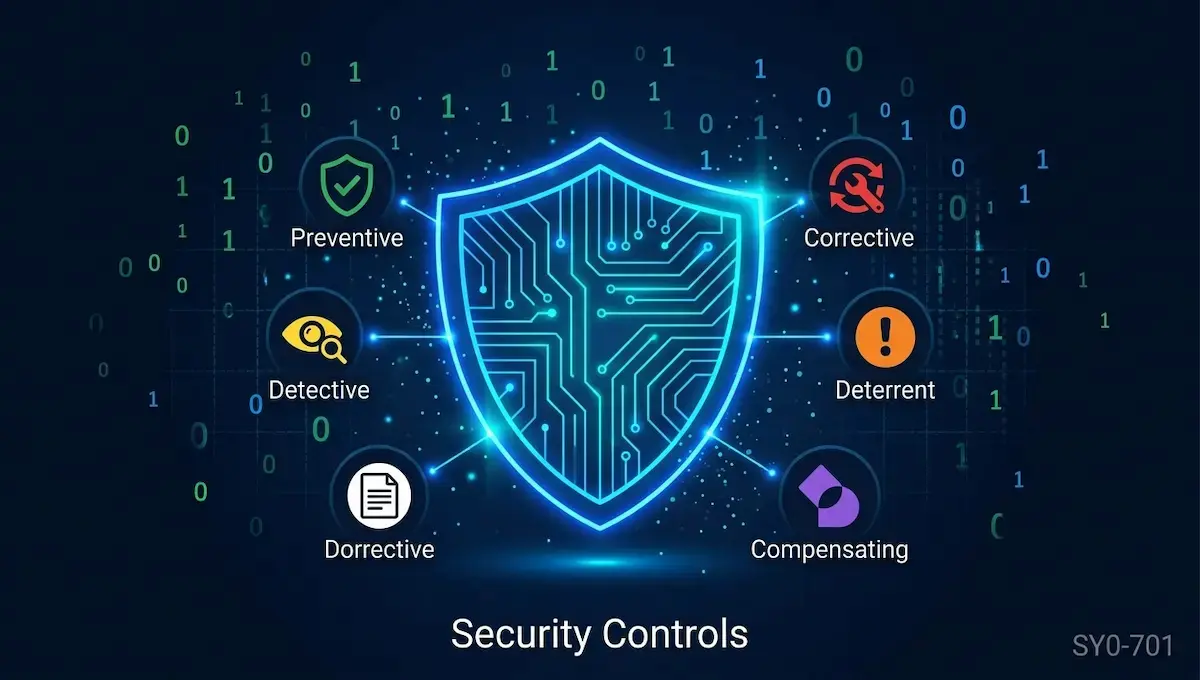
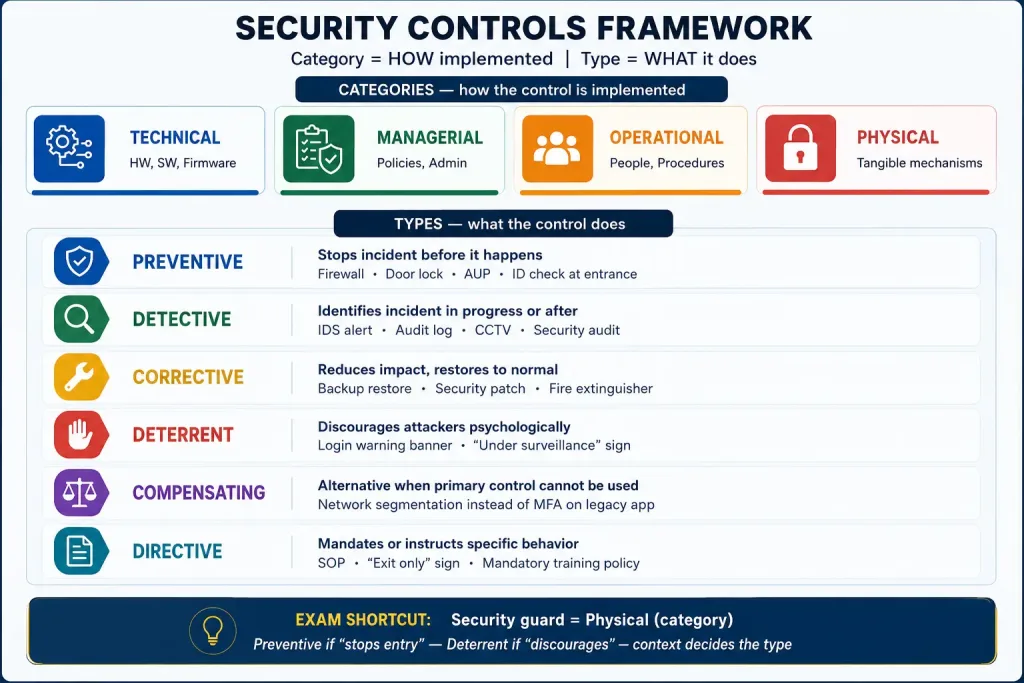
A security control is a safeguard or countermeasure used to reduce risk. Classify controls along two different dimensions: category describes the control’s implementation, while type describes its intended function. The same control can fit more than one functional type depending on the scenario.
Security Control Categories: How a Control Is Implemented
Technical
Implemented through technology, hardware, software, or firmware. Examples include firewalls, encryption, endpoint protection, access control lists, intrusion detection, and multifactor authentication.
Managerial
Driven by governance, policies, standards, planning, and oversight. Examples include risk assessments, security policies, audit requirements, and a formal security program.
Operational
Performed by people and day-to-day processes. Examples include awareness training, backup procedures, visitor handling, incident response activities, and guard procedures.
Physical
Protects facilities, equipment, and people through tangible safeguards. Examples include locks, fences, bollards, badge readers, barriers, lighting, and access control vestibules.
Security Control Types: What a Control Does
| Control Type | Purpose | Example | Exam Clue |
|---|---|---|---|
| Preventive | Attempts to stop an unwanted event before it occurs. | Firewall rule, door lock, least-privilege permissions. | Blocks or prevents. |
| Deterrent | Discourages someone from attempting an unwanted action. | Warning sign, visible camera, monitoring banner. | Discourages an attempt. |
| Detective | Identifies or records an event that has occurred or is occurring. | IDS alert, audit log review, motion sensor, CCTV monitoring. | Detects, alerts, or records. |
| Corrective | Reduces the effects of an incident and helps restore normal operation. | Restore from backup, remediate a compromised host, apply a fix. | Repairs or restores. |
| Compensating | Provides an alternative safeguard when the primary control cannot be implemented. | Enhanced segmentation and monitoring for a legacy system that cannot support MFA. | Alternative safeguard for a control gap. |
| Directive | Directs people or systems to follow a required behavior. | Written policy, mandatory procedure, authorized-personnel instruction. | Instructs or mandates. |
1.2 — Fundamental Security Concepts
The CIA Triad: Confidentiality, Integrity, and Availability
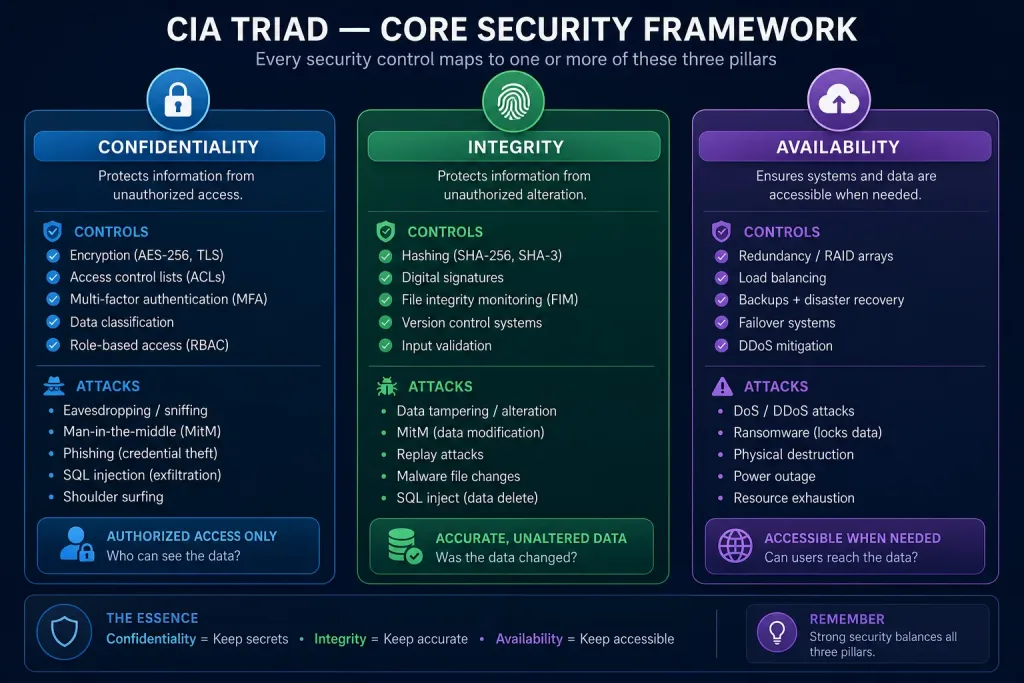
The CIA triad is a foundational model for protecting information and systems. A single incident can affect more than one objective, so identify the primary impact described by the scenario.
Prevent Unauthorized Disclosure
Only authorized users, devices, or services should access protected information. Safeguards include encryption, access controls, data classification, and least privilege.
Example: A stolen drive contains encrypted customer records that cannot be read without the key.
Prevent Unauthorized Changes
Information should remain accurate, complete, and protected from unauthorized alteration or destruction. Hashes, digital signatures, integrity monitoring, and controlled change processes can help.
Example: A trusted cryptographic hash reveals that a downloaded file differs from the expected version.
Keep Services Accessible
Authorized users should be able to access systems and data when needed. Resilience measures include redundancy, tested backups, failover, capacity planning, and denial-of-service protection.
Example: A redundant service remains available after one server fails.
| Scenario | Primary CIA Objective | Reason |
|---|---|---|
| An attacker reads confidential payroll files. | Confidentiality | Information was disclosed to an unauthorized party. |
| An attacker changes a beneficiary’s bank details. | Integrity | Data was altered without authorization. |
| Ransomware prevents staff from opening essential files. | Availability | Legitimate users cannot access needed information. Some ransomware incidents also affect confidentiality if data is exfiltrated. |
| A person intercepts and modifies data in transit. | Confidentiality and/or integrity | The exact impact depends on whether the data is disclosed, altered, or both. |
For a deeper breakdown and additional scenarios, study the CIA Triad lesson.
Authentication, Authorization, and Accounting (AAA)
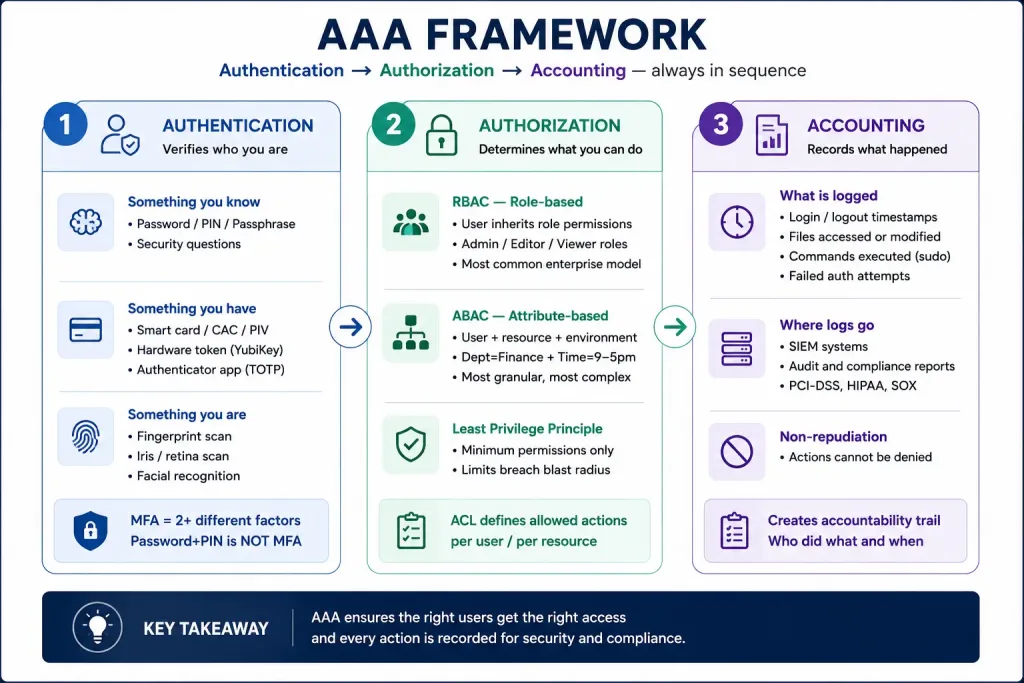
AAA helps control and record access. The three terms describe distinct functions and should not be treated as synonyms.
Authentication
Verifies the claimed identity of a person or system. Methods include passwords, smart cards, certificates, biometrics, and multifactor authentication.
Authorization
Determines which resources or actions an authenticated subject is allowed to use. Common models include RBAC, ABAC, DAC, and MAC.
Accounting
Records activity such as sign-ins, resource use, administrative changes, timestamps, and session duration to support auditing and investigations.
Authenticating People vs. Systems
Authenticating People
People may authenticate with knowledge factors (password or PIN), possession factors (smart card or security key), inherence factors (biometrics), or a combination of different factor categories. Identity proofing establishes an identity at enrollment; authentication verifies a claimed identity during access.
Authenticating Systems
Devices, servers, applications, and services also need identities. Common mechanisms include device certificates, machine accounts, workload identities, and mutual TLS (mTLS), where both communicating endpoints authenticate. Being on an internal network is not sufficient proof of trust.
Authentication Factors and Authorization Models
| Concept | Meaning | Example |
|---|---|---|
| Something you know | Knowledge factor | Password or PIN. |
| Something you have | Possession factor | Smart card or hardware security key. |
| Something you are | Inherence factor | Fingerprint or iris scan. |
| RBAC | Role-Based Access Control | Permissions assigned to job roles. |
| ABAC | Attribute-Based Access Control | Decision based on subject, resource, action, and contextual attributes. |
| DAC | Discretionary Access Control | An owner can decide who receives access, subject to system rules. |
| MAC | Mandatory Access Control | Central policy and labels determine access; ordinary users cannot freely override them. |
For full examples of AAA, authentication factors, and permissions, read the AAA lesson.
Non-Repudiation
Non-repudiation is the ability to provide trustworthy evidence supporting the origin or an action so that a party cannot easily deny having performed it. Digital signatures can support non-repudiation when the signing key is controlled properly and the certificate, identity, signature, and applicable process are valid.
Digital signatures can support authenticity and integrity as well. They do not by themselves make message contents confidential; encryption is used when confidentiality is required. Audit logs support accountability and investigation, but a log entry alone does not automatically guarantee non-repudiation. For details, use the Non-Repudiation and Digital Signatures lesson.
Gap Analysis
A gap analysis compares the current state of a security program, system, or process with a defined target state, requirement, or standard. It identifies missing or insufficient safeguards so an organization can prioritize improvements.
Identify the requirement, policy, baseline, or desired security state.
Collect evidence through inventories, interviews, configuration reviews, and testing.
Document missing controls, inconsistent configurations, and unmet requirements.
Rank fixes by risk, impact, effort, dependencies, and compliance requirements.
Zero Trust
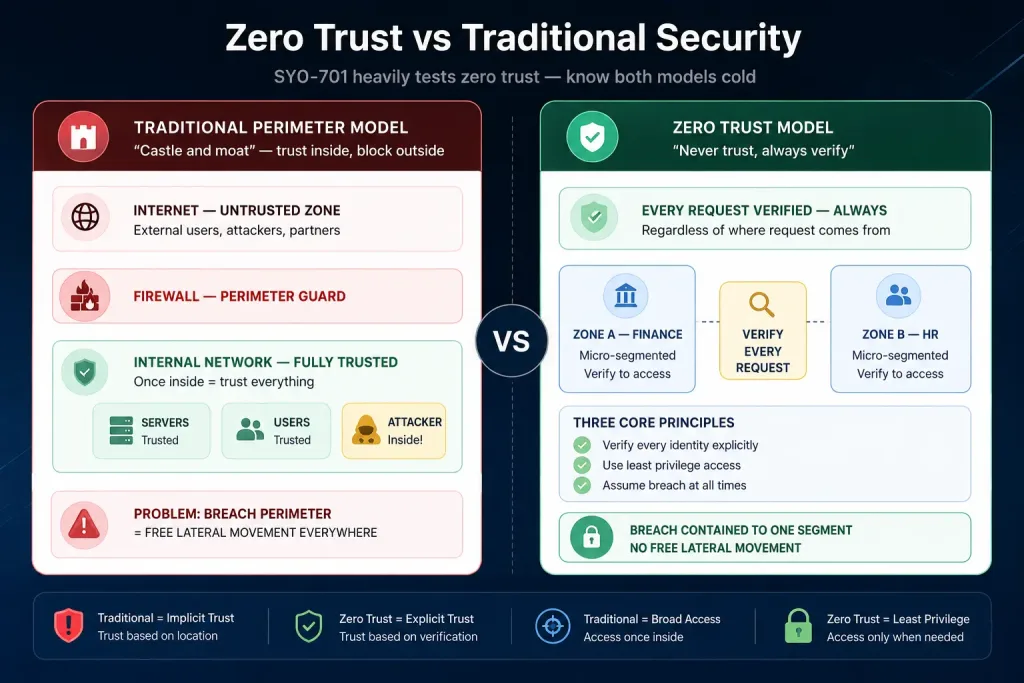
Zero Trust removes implicit trust based only on network location or ownership. Access requests are evaluated using identity, policy, resource sensitivity, device or system signals, and relevant context. Common principles are to verify explicitly, use least privilege, and assume breach.
Verify Explicitly
Use relevant identity, authentication, authorization, device, and context signals to make an access decision.
Use Least Privilege
Grant only the access needed for the task, scope, and appropriate duration.
Assume Breach
Design controls to limit damage, detect suspicious activity, and constrain lateral movement if compromise occurs.
Zero Trust Control Plane and Data Plane
The CompTIA objectives group key Zero Trust terms under the control plane and data plane. In the NIST logical model, the Policy Engine (PE) makes the resource-access decision, the Policy Administrator (PA) carries out that decision by instructing the enforcement point, and the Policy Enforcement Point (PEP) mediates the connection. Products may combine some roles in their implementation.
| Plane | Term | Core Idea |
|---|---|---|
| Control | Adaptive identity | Use changing identity, device, behavior, or risk signals to adjust authentication assurance or an access decision. |
| Control | Threat scope reduction | Limit what an account, device, or compromised workload can reach, reducing the potential blast radius. |
| Control | Policy-driven access control | Make access decisions using defined policy and relevant context rather than implicit network trust. |
| Control | Policy Engine (PE) | Evaluates enterprise policy and supporting information to grant, deny, or revoke access. |
| Control | Policy Administrator (PA) | Executes the PE’s decision by establishing or terminating the communication path through commands to a PEP. |
| Data | Implicit trust zones | Traditional designs may treat an internal zone as trusted by default; Zero Trust reduces reliance on that assumption. |
| Data | Subject/System | The person, device, application, service, or workload requesting access to a protected resource. |
| Data | Policy Enforcement Point (PEP) | Enables, monitors, and terminates the subject-to-resource connection according to the access decision. |
Study the dedicated Zero Trust Architecture lesson for a deeper explanation and scenario practice.
Physical Security Controls
Physical security helps prevent, deter, detect, delay, or respond to unauthorized entry, theft, damage, and environmental threats. Multiple layers are often combined because no single measure addresses every risk.
| Control | Purpose / Use |
|---|---|
| Bollards | Sturdy posts that help prevent vehicles from entering protected areas. |
| Access control vestibule | A controlled entry area used to manage entry and reduce tailgating. A mantrap is a common implementation. |
| Fencing | Defines a boundary, delays access, and helps channel people toward monitored entry points. |
| Video surveillance | Supports observation, detection, evidence collection, and sometimes deterrence. |
| Security guards | Provide human observation, access checks, patrols, and response. |
| Access badges | Identify a credential and can be used with readers and access rules. |
| Lighting | Improves visibility, supports observation, and can discourage unauthorized activity. |
Physical Security Sensors
Infrared
Detects infrared energy or changes in thermal patterns. Passive infrared (PIR) sensors commonly detect changes caused by moving warm bodies.
Pressure
Detects force or weight, such as a person stepping on a pressure-sensitive mat or surface.
Microwave
Uses microwave signals and changes in the reflected signal to detect movement in a monitored area.
Ultrasonic
Uses high-frequency sound waves and detects changes in the returning signal to identify movement or presence.
For physical control examples and visual comparisons, use the Physical Security Controls lesson.
Deception and Disruption Technologies
Deception technologies create monitored decoys that can reveal suspicious activity. They complement rather than replace core security controls. Their value comes from making unauthorized interaction visible and giving defenders useful telemetry.
Honeypot
A decoy system or service designed to attract and monitor unauthorized activity. It should be isolated and monitored so it does not become a stepping stone into production systems.
Honeynet
A group or network of decoy systems that provides a broader environment for observing attacker behavior.
Honeyfile
A planted file that appears valuable or interesting. Attempts to open or access it can generate an alert.
Honeytoken
A fake credential, record, token, or other data item placed to reveal unauthorized use when it is accessed or presented.
1.3 — Change Management: Security at a Glance
Change management is a controlled process for evaluating, approving, testing, implementing, documenting, and reviewing changes to systems or services. Its goal is not to block every change; it is to understand risk, authorize appropriate work, reduce unexpected impact, and retain a way to recover when a change fails.
Record the purpose, scope, requester, change owner, affected systems, and stakeholders responsible for review or implementation.
Assess security, business, availability, privacy, compatibility, dependencies, and operational impacts; obtain the required approval before implementation.
Review test evidence, define a suitable deployment window, communicate expected effects, and follow the applicable standard or emergency procedure.
Prepare a backout plan, follow the SOP, record results, update diagrams and policies/procedures, and use version control for controlled changes.
Business Processes That Affect Security Operations
| Item | Why It Matters |
|---|---|
| Approval process | Confirms the change is authorized by the appropriate people before work begins, except where an approved emergency process applies. |
| Ownership | Identifies who is accountable for the change, implementation, communication, and outcome. |
| Stakeholders | Finds teams or users who may be affected, including operations, security, application owners, support, and the business. |
| Impact analysis | Evaluates security risk, service availability, compatibility, compliance, cost, and dependencies. |
| Test results | Provides evidence that the change was tested and that expected behavior, security checks, and acceptance criteria were met. |
| Backout plan | Specifies how to reverse the change or restore the known-good state if the change fails or creates unacceptable risk. |
| Maintenance window | Schedules work to reduce business disruption and ensures the correct people and recovery resources are available. |
| Standard operating procedure (SOP) | Provides approved, repeatable steps for routine changes and supports consistency and auditability. |
Technical Implications of Change
| Technical Item | Possible Security or Operational Impact | Example |
|---|---|---|
| Allow lists / deny lists | A change may unintentionally permit a harmful item or block a legitimate user, application, domain, or connection. | A new firewall rule allows a required service but must not expose an administrative port to the internet. |
| Restricted activities | Some operations may need to be paused or limited during deployment to prevent conflicting writes or unsafe operation. | Disable account provisioning while an identity-system schema is migrated. |
| Downtime | A change may interrupt access, monitoring, transaction processing, or other business services. | Plan a maintenance window and communicate expected service impact. |
| Service restart | A background service may stop briefly, lose active sessions, or fail to restart correctly. | Restart a logging agent and verify event collection resumes. |
| Application restart | An application may drop user sessions or require a coordinated deployment. | Restart a web application after a library update and test sign-in and key transactions. |
| Legacy applications | Older software may be incompatible with a patch, modern cryptography, MFA, or a changed dependency. | Test in a controlled environment and plan replacement or an approved compensating control when necessary. |
| Dependencies | Changes to shared libraries, databases, identity providers, certificates, or network services can affect dependent systems. | Validate that a certificate renewal will not break services that rely on the previous trust chain. |
Documentation and Version Control
After an approved change, update network and system diagrams when the architecture changes, update affected policies and procedures, and preserve version history for configuration or source changes. Record the actual implementation, any deviation from the plan, test results, and the final outcome. Documentation is part of the security record—not optional housekeeping.
For a dedicated walkthrough, see the Change Management lesson.
1.4 — Cryptography and PKI: Core Concepts
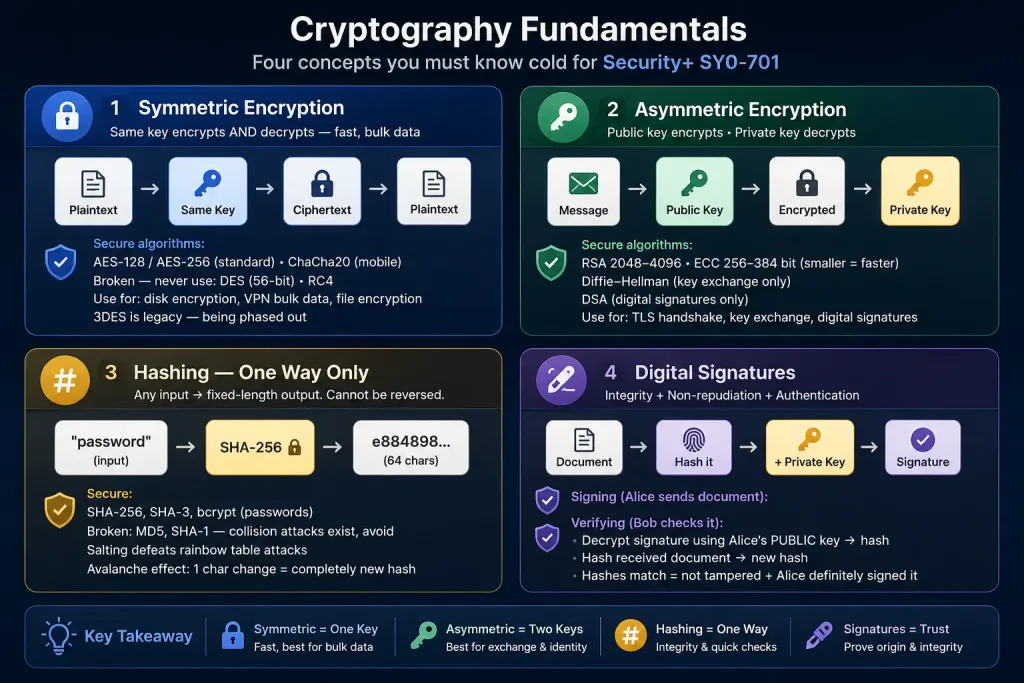
Cryptographic solutions must match the security objective and the data being protected. Encryption is primarily used for confidentiality; hashing supports integrity checks; digital signatures support integrity and origin authentication and can support non-repudiation; key-management processes protect the keys that make these mechanisms trustworthy.
Symmetric Encryption, Asymmetric Cryptography, and Key Exchange
| Concept | How It Works | Typical Use / Exam Clue |
|---|---|---|
| Symmetric encryption | The same secret key is used to encrypt and decrypt data. | Efficiently protects large amounts of data such as disks, files, databases, and network traffic. The secret key must be protected and shared securely. |
| Asymmetric cryptography | Uses a related public/private key pair. In public-key encryption schemes, a sender can encrypt for a recipient with the recipient’s public key, and the recipient decrypts with the private key. Digital signatures are a separate operation. | Supports signatures, certificates, and certain key-establishment or encryption workflows. It is usually more computationally expensive than symmetric encryption for bulk data. |
| Key exchange / agreement | Allows parties to establish a shared secret over a channel without simply sending the secret key in plaintext. Diffie–Hellman and elliptic-curve Diffie–Hellman are common examples. | Often establishes session keys that are then used with symmetric encryption. Key exchange alone does not automatically authenticate the communicating parties. |
| Algorithms and key length | An algorithm defines the cryptographic operation; key length is one factor in its security strength. | AES is symmetric encryption; RSA and ECC are public-key cryptography families; Diffie–Hellman is used for key agreement; SHA-2/SHA-3 are hash families, not encryption algorithms. |
Encryption Levels and Transport / Communication
| Level / Method | What Is Protected | Example or Consideration |
|---|---|---|
| Full-disk | Most or all data on a storage device, commonly when the device is powered off or locked. | Helps protect data if a laptop or drive is lost; it does not by itself stop an already authorized, logged-in user from accessing files. |
| Partition | A selected disk partition. | Can protect one partition while other partitions have different protection. |
| File | Individual files or selected file collections. | Useful when protection should follow particular files or folders. |
| Volume | A logical storage volume. | Protection scope follows the configured volume rather than necessarily the entire physical disk. |
| Database | A database, its storage, or database-managed data. | Implementation may protect the whole database or selected database objects; details depend on the product and configuration. |
| Record | Individual records or rows. | Allows more granular protection for selected records. |
| Transport / communication | Data traveling between systems or endpoints. | TLS is commonly used to protect web and application traffic. Secure transport does not automatically protect the data after it reaches an endpoint. |
Public Key Infrastructure (PKI), Keys, and Certificates
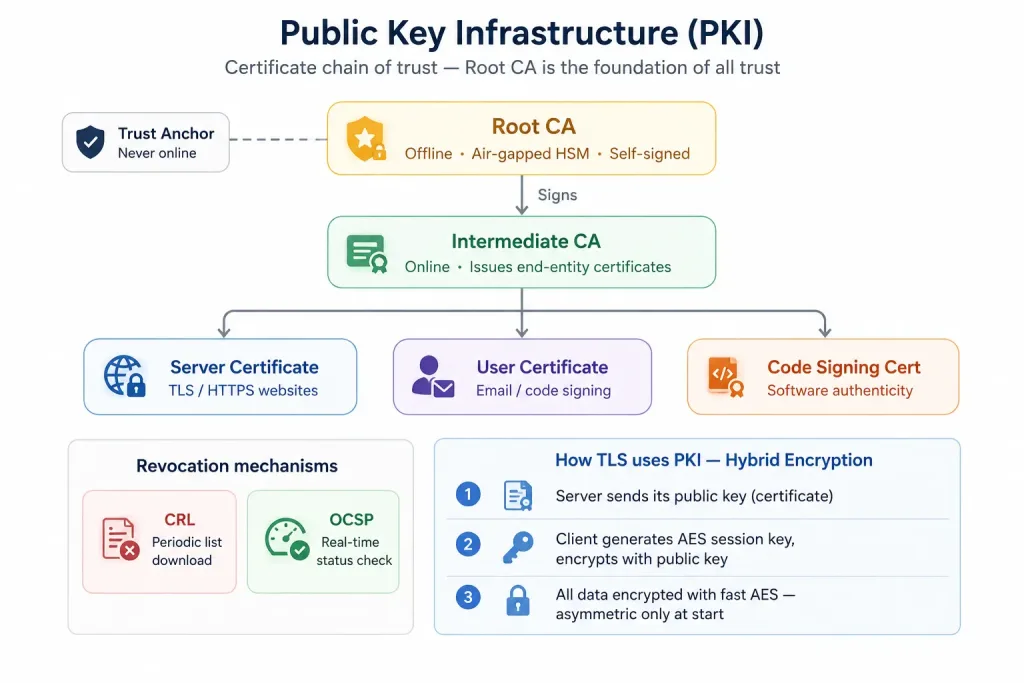
Public key infrastructure (PKI) combines people, policies, processes, and technology to issue, distribute, validate, renew, and revoke public-key certificates. A certificate binds a public key to a subject or identity according to the certificate contents and issuing/validation process. A certificate’s presence alone does not prove that it is trusted or appropriate for every purpose.
| PKI Term | Purpose / What to Remember |
|---|---|
| Public key | Can be distributed to others. It may be used to verify a signature or, in public-key encryption schemes, encrypt data for the key owner. |
| Private key | Must be protected by its owner or system. It may be used to decrypt data in an applicable scheme or create a digital signature. |
| Key escrow | A controlled arrangement in which an authorized party or system holds key material under documented access and recovery conditions. It creates governance and security risks if access is abused or the escrow is compromised. |
| Certificate Authority (CA) | Issues and signs certificates under defined identity-validation and certificate policies. |
| Root of trust / Root CA | A trust anchor whose public key is accepted through a relying system’s trust configuration. Root CA certificates are often self-signed and their private keys are strongly protected; “self-signed” alone does not make a certificate trusted. |
| Third-party certificate | Issued by an external CA that relying systems may already trust. Trust still depends on a valid chain, appropriate name and usage, dates, and revocation/status checks where applicable. |
| Self-signed certificate | Signed by its own corresponding private key rather than an independent CA. It may be suitable in limited, deliberately configured environments, but browsers and systems will not automatically trust it merely because it is self-signed. |
| Certificate Signing Request (CSR) | Contains a public key and identifying/request information submitted to a CA or issuer. The private key should not be included in the CSR. |
| Certificate Revocation List (CRL) | A published list of certificates that the issuing CA has revoked before their stated expiration. |
| Online Certificate Status Protocol (OCSP) | Allows a relying system to query a responder for certificate status. Response freshness depends on the responder, response validity, and caching behavior. |
| Wildcard certificate | Can cover multiple hostnames matching its wildcard name, commonly one label such as *.example.com. It does not automatically cover the bare apex example.com or deeper nested names unless those names are also covered. |
Cryptographic Tools
Trusted Platform Module (TPM)
A hardware-based security component that can protect keys and support platform integrity measurements and device trust functions.
Hardware Security Module (HSM)
A specialized hardware device designed to protect cryptographic key material and perform sensitive cryptographic operations in a controlled environment.
Key Management System (KMS)
A system or service for managing keys and their lifecycle, including creation, storage, access policy, rotation, auditing, and retirement or destruction.
Secure Enclave
A protected execution or storage environment designed to isolate sensitive operations and key material from the rest of the system. The exact implementation varies by platform.
Obfuscation: Steganography, Tokenization, and Data Masking
| Technique | What It Does | Important Distinction |
|---|---|---|
| Steganography | Conceals the existence of a message by embedding it in another file or medium, such as an image, audio file, or video. | Hiding a message is not the same as encrypting its contents; a discovered hidden message may still be readable. |
| Tokenization | Replaces sensitive values with tokens that have no useful meaning outside the tokenization system or mapping process. | Protection depends on securing the token vault or mapping service and controlling access to it. |
| Data masking | Conceals or transforms sensitive fields for display, testing, or limited-use contexts. | Masking can reduce exposure but may not protect the original data at rest unless combined with other controls. |
Hashing, Salting, Key Stretching, and Digital Signatures
| Concept | Core Function | Exam Reminder |
|---|---|---|
| Hashing | Transforms input data into a fixed-length digest. | Hashing is not encryption and has no intended decryption step. Integrity checks require a trustworthy reference value or an authenticated mechanism. |
| Salting | Adds a unique, typically non-secret random value to a password before deriving/storing its verifier. | A salt helps prevent identical passwords from producing identical stored values and defeats reusable precomputed tables; it is not a password by itself. |
| Key stretching | Uses a deliberately more expensive derivation process to make repeated password guesses slower. | Salt and stretching are often used together with a suitable password-based key derivation function. |
| Digital signature | A signer uses a private signing key to create a signature; a verifier uses the associated public key and verification algorithm. | Can support integrity, origin authentication, and non-repudiation when correctly implemented and supported by key management, identity, and policy. A signature alone does not provide confidentiality. |
Blockchain and Open Public Ledgers
A blockchain is a type of ledger that organizes records into cryptographically linked blocks and uses a protocol to agree on or validate the ledger’s state. An open public ledger is designed to be publicly accessible for reading or independently verifying transactions or records, though exact visibility and participation rules depend on the system.
These designs can make unauthorized retrospective changes detectable or difficult under the ledger’s assumptions, but they do not guarantee that submitted data is true, protect all personal information, or remove the need for secure keys and sound governance. Never assume that “on a blockchain” means automatically private, correct, or secure.
Continue with Cryptography Basics, Public Key Infrastructure (PKI), and the Digital Signatures and Non-Repudiation lesson for deeper examples.
Putting the Concepts Together: Scenario Analysis
Scenario: A suspicious account accesses a sensitive system
An employee’s credentials are stolen. The attacker signs in from an unusual device and attempts to download restricted files. The organization has MFA, least-privilege permissions, device compliance rules, audit logs, and a deception file in a restricted share.
- AAA: Authentication checks identity, authorization restricts available files, and accounting records the session and attempted actions.
- Zero Trust: Device and risk signals can trigger additional checks or denial instead of trusting the session solely because it is authenticated.
- CIA: Blocking unauthorized file disclosure protects confidentiality. Logs can help investigate access and verify whether changes occurred.
- Detective controls: Monitoring may identify unusual downloads or access to the deception file.
- Gap analysis: After the event, the organization compares its intended controls with what failed or was missing and prioritizes remediation.
Lesson: Good security uses complementary controls. No single technology replaces sound identity, access, monitoring, response, and recovery processes.
Security+ SY0-701 Exam Strategy
Practice Questions
14 practice questions. Open each card to see the answer and explanation.
Exam Quiz
Lesson 01.1 — General Security Concepts · 15 questions · 10 minutes
General Security Concepts — Exam Simulation
Test your understanding of control types, CIA, AAA, Zero Trust, gap analysis, change management, physical security, deception technology, cryptography, and PKI.
15 Questions
Domain 1 overview
10 Minutes
Timed simulation
Instant Feedback
Explanation per answer
Answer Review
Score and corrections
Lesson 01.1 — Summary
General Security Concepts: Security Controls, Fundamental Concepts, Change Management, and Cryptography
Module 01 · Domain 1.0 · Exam domain weight: 12%
Key Takeaways
| Concept | Core Purpose | Exam Clue |
|---|---|---|
| Confidentiality | Prevent unauthorized disclosure | Someone views or receives protected data |
| Integrity | Protect accuracy and completeness | Data or files were changed without approval |
| Availability | Keep services and data accessible | Legitimate users cannot access resources |
| Control types | Stop, discourage, detect, correct, compensate, or direct | Classify the intended function |
| AAA | Verify, permit, and record | Who are you? What can you do? What did you do? |
| Gap analysis | Compare current and target state | Find deficiencies and prioritize fixes |
| Zero Trust | Evaluate resource access explicitly | Do not trust only because a user is internal |
| PKI | Manage public-key certificate trust | Certificates, CA chain, CRL, OCSP |
Exam Tips — Domain 1.0
- Classify both the category and the type of a control when the question asks for both.
- Map disclosure to confidentiality, modification to integrity, and inability to access to availability.
- Authentication verifies identity; authorization grants permissions; accounting records activity.
- Know all four physical sensor types: infrared, pressure, microwave, and ultrasonic.
- Distinguish honeypot, honeynet, honeyfile, and honeytoken.
- Know encryption levels, public/private keys, key exchange, TPM/HSM/KMS/Secure Enclave, obfuscation, hashing/salting/key stretching, blockchain, and certificate lifecycle terms.
- Change management includes allow/deny lists, restricted activities, downtime, restarts, legacy compatibility, dependencies, documentation, and version control.