
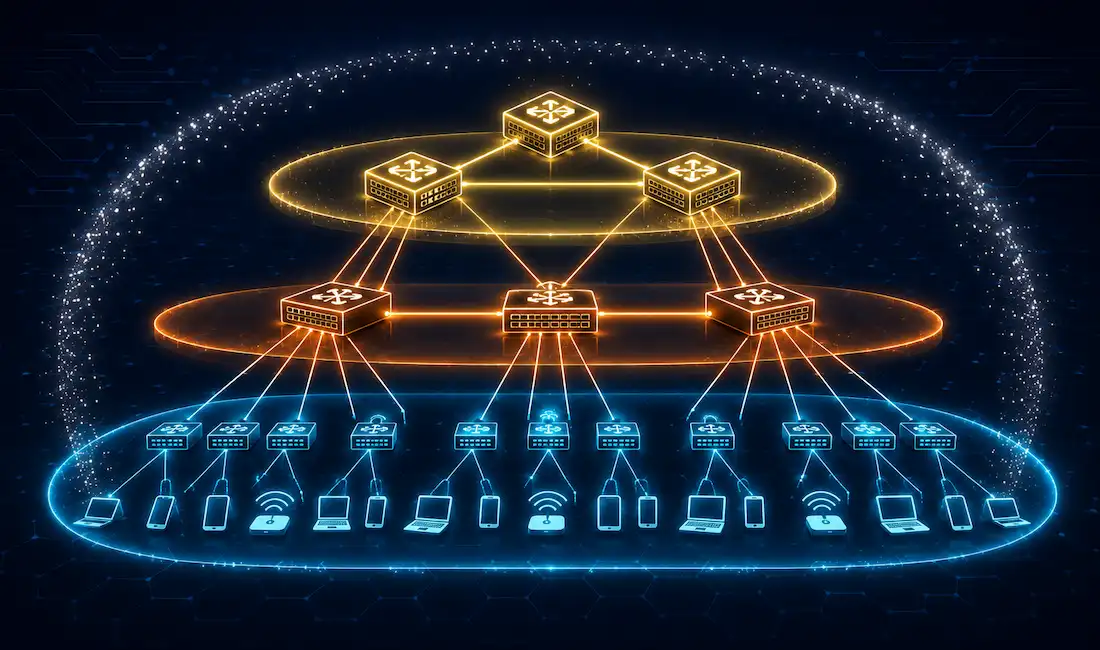
Cisco Borderless Networks is an architecture designed to enable secure, seamless connectivity for any user, device, or location, integrating wired and wireless access with unified policy and performance management. It’s built to address common enterprise IT challenges — mobility, security, and scalability — using Cisco Catalyst switches, ISR routers, and management tools like Cisco DNA Center. For CCNA and CCNP students, understanding Borderless Networks is essential groundwork for campus network design, a recurring exam topic on both certifications.
What a Cisco Borderless Network Actually Delivers
Cisco Borderless Networks integrate wired and wireless access to deliver network and endpoint services through a single, scalable, secure architecture. The design covers three broad categories of service:
- Network Services — routing, QoS, and security policies delivered through Cisco Catalyst switches (such as the 9300 series) and ISR routers (such as the 4400 series).
- Endpoint Services — support for a wide range of connected devices (IP phones, laptops, IoT sensors) using Cisco Identity Services Engine (ISE) for access control and policy enforcement.
- Management — Cisco DNA Center provides centralized configuration, monitoring, and automation across the whole architecture rather than requiring engineers to manage every device individually.
Together, these three layers of service are what let a Borderless Network deliver consistent connectivity and security regardless of where a user or device physically connects — which is the entire point of the “borderless” framing: the network’s logical boundaries are defined by policy, not by physical location.
The Four Core Principles
The Cisco Borderless switched network is built on four core design principles, each addressing a different practical concern in campus network design:
Hierarchical Network Design — organizes the network into access, distribution, and core layers, each with a distinct role. Cisco Catalyst 9200 switches at the access layer connect end devices directly, while Catalyst 9500 switches at the core provide high-speed backbone connectivity between distribution blocks. This separation of concerns is what makes the rest of the principles below actually achievable in a large network.
Modularity — allows each layer to scale independently, so growth in one part of the network doesn’t force a redesign of the whole thing. Adding a new building’s worth of access-layer switches, for example, shouldn’t require touching the core layer at all. Cisco DNA Center supports this kind of modular growth by letting new switches and services be provisioned through consistent templates rather than one-off manual configuration.
Resiliency — ensures high availability through protocols like HSRP (Hot Standby Router Protocol) for first-hop redundancy on Cisco routers, and EtherChannel for link-level redundancy on switches. If a single device or link fails, traffic continues to flow through a standby path rather than the whole segment going dark — a key topic on the CCNP exam specifically.
Flexibility — supports a genuinely diverse mix of devices and applications, from VoIP handsets to wireless laptops, using Cisco ISE for access control and QoS policies to prioritize latency-sensitive traffic like voice and video over less time-sensitive data.
Understanding these four principles matters beyond exam prep, since they give a network designer a consistent framework for evaluating almost any real-world design decision — security, mobility, and unified communications requirements all map back to one or more of these four principles. Cisco itself designs both three-tier and two-tier hierarchical networks for campus deployments, depending on the specific requirements of the site being built.
The Three-Tier Hierarchical Model
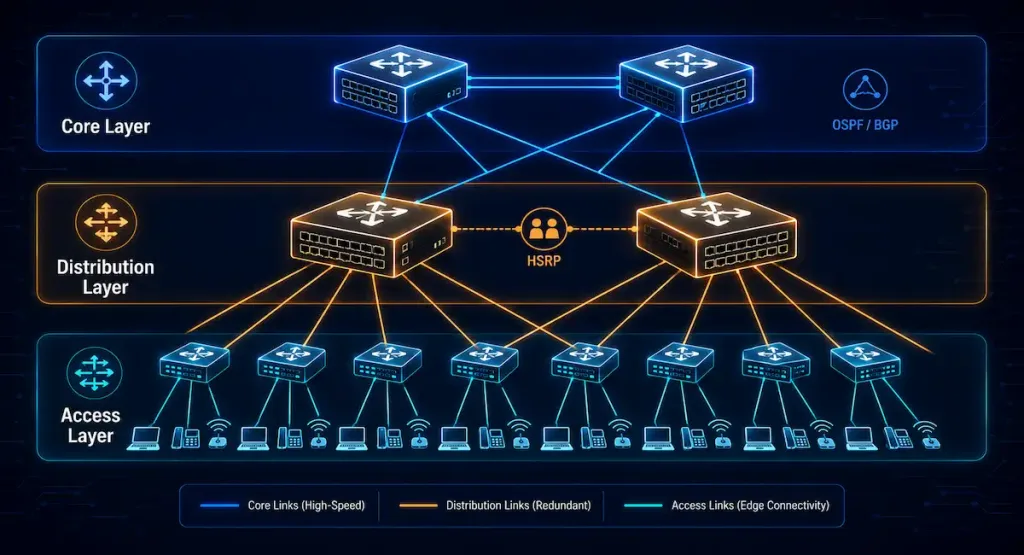
Cisco’s hierarchical network design divides a campus network into access, distribution, and core layers, each contributing to overall scalability and efficiency.
Access Layer
The access layer is where traffic enters or exits the campus network — it’s effectively the edge of the network from an end-user’s perspective. Its main function is to provide network connectivity and access for end-users, with access-layer switches connecting up to distribution-layer switches above them.
To meet growing user and application demands, modern access-layer switching platforms increasingly offer converged, integrated services for different types of endpoints at the edge of the network — voice, data, and wireless traffic all arriving on the same physical switch, but handled with different policies. (Note: this link points to an unrelated article about OSPF network types rather than endpoint types — an inherited link mismatch from the original article, flagged here per audit policy.) Building this kind of intelligence into access-layer switches lets applications behave more capably and securely without needing distribution- or core-layer devices to do the heavy lifting.
- Role: Connects end devices (PCs, IP phones, wireless APs) to the network, providing edge connectivity.
- Typical Cisco devices: Catalyst 9200 or 9300 switches, chosen for high port density and PoE support for phones and access points.
- Key features: VLAN segmentation (e.g., a dedicated voice VLAN), QoS for traffic prioritization, and Cisco ISE integration for secure, policy-based access.
- CCNA/CCNP relevance: Configuring VLANs and port security — commands like
switchport mode accessandswitchport port-security.
Distribution Layer
The distribution layer sits between access and core, and does considerably more work than simply passing traffic through. It provides intelligent switching and routing, enforces network access policy, and delivers differentiated services to different classes of application traffic arriving from the access layer below.
This layer also provides redundant paths for end-users through duplicate distribution switches, along with equal-cost paths up to the core layer. The distribution layer is where large-scale wiring-closet networks, Layer 2 broadcast domains, and Layer 3 routing boundaries are all aggregated into a manageable structure.
- Role: Aggregates access-layer traffic and applies routing, QoS, and security policy.
- Typical Cisco devices: Catalyst 9300 or 9400 switches, chosen for redundancy capability and policy enforcement capacity.
- Key features: HSRP for first-hop failover, ACLs for traffic filtering and security, and inter-VLAN routing.
- CCNA/CCNP relevance: Configuring HSRP (e.g.,
standby 1 ip 192.168.1.1) and QoS policies at the distribution layer.
Core Layer
The core layer is the backbone of the entire Borderless Network. It connects multiple distribution-layer blocks together, acts as the aggregation point for every other part of the campus, and interconnects separate campuses where a design spans more than one physical site. Its primary jobs are fast fault isolation and high-speed backbone connectivity — the core layer generally shouldn’t be doing complex policy enforcement, since that work belongs at the distribution layer.
- Role: Serves as the high-speed backbone connecting distribution layers and campus blocks together.
- Typical Cisco devices: Catalyst 9500 switches are Cisco’s standard campus-core recommendation for low-latency, high-throughput connectivity. Nexus 9000 series switches are sometimes mentioned alongside the Catalyst 9500 in this role, but they’re primarily positioned for data-center leaf-spine fabrics (particularly with Cisco ACI) rather than traditional campus-core deployments — worth keeping in mind if you’re specifically designing a campus network rather than a data center.
- Key features: OSPF or BGP for routing between blocks, and EtherChannel for link redundancy.
- CCNA/CCNP relevance: Understanding core routing protocol behavior and redundancy mechanisms (
ip routing,port-channel load-balance).
Two-Tier (Collapsed Core) Networks
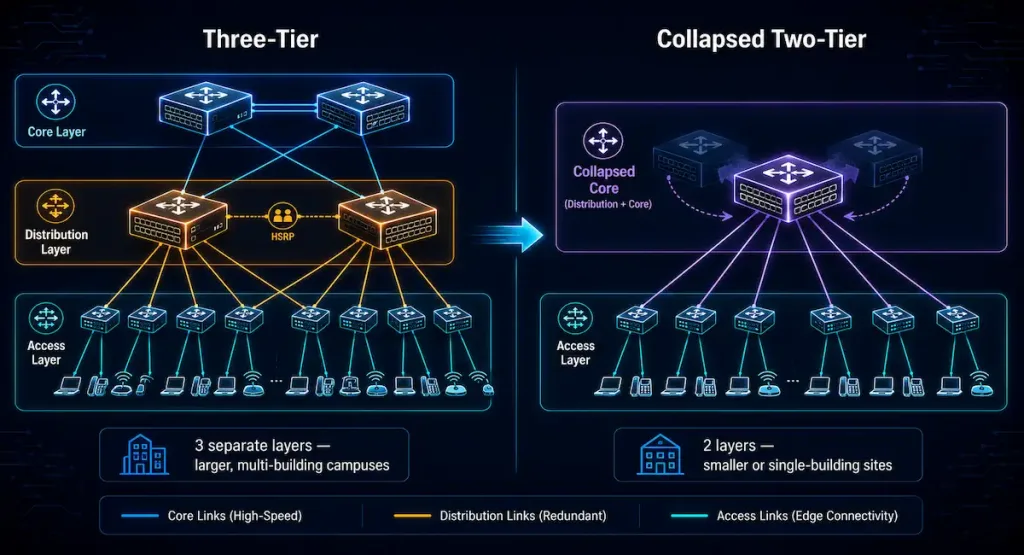
A three-tier campus network — with access, distribution, and core as fully separate layers — is typically planned for organizations that need a cost-effective, scalable physical layout across a large-scale network spanning multiple buildings or campuses. The common best practice is an extended-star physical topology radiating out from a main campus to every other site.
A campus with fewer users, or a single-building deployment, usually doesn’t need separate core and distribution layers at all. The design that results is called a collapsed core network — also referred to as a two-tier campus network. In a collapsed design, the role of the core switches effectively merges into the distribution switches, combining what would otherwise be two separate layers into one.
- Role: Combines core and distribution layer functions for smaller campuses or single-building networks, reducing both hardware cost and design complexity.
- Typical Cisco devices: Catalyst 9300 switches, configured to handle both distribution and core functions simultaneously.
- Design: A two-tier topology (access layer plus a collapsed core), well suited to small-to-medium networks with a limited user base.
- CCNA/CCNP relevance: Configuring a collapsed-core switch for both routing and aggregation duties (
ip routing, VLAN configuration across multiple VLANs).
Choosing Between Three-Tier and Two-Tier Designs
The decision between a three-tier and collapsed two-tier design generally comes down to a few practical factors rather than a fixed rule:
- Number of buildings or wiring closets — multiple buildings or a large number of access-layer wiring closets generally justify a dedicated distribution layer to aggregate that complexity before it reaches the core.
- Total user and device count — a higher device count means more east-west traffic between access switches, which a dedicated distribution layer is better equipped to handle without overloading a collapsed core.
- Growth expectations — if a site is expected to grow significantly, starting with a three-tier design (or at least planning for an easy migration path to one) can avoid a disruptive redesign later.
- Budget and operational complexity — a collapsed core genuinely reduces both hardware cost and the number of devices to manage, which matters for smaller organizations without a large network operations team.
In practice, many single-building campuses and branch offices run perfectly well on a collapsed two-tier design, while larger, multi-building campuses and headquarters sites tend to justify the added complexity of a full three-tier hierarchy.
Conclusion
Cisco Borderless Networks bring together hierarchical design, modularity, resiliency, and flexibility into a single architectural framework for building secure, scalable campus networks. Whether implemented as a full three-tier hierarchy or a collapsed two-tier design, the same access/distribution/core roles and Cisco technologies — Catalyst switching, ISE-based policy, HSRP and EtherChannel redundancy, DNA Center management — apply, just distributed across fewer physical devices in smaller deployments. Understanding both the principles and the practical decision criteria for choosing between design options is core material for CCNA and CCNP campus-design exam objectives alike.
FAQs
What is a Cisco Borderless Network?
A Cisco Borderless Network is an architecture that integrates wired and wireless access into a single, policy-driven design, enabling secure connectivity for any device from any location using Cisco Catalyst switches, ISR routers, and centralized management through DNA Center. The “borderless” name reflects that network boundaries are defined by security and access policy rather than by physical location or connection type. This lets the same consistent user experience and security posture apply whether someone connects from a wired desk, a wireless laptop, or a mobile device.
Why is hierarchical design important in Borderless Networks?
Hierarchical design — splitting the network into access, distribution, and core layers — ensures scalability and operational efficiency by giving each layer a clearly defined job rather than one flat network trying to do everything at once. This separation makes troubleshooting more straightforward, since a problem can usually be isolated to a specific layer, and it makes growth more manageable, since adding capacity at one layer doesn’t necessarily require redesigning the others. It’s also a foundational, heavily tested concept on both the CCNA and CCNP exams specifically because it underlies so much of real-world campus network design.
What Cisco tools support Borderless Networks?
Cisco DNA Center provides centralized management, monitoring, and automation across the whole architecture, while Catalyst 9000 series switches (9200, 9300, 9400, and 9500) provide the actual switching hardware across the access, distribution, and core layers respectively. Cisco ISE handles access control and policy enforcement for the wide range of endpoint types a Borderless Network needs to support, from managed corporate laptops to BYOD devices and IoT sensors. Together, these tools are what let a Borderless Network actually deliver on its core principles of modularity, resiliency, and flexibility rather than just being architectural theory.
How does a collapsed core network differ from a three-tier design?
A collapsed core network merges the core and distribution layers into one set of devices, typically Catalyst 9300 switches configured to handle both routing/aggregation and backbone duties simultaneously — versus a three-tier design, which keeps all three layers as fully separate physical devices. This makes a collapsed core meaningfully cheaper and simpler to operate, which is why it’s the common choice for smaller campuses or single-building sites. The tradeoff is reduced separation of concerns and typically less redundancy capacity compared to a full three-tier design, which matters more as a site grows in size or complexity.
How can I practice Cisco Borderless Network configurations?
Cisco Packet Tracer and GNS3 are both widely used to simulate the VLAN, HSRP, and QoS configurations covered across the access, distribution, and core layers described above, without needing physical Cisco hardware. Practicing commands like standby 1 ip for HSRP, switchport mode access and switchport port-security for access-layer configuration, and basic inter-VLAN routing will cover the practical, hands-on side of both the CCNA and CCNP exam objectives related to this topic. Building a small lab topology with one device representing each layer — even a collapsed two-tier version — is a genuinely effective way to internalize how the roles differ in practice, not just on paper.



