Cisco routers and switches don’t allow meaningful remote access out of the box — VTY lines need at least a password configured before any Telnet or SSH session succeeds at all. Remote connectivity options are Telnet, over the VTY port, or SSH. SSH provides encrypted sessions and is strongly recommended by Cisco for remote administration, given Telnet’s well-documented vulnerability: every character of a Telnet session, including the login password, travels across the network in plain text.
VTY port access restriction lets you define which IP addresses are allowed Telnet or SSH access to the router’s EXEC process. Beyond just requiring a password, administrative access can be restricted to specific source addresses using an ACL and the access-class command applied on the VTY lines themselves.
Prerequisites
- Basic knowledge of standard ACLs — this guide assumes that configuration guide’s coverage of syntax, wildcard masks, and the implicit deny.
- A Cisco device running IOS 15+ or IOS-XE.
- Terminal software installed (PuTTY, Tera Term, or similar).
- Understanding of wildcard masks — for example, 0.0.0.255 for a /24 subnet.
If a router’s IOS doesn’t support SSH — rare on anything from after 2019 — fall back to Telnet with restrictions, understanding that the session itself remains unencrypted regardless of how tightly the source addresses are controlled.
Why a Standard ACL Is Enough for VTY Security
Filtering Telnet or SSH traffic is normally considered extended ACL territory, since it involves filtering a specific higher-layer protocol and port. But a standard ACL works perfectly well here, because access-class doesn’t need to match protocol or port at all — the VTY line itself already is the Telnet/SSH service. All access-class needs to check is the source address of whoever’s connecting, which is exactly what a standard ACL matches.
The access-class Command and Direction
Configure it in line configuration mode:
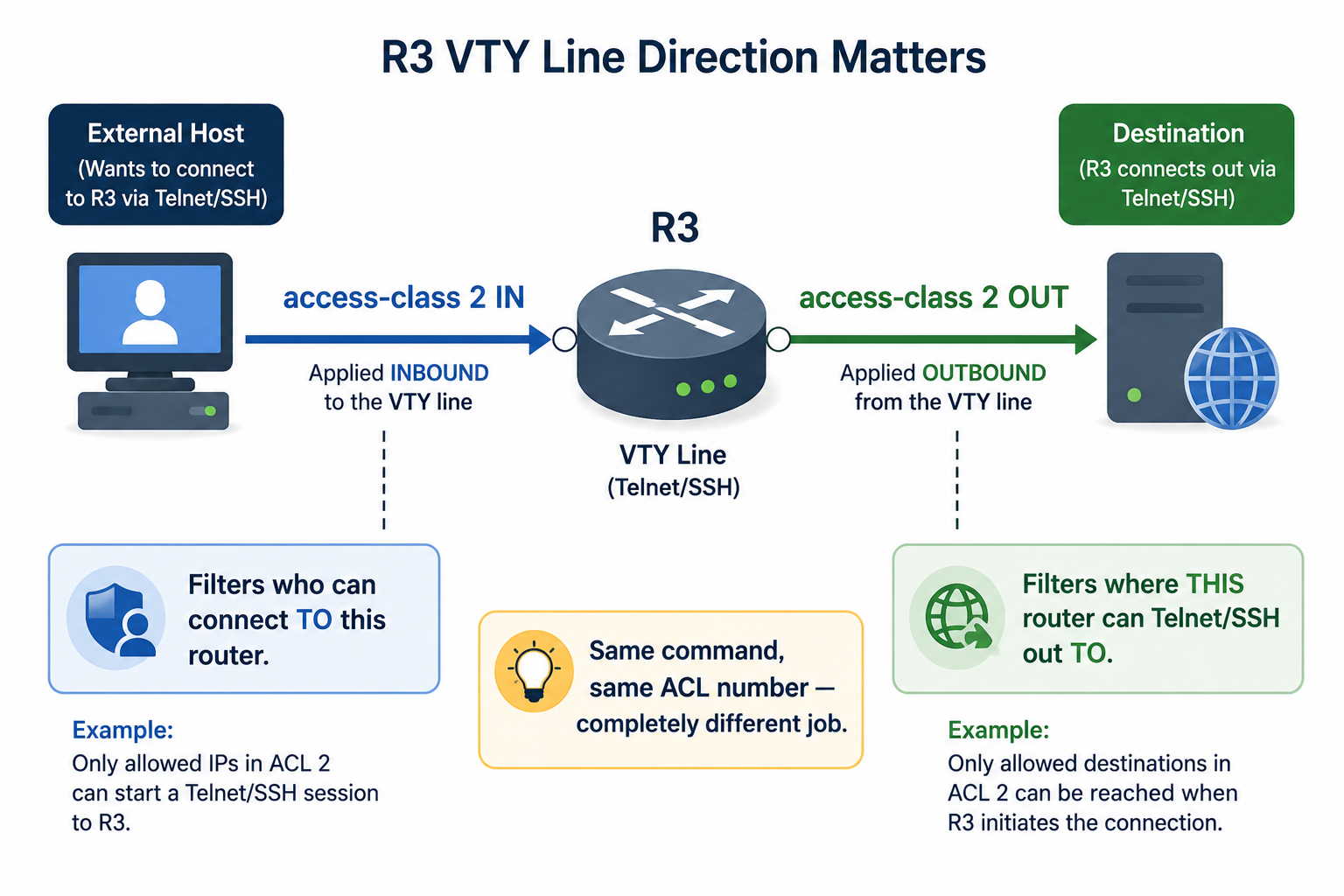
Router(config-line)# access-class <access-list-number> { in | out }The direction matters more than it might first appear, and the two options do genuinely different jobs:
inrestricts incoming connections — who’s allowed to Telnet or SSH into this router. This is the direction used for the overwhelming majority of VTY security configurations, and the one covered in the examples below.outrestricts the router’s own outbound Telnet or SSH sessions — controlling which destinations someone already logged into this router is permitted to Telnet or SSH out to from an EXEC session. The ACL’s address in this direction matches the destination the router is connecting toward, not the source connecting in. This direction is far less commonly configured, but worth knowing exists, sinceaccess-class outandaccess-class insolve two entirely different security problems despite looking like a simple flag flip.
Configuring the ACL
This example permits only the 192.168.1.0/24 network to reach VTY lines 0–4 on router R3, denying every other source:
R3(config)# access-list 2 permit 192.168.1.0 0.0.0.255
R3(config)# access-list 2 deny any log
!
R3(config)# line vty 0 15
R3(config-line)# password StrongPass123!
R3(config-line)# login
R3(config-line)# transport input telnet ssh
! Both enabled here, though SSH should be preferred whenever the platform supports it
R3(config-line)# access-class 2 in
R3(config-line)# exit
Defining the ACL before applying it, as shown here, means VTY lines are never briefly unprotected during configuration — referencing an ACL number that doesn’t exist yet in access-class doesn’t filter anything until the ACL actually has statements, so building it first closes that gap. The explicit deny any log, rather than relying on the implicit deny, means denied connection attempts are both counted and logged — exactly the visibility technique covered in the ACL statistics guide, applied here to catch unauthorized remote-access attempts specifically.
Alternative: SSH-Only Configuration
For anywhere SSH is supported — which is nearly everywhere on current IOS — disabling Telnet entirely closes off the plain-text vulnerability completely rather than just restricting who can use it:
R3(config)# hostname R3
R3(config)# ip domain-name example.com
R3(config)# crypto key generate rsa modulus 2048
R3(config)# username admin privilege 15 secret StrongPass
R3(config)# line vty 0 15
R3(config-line)# login local
R3(config-line)# transport input ssh
R3(config-line)# access-class 2 in
The hostname and domain name are prerequisites for RSA key generation, since Cisco IOS derives the key’s internal name from both. login local tells the VTY lines to authenticate against the local username database rather than a single shared line password, giving each administrator their own credentials — a meaningful improvement over the single shared password in the Telnet/SSH example above. transport input ssh (without telnet) removes Telnet as an option entirely, rather than just deprioritizing it.
Named ACLs for VTY Security
As with any standard ACL, a named ACL reads more clearly than a bare number once more than one VTY-security policy exists across a network:
R3(config)# ip access-list standard VTY-ACCESS
R3(config-std-nacl)# permit 192.168.1.0 0.0.0.255
R3(config-std-nacl)# deny any
R3(config-std-nacl)# exit
R3(config)# line vty 0 15
R3(config-line)# access-class VTY-ACCESS in
Verifying the Configuration
After configuring and applying the ACL, verify it’s actually behaving as intended — configuration review alone doesn’t confirm enforcement. Attempt a connection from a permitted source and a denied source, then check show access-lists:
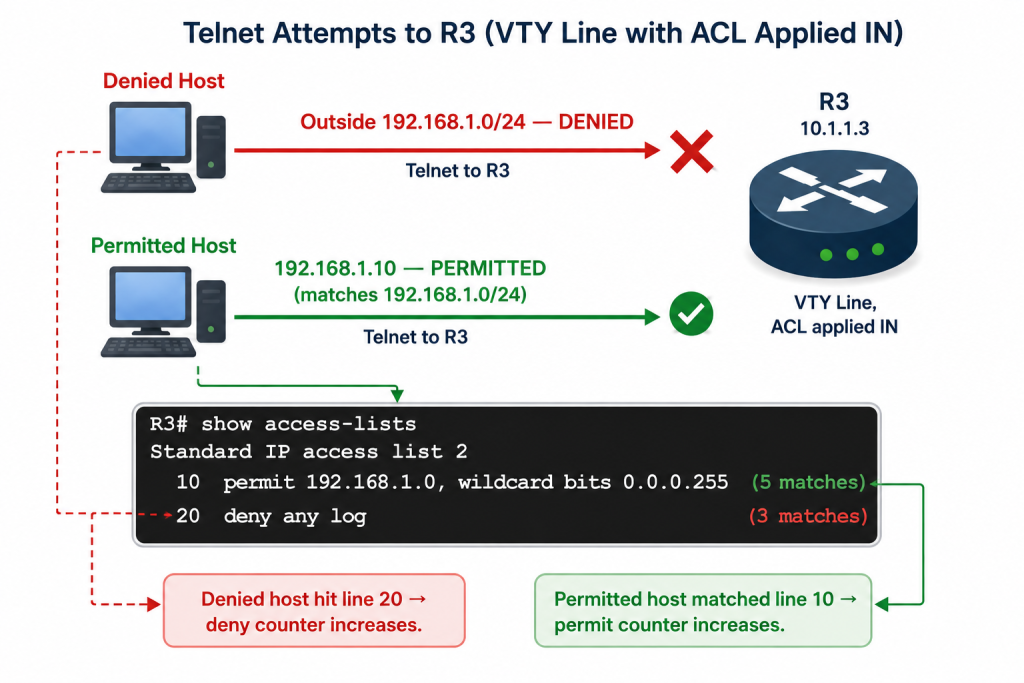
R3# show access-lists
Standard IP access list 2
    10 permit 192.168.1.0, wildcard bits 0.0.0.255 (5 matches)
    20 deny any log (3 matches)
R3#
A permitted host’s successful connection increments the permit statement’s count; a denied host’s rejected attempt increments the deny count and, because of the log keyword, also produces a syslog entry with the source address — visible with show logging. Seeing both counts move in response to real connection attempts is the actual confirmation the ACL is enforcing correctly, not just configured correctly.
Troubleshooting VTY ACL Issues
- Use
show lineto check active VTY sessions and confirm which lines are currently in use or available. - Debug denies with
debug ip packetwhen the ACL statistics alone don’t explain unexpected behavior — but use this cautiously, since it carries real CPU cost on a busy router, the same caution that applies to every debug command covered elsewhere in this series. - Forgotten
transport input. If this line is missing or misconfigured, VTY access fails entirely regardless of how the ACL is set up — check this before assuming the ACL itself is the problem. - ACL applied
outinstead ofin. This is the most common VTY-specific mistake, since the two directions look like a simple toggle but actually filter completely different traffic. An ACL appliedoutwheninwas intended does nothing to restrict who can connect to the router, while appearing fully configured.
IPv6 ACLs for VTY Security
For dual-stack networks, apply an IPv6-equivalent restriction:
R3(config)# ipv6 access-list VTY-IPV6
R3(config-ipv6-acl)# permit ipv6 2001:DB8:1::/64 any
R3(config-ipv6-acl)# deny ipv6 any any
R3(config-ipv6-acl)# exit
R3(config)# line vty 0 15
R3(config-line)# ipv6 access-class VTY-IPV6 in
Worth noting: IPv6 ACLs have no standard/extended split the way IPv4 ACLs do. Every IPv6 ACL uses this same extended-style syntax, matching source and destination together (permit ipv6 <source> <destination>) — there’s no IPv6 equivalent of a source-only standard ACL. Applying this alongside the IPv4 access-class configuration above gives VTY lines equivalent protection across both address families, which matters for any router genuinely reachable over both IPv4 and IPv6.
Real-World Scenarios
In a branch office, restricting VTY access to an admin subnet only — rather than to individual host addresses — balances security with the practical reality that administrators don’t always connect from the same single machine. Integrating with AAA/RADIUS for centralized authentication and logging extends this well beyond what a standalone ACL can provide alone, giving per-user audit trails rather than just per-source-address visibility.
For cloud-managed platforms like Meraki, the underlying concept — restricting management access to trusted source ranges — is typically configured through the dashboard rather than CLI ACL syntax, but the security principle is identical: administrative access should never be open to the entire internet or an entire internal network by default.
Illustrative Scenario: An ACL That Looked Fine but Filtered Nothing
Here’s a common scenario, meant to show the troubleshooting logic in action rather than describe a specific real event.
An administrator configures access-list 2 correctly, restricting VTY access to a trusted subnet, and confirms the syntax with show access-lists. Weeks later, a security review finds that hosts well outside the intended subnet have been successfully connecting to the router via Telnet the entire time.
Checking show running-config for the VTY line configuration reveals the ACL was applied with access-class 2 out rather than access-class 2 in. The ACL itself was configured correctly and genuinely restricts something — outbound Telnet sessions initiated from this router toward other destinations — but that’s a different security control from the one intended. Every incoming connection attempt, regardless of source, was still passing through entirely unfiltered, since nothing was actually restricting who could connect in.
Correcting the direction to access-class 2 in closes the gap immediately. The broader lesson: access-class in and access-class out aren’t a simple stylistic choice — they enforce genuinely different policies, and a working, correctly-matched ACL applied in the wrong direction produces no error at all, just silent, complete non-enforcement of the control you actually intended.
Conclusion and Best Practices
Securing VTY access with a standard ACL and access-class is foundational CCNA material, but production networks should layer this with AAA/RADIUS authentication for CCNP-level designs, giving centralized, per-user control beyond what a source-address ACL alone provides. Prefer SSH over Telnet wherever the platform supports it, use the explicit deny any log pattern to make denied attempts visible rather than relying on the invisible implicit deny, and always confirm access-class is applied in the direction actually intended — in for the vast majority of real-world configurations. Test any VTY security change in a lab environment first, since a misconfigured direction or a forgotten transport input can lock out legitimate remote access just as easily as it can fail to block unauthorized access.
FAQs
How do I configure a standard ACL for VTY security on a Cisco router?
Enter line configuration mode with line vty 0 15, set a password and enable login, configure transport input for Telnet and/or SSH, and apply the ACL with access-class <number> in. Define the ACL itself to permit trusted subnets and deny everything else, ideally with deny any log as the final explicit statement rather than relying on the invisible implicit deny. Verify with show access-lists after real connection attempts to confirm the counts are actually moving.
Why use standard ACLs instead of extended for VTY ports?
Standard ACLs filter by source IP address only, which is sufficient for VTY access control because access-class doesn’t need port or protocol matching — the VTY line itself already represents the Telnet/SSH service. Extended ACLs add protocol and port filtering capability that simply isn’t needed here, making standard ACLs the simpler, sufficient tool for this specific job. This is a different use case from access-class out, which restricts the router’s own outbound Telnet/SSH sessions rather than incoming access.
What are common issues when applying ACLs to VTY lines?
A forgotten transport input command blocks all remote access regardless of the ACL, while incorrect wildcard masks can unintentionally permit broader ranges than intended. The most VTY-specific mistake is applying access-class with out when in was actually intended — the ACL still filters something, just not incoming connections, which means the intended restriction silently never takes effect. Troubleshoot with show line for active sessions and debug ip packet for denies, used cautiously given its CPU cost.
How does SSH improve VTY security over Telnet with ACLs?
SSH encrypts the entire session, including login credentials, unlike Telnet’s plain-text transmission — a distinction that matters regardless of how tightly an ACL restricts source addresses, since an ACL controls who can attempt a connection, not whether that connection is readable in transit. Generate RSA keys with crypto key generate rsa, restrict to SSH only with transport input ssh, and combine with local or RADIUS authentication for layered, CCNP-level security. ACLs and encryption solve different problems and are meant to be used together, not as alternatives to each other.
How do I verify and troubleshoot VTY ACL configurations?
After real connection attempts from both permitted and denied sources, run show access-lists to confirm match counts are actually incrementing, and show running-config | section line vty to confirm the ACL is applied in the intended direction. If access is denied unexpectedly, check statement order for shadowing, confirm the ACL is applied in rather than out, and use the explicit deny any log pattern so denied attempts show up in show logging for auditing rather than disappearing into the invisible implicit deny.