Asad Ijaz
Lead Networking Architect and Editor at NetworkUstad. BS in Computer Networks and Security, CCNP and CCNA certified, with 11+ years of experience in enterprise network design, implementation, and troubleshooting. Writes practical tutorials on routing, IPv4 management, network automation, and security fundamentals.
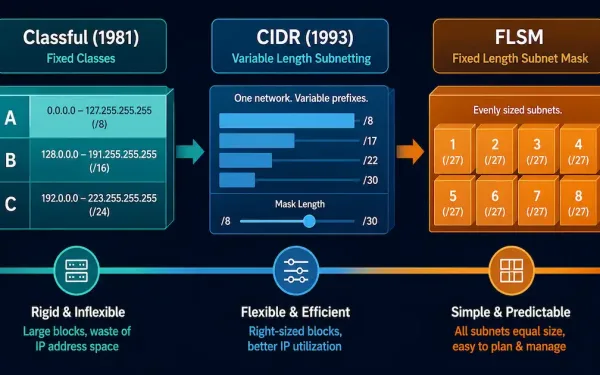
From Classful Network Addressing to CIDR and Fixed-Length Subnet Masking
IPv4 addressing didn’t arrive in its modern form all at once. It started as a rigid, class-based system, was replaced by a far more flexible scheme called CIDR, and along the way developed subnetting techniques — starting with Fixed-Length Subnet Masking (FLSM) — for splitting a network into smaller pieces. Understanding this progression matters for...
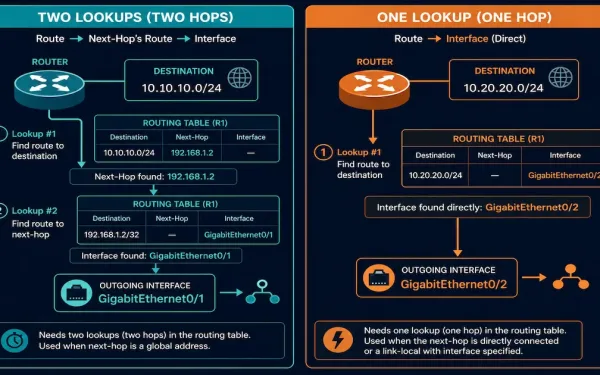
Static IPv6 Routes: Next-Hop Address vs. Directly Connected (Exit Interface)
A static IPv6 route can be built two different ways: pointing only at a next-hop IPv6 address, or pointing at an exit interface directly. These aren’t just two syntax options — they produce genuinely different lookup behavior in the router, and understanding that difference is core CCNA and CCNP material. This guide covers both forms,...
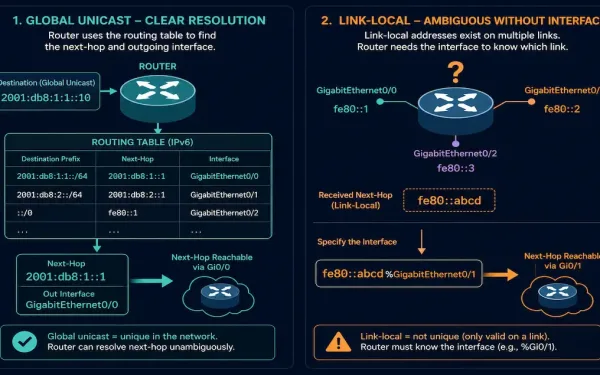
The IPv6 Route Next-Hop Option: Global vs. Link-Local, Explained
Configuring a static IPv6 route looks almost identical to configuring a static IPv4 route — but IPv6 has one real syntax wrinkle that trips up a lot of people moving from IPv4: whether the next hop needs an interface specified alongside it depends entirely on whether that next hop is a global unicast address or...
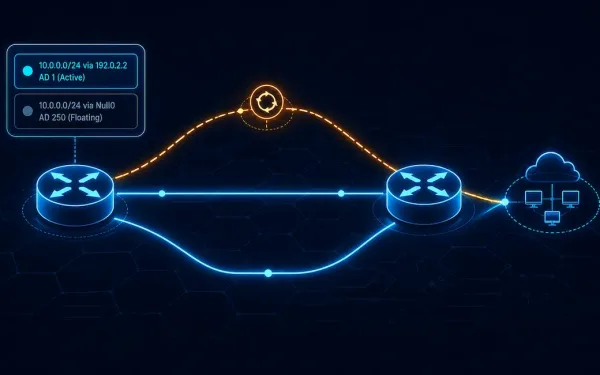
IPv6 Route Command: Configuring Static Routes on Cisco Routers
If you already know how to configure a static route for IPv4, configuring IPv6 static routes will feel familiar — the syntax and underlying logic are nearly identical, with only minor differences. IPv6 static routes are configured using the ipv6 route command in global configuration mode. The general syntax is: The parameters here map almost...
How to Configure an IPv4 Loopback Interface
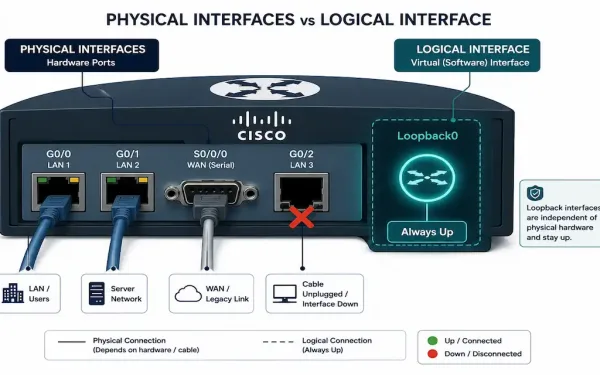
A loopback interface is one of the simplest things you can configure on a Cisco router, and one of the most quietly important. It has no physical hardware behind it, can’t be unplugged, and stays up as long as the router itself is running — which is exactly why it’s the standard choice for a...
What is Console Access to Cisco Devices
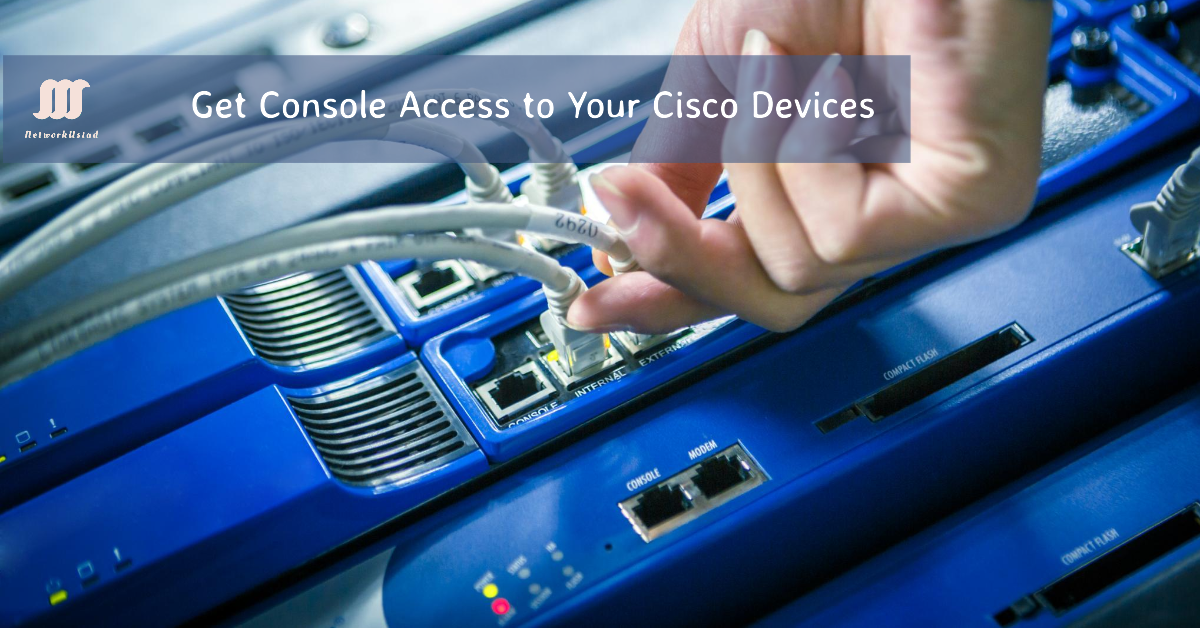
Console Access is an essential topic for networking students, so I will explain console access to Cisco devices in this lesson. All Cisco routers and switches have a console port, the management interface. It connects a computer directly to a router or switch and manages it. The console port is also used for initial configuration....
How to Assign an IP Address on a Windows PC
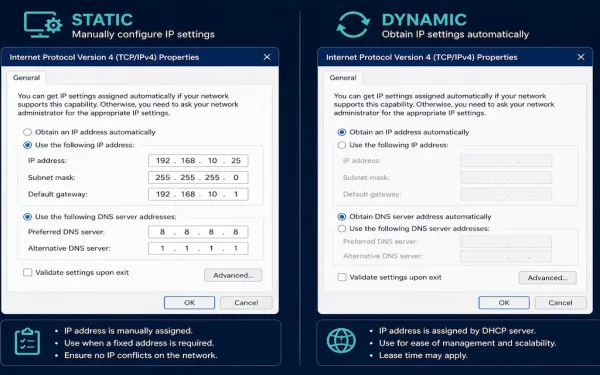
Every host on a network needs an IP address, and there are exactly two ways to give it one: type it in manually (static) or let a DHCP server assign it automatically (dynamic). Knowing both isn’t just a CCNA exam requirement — it’s the first troubleshooting question worth asking whenever a Windows machine can’t reach...
Redundancy and Traffic Management for Small Networks
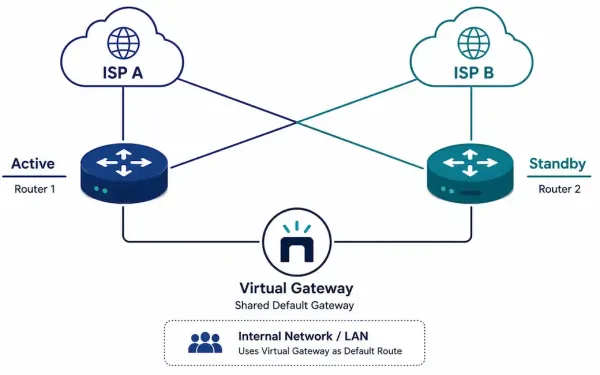
A single point of failure is exactly what it sounds like: one router, one link, or one ISP connection that, if it fails, takes the whole network down with it. Redundancy eliminates these single points of failure. Traffic management ensures that when bandwidth gets tight, the traffic that actually needs priority — voice, video —...
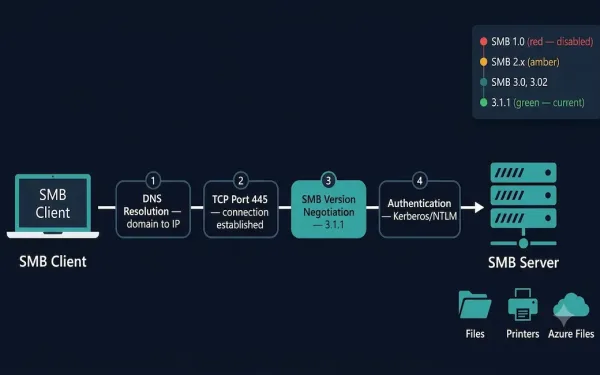
Server Message Block (SMB) Protocol: A Complete Guide
The Server Message Block (SMB) protocol enables hosts to share files, directories, printers, and other resources across a network as if those resources were local. It is a request-response protocol that operates at the Application layer, using TCP port 445 for direct communication. Every message in the SMB protocol follows a standard structure: a fixed-size...
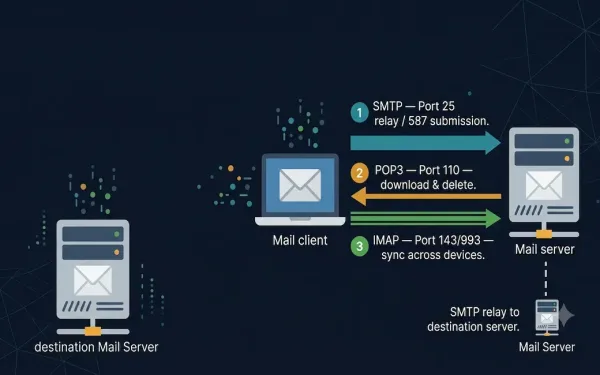
Email Protocols: SMTP, POP3, and IMAP
Email is one of the primary services running on the internet. The email server stores email messages in a database, and email uses a store-and-forward method for sending and holding messages. Email clients communicate with servers running mail services to send and receive email, and the client-connected server in turn communicates with other mail servers...