

Domain 6.1 | Automation and Programmability — 10% of exam
Learning Objectives
By the end of this lesson, you will be able to:
- Explain the scaling problem traditional, manual CLI-based network management runs into as network size grows.
- Describe the four concrete ways automation addresses this problem: reducing repetitive tasks, decreasing human error, enabling consistency, and enabling version control and auditability.
- Explain the concept of idempotency and why it matters for automated configuration deployment.
- Describe how treating configuration “as code” changes how network changes are reviewed, deployed, and rolled back.
Key Terms Glossary
| Term | Definition |
|---|---|
| Automation | Using software to perform configuration or management tasks programmatically, rather than manually through individual device access. |
| Configuration drift | The gradual, unintentional divergence of a device’s actual configuration from its intended baseline over time. |
| Infrastructure as Code (IaC) | The practice of defining configuration in version-controlled files rather than only as each device’s live running configuration. |
| Idempotency | A property where applying the same automated configuration repeatedly produces the same end result, without unintended side effects from repetition. |
| Version control | A system (such as Git) tracking changes to configuration files over time, supporting review, history, and rollback. |
| Rollback | Reverting a device or system to a previous known-good configuration state. |
The Scaling Problem Traditional Management Runs Into
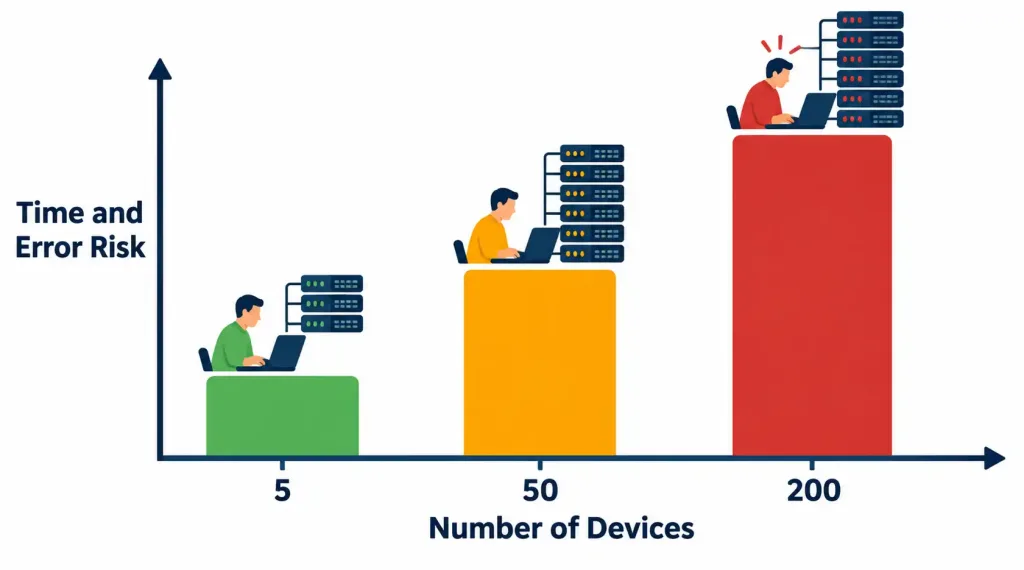
Every objective covered so far in this course has focused on configuring a single device, or perhaps a small handful of devices in a lab topology, one CLI session at a time. This approach works perfectly well at that scale — and it becomes genuinely unworkable as the number of devices grows into the dozens, hundreds, or thousands that a real enterprise network actually contains. Manually logging into each device, typing the same or similar commands, and verifying the change took effect correctly is a linear-time process: twice as many devices means roughly twice as much time and twice as many opportunities for something to go wrong along the way.
This isn’t a hypothetical concern. A configuration change needed across 200 switches — say, updating an ACL to block a newly discovered threat, or rolling out a new NTP server address — represents 200 individual opportunities for a typo, a skipped device, or an inconsistently applied command, if performed manually one device at a time. Automation addresses this scaling problem directly, and it does so in four distinct, concrete ways worth understanding individually rather than as one vague “automation is good” claim.
Four Concrete Ways Automation Helps
Reducing Manual, Repetitive Tasks
The most immediately obvious benefit: a configuration change that would take hours of individually logging into device after device can instead be pushed programmatically to all 200 switches in roughly the time it would take to manually configure a small handful of them by hand. This isn’t just a convenience — it changes what’s practically feasible at all. A change that would require an entire weekend of manual work, and therefore might get postponed or scoped down to “just the most critical devices for now,” becomes something that can be executed comprehensively and quickly instead.
Decreasing Human Error
Manual CLI entry, especially repeated across many devices, is a well-documented source of real-world network outages. A single mistyped subnet mask, an ACL entry accidentally reversed in order (recall from objective 5.6 how much order matters there), or simply forgetting to apply a change to one device out of two hundred — these are exactly the kind of configuration vulnerabilities discussed back in objective 5.1, where a mistake in how a system is set up, rather than a software flaw, creates the actual weakness.
Automation doesn’t eliminate the possibility of a mistake in the underlying logic being deployed, but it eliminates the far more common category of mistake: manual, repetitive execution errors that creep in specifically because a human is doing the same tedious task over and over across many devices.
Some of the internet’s most widely publicized outages over the years have traced back to exactly this kind of manual, repetitive execution mistake rather than any exotic technical failure — a single mistyped command intended for one device or one small scope, executed instead against a much broader production fleet, or a manually applied change that was correct in isolation but subtly inconsistent with what a different engineer had applied to a different device earlier that same week. These aren’t failures of technical knowledge; they’re the entirely predictable consequence of asking a human to perform the same careful, error-prone task correctly, hundreds of times in a row, without the benefit of a machine’s tireless consistency.
Enabling Consistency
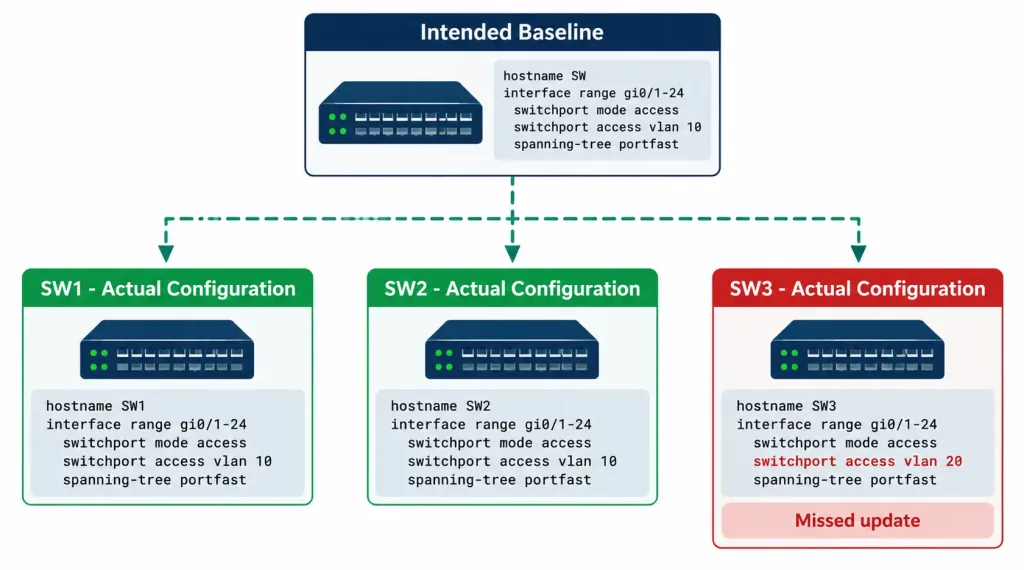
Without automation, configuration naturally tends to drift apart over time even when every individual change was made with good intentions. If an administrator updates a security policy on one switch but forgets a second switch during a busy week, the network is now in a genuinely inconsistent state — and critically, there’s no automatic detection of this discrepancy under a manual management model. Nobody necessarily notices until the inconsistency causes a visible problem, sometimes much later, sometimes during an incident when consistent behavior actually mattered.
This gradual, unintentional divergence has a name — configuration drift — and automated configuration deployment directly and reliably prevents it by ensuring every device receives an identical, validated configuration from the same source, rather than accumulating subtle, untracked differences through independent manual changes made at different times by potentially different people on different days.
Enabling Version Control and Auditability
This fourth benefit represents a genuine shift in how network configuration is conceptually treated, not just a faster way to do the same old thing. When configuration is defined as code — text files describing the intended state of a device or fleet of devices — rather than existing only as whatever happens to currently be running on each device, that code can be managed the same way software developers manage their own source code: tracked in a version control system (commonly Git), reviewed by a colleague before being deployed, and cleanly rolled back to a previous known-good state if a change turns out to cause problems.
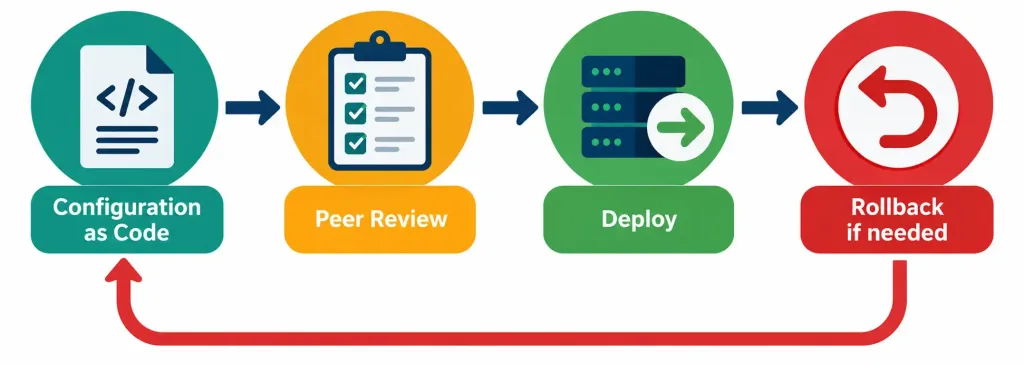
This is a meaningfully different operational model from traditional CLI-based management, where “what changed, when, and why” often lives only in an administrator’s memory, a change ticket if one was filed, or scattered comments in a configuration file — none of which provide the same rigor as an actual version history showing every change, who made it, and the ability to instantly compare any two points in time or revert to any previous state with confidence.
Pipelines: Automating the Review-and-Deploy Process Itself
Once configuration lives in a version-controlled repository, organizations commonly build on top of that foundation with a CI/CD pipeline (Continuous Integration/Continuous Deployment) — an automated sequence that runs whenever a proposed configuration change is submitted, checking it against validation rules, requiring peer review, and only pushing the change to real devices once it’s passed every defined check.
This takes the version-control benefit one step further: rather than a human remembering to manually run tests or double-check a change before applying it, the pipeline itself enforces that process consistently, every single time, for every single change, regardless of how busy or distracted the engineer submitting it happens to be that day. This is worth recognizing as a natural extension of configuration-as-code thinking, even though building a full pipeline is a more advanced practice than simply storing configuration files in version control.
Idempotency: A Property Worth Understanding Precisely
A concept worth internalizing carefully, since it’s foundational to how good automation tooling is actually designed: idempotency means that applying the same automated configuration repeatedly produces the same end result, without unintended side effects accumulating from running it more than once.
Consider a non-idempotent example first, to make the contrast clear: a script that says “add this line to the configuration file” would, if run twice by accident, add that same line twice — an unintended, accumulating side effect from repetition. An idempotent equivalent instead says “ensure this line exists in the configuration file” — running it once adds the line if it’s missing; running it a second time recognizes the line is already present and does nothing further, producing the exact same end state either way, regardless of how many times it’s executed.
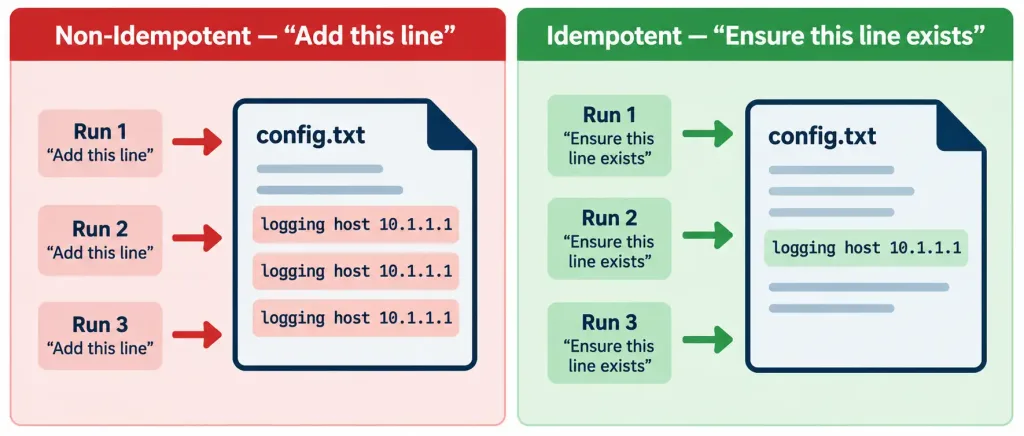
This property matters enormously in practice because automated configuration tools are frequently re-run — sometimes deliberately, to confirm a fleet of devices still matches its intended state, and sometimes accidentally, due to a retry after a network hiccup during the original run. An idempotent tool can be safely re-run without an administrator needing to carefully track “did this already execute successfully the first time” — the tool converges every device toward the same intended end state regardless of how many times it runs, which is a considerably safer and more predictable operational property than a tool that accumulates unintended changes each time it’s invoked.
Common Misconceptions
- “Automation eliminates the need for human oversight entirely.” Automation eliminates repetitive manual execution errors, but the underlying logic being automated still needs to be correctly designed and reviewed by a human — automation faithfully and consistently executes what it’s told, including a flawed instruction, at scale.
- “Configuration drift only happens due to carelessness.” It can happen even with well-intentioned, careful administrators simply because manual processes have no built-in mechanism to detect when one device was missed or configured slightly differently than intended — drift is a structural property of manual management, not primarily a discipline problem.
- “Version control for network configuration is the same as just keeping backup copies of device configs.” Version control provides structured history, the ability to review proposed changes before they’re applied, and precise tracking of what changed and why — a folder of periodic configuration backups doesn’t provide the same reviewability or fine-grained change history.
- “Idempotency just means a script runs successfully every time.” It specifically means repeated execution produces the same end state without accumulating side effects — a script that runs “successfully” but adds a duplicate line every time it’s re-run is not idempotent, even if it doesn’t throw any errors.
- “Automation is only relevant for very large networks.” While the scaling benefits are most dramatic at large scale, the consistency, auditability, and error-reduction benefits apply even to smaller networks — automation’s value isn’t purely a function of device count.
Frequently Asked Questions
Does automation require replacing all existing CLI knowledge with something entirely different?
No — most network automation tools ultimately still push CLI-equivalent configuration or use APIs that accomplish the same underlying changes; automation changes how configuration gets applied and managed, not the underlying networking concepts and configuration itself, which remain the same knowledge covered throughout this entire course. A solid grasp of what a correct configuration actually looks like — everything covered in the domains before this one — remains the foundation automation builds on top of, rather than something automation makes unnecessary to learn.
Can automation introduce new risks that manual configuration doesn’t have?
Yes — a flawed automated script or playbook can push an error to every managed device simultaneously and near-instantly, which is a genuinely different risk profile than a manual mistake that’s typically confined to whichever single device was being worked on at the time. This is exactly why review processes and testing in non-production environments before wide deployment remain important even in a heavily automated environment.
Is version control only useful for very large teams?
No — even a single administrator benefits from having a clear history of configuration changes, the ability to see exactly what changed between two points in time, and a reliable way to revert a problematic change, regardless of team size.
How does configuration drift get detected in an automated environment?
Many automation tools support a “check” or “dry-run” mode that compares a device’s actual current state against its intended, defined state without making any changes, reporting any discrepancies found — this is one of the practical ways automated tooling actively prevents drift rather than just applying changes once and hoping nothing changes afterward.
Does adopting automation mean giving up granular control over individual devices?
No — well-designed automation still allows for device-specific configuration where genuinely needed; the goal is eliminating unnecessary manual repetition and inconsistency, not forcing every device into an identical configuration regardless of legitimate differences in role or requirements.
Does an organization need to automate everything at once, or can adoption happen gradually?
Gradual adoption is not just possible but genuinely common in practice — an organization might start by automating a single, well-understood, low-risk task (pushing a standard NTP configuration to a device fleet, for instance) before expanding into more complex or higher-stakes automation as confidence and tooling maturity grow. There’s no requirement to fully automate an entire network’s management in one step, and attempting to do so without first building experience on smaller, well-scoped tasks is a common source of avoidable early setbacks in real automation adoption efforts.
Network Automation Fundamentals
Quiz #49: Automation, Configuration Drift, Configuration-as-Code, Idempotency, Version Control, and Dry-Run Validation
How This Objective Sets Up the Rest of This Domain
This lesson’s four benefits — reduced repetition, decreased error, consistency, and version control — are deliberately abstract and tool-agnostic, and that’s by design. The remaining objectives in this domain build concrete mechanisms on top of exactly this foundation: controller-based architectures centralize the consistency benefit at a network-wide scale.
REST APIs and JSON provide the technical means by which automated tools actually communicate with devices and controllers, and configuration management tools like Ansible are the concrete embodiment of the configuration-as-code and idempotency principles introduced here in the abstract. Understanding why automation matters — the actual problems it solves — makes every subsequent objective in this domain easier to reason about as a specific answer to one of these four general benefits, rather than a disconnected pile of new tools and acronyms to memorize independently of each other.
Summary
- Manual, CLI-based network management scales linearly with device count, making it slow and increasingly error-prone as a network grows into the dozens, hundreds, or thousands of devices a real enterprise network actually contains.
- Automation addresses this through four concrete mechanisms: reducing repetitive manual tasks, decreasing human error, enabling consistency across devices, and enabling version control and auditability of configuration changes.
- Configuration drift — the gradual, unintentional divergence of actual configuration from intended baseline — is a structural risk of manual management that automated, validated configuration deployment directly prevents, without requiring extraordinary discipline from any individual administrator.
- Idempotency, where repeated execution of the same automation produces the same end state without accumulating side effects, is a foundational property of well-designed automation tooling, allowing safe re-execution without careful manual tracking of prior runs.
- Automation adoption doesn’t need to happen all at once — starting with a small, well-scoped, low-risk task and expanding gradually is a common and sensible real-world approach.
- Treating configuration “as code” — version-controlled, reviewed, and cleanly revertible — represents a genuine shift in operational model from traditional CLI-only management, not merely a faster way of doing the exact same thing as before.



