
Domain 1.0 | Networking Concepts — 23% of exam
Learning Objectives
By the end of this lesson, you will be able to:
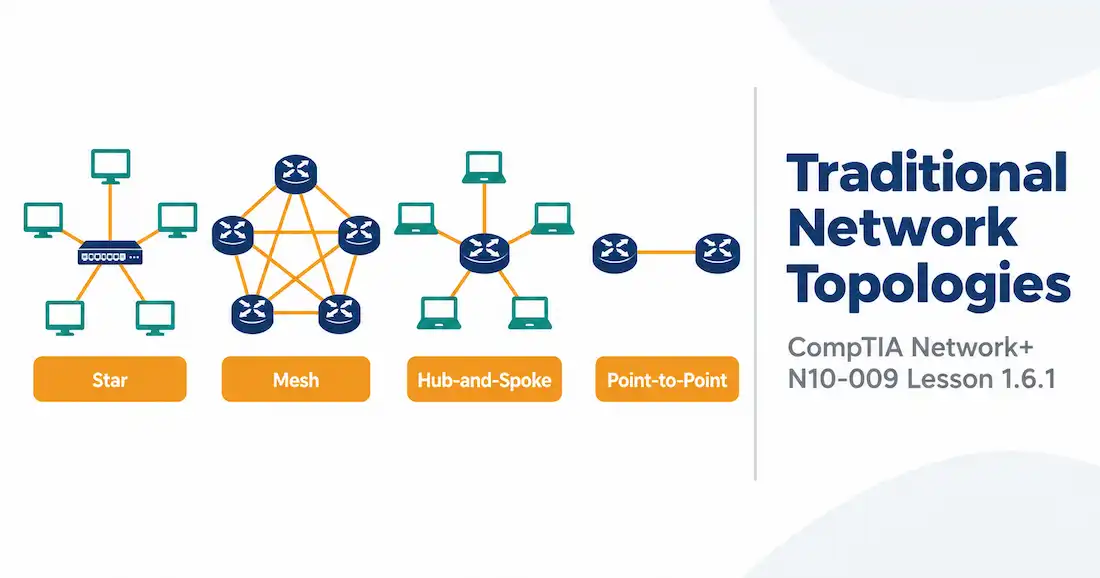
- Describe star, mesh, hub-and-spoke, and point-to-point topologies
- Explain the difference between full mesh and partial mesh
- Compare these topologies for cost, redundancy, and how well they scale
- Pick the right topology for a given scenario, and explain why
Key Terms
| Term | Definition |
|---|---|
| Star Topology | A layout where every device connects to one central device, typically a switch |
| Mesh Topology | A layout where devices connect directly to multiple other devices, rather than through one central point |
| Full Mesh | Every device connects directly to every other device |
| Partial Mesh | Some devices have multiple direct connections, but not every device connects to every other one |
| Hub-and-Spoke | A layout where a central site connects to multiple remote sites, and those remote sites don’t talk to each other directly |
| Point-to-Point | A single, dedicated link connecting exactly two devices or sites |
| Single Point of Failure | A single component whose failure can take down the whole network, or a large part of it |
Explanation
What a Topology Actually Describes
A topology is just the shape of a network. Not the cabling type. Not the protocols. Just: who connects to whom, and how.
Two kinds of topology exist, really. Physical topology is how the cables actually run. Logical topology is how traffic actually flows, which sometimes looks different from the physical layout. This lesson sticks to physical topology — the four classic shapes Network+ wants you to know.
Here’s why that distinction matters, and not just as trivia. Old-style Ethernet hubs created networks that were physically wired as a star — every cable ran to one central hub — but logically behaved like a shared bus, since a hub just repeats every signal out to every port, with no intelligence about who actually needs to hear it. Switches changed the logical picture without changing the physical wiring at all. Same star-shaped cabling. Completely different logical behavior underneath. That’s the whole point of separating “physical” from “logical” in the first place.
Star: The One You Already Use
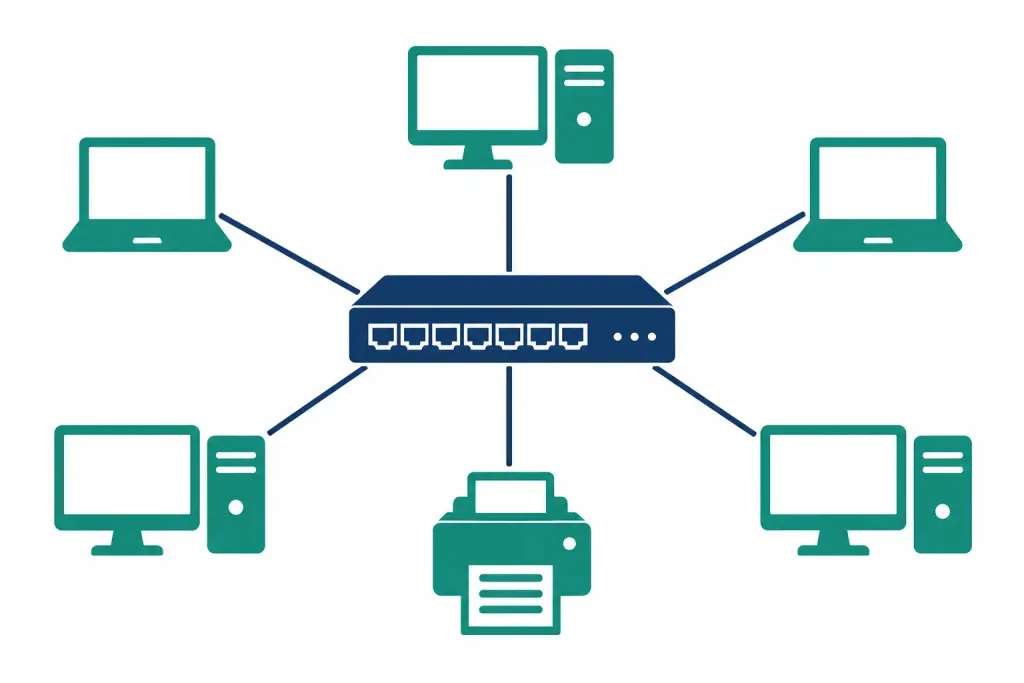
Walk into almost any office, and you’ll find a star topology. Every device connects to one central point — usually a switch, the kind covered back in Lesson 1.2.1. Nothing talks directly to anything else. Everything routes through the middle.
Why is this so common? A few reasons. Adding a new device is easy — just plug it into an open port. One bad cable only knocks out one device, not the whole network. Troubleshooting is simpler too, since problems tend to stay isolated.
There’s a catch, though. That central switch is a single point of failure. Take it down, and every device connected to it loses network access at once. This is exactly why core switches in real networks so often get built with redundant power supplies, and sometimes redundant hardware entirely. The star’s biggest weakness sits right at its center.
Cost-wise, star is friendly too, at least at the LAN scale. Every device needs one cable run back to the switch — nothing more. Compare that to mesh, where the number of required links climbs fast as you add devices. That single-cable-per-device simplicity is a big part of why star became the default for wiring closets and office floors everywhere, not just a historical accident.
Mesh: Redundancy at a Price
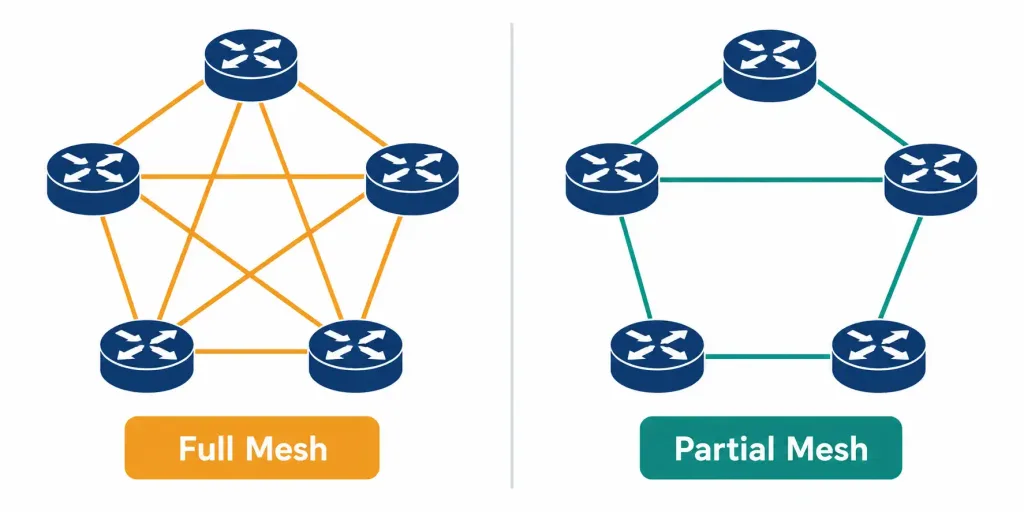
A mesh topology skips the central point altogether. Devices connect directly to each other instead.
There are two flavors. Full mesh means every device connects to every other device, directly. Maximum redundancy — lose one link, and traffic just reroutes through another path. But it gets expensive fast. The math isn’t kind: for n devices, you need n(n−1)/2 connections. Ten devices means 45 separate links. A hundred devices means almost 5,000. Full mesh works fine for a handful of critical core routers. It falls apart as a general-purpose design for anything larger.
Seeing the numbers side by side makes the point better than the formula alone:
| Devices | Required Links for Full Mesh |
|---|---|
| 4 | 6 |
| 5 | 10 |
| 10 | 45 |
| 20 | 190 |
| 50 | 1,225 |
Notice how that right-hand column accelerates. Doubling the device count doesn’t double the link count — it roughly quadruples it. That’s the real reason full mesh stays limited to small, critical cores instead of scaling out across an entire network.
Partial mesh is the practical compromise. Some devices get multiple direct connections — usually the ones carrying the most important traffic — while others connect through fewer paths. You get meaningful redundancy where it actually matters, without paying full mesh’s exploding connection count everywhere.
ISPs and large WAN providers lean on partial mesh heavily. Their core routers need serious redundancy — a single failed link can’t be allowed to strand an entire region — but wiring every single router directly to every other one, across a whole country or continent, would be absurd. So they mesh the critical paths, and route everything else more conventionally. Dynamic routing protocols handle the actual path selection on top of this, automatically shifting traffic when a link goes down, which is exactly what makes partial mesh’s selective redundancy worth having in the first place.
Hub-and-Spoke: Star’s Cousin, Different Job
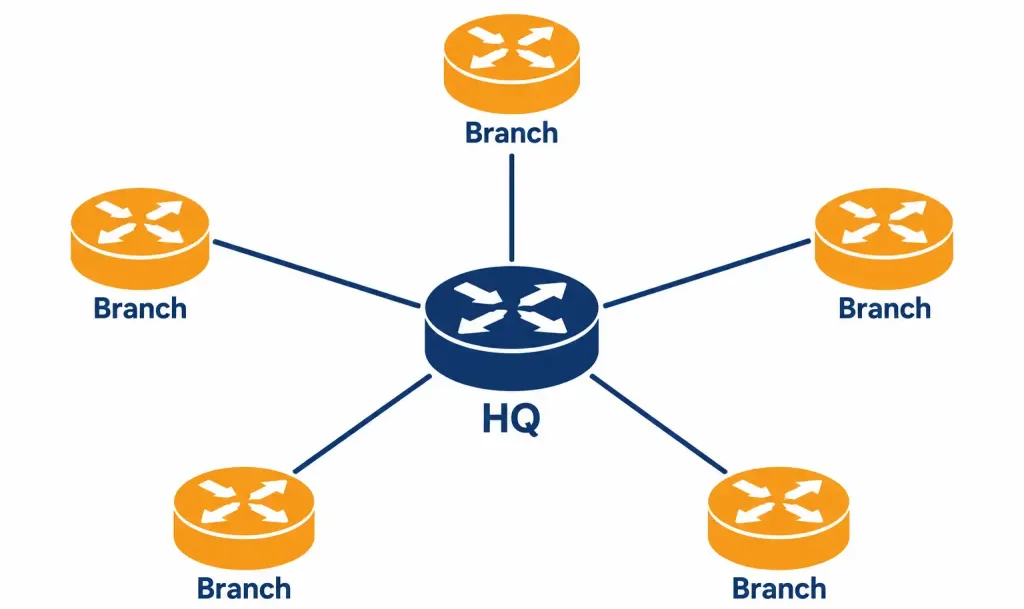
Hub-and-spoke looks a lot like a star. One central site — the hub — connects out to several remote sites, the spokes. The difference is context. Star usually describes a single LAN, with a switch in the middle. Hub-and-spoke usually describes a WAN, connecting entire office locations, with a router at the hub instead of a switch.
Picture a company headquarters connected to five branch offices. Each branch talks to headquarters directly. None of the branches talk to each other directly — if Branch A needs to reach Branch B, that traffic passes through the hub first. This ties straight back to the dedicated connections and VPNs covered earlier: each spoke-to-hub link is often exactly that kind of connection.
Hub-and-spoke shares star’s core weakness, too. Lose the hub, and every spoke loses its path to headquarters and to each other. It’s cheap to build, though — far cheaper than meshing every branch office directly to every other branch office. For most organizations, that trade-off makes sense. A handful of critical sites might still get a backup path added on top, turning parts of the design into a partial mesh.
Picture what actually happens during an outage. Headquarters loses power, or its router fails. Every branch office instantly loses its link back to HQ — email, shared file access, the internal ordering system, whatever runs centrally. But here’s the part people sometimes miss: the branches also lose the ability to talk to each other, even though none of their own equipment failed at all. That’s the hidden cost of hub-and-spoke’s simplicity. One failure, and the whole design’s connectivity model collapses at once, not just the link to headquarters.
Point-to-Point: As Simple as It Gets
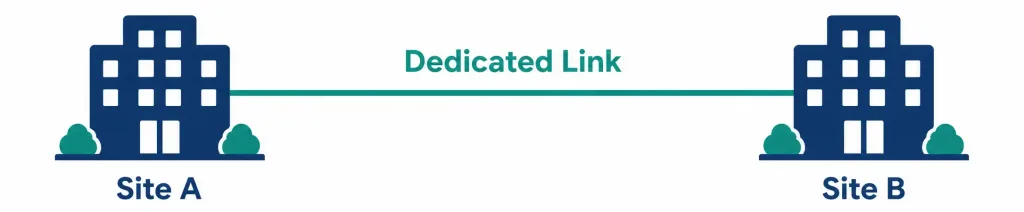
Point-to-point is the simplest topology there is. One link. Two endpoints. Nothing shared, nothing more complex going on.
Think of a dedicated line connecting two office buildings directly, with no intermediate hub or switch involved in that specific link. Point-to-point links show up constantly as building blocks inside bigger topologies, too — every spoke-to-hub connection in a hub-and-spoke design is itself a point-to-point link, just one piece of a larger picture.
Because it’s just one link between two known endpoints, point-to-point is also the easiest topology to troubleshoot. There’s no ambiguity about where a problem might be hiding. Either the link works, or it doesn’t, and there are only two ends to check. That simplicity is exactly why dedicated inter-building links, backup WAN connections, and direct data-center-to-data-center circuits are so often built as plain point-to-point, even inside networks that are otherwise far more complex.
Comparing All Four
| Topology | Redundancy | Cost | Scalability | Typical Use |
|---|---|---|---|---|
| Star | Low (hub is a single point of failure) | Low to moderate | Good — easy to add devices | LAN, connecting end devices to a switch |
| Full Mesh | Very high | Very high, grows fast | Poor beyond a small number of nodes | Small numbers of critical core devices |
| Partial Mesh | Moderate to high, where it matters | Moderate | Reasonable | WAN cores, ISP backbones |
| Hub-and-Spoke | Low (hub is a single point of failure) | Low | Good for adding new sites | WAN connecting branch offices to HQ |
| Point-to-Point | None on its own | Low per link | N/A — it’s a single link | Dedicated building-to-building or site-to-site connections |
Putting It Together: One Company’s Network
A mid-sized company runs its main office as a star, every desk and printer plugged into switches, those switches feeding up to a core switch. Simple, standard, works fine.
That company also has four branch offices. Rather than paying for direct links between every branch and every other branch, they connect each branch back to headquarters instead — classic hub-and-spoke. Cheaper, and it fits how the business actually works: most traffic flows to and from HQ anyway, not branch-to-branch.
Each of those branch links is, underneath, a point-to-point connection — one dedicated line, two endpoints. And in the core of the network, where an outage would be most painful, the company adds a couple of extra links between its most critical routers. That’s a small dose of partial mesh, layered on top of everything else, buying some redundancy exactly where it’s worth the cost.
Say headquarters later opens a fifth branch. Adding it is simple: run one new point-to-point link back to HQ, and the hub-and-spoke design absorbs it without touching anything else already in place. Now say the company decides two of its branches — say, a manufacturing site and its main warehouse — talk to each other constantly, far more than either talks to HQ. Rather than force that traffic through headquarters every time, the company adds one direct link between just those two branches. The overall design is still hub-and-spoke. But now it’s got one deliberate mesh-style shortcut, added exactly where the traffic pattern justified the extra cost.
Nobody designs a real network using just one topology in isolation. They combine pieces, matched to what each part of the network actually needs.
Recognition-Level Verification Concepts
This objective is about recognizing shapes, not configuring anything. A few things worth knowing on sight:
- A network diagram with one central box and lines fanning out to everything else is a star or a hub-and-spoke — check whether the center is a LAN switch (star) or a WAN router serving remote sites (hub-and-spoke).
- A diagram with lines crisscrossing between many devices, more connections than there are devices, is mesh. Count the connections against the device count to tell full mesh from partial mesh.
- A diagram showing just two boxes and one line between them is point-to-point — nothing more to it.
Common Exam Traps
- Star and hub-and-spoke look almost identical on a diagram. The difference is context and scale, not the shape itself. LAN and a switch means star. WAN and a router connecting whole sites means hub-and-spoke.
- Full mesh’s connection count grows fast. Don’t assume it scales the way a star does. Ten devices, 45 links. It gets ugly quickly.
- The hub in hub-and-spoke is a single point of failure, same as the center of a star. Don’t assume “spoke” implies any kind of independence — spokes can’t even reach each other if the hub goes down.
- Point-to-point isn’t a small or lesser topology. It’s a fundamental building block. Most bigger topologies are made of point-to-point links underneath.
- Partial mesh is the realistic middle ground, not a lesser version of full mesh. In most real networks, partial mesh — not full mesh — is the actual design choice, applied selectively where redundancy is worth paying for.
- Physical and logical topology aren’t always the same shape. Old Ethernet hubs are the classic example — physically wired as a star, but logically behaving like a shared bus. Don’t assume a diagram’s physical layout tells you everything about how traffic actually moves.
- A topology diagram tells you the shape, not the traffic pattern. Two networks can share the exact same topology and still behave completely differently, depending on where the actual application traffic goes. Don’t over-read a topology diagram as a guarantee about performance.
Lesson 1.6.1 Practice Questions
Traditional Network Topologies · 16 questions · Network+ N10-009, Domain 1.0
In a star topology, what does every device connect to?
A company's core switch fails, and every device on that floor loses network access at once. What does this illustrate?
How many connections does full mesh require for 10 devices?
Which two of the following are true about partial mesh?
A network diagram shows a headquarters router with lines fanning out to five branch office routers. The branches have no lines connecting them to each other. What topology is this?
Headquarters in a hub-and-spoke network loses power. What happens to the branch offices?
What is the simplest topology, consisting of just one link between two endpoints?
Which two statements about physical versus logical topology are correct?
Two branch offices in a hub-and-spoke network start exchanging huge amounts of traffic with each other, far more than either sends to HQ. What's a reasonable fix?
What's the main reason star topology is so common for wiring office LANs?
A diagram shows 4 routers with 6 lines connecting every possible pair of them. What topology is this?
A company runs one dedicated line directly between two office buildings, with nothing else attached to that specific link. What is this link's topology?
Which statement correctly distinguishes star from hub-and-spoke?
Which two of the following correctly describe full mesh?
An ISP needs strong redundancy for its regional core routers, but meshing every router in the country directly to every other one would be far too expensive. What approach fits best?
Why is point-to-point often described as the easiest topology to troubleshoot?
Summary
Star connects every device to one central point — usually a switch. Easy to manage, but the center is a single point of failure.
Mesh connects devices directly to each other. Full mesh means every device to every other device — maximum redundancy, but the connection count explodes. Partial mesh adds redundancy selectively instead.
Hub-and-spoke looks like a star but usually describes a WAN — a central site connected to multiple remote sites that don't talk to each other directly.
Point-to-point is the simplest topology: one dedicated link, two endpoints. It's also the basic building block inside larger topologies.
Real networks mix these shapes together, matching each part of the design to what that specific part actually needs.



